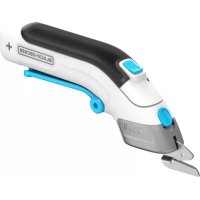
BLACK & DECKER KC2000 - Outil électrique BLACK & DECKER - Notice d'utilisation et mode d'emploi gratuit
Retrouvez gratuitement la notice de l'appareil BLACK & DECKER KC2000 BLACK & DECKER au format PDF.


| Type de produit | Outil électrique multifonction (perceuse/visseuse, scie sauteuse, ponceuse) |
| Marque | Black & Decker |
| Modèle | KC2000 |
| Tension nominale | 12 V DC |
| Type de batterie | Ni-Cd rechargeable |
| Capacité de la batterie | 1,5 Ah |
| Chargeur | 230 V ~ 50 Hz |
| Temps de charge | Environ 1 heure |
| Vitesse à vide (perçage) | 0 - 700 tr/min |
| Vitesse à vide (scie) | 0 - 3 000 min⁻¹ |
| Oscillations à vide (ponçage) | 0 - 8 000 min⁻¹ |
| Couple maxi (perçage) | 6,2 Nm |
| Capacité du mandrin | 10 mm |
| Capacité de perçage acier | 10 mm |
| Capacité de perçage bois | 25 mm |
| Profondeur de coupe bois (scie) | 38 mm |
| Angles de coupe (scie) | 0°, 45° |
| Poids (approx.) | 1,5 kg |
| Fonctions principales | Perçage, vissage, sciage, ponçage |
| Entretien | Nettoyage régulier des fentes de ventilation ; lubrification du rouleau guide de la tête de scie |
| Sécurité | Double isolation, verrouillage de l'outil, arrêt automatique en surcharge |
| Garantie | 24 mois (hors usage professionnel) |
FOIRE AUX QUESTIONS - BLACK & DECKER KC2000 BLACK & DECKER
Questions des utilisateurs sur BLACK & DECKER KC2000 BLACK & DECKER
0 question sur cet appareil. Repondez a celles que vous connaissez ou posez la votre.
Poser une nouvelle question sur cet appareil
Téléchargez la notice de votre Outil électrique au format PDF gratuitement ! Retrouvez votre notice BLACK & DECKER KC2000 - BLACK & DECKER et reprennez votre appareil électronique en main. Sur cette page sont publiés tous les documents nécessaires à l'utilisation de votre appareil BLACK & DECKER KC2000 de la marque BLACK & DECKER.
MODE D'EMPLOI BLACK & DECKER KC2000 BLACK & DECKER
UK
Ireland
Australia
New Zealand
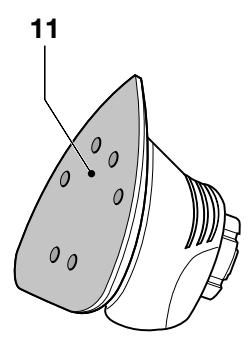
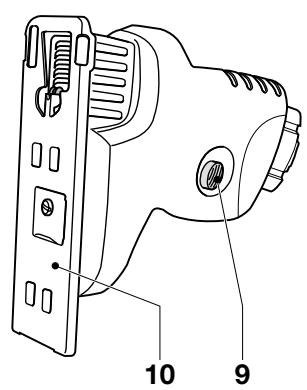
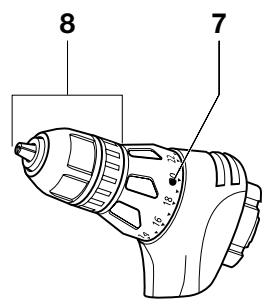
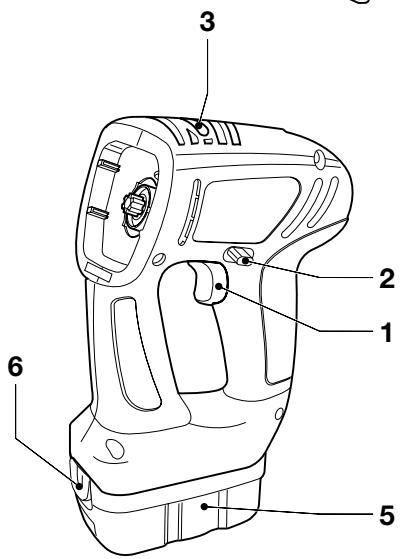
A
Intended use
Your Black & Decker multi-purpose tool has been designed for a wide range of DIY applications.
Using the drill/screwdriver head, this tool is intended for screwdriving applications and for drilling in wood, metal, plastics and soft masonry.
Using the jigsaw head, this tool is intended for sawing wood, metal and plastics.
Using the sander head, this tool is intended for sanding wood, metal, plastics and painted surfaces.
This tool is intended for consumer use only.
Your Black & Decker charger has been designed for charging
Black & Decker batteries of the type supplied with this tool.
Safety instructions
Warning! When using battery-powered tools, basic safety precautions, including the following, should always be followed to reduce the risk of fire, leaking batteries, personal injury and material damage.
Read all of this manual carefully before operating the tool.
Retain this manual for future reference.
Keep work area clean
Cluttered areas and benches can cause accidents.
Consider work area environment
Do not expose the tool to rain. Do not use the tool in damp or wet conditions. Keep the work area well lit. Do not use the tool where there is a risk of causing fire or explosion, e.g. in the presence of flammable liquids and gases.
Keep children away
Do not allow children, visitors or animals to come near the work area or to touch the tool.
Dress properly
Do not wear loose clothing or jewellery, as these can be caught in moving parts. Preferably wear rubber gloves and non-slip footwear when working outdoors. Wear protective hair covering to keep long hair out of the way.
Personal protection
Always use safety glasses. Use a face or dust mask whenever the operations may produce dust or flying particles.
Hearing protection should be worn.
Do not overreach
Keep proper footing and balance at all times.
Stay alert
Watch what you are doing. Use common sense.
Do not operate the tool when you are tired.
Secure workpiece
Use clamps or a vice to hold the workpiece. It is safer and it frees both hands to operate the tool.
Connect dust extraction equipment
If devices are provided for the connection of dust extraction and collection facilities, ensure that these are connected and properly used.
Remove adjusting keys and wrenches
Always check that adjusting keys and wrenches are removed from the tool before operating the tool.
Use appropriate tool
The intended use is described in this instruction manual.
Do not force small tools or attachments to do the job of a heavy-duty tool. The tool will do the job better and safer at the rate for which it was intended. Do not force the tool.
Warning! The use of any accessory or attachment or performance of any operation with this tool other than those recommended in this instruction manual may present a risk of personal injury.
Check for damaged parts
Before use, carefully check the tool for damage. Check for misalignment and seizure of moving parts, breakage of parts, damage to guards and switches and any other conditions that may affect its operation. Ensure that the tool will operate properly and perform its intended function. Do not use the tool if any part is damaged or defective. Do not use the tool if the switch does not turn it on and off. Have any damaged or defective parts repaired or replaced by an authorised repair agent. Never attempt any repairs yourself.
Remove the battery
Where the design permits, remove the battery when the tool is not in use, before changing any parts of the tool, accessories or attachments and before servicing.
Avoid unintentional starting
Do not carry the tool with a finger on the on/off switch. Be sure that the tool is switched off when inserting the battery into the tool.
Do not abuse cord
Never carry the charger by its cord or pull it to disconnect from the socket. Keep the cord away from heat, oil and sharp edges.
Store idle tools
When not in use, tools, batteries and chargers should be stored in a dry, locked up or high place, out of reach of children.
Maintain tools with care
Keep cutting tools sharp and clean for better and safer performance. Follow the instructions for maintenance and changing accessories. Keep handles and switches dry, clean and free from oil and grease.
Repairs
This tool complies with relevant safety requirements.
Repairs should only be carried out by qualified persons using original spare parts; otherwise this may result in considerable danger to the user.
Additional safety instructions for batteries and chargers
Batteries
-
Never attempt to open for any reason.
Do not expose the battery to water. -
Do not store in locations where the temperature may exceed 40^ .
- Charge only at ambient temperatures between 4^ and 40^ .
- Charge only using the charger provided with the tool.
-
When disposing of batteries, follow the instructions given in the section "Protecting the environment".
Under extreme conditions, battery leakage may occur. When you notice liquid on the battery, proceed as follows: -
Carefully wipe the liquid off using a cloth. Avoid skin contact.
- In case of skin or eye contact, follow the instructions below.
Warning! The battery fluid, a 25 - 30% solution of potassium hydroxide, can be harmful. In case of skin contact, immediately rinse with water. Neutralise with a mild acid such as lemon juice or vinegar. In case of eye contact, rinse abundantly with clean water for at least 10 minutes. Consult a physician.

Fire hazard! Avoid short-circuiting the contacts of a detached battery (e.g. when storing the battery in a toolbox).

Do not incinerate the battery.

Do not attempt to charge damaged batteries.
Chargers
- Use your Black & Decker charger only to charge batteries of the type supplied with your tool. Other batteries could burst, causing personal injury and damage.
- Never attempt to charge non-rechargeable batteries.
- Have defective cords replaced immediately.
Do not expose to water.
Do not open the charger.
Do not probe the charger.

The charger is intended for indoor use only.
Additional safety instructions for drill/screwdrivers
- Before drilling into walls, floors or ceilings, check for the location of wiring and pipes.
- Avoid touching the tip of a drill bit just after drilling, as it may be hot.
Additional safety instructions for jigsaws
Always use the appropriate type of saw blade for the workpiece material and type of cut.
- Only use saw blades in perfect condition.
Always switch the tool off and wait for the saw blade to come to a complete standstill before putting the tool down.
- Keep your hands well clear of the saw blade while working.
- Whenever possible, use clamps or a vice to secure the workpiece.
Additional safety instructions for sanders
Always wear a dust mask whenever sanding.
Thoroughly remove all dust after sanding.
Take special care when sanding paint which is possibly lead based or when sanding some woods and metal which may produce toxic dust:
- Wear a dust mask specifically designed for protection against lead paint dust and fumes and ensure that persons within or entering the work area are also protected.
- Do not let children or pregnant women enter the work area.
- Do not eat, drink or smoke in the work area.
- Dispose of dust particles and any other debris safely.
Electrical safety
Your charger has been designed for a specific mains voltage. Always check that the mains voltage corresponds to the voltage on the rating plate.

Your charger is double insulated in accordance with EN 60335; therefore no earth wire is required.
Mains plug replacement (U.K. & Ireland only)
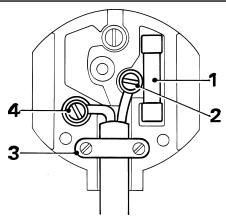
Should your mains plug need replacing and you are competent to do this, proceed as instructed below. If you are in doubt, contact an authorised repair agent or a qualified electrician.
- Disconnect the plug from the supply and remove the fuse from the plug.
Cut off the plug and dispose of it safely; a plug with bared copper conductors is dangerous if engaged in a live socket outlet.
- Only fit 13 Amperes BS1363A approved plugs fitted with a 5 A fuse (1).
- The cable wire colours, or a letter, will be marked at the connection points of most good quality plugs. Attach the wires to their respective points in the plug (see above). Brown is for Live (L) (2), blue is for Neutral (N) (4).
- Before replacing the top cover of the mains plug ensure that the cable restraint (3) is holding the outer sheath of the cable firmly and that the leads are correctly fixed at the terminal screws.
- If the plug has a fuse cover, make sure that the fuse cover is fitted. Do not use the plug if the fuse cover is missing or damaged.

Never use a light socket.
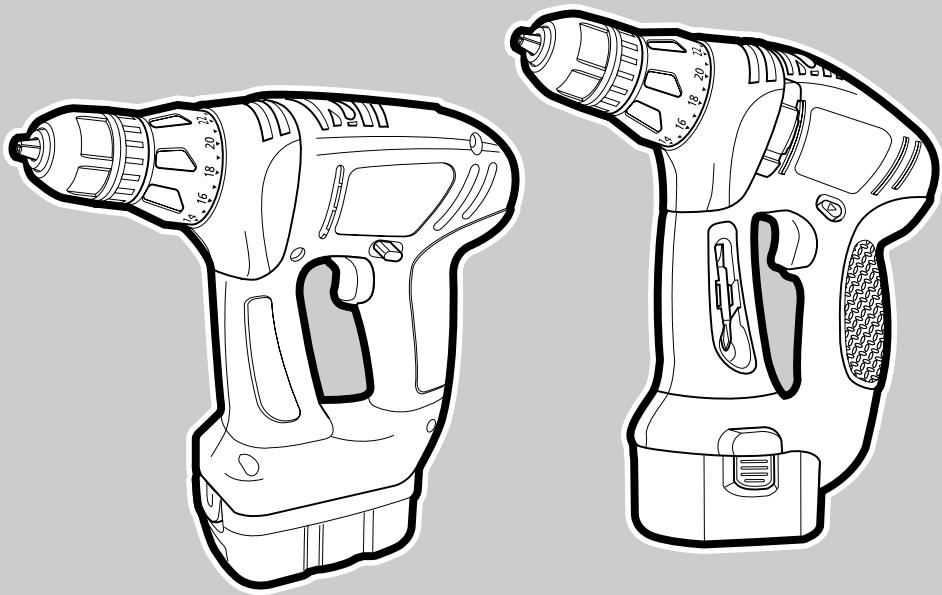
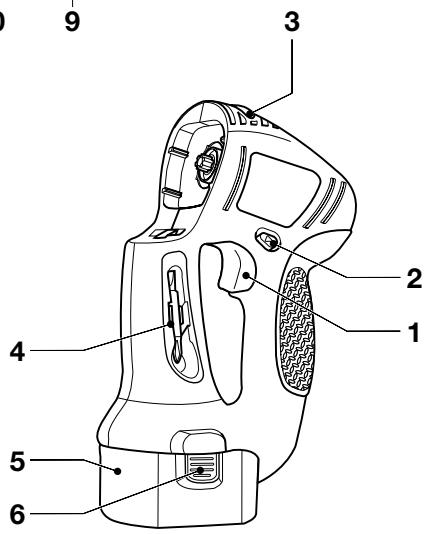
OVERVIEW (fig. A)
Motor unit
- Variable speed switch
- Forward/reverse slider
- Head release button
- Bit holder
- Battery
- Battery release buttons
Drill/screwdriver head
- Torque adjustment collar
- Chuck
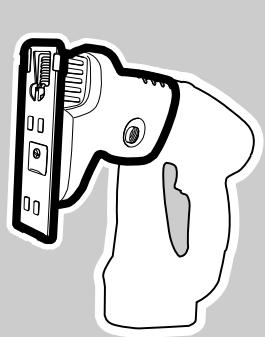
Jigsaw head
- Lock-off button
- Saw shoe
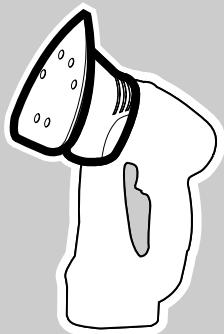
Sander head
- Sanding base
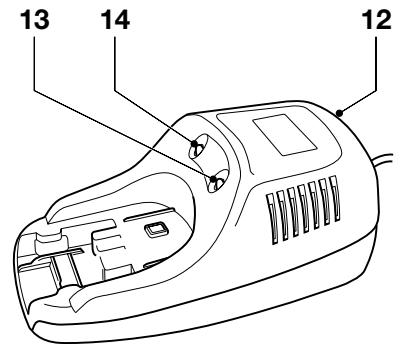
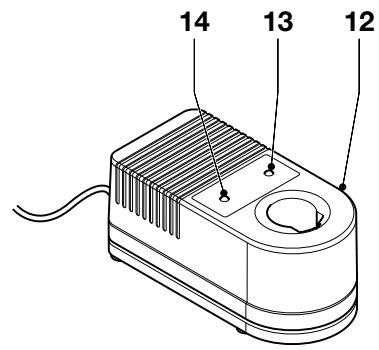
Charger
- Charger
- Charging indicator
- End of charge indicator
Assembly
Warning! Before assembly, remove the battery from the tool.
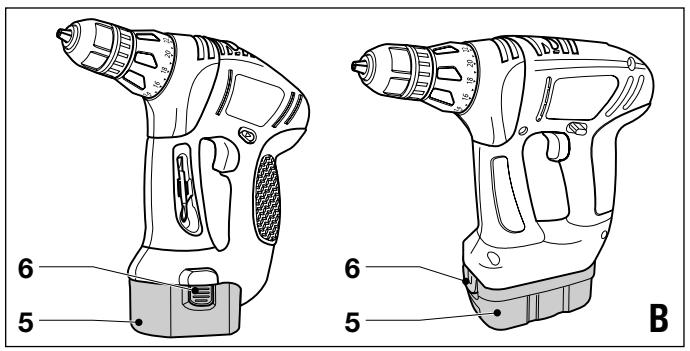
Fitting and removing the battery (fig. B)
KC2000
To fit the battery (5), line it up with the receptacle on the tool. Slide the battery into the receptacle and push until the battery snaps into place.
To remove the battery, push the two release buttons (6) simultaneously while at the same time pulling the battery out of the receptacle.
KC2002
To fit the battery (5), line it up with the receptacle on the tool. Slide the battery into the receptacle and push until the battery snaps into place.
To remove the battery, push the release button (10) while at the same time pulling the battery out of the receptacle.
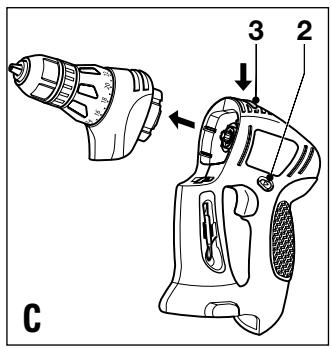
Fitting and removing tool heads (fig. C)
The different tool heads can be easily exchanged.
Lock the tool by setting the forward/reverse slider (2) to the centre position.
To remove a tool head, depress the head release button (3) and take the head off the tool.
To fit a tool head, line it up with the tool as shown and push it onto the tool until it snaps into place.
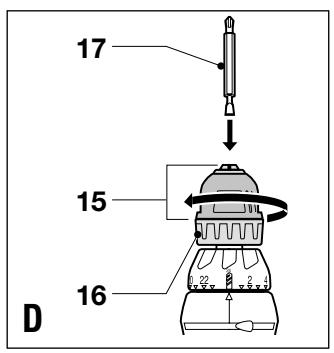
Fitting and removing a drill bit or screwdriver bit (fig. A & D)
The drill/screwdriver head is fitted with a keyless chuck to allow for an easy exchange of bits.
Lock the tool by setting the forward/reverse slider (2) to the centre position (fig. A).
Open the chuck by turning the front part (15) with one hand while holding the rear part (16) with the other (fig. D).
Insert the bit shaft (17) into the chuck.
Firmly tighten the chuck by turning the front part (15) with one hand while holding the rear part (16) with the other.
This tool is supplied with a double-ended screwdriver bit in the bit holder (4) (fig. A).
To remove the screwdriver bit from the bit holder, lift the bit from the recess.
To store the screwdriver bit, firmly push it into the holder.
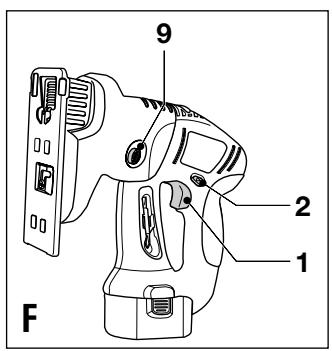
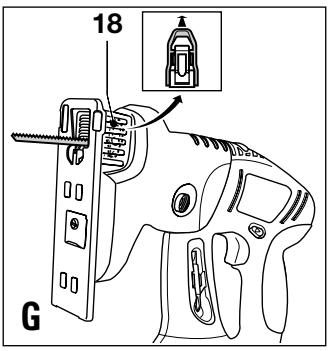
Fitting and removing a saw blade (fig. F & G)
Lock the tool by setting the forward/reverse slider (2) to the centre position (fig. F).
To fit a saw blade, lift the lever (18) and hold it in this position (fig. G).
- Insert the saw blade into the holder as shown. Make sure that the teeth are pointing to the front.
Release the lever.
To remove the saw blade, lift the lever (18) and pull the saw blade from the holder.
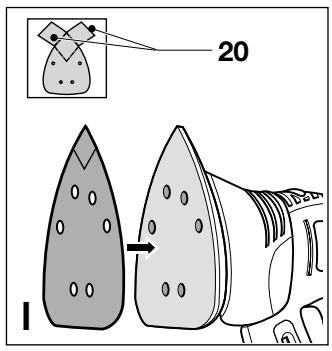
Fitting and removing sanding sheets (fig. F & I)
The sanding head uses pre-cut sanding sheets.
Lock the tool by setting the forward/reverse slider (2) to the centre position (fig. F).
Before fitting a new sheet, remove the two additional diamond tips (20) (fig. 1).
To fit a sanding sheet, line it up with the sanding base as shown.
Press the sheet firmly and evenly onto the sanding base, making sure that the holes in the sheet coincide with the holes in the base.
To remove the sheet, pull it off the sanding pad.
Warning! Never use the sanding head without a sanding sheet or accessory in place.
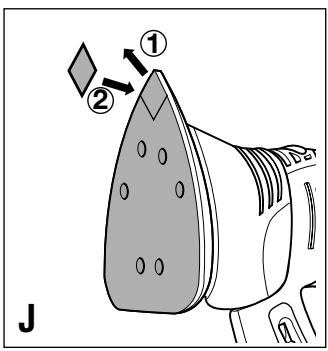
Replacing the diamond sanding tip (fig. F & J)
Sanding sheets are supplied with two replacement diamond tips. The diamond tip can be reversed when worn. When both sides are worn, replace the diamond tip.
Lock the tool by setting the forward/reverse slider (2) to the centre position (fig. F).
To reverse the tip, remove it, turn it 180^ and press it back onto the base as shown (fig. J).
To replace the tip, pull the old tip off the base and press a new one onto the base.
Warning! When removing the tip from the pad, be careful not to pull the pad off the sanding base.
Use
Warning! Let the tool work at its own pace. Do not overload.
Charging the battery (fig. A)
The battery needs to be charged before first use and whenever it fails to produce sufficient power on jobs that were easily done before. A new battery, or a battery that has not been used for an extended period of time, achieves full performance only after approx. 5 charging and discharging cycles. The battery may become warm while charging; this is normal and does not indicate a problem. After normal use, a charging time of 60 minutes will provide sufficient power for most applications. However, further charging for up to 90 minutes could significantly increase the use time, depending on the battery and charging conditions.
Warning! Do not charge the battery at ambient temperatures below 4^ or above 40^ . Recommended charging temperature: approx. 24^ .
To charge the battery (5), remove it from the tool and insert it into the charger (12). The battery will only fit into the charger in one way. Do not force. Be sure that the battery is fully seated in the charger.
Plug in the charger.
- Check if the red charging indicator (13) lights up. If the green end of charge indicator (14) lights up now instead, the battery is too hot and cannot be charged.
If this happens, remove the battery from the charger, let the battery cool down for approx. 1 hour and re-insert it.
After approx. 1 hour of charging, the red charging indicator (13) will stop lighting and the green end of charge indicator (14) will light up. The battery is now fully charged.
Remove the battery from the charger.
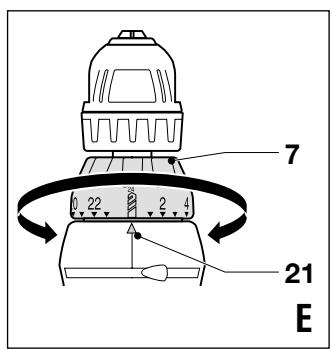
Selecting the torque or drill position (fig. E)
This tool is fitted with a collar to set the torque for tightening screws.
For drilling, set the collar (7) to the drilling position by aligning the symbol with the marking (21).
For screwdriving, set the collar to the desired setting. If you do not yet know the appropriate setting, proceed as follows:
- Set the collar (7) to position 1.
Tighten the first screw. - If the clutch ratchets before the desired result is achieved, increase the collar setting and continue tightening the screw. Repeat until you reach the correct setting. Use this setting for the remaining screws.
Selecting the direction of rotation (fig. A)
For drilling, sawing, sanding and tightening screws, use forward (clockwise) rotation. For loosening screws or removing a jammed drill bit, use reverse (counterclockwise) rotation.
To select forward rotation, push the forward/reverse slider (2) to the left.
To select reverse rotation, push the forward/reverse slider to the right.
To lock the tool, set the forward/reverse slider into the centre position.
Drilling/screwdriving (fig. A)
Select forward or reverse rotation using the forward/ reverse slider (2).
To switch the tool on, press the variable speed switch (1). The tool speed depends on how far you press the switch.
To switch the tool off, release the variable speed switch.
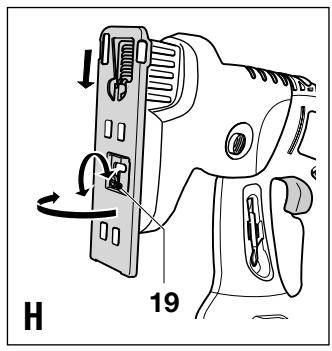
Setting the sawing angle (fig. F & H)
The saw shoe can be set to angles of 0^ (straight) and 45^ (right-side bevel).
Lock the tool by setting the forward/reverse slider (2) to the centre position (fig. F).
- Loosen the screw (19) until the shoe can move freely (fig. H).
Pull the saw shoe forward and tilt it into the required angle.
Tighten the screw (19).
Sawing (fig. F)
Select forward rotation by moving the forward/reverse slider (2) to the left.
To switch the tool on, keep the lock-off button (9) depressed and press the variable speed switch (1). The tool speed depends on how far you press the switch.
Release the lock-off button (9).
To switch the tool off, release the variable speed switch.
Sanding (fig. A)
Select forward rotation by moving the forward/reverse slider (2) to the left.
To switch the tool on, press the variable speed switch (1). The tool speed depends on how far you press the switch.
To switch the tool off, release the variable speed switch.
Hints for optimum use
Drilling
Always apply a light pressure in a straight line with the drill bit.
- Just before the drill tip breaks through the other side of the workpiece, decrease pressure on the tool.
Use a block of wood to back up workpieces that may splinter.
- Use spade bits when drilling large diameter holes in wood.
Use HSS drill bits when drilling in metal.
Use masonry bits when drilling in soft masonry.
- Use a lubricant when drilling metals other than cast iron and brass.
- Make an indentation using a centre punch at the centre of the hole to be drilled in order to improve accuracy.
Screwdriving
Always use the correct type and size of screwdriver bit.
- If screws are difficult to tighten, try applying a small amount of washing liquid or soap as a lubricant.
Always hold the tool and screwdriver bit in a straight line with the screw.
Sawing
Always use the appropriate type of saw blade for the workpiece material and type of cut.
- If necessary, drill a hole near the starting point of the cut.
When sawing wooden workpieces, it is not necessary to drill a pilot hole:
Mark the desired starting point.
- Tilt the tool forward and place the rounded front edge of the saw shoe on the workpiece.
- Switch the tool on and slowly feed the saw blade into the workpiece at the desired starting point.
When cutting sheet metal:
- Clamp a piece of plywood or soft wood to the back of the workpiece and saw through the combination in order to obtain a clear cut.
- Do not force the saw blade into the workpiece. Note that cutting sheet metal will normally take more time than sawing thicker wooden workpieces.
Spread a thin film of oil along the cutting line before sawing.
To cut, switch the tool on and move it down until the saw blade is exactly over the point of entry.
Lower the rear of the shoe towards the workpiece, maintaining a firm pivoting pressure on the saw shoe. With the shoe flat on the workpiece, feed the blade into the workpiece.
When cutting laminates:
Cut thin laminates with the back surface facing up, as splintering is most likely to occur on the side of the workpiece facing the saw shoe.
For clean cuts, clamp a piece of plywood or hardboard to both sides of the laminate and cut through the resulting sandwich.
Sanding
Do not exert too much pressure on the tool.
Regularly check the condition of the sanding sheet. Replace when necessary.
- When sanding new layers of paint before applying another layer, use extra fine grit.
- On very uneven surfaces, or when removing layers of paint, start with a coarse grit. On other surfaces, start with a medium grit. In both cases, gradually change to a fine grit for a smooth finish.
Consult your retailer for more information on available accessories for sanding, polishing, stripping and scrubbing.
Maintenance
Your Black & Decker tool has been designed to operate over a long period of time with a minimum of maintenance.
Continuous satisfactory operation depends upon proper tool care and regular cleaning.
Your charger does not require any maintenance apart from regular cleaning.
Warning! Before performing any maintenance on the tool, remove the battery from the tool. Unplug the charger before cleaning it.
Regularly clean the ventilation slots in your tool and charger using a soft brush or dry cloth.
- Regularly clean the motor housing using a damp cloth. Do not use any abrasive or solvent-based cleaner.
- Regularly open the chuck and tap it to remove any dust from the interior.
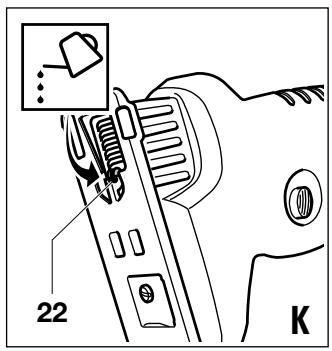
Regularly apply a drop of light machine oil to the guide roller (22) of the jigsaw head (fig. K).
Protecting the environment
Tools

Black & Decker provides a facility for recycling Black & Decker products and rechargeable batteries once they have reached the end of their working life. This service is provided free of charge. To take advantage of this service please return your product to any authorised repair agent who will collect them on our behalf.
Batteries

Black & Decker batteries can be recharged many times. At the end of their useful life, discard batteries with due care for our environment:
- Run the battery down completely, then remove it from the tool.
NiCd and NiMH batteries are recyclable. Take them to any authorised repair agent or a local recycling station. You can check the location of your nearest authorised repair agent by contacting your local Black & Decker office at the address indicated in this manual. Alternatively, a list of authorised Black & Decker repair agents and full details of our after-sales service and contacts are available on the Internet
at www.2helpU.com.
Technical data
| KC2000 | KC2002 | ||
| Voltage | \( V_{DC} \) | 12 | 14.4 |
| Battery cat. no. | A9275 | ||
| Drill/screwdriver: | |||
| No-load speed | \( min^-1 \) | 0 - 700 | 0 - |
| Max. torque | Nm | 6.2 | $ |
| Chuck capacity | mm | 10 | 10 |
| Max. drilling capacity in steel/wood | mm | 10/25 | 10/25 |
| Jigsaw: | |||
| No-load speed | \( min^{-1} \) | 0 - 3,000 | 0 - 3,000 |
| Max. depth of cut in wood | mm | 38 | 38 |
| Sawing angles | 0°, 45° | 0°, 45° | |
| Sander: | |||
| Oscillations (no load) | \( min^{-1} \) | 0 - 8,000 | 0 - 8,000 |
| Battery | A9275 | |
| Voltage | VDC 12 | 14.4 |
| Capacity | Ah 1.5 |
| Charger | |
| Input voltage | VAC 230 |
| Approx. charging time | h 1 |
EC declaration of conformity
Black & Decker declares that these products conform to: EN 50260, EN 55014-1, EN 55014-2, EN 61000-3-2, EN 61000-3-3, EN 60335
LpA (sound pressure): 82 dB(A), LWA (acoustic power) 95 dB(A), hand/arm weighted vibration 5.3~m / s^2

Colin Wills, Director of Engineering BDCI, 4/F, 2 Dai Wang Street Tai Po Industrial Estate Tai Po NT, Hong Kong
Guarantee
Black & Decker is confident of the quality of its products and offers an outstanding guarantee. This guarantee statement is in addition to and in no way prejudices your statutory rights. The guarantee is valid within the territories of the Member States of the European Union and the European Free Trade Area.
If a Black & Decker product becomes defective due to faulty materials, workmanship or lack of conformity, within 24 months from the date of purchase, Black & Decker guarantees to replace defective parts, repair products subjected to fair wear and tear or replace such products to ensure minimum inconvenience to the customer unless:
- The product has been used for trade, professional or hire purposes;
- The product has been subjected to misuse or neglect;
- The product has sustained damage through foreign objects, substances or accidents;
Repairs have been attempted by persons other than authorised repair agents or Black & Decker service staff.
To claim on the guarantee, you will need to submit proof of purchase to the seller or an authorised repair agent. You can check the location of your nearest authorised repair agent by contacting your local Black & Decker office at the address indicated in this manual. Alternatively, a list of authorised Black & Decker repair agents and full details of our after-sales service and contacts are available on the Internet at: www.2helpU.com
Australia
DEWALT Industrial Power Tool Company
7 Clarice Road Tel.03 9895 9200
Box Hill, Victoria 3128 Fax 03 9899 7465
New Zealand
Black & Decker Tel.09 579 7600
81 Hugo Johnson Drive Fax 09 579 8200
Penrose,Auckland,New Zealand
United Kingdom
Black & Decker Tel. 01753 511234
210 Bath Road Fax 01753 551155
Slough, Berkshire SL1 3YD Helpline 01753 574277
| BLACK&DECKER | KC2000 | TYP. 1 |
| Dealer address | Date of purchase |
| Name: | Was this tool bought as a replacement? |
| Address: | Yes |
| No | |
| Town: | |
| Postal code: | Dealer address: |
| Was this tool a gift? | Data protection act: Tick the box if you prefer not to receive further information. |
| Yes | Tick the box if you prefer not to receive further information. |
| No | |
| Was this tool your first purchase? | |
| Yes | |
| No |
GUARANTEE CARD
Please complete this section immediately after the purchase of your tool and send it to Black & Decker in your country. If you live in Australia or New Zealand, please register by using the alternative guarantee card supplied.