
SUMO POWER SILVER 1200W - Alimentation pour ordinateur GIGABYTE - Notice d'utilisation et mode d'emploi gratuit
Retrouvez gratuitement la notice de l'appareil SUMO POWER SILVER 1200W GIGABYTE au format PDF.


| Type de produit | Alimentation pour ordinateur |
| Marque | GIGABYTE |
| Modele | SUMO POWER SILVER 1200W |
| Norme | ATX 12V V2.3 / SSI EPS 12V V2.91 |
| Certification | 80 Plus Silver (efficacite jusqu'a 88%) |
| Puissance totale continue | 1200W |
| Puissance maximale | 1250W |
| Tension d'entree | 110-240Vac |
| Frequence | 60/50Hz |
| Nombre de rails +12V | 6 |
| Connecteurs fournis | 1x 24-pin, 2x CPU (4+4 et 8-pin), 6x PCI-E (6+2), 12x SATA, 5x peripherique 4-pin, 1x Floppy 4-pin |
| Ventilateur | 12 cm Blue LED silencieux avec controle d'eclairage |
| Dimensions (L x l x H) | 200 x 150 x 86 mm |
| MTBF | >100 000 heures |
| Temperature de fonctionnement | 0 a 40°C |
| Protections integrees | OCP, OPP, OVP, UVP, SCP, OTP |
| Composants internes | Condensateurs japonais et solides |
| Cables modulaires | Oui |
| Conformites | CUL/TUV/CB/CE/FCC/BSMI/C-tick, ErP/RoHS/WEEE |
FOIRE AUX QUESTIONS - SUMO POWER SILVER 1200W GIGABYTE
Questions des utilisateurs sur SUMO POWER SILVER 1200W GIGABYTE
0 question sur cet appareil. Repondez a celles que vous connaissez ou posez la votre.
Poser une nouvelle question sur cet appareil
Téléchargez la notice de votre Alimentation pour ordinateur au format PDF gratuitement ! Retrouvez votre notice SUMO POWER SILVER 1200W - GIGABYTE et reprennez votre appareil électronique en main. Sur cette page sont publiés tous les documents nécessaires à l'utilisation de votre appareil SUMO POWER SILVER 1200W de la marque GIGABYTE.
MODE D'EMPLOI SUMO POWER SILVER 1200W GIGABYTE
GIGABYTE
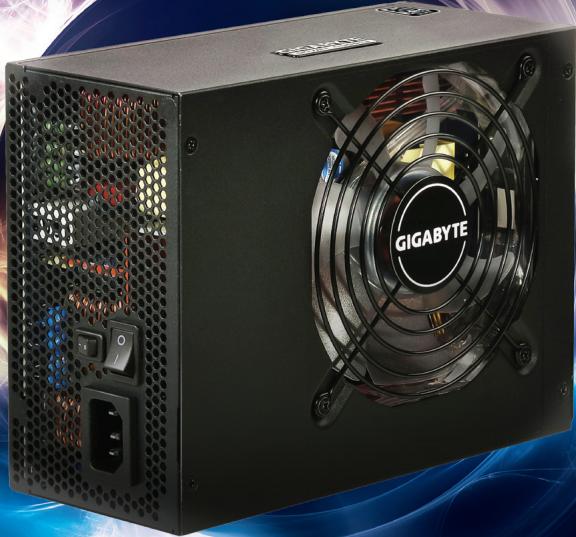
The Lord of Power
Sumo Power Silver 900W/1200W
- User Manual / English
- Handbuch / Deutsche
- Manual de l'utiliser / Francais
- Manual de usuario / Español
PykoBODCTBO nOlb3OBaTeJIa / PocCm
·使用說明書/中文
·使用说明书/中文
- ハーネーマニル / 日本語
| Table of Contents | Page |
| Cautions andWarnings | 2 |
| Components Check | 2 |
| 1. Product Introduction | 3 |
| 1-1 Introduction | 3 |
| 1-2 Product Highlights | 3 |
| 1-3 Model Description | 3 |
| 2. Product Specifications | 4 |
| 2-1 Power Input Specifications | 4 |
| 2-2 Power Output Specifications | 5 |
| 2-3 Features | 5 |
| 3. Description of Power Connectors | 6 |
| 3-1 Number of Connectors | 6 |
| 3-2 Description of Standard Cables | 7 |
| 3-3 Descriptions of Modular Cables | 8 |
| 4. Installation | 10 |
| 5. Troubleshooting | 11 |
| 6. Introduction of Protection Mechanism | 12 |
Cautions andWarnings
※ Please unplug or switch off the power supply when installing it.
※ Make sure that the power source is consistent with the specifications labeled on the nameplate before turning on the power supply.
※ Do not pull and/or unplug the power cord when the power supply is in use. Doing so may cause damage to your components. You should change a new power cord or outlet if there is any bad connection.
※ Do not use the power supply in a high humidity and/or temperature environment.
※ High voltages exist in the power supply. Only an authorized service technician or electrician can open the power supply case. Doing so will void the warranty.
※All warranties and guarantees will be voided in the event of failure to comply with any of the warnings and cautions covered in this manual.
※If the power supply is not working properly, please contact our Product Service Center.
Components Check
- Sumo Power Silver power supply
Modular cables - AC power cord
- User manual
- Installation screw kit
1. Product Introduction
1-1 Introduction
A power supply is the supply center for all power needs. With this component, the system operation may be supported so that its stability and reliability can be maintained. GIGABYTE launches the high-performance, 80 Plus Silver certified Sumo Power Silver 900W/1200W power supply that streamlines the operation of your computer by utilizing the best power source while enhancing the system liability to prevent power supply abnormalities resulting from surge, etc. Equipped with the Japanese-made capacitors and solid capacitors, each Sumo Power silver 900W/1200W has the longest lifespan. Furthermore, the 12-cm Blue LED fan comes with the power supply so that you can enjoy every single moment while using it.
1-2 Product Highlights
80 Plus Silver certified - up to 88% efficient
Compliant with the latest power supply design: Intel 12V v2.3/EPS12V v2.91
Double anti-EMI design
- 5 (900W)/6 (1200W) +12V rails for the best system compatibility
- High quality Japanese-made capacitors and solid capacitors for a longer lifespan of power supply
- Modular connectors for easier cabling management
12-cm blue LED silent cooling fan with switchable light control
- Safety protection mechanism: over-current Protection, over-power protection, over-voltage protection, under-voltage protection, short circuit protection, and over temperature protection
- Multiple safety compliance certifications: CUL/TUV/CB/CE/FCC/BSMI/C-tick
Compliant with the latest ErP/RoHS/WEEE environmental certification standards
Sound and robust enclosure with anti-scratch design
1-3 Model Description
| Product Name | Model |
| Sumo Power Silver 900W | GE-H900A-D1 |
| Sumo Power Silver 1200W | GE-HK20A-D1 |
2. Product Specifications
2-1 Power Input Specifications
- Type: ATX 12V V2.3/SSI EPS 12V V2.91
Voltage: 900W-100~240Vac / 1200W-110~240Vac - Current: 900W-12A@115Vac/6.3A@230Vac, 1200W-15A@115Vac/10A@230Vac
Frequency: 60/50Hz
Power good signal: 100ms~500ms - Hold up time: > 17ms
- Efficiency: 88% Typically
Continuous output capacity: 900W/1200W
Maximum output capacity: 950W/1250W
2-2 Power Output Specifications
Sumo Power 900W
| Model | GE-H900A-D1 | ||||||||
| AC Input Voltage | 100-240Vac, 12-6.3A | ||||||||
| Frequency | 60/50Hz | ||||||||
| Power Factor Correction type | Active PFC | ||||||||
| DC Output | +5V | +3.3V | +12V1 | +12V2 | +12V3 | +12V4 | +12V5 | -12V | +5Vsb |
| Max. Output Current | 25A | 25A | 25A | 25A | 25A | 28A | 28A | 0.5A | 4.0A |
| Max. Output Power | 166W | 864W | 6W | 20W | |||||
| Total Power | 900W | ||||||||
Sumo Power 1200W
| Model | GE-HK20A-D1 | |||||||||
| AC Input Voltage | 110-240Vac, 15-10A | |||||||||
| Frequency | 60/50Hz | |||||||||
| Power Factor Correction type | Active PFC | |||||||||
| DC Output | +5V | +3.3V | +12V1 | +12V2 | +12V3 | +12V4 | +12V5 | +12V6 | -12V | +5Vsb |
| Max. Output Current | 25A | 25A | 25A | 25A | 25A | 30A | 30A | 30A | 0.5A | 4.0A |
| Max. Output Power | 190W | 1166W | 6W | 20W | ||||||
| Total Power | 1200W | |||||||||
2-3 Features
Dimensions: L 200 x W 150 x H 86 (mm)
- Operating Temperature: 0 40^ C
MTBF: > 100,000 Hours
EMC: CE/FCC/CB
- Safety compliance: CUL/TUV/BSMI/C-tick
3. Description of Power Connectors
3-1 Number of Connectors
| Connector | GE-H900A-D1 | GE-HK20A-D1 | |
| 24-pin Motherboard Connector | 1 | 1 | |
| (4+4)-pin +12V CPU Connector | 1 | 1 | |
| 8-pin +12V CPU Connector | 1 | 1 | |
| (6+2)-pin PCI-E2.0 Connectors | 6 | 6 | |
| SATA Connectors | 12 | 12 | |
| 4-pin Peripheral Connectors | 5 | 5 | |
| 4-pin Floppy Connector | 1 | 1 | |
3-2 Description of Standard Cables
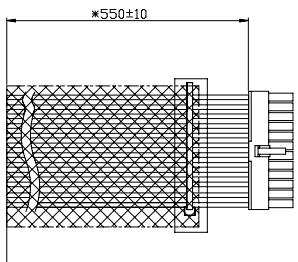
24-pin Connector (P1)
| Pin No. | Description | Color |
| 12 | +3.3V | Orange |
| 11 | +12V | Yellow |
| 10 | +12V | Yellow |
| 9 | +5Vsb | Purple |
| 8 | PWR ok | Gray |
| 7 | COM | Black |
| 6 | +5V | Red |
| 5 | COM | Black |
| 4 | +5V | Red |
| 3 | COM | Black |
| 2 | +3.3V | Orange |
| 1 | +3.3V | Orange |
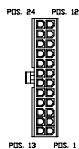
| Pin No. | Description | Color |
| 24 | COM | Black |
| 23 | +SV | Red |
| 22 | +SV | Red |
| 21 | +SV | Red |
| 20 | ----- | ----- |
| 19 | COM | Black |
| 18 | COM | Black |
| 17 | COM | Black |
| 16 | PS-ON | Green |
| 15 | COM | Black |
| 14 | -12V | Blue |
| 13 | +3.3V | Orange |
| +3.3V | Brown |
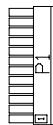
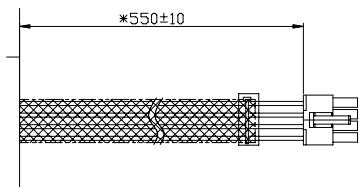
4+4-PIN CPU Power Connector (P2, P3)
| Pin No. | Description | Color |
| 4 | +12V2 | Yellow |
| 3 | +12V2 | Yellow |
| 4 | +12V2 | Yellow |
| 3 | +12V2 | Yellow |
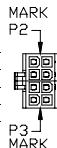
| Pin No. | Description | Color |
| 2 | COM | Black |
| 1 | COM | Black |
| 2 | COM | Black |
| 1 | COM | Black |
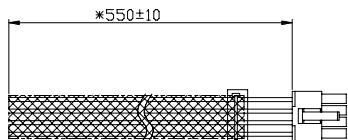
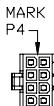
8-PIN CPU Power Connector
| Pin No. | Description | Color |
| 8 | +12V6 | Yellow/White |
| 7 | +12V6 | Yellow/White |
| 6 | +12V6 | Yellow/White |
| 5 | +12V6 | Yellow/White |
| Pin No. | Description | Color |
| 4 | COM | Black |
| 3 | COM | Black |
| 2 | COM | Black |
| 1 | COM | Black |
3-3 Descriptions of Modular Cables
Modular Backplane
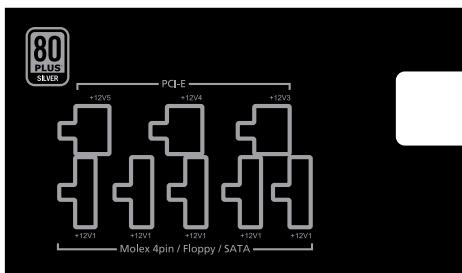
Sumo Power Silver 900W
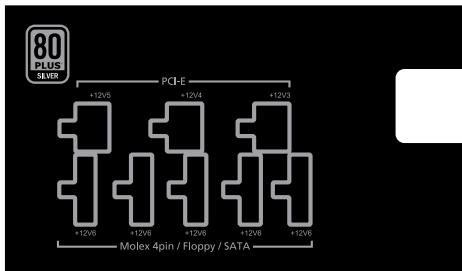
Sumo Power Silver 1200W
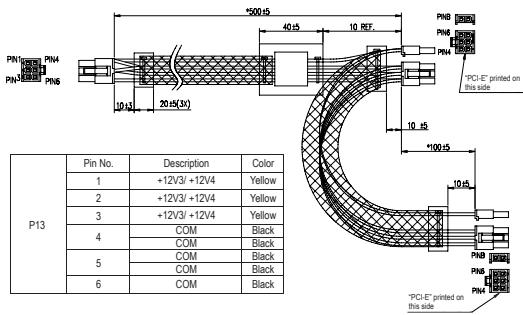
Graphic Card Connectors: 6-pin PCI-E power connector to dual 6 + 2 -pin PCI-E power connectors x 3
| PCI-E | Pin No. | Description | Color |
| 1 | +12V3/ +12V4 | Yellow | |
| 2 | +12V3/ +12V4 | Yellow | |
| 3 | +12V3/ +12V4 | Yellow | |
| 4 | COM | Black | |
| 5 | COM | Black | |
| 6 | COM | Black | |
| 7 | COM | Black | |
| 8 | COM | Black |
| PCI-E | Pin No. | Description | Color |
| 1 | +12V3/ +12V4 | Yellow | |
| 2 | +12V3/ +12V4 | Yellow | |
| 3 | +12V3/ +12V4 | Yellow | |
| 4 | COM | Black | |
| 5 | COM | Black | |
| 6 | COM | Black | |
| 7 | COM | Black | |
| 8 | COM | Black |
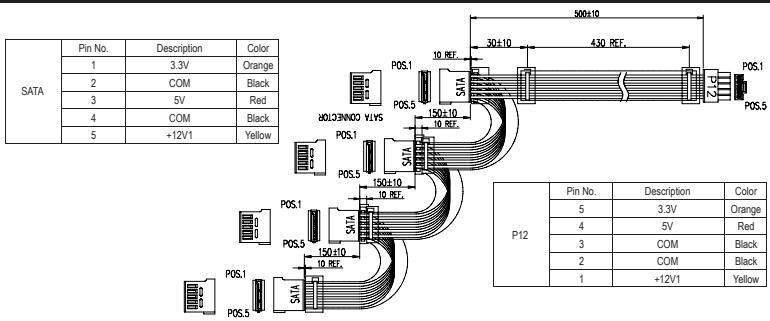
SATA Connectors: 5-pin power connector to quad SATA power connectors x3
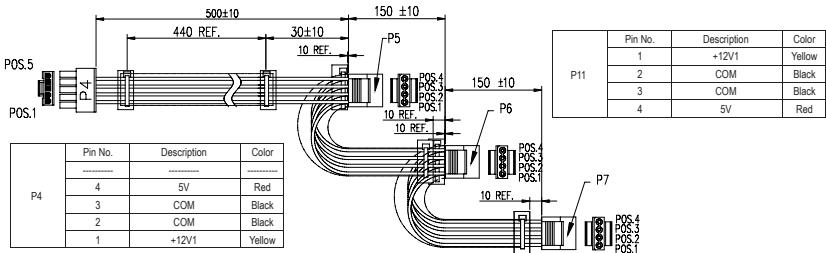
4-pin Peripheral Power Connectors: 5-pin power connector to triple 4-pin peripheral power connectors x 1
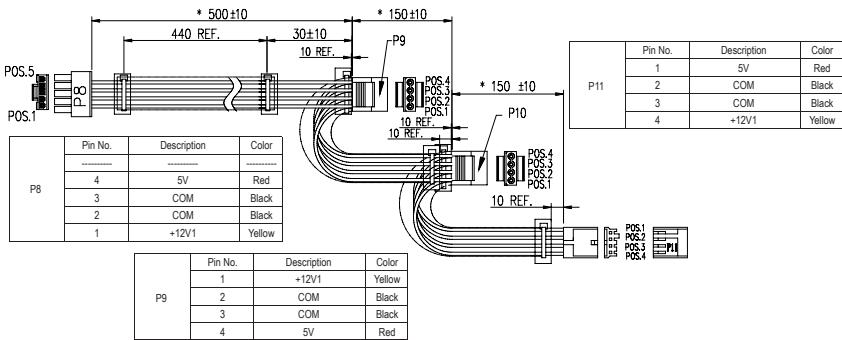
4-pin Floppy power connector: 5-pin power connector to dual 4-pin peripheral power connectors and single small 4-pin floppy power connector x 1
4. Installation
- Switch off the main power and unplug the power cord.
- Unfasten the case screws on the case to open the panel on the side of the housing.
- Unplug all power connectors from the motherboard and peripherals, such as system fans, hard disk drives, optical drives, floppy disk drives, etc.
- Place the power supply in proper location and secure it with screws.
- Connect the P1 (24-pin) and P2 (CPU 4+4-pin) connectors to the motherboard.
- Then connect peripheral system components with proper connectors.
- Make sure that all connectors have been connected.
- Close the housing and secure the case screws.
- Insert the power cord and switch on the main power.
5. Troubleshooting
If the power supply does not work properly, please follow the troubleshooting steps below:
(1) Is the power cord inserted correctly into both the AC outlet and the AC power socket of the power supply?
(2) Ensure that the "I/O" switch on the power supply is switched to "I".
(3) Make sure that all the appropriate power connectors are properly connected to each device.
(4) If the UPS is connected, ensure that it is open and working normally.
If the power supply is not working properly after following the instructions above, please contact local stores or GIGABYTE offices for after-sale service. For more information about technical support, please visit the GIGABYTE website: www.gigabyte.com.
6. Introduction of Protection Mechanism
Over-Current Protection:
| Voltage | GE-H900A-D1 | GE-HK20A-D1 | ||
| Protection Point | Protection Point | |||
| Min | Max | Min | Max | |
| +5V | 30A | 60A | 30A | 65A |
| +3.3V | 30A | 60A | 30A | 65A |
| +12V1.2.3.4.5 | 30A | 60A | 30A | 65A |
| +12V6 | 30A | 65A | ||
Over-Voltage Protection:
| Voltage | Protection Point | |
| Min | Max | |
| +5V | 5.75V | 7.0V |
| +3.3V | 3.76V | 4.5V |
| +12V1.2.3.4.5.6 | 13.50V | 16.0V |
Over-Power Protection:
900W: 110 150% of Full-Loading
1200W: 110 ~ 130% of Full-Loading
Short Circuit Protection:
The short circuit placed on +3.3V , +5V , +12V and -12V output shall cause no damage and the power supply shall shut down or latch.
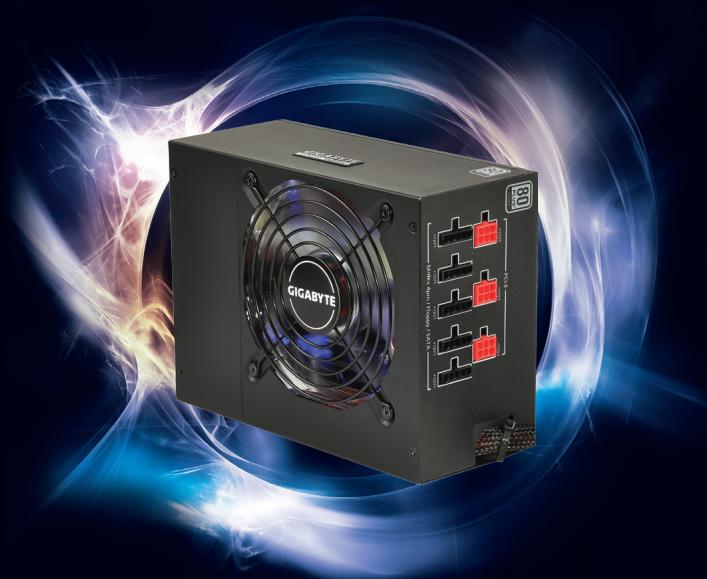
Sumo Power Silver 900W/1200W
- The specifications and pictures are subject to change without notice.
- All trademarks and logos are the property of their respective holders.
www.gigabyte.com
- GIGABYTE
- The Lord of Power
- Cautions andWarnings
- Components Check
- Product Introduction
- 1-1 Introduction
- 1-2 Product Highlights
- 1-3 Model Description
- Product Specifications
- 2-1 Power Input Specifications
- 2-2 Power Output Specifications
- 2-3 Features
- Description of Power Connectors
- 3-2 Description of Standard Cables
- 3-3 Descriptions of Modular Cables
- Modular Backplane
- Installation
- Troubleshooting
- Introduction of Protection Mechanism
- Over-Power Protection:
- Short Circuit Protection:
- Sumo Power Silver 900W/1200W
Marque : GIGABYTE
Modèle : SUMO POWER SILVER 1200W
Catégorie : Alimentation pour ordinateur