
ODIN PLUS 600W - Alimentation pour ordinateur GIGABYTE - Notice d'utilisation et mode d'emploi gratuit
Retrouvez gratuitement la notice de l'appareil ODIN PLUS 600W GIGABYTE au format PDF.


| Type de produit | Alimentation pour ordinateur |
| Marque | GIGABYTE |
| Modèle | ODIN PLUS 600W |
| Puissance nominale | 600 W |
| Facteur de forme | ATX |
| Certification 80 PLUS | Bronze |
| Normes supportées | Intel ATX 12V V2.3 |
| Correction du facteur de puissance | Active PFC |
| Ventilateur | 120 mm, transparent, avec LED bleue et interrupteur LED |
| Sorties +12V | 3 rails indépendants |
| Connecteurs PCI-E | 2 connecteurs (6+2 broches) |
| Compatibilité SLI | Certifié NVIDIA SLI Ready |
| Câblage | Gainé (sleeved) |
| Dissipateur thermique | Grand dissipateur à code couleur |
| Boîtier | Noir laqué |
| Protections | OPP, OVP, OCP, OTP |
| Condensateurs | Condensateur principal japonais et condensateurs solides côté secondaire |
| Dimensions approximatives | 150 x 140 x 86 mm |
| Poids approximatif | 2,5 kg |
| Conformité environnementale | RoHS et WEEE |
| Garantie | Voir conditions du fabricant |
FOIRE AUX QUESTIONS - ODIN PLUS 600W GIGABYTE
Questions des utilisateurs sur ODIN PLUS 600W GIGABYTE
0 question sur cet appareil. Repondez a celles que vous connaissez ou posez la votre.
Poser une nouvelle question sur cet appareil
Téléchargez la notice de votre Alimentation pour ordinateur au format PDF gratuitement ! Retrouvez votre notice ODIN PLUS 600W - GIGABYTE et reprennez votre appareil électronique en main. Sur cette page sont publiés tous les documents nécessaires à l'utilisation de votre appareil ODIN PLUS 600W de la marque GIGABYTE.
MODE D'EMPLOI ODIN PLUS 600W GIGABYTE
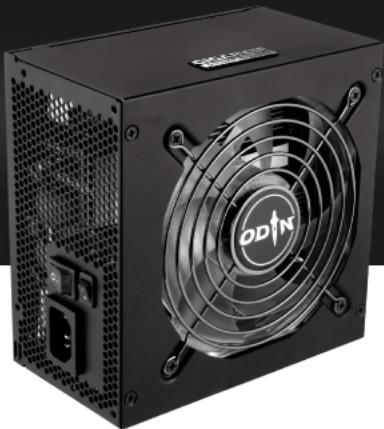
ODIN Plus 600W
English User's Guide
Features
Complies to Intel ATX 12V V2.3.
Active PFC design
- New technology layout high efficiency design
GIGABYTE board layout design
- Equipped with Japan made bulk capacitor and solid capacitors at secondary side.
- 80Plus bronze certified high efficiency power supply that reduces energy wasted and electricity usage.
12CM intelligent transparent cooling fan with Blue LED
- Equipped with LED switch to turn on/off LED at will
- Triple rails of +12V output
PCI-E 2.0 ready
Certified NVIDIA SLI ready
Sleeved cabling
Color-coded extra large heat-sink
Elegant black coated casing
- Multiple safety protection features: OPP/OVP/OCP/OTP
RoHS and WEEE compliant
The following are not covered by the warranty:
- Using the product incorrectly or in a manner other than the designed purpose.
- Nonobservance of the proper operation provided.
- Malfunction due to interference from other devices.
- Unapproved modification of the product.
- Consequential damage to other objects due to the product's fault.
- Malfunction arising from natural hazards E.g. earthquake, lightning, fire, and floods.
The product's warranty label has been removed or damaged.
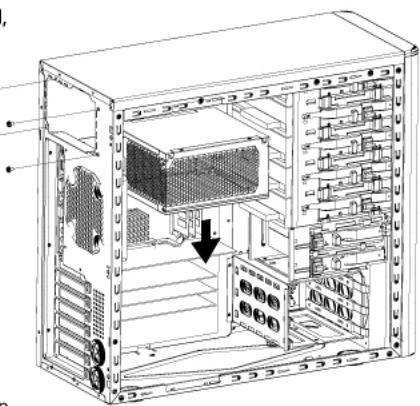
STEP1
If your system does not have a power supply installed, please skip to Step 2.
- Turn off power and disconnect power cable.
- Disconnect all connectors from your existing power supply.
- Remove the screws securing your existing power supply unit, than take it out of the case.
STEP2
- Install your ODIN Plus Power Supply.
- Connect all power connectors to the motherboard and all devices as needed.
- Secure the power supply firmly at the right position of chassis by using screws from the retail package
- Close the chassis and connect the AC power cord.
- Switch the I/O switch to "I" position, and now the system is ready for operation.

Do not open this power supply unit!
No serviceable components inside!
Qualified service personnel only!
Incorrect connector installation may possibly burn out the motherboard and other components.
Connector List
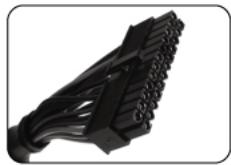
ATX Motherboard connector (24 Pin)
| Signal | Pin | Color | Signal | Pin | Color |
| COM | 24 | Black | +3.3V | 12 | Orange |
| +5V | 23 | Red | +12V 1 | 11 | YEL/BLK |
| +5V | 22 | Red | +12V 1 | 10 | YEL/BLK |
| +5Vs | White | ||||
| +5V | 21 | Red | +5Vsb | 9 | Purple |
| - | 20 | - | PWR.ok | 8 | Gray |
| COM | 19 | Black | COM | 7 | Black |
| COM | 18 | Black | +5V | 6 | Red |
| COM | 17 | Black | COM | 5 | Black |
| PS_ON | 16 | Green | +5V | 4 | Red |
| COM | 15 | Black | COM | 3 | Black |
| -12V | 14 | Blue | +3.3V | 2 | Orange |
| +3.3V | 13 | Orange | +3.3V | 1 | Orange |
| +3.3Vs | Brown |
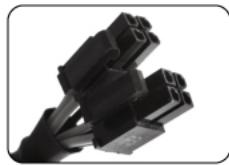
CPU connector (4+4 Pin)
| Signal | Pin | Color | Signal | Pin | Color |
| +12V2 | 8 | Yellow | COM | 4 | Black |
| +12V2 | 7 | Yellow | COM | 3 | Black |
| +12V2 | 6 | Yellow | COM | 2 | Black |
| +12V2 | 5 | Yellow | COM | 1 | Black |
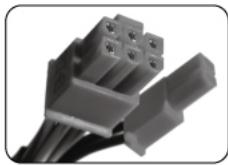
PCI-E connector 1 (6+2 Pin)
| Signal | Pin | Color | Signal | Pin | Color |
| COM | 2 | Black | COM | 1 | Black |
| COM | 6 | Black | +12V3 | 3 | YEL/BLU |
| COM | 5 | Black | +12V3 | 2 | YEL/BLU |
| COM | 4 | Black | +12V3 | 1 | YEL/BLU |
PCI-E connector 2 (6+2 Pin)
| Signal | Pin | Color | Signal | Pin | Color |
| COM | 2 | Black | COM | 1 | Black |
| COM | 6 | Black | +12V1 | 3 | YEL/BLU |
| COM | 5 | Black | +12V1 | 2 | YEL/BLU |
| COM | 4 | Black | +12V1 | 1 | YEL/BLU |
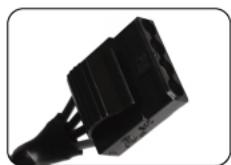
Peripheral Connector
| Signal | Pin | Color |
| +12V1 | 1 | YEL/BLK |
| COM | 2 | Black |
| COM | 3 | Black |
| +5V | 4 | Red |

SATA Connector
| Signal | Pin | Color |
| +12V1 | 5 | YEL/BLK |
| COM | 4 | Black |
| +5V | 3 | Red |
| COM | 2 | Black |
| +3.3V | 1 | Orange |
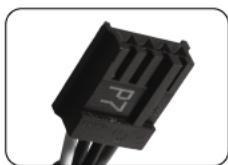
FDD Connector
| Signal | Pin | Color |
| +12V1 | 4 | YEL/BLK |
| COM | 3 | Black |
| COM | 2 | Black |
| +5V | 1 | Red |
Marque : GIGABYTE
Modèle : ODIN PLUS 600W
Catégorie : Alimentation pour ordinateur