
WTXG59 - Station météorologique LA CROSSE TECHNOLOGY - Notice d'utilisation et mode d'emploi gratuit
Retrouvez gratuitement la notice de l'appareil WTXG59 LA CROSSE TECHNOLOGY au format PDF.


| Type de produit | Montre bracelet multifonction avec station météorologique |
| Marque | LA CROSSE TECHNOLOGY |
| Modèle | WTXG59 |
| Alimentation | Pile CR2032 3V lithium |
| Autonomie de la pile | Environ 1,5 an (utilisation standard) |
| Écran | Affichage numérique LCD avec rétroéclairage électroluminescent |
| Fonctions principales | Heure, double fuseau, alarme, chronographe, minuterie, altimètre, baromètre, boussole, prévisions météo, podomètre, rétroéclairage |
| Altimètre | Plage de mesure: -702 m à 9164 m (référence niveau de la mer à 1013,2 hPa) |
| Baromètre | Plage de mesure: 300 à 1100 hPa (8,85 à 32,48 inHg) |
| Thermomètre | Plage de mesure: -10°C à 60°C (14°F à 140°F) |
| Boussole numérique | Précision: 1° (affichage numérique), 16 directions cardinales, verrouillage du cap, cap arrière |
| Prévisions météo | 4 symboles: soleil, partiellement nuageux, nuageux, pluie (basé sur la pression) |
| Chronographe | Résolution: 1/100 s, capacité: 99 h 59 min 59,99 s, 100 mémoires de tour |
| Minuterie | Résolution: 1 s, capacité: 99 h 59 min 59 s, 6 valeurs préréglées |
| Podomètre | Jusqu'à 99999 pas, lié au mode cadence |
| Résistance à l'eau | Jusqu'à 10 mètres (1 ATM) |
| Entretien et nettoyage | Essuyer avec un chiffon doux et sec. Éviter l'exposition prolongée à des conditions extrêmes. |
| Consignes de sécurité | Ne pas ouvrir le boîtier. Éloigner des aimants et des objets magnétiques. Protéger des chocs violents. |
| Pièces détachées et réparabilité | Pile de rechange CR2032. Le remplacement de la pile doit être effectué par un service agréé. |
| Informations générales | Manuel d'utilisation inclus. Garantie et support technique sur www.lacrossetechnology.fr |
FOIRE AUX QUESTIONS - WTXG59 LA CROSSE TECHNOLOGY
Questions des utilisateurs sur WTXG59 LA CROSSE TECHNOLOGY
0 question sur cet appareil. Repondez a celles que vous connaissez ou posez la votre.
Poser une nouvelle question sur cet appareil
Téléchargez la notice de votre Station météorologique au format PDF gratuitement ! Retrouvez votre notice WTXG59 - LA CROSSE TECHNOLOGY et reprennez votre appareil électronique en main. Sur cette page sont publiés tous les documents nécessaires à l'utilisation de votre appareil WTXG59 de la marque LA CROSSE TECHNOLOGY.
MODE D'EMPLOI WTXG59 LA CROSSE TECHNOLOGY
XG-59
Total Xtreme
LA CROSSE
TECHNOLOGY
Instruction Manual
1.0 Introduction
Thank you for purchasing the La Crosse Technology XG-59 wrist watch.
The La Crosse Technology XG-59 wrist watch features electronic sensors, which measure outdoor conditions (e.g. weather forecast, temperature, barometer, altitude, and compass directions.)
The La Crosse Technology XG-59 wrist watch provides the essential information while you hike, camp, bike, and perform other outdoor activities, especially for extended periods of time
The La Crosse Technology XG-59 wrist watch also includes regular time, dual time, daily alarm, chronograph and a timer, in a sleek water resistant case.
The La Crosse Technology XG-59 wrist watch is carefully designed and created for outdoor enthusiasts. It is recommended to read the following instructions before using the La Crosse Technology XG-59 wrist watch:
- Avoid exposing your La Crosse Technology XG-59 wrist watch to extreme conditions for an extended period of time.
- Avoid rough usages or severe impacts to your La Crosse Technology XG-59 wrist watch
- Do not open the La Crosse Technology XG-59 wrist watch's case, unless a certified service agency advises you to do so, in order to prevent any harm to the precise electronic sensors and components.
- Clean your La Crosse Technology XG-59 wrist watch with a soft cloth occasionally to extend the life of the unit.
- Keep your La Crosse Technology XG-59 wrist watch away from magnets or magnetic objects (i.e. mobile phones, speakers, motors, etc.)
- Store your La Crosse Technology XG-59 wrist watch in a dry place when not in use.
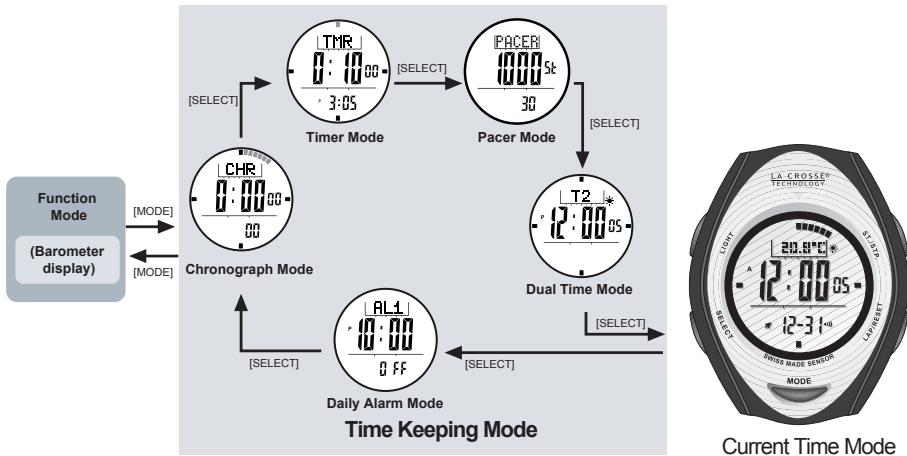
3.0 Major Function Modes - Time Keeping Mode
Buttons Used [MODE], [SELECT]
2.0 Parts and Its Functions
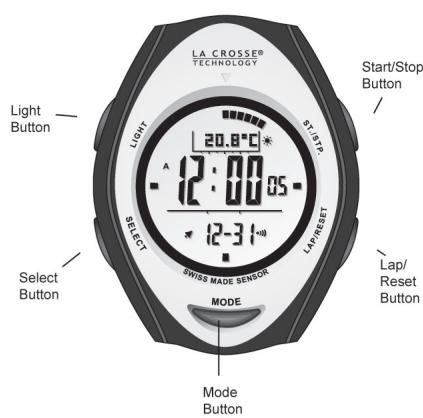
Select Button
- Select among the Current Time, Alarm, Chronograph, Timer, and Dual Time Mode
- Select between features when setting the unit
Mode Button
- Select between Barometer, Altimeter, and Compass Mode
Start/Stop Button
- Main display: Toggle between Day, Temperature, Altimeter, and Pressure displays
- Start/Stop the Chronograph or Timer
- Toggle between Yes/No options on the beep feature.
- Increase the digit amount when setting time, timer, and alarms.
Lap/Reset Button
- Lap/Reset the Chronograph
- Move the cursor to the left when reviewing the history of altitude or barometer readings
- Toggle between Yes/No options on the alarms, beep, and chime features.
- Decrease the digit amount when setting time, timer, and alarms.
Light Button
3.0 Major Function Modes - Function Mode
Button Used [MODE]
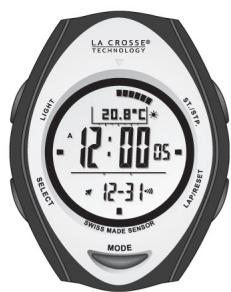
Current Time Mode
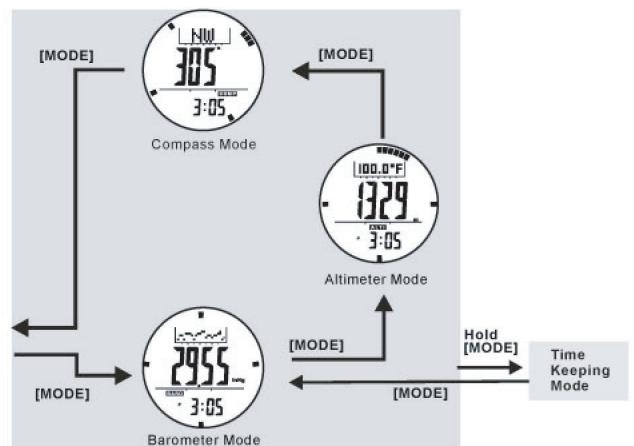
Mode Features
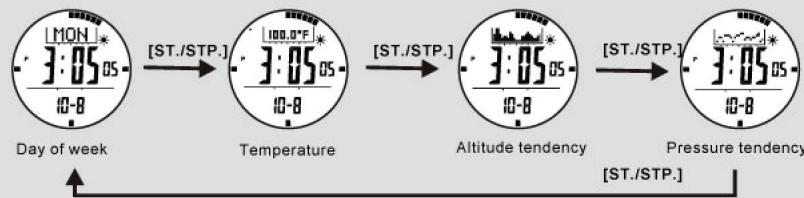
4.0 Current Time Mode - Day of week, temperature, altitude and pressure display
Button Used [Start/Stop]:[S/S]
There are a total of 4 kinds of function among the upper display:
Day of the week
- Temperature
Altitude tendency
Pressure tendency
User can select by [ST./STP.] button
If [ST./STP.] button is held for 2 seconds, the top display will start to toggle between the Day, Temperature, Altitude, and Pressure readings, changing per second.
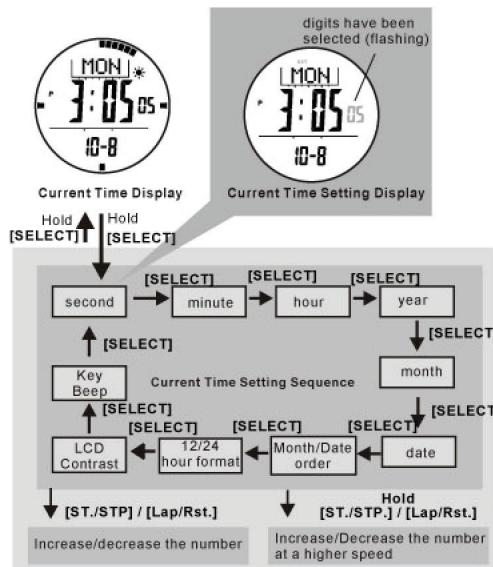
4.2 Current Time Mode - Setting the Current Time and the Calendar
Button Used [SELECT], [ST./STP.] [LAP/RST.]
To enter Setting Mode
- To enter the Setting Mode, press and hold the [SELECT] button for two (2) seconds. The display will change from Current Time Mode to Current Time Setting Display. The "SET" icon will appear.
The seconds will be selected (flashing). - Press [SELECT] button to change the selections as in the Current Time Setting sequence (see graphic)
Different Setting procedure
While seconds are selected (flashing), press the [ST./STP] or [LAP/RST] button to reset the seconds to "00". The digits will remain at "00" until the button is released.
While the other settings (minutes, hour, year, month, date) are selected (flashing), press the [ST./STP.] button to increase the digit amount. Hold the button to increase the digits quickly.
Press the [LAP/RST] button to decrease the digit amount. Hold the button to decrease the digits quickly.
Continued...
A special feature of the La Crosse Technology XG-59 wrist watch is displaying weather tendency. It performs by analyzing the changes of the past air pressure.
Weather Icons
La Crosse Technology XG-59 wrist watch will display four different symbols to indicate the forecast weather. They include:
Sunny
Partly Cloudy
Cloudy
Rain
The symbols will be shown only in the Current Time Mode and Dual Time mode.
IMPORTANT: Since the watch predicts the coming weather conditions by using the changing air pressure data, users are highly advised to remain at the same altitude for about 8 to 12 hours for higher accuracy.
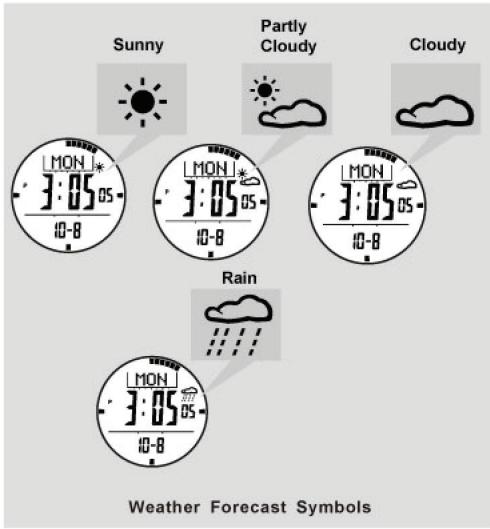
4.1 Current Time Mode - Weather Forecast
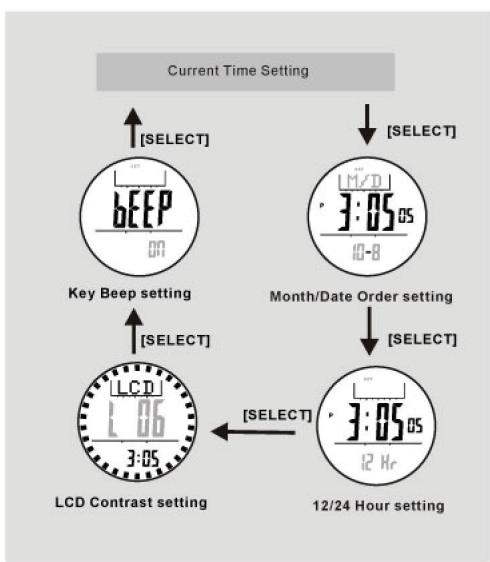
4.3 Current Time Mode - Setting the 12/24 Hour, LCD Contrast and Key Beep
Button Used [SELECT], [ST./STP.], [LAP/RST.]
- Month/Date Order: You can change the month and date order when "M/D" or "D/M" appears by pressing the [ST/STP] or [LAP/RST] button. Press the [SELECT] button to advance to the next setting.
12/24 Hour: When the 12/24 hour format is displayed, press the [ST./STP] button to select either 12Hr or 24 Hr format. Press the [SELECT] button to advance to the next setting.
LCD Contrast: In LCD Contrast mode, press the [ST./STP] button to increase the contrast setting, or press [LAP/RST] button to decrease the contrast setting. The contrast effect changes instantly as the value changes. The LCD Contrast range is from 1 to 10. Press [SELECT] button to advance to the next setting.
Key Beep: You can turn on or off the key beep sound by pressing [ST/STP] button or [LAP/RST] button.
After Setting
Hold the [SELECT] button to confirm the settings and return to the Current Time mode.
5.0 Daily Alarm Mode - Setting the Alarm
Button Used
[SELECT], [ST/SIP.], [CAP/RST.]
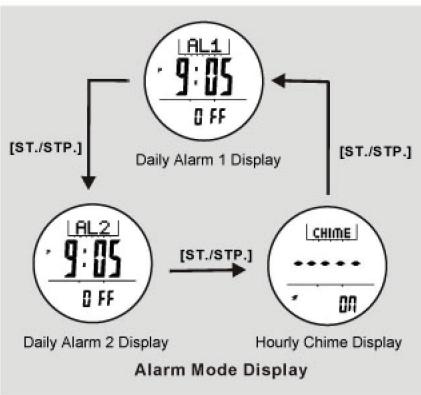
Daily Alarm 1 and Daily Alarm 2
- The La Crosse Technology XG-59 wrist watch has two (2) daily alarms: Daily Alarm 1 and Daily Alarm 2, which work independently of each other.
- From the Current Time Display, press the [SELECT] button. The display will show AL1 at the top.
- Press the [LAP/RST] button to turn the alarm ON or OFF under the Alarm display.
- When the Daily Alarm 1 or 2 is ON, the watch will sound at the pre-set alarm time every day. Press any button to stop the alarm sound.
Press the [ST/STP] button to switch between the Daily Alarm 1, Daily Alarm 2, and Chime displays.
To Set the Daily Alarm 1, Daily Alarm 2, and Hourly Chime
- Under AL1 or AL2 display, hold the [MODE] button for 2 seconds, to set the alarm time. "SET" will appear and the minutes will be selected (flashing).
- Press the [ST/STP] button to increase the digit amount. Hold the button to increase the digits quickly. Press the [LAP/RST] button to decrease the digit amount. Hold the button to decrease the digits quickly.
- Press the [SELECT] button, the hour digits will be selected (flashing). Repeat the step for setting minutes.
- Press and hold the [SELECT] button to finish setting and return to the Alarm 1.
- Press the [ST/STP.] button to display AL2. Repeat the steps to set Alarm 2.
- When AL1 or AL2 is on, * will appear on the Current Time display.
- Press [ST/STP] button, the Chime function will be displayed. Press [LAP/RST] under Chime display to turn ON or OFF the hourly chime. When it is ON, "▲" will appear on the Current Time display.
Press [SELECT] button 4 times to return to the Current Time display.
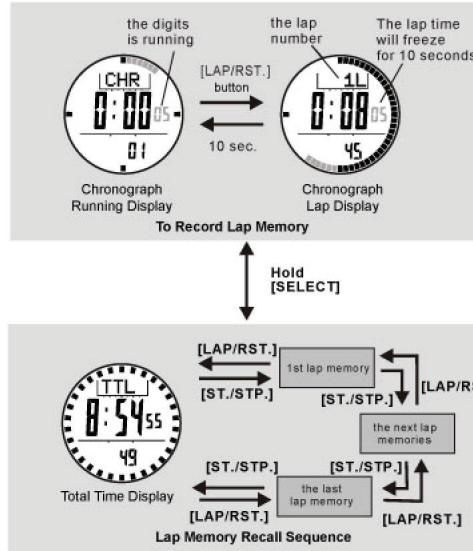
6.1 Chronograph Mode - Record/Recall a Lap Memory
Button Used
[SELECT], [ST./STP.], [LAP/RST.]
To Record Lap Memory
- The Chronograph mode allows you to record and save up to 100 lap times.
- Press the [ST/STP] button to start the Chronograph. Then press the [LAP/RST] button to record the lap.
- The lap number will be shown at the top of the display. (i.e. 1L)
- Press the [ST./STP.] button to stop the Chronograph
- The time display will pause, however, the outer seconds ring will still be going. The running time will return after 10 seconds.
- Repeat the steps above to record another set of lap times.
To Recall the Lap Memory
- In Chronograph mode, hold the [SELECT] button for 3 seconds.
- When total time (TTL) is displayed, press the [ST/STP] button to go to the next time lap, or press [LAP/RST] button to go to the previous time lap.
- Hold the [SELECT] button at any time to return to the Chronograph display.
To Reset Lap Memory
- At the Chronograph display, press and hold the [LAP/RST.] button for 2 seconds to reset the Chronograph lap memory.
6.0 Chronograph Mode - Start/Stop the Chronograph
Button Used
[ST./STP.], [LAP/RST.]
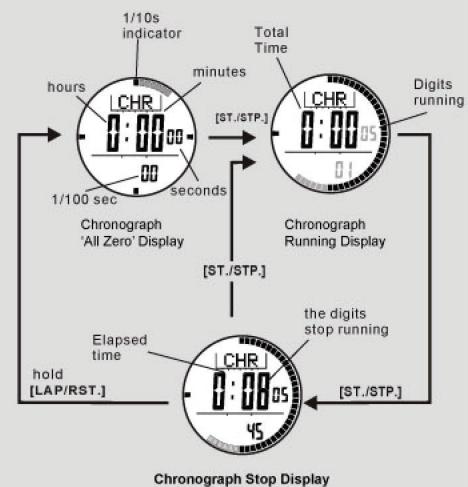
Chronograph Mode
The Chronograph measures elapsed and lap times.
- The display shows the 'All Zeros' display when the chronograph is being selected the first time or the chronograph is reset.
To Start / Stop the Chronograph
- From the Current Time Display, press [SELECT] button twice to enter Chronograph mode.
- Press [ST./STP.] button once to start the Chronograph.
Press [ST./STP.] button again to stop the Chronograph. - The elapsed time between the start and stop keystrokes will be displayed.
- Repeat the steps above to re-start and stop the Chronograph's accumulative time.
To Reset the Chronograph
- Stop the Chronograph time.
- Press and hold the [LAP/RST] button for 2 seconds to reset the chronograph to 'All Zeros' display.
7.0 Timer Mode - Countdown Timer and the Quick-Set-Values
Button Used
[LAP/RST.]
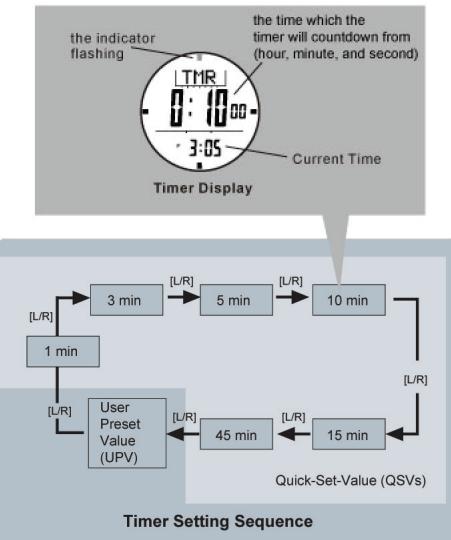
Countdown Timer
- The La Crosse Technology XG-59 wrist watch has a Countdown Timer mode.
- The Countdown Timer starts counting from the preset value to zero, and stops.
The Quick-Set-Values (QSVs)
The Quick-Set-Value is a set of default values in the La Crosse Technology XG-59 wrist watch for easier use of the timer.
There are 6 Quick-Set-Values: 1, 3, 5, 10, 15 and, 45 minutes. The values cannot be changed by the user.
The User Preset Value (UPV)
- The User Preset Value is a value which can be changed by the user.
The setting range is up to 99 hours 59 minutes 59 seconds. - Once the UPV has been set, such as 30 minutes, the value is stored in the La Crosse Technology XG-59 wrist watch, so the user may recall it again.
7.1 Timer Mode - Setting the User Preset Value
Button Used [ST/STP].[LAP/RST.]
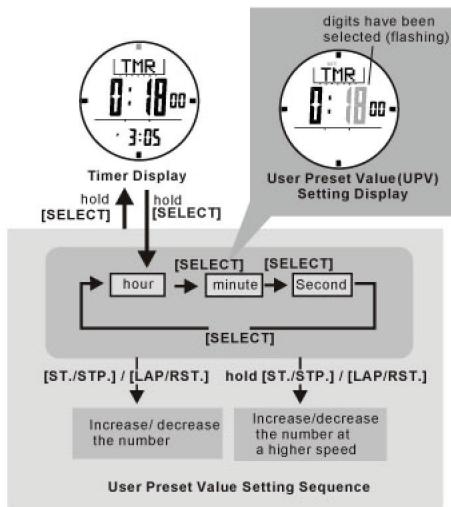
To Set the User Preset Value
- From the Current Time Display, press the [SELECT] button three (3) times to enter Timer mode.
- Press and hold the [SELECT] button for 2 seconds to change from Timer display to User Preset Value Setting display.
The hour digits are selected (flashing). - Press the [ST/STP] button to increase the digit amount. Press and hold the button to increase the digits quickly.
- Press the [LAP/RST.] button to decrease the digit amount. Press and hold the button to decrease the digits quickly.
- Press [SELECT] button, the minutes digits are selected (flashing). Repeat the steps above.
- Press the [SELECT] button, the seconds digits are selected (flashing). Repeat the steps above.
- Once the timer is set, press and hold the [SELECT] button for two (2) seconds to return to the Timer display.
8.0 Pacer Mode - Using the Pacer
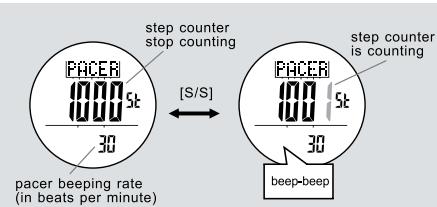
Pacer Mode
- When the pacer is activated, it will generate beeps at a pre-defined beeping rate.
- The beeping rate can be set from 30 to 180 beats per minute (BPM) in step of 5.
How to Use the Pacer Mode
- Once the beeping rate has been set (for example 30 BPM), press the [S/S] button will start the beeping.
- When the watch is beeping, press the [S/S] button can stop the beeping.
Step Counter
- In supplementary of Pacer Function, when the Pacer beeps once, the step counter will advance one.
- When the pacer is activated and the step counter starts counting, pressing the [S/S] button can stop the pacer and step counter at the same time.
- The maximum counting range of the step counter is 99999 steps.
- To reset the step counter to 0, hold the [L/R] button when the pacer was stopped.
NOTE: When the pacer is running continuously for 8 hours, it will be stopped automatically for power saving.
7.2 Timer Mode - Using the Timer
Button Used
[Start/Stop]: [S/S], [Lap/Reset]: [L/R]
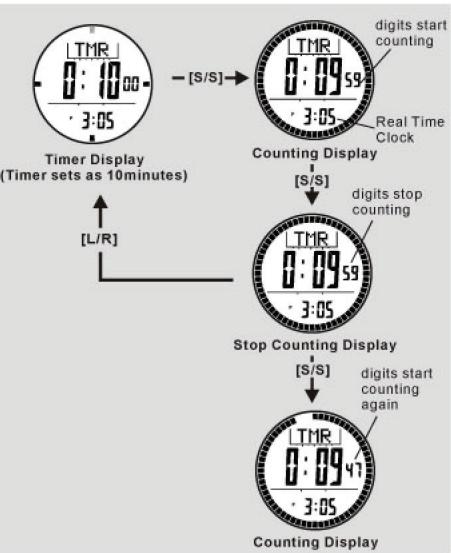
To Use the Timer
- When the Timer is set, press the [S/S] button to start the timer. Press the [S/S] button again to stop the timer.
The time will be displayed continuously until it reaches Zero. - In the last 10 minutes, it will beep for every minute, the last minute, it will beep every 10 seconds, the last 5 seconds, it will beep for every second.
- Once the Timer has reached 'Zero', the beep sound will be heard for 30 seconds. Press any button to stop the beep.
- The last timer value will be displayed automatically at the end of the beep sound.
To Reload the Timer
- Press the [L/R] button to reload the time value when the Timer is stopped.
8.1 Pacer Mode - Setting the Pacer value
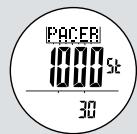
Pacer Mode
hold [M]
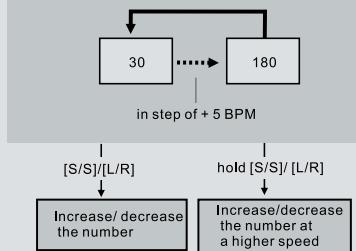
How to Set the Beeping Rate
- To select the setting display, hold down the [M] button for 2 seconds in the Pacer Mode.
- When the beeping rate digits start to flash, press the [S/S] or [L/R] button to increase / decrease the number. (Hold down the button to change the number at a higher speed).
- When the setting is completed, press and hold the [M] button to exit the setting display.
8.2 Pacer Mode - Link with Chronograph

How to use the Pacer when it links with Chronograph Mode
- When Pacer Mode is ON: Press the [M] button to select Chronograph Mode.
- Press the [S/S] button will start the counting and beeping at the same time.
- When the Chronograph is counting and the watch is beeping, pressing the [S/S] button can stop the beeping sound and the chronograph at the same time.
10.0 Altimeter Mode - Temperature and History Display
Button Used [MODE],[ST./STP.],[LAP/RST.]
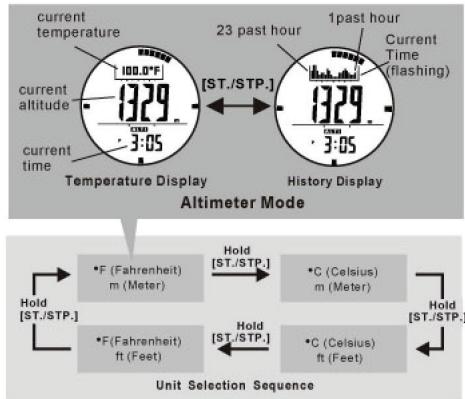
The La Crosse Technology XG-59 wrist watch provides two kinds of Altimeter displays: Temperature and History.
NOTE: If you want to have an accurate reading of the air temperature, you must remove the watch from the wrist for 20 to 30 minutes. This ensures the body temperature will not affect the watch's reading.
Temperature Display
From the Current Time Display, press [MODE] button twice to display Altimeter Mode
In the Aitlimeter mode, the top will be current temperature in degree Celsius (^) or degree Fahrenheit (^) .
- The middle display shows the current altitude in meters or feet. The bottom display shows the current time in hour and minutes.
- The indicators which encircle the display, show the current time in 1 second resolution analogically.
- Press and hold the [LAP/RST] button to perform force detection function to get one reading immediately.
Switching between Units
- Press and hold the [ST./STP.] button to change the units (see graphic)
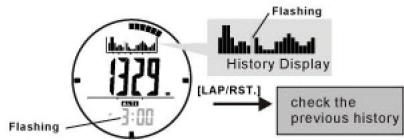
History Display
- Press the [ST/STP] button, the top display will show the Altimeter graph. The far right reading will be selected (flashing).
- Press [LAP/RST.] button to move left to review the history readings of the past 23 hours. Once the cursor is not located at the current time, the bottom display will show the time of the reading.
- Press [ST/STP.] button to return to the Altimeter mode.
9.0 Dual Time Mode - Setting the Dual Time
Button Used
[ST./STP.], [LAP/RST.]
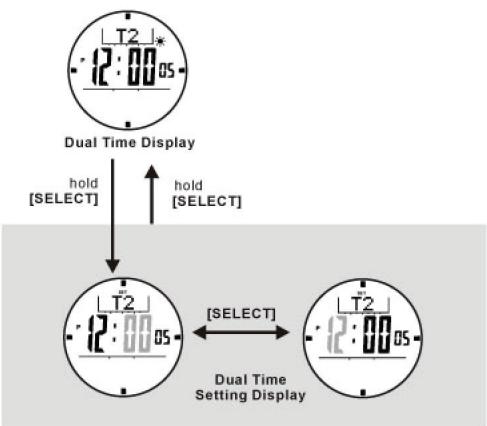
To Set the Dual Time
From the Current Time Display, press the [SELECT] button four (4) times to enter Dual Time mode. The display will show T2 at the top.
- Hold the [SELECT] button for 2 seconds to enter the Dual Time Setting Display mode.
The minute digits are selected (flashing).
- Press [ST./STP.] button to increase the digit amount. Press and hold the [ST./STP.] button to increase the digits quickly.
- Press [LAP/RST] button to decrease the digit amount. Press and hold the [LAP/RST.] button to decrease the digits quickly.
- Press the [SELECT] button, the hour is selected (flashing).
- Press [ST./STP] button to increase the digit amount. Press and hold the [ST./STP] button to increase the digits quickly.
- Press [LAP/RST] button to decrease the digit amount. Press and hold the [LAP/RST.] button to decrease the digits quickly.
- Press and hold the [SELECT] button for 2 seconds, to return to the Dual Time mode display.
10.1 Altimeter Mode - Adjust Menu
Button Used [SELECT]
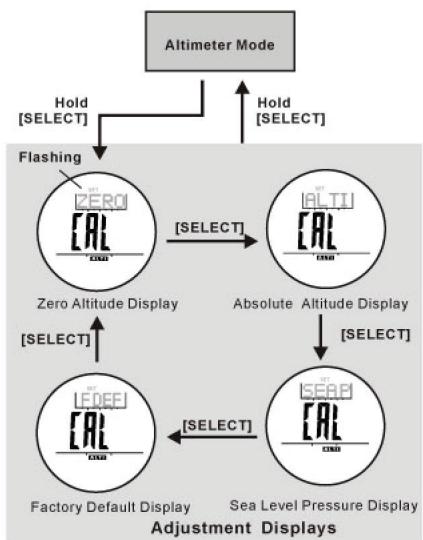
Press and hold the [SELECT] button in the Altimeter mode to enter the adjustment display. There are four (4) adjustment methods:
Zero Altitude
- Make altitude to zero for relative altitude measurement
Absolute Altitude
- Set altitude to known value, which can be recalled for next setting
Sea Level Pressure
- Input specific sea level pressure. Please contact your local observatory for the specific sea level pressure value in your area.
Factory Default
- Restore to default factory setting where assumed sea level pressure is 1013.2mb
- Altitude is calibrated independently on each mode. For example, if absolute altitude is selected, effect of the sea level pressure on the previous setting will be ignored.
10.2 Altimeter Mode -Zero Altitude Adjustment
Button Used
[MODE], [ST./STP.], [LAP/RST.]
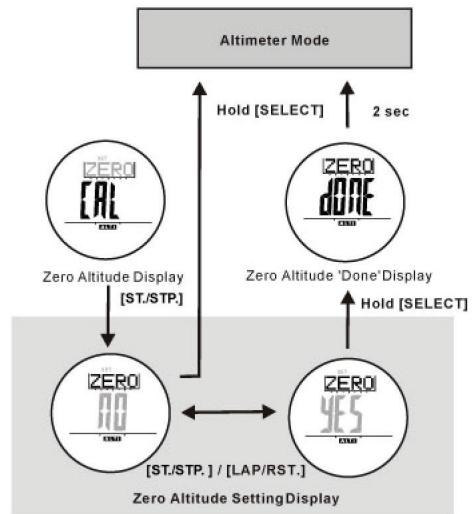
To Measure the Relative Altitude
- The La Crosse Technology XG-59 wrist watch can measure relative altitude. For example, it can measure the ascending or descending altitude between the starting point and the finishing point of a trail.
To measure the ascending or descending altitude of a trail, set the altitude to zero at a reference point, such as the starting point of a trail.
To Set the Altimeter to Zero
- Press and hold the [SELECT] button. The top display will change to (ZERO)
- Press [ST/STP] or [LAP/RST.] button to select "YES" or "NO".
- Press and hold the [SELECT] button to confirm selection.
- When 'YES' is confirmed, 'DONE' will show, and the display will automatically return to the Altimeter mode
After the La Crosse Technology XG-59 wrist watch is set to 'zero' (0), the watch will display the relative altitude continuously; hence, you can monitor your ascending or descending altitude.
To restore the factory default, please refer to the section "10.5 - Altimeter Mode - Factory Default".
10.4 Altimeter Mode - Sea Level Pressure Adjustment
Button Used
[MODE], [ST./STP.], [LAP/RST.]
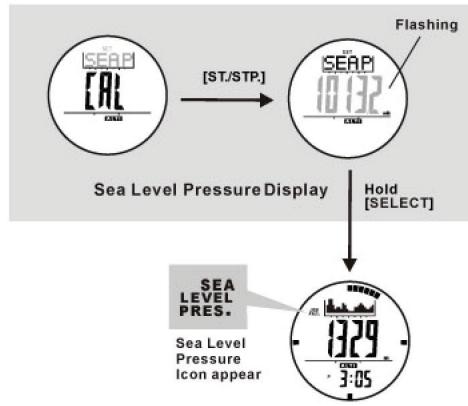
Why the Sea Level Pressure needs to be Adjusted
- Since the altitude is calculated from the changes in air pressure, the Sea Level pressure will change depending on your location.
To achieve a more accurate reading, the Sea Level pressure should be updated when you move from one location to another.
To adjust the Sea Level Pressure
- Press and hold the [SELECT] button for 2 seconds. The top display will show (ZERO). Press the [SELECT] button twice. The top display will show (SEAP).
- Press the [ST/STP] button. The Sea Level Pressure is selected (flashing).
- Press the [ST/STP] button to increase the digit amount. Press and hold the [ST/STP] button to increase the digit quickly.
- Press the [LAP/RST.] button to decrease the digit amount. Press and hold the [LAP/RST.] button to decrease the digit quickly.
- Hold the [SELECT] button to confirm the setting. The display will automatically return to the Altimeter mode.
- After confirming the value, the "Sea Level Pres." Icon will appear to the left of the top display. This indicates the Sea Level Pressure has been calibrated.
10.3 Altimeter Mode - Absolute Altitude Adjustment
Button Used
[ST./STP.], [LAP/RST.]
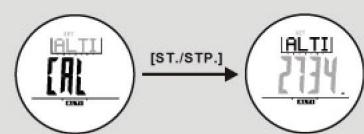
Absolute Altitude Setting Display
Why the Altimeter needs to be Calibrated
- As the absolute altitude is calculated from the air pressure, the change of air pressure would affect the altitude reading.
To reachieve a more accurate reading, the La Crosse Technology XG-59 wrist watch needs to be calibrated from time to time as pressure may change gradually, evaluated within hours.
Before Calibrating the Altimeter
- Calibrate the altimeter at a place where the altitude is determined, such as Sea Level (0m) or beside an altitude sign pole (e.g. 89m). Input this value into the La Crosse Technology XG-59 wrist watch during the calibration procedure
IMPORTANT: Input an incorrect altitude during the calibration procedure will result in incorrect altitude readings in the future.
Calibration Procedures
- In the Altimeter mode, press and hold the [SELECT] button for 2 seconds. When (ZERO) is shown in the top display, press the [SELECT] button to select the Altimeter adjustment display (ALTI).
- Press [ST./STP.] in Absolute Altitude Display.
- While the digits are selected (flashing), press the [ST/STP] button to increase the digit amount. Press and hold the [ST/STP] button to increase the digit quickly.
- Press the [LAP/RST] button to decrease the digit amount. Press and hold the [LAP/RST] button to decrease the digit quickly.
Press and hold the [SELECT] button for 2 seconds to confirm the setting. The display will automatically return to the Altimeter mode
10.5 Altimeter Mode -Factory Default
Button Used
[SELECT], [Start/Stop], [Lap/Reset]

You can restore the Factory Default settings, assuming the Sea Level Pressure is 1013.2mb.
To Set the Factory Default
- Press and hold the [SELECT] button for 2 seconds. The top display will show (ZERO).
Press the [SELECT] button three (3) times. The top display should show (FDEF). - Press the [ST./STP.] button.
- Press the [ST/STP] or [LAP/RST] button to select "YES" or "NO".
- Press and hold the [SELECT] button to confirm the setting.
- When "YES" is confirmed, "DONE" will show, and the display will automatically return to the Altimeter mode.
11.0 Barometer Mode - Temperature and History Display
Button Used
[ST./STP], [LAP/RST.]
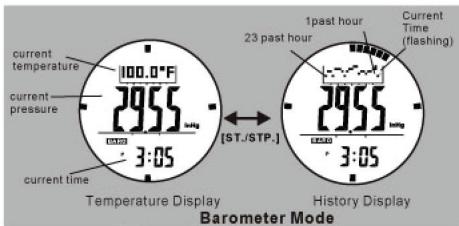
The La Crosse Technology XG-59 wrist watch provides two (2) kinds of Barometer displays: Temperature and History.
Press the [MODE] button to enter the Barometer mode.
Temperature Display
- In the Barometer mode, the current temperature is displayed at the top in degree Celsius (°C) or degree Fahrenheit (°F).
NOTE: If you want to have an accurate reading of the air temperature, you must remove the watch from the wrist for 20 to 30 minutes. This ensures the body temperature will not affect the watch's reading. - The middle display shows the current pressure in mb or inHg. The bottom display shows the current time in hour and minutes
- The indicators which encircle the display show the current time in 1 second resolution analogically.
- Press and hold the [LAP/RST.] button to perform force detect function to get one reading immediately.
To Switch between Units
- The La Crosse Technology XG-59 wrist watch can display pressure in mb or inHg, and temperature in degree Celsius (°C) or degree Fahrenheit (°F).
- Hold the [S/S] button to change the units (see graphic)
History Display
- Press the [ST/STP] button, the top display will show the Pressure graph. The far right reading will be selected (flashing).
- Press [LAP/RST.] button to move left to review the history readings of the past 23 hours. Once the cursor is not located at the current time, the bottom display will show the time of the reading.
- Press the [ST./STP.] button to return to the Barometer mode.
11.1 Barometer Mode - Adjust Menu
Button Used [SELECT]
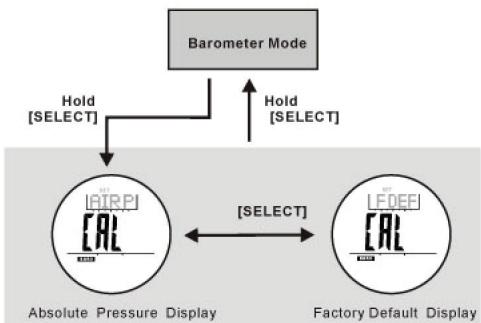
Adjustment Displays
- Press and hold the [SELECT] button for 2 seconds to show the Barometer adjustments display. (AIRP) will be displayed at the top.
-There are 2 kinds of adjustments.
o Absolute Pressure: Input the known atmospheric pressure directly.
Factory Default: Restore to factory default settings
11.2 Barometer Mode - Absolute Pressure Adjustment
Button Used
[ST./STP.], [LAP/RST.]
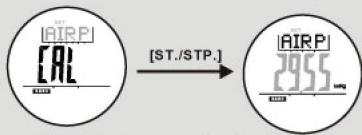
Absolute Pressure Setting Display
Before Calibrating the Barometer
- The La Crosse Technology XG-59 wrist watch was calibrated for you in the factory. For normal use, you do not need to calibrate the Barometer. But a calibration procedure is included for vigorous users of the La Crosse Technology XG-59 wrist watch.
- In order to input the information into the watch, during the calibration procedure, you will need the barometric pressure of your current position.
- Consult the nearest observatory station, or airport from your current position to get the current ambient barometric pressure.
Important: Inputting the incorrect pressure value during the calibration procedure will result in incorrect pressure readings in the future.
Calibration Procedure
- Press [ST./STP.] in Absolute Pressure Display
While digits are being selected (flashing), press the [ST/STP] button to increase the digit amount. Press and hold the [ST/STP] button to increase the digit quickly. - Press the [LAP/RST.] button to decrease the digit amount. Press and hold the [LAP/RST.] button to decrease the digit quickly.
- Press and hold the [SELECT] button for 2 seconds to confirm the inputted data and return to the Barometer display.
11.3 Barometer Mode -Factory Default
Button Used
[SELECT], [ST./STP.], [LAP/RST.]
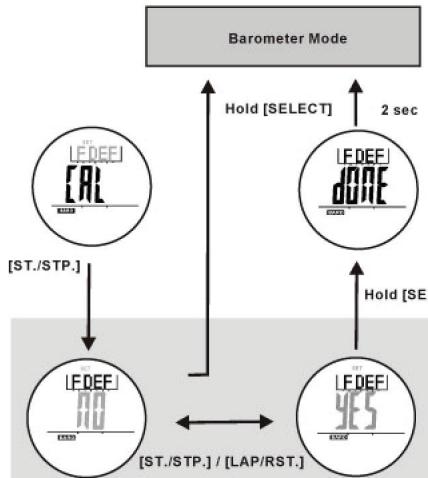
Factory Default SettingDisplay
You can also adjust the pressure back to factory default value.
To Set the Factory Default
- At the Barometer display, press and hold the [SELECT] button for 2 seconds to show the Barometer adjustment display.
- Press the [SELECT] button to select the Factory Default option (FDEF)
Press [ST/STP] or [LAP/RST]. button to select "YES" or "NO". - Press and hold [SELECT] button to confirm setting.
- When "YES" is confirmed, "DONE" will show, and the display will automatically return to the Barometer mode.
12.0 Compass Mode - Precautions
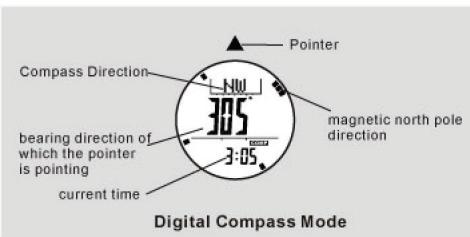
Precautions when using the Compass
- Keep your La Crosse Technology XG-59 wrist watch away from magnets or appliances which may contain magnetic objects, such as: mobile phones, speakers, motors, etc.
The La Crosse Technology XG-59 wrist watch, like most magnetic compasses, points to the magnetic North, which is slightly different from the true North. Check section "12.5 - Compass Mode - Magnetic Declination" for more information.
Perform the compass calibration from time to time, to reinforce the precision of the La Crosse Technology XG-59 wrist watch.
To achieve a accurate result, you should avoid measuring a direction on the following conditions:
o The watch is too close to magnetic objects.
o The watch is too close to metal objects.
o The watch is too close to an electrical appliance.
o The watch is inside a moving object or a concrete building.
12.2 Compass Mode - Compass Mode
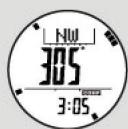
Compass Mode
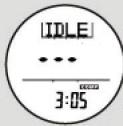
Idle Mode
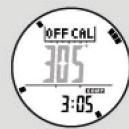
Distortion display
Compass Mode
- In the Compass mode, the top display shows the compass direction.
The middle display shows the digital bearing direction - The bottom display shows the current time in hour and minutes.
- The indicators encircled the display show the direction of magnetic North analogically.
Idle Mode
- If no keys are pressed within a minute, the La Crosse Technology XG-59 wrist watch will automatically go into IDLE mode. Press any button to reactivate the compass.
Distortion
- If distortion is detected (e.g. not level), "OFF CAL" with flashing direction digits will show.
- Users can refer to section "12.8 - Compass Mode - Calibrating the Compass" when distortion occurs.
12.1 Compass Mode - Compass Directions and Bearing Directions
Button Used [MODE],[LAP/RST.]
| Marks | Compass Directions | Bearing Directions |
| N | North | 349- - 11* |
| NNE | North Northeast | 11- - 34* |
| NE | Northeast | 34- - 56* |
| ENE | East Northeast | 56- - 79* |
| E | East | 79- - 101* |
| ESE | East Southeast | 101- - 124* |
| SE | Southeast | 124- - 146* |
| SSE | South Southeast | 146- - 169* |
| S | South | 169- - 191* |
| SSW | South Southwest | 191- - 214* |
| SW | Southwest | 214- - 236* |
| WSW | West Southwest | 236- - 259* |
| W | West | 259- - 281* |
| WNW | West Northwest | 281- - 304* |
| NW | Northwest | 304- - 327* |
| NNW | North Northwest | 327- - 349* |
The Direction of an Object
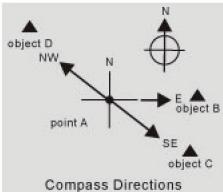
- The direction of an object from a point is specified in either compass directions or bearing directions
- The La Crosse Technology XG-59 wrist watch provides 16 compass directions and 16 bearing directions.
The Compass Directions
The compass directions are shown on the graph.
- For example, in the figure on left, the compass direction of Object B from point A is east. The compass direction of Object C from point A is southeast. The compass direction of Object D from point A is northwest.
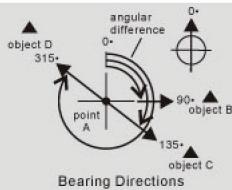
The Bearing Directions
- The Bearing direction of an object is defined as the angular difference between North and the object. (Assume zero (0) for North, and the measuring range is from 0 to 359 degrees)
- For example, in the figure on the left, the bearing direction of object B from point A is 90^ . The bearing direction of object C from point A is 135^ . The bearing direction of object D from point A is 315^ .
12.3 Compass Mode - Backward Bearing Direction and Compass Lock
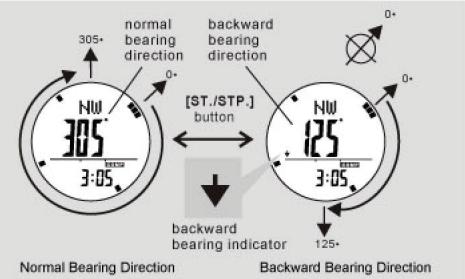
Backward Bearing Directions
- The La Crosse Technology XG-59 wrist watch has a built-in function which shows backward bearing direction of an object.
- The backward bearing direction is the opposite direction from the normal bearing direction.
- When the "Backward Bearing" indicator "▼" appears, the La Crosse Technology XC-59 wrist watch displays the backward bearing direction of the object.
From the Current Time Display, press the [MODE] button three (3) times to enter Compass Mode.
Press the [S/S] button to select between normal and backward bearing directions, in the Compass mode.
Compass Lock
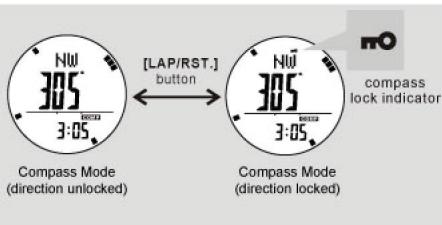
- The La Crosse Technology XG-59 wrist watch includes a lock function for important direction readings.
- In the Compass mode, press the [LAP/RST.] button to lock/unlock the direction readings.
- When the 'Lock' indicator, "no" appears, the La Crosse Technology XG-59 wrist watch locks the direction readings.
- The lock status will be released when the watch enters IDLE mode.
12.4 Compass Mode - Applications of the Compass
Check current position bybackward bearing
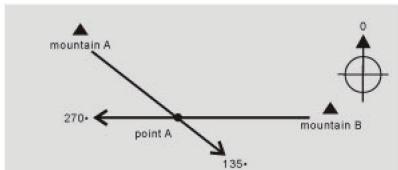
Check your position by Backward Bearing Directions
- Spot two distant identifiable landmarks such as mountains, lighthouses, forts and buildings, from your current position. For example, mountain A and B (see graphic).
- Check the backward bearing directions of mountain A and B from your current position. Such as 135^ for mountain A and 270^ for mountain B.
- Use a ruler to draw the line 135^ on the map, which starts from mountain A. Draw the line 270^ on the map, which starts from mountain B.
- Your current position on the map will be the intersection point (point A) of the lines.
A sample trail on a map
Check that the Hiking Course is Correct
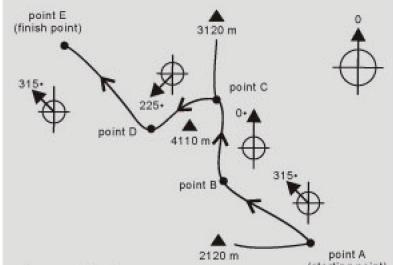
- During a hike, the La Crosse Technology XG-59 wrist watch can keep you on the correct course. For example, the trail starts from point A and finishes at point E, as drawn on the map (see graphic).
- Mark the points (identifiable landmarks) where the trail turns its direction or it branches out. Mark it as point A, B, C, D, and E on the map (see graphic).
Find out the bearing directions from point A to point B (315^) ,point B to point C (0^) ,point C to point D (225^) ,and then from point D to point E (315^) - During the hike, make sure that your direction is 315^ from point A to point B. Perform similar checking points in other sections of the trail.
IMPORTANT: if you doubt the directions and positions of the trail, consult the park administration office before you start hiking.
12.6 Compass Mode - Magnetic Declination Compensation
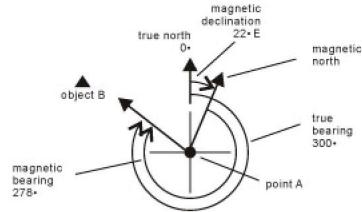
Example 1: Compensate the Bearing at a place with Westerly (W) Magnetic Declination
Example 2: Compensate the Bearing at a place with Easterly (E) Magnetic Declination
Magnetic Declination Compensation
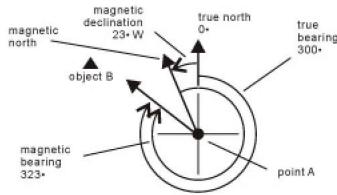
Compensate an object's bearing by subtracting westerly (W) magnetic declination or add easterly (E) magnetic declination with the magnetic bearing.
Example 1 (see graph)
- If 23 (W) westerly magnetic declination and the compass needle points 323 (MB). What is the true bearing (TB)?
(TB) = (MB) - (W) The true bearing is 300. 300(TB) = 323(MB) - 23(W)
Example 2 (see graph)
- If 22 (E) easterly magnetic declination and the compass needle points 278 (MB). What is the true bearing (TB)?
(TB) = (MB) + (E) The true bearing is 300. 300(TB) = 278(MB) + 22(E) - The La Crosse Technology XG-59 wrist watch allows you to compensate for the compass bearing at a place where the magnetic declination is either westerly declination or easterly declination. Check section "12.8 Compass Mode - Calibrating the Compass" for more information.
12.5 Compass Mode - Magnetic Declination
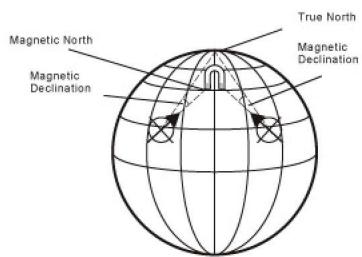
What is Magnetic Declination
The Magnetic North Pole is slightly different from the True North Pole (see graphic)
- The La Crosse Technology XG-59 wrist watch, like most magnetic compasses, does point to the Magnetic North Pole. On the contrary, everything measured from a map is related to the True North Pole.
- The angular difference between Magnetic North Pole and True North Pole is called magnetic declination. The amount (degrees and minutes) and direction (easterly and westerly) depends on your location.
- For serious compass user or who intends to perform accurate navigation, the compass must be adjusted to compensate the magnetic declination.
- The La Crosse Technology XG-59 wrist watch also includes a compensation setting for the Magnetic Declination. Check section "12.10 - Calibrating the compass Mode - Magnetic Declination Mode", for more information about this setting.
Magnetic Declination Information
- Most topographic maps include a small arrow which shows the magnetic North Pole or Magnetic Declination information.
- For the benefit of the La Crosse Technology XG-59 wrist watch user, this manual includes the Magnetic Declination for some major cities. Check the section "12.7 - Compass Mode - Magnetic Declination at Major Cities".
- For those cities whose names are not included on the list, please refer to these websites:
o http://www.geolab.nrcan.gc.ca/geomag/cgrf_e.shtml
o http://www.ngdc.noaa.gov/seg/geomag/geomag.shtml
12.7 Compass Mode - Magnetic Declination at Major Cities
| No. | Country/Place | Major City | Declination | No. | Country/Place | Major City | Declination |
| 1 | Afghanistan | Kabul | 2-E | 33 | Netherlands | Amsterdam | 1-W |
| 2 | Australia | Canberra | 12-E | 34 | New Zealand | Wellington | 22-E |
| 3 | Austria | Vienna | 2-E | 35 | Norway | Oslo | 0 |
| 4 | Bahrain | Manama | 2-E | 36 | Pakistan | Islamabad | 2-E |
| 5 | Bangladesh | Dhaka | 0 | 37 | Philippines | Manila | 1-W |
| 6 | Belgium | Brussels | 1-W | 38 | Portugal | Lisbon | 5-W |
| 7 | Brazil | Brasília | 19-W | 39 | Russia | Moscow | 9-E |
| 8 | Canada | Ottawa | 14-W | 40 | Singapore | Singapore | 0 |
| 9 | Chile | Santiago | 5-E | 41 | South Africa | Cape Town | 23-W |
| 10 | China | Beijing | 6-W | 42 | Spain | Madrid | 3-W |
| 11 | China | Hong Kong | 2-W | 43 | Sweden | Stockholm | 3-E |
| 12 | Costa Rica | San Jose | 0 | 44 | Switzerland | Bern | 0 |
| 13 | Cuba | Havana | 3-W | 45 | Taiwan | Tai-pei | 3-W |
| 14 | Czech Republic | Prague | 2-E | 46 | Thailand | Bangkok | 0 |
| 15 | Denmark | Copenhagen | 1-E | 47 | UAE | Abu Dhabi | 1-E |
| 16 | Egypt | Cairo | 3-E | 48 | United Kingdom | London | 3-W |
| 17 | Finland | Helsinki | 6-E | 49 | United States | Washington, DC | 10-W |
| 18 | France | Paris | 1-W | 50 | Juneau | 25-E | |
| 19 | Germany | Berlin | 1-E | 51 | Phoenix | 12-E | |
| 20 | Greece | Athens | 3-E | 52 | Little Rock | 2-E | |
| 21 | Hungary | Budapest | 4-E | 53 | Sacramento | 16-E | |
| 22 | India | New Delhi | 1-E | 54 | Denver | 10-E | |
| 23 | Indonesia | Jakarta | 1-E | 55 | Atlanta | 4-W | |
| 24 | Israel | Jerusalem | 3-E | 56 | Honolulu | 10-E | |
| 25 | Italy | Rome | 1-E | 57 | Boston | 16-W | |
| 26 | Japan | Tokyo | 7-W | 58 | Saint Paul | 2-E | |
| 27 | Jordan | Amman | 3-E | 59 | Jackson | 1-E | |
| 28 | Kenya | Nairobi | 1-E | 60 | Santa Fe | 10-E | |
| 29 | Korea | Seoul | 7-W | 61 | Oklahoma City | 6-E | |
| 30 | Malaysia | Kuala Lumpur | 1-E | 62 | Salem | 18-E | |
| 31 | Mexico | Mexico City | 6-E | 63 | Harrisburg | 11-W | |
| 32 | Nepal | Kathmandu | 0 | 64 | Salt Lake City | 14-E |
12.8 Calibrating Mode - Calibration the Compass
Button Used [SELECT]
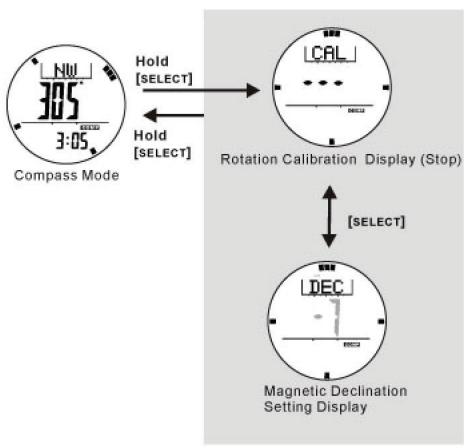
To Calibrate the Compass
- The La Crosse Technology XG-59 wrist watch must be calibrated in any one of the following conditions:
o The first time the watch is used.
o The battery has been replaced.
o The bearing direction digits are flashing.
o The compass is being used in a different location from the last calibration.
o The user would like to regulate the precision of the digital compass.
- The compass calibration includes two (2) different processes.
o Rotation Calibration Mode
-Press and hold the [SELECT] button under Compass Mode
o Magnetic Declination Setting
-Press the [SELECT] button under Rotation Calibration Mode
- It is advisable to calibrate both processes from time to time for a more accurate reading.
IMPORTANT: If the watch has not been calibrated, the direction made by the watch may display an inaccurate direction.
12.10 Calibrating the compass - Magnetic Declination Mode
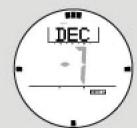
Magnetic Declination Setting Display
Button Used
[SELECT], [ST./STP.], [LAP/RST.]
Check section "12.7 Compass Mode - Magnetic Declination at Major Cities" to get the magnetic declination of the city nearest to your current position. Input this angle into the La Crosse Technology XG-59 wrist watch during the calibration.
Magnetic Declination Mode
- Press the [SELECT] button under Rotation Calibration Mode.
While the digits are selected (flashing), press the [ST./STP] button to increase the digit amount. Press and hold the [ST./STP] button to increase the digit quickly. - Press the [LAP/RST] button to decrease the digit amount. Press and hold the [LAP/RST.] button to decrease the digit quickly.
- Press and hold the [SELECT] button to confirm the setting, and automatically return to the Compass Mode display, to start measuring.
12.9 Calibrating the compass - Compass Rotation Calibration Mode
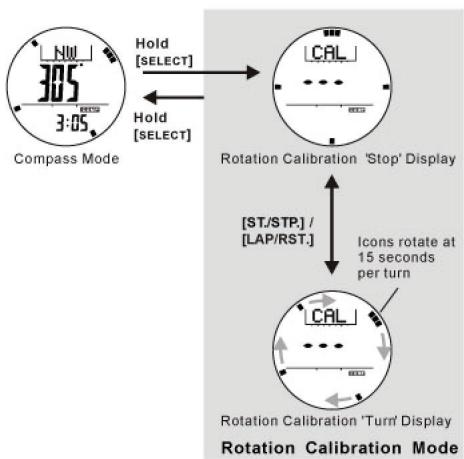
Button Used [SELECT].[ST/STP].[LAP/RST]
Rotation Calibration Mode
- Press and Hold the [SELECT] button under the Compass Mode.
- Press the [ST./STP] button to start rotation calibration and rotate the watch in the same direction of the rotating icon for more than 2 turns.
- Press the [ST./STP.] or [LAP/RST.] button to stop.
- After the calibration, press and hold the [select] button to return to the Compass Mode display and start taking measurements.
13.0 Low Battery Indication & Battery Replacement
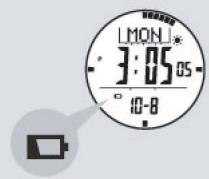
Low Battery Indication
Low Battery Detection
- When the low battery indicator appears on the display, it is recommended to replace the battery with a new CR2032 battery.
- If the appearance of the low battery indicator is caused by using the La Crosse Technology XG-59 wrist watch under very cold conditions. The indicator will disappear once the watch returns to normal temperatures.
NOTE:
- It is recommended to have the battery replaced by a certified service agency; because the La Crosse Technology XG-59 wrist watch contains precise electronic sensors and components.
- The memory will be cleared when the battery is replaced.
Review section
12.8 Compass Mode - Calibrating the Compass" to re-calibrate the compass before use.
13.0 Specifications
Current Time Mode
Hour, minute, second, am and pm (in 12 hour mode), month, date, and day of the week. Barometer, pressure history display, altitude history, or current temperature.
Time System
12-hour or 24 hour
Calendar System
Auto-Calendar pre-programmed from the year 2004 to 2099
Weather Forecast
4 symbols to indicate weather forecast
Alarm Mode
2 daily alarms
Hourly chime
Alarm Sounds
Sounds for 30 seconds at set alarm time
Chronograph Mode
Resolution
1/100 second
Measuring Range 99 hours, 59 minutes, 59.99 seconds
Measuring Mode 100 lap history Recall lap history and total time
Timer Mode
Resolution
1 second resolution
Measuring Range
99 hours 59 minutes 59.99 seconds
Operation Mode
Countdown
Quick Set
6 Quick-Set-Values
(1,3,5,10,15,and 45 minutes)
Timer Sounds
Sounds for 30 seconds when count
reaches zero
Pacer Mode
Measuring range
30 BPM to 180 BPM
5 BPM per step
Step counter
Up to 99999 steps
Altimeter Mode
Resolution
1m (1ft
Measuring Range
-2306ft to 30065 ft
(-702 m to 9164m) Assuming sea
level is 1013.2 hPa/mbar
Sampling Interval
First 5minutes:1 second
After 5 minutes: 1 minute
14.0 Specifications
Barometer Mode
Resolution
0.01 inHg (0.1 hPa/mbar)
Measure Range
8.85 inHg to 32.48 in Hg
(300 hPa/mbar to 1100 hPa/mbar)
History Recall
Backlight
Electro-Luminescent (EL) backlight
Water Resistant Case
Up to 10 meters (=1ATM)
Battery
Singe 3V lithium batter (CR2032)
Thermometer
Resolution
0.1°F (0.1°C)
Measuring Range
14.0°F to 140.0°F (-10.0°C to 60.0°C)
Compass Mode
Resolution
1 display (digital)
1 of 60 pointers (graphical)
Measuring Range
0 to 359 (digital)
1 to 60 pointers (graphical)
Others
Digital bearing reading lock
Digital backward bearing
Battery Life
Approximately 1.5 years under the following conditions
- 30 seconds alarm operation per day
- 5 second EL backlight operation per day
- 5 minutes sensor mode operation per day
Low Battery Detection
Battery voltage is less than 2.4V + / - 0.2V
For warranty work, technical support, or information contact :
http://www.lacrossetechnology.fr
http://www.lacrossetechnology.net
http://www.lacrossetechnology.it
http://www.lacrossetechnology.be
All right reserved. This handbook must not be reproduced in any form, even in excerpts, or duplicated or processed using electronic or mechanical procedures without written permission of the
This handbook may contain mistakes and printing error.
The information in this handbook is regularly checked and
corrections made in the next issue. We apologise for any
inconvenience, but accept no liability for technical mistakes or
printing errors, or their consequences. All trademarks and patents
are acknowledged and infringements will be pursue.
- XG-59
- Total Xtreme
- Introduction
- Major Function Modes - Time Keeping Mode
- Parts and Its Functions
- Select Button
- Mode Button
- Start/Stop Button
- Lap/Reset Button
- Light Button
- Major Function Modes - Function Mode
- To enter Setting Mode
- Different Setting procedure
- Weather Icons
- After Setting
- Daily Alarm Mode - Setting the Alarm
- Daily Alarm 1 and Daily Alarm 2
- To Set the Daily Alarm 1, Daily Alarm 2, and Hourly Chime
- Chronograph Mode - Record/Recall a Lap Memory
- To Record Lap Memory
- To Recall the Lap Memory
- To Reset Lap Memory
- Chronograph Mode - Start/Stop the Chronograph
- Chronograph Mode
- To Start / Stop the Chronograph
- To Reset the Chronograph
- Timer Mode - Countdown Timer and the Quick-Set-Values
- Countdown Timer
- The Quick-Set-Values (QSVs)
- The User Preset Value (UPV)
- Timer Mode - Setting the User Preset Value
- To Set the User Preset Value
- Pacer Mode - Using the Pacer
- Pacer Mode
- How to Use the Pacer Mode
- Step Counter
- Timer Mode - Using the Timer
- To Use the Timer
- To Reload the Timer
- Pacer Mode - Setting the Pacer value
- How to Set the Beeping Rate
- Pacer Mode - Link with Chronograph
- How to use the Pacer when it links with Chronograph Mode
- Altimeter Mode - Temperature and History Display
- Temperature Display
- Switching between Units
- History Display
- Dual Time Mode - Setting the Dual Time
- To Set the Dual Time
- Altimeter Mode - Adjust Menu
- Zero Altitude
- Absolute Altitude
- Sea Level Pressure
- Factory Default
- Altimeter Mode -Zero Altitude Adjustment
- To Measure the Relative Altitude
- To Set the Altimeter to Zero
- Altimeter Mode - Sea Level Pressure Adjustment
- Why the Sea Level Pressure needs to be Adjusted
- To adjust the Sea Level Pressure
- Altimeter Mode - Absolute Altitude Adjustment
- Why the Altimeter needs to be Calibrated
- Before Calibrating the Altimeter
- Calibration Procedures
- Altimeter Mode -Factory Default
- To Set the Factory Default
- Barometer Mode - Temperature and History Display
- To Switch between Units
- Barometer Mode - Adjust Menu
- Barometer Mode - Absolute Pressure Adjustment
- Before Calibrating the Barometer
- Calibration Procedure
- Barometer Mode -Factory Default
- Compass Mode - Precautions
- Precautions when using the Compass
- Compass Mode - Compass Mode
- Compass Mode
- Idle Mode
- Distortion
- Compass Mode - Compass Directions and Bearing Directions
- The Direction of an Object
- The Compass Directions
- The Bearing Directions
- Compass Mode - Backward Bearing Direction and Compass Lock
- Backward Bearing Directions
- Compass Lock
- Compass Mode - Applications of the Compass
- Check your position by Backward Bearing Directions
- Check that the Hiking Course is Correct
- Compass Mode - Magnetic Declination Compensation
- Magnetic Declination Compensation
- Example 1 (see graph)
- Example 2 (see graph)
- Compass Mode - Magnetic Declination
- What is Magnetic Declination
- Magnetic Declination Information
- Compass Mode - Magnetic Declination at Major Cities
- Calibrating Mode - Calibration the Compass
- To Calibrate the Compass
- Calibrating the compass - Magnetic Declination Mode
- Button Used
- Magnetic Declination Mode
- Calibrating the compass - Compass Rotation Calibration Mode
- Rotation Calibration Mode
- Low Battery Indication & Battery Replacement
- Low Battery Detection
- NOTE:
- Specifications
- Specifications
Marque : LA CROSSE TECHNOLOGY
Modèle : WTXG59
Catégorie : Station météorologique