
FRV-1 - Multi-effets pour guitare ROLAND - Notice d'utilisation et mode d'emploi gratuit
Retrouvez gratuitement la notice de l'appareil FRV-1 ROLAND au format PDF.


| Type de produit | Effet de réverbération numérique |
| Caractéristiques techniques principales | 16 types de réverbération, 3 types de modulation, 3 types de delay |
| Alimentation électrique | Adaptateur secteur inclus, 9V DC |
| Dimensions approximatives | 215 mm x 130 mm x 60 mm |
| Poids | 1,2 kg |
| Compatibilités | Compatible avec la plupart des guitares et équipements audio |
| Type de batterie | Non applicable (fonctionne avec adaptateur secteur) |
| Tension | 9V |
| Puissance | Non spécifiée |
| Fonctions principales | Réverbération, modulation, delay, entrée/sortie audio |
| Entretien et nettoyage | Essuyer avec un chiffon doux, éviter les produits chimiques agressifs |
| Pièces détachées et réparabilité | Disponibilité limitée, consulter le service client pour les réparations |
| Informations générales utiles | Idéal pour les musiciens en live et en studio, interface utilisateur intuitive |
FOIRE AUX QUESTIONS - FRV-1 ROLAND
Questions des utilisateurs sur FRV-1 ROLAND
0 question sur cet appareil. Repondez a celles que vous connaissez ou posez la votre.
Poser une nouvelle question sur cet appareil
Téléchargez la notice de votre Multi-effets pour guitare au format PDF gratuitement ! Retrouvez votre notice FRV-1 - ROLAND et reprennez votre appareil électronique en main. Sur cette page sont publiés tous les documents nécessaires à l'utilisation de votre appareil FRV-1 de la marque ROLAND.
MODE D'EMPLOI FRV-1 ROLAND
The result of a collaboration with Fender ^® , the FRV-1 is a compact pedal that uses COSM technology to faithfully reproduce the sound of the classic Fender Reverb unit.
COSM (Composite Object Sound Modeling)
Composite Object Sound Modeling—or “COSM” for short—is BOSS/Roland’s innovative and powerful technology that’s used to digitally recreate the sound of classic musical instruments and effects. COSM analyzes the many factors that make up the original sound—including its electrical and physical characteristics—and creates a digital model that accurately reproduces the original.

OFFICIALLY LICENSED

Before using this unit, carefully read the sections entitled: "USING THE UNIT SAFELY" and "IMPORTANT NOTES" (supplied on a separate sheet). These sections provide important information concerning the proper operation of the unit. Additionally, in order to feel assured that you have gained a good grasp of every feature provided by your new unit, this manual should be read in its entirety. The manual should be saved and kept on hand as a convenient reference. A battery is supplied with the unit. The life of this battery may be limited, however, since its primary purpose was to enable testing.
What is the Fender Reverb?
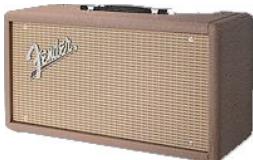
Spring unit
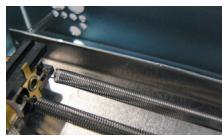
The Fender Reverb was first introduced in 1961. Created many years before the digital reverbs that are common today, it's known as a "spring reverb" because it produces reverberation by using a vacuum tube circuit to drive a long spring mechanism. Its distinctively warm yet brilliant sound has been used in thousands of recordings and countless live performances, earning it the status of "industry standard" among standalone spring-reverb units.
Extremely versatile and musical, the Fender Reverb sounds great with vocals and a wide range of instruments. However, its unique sound characteristics—including the mechanical resonance of its springs—are a perfect match for guitar. Surf music guitarists consider its sound to be indispensable, and it has achieved long-lasting popularity among blues, country, and rockabilly players as well. The 1963 Fender Reverb model is particularly revered, and was the basis for the reverb circuit built into guitar amps such as the TWIN REVERB ^® , which was first introduced that same year.

MIXER Knob
This knob adjusts the balance between the direct sound and the reverb sound.
Turning it toward the right increases the reverb sound, and turning it toward the left increases the direct sound.
* When you turn this knob all the way to the left, there is no reverb sound.
AC Adaptor Jack
Accepts connection of an AC Adaptor (PSA series; optional). By using an AC Adaptor, you can play without being concerned about how much battery power you have left.
* If the AC adaptor is connected while power is on, the power supply is drawn from the AC adaptor.
* We recommend that you keep batteries installed in the unit even though you'll be powering it with the AC adaptor. That way, you'll be able to continue a performance even if the cord of the AC adaptor gets accidentally disconnected from the unit.
NOTE
Use only the specified AC adaptor (PSA series), and connect it to an AC outlet of the correct voltage. Do not use any other AC adaptor, since this may cause malfunction.
OUTPUT Jack
Connect this jack to your amp or to the input of another effect unit.
MEMO
As an alternate connection method, you can insert the FRV-1 in your guitar amp's serial effect loop (send/return) if it is equipped with one. This is recommended if you're using your amp's preamp section to generate high-gain distortion sounds. Refer to the owner's manual for your amp to learn more about using its effect loop.
TONE Knob
This knob adjusts the tone of the reverb sound. Turning it to the right of center will make the sound brighter, and turning it to the left of center will make the sound warmer.
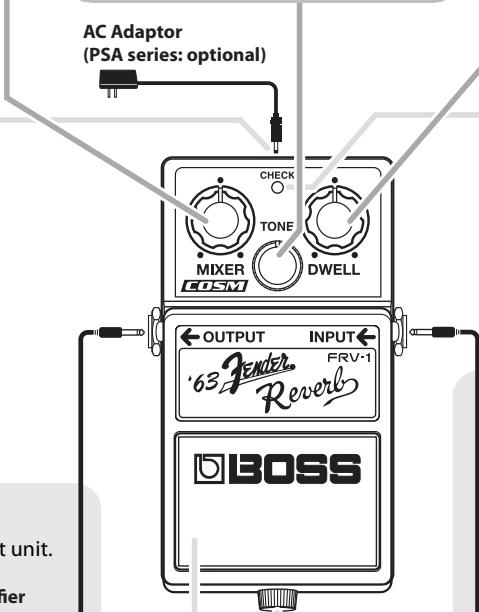
DWELL Knob
This knob determines the character of the reverb sound.
As you turn the knob to the right, both the richness and volume of the reverb sound increases. At higher settings, the sound takes on a distinctive "springy" or "twangy" character that's unique to spring-type reverb units. * When you turn this knob all the way to the left, there is no reverb sound.
CHECK Indicator
This indicator shows whether the effect is on or off, and also doubles as the battery check indicator.
The indicator lights when the effect is on.
* If you're powering the unit with a battery and the CHECK indicator goes dim—or doesn't light at all—when you try to turn the effect on, the battery is near depletion and should be replaced. For instructions on changing the battery, refer to "Changing the Battery."
* The CHECK indicator shows whether the effect is being applied or not. It does not indicate whether the power to the device is on or not.
INPUT Jack
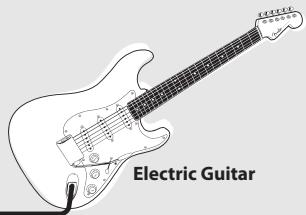
This jack accepts signals coming from a guitar or other musical instrument, or another effects unit.
* The INPUT jack doubles as the power switch. Power to the unit is turned on when you plug into the INPUT jack; the power is turned off when the cable is unplugged. To prevent unnecessary battery consumption, be sure to disconnect the plug from the INPUT jack when not using the effects unit.
MEMO
If you use an overdrive or distortion-type effect, we recommend that you connect it before the FRV-1.
natural_image
Line drawing of an electric guitar with labeled parts (no text or symbols on the instrument itself)Pedal Switch
This switch turns the effect on/off.
Thumbscrew
When this screw is loosened, the pedal will open, allowing you to change the battery.
* For instructions on changing the battery, refer to "Changing the Battery."
Precautions When Connecting
* To prevent malfunction and/or damage to speakers or other devices, always turn down the volume, and turn off the power on all devices before making any connections.
* Some connection cables contain resistors. When connection cables with resistors are used, the sound level may be extremely low, or impossible to hear. For information on cable specifications, contact the manufacturer of the cable.
* If you'll be using the FRV-1 for an extended time, we recommend that you use an AC adaptor. If you prefer to use a battery, we recommend an alkaline battery.
* Raise the amp volume only after turning on the power to all connected devices.
* Once the connections have been completed, turn on power to your various devices in the order specified. By turning on devices in the wrong order, you risk causing malfunction and/or damage to speakers and other devices.
When powering up: Turn on the power to your guitar amp last.
When powering down: Turn off the power to your guitar amp first.
* This unit is equipped with a protection circuit. A brief interval (a few seconds) after power up is required before the unit will operate normally.
* When operating on battery power only, the unit's indicator will become dim when battery power gets too low. Replace the battery as soon as possible.
Changing the Battery
When the indicator goes dim or no longer lights while the effect is on, it means that the battery must be replaced.
Replace the battery following the steps below.
- Hold down the pedal and loosen the thumbscrew, then open the pedal upward.
* The pedal can be opened without detaching the thumbscrew completely.
-
Remove the old battery from the battery housing, and remove the snap cord connected to it.
-
Connect the snap cord to the new battery, and place the battery inside the battery housing.
* Be sure to carefully observe the battery's polarity (+ versus -).
- Slip the coil spring onto the spring base on the back of the pedal, and then close the pedal.
* Carefully avoid getting the snap cord caught in the pedal, coil spring, and battery housing.
- Finally, insert the thumbscrew into the guide bush hole and fasten it securely.
Troubleshooting
Power won't come on / CHECK indicator doesn't light:
● Is your guitar properly connected to the INPUT jack?
Check the connection once more.
* The power will not turn on without a plug connected to the INPUT jack. * The CHECK indicator shows whether the effect is being applied or not. It does not indicate whether the power to the device is on or not.
- Is the specified adaptor (PSA series: optional) properly connected?
Check the connection once more.
* Never use any AC adaptor other than one specified for use with the FRV-1.
● Is the battery low or dead?
Replace with a new battery.
* The battery that is supplied with the unit is for temporary use, intended primarily for testing the pedal's operation.
* If you'll be using the FRV-1 for an extended time, we recommend that you use an AC adaptor. If you prefer to use a battery, we recommend an alkaline battery.
* To prevent unnecessary battery consumption, be sure to disconnect the plug from the INPUT jack when not using the effects unit.
No sound / Low volume:
● Is your instrument properly connected to the FRV-1?
Check the connection once more.
● Is the DWELL knob and/or MIXER knob turned down?
Turning the DWELL knob or MIXER knob toward the left will decrease the amount of reverb sound when the effect is on; if either knob is turned all the way to the left, there will be no reverb sound. To hear the reverb, turn the DWELL knob and MIXER knob to the right.
- Is the volume turned down on any guitar amp or effects device you have connected?
Check the settings of the connected device.
● Is the battery low or dead?
Replace with a new battery.
"Springy," "twangy," or "drip-like" sounds are heard in the reverb:
In the original Fender Reverb, these sounds are produced by the mechanical resonances of the springs. They are apparent as the DWELL knob is turned up, and also when dynamic, percussive sounds are played into the unit. These sound characteristics are particularly popular in surf guitar music, and are an integral part of the genre.
As with the other characteristics of the Fender Reverb, the FRV-1 faithfully models these resonance sounds. Turning the DWELL knob to the left will reduce their level and create more of a "room" reverb sound.
Setting Samples
Surf Sound
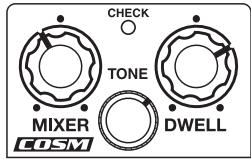
Blues Sound
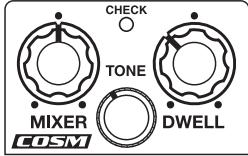
Specifications
FRV-1: Fender Reverb
| Nominal Input Level | -20 dBu |
| Input Impedance | 1 M ohm |
| Nominal Output Level | -20 dBu |
| Output Impedance | 1 k ohm |
| Recommended Load Impedance | 10 k ohms or greater |
| Power Supply | DC 9 V: Dry battery 6F22 (9 V) type (carbon)/Dry battery 6LR61 (9 V) type (alkaline),AC Adaptor (PSA series: optional) |
| Current Draw | 37 mA (DC 9 V)* Duration of continuous use with battery operation:Alkaline: 10.5 hoursThese figures will vary depending on the actual conditions of use. |
| Dimensions | 73 (W) x 129 (D) x 59 (H) mm2-7/8 (W) x 5-1/8 (D) x 2-3/8 (H) inches |
| Weight | 420 g / 15 oz (including battery) |
| Accessories | Owner's Manual, Leaflet ("USING THE UNIT SAFELY," "IMPORTANT NOTES," and "Information"), Dry battery/9 V type (6LR61) |
| Option | AC adaptor (PSA series) |
* 0 dBu = 0.775 Vrms
* The battery that was supplied with the unit is for temporary use, intended primarily for testing the unit's operation. We suggest replacing this with an alkaline dry cell.
* In the interest of product improvement, the specifications and/or appearance of this unit are subject to change without prior notice.
* FENDER ^ , STRATOCASTER ^ , TWIN REVERB ^ , and the distinctive headstock and body design commonly found on the STRATOCASTER guitar are the trademarks of FMIC. All rights reserved.
In this document, their names are used solely to identify the equipment whose sound is simulated by COSM.