SIGMA SPORT BC 600 - Compteur de vélo

BC 600 - Compteur de vélo SIGMA SPORT - Notice d'utilisation et mode d'emploi gratuit

Retrouvez gratuitement la notice de l'appareil BC 600 SIGMA SPORT au format PDF.

📄 2 pages Français FR Télécharger 💬 Question IA 11 questions ⚙️ Specs
Notice SIGMA SPORT BC 600 - page 1
Choisissez votre langue et indiquez votre email : nous vous enverrons une version traduite specifiquement.
Type de produit Compteur de vélo
Marque SIGMA SPORT
Modèle BC 600
Alimentation 1 pile 1,5 V, type SR44 (G13)
Autonomie de la pile Environ 2 ans
Affichage LCD
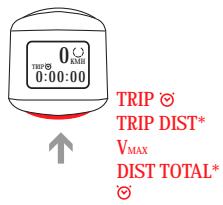
Fonctions principales Vitesse (km/h ou mph), distance totale (DIST TOTAL jusqu'à 99999 km), distance du trajet (TRIP DIST), temps de trajet (TRIP ☺ max 9:59:59), vitesse max (V_MAX), horloge (12h/24h)
Réglage circonférence de roue Manuel, de 0 à 3999 mm
Étendue de mesure vitesse Jusqu'à 300 km/h
Précision distance 10 m
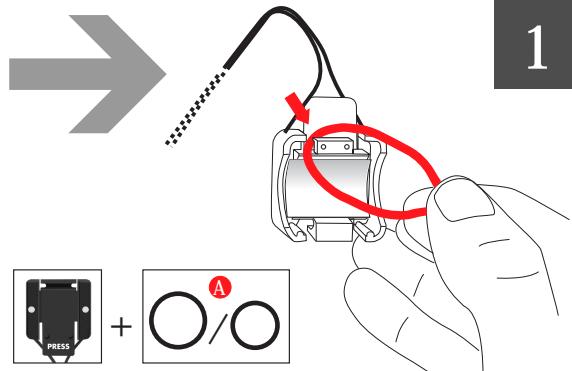
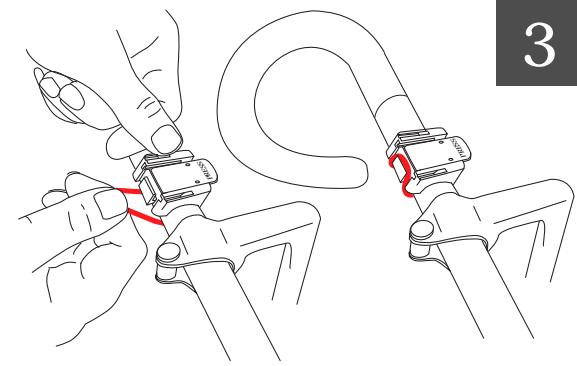
Montage Sur guidon avec support (2 sangles élastiques fournies)
Capteur À fourche, avec aimant sur rayon (distance max 5 mm)
Protection contre le vol Compteur amovible
Garantie 12 mois à compter de la date d'achat
Température de fonctionnement 0°C à 60°C (affichage peut devenir noir au-delà de 60°C, lent en dessous de 0°C)
Poids estimé Environ 50 g
Dimensions estimées Environ 5 x 7 x 2 cm
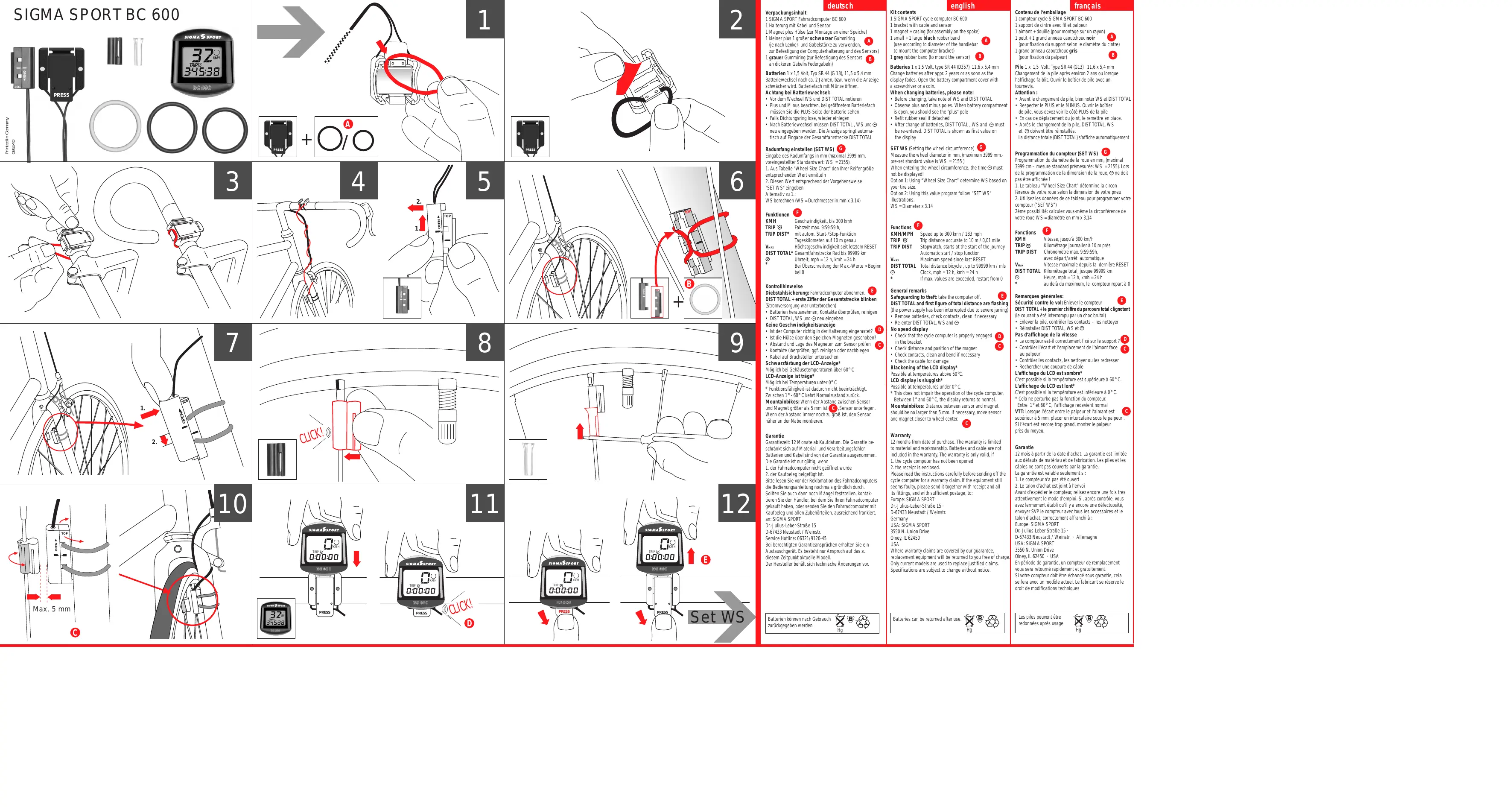
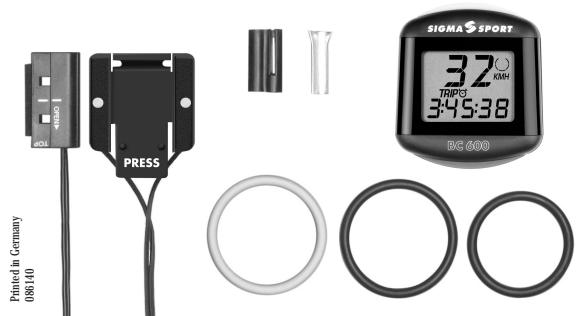
Contenu du kit Compteur, support avec câble et capteur, aimant avec boîtier, 2 sangles élastiques (petite et grande), 1 sangle grise pour capteur, pile, notice
Entretien Nettoyer les contacts, vérifier câble et aimant, remplacer pile si affichage faible

FOIRE AUX QUESTIONS - BC 600 SIGMA SPORT

Comment régler la circonférence de la roue (SET WS) ?
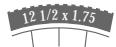
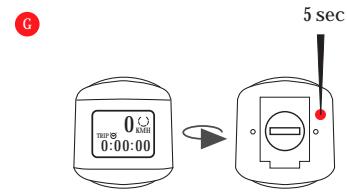
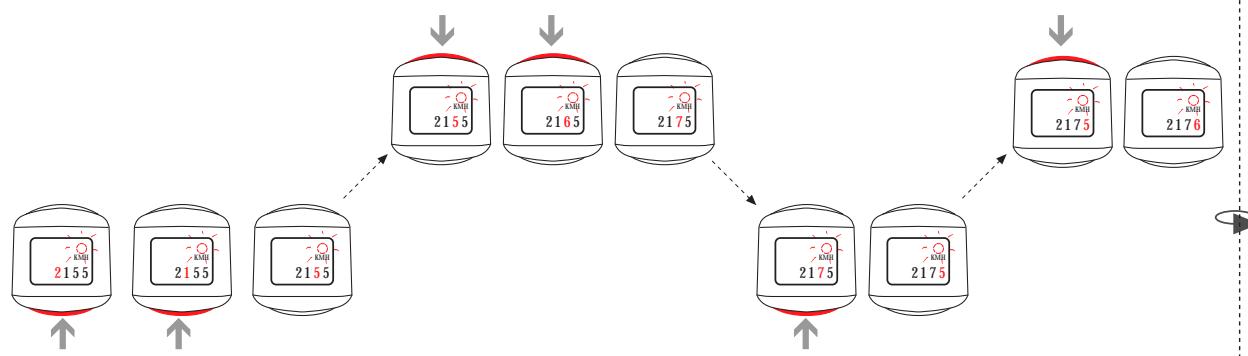
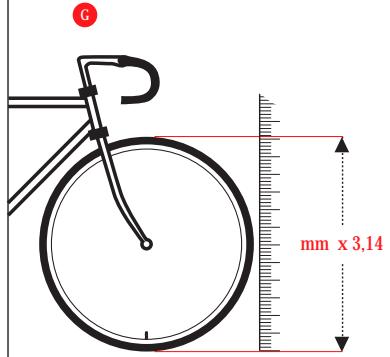
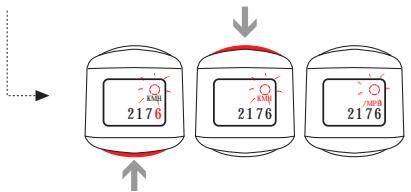
Appuyez sur le bouton situé à l'arrière du compteur pendant 5 secondes pour entrer en mode réglage. Utilisez le tableau de correspondance des pneus ou calculez la circonférence en multipliant le diamètre de la roue (en mm) par 3,14. Entrez la valeur (max 3999 mm) en appuyant sur le bouton pour incrémenter chaque chiffre. Validez en appuyant longuement.
Que faire si l'écran devient noir ?
Un écran noir peut survenir à des températures supérieures à 60°C. Ce n'est pas un défaut : rangez le compteur à l'ombre ou attendez qu'il refroidisse. Entre 1°C et 60°C, l'affichage redevient normal.
Comment changer la pile du BC 600 ?
Ouvrez le compartiment à piles à l'aide d'une pièce de monnaie. Notez d'abord les valeurs de DIST TOTAL et WS. Insérez la nouvelle pile (type SR44) avec le pôle + visible. Remettez le joint d'étanchéité s'il s'est détaché. Après le changement, vous devrez saisir à nouveau DIST TOTAL, WS et l'heure.
Pourquoi la vitesse ne s'affiche-t-elle pas ?
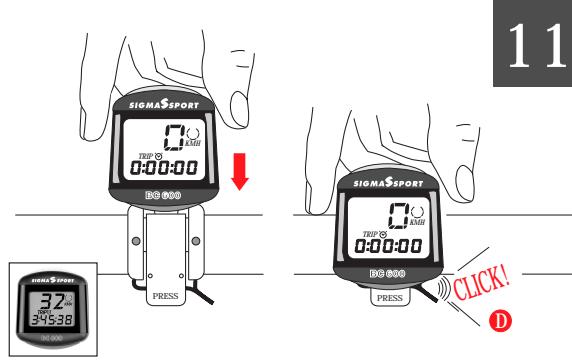
Vérifiez que le compteur est bien enclenché dans le support. Assurez-vous que l'aimant sur le rayon est aligné avec le capteur et que la distance entre eux ne dépasse pas 5 mm. Vérifiez les contacts et le câble ; nettoyez les contacts si nécessaire.
Comment remettre à zéro les données du trajet (TRIP) ?
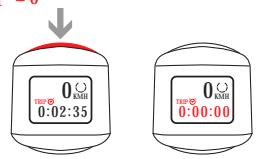
En mode normal, maintenez le bouton enfoncé pendant 3 secondes pour remettre à zéro la distance du trajet et le temps de trajet. Les valeurs de vitesse max, distance totale et heure ne sont pas affectées.
Le compteur clignote : que faire ?
Si DIST TOTAL et le premier chiffre de la distance totale clignotent, cela signifie que l'alimentation a été interrompue (par exemple après un choc ou un changement de pile). Retirez la pile, vérifiez les contacts, puis réinsérez-la. Vous devrez alors saisir à nouveau DIST TOTAL, WS et l'heure.
Quelle pile utiliser et où se trouve le compartiment ?
Utilisez une pile bouton 1,5 V de type SR44 (G13). Le compartiment se trouve à l'arrière du compteur ; ouvrez-le avec une pièce de monnaie. La pile dure environ 2 ans.
Comment installer le capteur sur la fourche ?
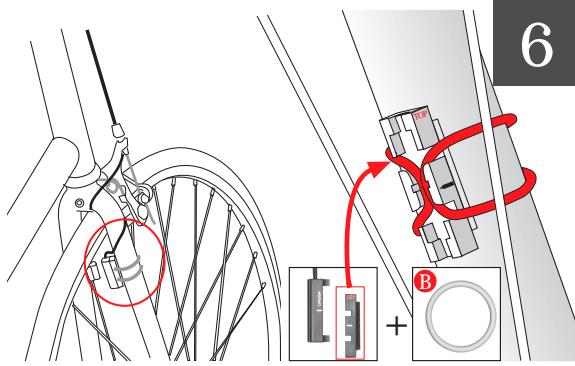
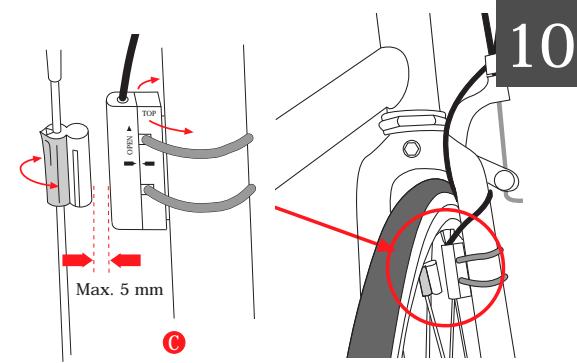
Fixez le capteur sur la fourche à l'aide de la sangle élastique grise. Placez l'aimant sur un rayon, en alignement avec le capteur. La distance entre le capteur et l'aimant ne doit pas dépasser 5 mm. Pour les vélos tout terrain, rapprochez le capteur du moyeu si nécessaire.
Le compteur est-il résistant à l'eau ?
La notice ne mentionne pas de résistance à l'eau spécifique. Il est conseillé de retirer le compteur en cas de pluie intense ou de le protéger. Les contacts peuvent être nettoyés avec un chiffon sec.
Comment configurer l'horloge (SET CLK) ?
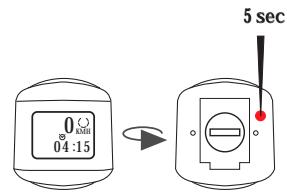
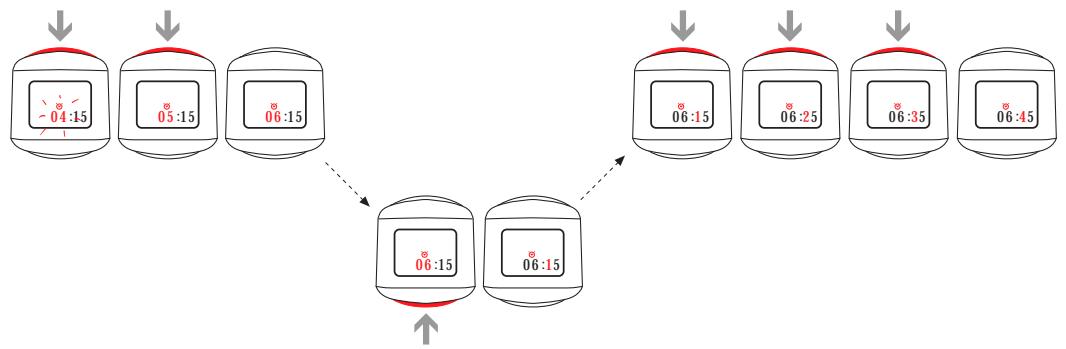
Maintenez le bouton enfoncé pendant 5 secondes pour entrer en mode SET. Appuyez brièvement pour passer à l'étape suivante jusqu'à SET CLK. Réglez l'heure en appuyant sur le bouton pour faire défiler les chiffres. Validez en appuyant longuement. Le format 12h/24h est automatique selon l'unité de vitesse (mph=12h, km/h=24h).

Questions des utilisateurs sur BC 600 SIGMA SPORT

1 question sur cet appareil. Repondez a celles que vous connaissez ou posez la votre.

Poser une nouvelle question sur cet appareil

L'email reste privé : il sert seulement à vous prévenir si quelqu'un répond à votre question.

Comment éteindre le compteur de vélo SIGMA SPORT BC 600 ?
FAQ fréquente - 01/04/2026
Réponse Notice-Facile

Pour éteindre le compteur de vélo SIGMA SPORT BC 600, il n'existe pas de bouton d'arrêt manuel classique. En effet, ce modèle est conçu pour s'éteindre automatiquement afin d'économiser la batterie.

Fonctionnement de l'arrêt automatique :

  • Le compteur s'éteint automatiquement après une période d'inactivité, généralement quelques minutes sans mouvement détecté.
  • Il se rallume automatiquement dès que vous recommencez à pédaler ou que le capteur détecte un mouvement.

Conseils supplémentaires :

  • Si vous souhaitez éteindre complètement l'appareil pour un stockage prolongé, vous pouvez retirer la pile.
  • Assurez-vous que le capteur et l'aimant ne détectent aucun mouvement pour que l'appareil puisse s'éteindre automatiquement.

Cette gestion automatique de l'alimentation permet de maximiser la durée de vie de la batterie sans intervention manuelle.

Répondre (soyez le premier)

Téléchargez la notice de votre Compteur de vélo au format PDF gratuitement ! Retrouvez votre notice BC 600 - SIGMA SPORT et reprennez votre appareil électronique en main. Sur cette page sont publiés tous les documents nécessaires à l'utilisation de votre appareil BC 600 de la marque SIGMA SPORT.

MODE D'EMPLOI BC 600 SIGMA SPORT
SIGMA SPORT BC 600 - 1

text_image Printed in Germany 086140 PRESS SIGMA SPORT 32 KWH TRIP3 3:45:38 RG 600
SIGMA SPORT BC 600 - 2

text_image 1 PRESS + A / O

SIGMA SPORT BC 600 - 3

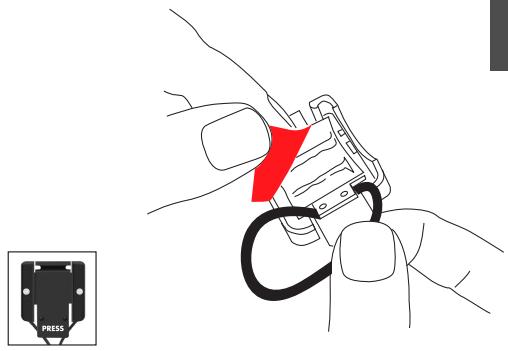
natural_image Illustration of hands connecting a cable to a device, with a red arrow indicating the cable's direction (no text or symbols present)
SIGMA SPORT BC 600 - 4

natural_image Illustration of hands connecting a small mechanical component to a cable or clamp, with no visible text or symbols.
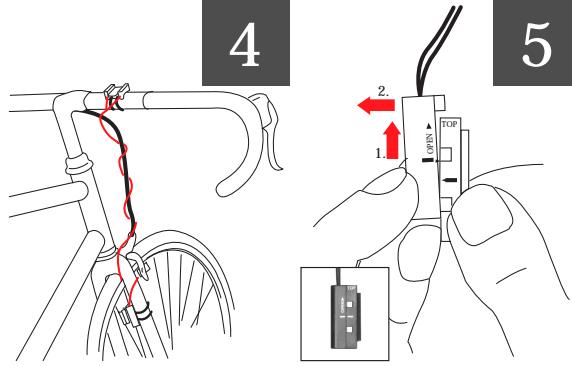
SIGMA SPORT BC 600 - 5

text_image 4 2 1. 5

SIGMA SPORT BC 600 - 6

text_image Diagram illustrating bicycle wheel assembly with labeled components and red motion arrows indicating motion direction
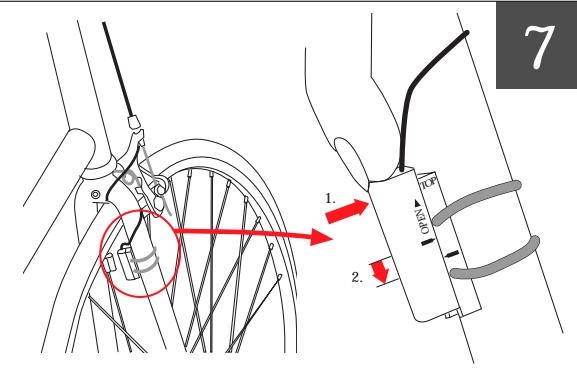
SIGMA SPORT BC 600 - 7

text_image 7 1. 2.

SIGMA SPORT BC 600 - 8

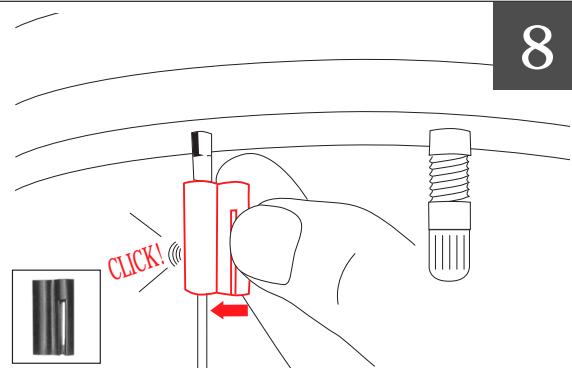
text_image 8 CLICK!

SIGMA SPORT BC 600 - 9

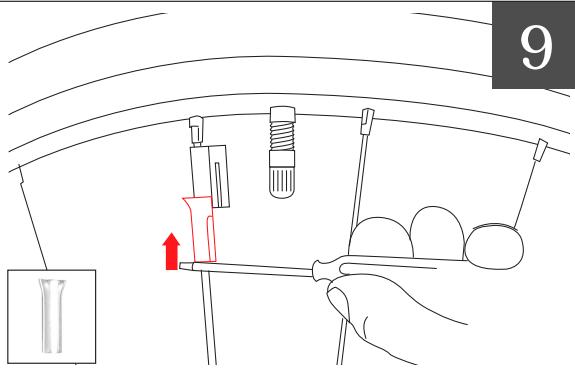
text_image 9

SIGMA SPORT BC 600 - 10

text_image TOP OPEN Max. 5 mm 10

SIGMA SPORT BC 600 - 11

text_image SIGMA SPORT 0:00:00 BQ 000 PRES SIGMA SPORT 0:00:00 BQ 000 PRES 32 345:38 11 CLICK! D
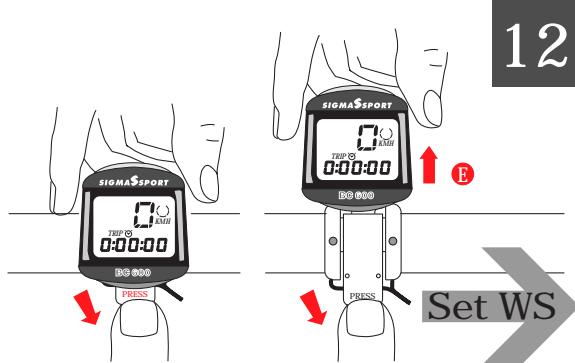
SIGMA SPORT BC 600 - 12

text_image SIGMA SPORT TBP 0 0:00:00 BQ 000 PRESS SIGMA SPORT TBP 0 0:00:00 BQ 000 PRESS Set WS 12

Batterien 1 x 1,5 Volt, Typ SR 44 (G 13), 11,5 x 5,4 mm Batteriewechsel nach ca. 2 Jahren, bzw. wenn die Anzeige schwächer wird. Batteriefach mit Münze öffnen.

Achtung bei Batteriewechsel:

- Vor dem Wechsel WS und DIST TOTAL notieren - Plus und Minus beachten, bei geöffnetem Batteriefach müssen Sie die PLUS-Seite der Batterie sehen! - Falls Dichtungsring lose, wieder einlegen

- Nach Batteriewechsel müssen DIST TOTAL, WS und neu eingegeben werden. Die Anzeige springt automatisch auf Eingabe der Gesamtfahrstrecke DIST TOTAL

Radumfang einstellen (SET WS) G Eingabe des Radumfangs in mm (maximal 3999 mm, voreingestellter Standardwert: WS = 2155).

  1. Aus Tabelle "Wheel Size Chart" den Ihrer Reifengröße entsprechenden Wert ermitteln

  2. Diesen Wert entsprechend der Vorgehensweise "SET WS" eingeben.

Alternativ zu 1.: WS berechnen (WS = Durchmesser in mm x 3.14)

Funktionen F

KMH Geschwindigkeit, bis 300 kmh TRIP ☺ Fahrzeit max. 9:59:59 h,

TRIP DIST* mit autom. Start-/Stop-Funktion Tageskilometer, auf 10 m genau

V _MAX Höchstgeschwindigkeit seit letztem RESET DIST TOTAL* Gesamtfahrstrecke Rad bis 99999 km

Uhrzeit, mph = 12 h, kmh = 24 h Bei Überschreitung der Max.-Werte > Beginn bei 0

Kontrollhinweise

Diebstahlsicherung: Fahrradcomputer abnehmen. DIST TOTAL + erste Ziffer der Gesamtstrecke blinken (Stromversorgung war unterbrochen)

- Batterien herausnehmen, Kontakte überprüfen, reinigen - DIST TOTAL, WS und ☺ neu eingeben

Keine Geschwindigkeitsanzeige

- Ist der Computer richtig in der Halterung eingerastet? - Ist die Hülse über den Speichen-Magneten geschoben? - Abstand und Lage des Magneten zum Sensor prüfen

- Kontakte überprüfen, ggf. reinigen oder nachbiegen - Kabel auf Bruchstellen untersuchen

Schwarzfärbung der LCD-Anzeige*

Möglich bei Gehäusetemperaturen über 60°C

LCD-Anzeige ist träge*

Möglich bei Temperaturen unter 0°C * Funktionsfähigkeit ist dadurch nicht

- Funktionstätigkeit ist dadurch nicht beeinträchtigt. Zwischen 1° - 60° C kehrt Normalzustand zurück

Zwischen 1° - 60 °C kerrit Normalzustand zurück Mountainbikes: Wenn der Abstand zwischen Sensor

und Magnet größer als 5 mm ist C, Sensor unterlegen. Wenn der Abstand immer noch zu groß ist, den Sensor näher an der Nabe montieren.

Garantie

Garantiezeit: 12 Monate ab Kaufdatum. Die Garantie beschränkt sich auf Material- und Verarbeitungsfehler.

Batterien und Kabel sind von der Garantie ausgenommen. Die Garantie ist nur gültig, wenn

  1. der Fahrradcomputer nicht geöffnet wurde
  2. Der Kauflachteinfristet

  3. der Kaufbeleg belgefügt ist.

Bitte lesen Sie vor der Reklamation des Fahrradcomputers die Radiierungspalitungs nachmals gündlich durch

die Bedienungsamleitung nochmals grundlich durch. Sollten Sie auch dann noch Mängel feststellen, kontak-

Sönken Sie auch dann noch Münger Restehlen, kõlt tieren Sie den Händler, bei dem Sie Ihren Fahrradcor

gekauft haben, oder senden Sie den Fahrradcomputer mit Kaufbeleg und allen Zubehörteilen, ausreichend frankiert, an: SIGMA SPORT

Dr.-Julius-Leber-Straße 15

D-67433 Neustadt / Weinstr.

Service Hotline: 06321/9120-45

Bei berechtigten Garantieansprüchen erhalten Sie ein

Austauschgerät. Es besteht nur Anspruch auf das zu

diesem Zeitpunkt aktuelle Modell.

Der Hersteller behalt sich technische Änderungen vor.

Batterien können nach Gebrauch zurückgegeben werden.

SIGMA SPORT BC 600 - 13

english Kit contents 1 SIGMA SPORT cycle computer BC 600 1 bracket with cable and sensor 1 magnet + casing (for assembly on the spoke) 1 small + 1 large black rubber band (use according to diameter of the handlebar to mount the computer bracket) 1 grey rubber band (to mount the sensor) Batteries 1 x 1.5 Volt, type SR 44 (D357), 11.6 x 5.4 mm

Change batteries after appr. 2 years or as soon as the display fades. Open the battery compartment cover with a screwdriver or a coin.

When changing batteries, please note

- Before changing, take note of WS and DIST TOTAL - Observe plus and minus poles. When battery compared

is open, you should see the 'plus' pole • Refit rubber seal if detached

- Rent rubber seal if detached - After change of batteries, DIST TOTAL, WS and must be re-entered. DIST TOTAL is shown as first value on the display

SET WS (Setting the wheel circumference) G Measure the wheel diameter in mm, (maximum 3999 mm. pre-set standard value is WS = 2155 )

When entering the wheel circumference, the time ⬤ must not be displayed!

Option 1: Using "Wheel Size Chart" determine WS based on your tire size.

Option 2: Using this value program follow "SET WS" illustrations.

WS = Diameter x 3.14

Functions

KMH/MPH Speed up to 300 kmh / 183 mph TRIP ☺ Trip distance accurate to 10 m / 0,01 mile TRIP DIST Stopwatch, starts at the start of the journey

Automatic start / stop function Maximum speed since last RESE

DIST TOTAL Total distance bicycle, up to 99999 km / ml Clock, mph = 12 h, kmh = 24 h

If max. values are exceeded, restart from 0

General remarks

Safeguarding to theft: take the computer off. DIST TOTAL and first figure of total distance are flashing

(the power supply has been interrupted due to severe jaming - Remove batteries, check contacts, clean if necessary - Re-enter DIST TOTAL, WS and ☺

No speed display

- Check that the cycle computer is properly engaged in the bracket

- Check distance and position of the magnet - Check contacts, clean and bend if necessary

- Check the cable for damage

Blackening of the LCD display*

Possible at temperatures above 60°C. LCD display is sluggish*

Possible at temperatures under 0°

* This does not impair the operation of the cycle computer. Between 1° and 60° C, the display returns to normal. Mountainbikes: Distance between sensor and magnet should be no larger than 5 mm. If necessary, move sensor and magnet closer to wheel center.

SIGMA SPORT BC 600 - 14

SIGMA SPORT BC 600 - 15

SIGMA SPORT BC 600 - 16

SIGMA SPORT BC 600 - 17

SIGMA SPORT BC 600 - 18

SIGMA SPORT BC 600 - 19

SIGMA SPORT BC 600 - 20

SIGMA SPORT BC 600 - 21

SIGMA SPORT BC 600 - 22

SIGMA SPORT BC 600 - 23

SIGMA SPORT BC 600 - 24

SIGMA SPORT BC 600 - 25

SIGMA SPORT BC 600 - 26

SIGMA SPORT BC 600 - 27

SIGMA SPORT BC 600 - 28

SIGMA SPORT BC 600 - 29

SIGMA SPORT BC 600 - 30

SIGMA SPORT BC 600 - 31

SIGMA SPORT BC 600 - 32

SIGMA SPORT BC 600 - 33

SIGMA SPORT BC 600 - 34

SIGMA SPORT BC 600 - 35

SIGMA SPORT BC 600 - 36

SIGMA SPORT BC 600 - 37

SIGMA SPORT BC 600 - 38

SIGMA SPORT BC 600 - 39

SIGMA SPORT BC 600 - 40

SIGMA SPORT BC 600 - 41

SIGMA SPORT BC 600 - 42

SIGMA SPORT BC 600 - 43

SIGMA SPORT BC 600 - 44

[Non-Text]

Warranty

12 months from date of purchase. The warranty is limited to material and workmanship. Batteries and cable are not included in the warranty. The warranty is only valid, if

included in the warranty. The warranty is only valid, if 1. the cycle computer has not been opened

  1. the receipt is enclosed.

Please read the instructions carefully before sending off the cycle computer for a warranty claim. If the equipment still seems faulty, please send it together with receipt and all its fittings, and with sufficient postage, to:

Europe: SIGMA SPORT

Dr.-Julius-Leber-Straße 15 - Dr. 07420 N.

D-67433 Neustadt / Weinst

Germany

USA: SIGMA SPORT 9550 N. Union Dr

3550 N. Union Driv Olney, II 62450

Olney, IL 02430 USA

Where warranty claims are covered by our guarantee, replacement equipment will be returned to you free of charge. Only current models are used to replace justified claims. Specifications are subject to change without notice.

Batteries can be returned after use.

|

SIGMA SPORT BC 600 - 45

SIGMA SPORT BC 600 - 46

SIGMA SPORT BC 600 - 47

SIGMA SPORT BC 600 - 48

SIGMA SPORT BC 600 - 49

SIGMA SPORT BC 600 - 50

SIGMA SPORT BC 600 - 51

SIGMA SPORT BC 600 - 52

SIGMA SPORT BC 600 - 53

SIGMA SPORT BC 600 - 54

SIGMA SPORT BC 600 - 55

SIGMA SPORT BC 600 - 56

SIGMA SPORT BC 600 - 57

SIGMA SPORT BC 600 - 58

SIGMA SPORT BC 600 - 59

SIGMA SPORT BC 600 - 60

SIGMA SPORT BC 600 - 61

SIGMA SPORT BC 600 - 62

SIGMA SPORT BC 600 - 63

SIGMA SPORT BC 600 - 64

SIGMA SPORT BC 600 - 65

SIGMA SPORT BC 600 - 66

SIGMA SPORT BC 600 - 67

SIGMA SPORT BC 600 - 68

SIGMA SPORT BC 600 - 69

SIGMA SPORT BC 600 - 70

SIGMA SPORT BC 600 - 71

SIGMA SPORT BC 600 - 72

SIGMA SPORT BC 600 - 73

SIGMA SPORT BC 600 - 74

SIGMA SPORT BC 600 - 75

SIGMA SPORT BC 600 - 76

SIGMA SPORT BC 600 - 77

SIGMA SPORT BC 600 - 78

SIGMA SPORT BC 600 - 79

SIGMA SPORT BC 600 - 80

SIGMA SPORT BC 600 - 81

SIGMA SPORT BC 600 - 82

SIGMA SPORT BC 600 - 83

SIGMA SPORT BC 600 - 84

SIGMA SPORT BC 600 - 85

SIGMA SPORT BC 600 - 86

SIGMA SPORT BC 600 - 87

SIGMA SPORT BC 600 - 88

SIGMA SPORT BC 600 - 89

SIGMA SPORT BC 600 - 90

SIGMA SPORT BC 600 - 91

SIGMA SPORT BC 600 - 92

SIGMA SPORT BC 600 - 93

SIGMA SPORT BC 600 - 94

SIGMA SPORT BC 600 - 95

SIGMA SPORT BC 600 - 96

SIGMA SPORT BC 600 - 97

SIGMA SPORT BC 600 - 98

SIGMA SPORT BC 600 - 99

SIGMA SPORT BC 600 - 100

SIGMA SPORT BC 600 - 101

SIGMA SPORT BC 600 - 102

SIGMA SPORT BC 600 - 103

SIGMA SPORT BC 600 - 104

SIGMA SPORT BC 600 - 105

SIGMA SPORT BC 600 - 106

SIGMA SPORT BC 600 - 107

SIGMA SPORT BC 600 - 108

SIGMA SPORT BC 600 - 109

SIGMA SPORT BC 600 - 110

SIGMA SPORT BC 600 - 111

SIGMA SPORT BC 600 - 112

SIGMA SPORT BC 600 - 113

SIGMA SPORT BC 600 - 114

SIGMA SPORT BC 600 - 115

SIGMA SPORT BC 600 - 116

SIGMA SPORT BC 600 - 117

SIGMA SPORT BC 600 - 118

SIGMA SPORT BC 600 - 119

SIGMA SPORT BC 600 - 120

SIGMA SPORT BC 600 - 121

SIGMA SPORT BC 600 - 122

SIGMA SPORT BC 600 - 123

SIGMA SPORT BC 600 - 124

SIGMA SPORT BC 600 - 125

SIGMA SPORT BC 600 - 126

SIGMA SPORT BC 600 - 127

SIGMA SPORT BC 600 - 128

SIGMA SPORT BC 600 - 129

SIGMA SPORT BC 600 - 130

SIGMA SPORT BC 600 - 131

SIGMA SPORT BC 600 - 132

SIGMA SPORT BC 600 - 133

SIGMA SPORT BC 600 - 134

SIGMA SPORT BC 600 - 135

SIGMA SPORT BC 600 - 136

SIGMA SPORT BC 600 - 137

SIGMA SPORT BC 600 - 138

SIGMA SPORT BC 600 - 139

SIGMA SPORT BC 600 - 140

SIGMA SPORT BC 600 - 141

SIGMA SPORT BC 600 - 142

SIGMA SPORT BC 600 - 143

SIGMA SPORT BC 600 - 144

SIGMA SPORT BC 600 - 145

SIGMA SPORT BC 600 - 146

SIGMA SPORT BC 600 - 147

SIGMA SPORT BC 600 - 148

SIGMA SPORT BC 600 - 149

SIGMA SPORT BC 600 - 150

SIGMA SPORT BC 600 - 151

SIGMA SPORT BC 600 - 152

SIGMA SPORT BC 600 - 153

SIGMA SPORT BC 600 - 154

SIGMA SPORT BC 600 - 155

SIGMA SPORT BC 600 - 156

SIGMA SPORT BC 600 - 157

SIGMA SPORT BC 600 - 158

SIGMA SPORT BC 600 - 159

SIGMA SPORT BC 600 - 160

SIGMA SPORT BC 600 - 161

SIGMA SPORT BC 600 - 162

SIGMA SPORT BC 600 - 163

SIGMA SPORT BC 600 - 164

SIGMA SPORT BC 600 - 165

SIGMA SPORT BC 600 - 166

SIGMA SPORT BC 600 - 167

SIGMA SPORT BC 600 - 168

SIGMA SPORT BC 600 - 169

SIGMA SPORT BC 600 - 170

SIGMA SPORT BC 600 - 171

SIGMA SPORT BC 600 - 172

SIGMA SPORT BC 600 - 173

SIGMA SPORT BC 600 - 174

SIGMA SPORT BC 600 - 175

SIGMA SPORT BC 600 - 176

SIGMA SPORT BC 600 - 177

SIGMA SPORT BC 600 - 178

SIGMA SPORT BC 600 - 179

SIGMA SPORT BC 600 - 180

SIGMA SPORT BC 600 - 181

SIGMA SPORT BC 600 - 182

SIGMA SPORT BC 600 - 183

SIGMA SPORT BC 600 - 184

SIGMA SPORT BC 600 - 185

SIGMA SPORT BC 600 - 186

SIGMA SPORT BC 600 - 187

SIGMA SPORT BC 600 - 188

SIGMA SPORT BC 600 - 189

SIGMA SPORT BC 600 - 190

SIGMA SPORT BC 600 - 191

SIGMA SPORT BC 600 - 192

SIGMA SPORT BC 600 - 193

SIGMA SPORT BC 600 - 194

SIGMA SPORT BC 600 - 195

SIGMA SPORT BC 600 - 196

SIGMA SPORT BC 600 - 197

SIGMA SPORT BC 600 - 198

SIGMA SPORT BC 600 - 199

SIGMA SPORT BC 600 - 200

SIGMA SPORT BC 600 - 201

SIGMA SPORT BC 600 - 202

SIGMA SPORT BC 600 - 203

SIGMA SPORT BC 600 - 204

SIGMA SPORT BC 600 - 205

SIGMA SPORT BC 600 - 206

SIGMA SPORT BC 600 - 207

SIGMA SPORT BC 600 - 208

SIGMA SPORT BC 600 - 209

SIGMA SPORT BC 600 - 210

SIGMA SPORT BC 600 - 211

SIGMA SPORT BC 600 - 212

SIGMA SPORT BC 600 - 213

SIGMA SPORT BC 600 - 214

TRIP ☺ = 0 3 sec
+ TRIP DIST* = 0
SIGMA SPORT BC 600 - 215

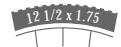
ETRTO
SIGMA SPORT BC 600 - 216
WS mph WS kmh

790 1272 988 1590 1210 1948 1184 1907 1225 1973 1258 2026 1274 2051 1286 2070 1298 2089 1313 2114 1325 2133 1307 2105 1296 2086 1214 1954

ETRTO
SIGMA SPORT BC 600 - 217

32-630 28-630 40-622 47-622 40-635 37-622 18-622 20-622 23-622 25-622 28-622 32-622 37-622 40-622

WS mph WS kmh

1366 2199 1350 2174 1381 2224 1409 2268 1407 2265 1370 2205 1306 2102 1313 2114 1325 2133 1333 2146 1335 2149 1350 2174 1370 2205 1381 2224
SIGMA SPORT BC 600 - 218

text_image G mm x 3,14

km/h:
WS = mm x 3,14
mp/h:
WS = (mm x 3.14) : 1.61

change to mph in SET WS mode
SIGMA SPORT BC 600 - 219

flowchart
graph TD
    A["Top Box 2176"] --> B["Bottom Box 2176"]
    B --> C["Bottom Box 2176"]
  1. END SET

  2. START SET

  3. SET 2155 ....▶ 2176
    SET WS
    SIGMA SPORT BC 600 - 220
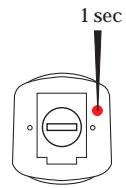
text_image G 0 THP @ KATH 0:00:00 5 sec

SIGMA SPORT BC 600 - 221

SIGMA SPORT BC 600 - 222

flowchart
graph TD
    A["Step 1: 2155"] --> B["Step 2: 2165"]
    B --> C["Step 3: 2175"]
    C --> D["Step 4: 2175"]
    D --> E["Step 5: 2176"]
    style A fill:#f9f,stroke:#333
    style B fill:#f9f,stroke:#333
    style C fill:#f9f,stroke:#333
    style D fill:#f9f,stroke:#333
    style E fill:#f9f,stroke:#333
SIGMA SPORT BC 600 - 223
3. END SET

  1. START SET
  2. SET 04:15 06:45
    SET CLK
    SIGMA SPORT BC 600 - 224

SIGMA SPORT BC 600 - 225

SIGMA SPORT BC 600 - 226

flowchart
graph TD
    A["04:15"] --> B["05:15"]
    B --> C["06:15"]
    C --> D["06:15"]
    D --> E["06:25"]
    E --> F["06:35"]
    F --> G["06:45"]
    style A fill:#f9f,stroke:#333
    style B fill:#f9f,stroke:#333
    style C fill:#f9f,stroke:#333
    style D fill:#f9f,stroke:#333
    style E fill:#f9f,stroke:#333
    style F fill:#f9f,stroke:#333
    style G fill:#f9f,stroke:#333

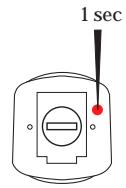
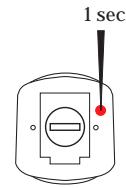
SIGMA SPORT BC 600 - 227

SIGMA SPORT BC 600 - 228
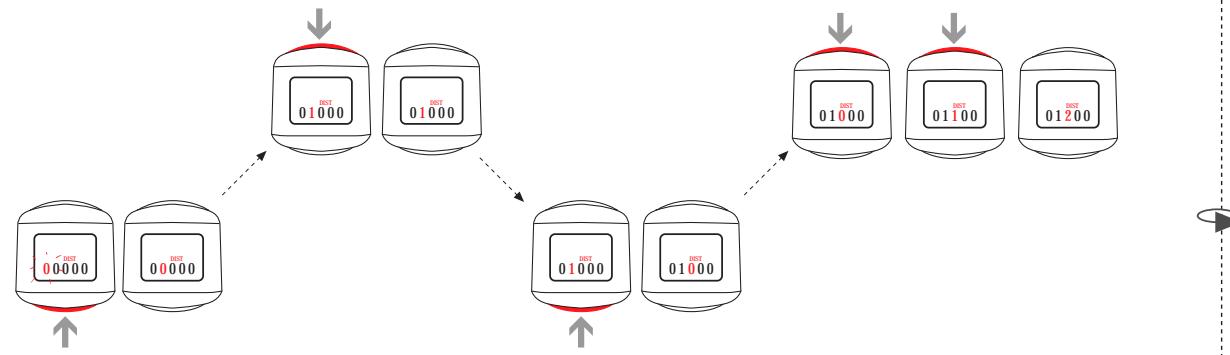
1. START SET
2. SET 00000 ....▶ 1200
3. END SET
SET DST

nach Batteriewechsel after battery change après change de piles after wisselen de batterijen dopo sostituzione delle pile cada cambio de pilas
SIGMA SPORT BC 600 - 229

flowchart
graph TD
    A["Storage Unit 1"] --> B["01000"]
    A --> C["01000"]
    B --> D["01000"]
    C --> E["01000"]
    D --> F["01000"]
    E --> G["01000"]
    F --> H["01200"]
    G --> I["01200"]
    style A fill:#f9f,stroke:#333
    style B fill:#ccf,stroke:#333
    style C fill:#ccf,stroke:#333
    style D fill:#cfc,stroke:#333
    style E fill:#cfc,stroke:#333
    style F fill:#fcc,stroke:#333
    style G fill:#fcc,stroke:#333
    style H fill:#fcc,stroke:#333
    style I fill:#fcc,stroke:#333
SIGMA SPORT BC 600 - 230

Assistant notice
Powered by Anthropic
En attente de votre message
Informations produit

Marque : SIGMA SPORT

Modèle : BC 600

Catégorie : Compteur de vélo