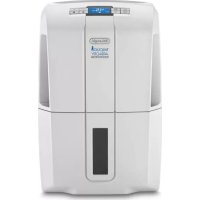
AD 1099.W S - Déshumidificateur DELONGHI - Notice d'utilisation et mode d'emploi gratuit
Retrouvez gratuitement la notice de l'appareil AD 1099.W S DELONGHI au format PDF.


| Type d'appareil | Four à convection |
| Commande | Électronique |
| Capacité | Non précisé |
| Puissance | Non précisé |
| Température maximale | Non précisé |
| Modes de cuisson | Convection, grill, traditionnel |
| Affichage | Électronique |
| Minuterie | Oui |
| Type d'ouverture | Porte frontale |
| Nettoyage | Non précisé |
| Dimensions (HxLxP) | Non précisé |
| Poids | Non précisé |
| Alimentation | Électrique |
| Accessoires inclus | Non précisé |
| Sécurité | Verrouillage enfant |
| Garantie | Non précisé |
FOIRE AUX QUESTIONS - AD 1099.W S DELONGHI
Questions des utilisateurs sur AD 1099.W S DELONGHI
0 question sur cet appareil. Repondez a celles que vous connaissez ou posez la votre.
Poser une nouvelle question sur cet appareil
Téléchargez la notice de votre Déshumidificateur au format PDF gratuitement ! Retrouvez votre notice AD 1099.W S - DELONGHI et reprennez votre appareil électronique en main. Sur cette page sont publiés tous les documents nécessaires à l'utilisation de votre appareil AD 1099.W S de la marque DELONGHI.
MODE D'EMPLOI AD 1099.W S DELONGHI
CONVECTION OVEN WITH ELECTRONIC CONTROLS
FOUR A CONVECTION AVEC COMMANDES ÉLECTRONIQUES
HORNO DE CONVECCION CON MANDOS ELECTRONICOS
FORNO VENTILADO COM COMANDOS ELECTRONICOS
Instructions for use
Mode d'emploi
Instrucciones de uso
Instruções
CONTENTS
CHAP.1 GENERAL
1.1 Control panel 3
1.2 Description and accessories provided 4
1.3 Important safeguards 5
1.4 Summary of operation 6
1.5 Installation 7
CHAP. 2 USING THE CONTROLS AND SETTING THE MODES
2.1 Setting the clock 8
2.2 Pizza Function 9
2.3 Bake and Fan/Bake functions 10
2.4 Broil function 13
2.5 Keepwarmfunction 15
2.6 Defrost function 16
2.7 Rotisserie function 17
2.8 Dehydrate function 19
CHAP. 3 CLEANING AND MAINTENANCE
3.1 Care and cleaning 20
ELECTRICAL CONNECTIONS
All it requires is a nearby 120 Volt 60Hz three-prong grounded power socket.
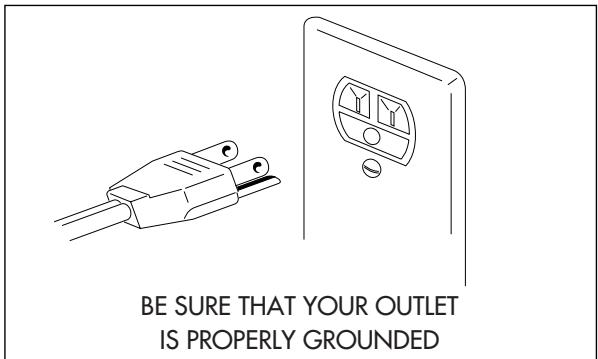
GROUNDING INSTRUCTIONS
This appliance must be grounded. In the event of an electrical short circuit, grounding reduces the risk of electric shock by providing an escape wire for the electric current.
This appliance is equipped with a cord having a grounding wire with a grounding plug.
The plug must be plugged into an outlet that is properly installed and grounded.
WARNING: IMPROPER USE OF THE GROUNDING PLUG CAN RESULT IN A RISK OF ELECTRIC SHOCK.
If you are uncertain that your outlets are properly grounded, please contact a qualified electrician or serviceman.
If it is necessary to use an extension cord, use only a three-wire extension cord that has a 3-blade grounding plug, and a 3-slot receptacle that will accept the plug on the appliance. The marked rating of the extension cord shall be equal to or greater than the electrical rating of the appliance.
- The cord length of this product has been selected to reduce the possibility of tangling in or tripping over a longer cord. If more cord length is needed, an extension cord may be used. It should be rated no less than 15 amps., 120 volts, and have Underwriters Laboratories/CSA listing.
- A six feet long, 15 amp. extension cord may be purchased from your local authorized service facility. When using a longer cord, be sure not to let it drape over the working area or dangle where someone could accidentally pull or trip over it.
- Handle the cord carefully for longer life; avoid jerking or straining the cord at the plug and appliance connections.
CHAPTER 1 - GENERAL
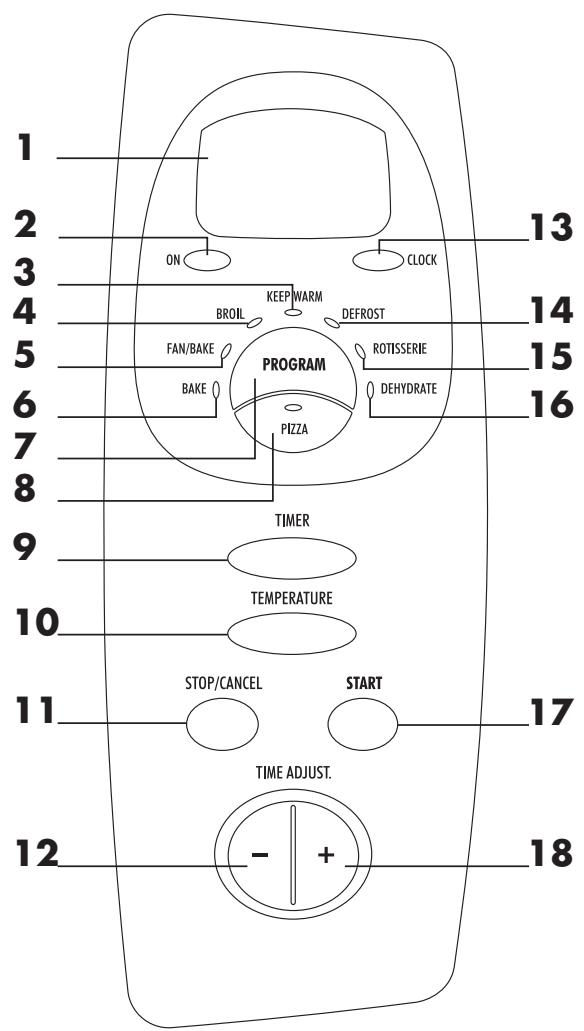
1.1 - CONTROL PANEL
| CONVERSION TABLE: | |
| °C | °F |
| 120 | 250 |
| 135 | 275 |
| 150 | 300 |
| 163 | 325 |
| 177 | 350 |
| 190 | 375 |
| 205 | 400 |
| 218 | 425 |
| 233 | 450 |
| 245 | 475 |
1 Display
2 ON power light
3 KEEP WARM indicator light
4 BROIL indicator light
5 FAN/BAKE indicator light
6 BAKE indicator light
7 PROGRAM button
8 PIZZA button/indicator light
9 TIMER button
10 TEMPERATURE button
11 STOP/CANCEL button
12"-" button
13 CLOCK button
14 DEFROST indicator light
15 ROTISSERIE indicator light
16 DEHYDRATE indicator light
17 START button
18 "+" button
1.2 - DESCRIPTION AND ACCESSORIES PROVIDED
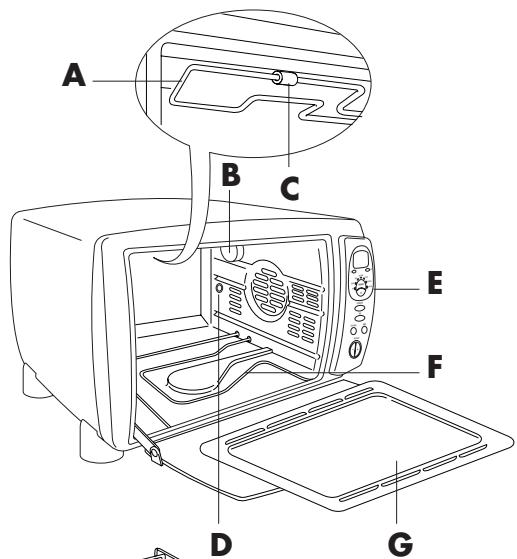
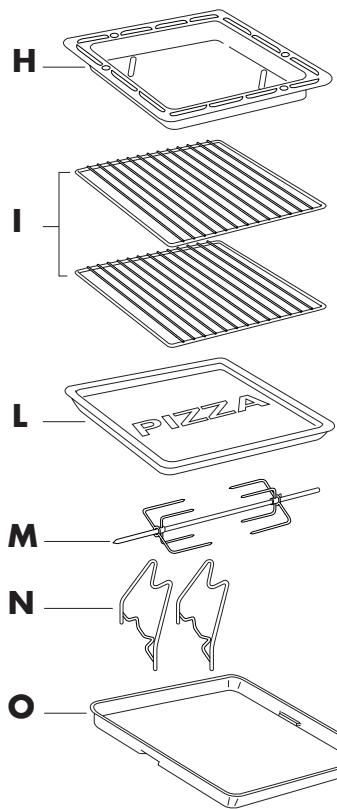
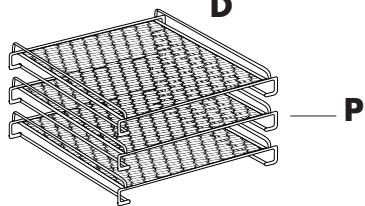
A Upper heating element
B Oven light
C Clasp for drop down heating element
D Rotisserie spit mount
E Control panel
F Lower heating element
G Crumb tray with heat deflectors
H Shallow pan
Wire rack (two provided)
Pizza tray
M Spit
N Spit supports
O Lasagne tray
P Dehydrator kit (optional)
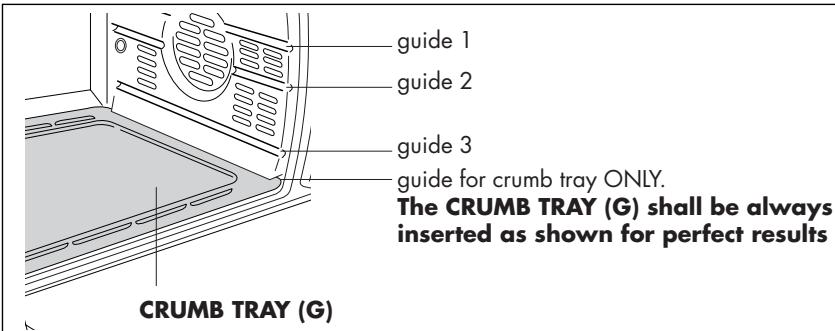
Chapter 1 - General
1.3 - IMPORTANT SAFEGUARDS
When using electric appliances basic safety precautions should always be followed, including the following:
1) Read all instructions.
2) The temperature of the door or the outer surfaces may be high when the appliance is operating: only ever touch the plastic knobs and handles.
3) To protect against electrical shock, do not immerse cord, plugs, in water or other liquid. See instructions for cleaning.
4) The appliance is not intended for use by young children or infirm persons without supervision. Young children should be supervised to ensure that they do not play with the appliance.
5) Unplug from outlet when not in use and before cleaning. Always press the STOP/CANCEL button before unplugging. Allow to cool before putting on or taking off parts and before cleaning the appliance.
6) If the supply cord is damaged, it must be replaced by the manufacturer or its service agent or a similar qualified person in order to avoid a hazard.
7) The use of accessory attachments not recommended by the appliance manufacturer may cause injuries.
8) Do not use outdoors.
9) Do not place heavy objects on the open door. Do not forcefully push the open door down. Do not place hot pans/baking tins (just removed from the oven) onto the open door.
10) Do not let cord hang over edge of table or counter, or touch hot surfaces.
11) Do not place on or near a hot gas or electric burner, or in a heated oven. Do not place anything on top of the oven while in use.
12) Extreme caution must be used when moving an appliance containing hot oil or other hot liquids.
13) If the plug gets hot, please call a qualified electrician.
14) Do not use this appliance for other than intended use.
15) Use extreme caution when removing the shallow pan (H) or disposing of hot grease.
16) Do not clean oven with metal scouring pads. Pieces can break off the pad and touch electrical parts creating a risk of electric shock.
17) To disconnect the appliance, press the STOP/CANCEL button. Then unplug the cord from the wall outlet.
18) To assure safe operation, oversized utensils or food must not be inserted into the oven.
19) Condensation and a grease deposit may form around the door and the air and steam outlet vents. This is normal.
20) CAUTION: Never leave the oven unattended when in use (especially when broiling).
21) Extreme caution should be exercised when using containers other than ovenproof metal, glass or ceramic.
22) Do not store any materials other than the manufacturer's recommended accessories in the oven when not in use.
23) Do not place any of the following materials in the oven: paper, cardboard, plastic and the like.
24) Do not cover crumb tray or any part of the oven with metal foil; this can cause overheating of the oven. Use aluminum foil on or under food only as directed in the appliance instructions.
THIS PRODUCT IS FOR HOUSEHOLD USE ONLY
SAVE THESE INSTRUCTIONS
WARNING: Once having removed the appliance from the packaging, check that the door is intact. As the door is made from glass, it is fragile, and should be replaced if visibly chipped, scored or scratched. Furthermore, when using, cleaning or moving the appliance, do not slam or bang the door or pour cold liquids on the glass when the appliance is hot.
1.4 - SUMMARY OF OPERATION
| FUNCTIONS | TEMPERATURE SETTING/DISPLAY INDICATION | POSITION OF WIRE RACK/ ACCESSORIES | GUIDES | TIMER | NOTES/TIPS |
| PIZZA (ONE LEVEL) | P1 | 1 2 3 | 15 min. (+5') | Always use the PIZZA TRAY (L) inserted in slot 3. Select one of the available PIZZA programs by pressing repeatedly the pizza button (8) according to the desired type of pizza load. | |
| P2 | 20 min. (+5') | ||||
| P3 | 25 min. (+5') | ||||
| FAN/BAKE FOR COOKING TWO PIZZAS AT ONCE | 375° F | 1 2 3 | 20-30 min. | Cooking two pizzas at once requires cooking directly on the two wire oven racks, one each in position 2 and 3. Use fan/bake setting. It is necessary to switch the rack position halfway through the cooking process (see page 9). | |
| BAKE | 250° - 475° F (see table on page 12) | or | 1 2 3 1 2 3 | up to 3 hours | You can cook in bake function with the SHALLOW PAN (H) inserted either in slot 2 or 3 or with a ovenproof container placed on the WIRE RACK, again inserted either is slot 2 or 3. The LASAGNA TRAY (O) may be also placed on the WIRE RACK (I). Bake casserole, fruit dessert, fish, stuffed vegetables, puddings and other moist foods that don't require browning and crisping. |
| FAN/BAKE (ONE LEVEL) | 250° - 450° F (see table on page 12) | 1 2 3 1 2 3 | up to 3 hours | You can cook in fan/bake function with the SHALLOW PAN (H) inserted either in slot 2 or 3 or with a oven-proof container placed on the WIRE RACK, again inserted either is slot 2 or 3. The LASAGNA TRAY (O) may be also placed on the WIRE RACK (I).Roast meats and poultry will cook faster. Use of a meat thermometer will help avoid overcooking. | |
| FAN/BAKE (DOUBLE LEVEL) | 250° - 450° F | 1 2 3 1 2 3 | up to 3 hours | It is possible to cook simultaneously on two level by inserting the accessories as shown. An ovenproof container or the LASAGNA TRAY (O) may be positioned on the WIRE RACK (I).Ideal for foods which can be stirred or turned during the cooking (e.g. roasted potatoes, on one shelf and chick-en parts on the second shelf). |
Chapter 1 - General
| FUNCTIONS | TEMPERATURE SETTING/DISPLAY INDICATION | POSITION OF WIRE RACK/ ACCESSORIES | GUIDES | TIMER | NOTES/TIPS |
| BROIL | brl | 123123 | up to 2 hours | During broiling of hamburger, sausages, kebabs and steaks always put the WIRE RACK (I) with the food in slot 1 and the SHALLOW PAN (H) in slot 2 to collect fat dropping. | |
| Put a oven-proof container (e.g. the LASAGNA TRAY (O) on the WIRE RACK (I) inserted in slot 2. | |||||
| KEEP WARM | 140°F | 123 | up to 2 hours | Select this function to keep hot food warm. Do not hold food more than an hour or reheat cold food. If not hot enough for serving press STOP/CANCEL button. | |
| DEFROST | dEF | 123 | up to 3 hours | To thaw frozen food in freezer packaging place it on wire rack or on shallow pan to catch any juices. Do not try to thaw large roasts or allow any food to overthrow | |
| ROTISSERIE | rot | 123 | up to 3 hours | Place the skewer and the supports on the SHALLOW PAN (H) as described on page 17 Then insert the SHALLOW PAN (H) in the slot 3. Ideal for poultry, beef, ecc. | |
| DEHYDRATE | dEH | 123 | up to 14 hours | Use dehydrator shelves or meshes. Place prepared food on the shelves and put them on the oven WIRE RACK (I) inserted in slot 3, without covering shelves with plastic food wrap. The fan and low heat will dry food in 8 to 14 hours. consult a book on drying foods for treatment of various foods. |
1.5 - INSTALLATION
1) Check that the appliance has not suffered any damage due to transportation.
2) Place the appliance on a flat, stable surface out of the reach of children (the glass door becomes very hot while the oven is in operation).
3) Before using this appliance, move it two to four inches away from the wall or any object on the counter top. Remove any object that may have been placed on top of the appliance. Do not use on surfaces where heat may be a problem.
4) When a function is started, the power light (2) turns on. Note: Initial start-up operation may result in minimal smell and smoke (about 15 min.). This is normal. It is due to the protective substance on heating elements which protects them from salt effects during shipping from the factory.
5) Condensation and a grease deposit may form around the door and the air and steam outlet vents. This is normal.
6) Before using the appliance for the first time, remove all paper contents such as: protection cardboard, instructions for use, plastic bags and so on.
PLEASE READ AND KEEP THIS BOOKLET HANDY. THE IDEAS AND INSTRUCTIONS WILL HELP YOU MAKE FULL USE OF THE OVEN
CHAPTER 2 - USING THE CONTROL AND SETTING THE MODES
2.1 - SETTING THE CLOCK
- When the appliance is connected to the domestic power supply for the first time, or after a power out, four dashes will appear on the display (---). In order to set the time of day, proceed as described below:
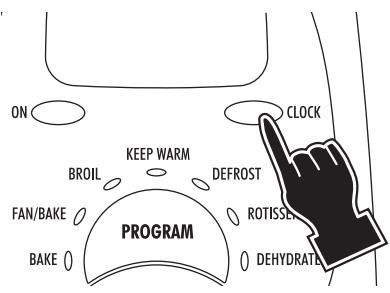
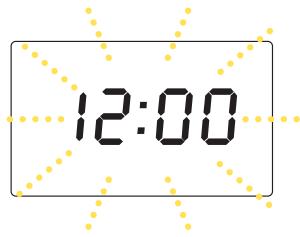
1 Press the CLOCK button (13). (the hours and the minutes flash on display)
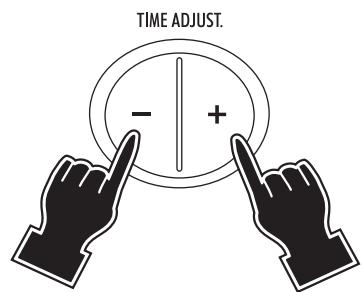
2 Set the desired time by pushing the "+" or "-" buttons (12-18). The times set will begin blinking on the display.
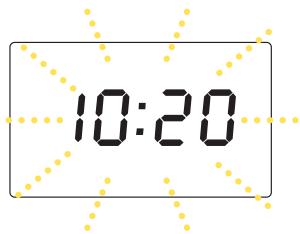
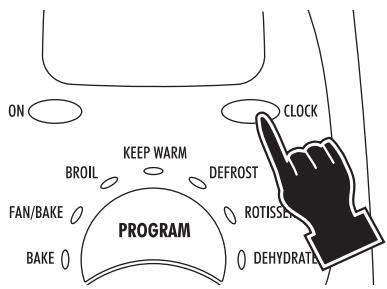
1 Press the CLOCK button (13) at any time during cooking to display the current time. (the display shows the time set)
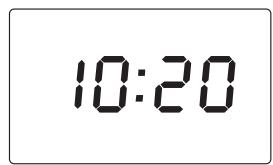
- If you wish to change the hour on the dial once it has been set, press the CLOCK button (13) before proceeding to set the new time as described above.
- It is possible to display the current time even after starting a function, by pressing the CLOCK button (13) (the time is displayed for 3 seconds).
2.2 - PIZZA FUNCTION
This oven is programmed with a special pizza function from De'Longhi. The program is designed specifically for cooking pizza dough, to result in the crispy pizza you love. Pizza can be cooked using the De' Longhi pizza tray provided, or the pizza can be cooked directly on the wire oven rack. (For the popular thick-style "rising crust" we especially recommend placing pizza on the wire rack.)
Important Note: Always position pizza in the lowest guide (see page 6). Using the pizza program, remember that it is NOT necessary to preheat the oven.
STOP/CANCEL
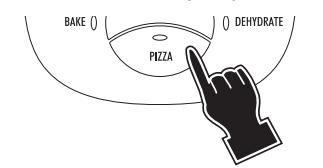
1 Press the PIZZA button and select the desired program (see the table below). The display will show the message "P1", "P2" o "P3".
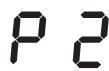
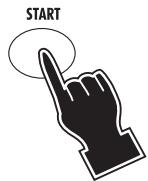
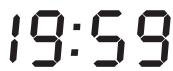
2 Press the START button (17). As you press START, time selected is reduced of 1 minute. The oven will start the countdown. At the end of the set time the control will emit 4 beeps (and the display will return to stand-by, showing the time of the day if previously set).
AND
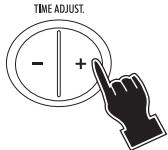
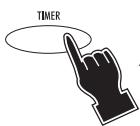
3 If, during the cooking, you think to need a longer duration for your pizza, press the TIMER button (9) and then add the desired time (for a maximum of 5 minutes more) by repeatedly pressing the "+" button (18).
If the START button (17) is not pressed within 3 minutes from the previous setting, the control will return to stand-by.
- The cooking process can be stopped in any moment by pressing the STOP/CANCEL button (1 1).
NOTES/TIPS TO COOK THE PIZZA
- If the oven is already hot (e.g. in case of sequential pizza cooking), the electronic control will automatically reduce/adjust the cooking time.
Always put the pizza on the PIZZA TRAY (L) provided; then insert the tray in slot 3. - Frozen pizza: remove the pizza from its packaging and put the pizza directly on the PIZZA TRAY (L). Home - made pizza with fresh dough: prepare the pizza on the well greased PIZZA TRAY (L) or line the tray with oven-proof paper. We suggest to add mozzarella or soft cheese just five minutes before the end of cooking: the cheese will melt perfectly without overburning.
In order to select the right program, refer to the following table; - Cooking rresult may vary adjust these settings to your individual preferences.
| DISPLAY INDICATION | NOTES/TIPS |
| P1 | Ideal for small pizzas (weight 6,5 - 9 ounce) |
| P2 | Ideal for medium frozen pizzas (weight 9 - 18 ounce) |
| P3 | Ideal for big frozen pizzas (weight 18 - 28 ounce) or for home-made pizzas. |
COOKING TWO PIZZAS AT ONCE
Note: The Special pizza program is intended only for cooking one pizza at a time, following the instruction above. Cooking two pizzas at once: The special pizza setting cannot be used for cooking two pizzas. However, you can get very good results with two pizzas following these directions:
Using the two wire oven racks, place one pizza in the lowest position and a second pizza in the middle position (see page 6). Use Fan/Bake setting (not special pizza setting) and PREHEAT to 375 degrees. Cook for 15 minutes an then switch the racks to opposite positions for an additional 10-15 minutes of additional cooking time.
2.3 - BAKE AND FAN/BAKE FUNCTIONS
| 35 OF | |
| 30 OF | |
| 1:00 | |
| 1:20 | |
| 1:19 |
- If the cooking time is not set (skipping points 3 and 4), the display will show the countdown starting from the default duration of 1:00 (1 hour).
- The oven should always be preheated. Wait for the audible signal (3 times 3 short beeps) before placing the shallow pan (H) with food in the oven.
- The set time can be modified during cooking by simply repeating points 3 and 4. The countdown will automatically restart 3 seconds after the last setting.
- To display the current temperature (during cooking), simply press the TEMPERATURE button (10). To modify the set temperature, press again, within 3 seconds, one of the two buttons (12 or 18) until the new desired setting will be displayed.
- If the START button (17) is not pressed within 3 minutes from the previous setting, the control will return to stand-by.
HEAT CIRC CONVECTION FEATURE WITH FAN/BAKE MODE
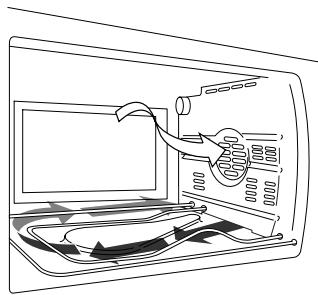
To get the most from convection cooking, this DeLonghi oven incorporates our patented Heat Circ design.
How does it work? When using convection mode, the Heat Circ design first pulls air down to the heating elements, where it circulates and becomes very hot. Next, this heated air is transferred into the cooking chamber and circulated there to enhance cooking results as only convection cooking can. The crumb tray is designed with special heat deflectors to precisely direct the process.
DeLonghi's Heat Circ feature is designed so that fan-circulated air is the hottest air in the oven. This enhances the time-saving benefit of convection cooking, and has been proven in our test kitchens to deliver the most consistent cooking results.
In general, meats and poultry can be cooked in less time (a meat thermometer will help to prevent overcooking). Cakes, pies, cookies, etc. can be baked at a lower temperature (see charts and recipes).
BAKE mode is used when browning and crisping are less important or undesirable. Use it, following conventional recipes, for casseroles, stuffed vegetables, fish, lasagna, fruit tarts, cheeses and other moist mixtures.

CONVECTION BAKING OF CONVENIENCE FOODS
Many convenience foods can be successfully baked or heated by convection on the FAN/BAKE mode. In general, follow the package directions for temperature and time. However, lower the temperature by 25^ for more even cooking of larger items, frozen foods (except waffles and pancakes) and packaged casserole mixtures. There is such a wide choice of convenience foods on the market and variations in packaging, quantities and initial temperatures (frozen, refrigerated and shelf temperature) that it's best to follow the package instructions. Check the food 5 to 10 minutes before the time is up; you may need to adjust the time and/or temperature for best results.
Here are some tips for different types of convenience foods:
- If directions call for placing the food container on a metal pan or cookie sheet to avoid spills or to aid even cooking, use the shallow pan provided. Use it or the cookie sheets for foods, such as rolls, cookies, turnovers or frozen French fries, breaded fish or chicken pieces, that are placed directly on a pan or cookie sheet.
- Some frozen foods come in "oven-proof" plastic or paper containers which can be cooked in a microwave oven and, within limits, a conventional oven. Be sure to follow directions for maximum baking temperature. The container can melt or scorch if too high a temperature is used. To be on the safe side, set the oven 25^ . lower than the recommended temperature.
- When baking packaged mixtures (such as scalloped potatoes, macaroni and cheese, brownies, corn bread, coffeecake and cake mixes) check the package directions for recommended sizes of pan, casserole or dish and the proper baking times for each. A 9-inch round or an 11/7- by 11/2 inch rectangular pan will fit in the oven with room on all sides for air circulation.
Layer cake mixes can be baked one layer at a time in a 8- or 9-inch round pan or all of the batter in a 3-inch deep 9-inch round bundt or spring-form pan.
TEMPERATURE AND TIME FOR TYPICAL FOODS
The suggested temperature and times will vary depending on the temperature of the food placed in the oven, the quantity and personal preference. Times given for meat and poultry are for refrigerator temperature. Add five minutes for preheating the oven.
| FOOD | FUNCTION | TEMPERATURE SETTING | APPROX. TIME | NOTES AND TIPS |
| Whole chicken 11-12 lbs. Unstuffed. | FAN/BAKE | 350°F to 400°F | 120 min. or until internal temperature of 175°F in thigh and breast | Put the poultry or the meat directly in the SHALLOW PAN (H) inserted in the slot 3. If you desire to cook in a oven-proof container, put the container on the WIRE RACK (I) inserted in slot 3. |
| Pork Loin or Rib Roast, 3 - 6 lbs. | FAN/BAKE | 350°F to 400°F | 90 min. or until internal temperature of 170°F is reached. | |
| Pork Baby Back Ribs 1.75 - 2 lbs. in 6 - to 10 - inch strips. | FAN/BAKE | 300°F for 25 min. then BROIL for 30 min. | Total time 50 min. or until brown and very tender. | Use the SHALLOW PAN (H) lined with foil inserted in the slot 3. |
| Beef Sirloin or Rib Roast 5 - 7 lbs, boned. | FAN/BAKE | 350°F to 400°F | 25 min./lb. for rare 30 min./lb for medium 35 min./lb. well | Have roast tied for even cooking. Use SHALLOW PAN (H) in slot 2 or 3. |
| Cornish Hens 1.5 lbs. each, two split into four halves. | FAN/BAKE | 350°F to 400°F | 45 - 50 min. or until tender and juice is clear when pierced with fork. | Roast on SHALLOW PAN (H) insert ed in slot 2, skin side up. Brush with orange marmalade or honey. Turn and brush several times until done. |
| Baking Potatoes | BAKE | 400°F to 450°F | For 6 to 8 large pota- toes. 45 - 50 min. or until fork-tender. | Wash and pierce raw potatoes with fork. Rub skins with salad oil if desired. Bake on the SHALLOW PAN (H) in the slot 3. |
| Pizza, homemade. | BAKE | 400°F to 450°F | 20 - 25 min. depending on size and topping. Bake until bubbling hot and crust crisp. | Insert the PIZZA TRAY (L) in the slot 3 (see fig. page 6) |
| PIZZA | P3 | 25 min., automatic pro- gram | ||
| Cakes: Layer, Sheet cake or Loaf cake. | FAN/BAKE | 350°F to 400°F | Follow traditional recipe timing but lower temper- ature by 25 to 50°F. | Insert the WIRE RACK (I) on the SHALLOW PAN (H) in slot 2. In case of tall rising cakes, place the tray in the slot 3. |
| Pies: Fruit, 9- inch double crust. | ||||
| Brownies, Bar, Cookies | FAN/BAKE | 350°F to 400°F | Follow traditional recipe timing but lower tem- perature by 25 to 50°F. Use 7x11 inch or 8-9 inch square pan or oven-glass dish. | Insert the WIRE RACK (I) or the SHALLOW PAN (H) in slot 2. Grease the pan accurately if required by the recipe. |
The chart and recipes cover various types of food. You can adapt your own favorite foods and recipes by following the directions for similar foods.
2.4 - BROILING FUNCTION
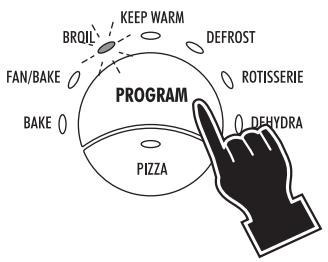
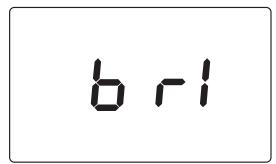
1 Select the BROILING function by pressing the PROGRAM button (7) until the BROIL indicator light (4) will be illuminated. The display will show the message b r t
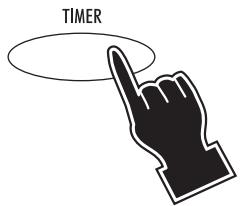
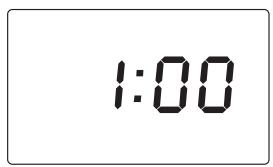
2 Press the TIMER button (9). The display will show 1:00.
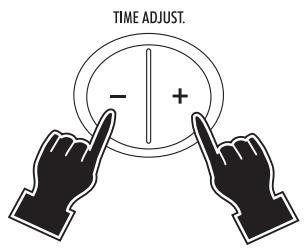
3 Set the time (max 2 hours) by pressing the " - " (12) and " + " (18) buttons. Keep the button pressed for more than 2 seconds to quickly scroll the time up or down. For each press of the button the time will increase or decrease by one 1 minute.
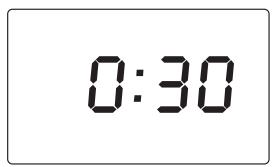

4 Press the START button (17). As you press START, time selected is reduced of 1 minute. The oven will start the countdown. At the end of the set time the control will emit 4 beeps and the display will return to stand-by (showing the time of the day, if previously set).
- If the cooking time is not set, (skipping points 2 and 3) the display will show the countdown starting from the default duration of 1:00 (1 hour).
- The set time can be modified during cooking by simply repeating points 2 and 3. The countdown will automatically restart 3 seconds after the last setting.
- If the START button (17) is not pressed within 3 minutes from the previous setting, the control will return to stand-by.
Chapter 2 - Using the control and setting the modes
Preheat the oven for 5 minutes, with the door slightly ajar (as highlighted in Figure 1).
Once the preheating time is complete, place the food being grilled directly on the wire rack (Figure 2) and close the door, leaving it ajar, as shown in Figure 3; remember to turn the food half way through cooking.
Important: for best results, place the food on the wire rack (I), leaving an empty space of around 1 in near the door (see Figure 2).
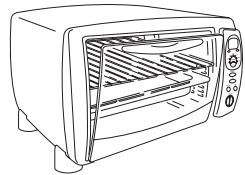
fig. 1
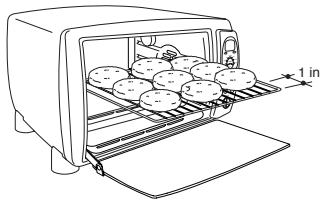
fig. 2
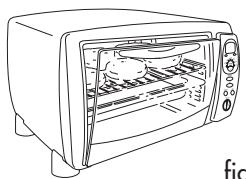
fig. 3
To top-brown casseroles with crumb or cheese toppings, place the shallow pan directly in slot 1; if the food has been prepared on a container, put the container on the wire rack inserted in slot 2 (as shown in the figure 4).
NOTE: Oven-glass dishes should not be exposed to direct broiler heat.
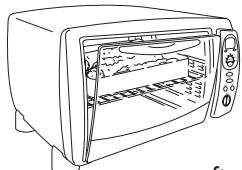
fig. 4
SUGGESTED BROILING TIMES
| FOOD | WEIGHT OR THICKNESS | APPROX. TIME (Turn at half time) |
| Beef Sirloin, Porterhouse Steak | 1-1 1/2 in. | Rare 12 - 15 min. Medium 16 - 18 min. |
| Beef Flank Steak, Filet | 3/4 - 1 in. | Rare 10 - 12 min. Medium 13 - 16 min. |
| Hamburger | 1 in. | Medium-well 15 - 18 min. |
| Pork Chop | 3/4 - in. | Well 18 - 22 min. |
| Fish Fillets, Steak (See note) | 1/2 - 1 in. | 10 - 16 min. |
| Chicken Piece, Broiler-fryer | 3 - 4 lb. | 40 - 50 min. until juices run clear when fork-tested and no pink when cut. |
| Bacon, Sausage, Links or Patties | Up to capacity of broil-rack. | 10 - 15 min. for crisp bacon, well-done sausage. |
Since fish is non-fatty it can be broiled directly on shallow pan. Broil until it flakes easily with a fork. Thin fillets need not to be turned.
To correctly toast bread, place the slices as shown in the figure to the side, that is, leaving 1 in of free space at the ends of the wire rack.
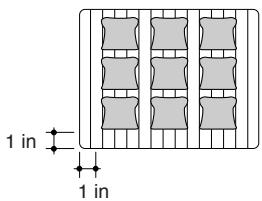
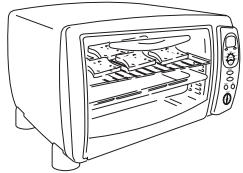
FOR TOASTING BREAD ONLY; the oven door must be closed completely (as shown in the figure to the side)
2.5 - KEEP WARM FUNCTION
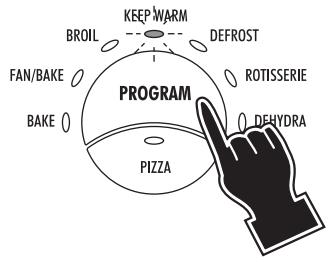
1 Select the KEEP WARM function by pressing the PROGRAM button (7) until the KEEP WARM indicator light (3) will be illuminated. The display will show the temperature 140^
14 OF
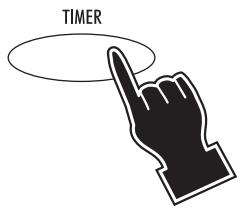
2 Press the TIMER button (9). The display will show 1:00.
100
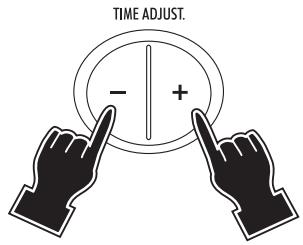
3 Set the time (max 2 hours) by pressing the " - " (12) and " + " (18) buttons. Keep the button pressed for more than 2 seconds to quickly scroll the time up or down. For each press of the button the time will increase or decrease by one 1 minute.
0:30

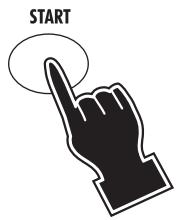
4 Press the START button (17). As you press START, time selected is reduced of 1 minute. The oven will start the countdown. At the end of the set time the control will emit 4 beeps and the display will return to stand-by (showing the time of the day, if previously set).
0:29
- For this function, should be placed in the lowest position (see page 6).
- If the keep warming time is not set, (skipping points 2 and 3) the display will show the countdown starting from the default duration of 1:00 (1 hour).
- The set time can be modified during cooking by simply repeating points 2 and 3. The countdown will automatically restart 3 seconds after the last setting.
- If the START'button (17) is not pressed within 3 minutes from the previous setting, the control will return to stand-by.
This feature is designed to keep foods warm, after they are cooked for short periods of time without overcooking. We do not recommend keeping foods warm for prolonged periods or using this feature to reheat frozen or cold foods.
2.6 - DEFROSTING FUNCTION
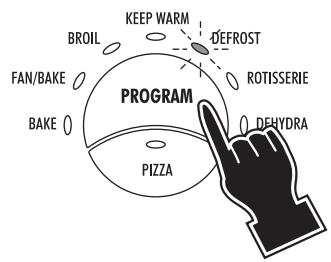
1 Select the DEFROSTING function by pressing the PROGRAM button (7) until the DEFROST indicator light (14) will be illuminated. The display will show the message d EF.
d EF
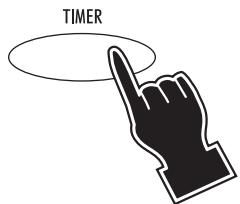
2 Press the TIMER button (9). The display will show 1:00.
1:00
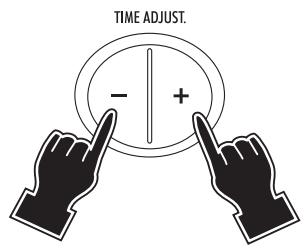
3 Set the time (max 3 hours) by pressing the - (12) and + - (18) buttons. Keep the button pressed for more than 2 seconds to quickly scroll the time up or down. For each press of the button the time will increase or decrease by one 1 minute.
0:40

STOP/CANCEL
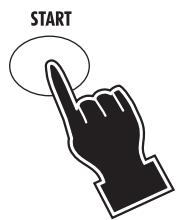
4 Press the START button (17). As you press START, time selected is reduced of 1 minute. The oven will start the countdown. At the end of the set time the control will emit 4 beeps and the display will return to stand-by (showing the time of the day, if previously set).
0:39
- If the defrosting time is not set, (skipping points 2 and 3) the display will show the countdown starting from the default duration of 1:00 (1 hour).
- The set time can be modified during cooking by simply repeating points 2 and 3. The countdown will automatically restart 3 seconds after the final setting.
- If the START button (17) is not pressed within 3 minutes from the previous setting, the control will return to stand-by.
Put the frozen food directly on the WIRE RACK (I) inserted in slot 2. Put the SHALLOW PAN (H) in slot 3 in order to catch the water dropping from the load during the defrosting process (see page 6).
Portions and pieces of raw meat, poultry and fish, frozen soups, pastry, fruit or leftovers will thaw more quickly on this setting than on a counter or in the refrigerator.
Thaw only pieces or portions small enough to thaw in an hour or less and do not let food come to room temperature.
Thawed food held too long or at a warm temperature can cause serious illness.
Large amounts of food should be defrosted in a refrigerator.
2.7 - ROTISSERIE FUNCTION
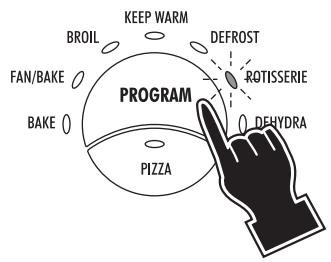
1 Select the ROTISSERIE function by pressing the PROGRAM button (7) until the ROTISSERIE indicator light (15) will be illuminated. The display will show the message rot.
rot
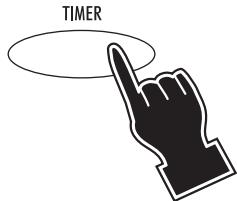
2 Press the TIMER button (9). The display will show 1:00.
1:00
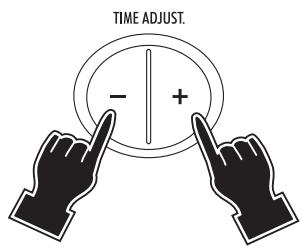
3 Set the time (max 3 hours) by pressing the - (12) and + - (18) buttons. Keep the button pressed for more than 2 seconds to quickly scroll the time up or down. For each press of the button the time will increase or decrease by one 1 minute.
2:30
STOP/CANCEL

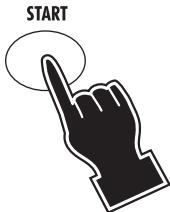
4 Press the START button (17). As you press START, time selected is reduced of 1 minute. The oven will start the countdown. At the end of the set time the control will emit 4 beeps and the display will return to stand-by (showing the time of the day, if previously set).
2:29
- If the rotisserie time is not set, (skipping points 2 and 3) the display will show the countdown starting from the default duration of 1:00 (1 hour).
- The set time can be modified during cooking by simply repeating points 2 and 3. The countdown will automatically restart 3 seconds after the final setting.
- If the START button (17) is not pressed within 3 minutes from the previous setting, the control will return to stand-by.
Chapter 2 - Using the control and setting the modes
This function is ideal for cooking chickens on the spit, fowl in general, roast pork and veal. The rotisserie function can be used for load of up to 10 pounds.
Operate as follows:
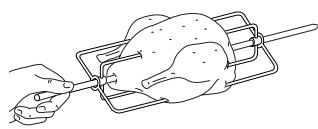
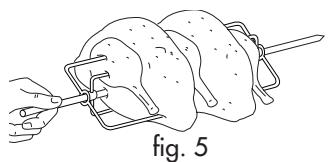
Place the food on the spit (P) and hold it firm using the forks (for best results, tie the meat using kitchen string).
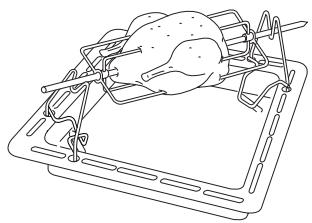
fig. 7
Place the spit on the supports.
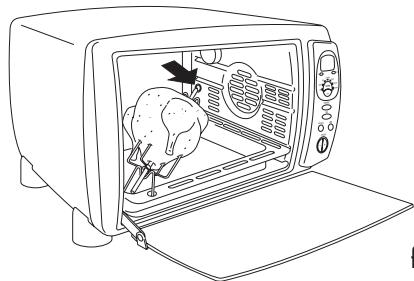
fig. 9
Once the dripping pan is in place, push the spit into the turnspit mount (D), tilting the spit supports (Q) to the right.
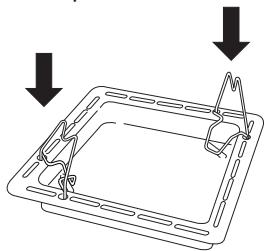
fig. 6
Place the spit supports (Q) on the dripping pan, in the holes provided.
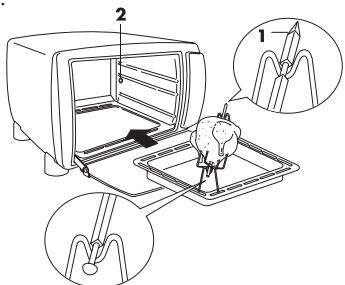
fig. 8
Slide the dripping pan with the food being cooked into the lower guide (3), tilting the spit supports (Q) to the left. Make sure the point of the spit 1 is facing forwards and is correctly inserted into the hole 2.
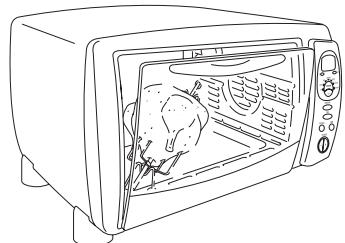
fig. 10
Close the door, leaving it slightly ajar, as highlighted in the figure.
For information on the cooking times, refer to the instructions in the table below.
| FOOD | WEIGHT | APPROX. TIME |
| Chicken | 4-5 lbs. | 120 min. |
| Chickens (2) | 9-10 lbs. | 180 min. |
| Rost pork | 3-4 lbs. | 90 min. |
| Turkey | 8-10 lbs. | 180 min. |
The rotisserie function is designed for use with a strict maximum load of 10 pounds. For example, please note that turkey at maximum 10 pound weight likely requires binding ties to comfortably clear the drip pan. Therefore, it is advised to be conservative with maximum weight when shopping for rotisserie birds. For larger loads, we recommend the Fan/Bake mode.
2.8 - DEHYDRATING MODE
Please note: The Dehydrating kit is readily available and can be ordered from De'Longhi. Please refer to address and details stated on carton box and/or warranty card.
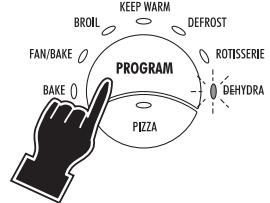
1 Select the DEHYDRATING function by pressing the PROGRAM button (7) until the DEHYDRATE indicator light (16) will be illuminated. The display will show the message dEH .
dEH
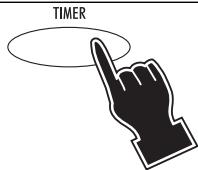
2 Press the TIMER button (9). The display will show 10:00.
10:00
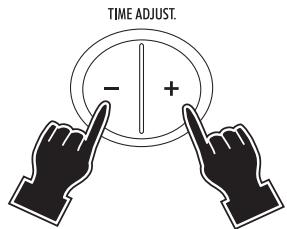
3 Set the time (max 14 hours) by pressing the - (12) and + + ^ (18) buttons. Keep the button pressed for more than 2 seconds to quickly scroll the time up or down. For each press of the button the time will increase or decrease by one 1 minute.
12:30

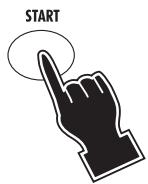
4 Press the START button (17). As you press START, time selected is reduced of 1 minute. The oven will start the countdown. At the end of the set time the control will emit 4 beeps and the display will return to standby (showing the time of the day, if previously set).
12:29
- If the dehydrating time is not set, (skipping points 2 and 3) the display will show the countdown starting from the default duration of 10:00 (10 hour).
- The set time can be modified during cooking by simply repeating points 2 and 3. The countdown will automatically restart 3 seconds after the last setting.
- If the START button (17) is not pressed within 3 minutes from the previous setting, the control will return to stand-by.
FOR DEHYDRATING
- Always preheat the oven before placing the racks with the food inside. When preheating is complete, the oven will emit three "beeps".
- Slices of apples, pineapple, pears, peaches or bananas, placed directly on the dehydrating shelves, will dry in 8 to 14 hours in the gently circulating warm air. Time will depend on the moisture in the fruit. Herbs can also be dried. However, the limited quantity of vegetables that can be dried at one time may not be worth your time and attention. Consult a book on dehydrating food for specific directions as to times, pretreatment and storage of dried foods.
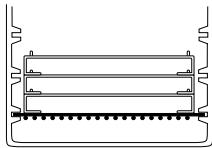
- Stack the dehydrating shelves on top of one another, and then place them on the wire rack.
- Wait for the audible signal (3 times 3 short beeps) before inserting the wire rack in the guide 3 (see figure).
Always leave the door open to the stop position.
CHAPTER 3 - CLEANING AND MAINTENANCE
3.1 - CARE AND CLEANING
Always unplug the oven-broiler and allow it to cool before cleaning. This unit has been designed and engineered with your safety in mind. To assure maximum safe operation, keep unit clean free of grease and build up of food particles.
The internal cavity of your oven is covered with a special enamel to which splashes and food particles do not stick, thus making cleaning particularly simple. Do not clean interior with metal scouring pads.
Pieces can break off and touch electrical parts, creating risk of electrical shock.
To clean the glass door, use a glass cleaner or a damp cloth. Wipe dry with a clean cloth. To clean the exterior finish, use a damp, sudsy cloth. For stubborn stains, a non-abrasive liquid cleaner or spray glass cleaner may be used. Do not use metal scouring pads, as they might mar the finish. Always remove cleaning agents by polishing with a dry cloth.
Slide the crumb tray (G) out from under the bottom of your oven (see fig. 11). Wash by hand. Should the soilage be difficult to remove, rinse the crumb tray with hot soapy water and if necessary, scour it delicately, without scratching it.
To make the cleaning of the inside of the oven easier, the upper heating element (A) can be lowered by pulling the clasp for drop down heating element (C) (fig. 12-13).
IMPORTANT: after cleaning, reposition and reattach the electrical element (fig. 14). The oven must be not used with the element in the lowered positioned.
OVEN LIGHT
The oven light (B) is always on when the oven is on. To replace the bulb, proceed as follows:
- unplug the appliance from the power socket
- unscrew the protective glass cover (X), by turning it anti-clockwise, and replace the bulb (Y) with a new one of the same type (see Fig. 15). Replace the protective glass cover (X).
Only use bulbs suitable for ovens (T572°F)
N.B. The oven can still be used even if the bulb is burnt-out
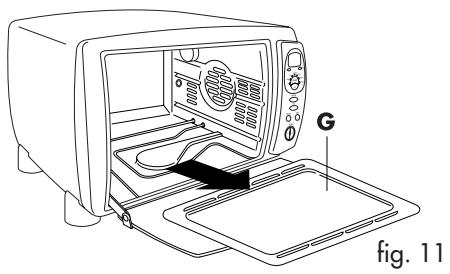
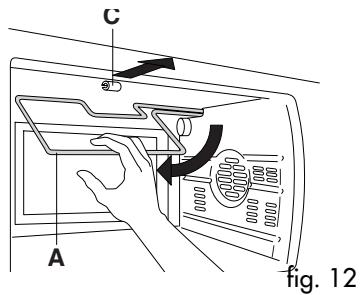
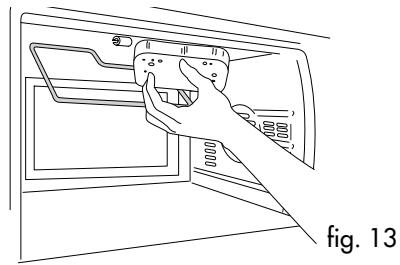
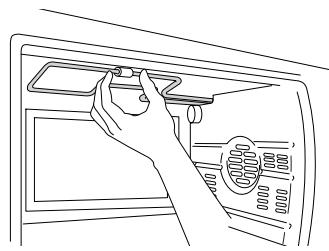
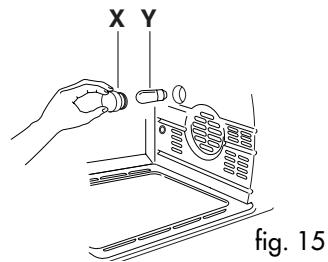
fig. 14