DJXIIB - Synthétiseur YAMAHA - Notice d'utilisation et mode d'emploi gratuit
Retrouvez gratuitement la notice de l'appareil DJXIIB YAMAHA au format PDF.


| Type de produit | Table de mixage DJ |
| Caractéristiques techniques principales | 2 canaux, égaliseur 3 bandes, effets intégrés |
| Alimentation électrique | Adaptateur secteur inclus |
| Dimensions approximatives | 320 mm x 230 mm x 100 mm |
| Poids | 1,5 kg |
| Compatibilités | Compatible avec la plupart des équipements DJ et logiciels de mixage |
| Type de batterie | Non applicable (fonctionne sur secteur) |
| Tension | 100-240 V AC |
| Puissance | 10 W |
| Fonctions principales | Mixage audio, effets sonores, enregistrement |
| Entretien et nettoyage | Utiliser un chiffon doux, éviter les produits chimiques agressifs |
| Pièces détachées et réparabilité | Disponibilité de pièces de rechange via le service après-vente Yamaha |
| Sécurité | Ne pas exposer à l'eau, utiliser dans un environnement sec |
| Informations générales utiles | Garantie de 2 ans, support technique disponible |
FOIRE AUX QUESTIONS - DJXIIB YAMAHA
Questions des utilisateurs sur DJXIIB YAMAHA
0 question sur cet appareil. Repondez a celles que vous connaissez ou posez la votre.
Poser une nouvelle question sur cet appareil
Téléchargez la notice de votre Synthétiseur au format PDF gratuitement ! Retrouvez votre notice DJXIIB - YAMAHA et reprennez votre appareil électronique en main. Sur cette page sont publiés tous les documents nécessaires à l'utilisation de votre appareil DJXIIB de la marque YAMAHA.
MODE D'EMPLOI DJXIIB YAMAHA
YAMAHA

DJX- DIB
Owner's Manual
SPECIALMESSAGESECTION
This product utilizes batteries or an external power supply (adapter). DO NOT connect this product to any power supply or adapter other than one described in the manual, on the name plate, or specifically recommended by Yamaha.
WARNING: Do not place this product in a position where anyone could walk on, trip over, or roll anything over power or connecting cords of any kind. The use of an extension cord is not recommended! IF you must use an extension cord, the minimum wire size for a 25' cord (or less) is 18 AWG. NOTE: The smaller the AWG number, the larger the current handling capacity. For longer extension cords, consult a local electrician.
This product should be used only with the components supplied or; a cart, rack, or stand that is recommended by Yamaha. If a cart, etc., is used, please observe all safety markings and instructions that accompany the accessory product.
SPECIFICATIONS SUBJECT TO CHANGE:
The information contained in this manual is believed to be correct at the time of printing. However, Yamaha reserves the right to change or modify any of the specifications without notice or obligation to update existing units.
This product, either alone or in combination with an amplifier and headphones or speaker/s, may be capable of producing sound levels that could cause permanent hearing loss. DO NOT operate for long periods of time at a high volume level or at a level that is uncomfortable. If you experience any hearing loss or ringing in the ears, you should consult an audiologist.
IMPORTANT: The louder the sound, the shorter the time period before damage occurs.
Some Yamaha products may have benches and / or accessory mounting fixtures that are either supplied with the product or as optional accessories. Some of these items are designed to be dealer assembled or installed. Please make sure that benches are stable and any optional fixtures (where applicable) are well secured BEFORE using.
Benches supplied by Yamaha are designed for seating only. No other uses are recommended.
NOTICE:
Service charges incurred due to a lack of knowledge relating to how a function or effect works (when the unit is operating as designed) are not covered by the manufacturer's warranty, and are therefore the owners responsibility. Please study this manual carefully and consult your dealer before requesting service.
ENVIRONMENTAL ISSUES:
Yamaha strives to produce products that are both user safe and environmentally friendly. We sincerely believe that our products and the production methods used to produce them, meet these goals. In keeping with both the letter and the spirit of the law, we want you to be aware of the following:
Battery Notice:
This product MAY contain a small non-rechargeable battery which (if applicable) is soldered in place. The average life span of this type of battery is approximately five years. When replacement becomes necessary, contact a qualified service representative to perform the replacement.
This product may also use "household" type batteries. Some of these may be rechargeable. Make sure that the battery being charged is a rechargeable type and that the charger is intended for the battery being charged.
When installing batteries, do not mix batteries with new, or with batteries of a different type. Batteries MUST be installed correctly. Mismatches or incorrect installation may result in overheating and battery case rupture.
Warning:
Do not attempt to disassemble, or incinerate any battery. Keep all batteries away from children. Dispose of used batteries promptly and as regulated by the laws in your area. Note: Check with any retailer of household type batteries in your area for battery disposal information.
Disposal Notice:
Should this product become damaged beyond repair, or for some reason its useful life is considered to be at an end, please observe all local, state, and federal regulations that relate to the disposal of products that contain lead, batteries, plastics, etc. If your dealer is unable to assist you, please contact Yamaha directly.
NAME PLATE LOCATION:
The name plate is located on the bottom of the product. The model number, serial number, power requirements, etc., are located on this plate. You should record the model number, serial number, and the date of purchase in the spaces provided below and retain this manual as a permanent record of your purchase.
Model
Serial No.
Purchase Date
PLEASE KEEP THIS MANUAL
92-BP (bottom)
PRECAUTIONS
PLEASE READ CAREFULLY BEFORE PROCEEDING
- Please keep these precautions in a safe place for future reference.

WARNING
Always follow the basic precautions listed below to avoid the possibility of serious injury or even death from electrical shock, short-circuiting, damages, fire or other hazards. These precautions include, but are not limited to, the following:
- Do not open the instrument or attempt to disassemble the internal parts or modify them in any way. The instrument contains no user-serviceable parts. If it should appear to be malfunctioning, discontinue use immediately and have it inspected by qualified Yamaha service personnel.
- Do not expose the instrument to rain, use it near water or in damp or wet conditions, or place containers on it containing liquids which might spill into any openings.
- If the AC adaptor cord or plug becomes frayed or damaged, or if there is a sudden loss of sound during use of the instrument, or if any unusual smells or smoke should appear to be caused by it, immediately turn off the
power switch, disconnect the adaptor plug from the outlet, and have the instrument inspected by qualified Yamaha service personnel.
- Use the specified adaptor (PA-5B, PA-5C or an equivalent recommended by Yamaha) only. Using the wrong adaptor can result in damage to the instrument or overheating.
- Before cleaning the instrument, always remove the electric plug from the outlet. Never insert or remove an electric plug with wet hands.
- Check the electric plug periodically and remove any dirt or dust which may have accumulated on it.

CAUTION
Always follow the basic precautions listed below to avoid the possibility of physical injury to you or others, or damage to the instrument or other property. These precautions include, but are not limited to, the following:
- Do not place the AC adaptor cord near heat sources such as heaters or radiators, and do not excessively bend or otherwise damage the cord, place heavy objects on it, or place it in a position where anyone could walk on, trip over, or roll anything over it.
- When removing the electric plug from the instrument or an outlet, always hold the plug itself and not the cord.
- Do not connect the instrument to an electrical outlet using a multiple-connector. Doing so can result in lower sound quality, or possibly cause overheating in the outlet.
- Unplug the AC power adaptor when not using the instrument, or during electrical storms.
- Always make sure all batteries are inserted in conformity with the +/- polarity markings. Failure to do so might result in overheating, fire, or battery fluid leakage.
- Always replace all batteries at the same time. Do not use new batteries together with old ones. Also, do not mix battery types, such as alkaline batteries with manganese batteries, or batteries from different makers, or different types of batteries from the same maker, since this can cause overheating, fire, or battery fluid leakage.
- Do not dispose of batteries in fire.
- Do not attempt to recharge batteries that are not intended to be charged.
- When the batteries run out, or if the instrument is not to be used for a long time, remove the batteries from the instrument to prevent possible leakage of the battery fluid.
- Keep batteries away from children.
- If the batteries do leak, avoid contact with the leaked fluid. If the battery fluid should come in contact with your eyes, mouth, or skin, wash immediately with water and consult a doctor. Battery fluid is corrosive and may possibly cause loss of sight or chemical burns.
- Before connecting the instrument to other electronic components, turn off the power for all components. Before turning the power on or off for all components, set all volume levels to minimum. Also, be sure to set the volumes of all components at their minimum levels and gradually raise the volume controls while playing the instrument to set the desired listening level.
- Do not expose the instrument to excessive dust or vibrations, or extreme cold or heat (such as in direct sunlight, near a heater, or in a car during the
day) to prevent the possibility of panel disfiguration or damage to the internal components.
- Do not use the instrument near other electrical products such as televisions, radios, or speakers, since this might cause interference which can affect proper operation of the other products.
- Do not place the instrument in an unstable position where it might accidentally fall over.
- Before moving the instrument, remove all connected adaptor and other cables.
- When cleaning the instrument, use a soft, dry cloth. Do not use paint thinners, solvents, cleaning fluids, or chemical-impregnated wiping cloths. Also, do not place vinyl, plastic or rubber objects on the instrument, since this might discolor the panel or keyboard.
- Do not rest your weight on, or place heavy objects on the instrument, and do not use excessive force on the buttons, switches or connectors.
- Use only the stand specified for the instrument. When attaching the stand or rack, use the provided screws only. Failure to do so could cause damage to the internal components or result in the instrument falling over.
- Do not operate the instrument for a long period of time at a high or uncomfortable volume level, since this can cause permanent hearing loss. If you experience any hearing loss or ringing in the ears, consult a physician.
SAVING USER DATA
- Always save data to an external device such as the Yamaha MIDI data file MDF3 frequently, in order to help prevent the loss of important data due to a malfunction or user operating error.
Yamaha cannot be held responsible for damage caused by improper use or modifications to the instrument, or data that is lost or destroyed.
Always turn the power off when the instrument is not in use.
Make sure to discard used batteries according to local regulations.
Congratulations on your purchase of the Yamaha DJX-IIB!
The DJX-IIB is a complete dance-music workstation that can be used both as a real-time performance instrument and a powerful production tool. Its intuitive interface makes real-time operation easy for artists with a DJ background.
Read this Owner's Manual carefully while playing your new DJX-IIB in order to take full advantage of its various features.
Packing List
- DJX-IIB
- Owner's Manual
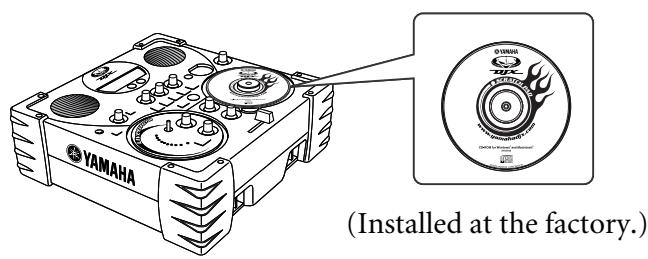
CD-ROM
How to Use the Manual
What is the DJX-IIB? page 5
Introduces the various DJX-IIB features.
Panel Controls.. page 8
Use this section to find out about all of the buttons and controls of the DJX-IIB.
Setting Up.. page 12
Explains how to connect up the power adaptor and how to install batteries.
100 tips to be a DJ! page 14
This section guides the novice user step-by-step through 100 important and useful tips in playing and creating great dance music. Like a game, each tip is a step up toward the goal of becoming a master DJ.
Appendix page 70
This contains various important lists such as the Voice list, Preset Pattern list, MIDI data format and MIDI implementation chart.
Troubleshooting.. page 70
If the DJX-IIB does not function as expected or you have some problem with the sound or operation, consult this section before calling your Yamaha dealer or service center. Most common problems and their solutions are covered here in a very simple and easy-to-understand way.
Glossary.. page 73
This section covers various important words and terms related to both the DJX-IIB and to dance music in general.
Index.. page 88
This section alphabetically lists virtually all topics, features, functions and operations with their respective page numbers, letting you quickly and easily find the information you need.
The illustrations and displays as shown in this owner's manual are for instructional purposes only, and may be different from your instrument.
The new DJX-IIB is a digital DJ powerhouse!
If you've dreamed of creating and performing your own cutting-edge, that 'n' funky dance music, you've come to the right place... The DJX-IIB is a fully digital DJ machine — a revolutionary new instrument that blends the reliability and clean sound of digital with stunningly powerful and easy-to-use analog-like controls.
No music knowledge or experience required!
If you've got great music in your head, but haven't had the training to bring it out to the real world, here's your chance! You don't need to know about chords, or how to read and play melodies — all you need is a good sense of rhythm, and the DJX-IIB can even help you develop that, too!
Let the DJX-IIB show you how to become a master DJ!
Whether you're a complete beginner or a turntable and mixing genius, the DJX-IIB can help you fully master the instrument. With the "100 Tips" section, you're guided step-by-step through 100 tips and trade secrets the pros use in playing and creating great dance music. Like a game, each tip is a step up toward the goal of becoming a master DJ.
Now let's take a look at the individual features and functions of the DJX-IIB
- Pattern Player . page 14 The DJX-IIB features a total of 70 dynamic rhythm patterns, perfect for your DJ performance. Each pattern has 10 different variations.
- Scratch Pad page 26
This awesome feature puts a virtual turntable at your fingertips, letting you scratch your own accents, beats and instrument hits — just like a real DJ! With a huge selection of 73 special Scratch "kits" to choose from, you can fly in turntable scratches, arpeggios, sound effects, and vocal soundbites — all while the rhythm is playing!
Powerful Effects page 20
The DJX-IIB gives you a ton of amazing sonic control features, including a wide variety of stunning effects that can be manipulated in real time. Use the special Scratch Pad and the knobs to tweak, warp and mangle your sound as you play.
Audio bpm page 62
If you've got a favorite beat on CD or vinyl, you can easily sync it up to the DJX-IIB! The DJX-IIB "hears" the beat (from a connected CD player, MD player, etc.) and automatically locks into the rhythm by auto-adjusting the bpm of the DJX-IIB's pattern.
MIDI Compatibility for Even Greater DJ Performance Power page 65
Grow your own patterns! With MIDI, you can connect a MIDI device (such as a computer or sequencer) to the DJX-IIB, and send patterns you've created on the sequencer to the DJX-IIB as pattern data. Then wail away with your new patterns on the DJX-IIB!
Packing List. 4
How to Use the Manual. 4
What is the DJX-IIB? 5
Contents 6
Panel Controls. 8
Top Panel. 8
Changing the Scratch Pad CD............10
Rear Panel & Connections 11
Setting Up (Power supply connections)......12
Switching On the Power 13
Data Backup & Initialization. 13
100 Tips to be a DJ! 14
Chapter 1
Pattern Player Basics. 14
Tip 1 Work out with the Patterns! 14
Tip 2 Switch between Banks. 15
Tip 3 Mixing Main and Fill-in Patterns. 16
Tip 4 Exploring other Patterns. 16
Tip 5 Come down on the "one"! 18
Tip 6 Keep the bpm steady! 19
Chapter 2
Live Effector Basics. 20
Tip 7 What is the Live Effector? 20
Tip 8 Distortion 21
Tip 9 Auto Pan. 21
Tip 10 Ring Modulation. 21
Tip 11 Flanger 21
Tip 12 Phaser. 22
Tip 13 Slice 22
Tip 14 Delay 22
Tip 15 Echo 23
Tip 16 Lo-Fi. 23
Tip 17 Wah. 23
Chapter 3
Isolator Basics 24
Tip 18 Tweak the sound just right! 24
Chapter 4
Filter Basics 25
Tip 19 Cutoff and Resonance. 25
Chapter 5
Scratch Pad Clinic 26
Tip 20 Work out on the Scratch Pad! 26
Tip 21 Quarter-note scratching. 27
Tip 22 Eighth-note scratching. 28
Tip 23 Sixteenth-note scratching. 28
Tip 24 Shuffle feel 29
Tip 25 Triggering drum loops from the Scratch Pad 29
Tip 26 Scratch Pad arpeggios 30
Tip 27 Scratch Pad sound effects 30
Tip 28 Scratch low, scratch high. 30
Tip 29 Stop the turntable 31
Tip 30 Give the Scratch Pad a new face! 31
Tip 31 CD-ROM goodies 31
Chapter 6
Part Mixer Basics 32
Tip 32 What is a Part? 32
Tip 33 Take the console and remix the Parts! 32
Tip 34 Extra texture! 33
Chapter 7
Crossfader Basics 34
Tip 35 Work the Crossfader! 34
Tip 36 Mute the Pattern 34
Tip 37 Crossfader cuts. 35
Chapter 8
Intermediate
Techniques 36
Tip 38 Transpose the key. 36
Tip 39 Change the bpm. 37
Tip 40 Reset to the default bpm. 37
Tip 41 Fade in, fade out. 38
Tip 42 Travel light! 38
Tip 43Tweak the cutoff. 39
Tip 44 Wah-wah scratching. 39
Tip 45 Warped vinyl and a cheap turntable! 40
Tip 46 Scratch Drum Loops in sync. 40
Tip 47 Mute the Scratch 40
Chapter 9
Pattern Player Power Tips ...... 41
Tip 48 Hitting a new Pattern and Variation — at the same time! 41
Tip 49 Hitting a new Pattern, Bank and Variation — at the same time! 41
Tip 50 Break to a new Pattern! 42
Tip 51 One-bar Patterns - all in a row! 43
Chapter 10
Crossfader Power Tips 44
Tip 52 Quick Crossfader scratching 44
Tip 53 Long Crossfader scratching. 44
Tip 54 Pattern loop vs. scratch loop 44
Chapter 11
Using the BPM/TAP button..... 45
Tip 55 Tap out the beat! 45
Tip 56 Start with a tap.. 45
Chapter 12
The Outside World. 46
Tip 57 Expanding your DJ setup. 46
Tip 58 Mute the speakers 46
Chapter 13
More Pattern Player Power Tips … 47
Tip 59 Creative Fill-in 1. 47
Tip 60 Creative Fill-in 2. 47
Tip 61 Playing intros and transitions. 47
Tip 62 Playing intros and transitions, part 2 47
Chapter 14
Live Effector Power Tips...... 48
Tip 63 Distortion 48
Tip 64 Auto Pan. 48
Tip 65 Ring Modulation. 49
Tip 66 Flanger 49
Tip 67 Phaser. 49
Tip 68 Slice 49
Tip 69 Delay 50
Tip 70 Delay fill-in. 50
Tip 71 Echo 51
Tip 72 Lo-Fi. 51
Tip 73 Wah. 51
Chapter 15
Isolator and Filter Power Tips...52
Tip 74 Isolator to the max! 52
Tip 75 Dark mixes and deep grooves cut the Cutoff! 53
Chapter 16
Scratch Pad Power Tips .54
Tip 76 Scratchings triplets. 54
Tip 77 Scratch on an intro! 55
Tip 78 Spin around and stop! 55
Tip 79 Instrumental dropout 56
Tip 80 More Part mixing. 56
Chapter 17
Advanced Techniques 58
Tip 81 Delay fill-in and fader cut. 58
Tip 82 Fade the scratch in and out! 58
Tip 83 Bored? Add some chords... and scratching!.....59
Tip 84 Down and out! 59
Tip 85 One-hand Effector control! 60
Tip 86 Instant reset! 61
Tip 87 Hit the Part on the "one"! 61
Tip 88 Check the bpm 61
Chapter 18
DJ Performance
Master Class 62
Tip 89 Cut in with a scratch and hit the next Variation. 62
Tip 90 Auto-adjusting the bpm. 62
Tip 91 Creative Fill-in 3. 63
Tip 92 Crossfader cut-in — Scratch plus effect. 63
Tip 93 Crossfader cut-in — Scratch plus Delay 63
Tip 94 Outro -tro -tro -tro 64
Tip 95 Upside down, inside out! 64
Tip 96 Taking the pulse. 64
Tip 97 Sync applications using the DJX-IIB as the master. 65
Tip 98 Sync applications using the DJX-IIB as the slave. 66
Tip 99 Get more Patterns! 67
Tip 100 Create your own Patterns! 68
Appendix 70
Troubleshooting 70
Error Message List 71
Specifications 72
Glossary 73
Pattern List 75
Voice List 76
Drum Kit List. 78
MIDI Data Format 81
MIDI Implementation Chart 87
Index 88
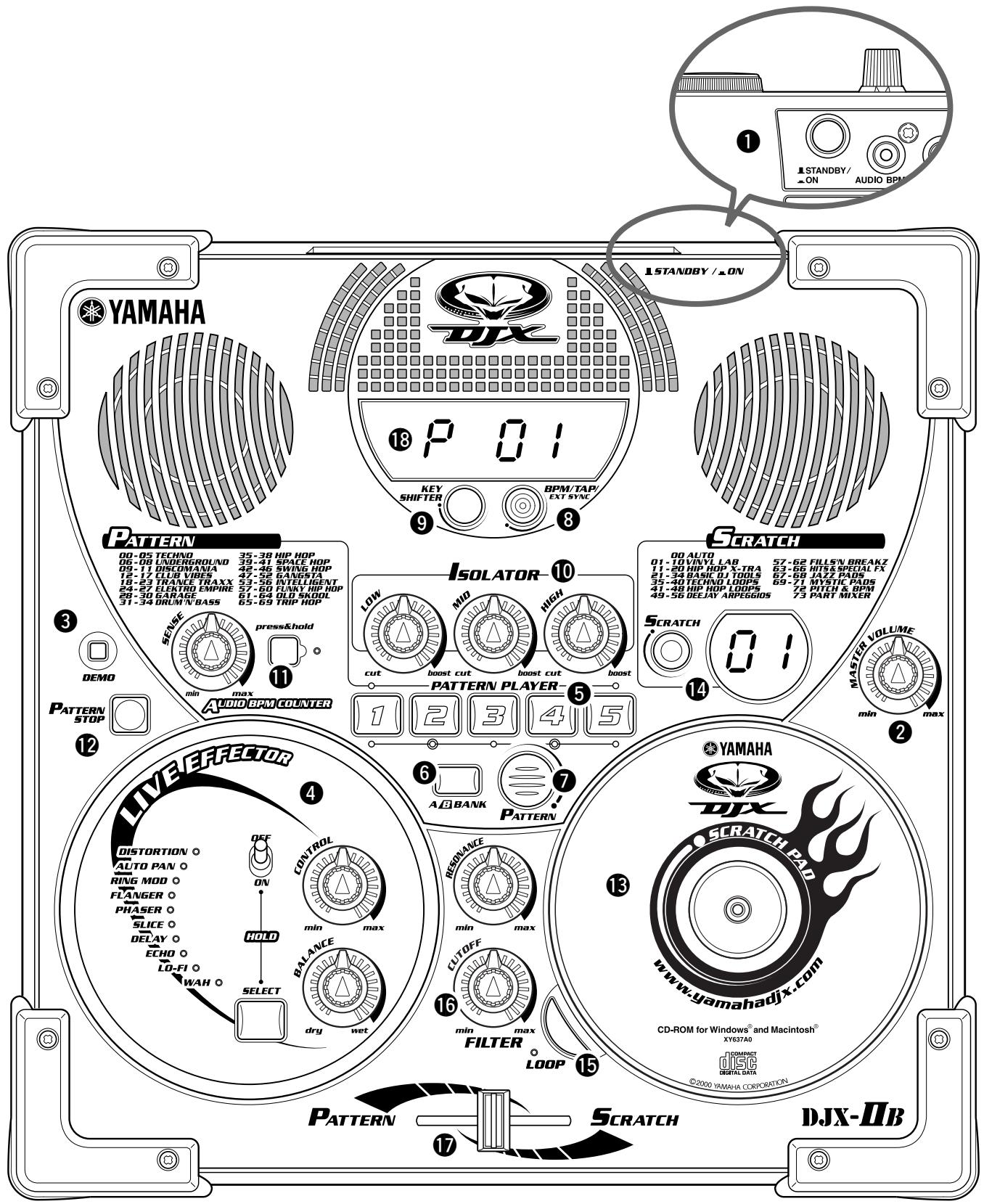
Top Panel
Be careful! Avoid pressing three or more panel buttons simultaneously. Doing so can cause the DJX-IIB to behave erratically.
1STANDBY/ON switch 13
Press to toggle the power on or off. (Power is on when the switch is pressed in.)
2 MASTER VOLUME. 13
This determines the overall volume of the DJX-IIB.
3 DEMO button
This is used to play the Demo songs that showcase the sophisticated capabilities of the DJX-IIB.
Press this button to start/stop the Demo songs. To select one of the Demo songs, hold the button down and simultaneously turn the scratch pad.
④ LIVE EFFECTOR section 20, 48
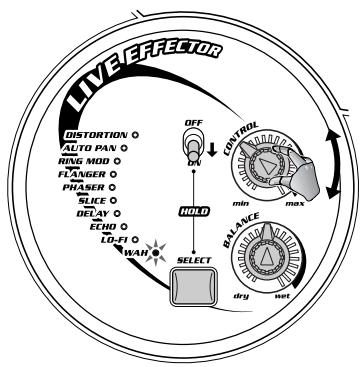
The DJX-IIB has a wide variety of built-in effects that affect the entire sound of the DJX-IIB and can be manipulated in real time. Use the SELECT button to call up one of the ten effects, then work the knobs to change the depth and amount of the effect.
PATTERNPLAYER buttons. 14
Press these buttons to trigger the various patterns of the DJX-IIB. The pattern starts immediately, as soon as its button is pressed.
A/B BANK button 15
Each of the DJX-IIB's patterns has 10 different variations. Use this button to switch between banks, then use the five PATTERN PLAYER buttons to play the desired pattern — giving you 10 different patterns to work with!
7 PATTERN button 16
This button lets you select the desired pattern. Simultaneously hold the button down and rotate the Scratch Pad "CD."
BPM/TAP button 45
This is used to change the bpm (tempo) of the selected pattern.
Each pattern of the DJX-IIB has been programmed with a default or standard bpm (tempo); however, you can change the bpm to any value between 32 and 280 beats per minute.
This button also determines whether the DJX-IIB will use its own internal clock or whether it will use MIDI clock received from the MIDI IN connector.
9 KEY SHIFTER button 36
This convenient button lets you change the overall pitch of the DJX-IIB to match the music on your CDs or vinyl, or to create chord changes. You can change the key of the pattern by pressing this button while the pattern is playing.
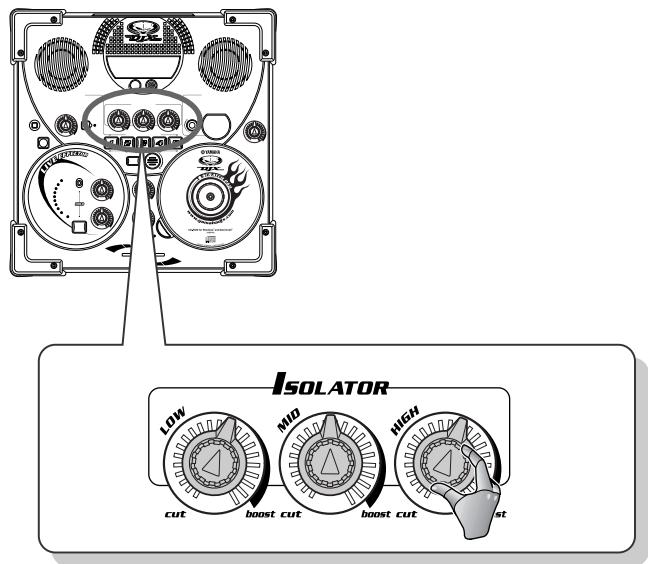
10 ISOLATOR knobs 24, 52
Use these knobs to change the timbre or tone of the
sound, adjusting the level of each frequency range: Low, Mid, and High. Turning each knob to the right boosts the level at that frequency, while turning it to the left cuts it.
1 AUDIO BPM COUNTER button, knob......62
The DJX-IIB has a powerful and convenient function that lets you synchronize external audio (such as from a CD or MD) with the patterns of the DJX-IIB. Hold down this button while playing the connected audio device. The DJX-IIB monitors the beat from the audio, and automatically locks into the rhythm by auto-adjusting the bpm of the DJX-IIB's pattern. The extracted bpm value is indicated in the display. The SENSE knob is used to adjust the input level of the external audio source.
12 PATTERN STOP button 14
This button stops playback of the Patterns and Scratch loops. Start the DJX-IIB's patterns by pressing one of the PATTERN PLAYER buttons and stop them by pressing the PATTERN STOP button.
13 SCRATCH PAD 26
This amazing feature emulates a real turntable. Turning or rocking the CD back and forth lets you play various turntable scratches, as well as loops, hits, and other special sound effects. Select the desired Scratch sound or effect by pressing the SCRATCH button.
The CD "platter" can be changed as desired. (See page 10.)
14 SCRATCH button 26
The Scratch Pad has a total of 74 different presets/ functions. Use this button to select the desired preset. The preset number is always indicated in the small display next to the SCRATCH button.
15 LOOP button 29
Pressing this button (to turn Loop on) lets you vary the Scratch effect in different ways, depending on the selected Scratch preset.
16 FILTER knobs. 25
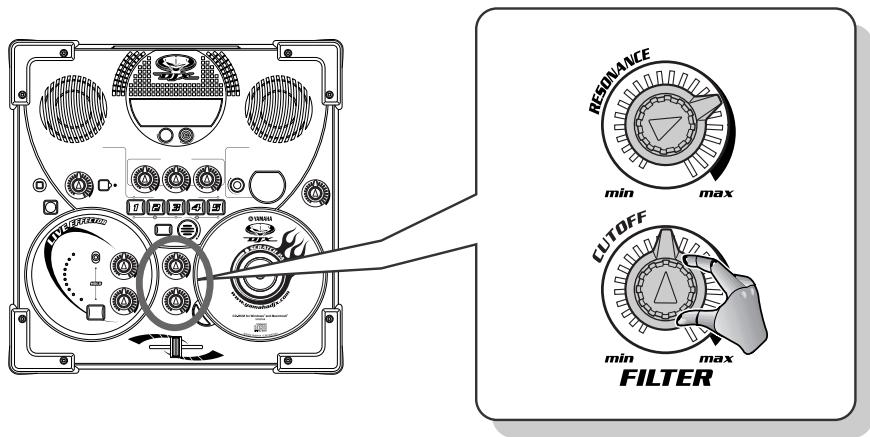
These adjust the filter cutoff and filter resonance of each part of the pattern. For the RESONANCE knob, turning to the right increases the effect. For the CUT-OFF knob, turning to the right raises the frequency.
17 Fader 34
This determines the level balance between the pattern and scratch sounds.
13 Display
This shows important information on certain settings and values of the DJX-IIB.
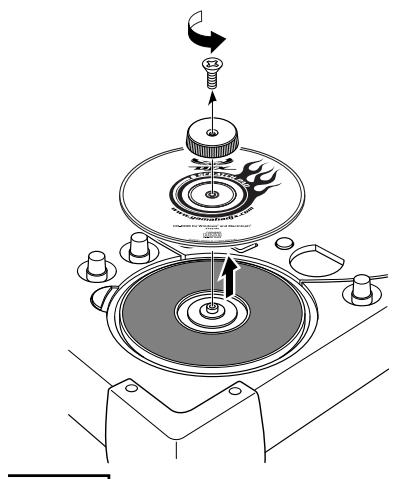
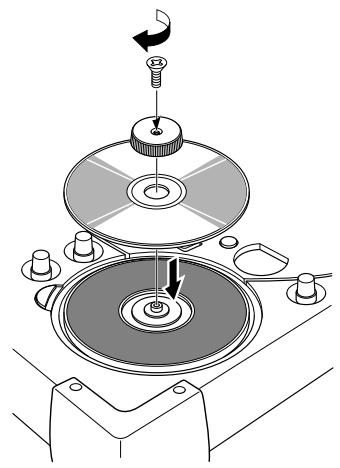
Changing the Scratch Pad CD
Included with the DJX-IIB is a special CD-ROM disc. The disc normally serves as a "platter" for the Scratch Pad function. Since special software is included on the disk, you will need to remove the disc to install the software.
If you have a CD with a particular design that you like, you can replace the included CD-ROM disc with a disc of your choice. To change the disc, follow the instructions below.
IMPORTANT
- The DJX-IIB does not read audio or other data from the Scratch Pad CD or CD-ROM. It merely functions as a physical "platter" for controlling the Scratch Pad, and provides added decoration. Feel free to install your own CD for different decoration if you like!
- Make sure to treat the included CD-ROM disc with care and be very careful not to damage it (especially during removal), since the reverse side of the disc contains important data. Yamaha cannot be responsible for any loss of data resulting from mishandling of the disc. (Normal use of the disc as a Scratch Pad will not damage the disc.)
1 Remove the indicated screw with a screwdriver.
2 Remove the CD-ROM disk.
3 Place the desired audio CD (or CD-ROM) on the Scratch Pad.
4 Replace and tighten the screw.
■ About the included CD-ROM
The included CD-ROM contains the following data:
DJX-II/IIB Premium CD-ROM
Live Movie at DJX Satellite
- DJX-II/IIB Function Guide — a fun way to get to know the DJX-IIB and its features!
- Pattern Launcher Application — for loading new Patterns to the DJX-IIB!
- Extra Patterns — a selection of specially programmed new Patterns you can load to your DJX-IIB!
Rear Panel & Connections
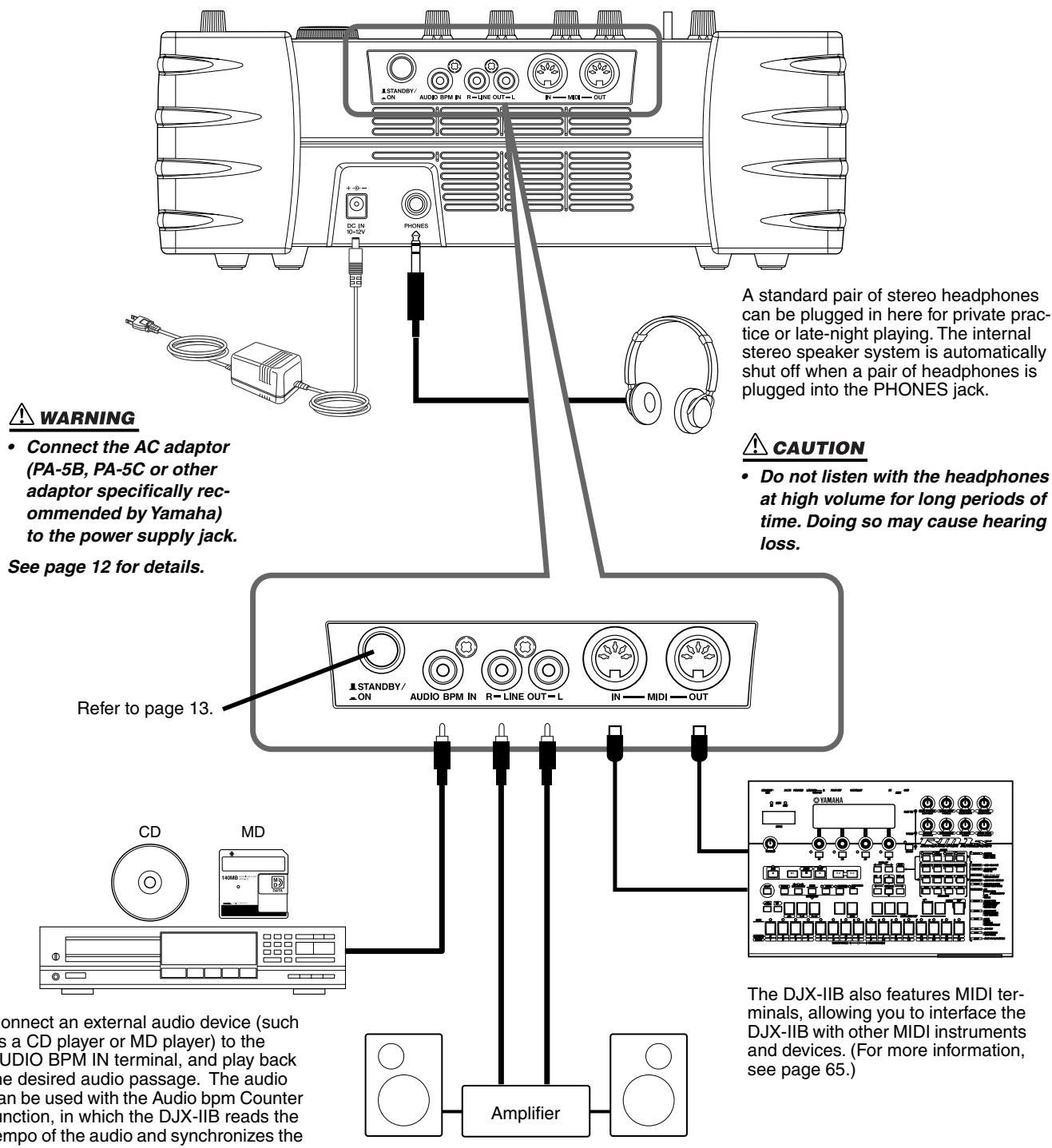
The LINE OUT jacks are used to send the DJX-IIB output to a keyboard amplifier, stereo sound system, mixing console, or tape recorder.
CAUTION
- Connect the DJX-IIB to external equipment only after turning off power for all devices. To prevent damage to the speakers, set the volume of the external devices at the minimum setting before connecting them. Failure to observe these cautions may result in electric shock or equipment damage.
Setting Up (Power supply connections)
Although the DJX-IIB will run either from an optional AC adaptor or batteries, Yamaha recommends use of the more environmentally safe AC adaptor. Follow the instructions below according to the power source you intend to use.
The batteries should be considered an auxiliary power source for data backup (page13).
Using An Optional AC Power Adaptor
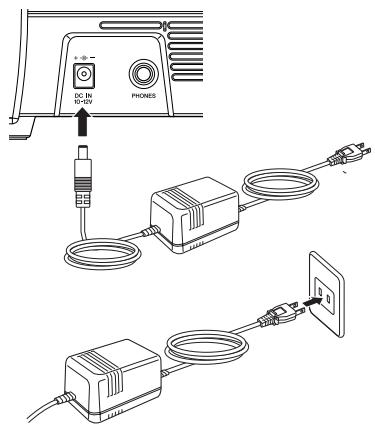
1 Make sure that the STANDBY/ON switch of the DJX-IIB is set to STANDBY.
2 Connect the AC adaptor (PA-5B, PA-5C or other adaptor specifically recommended by Yamaha) to the power supply jack.
3 Plug the AC adaptor into an AC outlet.
To disconnect the adaptor: Set the STANDBY/ON switch to STANDBY, then unplug the adaptor from the AC outlet, and then disconnect it from the DJX-IIB power supply jack.

WARNING
- Use ONLY a Yamaha PA-5B or PA-5C AC Power Adaptor (or other adaptor specifically recommended by Yamaha) to power your instrument from the AC mains. The use of other adaptors may result in irreparable damage to both the adaptor and the DJX-IIB.
- Unplug the AC Power Adaptor when not using the DJX-IIB, or during electrical storms.
Using Batteries
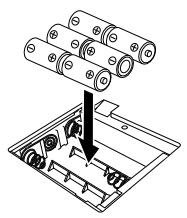
For battery operation the DJX-IIB requires six 1.5V SUM-1, "D" size, R-20 or equivalent batteries. When the batteries need to be replaced, the volume may be reduced, the sound may be distorted, and other problems may occur. When this happens, turn the power off and replace the batteries.
Replace the batteries as follows:
1 Open the battery compartment cover located on the instrument's bottom panel.
2 Insert the six new batteries, being careful to follow the polarity markings on the inside of the compartment.
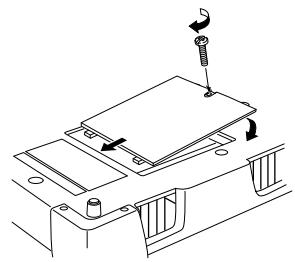
3 Replace the compartment cover, making sure that it locks firmly in place.
NOTE
- Plugging or unplugging the AC power adaptor while the batteries are installed will reset the DJX-IIB to the defaults.
- If you play the DJX-IIB with the volume at its maximum level when the batteries are used, the life of the batteries will be shorter.
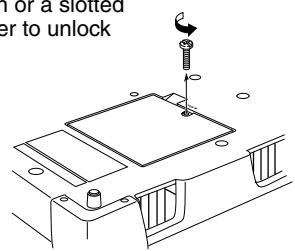
Use a coin or a slotted screwdriver to unlock the cover



CAUTION
- When the batteries run down, replace them with a complete set of six new batteries. NEVER mix old and new batteries.
- Do not use different kinds of batteries (e.g. alkaline and manganese) at the same time.
- If the instrument is not to be in use for a long time, remove the batteries from it, in order to prevent possible fluid leakage from the battery.
Switching On the Power
Once you've set up your DJX-IIB, try turning the power on.
Make sure your sound system's main level/volume control(s) and the DJX-IIB volume control are turned all the way down prior to turning the power on.
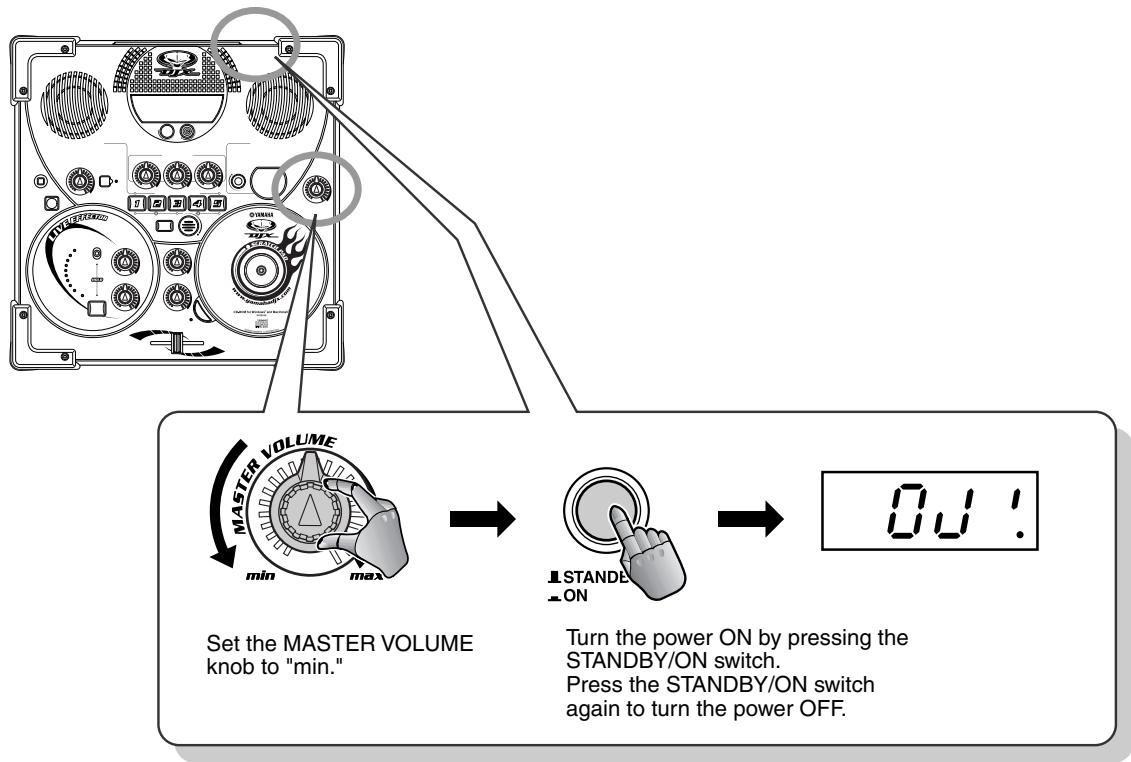

CAUTION
- Even when the switch is in the "STANDBY" position, electricity is still flowing to the instrument at the minimum level. When you are not using the DJX-IIB for a long time, make sure you unplug the AC power adaptor from the wall AC outlet, and/or remove the batteries from the instrument.
Data Backup & Initialization
Except for the User Pattern data, all DJX-IIB panel settings are reset to their initial settings whenever the power is turned on. The Use Pattern data is backed up (i.e. retained in memory) as long as an AC adaptor is connected or a set of batteries is installed.
All data can be initialized and restored to the factory preset condition by turning on the power while holding the LOOP button. "Clr!" will appear briefly on the display.
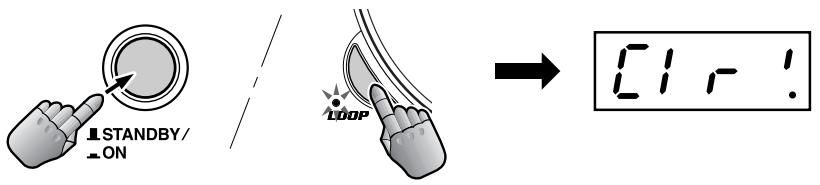

CAUTION
- All settings listed above, will be erased and/or changed when the data initialization procedure is carried out.
- Carrying out the data initialization procedure will usually restore normal operation if the DJX-IIB freezes or begins to act erratically for any reason.
This is NOT an owner's manual! At least not an ordinary one. But, then again, the DJX-IIB is no ordinary instrument. It's packed with exciting, easy-to-use dance music features that instantly sets it apart from run-of-the-mill conventional instruments!
This collection of 100 hot tips shows you how to get the most out of your new DJX-IIB in the shortest time possible. It's like an expert DJ or mixer taking you by the hand and showing you the ropes, sharing all the tricks and techniques you need to be a master DJ yourself! It takes you from the
bare-bones basics, to advanced power tips that get you mixing like a pro in no time!
So jump in!
The Levels — Work your way up!
Basic operations
Intermediate functions
Advanced tricks and techniques
...Power user features
Chapter 1
Pattern Player Basics
Start your DJ apprenticeship right here! The Patterns are the basic building blocks of the DJX-IIB sound — they're the rhythmic foundation for everything else on this dance machine.

1 Work out with the Patterns!

Here's where it all starts!
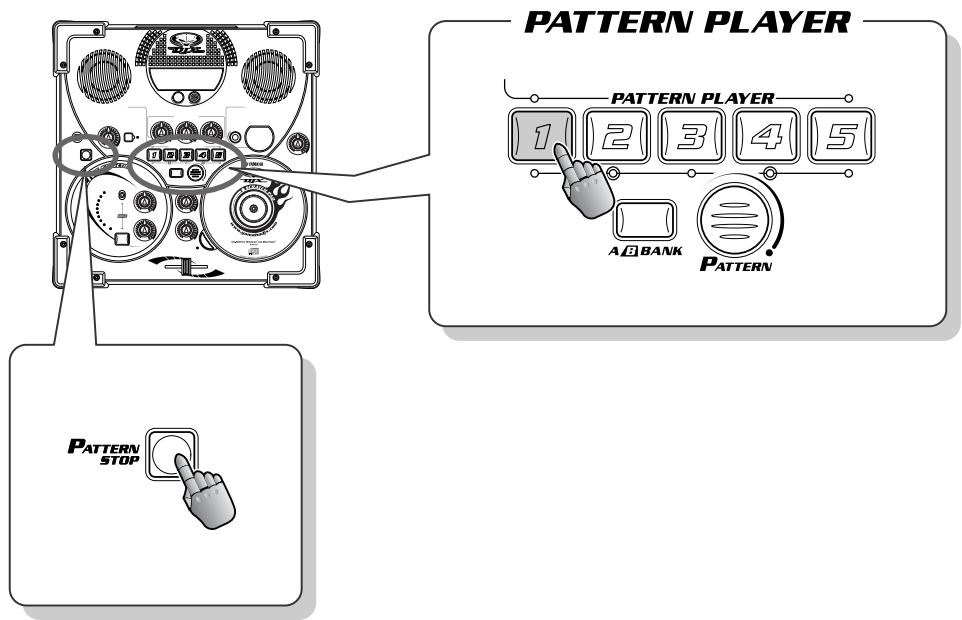
Hit one of the buttons in the PATTERN PLAYER section — and the Pattern starts immediately. Hitting another button instantly switches to a different Pattern (actually, a variation on the main Pattern).
Since the DJX-IIB starts the Pattern right away, be careful to press the key in time with the rhythm
Practice this a while — there's no better way to get your timing tight and develop a solid sense of rhythm!
To stop the Pattern, press PATTERN STOP.

2
Switch between Banks

Even though there are five buttons in the PATTERN PLAYER, you have a total of ten Patterns at your disposal — thanks to the A/B BANK button.
Each Bank, A and B, has five Patterns. When the A/B BANK button lamp is off, you can play Patterns A1 to A5. When the A/B BANK button lamp is on, you can play Patterns B1 to B5. Pressing the button doesn't change the Pattern, it only enables the Bank. So if you press the A/B BANK button by mistake, don't worry — simply press it again, and you're back to the original bank, without any sound changes!
Try this example:
1 Start Pattern A1.
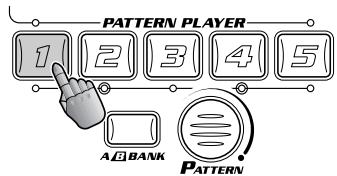
Press Pattern button 1.
2 Select Bank B.
Press the A/B BANK button. The A/B BANK button is on and Pattern button 1 flashes. (The flashing Pattern button indicates Bank select standby.).
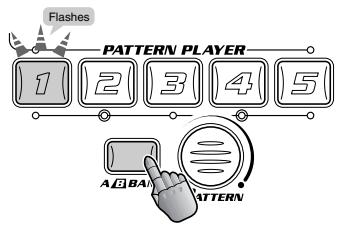
Notice that Pattern A1 is still playing. It will only change if you press another Pattern button..
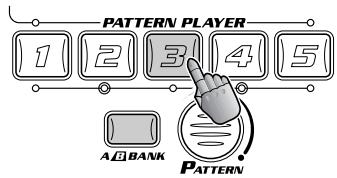
3 Press Pattern button 3.
Now Pattern B3 is playing.
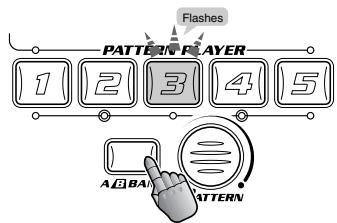
4 Select Bank A again.
The A/B BANK button is off and Pattern button 3 flashes.
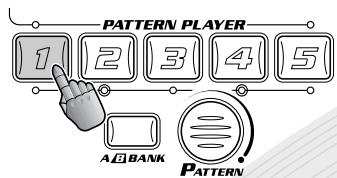
5 Press Pattern button 1.
Now you're back to Pattern A1.
Try mixing it up!
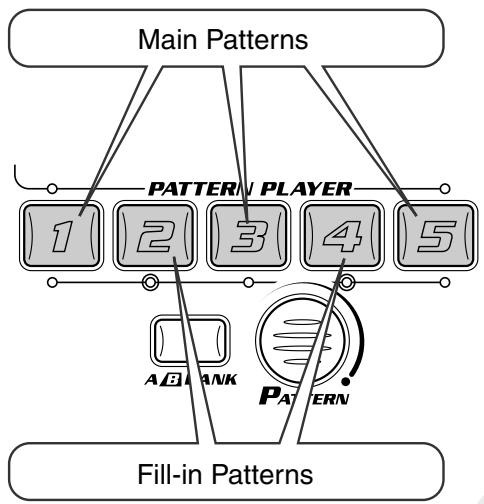
As you learned in Tip 2 above, each of the DJX-IIB's Patterns has ten different Variations. The main Patterns are played with buttons 1, 3, and 5, while the fill-in Patterns are played with buttons 2 and 4. (Fill-in Patterns are usually used as dynamic breaks or transitions.)
In general, the higher the Variation number (A1 - A5, B1 - B5), the busier or more complex the Patterns become.
Listen carefully to each Pattern — remember how each of them sound — then play them one after another for your own special performance!

4
Exploring other Patterns

Try out some different patterns
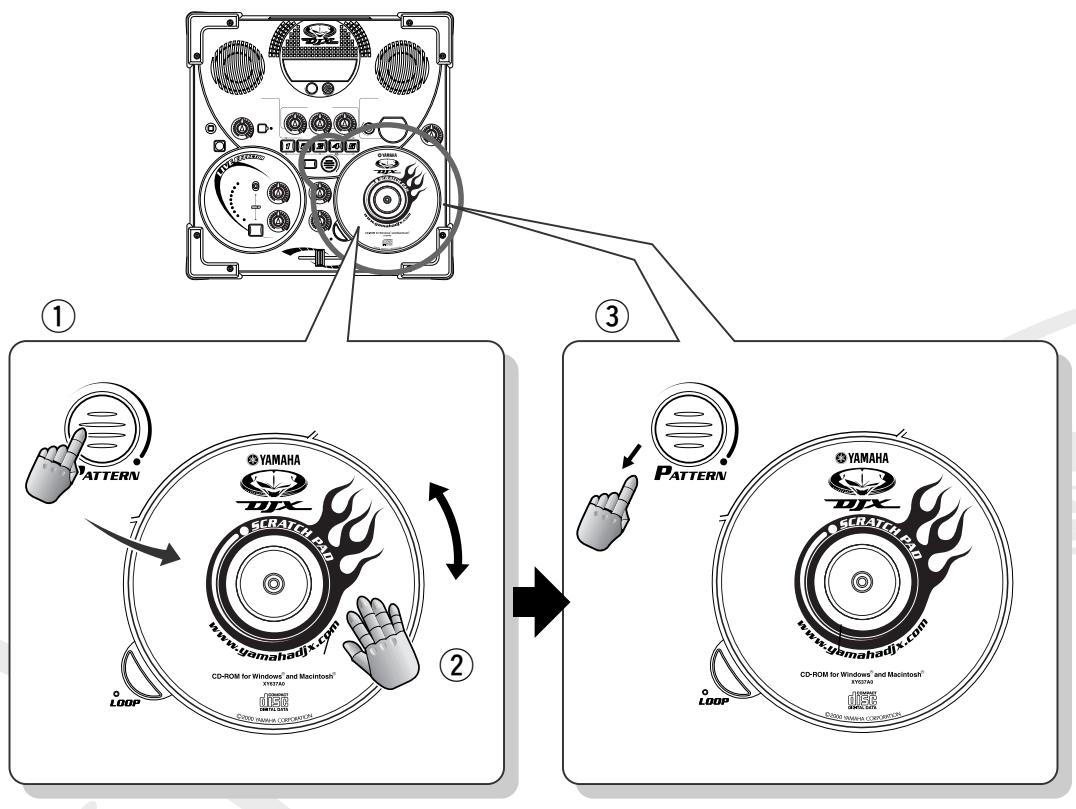
To change the Pattern, hold down PATTERN and simultaneously turn the Scratch Pad.
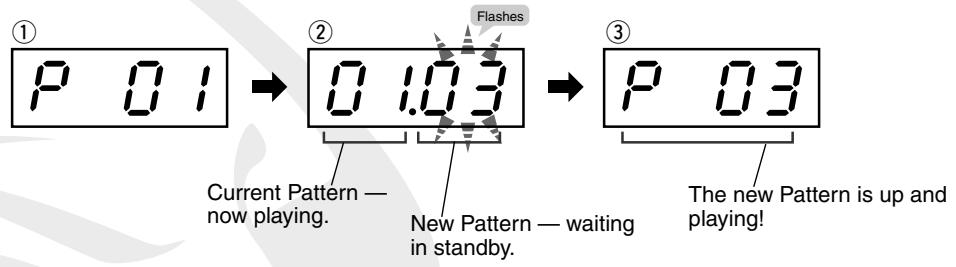
Check the display to see what you're selecting. The two numbers on the left indicate the current Pattern number, and the numbers on the right indicate the new one. Turn the Scratch Pad clockwise to advance through the Pattern numbers; turn it clockwise to go back.
But wait! The new Pattern doesn't actually start until you release PATTERN! Keep holding down the button while the Pattern loops, then release PATTERN on the "one" downbeat (see Tip 5) — the Pattern changes immediately!
Exploring other Patterns
| Category | # | Pattern Name | Comment |
| TECHNO | 01 | Japan Beatz | Experimental electronic madness — way cool! |
| 05 | Detroit | Serious House music — from where it all started! | |
| DISCOMANIA | 11 | Disco House | London's disco club scene. |
| CLUB VIBES | 17 | Hard House | Harder than you might expect... |
| DRUM'N'BASS | 34 | Jazz D&B | Straight from the heart of London — fast and stylish! |
| GANGSTA | 50 | Light | Feel it flow, a real Hip-hop cruiser from L.A. |
| 52 | Female | Extra smooth ‘n’ silky R&B-style Hip-hop. | |
| FUNKY HIP HOP | 59 | Club Funk | Funk with a Hip-hop flavor — real nice! |
| OLD SKOOL | 62 | Scratchin' | Really dark and hard Hip-hop — with a nice melody on Variation 10. |
| TRIP HOP | 65 | Deep | Dark and heavy Trip-hop, atmospheric and dreamy. |
The key to great timing is knowing where the "one" is. And the "one" is the first beat in a four-beat Pattern. Another key to timing is feeling the downbeats (four downbeats to a Pattern). The DJX-IIB makes this easy to do!
Check this out:
While the Pattern is playing, the dot in the bpm display flashes rhythmically. (If the bpm display is not shown, press BPM/TAP.)
Try hitting a different Pattern button on the "one" downbeat — when you've hit it right, you'll feel it!
If you're having trouble coming down on the "one," here's a handy hint that'll help you keep time... Double-up your count! This works especially well for slower rhythms — because even slight deviations from the beat can put glitches in your groove!
For a four-beat measure, count two on every beat — like this: 1 - 2 - 3 - 4 - 5 - 6 - 7 - 8.
Or count: "One-and-two-and-three-and-four-and..."
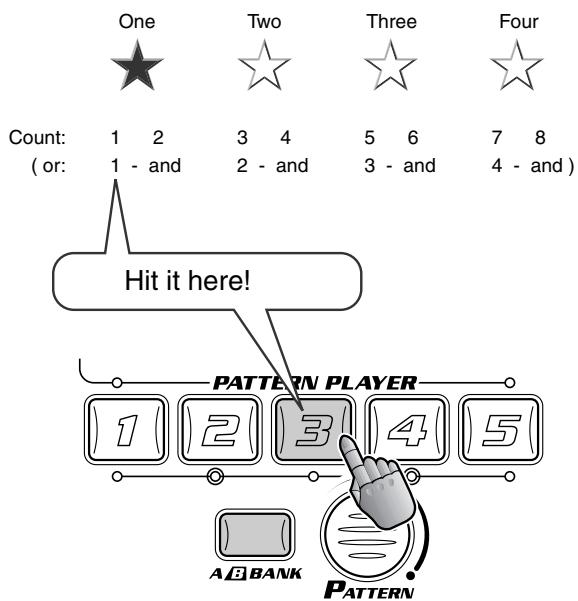
Try this technique while changing Patterns. Press a new PATTERN PLAYER button every bar, right on the "one," all the time counting out the beat like above. It's a fool-proof way to master the groove!

6
Keep the bpm steady!

Once you've started a Pattern, it's better to keep it playing at a steady bpm — unless you're aiming for special effects and sudden tempo changes.
Actually, the DJX-IIB takes care of this for you — automatically! If you change Patterns while a Pattern is playing, the bpm setting stays the same. However, if you stop the Pattern and start a new one, the bpm is automatically reset to best suit the newly selected Pattern.
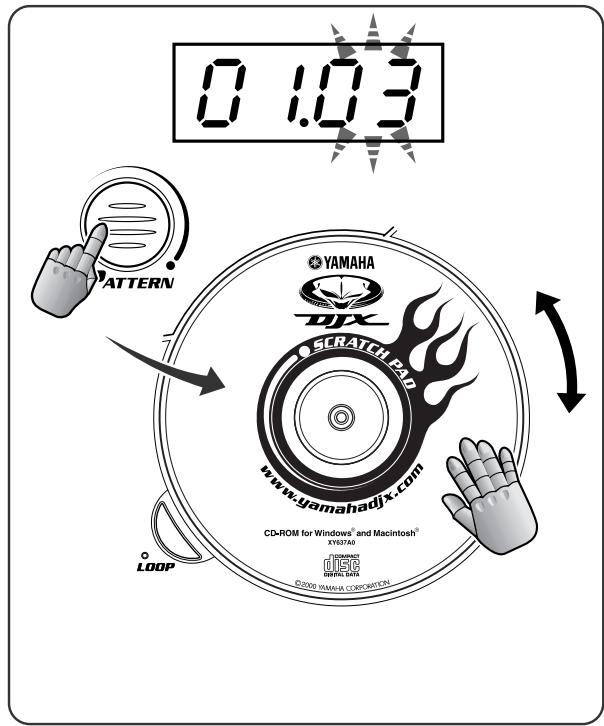
While the Pattern is running...

... and the bpm stays the same.
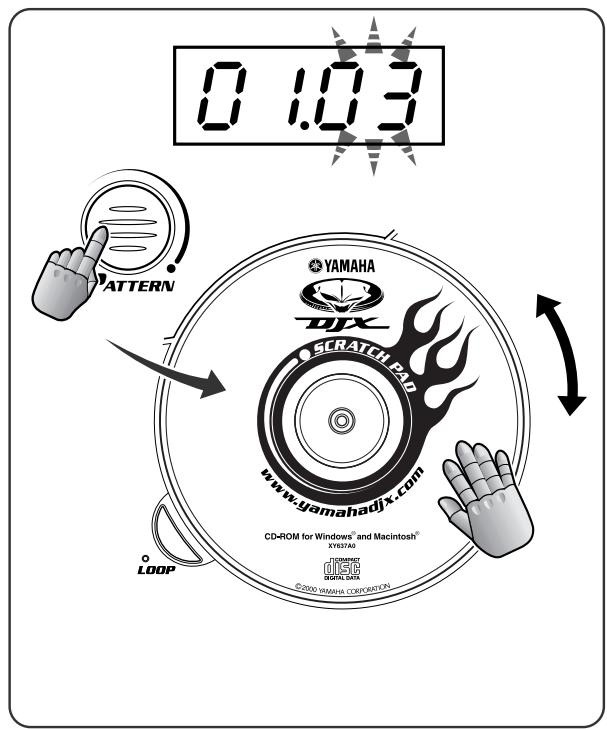
When the Pattern is stopped...

... and the bpm is set to best suit the selected Pattern.
Live Effector Basics
The effects of the DJX-IIB are more than just frosting on the cake — they're powerful tools that can completely transform the sounds and rhythms, and put a whole new spin on your tracks!

7 What is the Live Effector?

Here's where you can really get down and dirty with your beats!
The Live Effector gives you a wide variety of real-time effects that let you mangle and munge the sound in wild and exciting ways. All of the sounds of the DJX-IIB — the Patterns and the Scratches ( page 26) — are processed by these versatile sound shapers. You can turn the effects on and off in time with the rhythm, and adjust a pre-programmed key effect parameter and the balance (depth) of the effect in realtime as the Pattern plays.
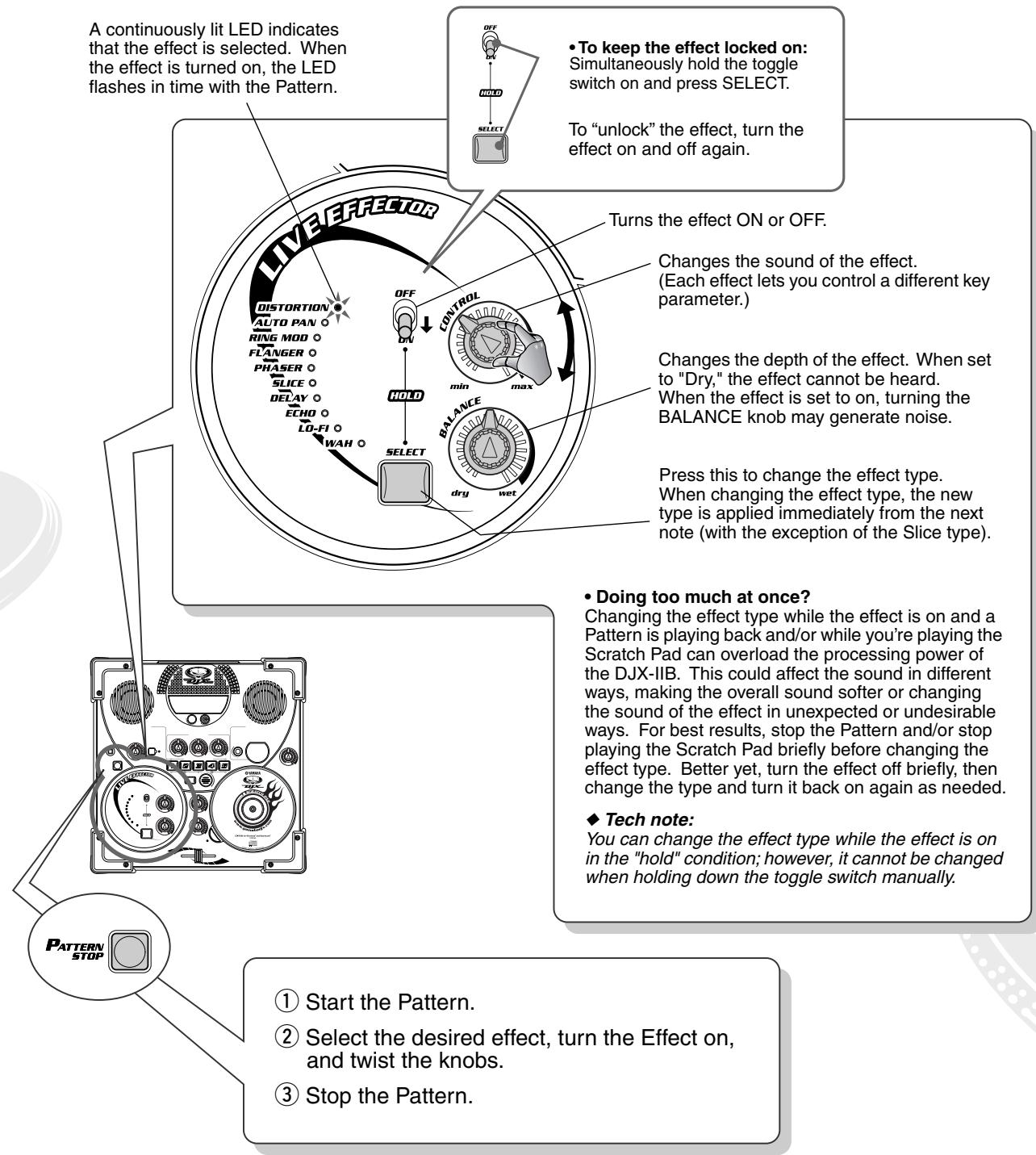

8 Distortion

This popular effect lets you distort the sound — from a soft grunge to a full-on metallic assault. Turn the CONTROL knob to the right for more crunch and bite.
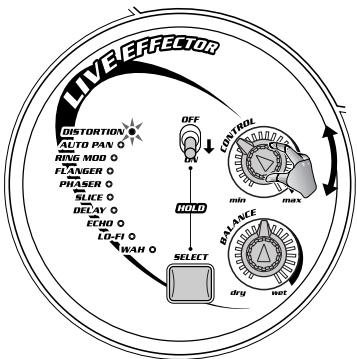


9 Auto Pan
Get your sound moving in space! This effect shifts the sound in the stereo image back and forth between hard left and hard right. Setting the CONTROL knob toward max speeds up the panning so much, the sound seems to be modulated — like on a synthesizer!
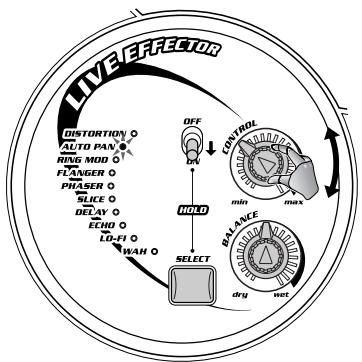


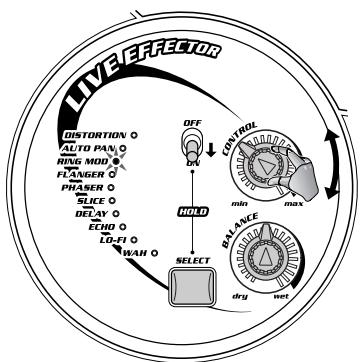
10 Ring Modulation
Here's an ultracool effect straight out of analog synthesizers! The Ring Modulator changes the sound dramatically by "overdriving" the oscillator — as set with the CONTROL knob. This effect can completely destroy the original pitch of the sound while generating a whole new set of pitches and harmonics, for a massively dynamic metallic sound. Use the CONTROL knob to change the frequency of the oscillator.
Use this sparingly! You'll want to save this awesome, powerful effect for certain climactic parts of your performance — and then blow people away!


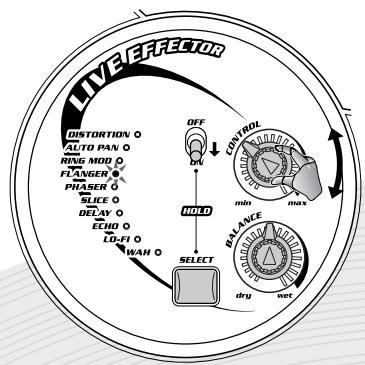
11 Flanger
This modulation-based effect produces a "swishing" or "tunneling" sound. Changing the speed of the modulation with the CONTROL knob produces a characteristic metallic, sweeping effect — much like a jet airplane taking off.
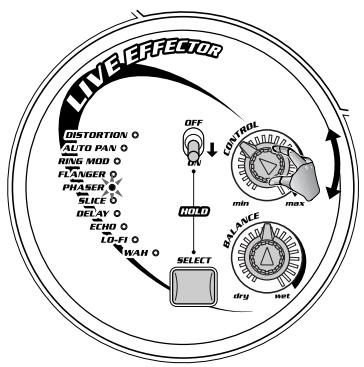
The Phaser effect is similar to Flanger (in Tip 11 above), but more subtle — not quite as dramatic. Phaser is good for adding a little bit of warm animation and movement to the sound. Use the CONTROL knob to change the speed of the modulation.

13 Slice

Chop up the beat, slice and dice — completely change the feel of the rhythm! Use the CONTROL knob on this happening effect to change the “slice” patterns, and come up with new rhythms on the fly!
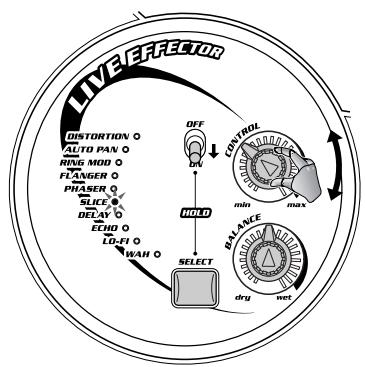

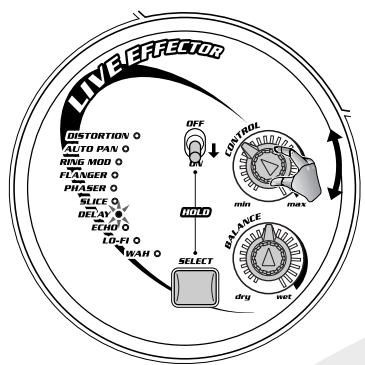
14 Delay

Delay is a popular effect that repeats the sound in rhythm. (There's a related Echo effect; see Tip 15 below.) And check this out — no rocket science needed! The DJX-IIB automatically syncs the delay time to the current bpm, so you don't even need to re-adjust the knob, even when the bpm is changed. Use the CONTROL knob to change the relative delay time to match the rhythmic effect you want. The DJX-IIB syncs to note values — 16th, 8th, 4th, triplet, etc.
Be careful — changing the delay time (by changing the CONTROL knob or bpm) may result in some noise.

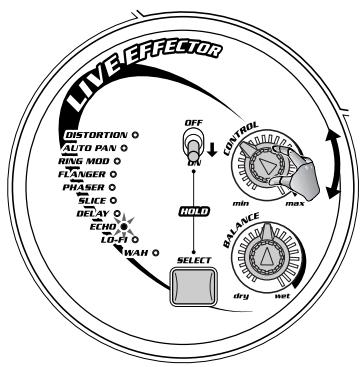
15 Echo

Like Delay (in Tip 14 above), Echo produces repeats of the sound for rhythmic effect. However, the CONTROL knob is used to change the number of repeats (also called "feedback"). Naturally, the DJX-IIB automatically syncs this effect to the bpm of the Pattern.

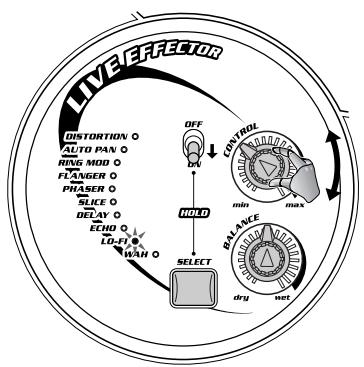
16 Lo-Fi

Need to grunge up your sound, but Distortion is too nasty for you? This useful effect lets you slap that retro, lo-rez sound onto your beats — just like they do in hip-hop, trip-hop and other styles. Lo-Fi gives the sound just a little bit of "dirt" — and lets you add a vintage analog-like touch to your performance.

17 Wah

Wah is a special moving filter effect that gives a funky feel to the sound. Use the CONTROL knob to change the speed of the filter motion. Setting this toward the maximum produces a trembling sound.
Isolator Basics
More sonic control to you! The Isolator lets you tailor the sound just the way you want it — phat and round, thin and edgy, or big and banging!

18Tweak the sound just right!

Need a beefier low end? Want to put some edge and shimmer in the top? Tweak these knobs to your heart's content, and get the sound just the way you want it! Try turning the Low and High knobs of the Isolator a little bit to the right, and make the sound more punchy. Try other settings as well to get the sound just right!
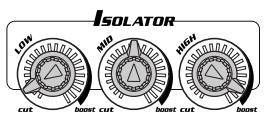
Each of these knobs boosts or cuts a general frequency band of the sound. Technically, the range for each knob is -12dB to +12dB.
Be careful with this, though — if the Master Volume is at or near the max, boosting these frequencies can result in some nasty distortion!
Helpful hint: Avoid boosting the level (when possible). For example, if you want to emphasize the highs and lows, add a gentle mid cut instead.
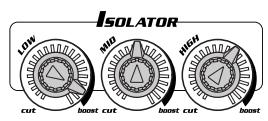
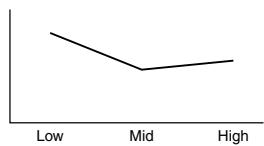
Boosted low end, slightly crisper high end.
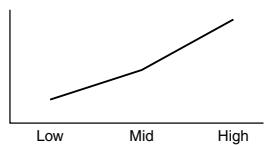
Very tinny sound — almost no bass, very bright and brittle high end.
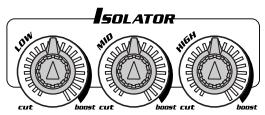
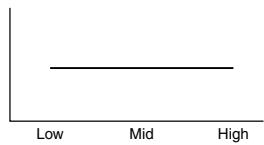
Flat response — normal settings.
Filter Basics
Pump up the energy on the dance floor a serious notch or two with these powerful filter tools!

19 Cutoff and Resonance

The CUTOFF and RESONANCE knobs control the filter effects. And what are "filter effects," you ask? Well, filters have been used for a long time with analog synthesizers, and in the right hands they are capable of turning static, boring sounds into something really dynamic and animated.
Turn CUTOFF to the left and the sound becomes darker or "muffled." Turn CUTOFF to the right and the sound becomes brighter. The RESONANCE knob controls how sharp the peak of the filter is. Turn RESONANCE to the right and the filter peak becomes sharp and pronounced. Turn the RESONANCE left and the filter becomes flat.
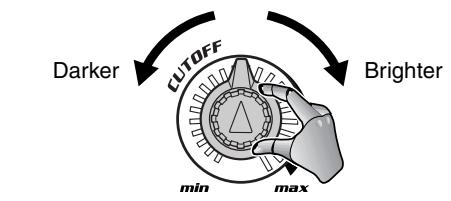
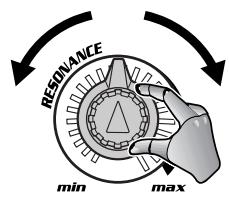
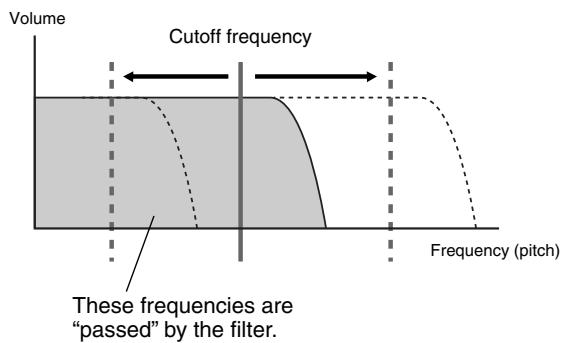

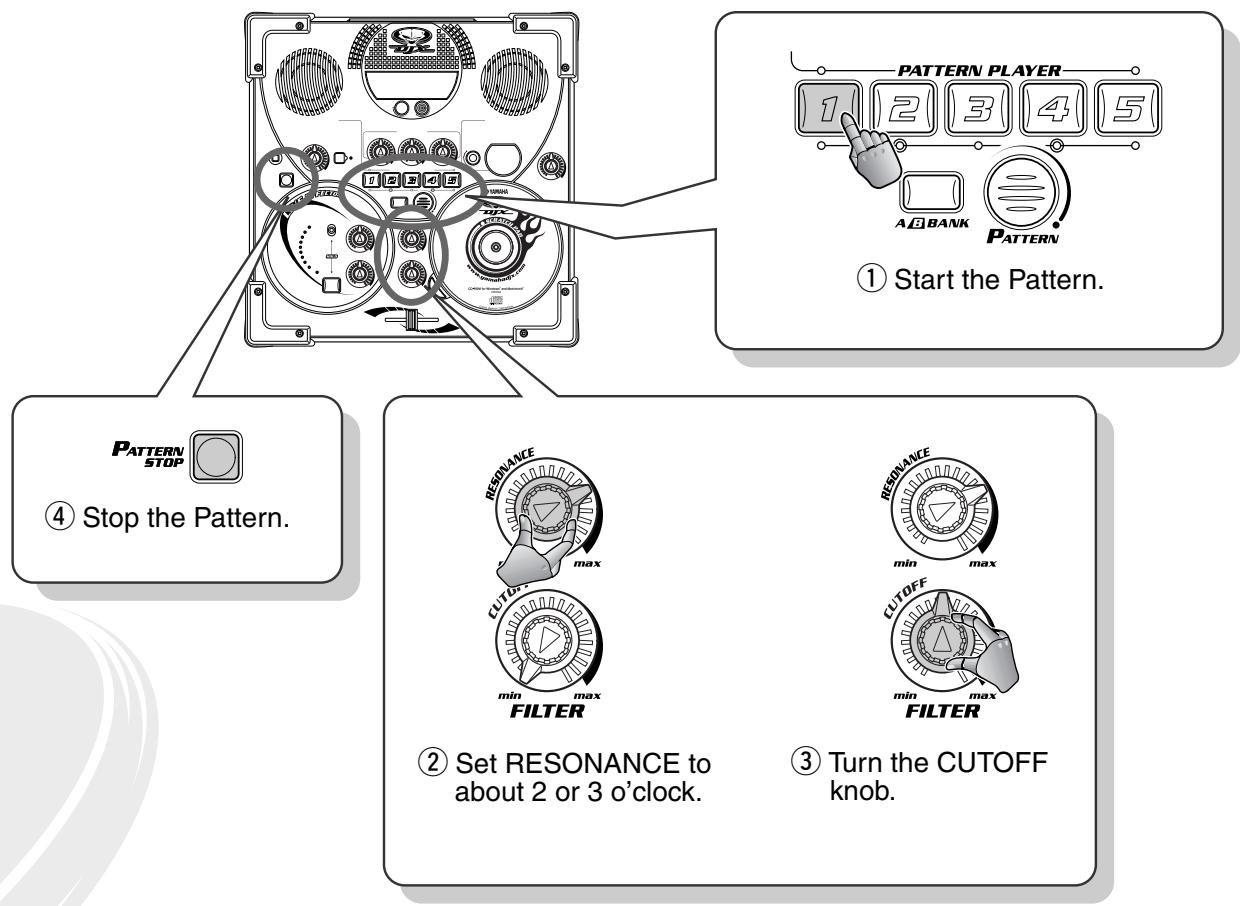
Try tweaking CUTOFF while RESONANCE is at about 2 or 3 o'clock (see below). The filter becomes sharper, and you can actually hear the filter peak moving according to the CUTOFF knob position.
There's no way to adequately describe this effect in words — you just have to try it out for yourself, and hear how awesome it can make your music sound!
Scratch Pad Clinic
The true mettle of a DJ is in his or her turntable work. That's why the DJX-IIB has a special Scratch Pad that lets you strut your stuff!

20 Work out on the Scratch Pad!

Step up to the turntable and work the platter like a real DJ! That's what the Scratch Pad's for!
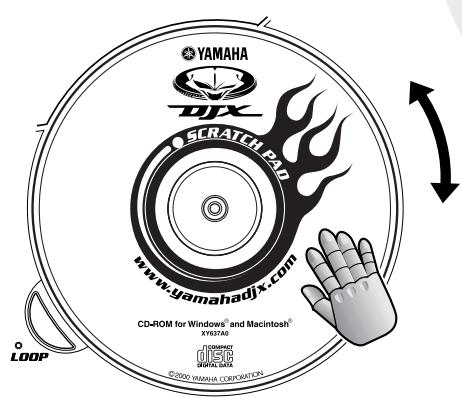
Set the Crossfader to around the center, then rock the Scratch Pad back and forth. Now you're scratching!
Start a Pattern and work the Scratch Pad while the Pattern's playing back — adding your own rhythmic parts and accents to the mix!
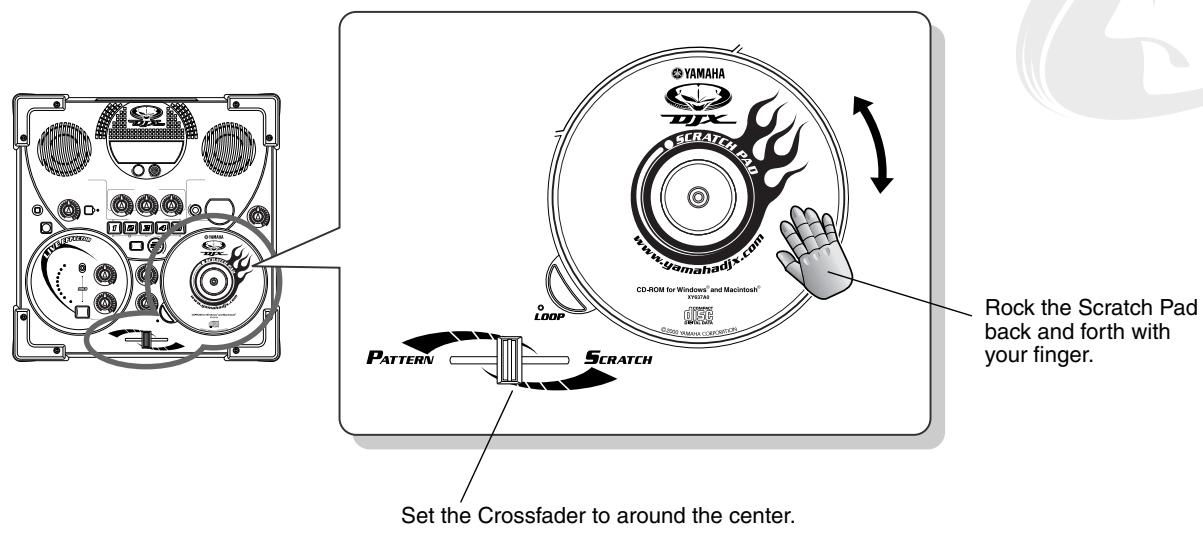
No need for vinyl here — leave your records at home! The DJX-IIB has a whopping total of 73 special Scratch “kits” that you can call up instantly and scratch right along with the Patterns!
To change the Scratch kit, hold down the SCRATCH button and simultaneously turn the Scratch Pad. Check the Scratch display to see what you're selecting.
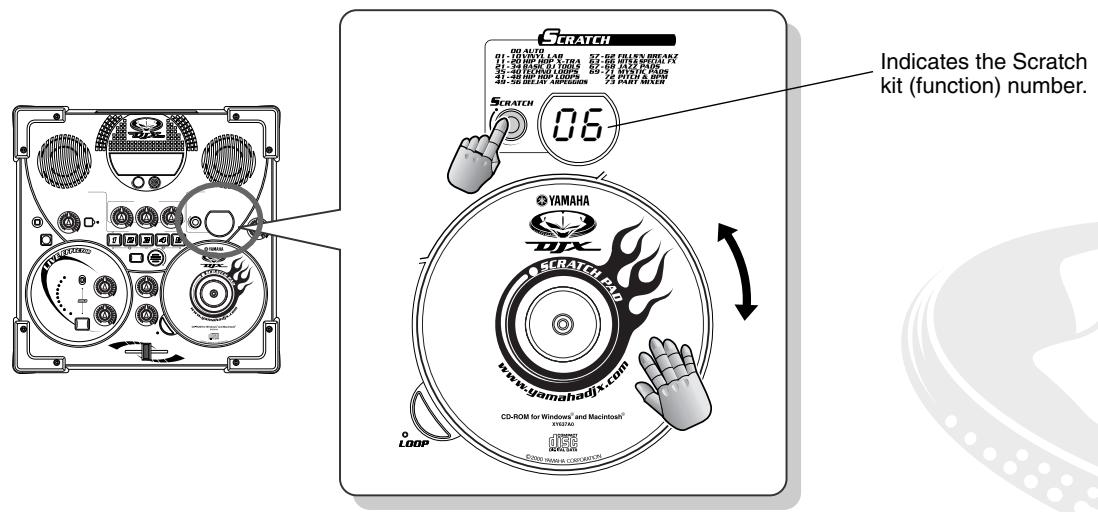
- Scratch List
The Auto kit (0) automatically selects a kit to best match the currently selected pattern.
| No. | Category Name | Scratch Name |
| 0 | AUTO | Auto |
| 1 | VINYL LAB | Vinyl Lab 1 |
| 2 | Vinyl Lab 2 | |
| 3 | Vinyl Lab 3 | |
| 4 | Vinyl Lab 4 | |
| 5 | Vinyl Lab 5 | |
| 6 | Vinyl Lab 6 | |
| 7 | Vinyl Lab 7 | |
| 8 | Vinyl Lab 8 | |
| 9 | Vinyl Lab 9 | |
| 10 | Vinyl Lab 10 | |
| 11 | HIP HOP X-TRA | Hip Hop X-tra 1 |
| 12 | Hip Hop X-tra 2 | |
| 13 | Hip Hop X-tra 3 | |
| 14 | Hip Hop X-tra 4 | |
| 15 | Hip Hop X-tra 5 | |
| 16 | Hip Hop X-tra 6 | |
| 17 | Hip Hop X-tra 7 | |
| 18 | Hip Hop X-tra 8 | |
| 19 | Hip Hop X-tra 9 | |
| 20 | Hip Hop X-tra 10 |
| No. | Category Name | Scratch Name |
| 21 | BASIC DJ TOOLS | Basic DJ Tools 1 |
| 22 | Basic DJ Tools 2 | |
| 23 | Basic DJ Tools 3 | |
| 24 | Basic DJ Tools 4 | |
| 25 | Basic DJ Tools 5 | |
| 26 | Basic DJ Tools 6 | |
| 27 | Basic DJ Tools 7 | |
| 28 | Basic DJ Tools 8 | |
| 29 | Basic DJ Tools 9 | |
| 30 | Basic DJ Tools 10 | |
| 31 | Basic DJ Tools 11 | |
| 32 | Basic DJ Tools 12 | |
| 33 | Basic DJ Tools 13 | |
| 34 | Basic DJ Tools 14 | |
| 35 | TECHNO LOOPS | Techno Loops 1 |
| 36 | Techno Loops 2 | |
| 37 | Techno Loops 3 | |
| 38 | Techno Loops 4 | |
| 39 | Techno Loops 5 | |
| 40 | Techno Loops 6 | |
| 41 | HIP HOP LOOPS | Hip Hop Loops 1 |
| 42 | Hip Hop Loops 2 | |
| 43 | Hip Hop Loops 3 | |
| 44 | Hip Hop Loops 4 | |
| 45 | Hip Hop Loops 5 | |
| 46 | Hip Hop Loops 6 | |
| 47 | Hip Hop Loops 7 | |
| 48 | Hip Hop Loops 8 |
| No. | Category Name | Scratch Name |
| 49 | DEEJAY ARPEGGIGOS | DeeJay Arpeggios 1 |
| 50 | DeeJay Arpeggios 2 | |
| 51 | DeeJay Arpeggios 3 | |
| 52 | DeeJay Arpeggios 4 | |
| 53 | DeeJay Arpeggios 5 | |
| 54 | DeeJay Arpeggios 6 | |
| 55 | DeeJay Arpeggios 7 | |
| 56 | DeeJay Arpeggios 8 | |
| 57 | FILLS 'NBREAKZ | Fills 'n Breakz 1 |
| 58 | Fills 'n Breakz 2 | |
| 59 | Fills 'n Breakz 3 | |
| 60 | Fills 'n Breakz 4 | |
| 61 | Fills 'n Breakz 5 | |
| 62 | Fills 'n Breakz 6 | |
| 63 | HITS & SPECIAL FX | Hits & Special FX 1 |
| 64 | Hits & Special FX 2 | |
| 65 | Hits & Special FX 3 | |
| 66 | Hits & Special FX 4 | |
| 67 | JAZZ PADS | Jazz Pads 1 |
| 68 | Jazz Pads 2 | |
| 69 | MYSTIC PADS | Mystic Pads 1 |
| 70 | Mystic Pads 2 | |
| 71 | Mystic Pads 3 | |
| 72 | PITCH & BPM | Pitch & BPM |
| 73 | PART MIXER | Part Mixer |

21 Quarter-note scratching

Now that you've tried out the Scratch Pad and some different Scratch sounds, let's get started using the Scratch Pad in real musical examples.
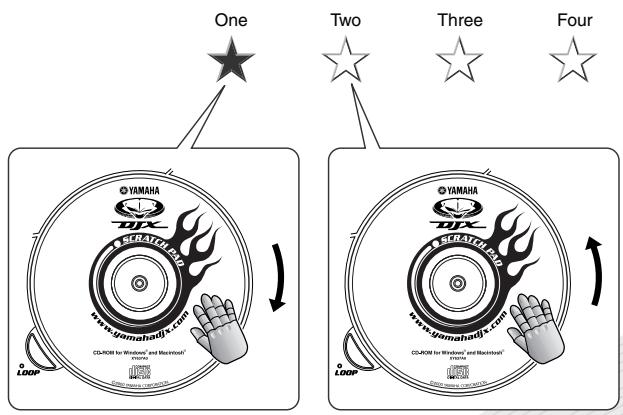
Quarter notes are the simplest to scratch in time with, since you simply scratch on every downbeat. In this example, select P12 and start up V A1. Rock the pad forward (clockwise) on the first downbeat, then rock it back (counter-clockwise) on the second downbeat, and so on. Notice that the scratch sound is actually a musical part that changes with the chords in the Pattern. Tap your foot or your heel with the beats (count out loud if you want, too!), and try to hit each beat with a scratch! Try different scratch "lengths" as well — for example, scratching forward for a short 1/8 turn, and back for a long 1/2 turn. Stay on the beat!

22 Eighth-note scratching

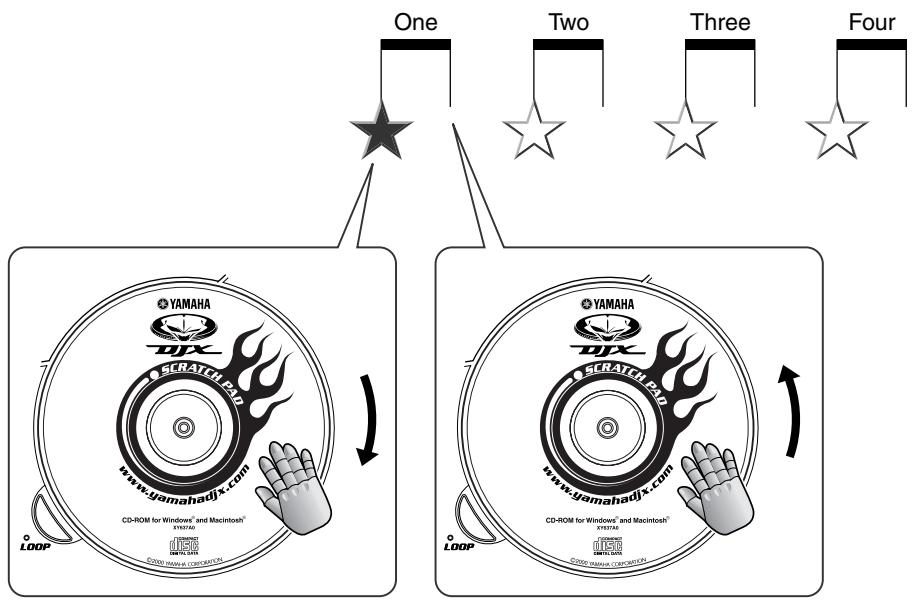
Once you've mastered quarter-note scratching, eighth notes are real easy! Just double up your scratching and play two scratches (forward and back) on every beat!
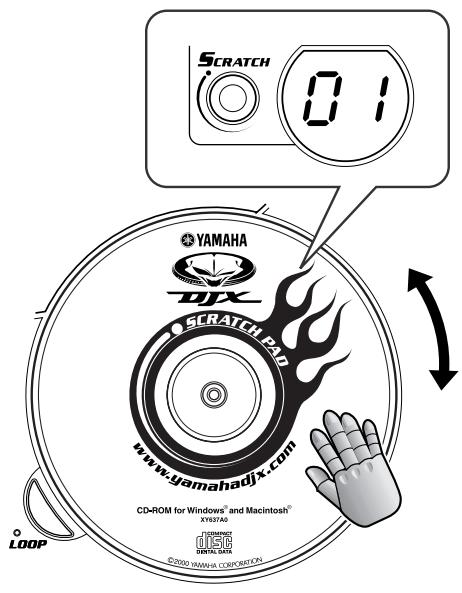
For this example, call up P39 and play V B5. For your scratching, try out Scratch 01 and rock the pad back and forth in short 1/8 turns.

23 Sixteenth-note scratching

Now let's go a little bit faster. Since sixteenth notes are half the value of eighth notes, you'll have to play twice as fast! This means four scratches (forward-back-forward-back) on every beat.
For this exercise, call up P41 and play V A1. For an alternate scratch, try out Scratch 13 and (like in Tip 22 above) work the pad in short 1/8 turns.

Slow down the bpm (Tip 39) if necessary — this will let you lock into the rhythm more easily.

24 Shuffle feel

Here things get a bit tricky! But don't worry — once you feel the rhythm, you'll have no trouble playing it!
Shuffle rhythms are a cornerstone of hip-hop music, and feature a heavy "swing" feel. Scratching to this rhythm is tricky since the forward scratch and backward scratch are not even — you'll have to do one slower than the other!
To get you into this, select P36 and start V B1. Try locking into the hi-hat groove — that's where the shuffle is!
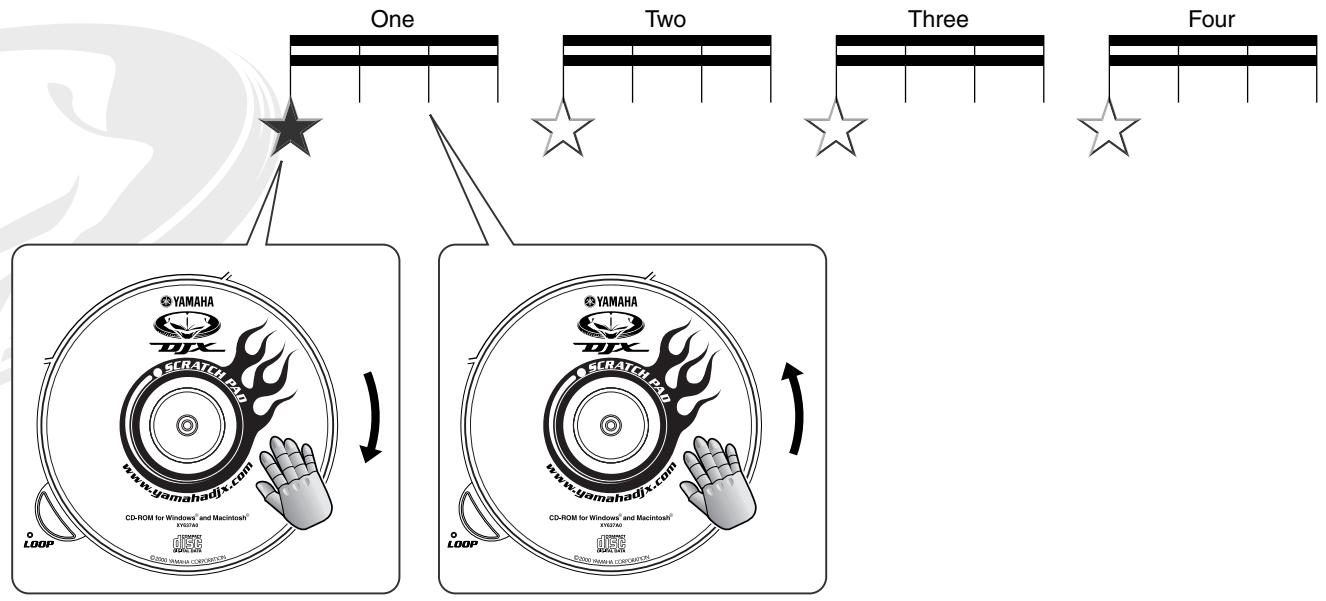

25 Triggering drum loops from the Scratch Pad

A common DJ technique is to scratch a vinyl loop a couple of times, then let the rhythm play. On the DJX-IIB, you can do the same thing!
Call up Scratch 01 and press the LOOP button (the lamp lights). Now, give the Scratch Pad a light push or pull, and the drum loop starts!
To stop the drum loop, press LOOP again (or press PATTERN STOP).
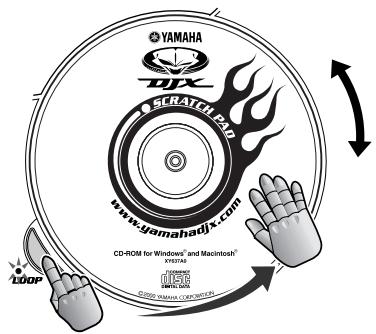

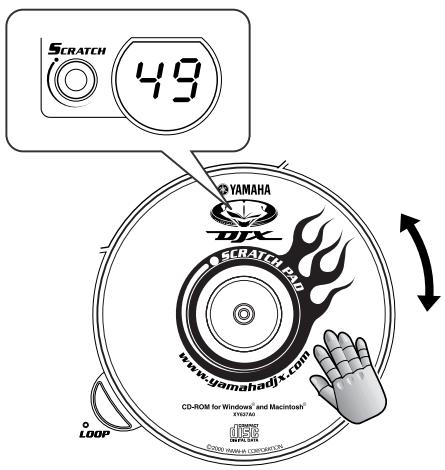
26 Scratch Pad arpeggios

The Scratch Pad has so much more than just scratch sounds! For some examples of how musical you can get with the Scratch Pad, check out the Arpeggiator kits.
Try this out! Select P29 and start V A3. Call up Scratch 49. Now the Scratch Pad plays arpeggiated phrases in time with the rhythm. Mix the arpeggios in with the Pattern and create your own sophisticated, multi-textured arrangements! You can keep the arpeggios playing indefinitely — even when the Scratch Pad is stopped — by pressing LOOP. Try working the Scratch Pad in different ways — rotating the pad in full turns, and changing speed, too. Notice how the arpeggios get higher or lower in pitch, depending on how fast you turn the pad!

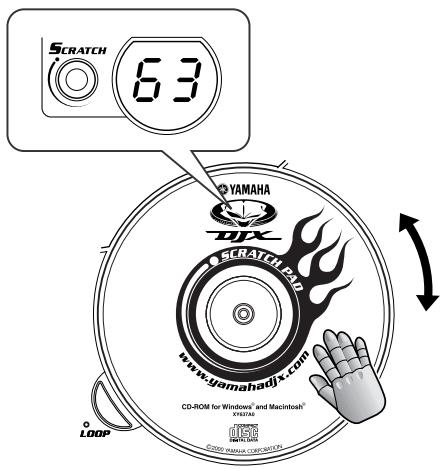
27 Scratch Pad sound effects

The DJX-IIB's Scratch Pad has a slew of special sound effects you can fly into your tracks and give your mixes a unique, dynamic touch.
Select Scratch 63. Turn the Scratch Pad clockwise to get one sound effect, and turn it counterclockwise to get a different sound!

28 Scratch low, scratch high…

The pitch of the Scratch Pad depends on how fast you scratch — just like a real turntable!
To get real low and grainy, turn the pad real slowly. For an edgy, high-pitched scratch, move the pad fast. Play around with this, and experiment with different Scratch kits!

29 Stop the turntable

You've heard the effect — where the whole track drops in pitch and slows down to a grinding halt! Guess what — you can do the same thing on the DJX-IIB, and have fingertip control over it, too!
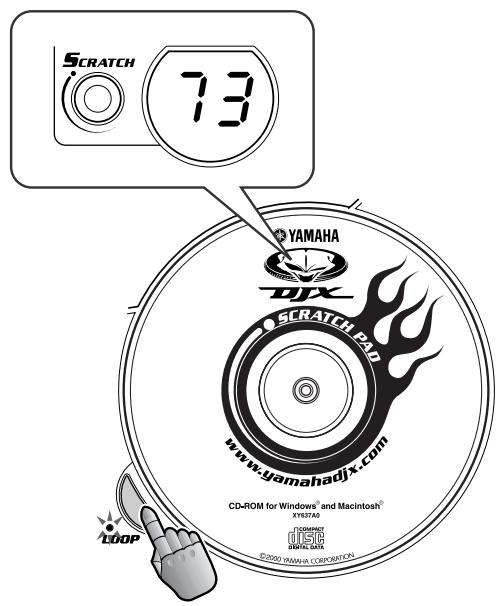
Select Scratch 72. This assigns the Scratch Pad to control both pitch and bpm simultaneously. Spin the pad counter-clockwise — and hear the pitch go down and the bpm slow down. Naturally, the bpm value is shown in the display as well. Turning the pad continuously until the display shows “- - - - ” brings everything to a grinding halt — just like turning off the power on a turntable!
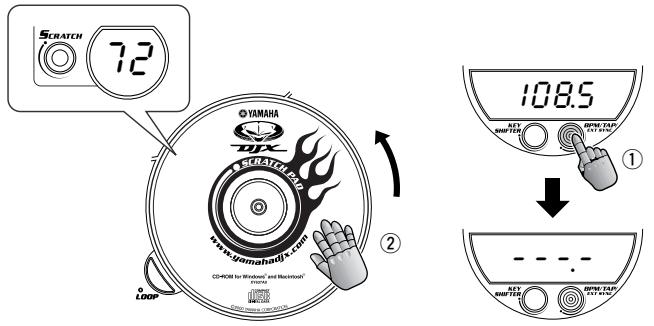
Press the LOOP button, and the "turntable" starts up again! The Pattern starts at low pitch and bpm, and quickly works its way back up to speed. An awesome effect that cranks up the excitement factor a couple more notches!
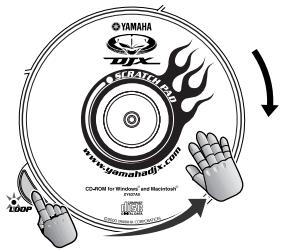
In a variation on this, try spinning the pad clockwise slowly a few turns to bring the pitch and speed up, then press LOOP. This gives you a more gradual build-up.

3D Give the Scratch Pad a new face!

Sure, this tip doesn't change the sound — but you CAN give the Scratch Pad a new look by swapping discs!
If you've got a CD or CD-ROM disc with a design you like, you can easily attach it to the Scratch Pad platter. For instructions on how to do this, see "Changing the Scratch Pad CD" on page 10.

31 CD-ROM goodies

The CD-ROM on the Scratch Pad actually contains a wealth of interesting and useful stuff for your DJX-IIB! It's compatible with both Windows 95/98 and Macintosh, and features the toys and tools listed below.
DJX-II/IIB Premium CD-ROM
Live Movie at DJX Satellite
- DJX-II/IIB Function Guide — a fun way to get to know the DJX-IIIB and its features!
- Pattern Launcher Application — for loading new Patterns to the DJX-IIB!
- Extra Patterns — a selection of specially programmed new Patterns you can load to your DJX-IIB!
Part Mixer Basics
Now that you've got your rhythm chops up to speed and some DJ tricks up your sleeve, it's time to work on the Parts! This chapter gives you the keys to improvising interesting arrangements and instrumental textures. Not to mention creating some slammin' and smokin' tracks!

32 What is a Part?

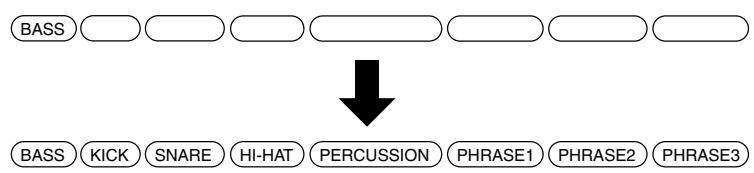
The DJX-IIB Patterns are made up of several different instrument Parts: Kick, Snare, Hi-Hat, Percussion, Bass, and pitched Phrases. Each Part has its own unique function and sound within the rhythm.
BASS KICK SNARE HI-HAT PERCUSSION PHRASE1 PHRASE2 PHRASE3
The Part Mixer puts you in the producer's seat — it lets you throw Parts in and drop Parts out in real time with the Scratch Pad, allowing you to arrange on the fly!
Part Mixer is contained in the Scratch kits — just select Scratch 73. (If Scratch 00 is currently up, simply hold down SCRATCH and turn the Scratch Pad back a “notch” to 73!)
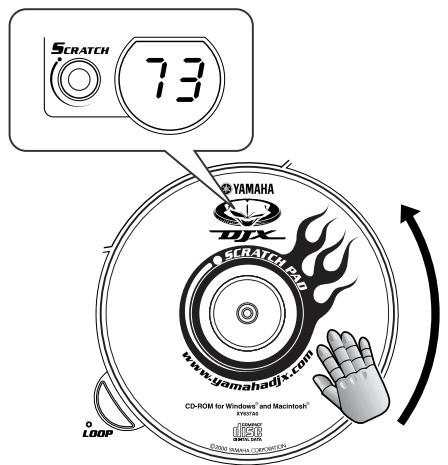

33 Take the console and remix the Parts!

Step up to the mixer and start juggling the arrangement around! When the Part Mixer "kit" is called up (see Tip 32 above), you can mute certain Parts by turning the pad counter-clockwise about 1/4 turn or 90^ . Likewise, if you've taken Parts out, you can bring them back in by turning the pad back clockwise by the same amount.
Tech note The specific Parts that are muted and the order in which they are brought in and out of the mix differs according to the selected Pattern.
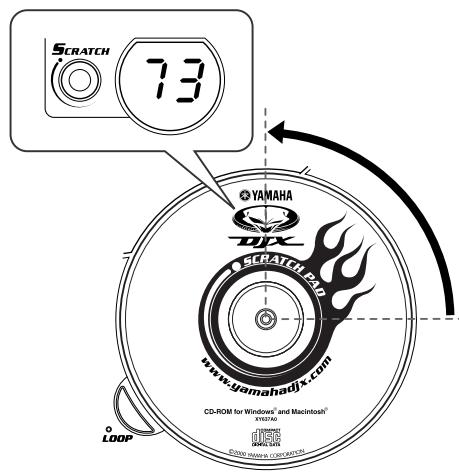
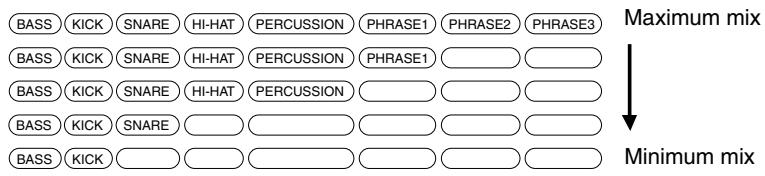
Each 1/4 turn goes forward or back one "step" in the Part Mix arrangement. Turning the pad around a full 360^ counter-clockwise instantly takes the mix down to the minimum. Turning it 360^ clockwise restores the maximum mix.
Helpful hint:
If you've muted several Parts, you can turn them all back on again instantly! Simply press LOOP — do this on the "one" downbeat — and the whole rhythm kicks in at once!

34 Extra texture!

Work on your instrument textures. All the mixmasters and mixologists do it! Why? Because it works like a charm!
Here's a specific example to get you started. Select P05. Before starting the Pattern, spin the pad counter-clockwise two full rotations. (Make sure Part Mixer is selected!) This takes the Part mix down to the bare bones! Now, start V A1.
Let the Pattern carry on for a while. Then turn the pad clockwise 1/4 of the way to change the texture. Keep doing this, letting each instrument group play for a while before bringing in the next. Also, try going back — turning the pad counter-clockwise to take Parts out of the mix. Then, when you want to get all the Parts happening, simply press LOOP (as in the “Helpful hint” in Tip 33 above).
Experiment with this — on the example Pattern and others — and let your ears be the judge. Above all, have fun! After all, this is the way the pros build up the sound.

Crossfader Basics
The DJX-IIB has a feather-touch Crossfader — just like those found on real DJ mixers — that lets you crossfade between your beats and your scratching!

35 Work the Crossfader!

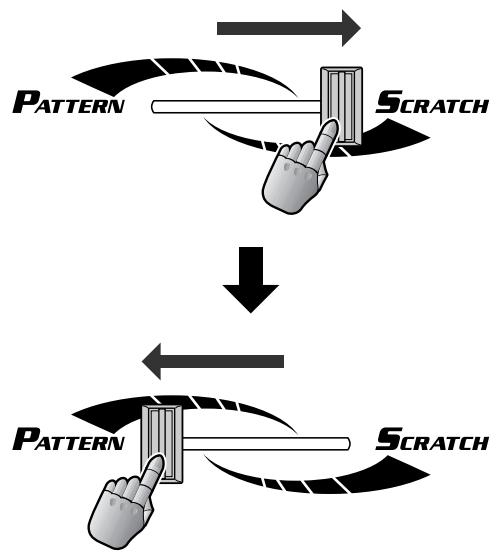
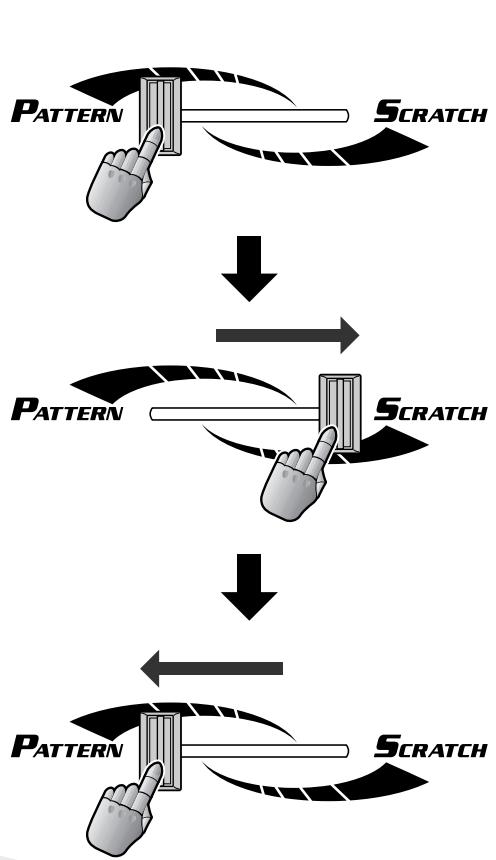
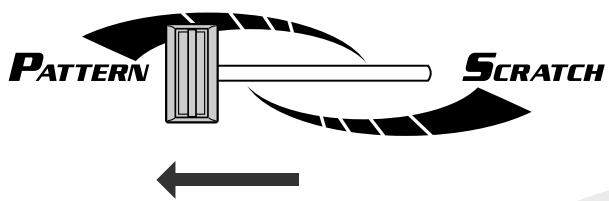
This short-throw, feather-touch Crossfader gives you easy and fast control over the Pattern/Scratch balance. The center spot has a lot of leeway and is very forgiving — just get the Crossfader somewhere near the middle and the level balance is equal. To hear only the Pattern, move the fader all the way to the left; to hear only the Scratch, move it all the way to the right.
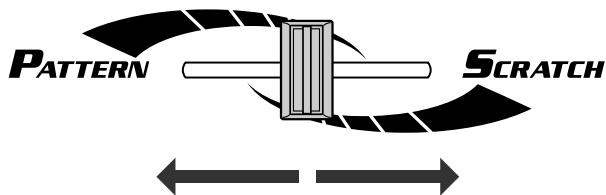
To hear only the Pattern, move the fader all the way to the left.
To hear only the Scratch, move it all the way to the right.
Helpful hint:
Want to work the Crossfader the opposite way — with the Scratch Pad sound on the left and the Pattern sound on the right? If you feel more comfortable with that arrangement, this operation's for you!
Simultaneously hold down the SCRATCH button and turn the power on. This reverses the operation of the Crossfader. To restore normal operation, simply turn the power off and back on again as usual.

36 Mute the Pattern

Sometimes you'll want to cut the Pattern out of the mix — maybe to work out on the Scratch Pad for a while — then bring it back in instantly. The Crossfader is a great way to do this — fast and easy!
Simply move the fader all the way to the right — preferably just before the “one” downbeat. To bring the Pattern back in from the “one,” flip the Crossfader back to the left and hit the Pattern button, all in one motion.

37 Crossfader cuts

This is one of the most basic moves in the DJ's collection of Crossfader techniques — cutting in with a scratch.
Hit a Pattern and keep the Crossfader all the way to the left so that only the Pattern is heard. While the Pattern is playing, work the Scratch Pad (even though you can't hear it). Whip the fader to the right and then back left quickly. If you do it right, you'll get a brief hit of the scratch — without interrupting the flow of the rhythm!
Once you get the hang of it — and you think your scratching chops are up to it — try working the Scratch Pad only when you flick the Crossfader!
Intermediate
Techniques
This chapter is a grab bag full of various tips that solidify your DJ chops and put you on your way to really mastering the instrument! Take your time and get these down before moving on to Chapter 9...

38 Transpose the key

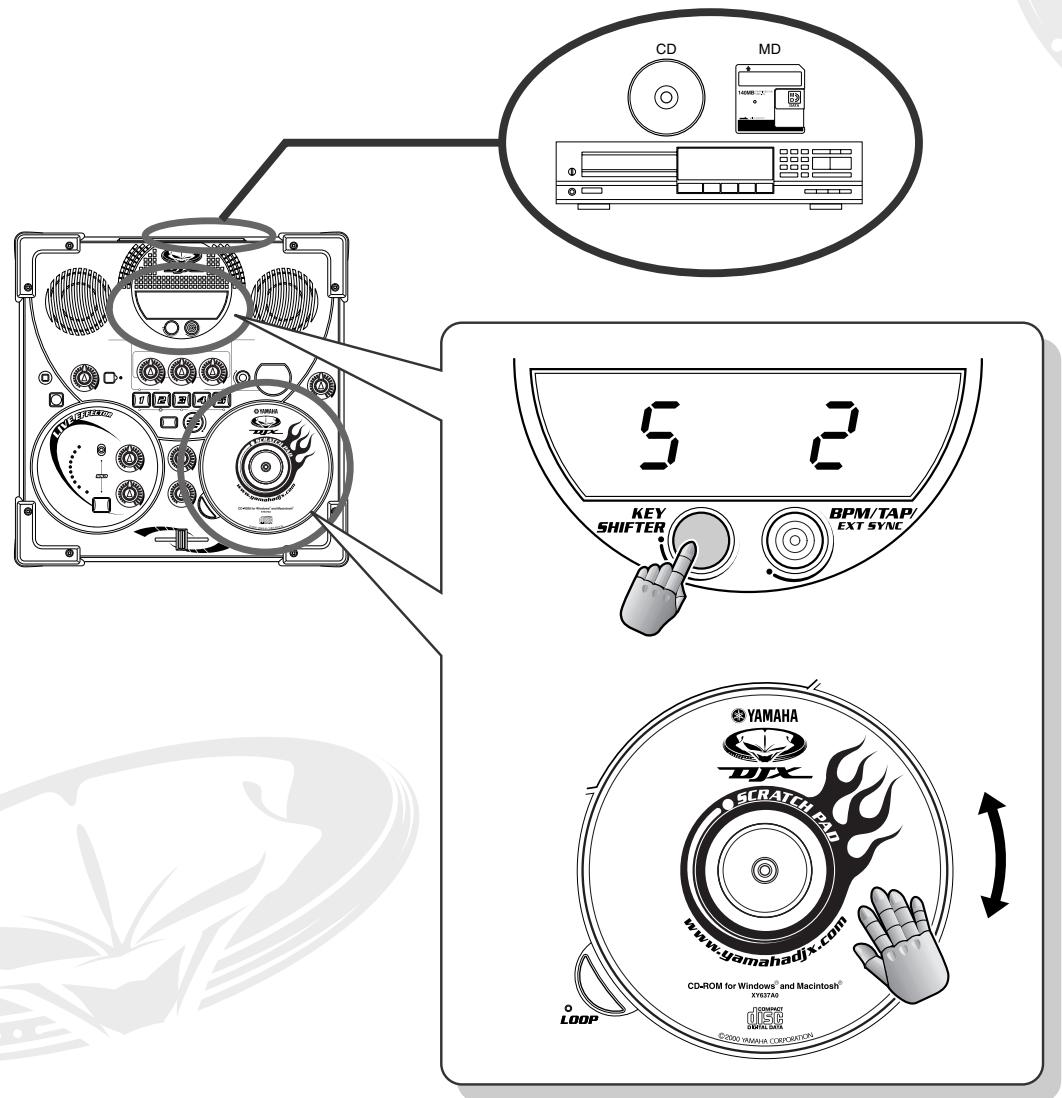
The Key Shifter section of the DJX-IIB lets you take the pitch (or "key") of the overall sound, and transpose it up or down — instantly!
Believe it or not, changing the key of the overall sound makes subtle but fundamental changes to the character of the sound as well. Use higher keys (+1 to +6) to make the sound more tense or brighter, and use the lower keys (-1 to -5) to make the sound more relaxed and subdued.
To change the key, hold down the KEY SHIFTER button and simultaneously turn the Scratch Pad. The amount of shift is shown in the display (-5 to 0 to +6, with 0 being normal pitch). Keep holding down the button until the point at which you want to change key, then release it — the key changes to the new setting instantly!
Key Shifter is especially convenient when you're using the DJX-IIB with an external sound source, such as CD or vinyl — letting you match the key of the Pattern to the key on the external source!

39 Change the bpm

Another sure-fire way to stir things up is to play with the bpm. Turn up the bpm and turn up the heat!
Press BPM/TAP once and turn the scratch pad. For you techies, the bpm range is 32.0 - 280.0. try starting the Pattern at a slower-than-normal bpm, then gradually bring the bpm up in speed to get the groove really happening!
Be careful! If the Pattern is stopped and you turn the scratch pad past 280.0, "Sync" appears in the display and the DJX-IIB goes into the Sync Mode (see page 66). To get out of this mode, simply turn the scratch pad clockwise, until bpm values appear in the display again.
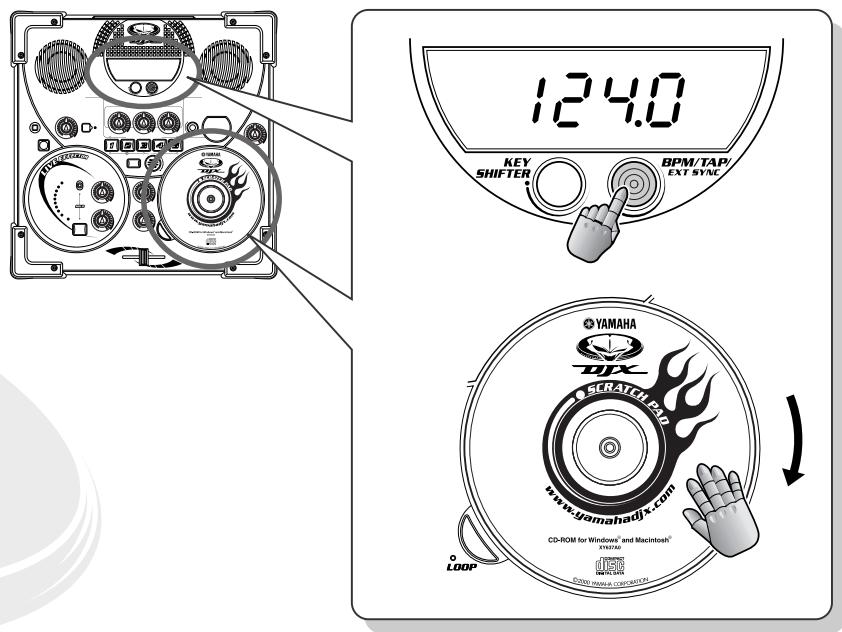

Sync Mode (page 66).
(Only selectable when Pattern is stopped.)

40 Reset to the default bpm

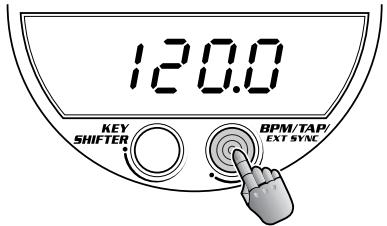
Want to get back to the original pre-programmed default bpm? Simply press and hold down BPM/TAP — and the bpm of the currently selected Pattern is instantly reset to its original speed.
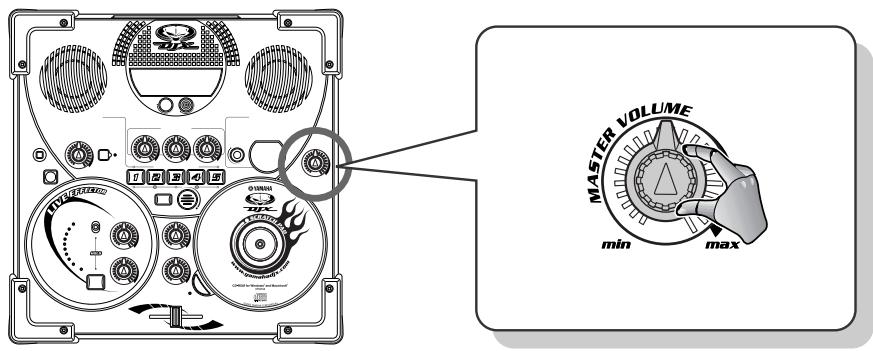
Easy, but effective! Simply use the MASTER VOLUME dial to create your own smooth fade-ins and fade-outs. One specific trick you can try is to fade out a Pattern down to silence, then quickly bring MASTER VOLUME up to normal and burst in with a new Pattern!

42 Travel light!

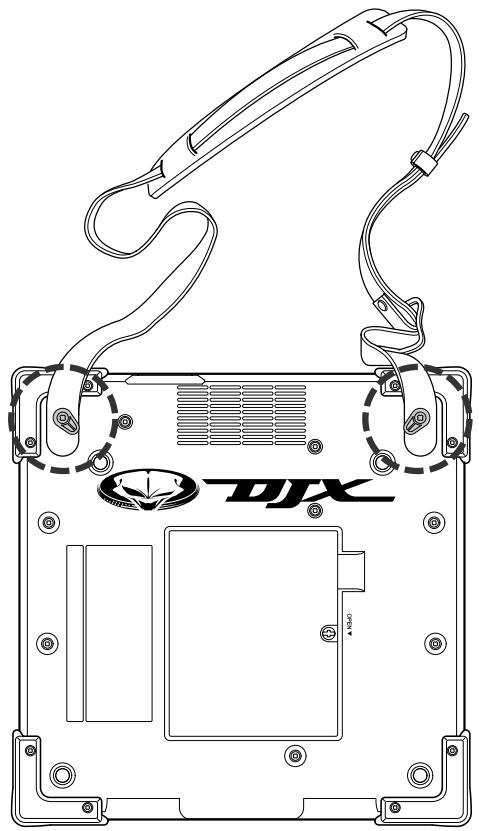
Small and light, the DJX-IIB is made for the road! And with the two special hooks fastened onto the bottom of the unit, just slap on a guitar strap — and you're ready to go!

43Tweak the cutoff

Select P06 and start V A1. Set RESONANCE to about 2 or 3 o'clock, then slowly turn the CUTOFF knob to create a slow sweeping effect. Twiddle the knob back and forth quickly and create a wahwah like trembling effect.

44 Wah-wah scratching

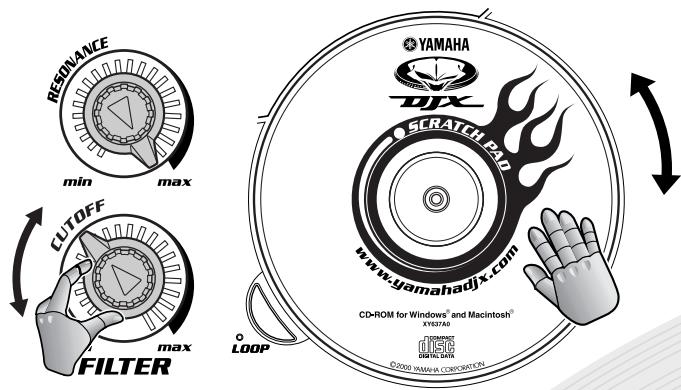
Here's a cool effect you can use to funkify your tracks! It's like running a turntable through a wahwah pedal. The settings suggested here work especially well with Scratch 01, but you may want to experiment with other settings when using other Scratch kits.
Set RESONANCE to max then turn the CUTOFF knob back and forth between 7 and 10 o'clock while playing the scratch sound. Try to keep the groove — both in your scratching and your knob turning!

45 Warped vinyl and a cheap turntable!

A lot of dance styles call for a lo-fi, analog sound. This simple trick lets you mimic the wow and flutter of a warped record — or a bad turntable!
Select Scratch 72 to call up the Pitch & bpm "kit" — this lets you speed up and slow down the Pattern. While the Pattern is playing, move the Scratch Pad back and forth slowly and over a short distance — just enough to waver the pitch up and down a little. For even greater lo-fi "realism," try using the Lo-Fi effect (Tip 16).

46 Scratch Drum Loops in sync

Here's a real convenient feature! You'll never have to worry about your Scratch Pad Drum Loops drifting out of time — the DJX-IIB automatically matches up the bpm of the loops to the bpm of the Pattern. (For information on playing Drum Loops, see Tip 25.)
However, the DJX-IIB can't sync up your loops if you don't play them on time! Be careful to turn the Scratch Pad right on the beat — just as you did with the Patterns. If you don't hit LOOP in rhythm, just press it again to turn it off, then try again!

47 Mute the Scratch

The Scratch Pad is a sensitive little beast — even the slightest touch can put a scratch in your mix. For those times you want to make sure the scratching stays out of the way of the Pattern, move the Crossfader all the way to the left.
Pattern Player
Power Tips

48 Hitting a new Pattern and Variation - at the same time!

There will be times when you'll want to change not only to a new Pattern, but to a specific Variation — instantly and at the same time. Here's the best way to do that!
First, simultaneously hold down PATTERN and turn the Scratch Pad to call up the new Pattern number. Remember to keep holding down PATTERN! Then — just at the “one” downbeat in the Pattern — press the desired Pattern button. Both the Pattern number and the Variation number change simultaneously.
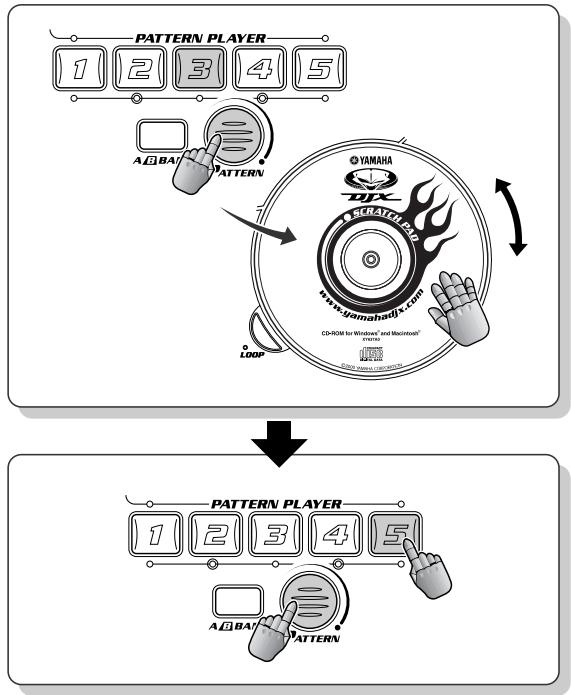
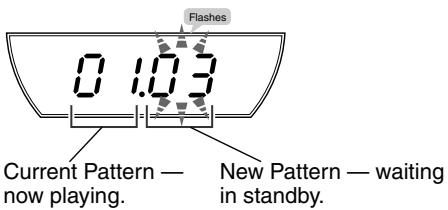
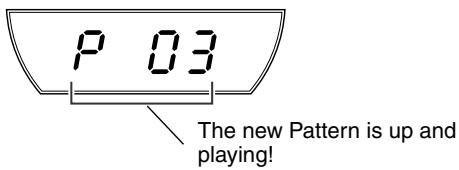

49 Hitting a new Pattern, Bank and Variation - at the same time!

Here's a sophisticated twist to Tip 48 above — changing the Bank along with the Pattern and Variation!
First, simultaneously hold down PATTERN and turn the Scratch Pad to call up the new Pattern number. Remember to keep holding down PATTERN! Next, press the A/B BANK button. Finally (without releasing the PATTERN button), press the desired PATTERN PLAYER button — just at the “one” downbeat in the Pattern. The Pattern number, the Bank and the Variation number all change simultaneously!
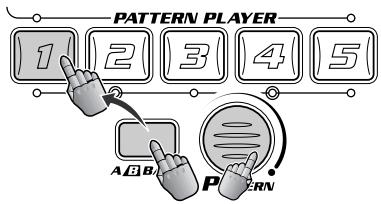
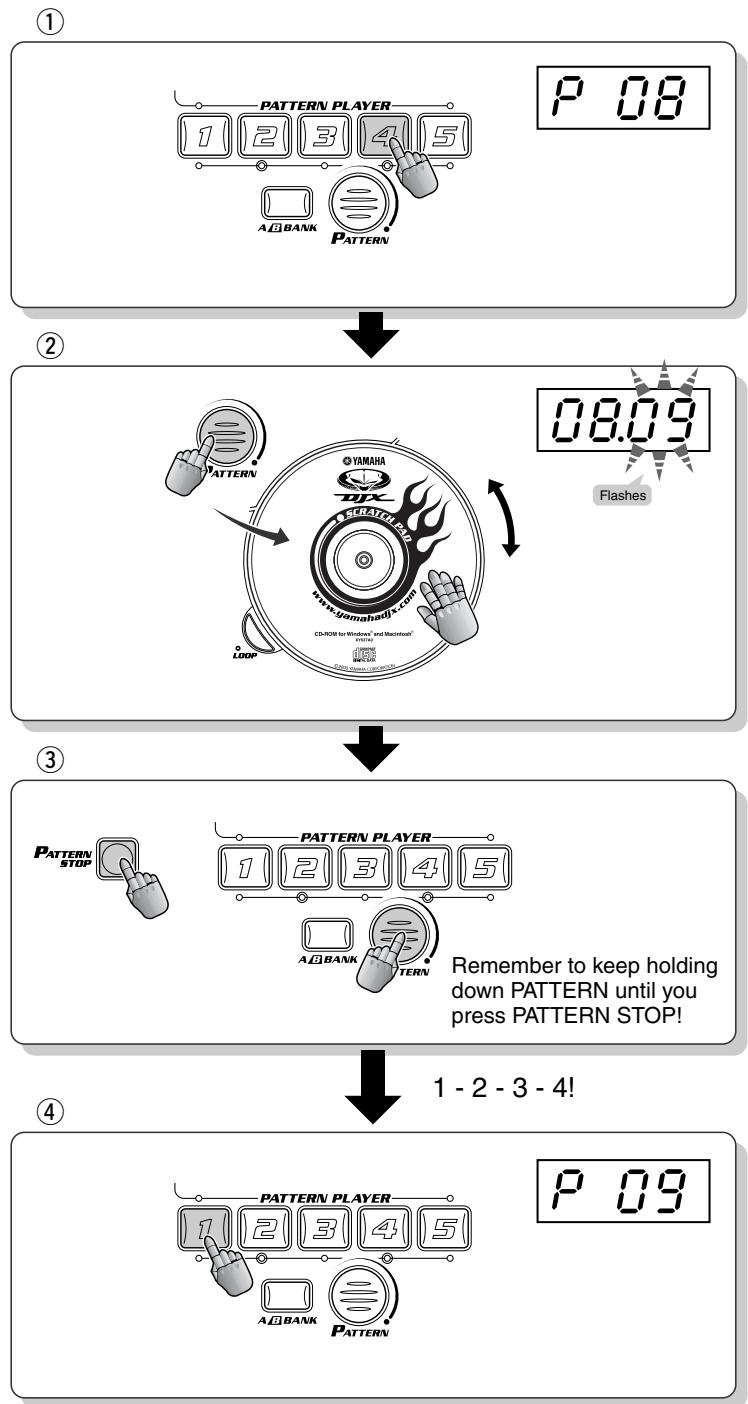
One sure-fire method to turn up the heat on the dance floor is to use a break or a drop-out just before hitting a new Pattern! Here, we'll try dropping everything out for a full measure (four beats).
While the first Pattern is playing, count the beat in your mind and tap it out with your heel — to make sure you're locked into the groove! At the same time, call up the new Pattern by simultaneously holding down PATTERN and turning the Scratch Pad. Remember to keep holding down PATTERN! Then — right on the "one" downbeat — press PATTERN STOP. Keep counting while you hold the button — 1 - 2 - 3 - 4! Finally, on the next "one," press the desired Pattern button.
Try this out with P08, V A4 as the first Pattern (good for a four-beat intro!), and break to P09, V A1.
As always, timing is everything! Whether you break for one beat, two beats, or four — make sure you come in with the next rhythm right on the “one”!

51 One-bar Patterns - all in a row!

Nearly all of the DJX-IIB's Patterns change every bar (four beats). Some loop in two-bar patterns, some loop every four bars. Some Patterns have more obvious changes than others (for example, listen to P59, V A1), but all have some sort of musical or textural progression that make the music flow and breathe.
You can create a different kind of flow by playing different Patterns in a row, each Pattern lasting just one bar. Select P59, and play V A1, A2, A3, and A4 like this:
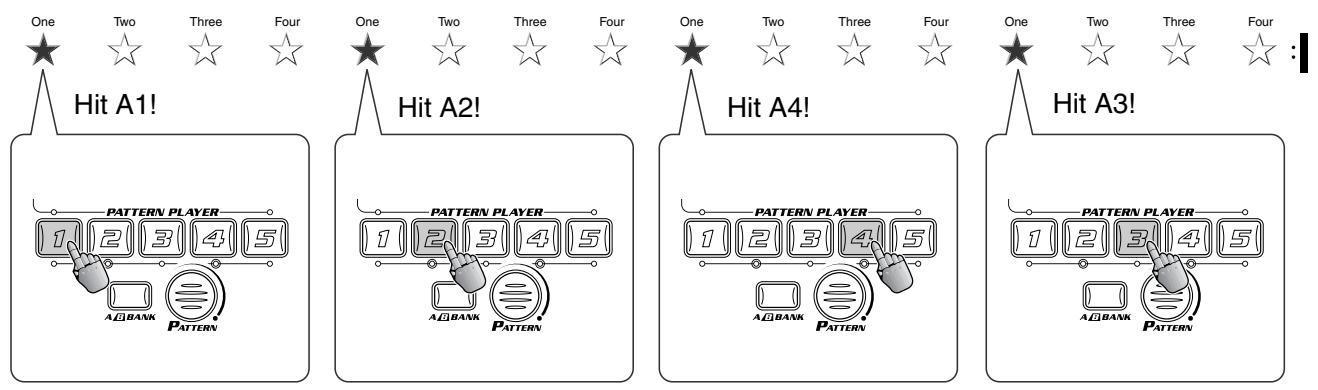
Repeat the above passage for about four or eight times, then switch to this:
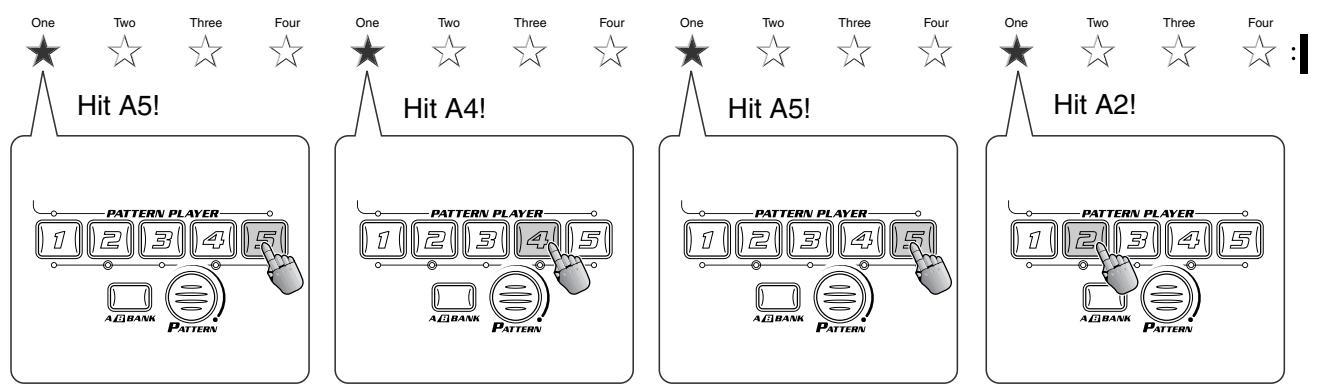
See how easily this lets you create your own two- or four-bar variations! Try it out with some of the other Patterns, too.
Crossfader Power
Tips

52 Quick Crossfader scratching

Here's a cool way to change the sound of a Pattern — and put your personal scratch touches on it — without disrupting the flow of the rhythm!
Select P50 and start V A1. Also, call up Scratch 01. While the Pattern is playing, try scratching along with the rhythm — just to get in the groove. As you keep working the Scratch Pad, flick the Crossfader on the beat, between hard left and hard right, like this:
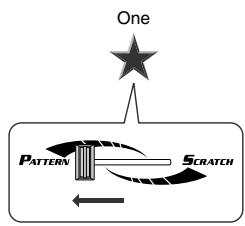
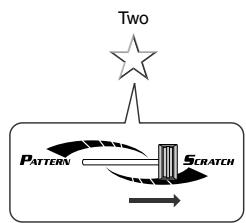
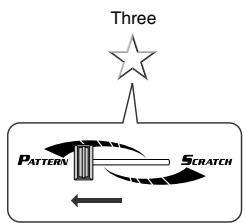
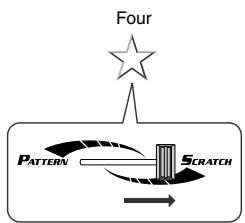
Flick it fast! Make sure the Pattern plays on the "one" and "three," while your scratching comes down on the "two" and "four" backbeats. And keep scratching even while only the Pattern is playing — so you stay in the pocket! Try other variations on this, cutting in to a Pattern with short scratch fills and accents.

53 Long Crossfader scratching

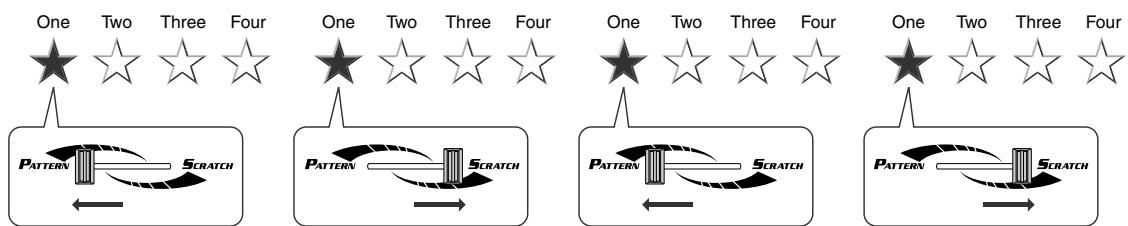
This one's going to take a bit of practice! Like Tip 52 above, try flicking the Crossfader between the Pattern and your scratching — but this time, hang with the scratch for one full bar!
That's right — scratch for four beats, then come back in with the Pattern on the "one." The reason this is tricky is because you have to rely on your body and mind as the timekeeper until you flick back to the Pattern.
Helpful hints:
- Tap out the beat with your foot. Try to flick the Crossfader back just before the "one."
- Double-up the count for slower rhythms (see Tip 5).
- Try practicing your fader-flicking without the Scratch Pad at first. Then, when you've got it down, bring in the scratch!

54 Pattern loop vs. scratch loop

Try Tips 52 and 53 with a Drum Loop instead of a scratch! Since the DJX-IIB keeps the Drum Loop in sync with the Pattern, you can switch seamlessly between the two — and create a ton of new rhythms!
Select one of the Drum Loops in the Scratch kits. Try to get a loop that complements the selected Pattern. Or, if you're after special effects and off-the-wall beats, call up a loop that intentionally clashes with the Pattern!
Start the Pattern with the Crossfader all the way left, and turn the Scratch Pad right on the "one" to start the Drum Loop. Then, work the Crossfader like you did in Tips 53 and 54. Try some other rhythmic flicks as well — like coming in with the loop on beats 3 and 4, for example.
Using the BPM/TAP button

55 Tap out the beat!

Change the bpm in real time! Tap the BPM/TAP button twice rhythmically, while the Pattern is running — and the bpm automatically changes to the tapped speed.
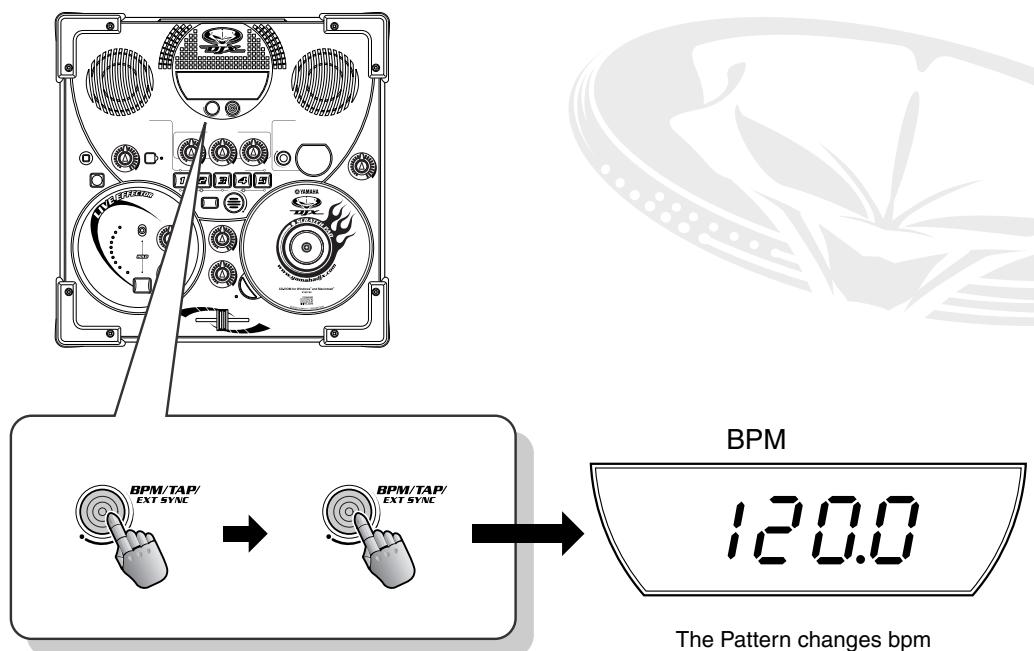
The Pattern changes bpm according to your tapping.

56 Start with a tap…

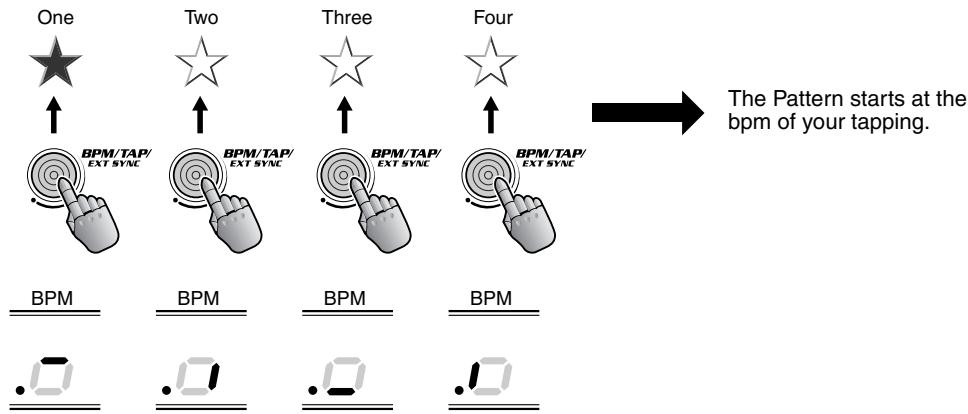
You can also get the Pattern going at whatever speed you like by simply tapping it out. Select a Pattern, then instead of hitting one of the Pattern Player, tap the BPM/TAP button — four times, in rhythm — and the Pattern starts automatically at the bpm you've tapped.
While you're tapping, the display shows each of your four taps, then displays the resulting bpm.
Tech note Only two taps are needed to start Pattern 42, since that Pattern is in 2/4 time.
The Outside World
Here are a couple of tips that get you started interfacing the DJX-IIB with external gear.
Go for it, and get your sound out there!

57 Expanding your DJ setup

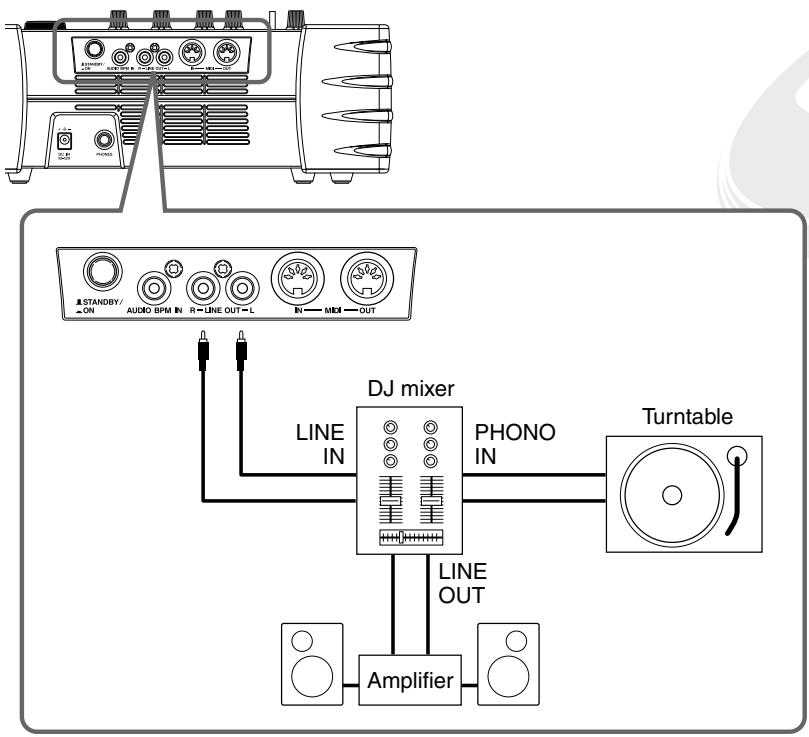
The DJX-IIB can easily do double-duty as part of a larger DJ setup. For example, you can connect the LINE OUT jacks to two of the inputs of a DJ mixer. Hook up a turntable to the other channels of the DJ mixer, and you've got a full dance production setup to rival the pros! This way you can play the DJX-IIB as well as your favorite vinyl tracks, and mix and switch them with the controls on the DJ mixer.
Naturally, you can also hook your DJX-IIB up to an MD recorder or cassette deck and record your DJ performances to disk or tape.

58 Mute the speakers

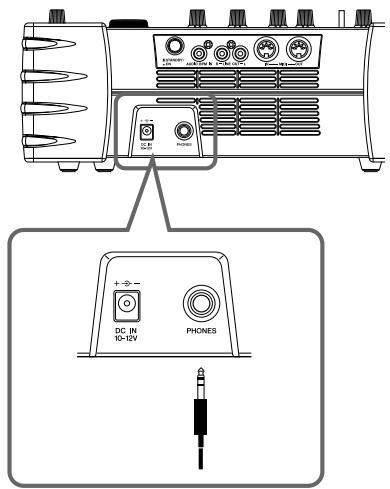
If you're routing the DJX-IIB's sound to a DJ mixer or external amplifier/speaker system, you may want to cut off the sound of the DJX-IIB's built-in speakers. Easy! Simply insert a phone plug into the PHONES jack — or hook up a set of stereo headphones for monitoring the DJX-IIB sound.
Naturally, even when the built-in speakers are muted in this way, audio is still output through the LINE OUT jacks.