
DD55C - Batterie électronique YAMAHA - Notice d'utilisation et mode d'emploi gratuit
Retrouvez gratuitement la notice de l'appareil DD55C YAMAHA au format PDF.


| Type de produit | Batterie électronique numérique |
| Marque | Yamaha |
| Modèle | DD55C |
| Alimentation | Adaptateur secteur AC (PA-5D/PA-5C) ou 6 piles LR14 (taille C) |
| Nombre de pads | 7 pads de percussion |
| Pédales | 2 pédales au pied (pour charleston/grosse caisse) |
| Kits de batterie | 45 kits prédéfinis + 1 kit personnalisé |
| Sons de percussion | 212 voix de batterie intégrées |
| Polyphonie maximale | 32 notes simultanées |
| Chansons intégrées | 100 morceaux d'accompagnement |
| Enregistrement | 1 chanson personnalisée (jusqu'à 20000 notes) |
| Effets | Réverbération (activée/désactivée) |
| Métronome | Clic intégré réglable |
| Réglage de sensibilité | 3 niveaux (0, 1, 2) pour chaque pad |
| Contrôle du volume | Volume principal et volume individuel par pad |
| MIDI | Entrée et sortie MIDI (DIN 5 broches) |
| Sortie casque | Prise PHONES/OUTPUT (jack stéréo 6,35 mm) |
| Accessoires fournis | 2 baguettes, 2 pédales, manuel d'utilisation |
| Nettoyage | Chiffon doux et sec ; ne pas utiliser de solvants |
| Sécurité | Utiliser uniquement l'adaptateur recommandé ; ne pas ouvrir l'appareil |
| Réparabilité | Aucune pièce réparable par l'utilisateur ; contacter un service agréé Yamaha |
FOIRE AUX QUESTIONS - DD55C YAMAHA
Questions des utilisateurs sur DD55C YAMAHA
0 question sur cet appareil. Repondez a celles que vous connaissez ou posez la votre.
Poser une nouvelle question sur cet appareil
Téléchargez la notice de votre Batterie électronique au format PDF gratuitement ! Retrouvez votre notice DD55C - YAMAHA et reprennez votre appareil électronique en main. Sur cette page sont publiés tous les documents nécessaires à l'utilisation de votre appareil DD55C de la marque YAMAHA.
MODE D'EMPLOI DD55C YAMAHA
DREUM
DD-55 DD-55c Digital Percussion Digital Percussion
Owner's Manual
SPECIALMESSAGESECTION
This product utilizes batteries or an external power supply (adapter). DO NOT connect this product to any power supply or adapter other than one described in the manual, on the name plate, or specifically recommended by Yamaha.
This product should be used only with the components supplied or; a cart, rack, or stand that is recommended by Yamaha. If a cart, etc., is used, please observe all safety markings and instructions that accompany the accessory product.
SPECIFICATIONS SUBJECT TO CHANGE:
The information contained in this manual is believed to be correct at the time of printing. However, Yamaha reserves the right to change or modify any of the specifications without notice or obligation to update existing units.
This product, either alone or in combination with an amplifier and headphones or speaker/s, may be capable of producing sound levels that could cause permanent hearing loss. DO NOT operate for long periods of time at a high volume level or at a level that is uncomfortable. If you experience any hearing loss or ringing in the ears, you should consult an audiologist.
IMPORTANT: The louder the sound, the shorter the time period before damage occurs.
NOTICE:
Service charges incurred due to a lack of knowledge relating to how a function or effect works (when the unit is operating as designed) are not covered by the manufacturer's warranty, and are therefore the owners responsibility. Please study this manual carefully and consult your dealer before requesting service.
ENVIRONMENTAL ISSUES:
Yamaha strives to produce products that are both user safe and environmentally friendly. We sincerely believe that our products and the production methods used to produce them, meet these goals. In keeping with both the letter and the spirit of the law, we want you to be aware of the following:
Battery Notice:
This product MAY contain a small non-rechargeable battery which (if applicable) is soldered in place. The average life span of this type of battery is approximately five years. When replacement becomes necessary, contact a qualified service representative to perform the replacement.
This product may also use "household" type batteries. Some of these may be rechargeable. Make sure that the battery being charged is a rechargeable type and that the charger is intended for the battery being charged.
When installing batteries, do not mix batteries with new, or with batteries of a different type. Batteries MUST be installed correctly. Mismatches or incorrect installation may result in overheating and battery case rupture.
Warning:
Do not attempt to disassemble, or incinerate any battery. Keep all batteries away from children. Dispose of used batteries promptly and as regulated by the laws in your area. Note: Check with any retailer of household type batteries in your area for battery disposal information.
Disposal Notice:
Should this product become damaged beyond repair, or for some reason its useful life is considered to be at an end, please observe all local, state, and federal regulations that relate to the disposal of products that contain lead, batteries, plastics, etc. If your dealer is unable to assist you, please contact Yamaha directly.
NAME PLATE LOCATION:
The name plate is located on the bottom of the product. The model number, serial number, power requirements, etc., are located on this plate. You should record the model number, serial number, and the date of purchase in the spaces provided below and retain this manual as a permanent record of your purchase.
Model
Serial No.
Purchase Date
92-BP (bottom)
PLEASE KEEP THIS MANUAL
FCC INFORMATION (U.S.A.)
1. IMPORTANT NOTICE: DO NOT MODIFY THIS UNIT!
This product, when installed as indicated in the instructions contained in this manual, meets FCC requirements. Modifications not expressly approved by Yamaha may void your authority, granted by the FCC, to use the product.
- IMPORTANT: When connecting this product to accessories and/or another product use only high quality shielded cables. Cable/s supplied with this product MUST be used. Follow all installation instructions. Failure to follow instructions could void your FCC authorization to use this product in the USA.
- NOTE: This product has been tested and found to comply with the requirements listed in FCC Regulations, Part 15 for Class "B" digital devices. Compliance with these requirements provides a reasonable level of assurance that your use of this product in a residential environment will not result in harmful interference with other electronic devices. This equipment generates/uses radio frequencies and, if not installed and used according to the instructions found in the users manual, may cause interference harmful to the operation of other electronic devices. Compliance
with FCC regulations does not guarantee that interference will not occur in all installations. If this product is found to be the source of interference, which can be determined by turning the unit "OFF" and "ON", please try to eliminate the problem by using one of the following measures:
Relocate either this product or the device that is being affected by the interference.
Utilize power outlets that are on different branch (circuit breaker or fuse) circuits or install AC line filter/s.
In the case of radio or TV interference, relocate/reorient the antenna. If the antenna lead-in is 300 ohm ribbon lead, change the lead-in to co-axial type cable.
If these corrective measures do not produce satisfactory results, please contact the local retailer authorized to distribute this type of product. If you can not locate the appropriate retailer, please contact Yamaha Corporation of America, Electronic Service Division, 6600 Orangethorpe Ave, Buena Park, CA90620
The above statements apply ONLY to those products distributed by Yamaha Corporation of America or its subsidiaries.
- This applies only to products distributed by YAMAHA CORPORATION OF AMERICA.
(class B)
OBSERVERA!
Apparaten kopplas inte ur växelströmskällan (nätet) sá länger som den ar ansluten till vagguttaget, även om själva apparaten har stängts av.
ADVARSEL: Netspääendingen til ditte apparat er IKKE afbrudt, säläenge netledningen siddr i en stikkontakt, som er t endt — ochá selvom der or slukket pá apparatets afbryder.
VAROITUS: Laitteen tosiopiirin kytketty käytökytkin ei irroita koko laitetta vergkosta.
Entsorgung leerer Batterien (nur innerhalb Deutschlands)
Leisten Sie einen Beitrag zum Umweltschutz. Verbrauchte Batterien oder Akkumulatoren dürfen nicht in den Hausmüll. Sie konnen bei einer Sammlstelle für Altbatterien bzw. Sondermüll abgegeben werden. Informieren Sie sich bei ihrer Kommune.
(battery)
(standby)
PRECAUTIONS
PLEASE READ CAREFULLY BEFORE PROCEEDING
- Please keep these precautions in a safe place for future reference.

WARNING
Always follow the basic precautions listed below to avoid the possibility of serious injury or even death from electrical shock, short-circuiting, damages, fire or other hazards. These precautions include, but are not limited to, the following:
- Do not open the instrument or attempt to disassemble the internal parts or modify them in any way. The instrument contains no user-serviceable parts. If it should appear to be malfunctioning, discontinue use immediately and have it inspected by qualified Yamaha service personnel.
- Do not expose the instrument to rain, use it near water or in damp or wet conditions, or place containers on it containing liquids which might spill into any openings.
- If the AC adaptor cord or plug becomes frayed or damaged, or if there is a sudden loss of sound during use of the instrument, or if any unusual smells or smoke should appear to be caused by it, immediately turn off the power switch, disconnect the adaptor plug from the outlet, and have the
instrument inspected by qualified Yamaha service personnel.
- Use the specified adaptor (PA-5D, PA-5C or an equivalent recommended by Yamaha) only. Using the wrong adaptor can result in damage to the instrument or overheating.
- Before cleaning the instrument, always remove the electric plug from the outlet. Never insert or remove an electric plug with wet hands.
- Check the electric plug periodically and remove any dirt or dust which may have accumulated on it.
- Do not put burning items, such as candles, on the unit.
A burning item may fall over and cause a fire.

CAUTION
Always follow the basic precautions listed below to avoid the possibility of physical injury to you or others, or damage to the instrument or other property. These precautions include, but are not limited to, the following:
- Do not place the AC adaptor cord near heat sources such as heaters or radiators, and do not excessively bend or otherwise damage the cord, place heavy objects on it, or place it in a position where anyone could walk on, trip over, or roll anything over it.
- When removing the electric plug from the instrument or an outlet, always hold the plug itself and not the cord.
- Do not connect the instrument to an electrical outlet using a multiple-connector. Doing so can result in lower sound quality, or possibly cause overheating in the outlet.
- Unplug the AC power adaptor when not using the instrument, or during electrical storms.
- Always make sure all batteries are inserted in conformity with the +/- polarity markings. Failure to do so might result in overheating, fire, or battery fluid leakage.
- Always replace all batteries at the same time. Do not use new batteries together with old ones. Also, do not mix battery types, such as alkaline batteries with manganese batteries, or batteries from different makers, or different types of batteries from the same maker, since this can cause overheating, fire, or battery fluid leakage.
- Do not dispose of batteries in fire.
- Do not attempt to recharge batteries that are not intended to be charged.
- When the batteries run out, or if the instrument is not to be used for a long time, remove the batteries from the instrument to prevent possible leakage of the battery fluid.
- Keep batteries away from children.
- If the batteries do leak, avoid contact with the leaked fluid. If the battery fluid should come in contact with your eyes, mouth, or skin, wash immediately with water and consult a doctor. Battery fluid is corrosive and may possibly cause loss of sight or chemical burns.
- Before connecting the instrument to other electronic components, turn off the power for all components. Before turning the power on or off for all components, set all volume levels to minimum. Also, be sure to set the volumes of all components at their minimum levels and gradually raise the volume controls while playing the instrument to set the desired listening level.
-
Do not expose the instrument to excessive dust or vibrations, or extreme cold or heat (such as in direct sunlight, near a heater, or in a car during the day) to prevent the possibility of panel disfiguration or damage to the internal components.
-
Do not use the instrument near other electrical products such as televisions, radios, or speakers, since this might cause interference which can affect proper operation of the other products.
- Do not place the instrument in an unstable position where it might accidentally fall over.
- Before moving the instrument, remove all connected adaptor and other cables.
- When cleaning the instrument, use a soft, dry cloth. Do not use paint thinners, solvents, cleaning fluids, or chemical-impregnated wiping cloths. Also, do not place vinyl, plastic or rubber objects on the instrument, since this might discolor the panel or keyboard.
- Do not rest your weight on, or place heavy objects on the instrument, and do not use excessive force on the buttons, switches or connectors.
- Do not operate the instrument for a long period of time at a high or uncomfortable volume level, since this can cause permanent hearing loss. If you experience any hearing loss or ringing in the ears, consult a physician.
DATA BACK-UP AND STORAGE
- Yamaha recommends that you regularly save data using an external device such as the floppy disk-based Yamaha MIDI data filer MDF3, and storing the floppy disks in a safe, cool, dry place. YAMAHA CANNOT BE HELD RESPONSIBLE FOR THE ACCIDENTAL LOSS OF IMPORTANT MUSIC DATA! Regarding the data you have created, as long as fresh batteries are inserted in (or an AC power adaptor is connected to) the instrument, the data will be retained, even when the power is turned off. It will also be retained long enough to exchange an old set of batteries for a new set. If you have important data in the instrument which you don't want to lose, please take care to keep fresh batteries inserted in (or keep an AC power adaptor connected to) the instrument, and to regularly save data.
Yamaha cannot be held responsible for damage caused by improper use or modifications to the instrument, or data that is lost or destroyed.
Always turn the power off when the instrument is not in use.
Make sure to discard used batteries according to local regulations.
- The illustrations and LED displays as shown in this owner's manual are for instructional purposes only, and may be different from the ones on your instrument.
- Any mention or reference to the DD-55 in this manual also applies to the model DD-55C.
Congratulations!
Thank you for purchasing the Yamaha DD-55. The DD-55 has been developed to respond and play like a drum set - but with greater ease, flexibility and sophisticated functions. Before you use the instrument, we recommend that you carefully read through this manual.
Contents
Setting Up 5
Power Requirements 5
Panel Controls 6
Playing the Demo Song 8
Play the Pads/Pedals 9
Pad Names 9
Hand Percussion ON/OFF 10
Assigning a Drum Kit to the Pads and Pedals ....10
Assigning a Voice to Individual Pads and Pedals ("L" Custom Kit) 11
Reverb ON/OFF 12
Setting the Pad Sensitivity 13
Adjusting the Pad Volume. 14
Click ON/OFF 14
Playing a Song 15
Select the Song and Play. 15
Tap Start 16
Auto Kit Select ON/OFF Setting. 16
Adjusting the Tempo 17
Play along with a Song 18
Track ON/OFF 18
Break. 18
A-B Repeat 19
Recording a Song 20
Recording 20
Playback 20
MIDI Functions 21
What's MIDI? 21
What You Can Do With MIDI 23
Connecting to a Computer 24
Enter/Exit the MIDI/Utility Mode 25
Setting the Clock 25
Local ON/OFF 26
Setting the MIDI Transmit Channel 27
Setting the MIDI Note Number 28
Saving and Loading Song Data 29
Appendix 31
Initialize 31
Troubleshooting 32
Drum Voice List. 33
Song List 35
Drum Kit List. 36
Drum Map 38
GM Voice List. 40
MIDI Implementation Chart 41
Specifications 44
Trademarks
- Apple and Macintosh are trademarks of Apple Computer, Inc., registered in the U.S. and other countries.
- Windows is the registered trademark of Microsoft® Corporation.
All other trademarks are the property of their respective holders.
Supplied Accesories
- Drum Stick (x2)
- Foot Pedal 1 & 2
- Owner's Manual
This section contains information about setting up your DD-55 for playing. Make sure to read this section carefully before using the instrument.
Power Requirements
Although the DD-55 will run either from an optional AC adaptor or batteries, Yamaha recommends use of an AC adaptor whenever possible. An AC adaptor is more environmentally friendly than batteries and does not deplete resources.
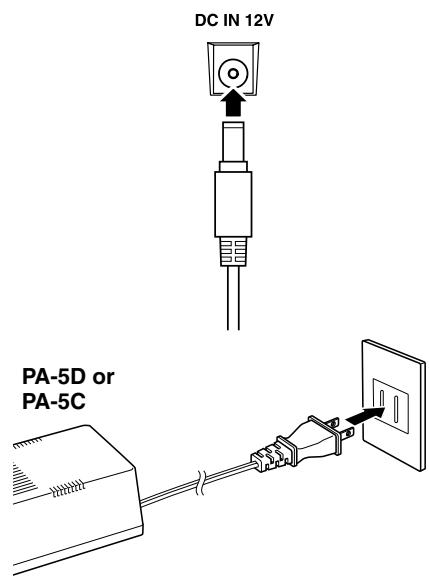
Using an AC Power Adaptor
① Make sure that the [STANDBY/ON] switch of the DD-55 is set to STANDBY.
② Connect the AC adaptor (PA-5D, PA-5C or other adaptor specifically recommended by Yamaha) to the power supply jack.
③ Plug the AC adaptor into an AC outlet.
CAUTION
- Never interrupt the power supply (e.g. remove the batteries or unplug the AC adaptor) during any DD-55 record operation! Doing so can result in a loss of data.
WARNING
- Use ONLY a Yamaha PA-5D or PA-5C AC Power Adaptor (or other adaptor specifically recommended by Yamaha) to power your instrument from the AC mains. The use of other adaptors may result in irreparable damage to both the adaptor and the DD-55.
- Unplug the AC Power Adaptor when not using the DD-55, or during electrical storms.
Using Batteries
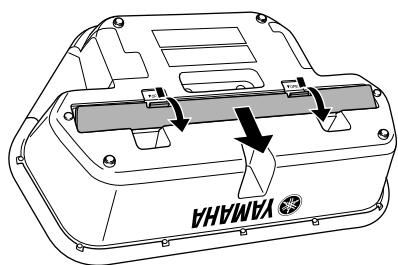
For battery operation the DD-55 requires six 1.5V "C" size, R14P (LR14) or equivalent batteries. (Alkaline batteries are recommended.) When the batteries need to be replaced, the volume may be reduced, the sound may be distorted, and other problems may occur. When this happens, turn the power off and replace the batteries, as described below.
① Open the battery compartment cover located on the instrument's bottom panel.
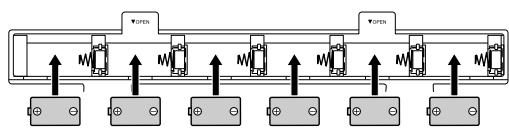
② Insert the six new batteries, being careful to follow the polarity markings on the inside of the compartment.
③ Replace the compartment cover, making sure that it locks firmly in place.
CAUTION
- When the batteries run down, replace them with a complete set of six new batteries. NEVER mix old and new batteries.
- Do not use different kinds of batteries (e.g. alkaline and manganese) at the same time.
- If the instrument is not to be in use for a long time, remove the batteries from it, in order to prevent possible fluid leakage from the battery.
- Plugging or unplugging the AC power adaptor while the batteries are installed will reset the DD-55 to the defaults.
Front Panel
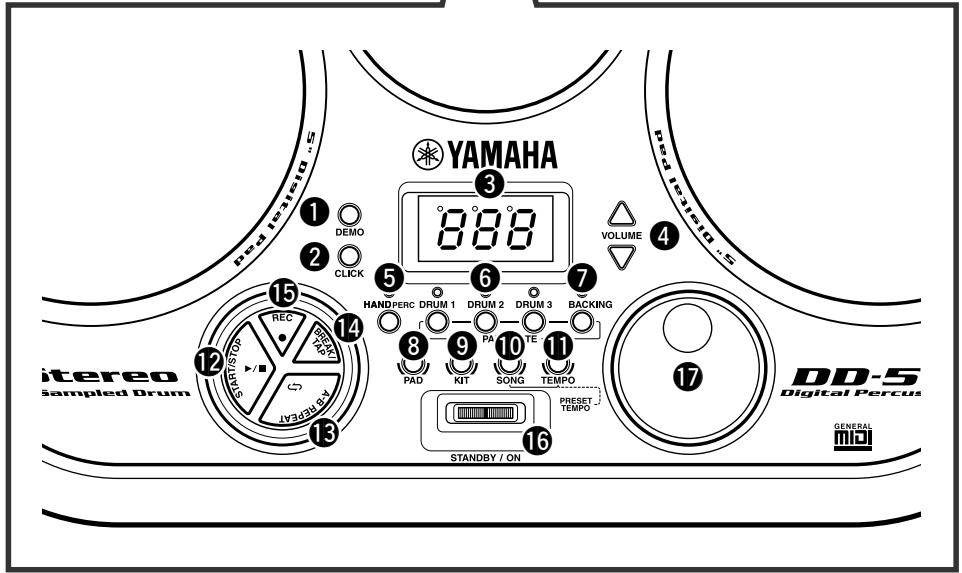
Front Panel
1 DEMO button 8,25
2 Click button 14
③ DISPLAY 10
VOLUME [▲], [▼] buttons 8
⑤ HAND PERC button. 10
DRUM 1-3 buttons 18
BACKING button 18
PAD button 11, 14, 27
KIT button 10,28
10 SONG button 8, 15, 16, 17
TEMPO button 17
12 START/STOP button 8, 15, 25
13 A-B REPEAT button 19
14 BREAK/TAP button 16, 18
15 REC button 20
16 STANDBY/ON Switch 8,31
DIAL 10
18 Drum Pads (x7) 9
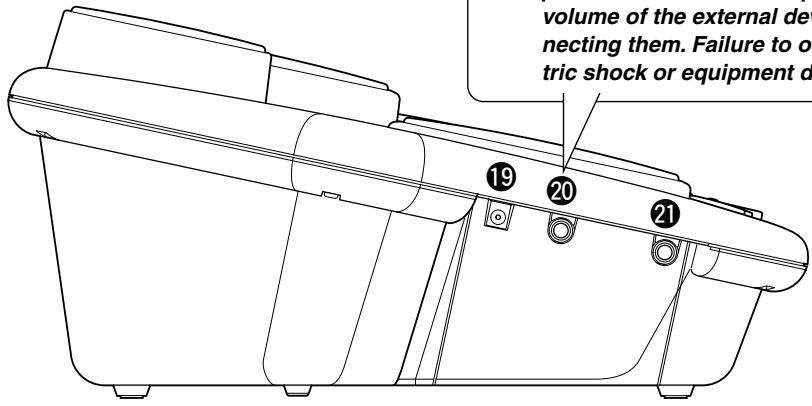
Side Panel (Left)
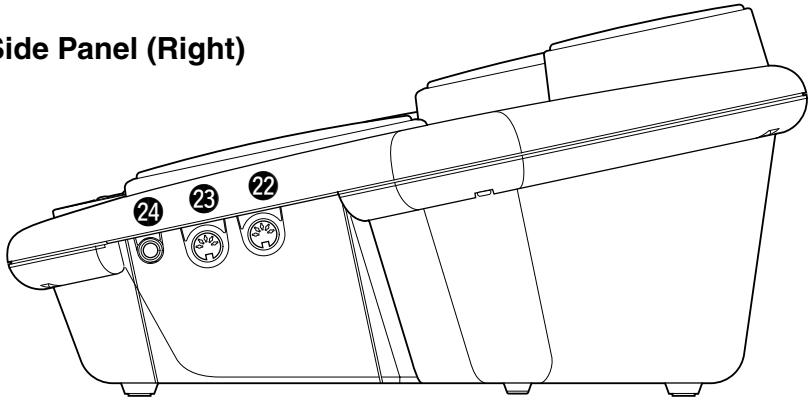
Side Panel (Right)
Side Panel (Left)
DC IN 12V (AC Adaptor) Jack. 5
20 PHONES/OUTPUT Jack 7
2 PEDAL 2 Jack 7
Side Panel (Right)
22 MIDI IN Terminal 22
23 MIDI OUT Terminal 22
24 PEDAL 1 Jack 7
Using a pair of headphones
A standard pair of stereo headphones can be plugged in here for private practice or late-night playing. The internal stereo speaker system is automatically shut off when a pair of head phones is plugged into the PHONES/OUTPUT jack.
Do not listen with the headphones at high volume for long periods of time. Doing so may cause hearing loss.
CAUTION
- Connect the DD-55 to external equipment only after turning off power for all devices. To prevent damage to the speakers, set the volume of the external devices at the minimum setting before connecting them. Failure to observe these cautions may result in electric shock or equipment damage.
CAUTION
- Since speakers are built into the DD-55, you should be careful to never leave any video tapes, cassette tapes, floppy disks or any kind of magnetic storage media on the panel — doing so may result in data loss or damage to the items. Also avoid using the DD-55 near a television or computer monitor, since interference may result.
- Use the sticks with caution. Do not use them for anything other than playing the instrument. Also, to avoid damage or injury, refrain from waving them recklessly or throwing them.
Using the Foot Pedals (1/2)
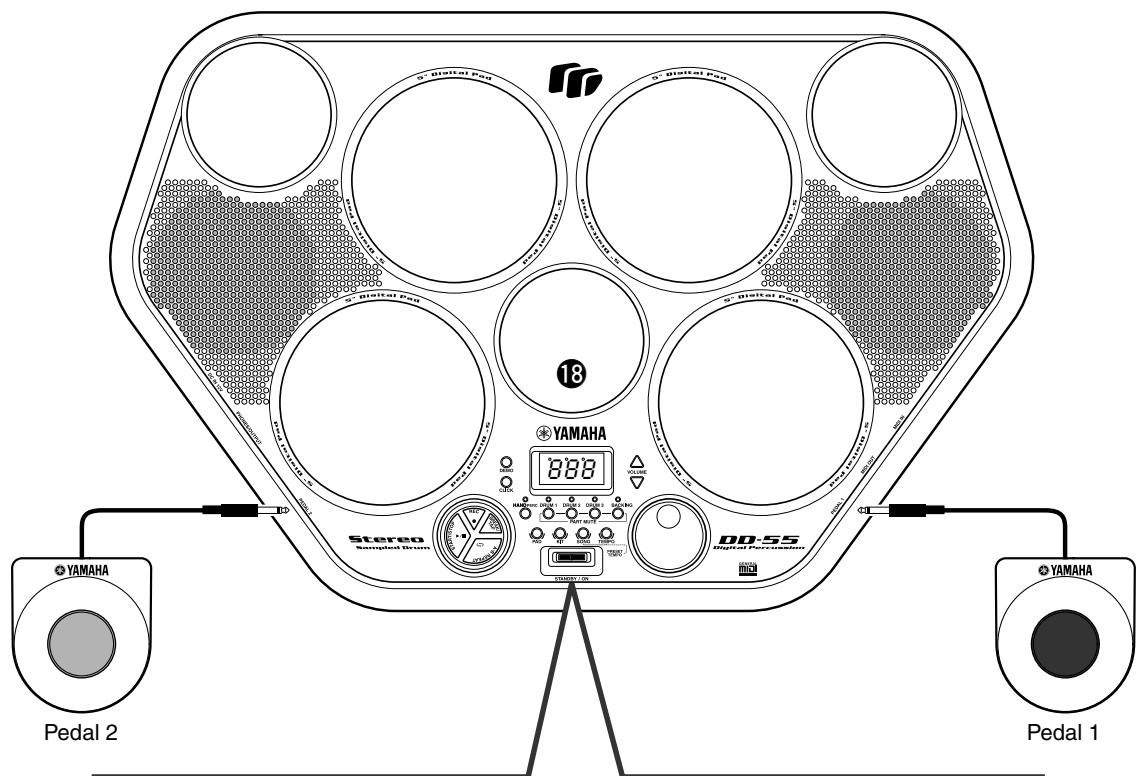
When connected, these pedals can be used simultaneously play the drum set's hi-hat pedal or bass drum voices — or they can also be assigned to play other voices as well. Connect the supplied Pedal 1 to the PEDAL 1 jack ② and Pedal 2 to the PEDAL 2 jack 2
CAUTION
- Make sure that the pedal plugs are properly connected to the PEDAL jacks before turning on the power.
- Do not press Pedal 2 while turning the power on. Doing this changes the recognized polarity of the pedal, resulting in reversed pedal operation.
- Avoid using the pedals directly on a soft floor, since they may scratch the surface of the floor.
- Avoid getting caught in or tripping over the pedal cords; this may cause the instrument to fall and result in damage or injury.
The DD-55 features a demonstration song, specially created to show you the dynamic possibilities of the instrument.
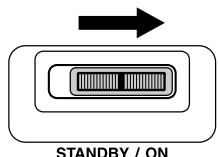


1 Turn on the power.
Turn the [STANDBY/ON] switch ON.
CAUTION
- Even when the switch is in the "STANDBY" position, electricity is still flowing to the instrument at the minimum level. When you are not using the DD-55 for a long time, make sure you unplug the AC power adaptor from the wall AC outlet, and/or remove the batteries from the instrument.
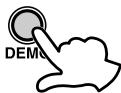
2 Start the Demo Song.
Press the [DEMO] button and the demo song starts playing.
MASTER VOLUME
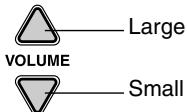
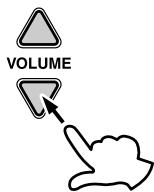
The overall volume level of the DD-55 is controlled by two VOLUME [▲], [▼] buttons (10 volume levels L0 - L9).
Press the VOLUME [▲] button to increase the overall volume by one level. Press the VOLUME [▼] button to decrease the overall volume by one level. Holding down either of the buttons increases or decreases the volume level rapidly.
| L0 | ← L5 → | L9 |
| Small | ← Volume Level → | Large |
- When the VOLUME is set to L0, no sound is produced.
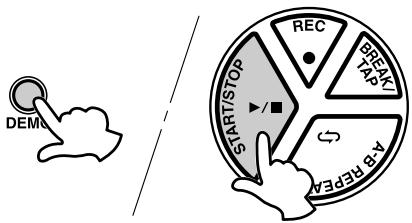
3 Stop the Demo Song.
To stop playback, press the [DEMO] button again or press the [START/STOP] button.
SONG VOLUME
To control the volume level of the song, press the [SONG] button and the song starts playing, simultaneously hold down the [SONG] button and use the VOLUME [▲], [▼] buttons (levels L0 - L9).
(For more information on songs, see page 15.)
The SONG VOLUME can be used to adjust the balance between the song accompaniment and your own performance on the pads.
Simultaneously hold down the [SONG] button and press the VOLUME [▲] button to increase the song volume by one level. Hold down the [SONG] button and press the VOLUME [▼] button to decrease the song volume by one level. Holding either of the buttons (while holding down the [SONG] button) increases or decreases the song volume level rapidly.
| L0 | ← L5 → | L9 |
| Small | ← Volume Level → | Large |
- When the VOLUME is set to L0, no sound is produced by the song.
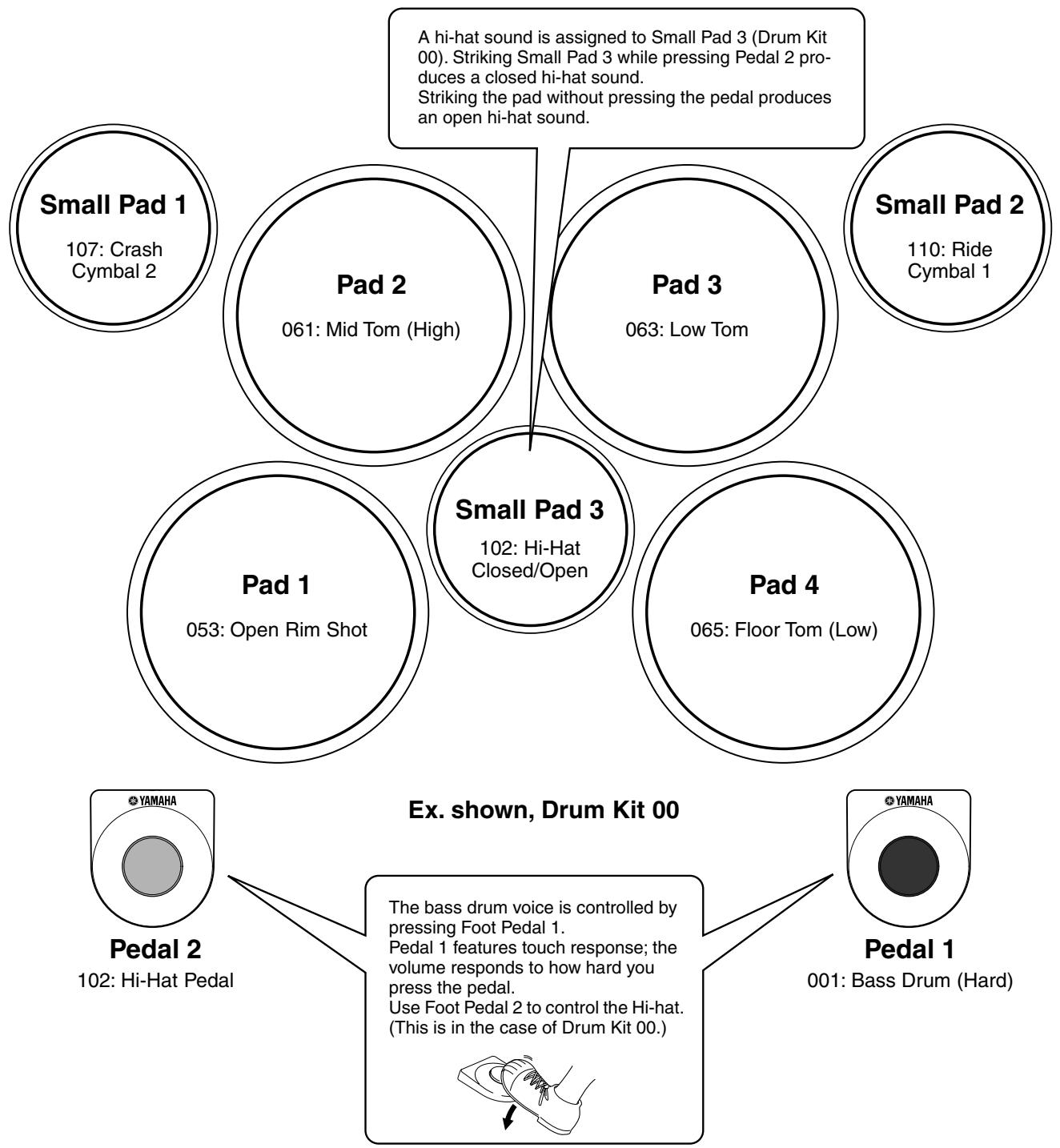
Strike the pad with the supplied drum sticks or your hands to play the drum voices. When playing the pads with your hands, turn the Hand Percussion feature on by pressing the [HAND PERC] button (the lamp lights).
The volume of the pads' sounds responds to your playing; when you play soft the volume is soft, and when you play strongly the volume is loud.
The actual loudness of the sound may vary according to which part of the pad is struck.
Pad Names
Hand Percussion ON/OFF
You can play the pads of the DD-55 either with the supplied sticks or with your hands.
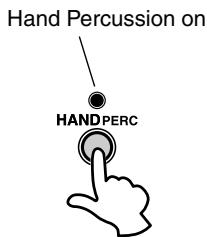
1 Press the [HAND PERC] button.
When you press the [HAND PERC] button, the button's lamp lights, and the pad sensitivity is automatically adjusted for optimum playing by hand.
![YAMAHA DD55C - Press the [HAND PERC] button. - 1](/content/2025/01/114548/images/4b469f90d9149b5bab6e7762fa8cb0c936a6dde3a765ab2b6f89acadbed3cc71.jpg)
- When HAND PERCUSSION is on, the DD-55 automatically selects an appropriate song (#94) and kit (#29), ideal for playing by hand and using with the Hand Percussion feature.
CAUTION
- When Hand Percussion is on, do not strike the pads with drumsticks or anything other than your hands.
Assigning a Drum Kit to the Pads and Pedals
The DD-55 allows you to choose from 45 different Drum Kits (00 - 44 : see the “Drum Kit List” page 36) quickly and easily. 45 of the kits have preset voice combinations that will be set to the pads and pedals when the kit is selected.
Select some different kits and try playing them.
The DD-55 also has one Custom Drum Kit allowing you to assign the desired voices to the seven pads or two pedals (see “Assigning a Voice to Individual Pads and Pedals” page 11).
For some drum kits (35 - 44), the sound changes each time you strike the pad.

1 Press the [KIT] button.
When you press the [KIT] button, the currently selected Drum Kit number appears on the display.
![YAMAHA DD55C - Press the [KIT] button. - 1](/content/2025/01/114548/images/aa8e4b736546eb174fa7b6b46968ddab2d338e15f016bd76fe064d53f5a2e4a0.jpg)
Select a Drum Kit Number.
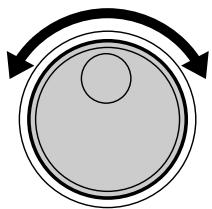
Turn the DIAL to select a Drum Kit number. Drum Kit numbers will increase as the DIAL is turned to the right (clockwise), and decrease as the DIAL is turned to the left (counter-clockwise).

- Drum Kit number 00 is normally selected when the power is turned on. However, if Auto Kit Select is set to OFF, the last Drum Kit selected before turning the power OFF, is automatically selected when the power is turned on. (See "Auto Kit Select ON/OFF Setting" on page 16.)
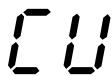
- The "C U" Drum Kit is the Custom Kit. Changes made to any one of the preset drum kits will be saved here. (See "Assigning a Voice to Individual Pads and Pedals" page 11.)
Assigning a Voice to Individual Pads and Pedals ("C U" Custom Kit)
The DD-55 contains a total of 212 high quality drum sounds (see the "Drum Voice List" page 33) — and you can assign these freely to each of the 7 drum pads and 2 foot pedals. Try assigning some different voices and create your own "L U" Custom Drum Kit.

- Any changes made to one of the preset drum kits will automatically be saved in the "C U" Custom Drum Kit.
- Both the Custom and "00" drum kit contents are the same until modified (see the "Drum Kit List" page 36).

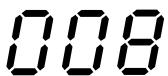
When you press the [PAD] button, Pad 1's currently assigned voice number is shown in the display.
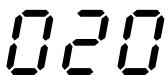
2 Select the pad or pedal to be assigned.
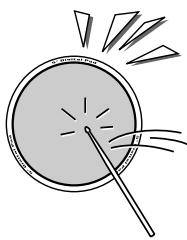
Strike any pad one time (or press a pedal), and the currently assigned voice number for that pad/pedal is shown in the display.
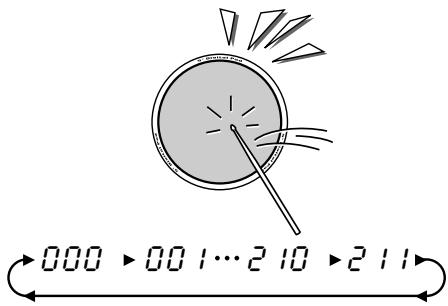
3 Select a Voice Number.
You can select the voice by repeatedly striking the pad or repeatedly pressing the pedal (while listening to the voice), or by turning the DIAL.
- Striking the pad or pressing the pedal to select a voice. Every time the pad is struck or a pedal is pressed, voice numbers will increase by a value of one (1).
Using the DIAL to select a voice.
Turn the DIAL to the right (clockwise), and voice numbers will increase. Turn the DIAL to the left (counter-clockwise), and voice numbers will decrease.
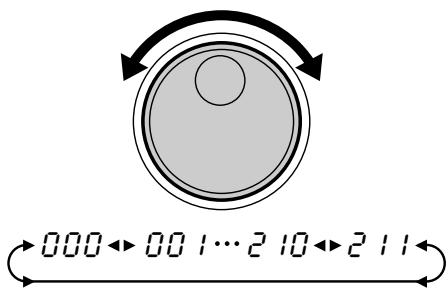
Repeat the previous steps 2 and 3 for any or all of the DD-55's pads and pedals.

4 Play the Pads and Pedals.
After assigning a voice to the desired pad/pedal, press the [KIT] button. You can now play the voice you have assigned to the pad/pedal. After you've assigned the voice, the DD-55 will automatically be set to the custom kit.
Reverb ON/OFF
Different depths of the DD-55's reverb effect can be added to the DD-55's overall sound.
1 Display the Reverb On/Off Setting.
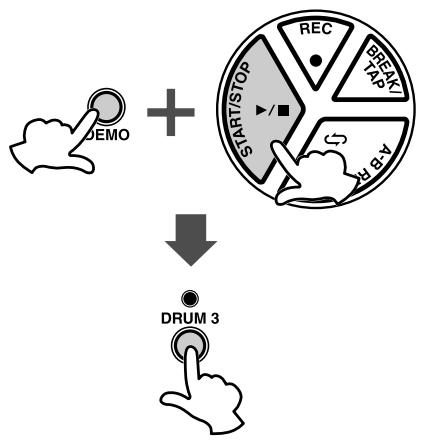
Simultaneously press the [DEMO] and [START/STOP] button to enter the MIDI/Utility mode, then press the [DRUM3] button. The current Reverb setting appears in the display.
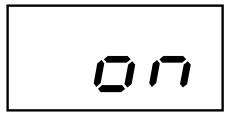
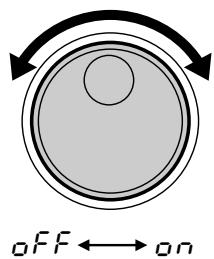
Reverb on
2 Set the Reverb On/Off.
To set to “ ” (Reverb ON), turn the DIAL to the right (clockwise), to set to “ F F ” (Reverb OFF), turn the DIAL to the left (counter-clockwise).
3 Exit the Reverb On/Off Setting.
After setting the Reverb ON/OFF, simultaneously press the [DEMO] and [START/STOP] button to exit the MIDI/Utility mode.
Setting the Pad Sensitivity
The DD-55 allows you to custom-set the sensitivity of the pads (range 0 - 2).
When set to a value of 2, the pad sensitivity is the highest, providing the most dynamic range for your playing (softest to loudest volume).
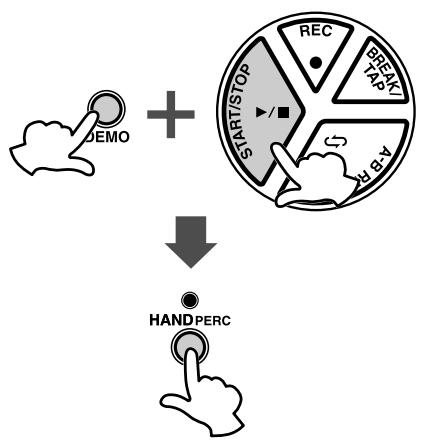
1 Display the current pad sensitivity setting.
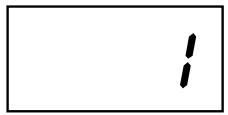
Simultaneously press the [DEMO] and [START/STOP] button to enter the MIDI/Utility mode, then press the [HAND PERC] button. The current pad sensitivity setting appears in the display.
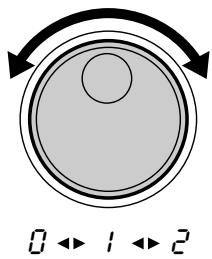
2 Set the sensitivity value.
To raise the value, turn the DIAL to the right (clockwise), and to lower it, turn the DIAL to the left (counter-clockwise).

- Default setting is "I."
3 Exit the sensitivity setting.
After setting the sensitivity, simultaneously press the [DEMO] and [START/STOP] button to exit the MIDI/Utility mode.
DD-55 Sound Triggering
The DD-55 is fitted with sensors underneath each pad. When struck, each pad/sensor produces velocity data. However, striking one pad very strongly may inadvertently trigger the sounds of other pads, because the sensors of those pads pick up the vibrations of the struck pad. To prevent this from happening, the DD-55 is set to ignore hits of low velocity. (It assumes the low velocity is "noise.") However, some noise may get through and trigger the sensors.
Here is another related problem: When you strike two pads simultaneously and hit one with less force than the other, the pad struck weakly may not sound because the DD-55 assumes the hit to be noise.
These problems may be solved by changing the DD-55 settings or altering your playing technique (as described below).
- Striking two pads simultaneously results in one of the pads not sounding.
Set the pad sensitivity level to 2. This may solve the problem if you strike one of the pads weakly. Better yet, try striking both pads with the same force.
- Striking one pad results in other pads also sounding, even though they were not struck.
Set the pad sensitivity level to 0. With this setting, any pads that are not struck may not respond to the vibrations of your playing.
Adjusting the Pad Volume
The DD-55 lets you adjust the volume of each pad (range: L0 - L9), allowing you to set the overall balance of the kit.
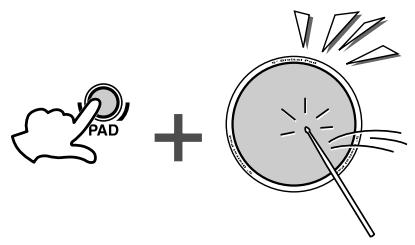
1 Press and hold the [PAD] button and strike the pad whose volume you want to adjust.
The corresponding pad is selected for changing volume.
![YAMAHA DD55C - Press and hold the [PAD] button and strike the pad whose volume you want to adjust. - 1](/content/2025/01/114548/images/5cb1c255b02d28edbddd41614a55eb663bf63897feb1b7cc8622927ae3b313a3.jpg)
![YAMAHA DD55C - Press and hold the [PAD] button and strike the pad whose volume you want to adjust. - 2](/content/2025/01/114548/images/2b0c8fc9aa97431ca950045ec36afb4c11b46200c241b4f81048833061e2066b.jpg)
Pad Volume
Press and hold down the [PAD] button and simultaneously press VOLUME [▲] or [▼] to adjust the designated pad's volume.
![YAMAHA DD55C - Press and hold down the [PAD] button and simultaneously press VOLUME [▲] or [▼] to adjust the designated pad's volume. - 1](/content/2025/01/114548/images/e8245054dcd648659d7fa0fe25e15192d0befd468be67a825378b8c8745866c1.jpg)
- The default Pad volume is "L 9."
Click ON/OFF

Press the [CLICK] button.
The click sounds in rhythm at the current tempo. (See "Adjusting the
Tempo" on page 17.)
To turn the click off, press the button once again.
The DD-55 features 100 different songs that can be used to provide accompaniment.
(See the "Song List" on page 35.)
Select one of the songs and have listen.
Select the Song and Play
1 Press the [SONG] button.
![YAMAHA DD55C - Press the [SONG] button. - 1](/content/2025/01/114548/images/d64394e4c83f1fb063dd2cf13499ec3b122077fb16c0a2313db3b8e03450ddcd.jpg)
![YAMAHA DD55C - Press the [SONG] button. - 2](/content/2025/01/114548/images/3a783c174f4a97ccd4cc64f5dfcc969ffd784f40b795ab3b2680623e8865fd68.jpg)
When you press the [SONG] button, the current song number appears in the display.
![YAMAHA DD55C - Press the [SONG] button. - 3](/content/2025/01/114548/images/3db54f993c1f531c81ea548e47a90a395be734704c188b8e597aa35588d3b13f.jpg)
2 Select a Song Number.
Use the DIAL to select a song number. Song numbers will increase as the DIAL is turned to the right (clockwise), and decrease as the DIAL is turned to the left (counter-clockwise). (See the “Song List” on page 35.)

- Song number “00” is automatically selected whenever the power is turned ON.
- With the Auto Kit Select feature turned on, selecting a song will also automatically select the best suited Drum Kit for that song. (See "Auto Kit Select ON/OFF Setting" on page 16.)
- Song numbers are arranged in each category according to their complexity. Smaller numbers are easier to play than larger numbers.
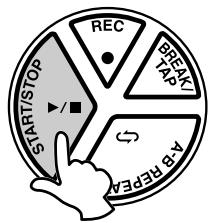
3 Press the [START/STOP] button.
When you press the [START/STOP] button, a one- or two-measure count-in plays, and the song starts playing.
As the song is playing, the Song's current measure will be shown in the display. Try playing the pads and pedals along with the song.
To stop playback of the song, press the [START/STOP] button once again.
![YAMAHA DD55C - Press the [START/STOP] button. - 1](/content/2025/01/114548/images/f9cedf3d955f2742af30f47bd332f79bf0c7e592780a5e2cd318b77b55abbe13.jpg)
- You can also use the TAP START function to start songs (see page 16).
Tap Start
The Tap Start function allows you to set the song's overall tempo as well as start the accompaniment — simply by tapping out the rhythm.
The accompaniment will playback at the tempo with which the pads are struck or the pedals are pressed.
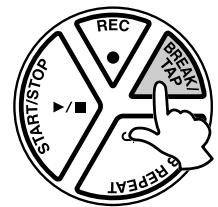
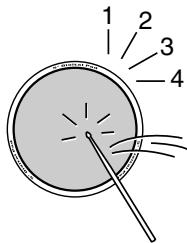
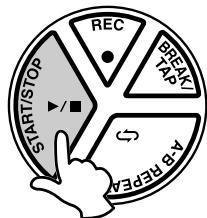
1 Press the [BREAK/TAP] button.
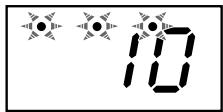
While song playback is stopped, press the [BREAK/TAP] button. All three of the beat lamps flash, indicating the DD-55 is set to Tap Start standby.
To cancel the Tap Start mode, simply press the [BREAK/TAP] button once again (the beat lamps will turn off).
2 Play the Tap Start.
In the case of a song in 4/4 , strike any pad or press any pedal four times, and the accompaniment will start at the desired tempo.

- The number of times needed to strike the pad will change according to the following time signatures: 5/4, 5 times; 4/4, 4 times; 3/4, 3 times; 6/8, 2 times.
3 Stop the Song Playback.
Press the [START/STOP] button and the song accompaniment will stop.
Auto Kit Select ON/OFF Setting
The Auto Kit Select function automatically selects the best matching drum kit for the selected song. You can deactivate this feature by setting the Auto Kit Select to OFF.
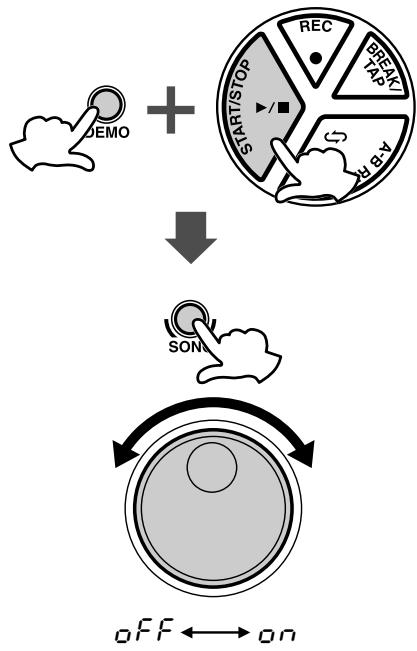
1 Setting the Auto Kit Select to ON/OFF.
Simultaneously press the [DEMO] and [START/STOP] button to enter the MIDI/Utility mode. An “ ” appears in the display indicating the MIDI/Utility mode.
Next, press the [SONG] button. The current ON/OFF setting appears in the display.
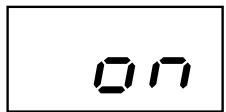
Auto Kit Select is turned on.
2 Select ON/OFF.
Turn the DIAL to the right (clockwise) to activate the Auto Kit Select ( n) . Turn to the left (counter-clockwise) to deactivate the Auto Kit Select ( FF) .
3 Exit the Auto Kit Select.
Press the [DEMO] and [START/STOP] buttons simultaneously once again to exit the MIDI/Utility mode.

- The Auto Kit Select is automatically set to “FF” when the MIDI Transmit Channel setting is changed (see “Setting the MIDI Note Number” on page 28).
Adjusting the Tempo
The song tempo can be set anywhere from 32 to 280 beats per minute. The higher the tempo value, the faster the tempo.

120
032→033…279→280
1 Press the [TEMPO] button.
When you press the [TEMPO] button, the current tempo value (32 - 280) appears in the display.
2 Set the Tempo.
Use the DIAL to select the TEMPO. Turn the DIAL to the right (clockwise) to increase the Tempo value, and turn it to the left (counter-clockwise) to decrease the value. (The Tempo range is 32 - 280.) Press the [SONG] button to exit from the Tempo setting mode.

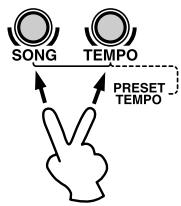
- When both the [SONG] and [TEMPO] buttons are pressed simultaneously, the preset tempo of the currently selected song is automatically applied.
- About the Beat Indicator
During song playback, the three beat lamps in the display will flash in a specific pattern to help you in keeping the beat.
For a song in 4/4 time at a tempo of 120 bpm:
| 1st beat | 2nd beat | 3rd beat | 4th beat |
| °120 | °120 | °120 | °120 |
Use the pads and pedals to play along with the song accompaniment.

- The DD-55 can play a total of 32 notes simultaneously. That includes notes produced by song accompaniment, pads, foot pedals, and note data received through the MIDI IN jack.
Track ON/OFF
The DD-55's song accompaniment consists of 4 tracks: Drum tracks 1, 2, and 3, and the Backing track.
| DRUM 1 | Bass Drum |
| DRUM 2 | Snare Drum |
| DRUM 3 | Cymbal |
| BACKING | Backing |
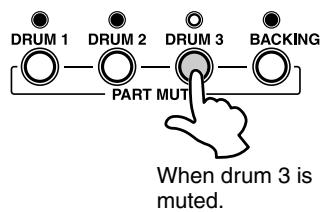
Pressing a Track button ([DRUM 1], [DRUM 2], [DRUM 3], [BACKING]) will mute (turn off the sound) the corresponding track and its indicator lamp will turn off.
Muting DRUM 1, DRUM 2 and DRUM 3 tracks allows you to play along with the song and practice the missing part.
Break
With the Break function, you can liven up songs by adding your own solos or fills, whenever you want.
Striking a pad while in the Break mode, the song's accompaniment will be muted until the end of the measure you have finished your fill or solo in.

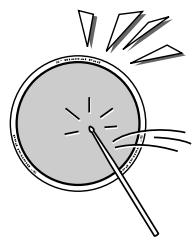
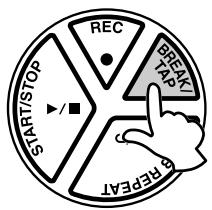
1 During song playback, press the [BREAK/TAP] button.
During song playback, press the [BREAK/TAP] button. The three beat lamps in the display flash, indicating the DD-55 is in Break standby mode.
To cancel the Break mode, simply press the [BREAK/TAP] button once again. (The beat lamps flash in tempo.)
2 Play the Break.
Strike any pad or pedal, and the accompaniment will mute until the end of the measure you played in. You can play a drum fill or drum solo during this break.
The DD-55 returns to the Break standby mode when the Break measure is completed.
3 Exit the Break mode.
To exit the Break mode, press the [BREAK/TAP] button.
The Break mode is also exited when the song is stopped.
A-B Repeat
If you want to practice a particular section of a song, you can specify that section's "A" (start repeat) and "B" (end repeat) points. The accompaniment will continuously repeat between points "A" and "B" allowing you to practice between those points for as long as you like.
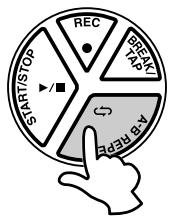
1 Set the "A" (start repeat) point.
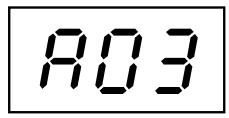
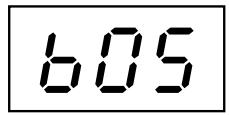
When the song playback has reached the start of the section you want to practice, press the [A-B REPEAT] button and the "A" repeat point is set. An "R" will appear in the display.
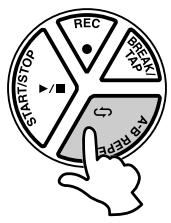
2 Set the "B" (end repeat) point.
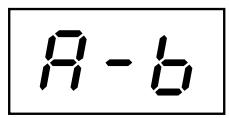
When the song playback has reached the end point of the section you want to practice, press the [A-B REPEAT] button once again to set the "B" point ("b" appears in the display). A one-measure count-in plays ("R-b" appears in the display), then the specified section plays back repeatedly. The current measure number will appear in the display during repeat playback.

- The A-B Repeat start and end points can only be set in measure steps.
3 Stop the A-B REPEAT.
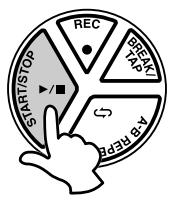
Press the [START/STOP] button and the song accompaniment will stop.
“ - ” will appear in the display indicating the A-B REPEAT mode is still engaged.
Press the [START/STOP] button once again and the accompaniment will again repeat between the set points.

- Repeat is canceled when a different song is selected.
- Exit the Repeat
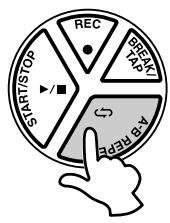
To exit the A-B Repeat function, press the [A-B REPEAT] button during playback (“R-b” is indicated), and the A-B Repeat mode will be canceled (the A-B Repeat points will also be canceled) and normal playback of the accompaniment will continue.
The DD-55's Custom Song feature (song number “L”) allows you to record and playback one original song (20000 notes approximately).
Data that can be recorded in the Custom Song Mode
- Drum pad and pedal data
- Song data (the number cannot be changed while in the RECORD Mode)
- Track ON/OFF settings
- Tempo setting (The tempo cannot be changed while in the RECORD mode)
- Song Volume setting
Recording
1 Prepare to Record.
Select the desired song, drum kit, tempo and track on/off setting.

- Any song from 00 - 99 can be selected. After recording, the data is automatically saved to the "C U" song. (Recording cannot be done if the "C U" song is selected.)
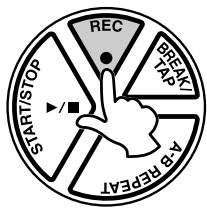
2 Start Recording.
Press the [REC] button to start recording. A count-in sound plays, guiding you into the start of the recording.
The following indication appears (for a time signature of 4/4):


- Press the [CLICK] button to turn the click sound on or off during recording.
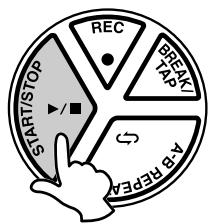
3 Stop Recording.
To stop recording, press the [START/STOP] button.

-
Any previously recorded data will be replaced with new data.
-
If the memory becomes full while recording is in progress, "FL" will appear in the display and recording will automatically stop.
Playback
The recorded Custom Song (CU) can be played back in the same manner as any song (song numbers 00 - 99).
[4]
Song number “L” follows Song number “99” (or prior to “00”).

- The A-B Repeat function (see page 19) cannot be used in the Custom Song Mode.
The MIDI IN and MIDI OUT terminals, located on the DD-55's right side panel, offer broadened musical possibilities through use of MIDI. What is MIDI? What can you do with MIDI? And how can you use MIDI with the DD-55? Here are some answers to those questions...
What's MIDI?
No doubt you have heard the terms "acoustic instrument" and "digital instrument." In the world today, these are the two main categories of instruments.
Let's consider an acoustic piano and a classical guitar as representative acoustic instruments. With the piano, you strike a key, and a hammer inside hits some strings and plays a note. With the guitar, you directly pluck a string and the note sounds.
But how does a digital instrument go about playing a note?
- Acoustic guitar note production
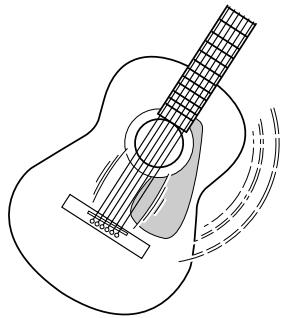
Pluck a string and the body resonates the sound.
Digital instrument note production
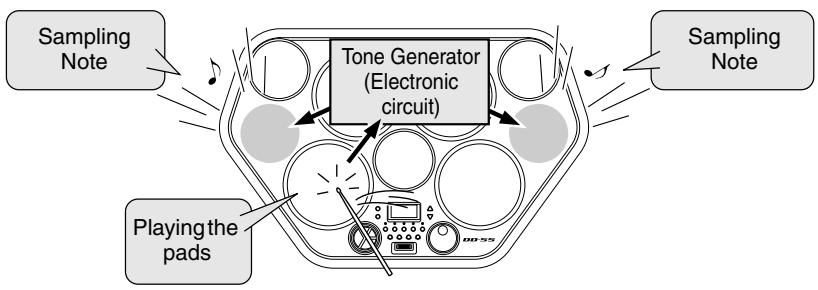
Based on playing information from the pads and pedals, a sampling note stored in the tone generator is played through the speakers.
As shown in the illustration above, in an electronic instrument the sampling note (previously recorded note) stored in the tone generator section (electronic circuit) is played based on information received from the pads and pedals. So then what is the information from the pads and pedals that becomes the basis for note production?
For example, let's say you play a "C" quarter note using the grand piano sound on the keyboard. Unlike an acoustic instrument that puts out a resonated note, the electronic instrument puts out information from the keyboard such as with what voice, with which key, about how strong, when was it pressed and when was it released. Then each piece of information is changed into a number value and sent to the tone generator. Using these numbers as a basis, the tone generator plays the stored sampling note.
- Example of Keyboard Information
| Voice number (with what voice) | 01 (grand piano) |
| Note number (with which key) | 60 (C3) |
| Note on (when was it pressed) and note off (when was it released) | Timing expressed numerically (quarter note) |
| Velocity (about how strong) | 120 (strong) |
MIDI is an acronym that stands for Musical Instrument Digital Interface, which allows electronic musical instruments to communicate with each other, by sending and receiving compatible Note, Control Change, Program Change and various other types of MIDI data, or messages.
The DD-55 can control a MIDI device by transmitting note related data and various types of controller data.
The DD-55 can be controlled by the incoming MIDI messages which automatically determine tone generator mode, select MIDI channels, voices and effects, change parameter values and of course play the voices specified for the various parts.
MIDI messages can be divided into two groups: Channel messages and System messages.
Channel Messages
The DD-55 is an electronic instrument that can handle 16 channels. This is usually expressed as "it can play 16 instruments at the same time." Channel messages transmit information such as Note ON/OFF, Program Change, for each of the 16 channels.
| Message Name | DD-55 Operation/Panel Setting |
| Note ON/OFF | Messages which are generated when the pad or pedal is played. Each message includes a specific note number which corresponds to the pad which is struck, plus a velocity value based on how hard the pad is struck. |
| Program Change | Voice setting (control change bank select MSB/LSB setting; only receive is available) |
| Control Change | Voice setting (volume, pan pot, etc.; only receive is available) |
System Messages
This is data that is used in common by the entire MIDI system. System messages include messages like Exclusive Messages that transmit data unique to each instrument manufacturer and Realtime Messages that control the MIDI device.
| Message Name | DD-55 Operation/Panel Setting |
| Exclusive Message | Reverb/Chorus/DSP settings, etc. |
| Realtime Messages | Clock setting Start/stop operation |
The messages transmitted/received by the DD-55 are shown in the MIDI Implementation Chart on page 41.
About MIDI terminals
In order to exchange MIDI data between multiple devices, each device must be connected by a MIDI cable.
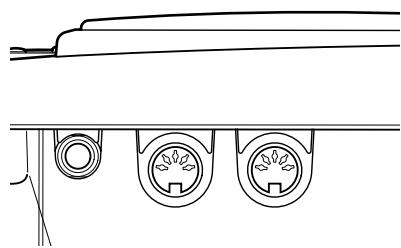
The DD-55 is equipped with two types of MIDI terminals, both of which are located on the right side panel.
MIDI IN Data transmitted from other MIDI instruments via MIDI, is received at this terminal.
MIDI OUT ......Data produced by the DD-55, is transmitted to other MIDI instruments via MIDI from this terminal.
NOTE
- Never use MIDI cables longer than about 15 meters. Cables longer than this can pick up noise which can cause data errors.
What You Can Do With MIDI
The DD-55 also features side panel MIDI terminals (MIDI IN and MIDI OUT) as well as a comprehensive set of MIDI functions, that let you use the instrument in a variety of recording and performance applications.
In all cases, make sure to properly set the MIDI Transmit Channels on the DD-55. Also make appropriate settings on the connected instruments. (Refer to the relevant owner's manuals for details.)
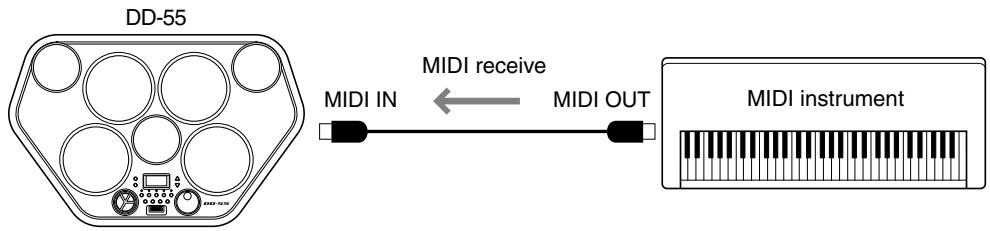
- You can play the voices and sounds of the DD-55 from another MIDI instrument
This setup allows you to control the DD-55 from a MIDI keyboard controller — especially one not having a tone generator. Connect the MIDI IN terminal on the DD-55 to the MIDI OUT terminal on the other instrument.
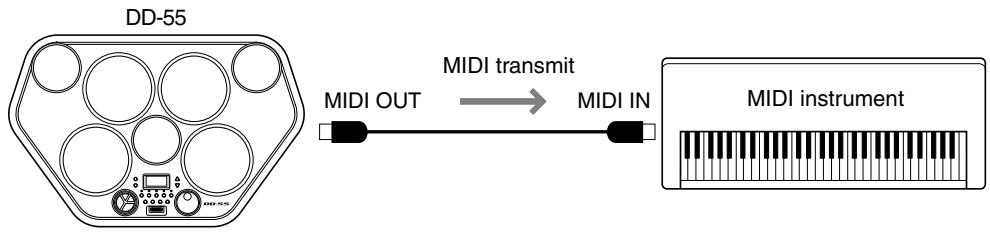
- You can play the voices and sounds of another MIDI instrument from the DD-55
In this setup, you can play another MIDI instrument or tone generator from the DD-55. For example, this lets you mix two different sounds together when you play a pad on the DD-55. Connect the MIDI OUT terminal on the DD-55 to the MIDI IN terminal on the other instrument.
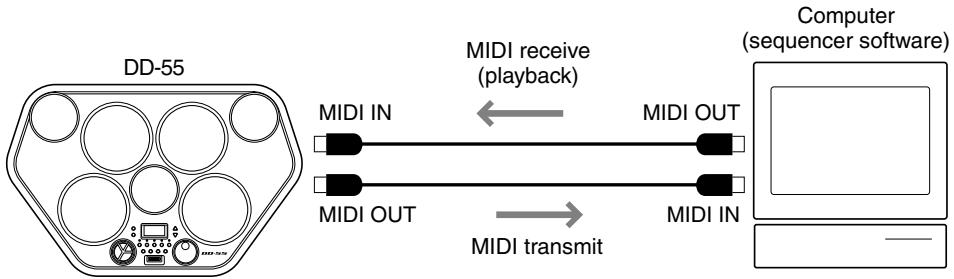
- You can record your performance on the DD-55 to a connected sequencer or computer
Here, you can record all your playing, along with the DD-55's auto accompaniment, to a connected computer or sequencer. Naturally, you can use the sophisticated functions of the computer or sequencer to edit your data, and play it back using the sounds of the DD-55. The DD-55 also lets you play back up to 16 different channels — letting you create complex recordings and compositions.
To set up, connect the MIDI OUT terminal on the DD-55 to the MIDI IN terminal on the sequencer or computer (allowing you to record). Also, connect the MIDI IN terminal on the DD-55 to the MIDI OUT terminal on the sequencer or computer (allowing playback). You may need to set Local On/Off (page 26) to off, for best results.
- DREUM
- DD-55 DD-55c Digital Percussion Digital Percussion
- SPECIALMESSAGESECTION
- SPECIFICATIONS SUBJECT TO CHANGE:
- NOTICE:
- ENVIRONMENTAL ISSUES:
- Battery Notice:
- Warning:
- Disposal Notice:
- NAME PLATE LOCATION:
- Model
- Serial No.
- Purchase Date
- PLEASE KEEP THIS MANUAL
- FCC INFORMATION (U.S.A.)
- IMPORTANT NOTICE: DO NOT MODIFY THIS UNIT!
- OBSERVERA!
- Entsorgung leerer Batterien (nur innerhalb Deutschlands)
- PRECAUTIONS
- PLEASE READ CAREFULLY BEFORE PROCEEDING
- WARNING
- Always follow the basic precautions listed below to avoid the possibility of serious injury or even death from electrical shock, short-circuiting, damages, fire or other hazards. These precautions include, but are not limited to, the following:
- CAUTION
- Always follow the basic precautions listed below to avoid the possibility of physical injury to you or others, or damage to the instrument or other property. These precautions include, but are not limited to, the following:
- DATA BACK-UP AND STORAGE
- Congratulations!
- Contents
- Setting Up 5
- Panel Controls 6
- Playing the Demo Song 8
- Play the Pads/Pedals 9
- Playing a Song 15
- Play along with a Song 18
- Recording a Song 20
- MIDI Functions 21
- Appendix 31
- Trademarks
- Supplied Accesories
- Power Requirements
- Using an AC Power Adaptor
- Using Batteries
- Front Panel
- Side Panel (Left)
- Side Panel (Right)
- Using a pair of headphones
- Using the Foot Pedals (1/2)
- Turn on the power.
- Start the Demo Song.
- MASTER VOLUME
- Stop the Demo Song.
- SONG VOLUME
- Pad Names
- Hand Percussion ON/OFF
- Press the [HAND PERC] button.
- Assigning a Drum Kit to the Pads and Pedals
- Press the [KIT] button.
- Select a Drum Kit Number.
- Assigning a Voice to Individual Pads and Pedals ("C U" Custom Kit)
- Select the pad or pedal to be assigned.
- Select a Voice Number.
- Play the Pads and Pedals.
- Reverb ON/OFF
- Display the Reverb On/Off Setting.
- Set the Reverb On/Off.
- Exit the Reverb On/Off Setting.
- Setting the Pad Sensitivity
- Display the current pad sensitivity setting.
- Set the sensitivity value.
- Exit the sensitivity setting.
- DD-55 Sound Triggering
- Adjusting the Pad Volume
- Press and hold the [PAD] button and strike the pad whose volume you want to adjust.
- Press and hold down the [PAD] button and simultaneously press VOLUME [▲] or [▼] to adjust the designated pad's volume.
- Click ON/OFF
- Select the Song and Play
- Press the [SONG] button.
- Select a Song Number.
- Press the [START/STOP] button.
- Tap Start
- Press the [BREAK/TAP] button.
- Play the Tap Start.
- Stop the Song Playback.
- Auto Kit Select ON/OFF Setting
- Setting the Auto Kit Select to ON/OFF.
- Select ON/OFF.
- Exit the Auto Kit Select.
- Adjusting the Tempo
- Press the [TEMPO] button.
- Set the Tempo.
- - About the Beat Indicator
- Track ON/OFF
- Break
- During song playback, press the [BREAK/TAP] button.
- Play the Break.
- Exit the Break mode.
- A-B Repeat
- Set the "A" (start repeat) point.
- Set the "B" (end repeat) point.
- Stop the A-B REPEAT.
- - Exit the Repeat
- Recording
- Prepare to Record.
- Start Recording.
- Stop Recording.
- Playback
- What's MIDI?
- - Acoustic guitar note production
- Digital instrument note production
- Channel Messages
- System Messages
- About MIDI terminals
- What You Can Do With MIDI
Marque : YAMAHA
Modèle : DD55C
Catégorie : Batterie électronique