
SC-NE1 - Enceinte bluetooth PANASONIC - Notice d'utilisation et mode d'emploi gratuit
Retrouvez gratuitement la notice de l'appareil SC-NE1 PANASONIC au format PDF.

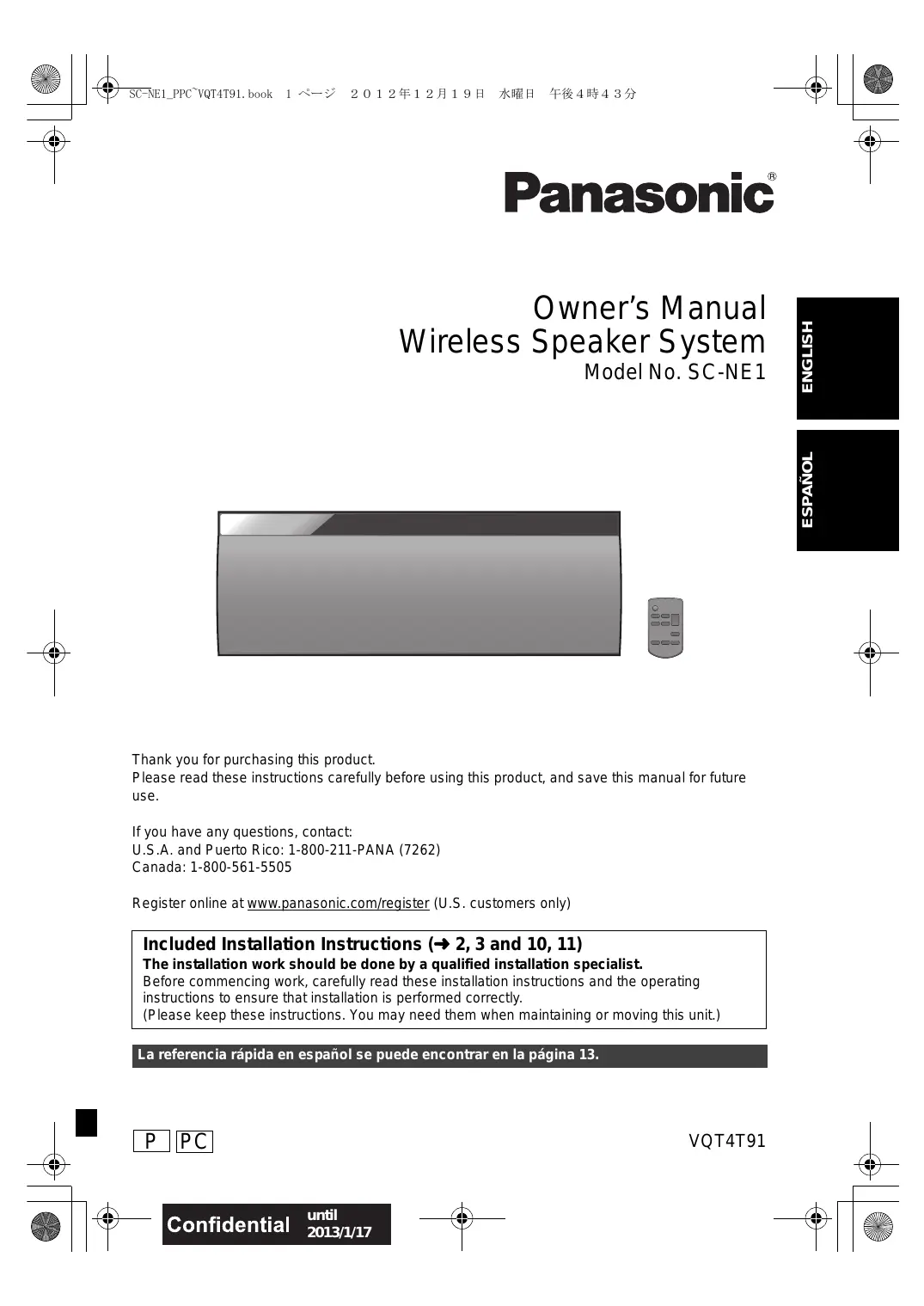

| Type de produit | Enceinte Bluetooth |
| Marque | Panasonic |
| Modèle | SC-NE1 |
| Catégorie | Enceinte sans fil |
| Dimensions (L × H × P) | 570 × 206 × 100 mm |
| Poids | Environ 2,7 kg |
| Alimentation | CA 120 V, 60 Hz |
| Consommation en fonctionnement | 11 W |
| Consommation en veille | Environ 0,1 W |
| Version Bluetooth | 2.1 + EDR |
| Portée Bluetooth | Environ 10 m (33 pi) |
| Type de haut-parleurs | 2 voies (woofer 8 cm, tweeter 2,5 cm) |
| Puissance de sortie (RMS) | 20 W par canal (6 Ω, 1 kHz, 10% DHT) |
| Puissance totale (RMS) | 40 W |
| Impédance | 6 Ω |
| Réponse en fréquence | 52 Hz - 25 kHz (-16 dB) |
| Entrées | AUX (jack 3,5 mm stéréo) |
| Fonctions audio | Surround direct-vocal, EQ préréglé (Heavy, Soft, Clear, Vocal, Flat), Basses/Aigus, Dynamic Bass |
| Minuterie de sommeil | Oui (30, 60, 90, 120 min) |
| Gradateur d'affichage | Oui |
| Mise en veille automatique | Oui (30 min sans opération) |
| Montage mural | Possible (accessoires fournis) |
| Nettoyage | Chiffon sec et doux (pas d'alcool, solvant) |
| Température de fonctionnement | 0 °C à 40 °C |
| Humidité de fonctionnement | 35 % à 80 % HR (sans condensation) |
FOIRE AUX QUESTIONS - SC-NE1 PANASONIC
Questions des utilisateurs sur SC-NE1 PANASONIC
0 question sur cet appareil. Repondez a celles que vous connaissez ou posez la votre.
Poser une nouvelle question sur cet appareil
Téléchargez la notice de votre Enceinte bluetooth au format PDF gratuitement ! Retrouvez votre notice SC-NE1 - PANASONIC et reprennez votre appareil électronique en main. Sur cette page sont publiés tous les documents nécessaires à l'utilisation de votre appareil SC-NE1 de la marque PANASONIC.
MODE D'EMPLOI SC-NE1 PANASONIC
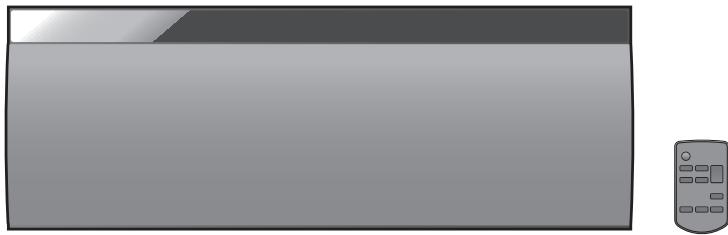
Owner's Manual Wireless Speaker System
Model No. SC-NE1
Thank you for purchasing this product.
Please read these instructions carefully before using this product, and save this manual for future use.
If you have any questions, contact:
U.S.A. and Puerto Rico: 1-800-211-PANA (7262)
Canada: 1-800-561-5505
Register online at www.panasonic.com/register (U.S. customers only)
Included Installation Instructions (→ 2, 3 and 10, 11)
The installation work should be done by a qualified installation specialist.
Before commencing work, carefully read these installation instructions and the operating instructions to ensure that installation is performed correctly.
(Pleases keep these instructions. You may need them when maintaining or moving this unit.)
La referencia rápida en español se pueda encontrar en la página 13.
IMPORTANT SAFETY INSTRUCTIONS
Read these operating instructions carefully before using the unit. Follow the safety instructions on the unit and the applicable safety instructions listed below. Keep these operating instructions handy for future reference.
1 Read these instructions.
2 Keep these instructions.
3 Heed all warnings.
4 Follow all instructions.
5 Do not use this apparatus near water.
6 Clean only with dry cloth.
7 Do not block any ventilation openings. Install in accordance with the manufacturer's instructions.
8 Do not install near any heat sources such as radiators, heat registers, stoves, or other apparatus (including amplifiers) that produce heat.
9 Do not defeat the safety purpose of the polarized or grounding-type plug. A polarized plug has two blades with one wider than the other. A grounding-type plug has two blades and a third grounding prong. The wide blade or the third prong are provided for your safety. If the provided plug does not fit into your outlet, consult an electrician for replacement of the obsolete outlet.
10 Protect the power cord from being walked on or pinched particularly at plugs, convenience receptacles, and the point where they exit from the apparatus.
11 Only use attachments/accessories specified by the manufacturer.
12 Use only with the cart, stand, tripod, bracket, or table specified by the manufacturer, or sold with the apparatus. When a cart is used, use caution when moving the cart/apparatus combination to avoid injury from tip-over.
13 Unplug this apparatus during lightning storms or when unused for long periods of time.
14 Refer all servicing to qualified service personnel. Servicing is required when the apparatus has been damaged in any way, such as power-supply cord or plug is damaged, liquid has been spilled or objects have fallen into the apparatus, the apparatus has been exposed to rain or moisture, does not operate normally, or has been dropped.
WARNING
Unit
- To reduce the risk of fire, electric shock or product damage,
- Do not expose this unit to rain, moisture, dripping or splashing.
- Do not place objects filled with liquids, such as vases, on this unit.
- Use only the recommended accessories.
- Do not remove covers.
- Do not repair this unit by yourself. Refer servicing to qualified service personnel.
AC power supply cord
- The power plug is the disconnecting device.
Install this unit so that the power plug can be unplugged from the socket outlet immediately.
Button-type battery (Lithium battery)
- Risk of fire, explosion and burns. Do not disassemble, heat above 60^ (140°F) or incinerate.

DO NOT INGEST BATTERY, CHEMICAL BURN HAZARD
This product contains a coin/button cell battery. If the coin/ button cell battery is swallowed, it can cause severe internal burns in just 2 hours and can lead to death. Keep new and used batteries away from children. If the battery compartment does not close securely, stop using the product and keep it away from children. If you think batteries might have been swallowed or placed inside any part of the body, seek immediate medical attention.
If any electrolyte should come into contact with your hands or clothes, wash it off thoroughly with water. If any electrolyte should come into contact with your eyes, never rub the eyes. Rinse eyes thoroughly with water, and then consult a doctor.
This product contains a CR Coin Cell Lithium Battery which contains Perchlorate Material - special handling may apply. See www.dtsc.ca.gov/hazardouswaste/perchlorate.
CAUTION
Unit
- Do not place sources of naked flames, such as lighted candles, on this unit.
Placement
-
To reduce the risk of fire, electric shock or product damage,
-
Do not install or place this unit in a bookcase, built-in cabinet or in another confined space. Ensure this unit is well ventilated.
- Do not obstruct this unit's ventilation openings with newspapers, tablecloths, curtains, and similar items.
Button-type battery (Lithium battery)
- Danger of explosion if battery is incorrectly replaced. Replace only with the type recommended by the manufacturer.
- Keep out of reach of children.
- Insert with poles aligned.
-
Mishandling of batteries can cause electrolyte leakage and may cause a fire.
-
Remove batteries if you do not intend to use the remote control for a long period of time. Store in a cool, dark place.
- Do not heat or expose to flame.
- Do not leave the battery(ies) in a car exposed to direct sunlight for a long period of time with doors and windows closed.
- Do not touch the terminals (+ and -) with metal objects.
-
Do not recharge, disassemble, remodel, heat or throw into fire.
-
When disposing the batteries, please contact your local authorities or dealer and ask for the correct method of disposal.
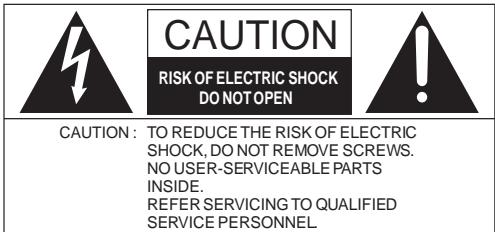
The lightning flash with arrowhead symbol, within an equilateral triangle, is intended to alert the user to the presence of uninsulated "dangerous voltage" within the product's enclosure that may be of sufficient magnitude to constitute a risk of electric shock to persons.
The exclamation point within an equilateral triangle is intended to alert the user to the presence of important operating and maintenance (servicing) instructions in the literature accompanying the appliance.
Product Identification Marking is located on the bottom of the unit.
-If you see this symbol
Information on Disposal in other Countries outside the European Union

This symbol is only valid in the European Union.
If you wish to discard this product, please contact your local authorities or dealer and ask for the correct method of disposal.
Table of contents
IMPORTANT SAFETY INSTRUCTIONS. 2
Accessories 4
About Bluetooth 4
Control reference guide. 5
Connections 6
Bluetooth® operations 7
Sound adjustment. 8
Others. 8
Troubleshooting 9
Attaching the unit to a wall (optional) 10
Specifications 12
Unit care. 12
License. 12
Spanish Quick Reference /
Referencia rápida en español 13
Limited Warranty (ONLY FOR U.S.A. AND
PUERTO RICO) 14
Limited Warranty (ONLY FOR CANADA)......15
About descriptions in this Owner's Manual
Pages to be referred to are indicated as 00
- Unless otherwise indicated, operations are described using the remote control.
Accessories
Check the supplied accessories before using this unit.
1 Remote control (with a battery) (N2QAYC000091)
1 AC power supply cord (K2CB2CB00022)
Wall mounting accessories
1 Screw (XTB3+8JFJK-J)
1 Safety holder (RGQ0660-K)

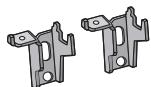
2 Wall mount brackets (RMQX1082-S)
(ONLY FOR CANADA)
The enclosed Canadian French label sheet corresponds to the English display on the top of the unit.

- Do not use AC power supply cord with other equipment.
- Product numbers provided in this Owner's Manual are correct as of December 2012. These may be subject to change.
About Bluetooth®
Panasonic bears no responsibility for data and/or information that is compromised during a wireless transmission.
Frequency band used
- This unit uses the 2.4 GHz frequency band.
Certification of this device
- This system conforms to frequency restrictions and has received certification based on frequency laws. Thus, a wireless permit is not necessary.
-
The actions below are punishable by law in some countries:
-
Taking apart or modifying the unit.
- Removing specification indications.
Restrictions of use
- Wireless transmission and/or usage with all Bluetooth® equipped devices is not guaranteed.
- All devices must conform to standards set by Bluetooth SIG, Inc.
- Depending on the specifications and settings of a device, it can fail to connect or some operations can be different.
- This system supports Bluetooth® security features. But depending on the operating environment and/or settings, this security is possibly not sufficient. Transmit data wirelessly to this system with caution.
- This system cannot transmit data to a Bluetooth® device.
Range of use
- Use this device at a maximum range of 10m (33 ft). The range can decrease depending on the environment, obstacles or interference.
Interference from other devices
- This unit may not function properly and troubles such as noise and sound jumps may arise due to radio wave interference if this unit is located too close to other Bluetooth® devices or the devices that use the 2.4 GHz band.
- This unit may not function properly if radio waves from a nearby broadcasting station, etc. is too strong.
Intended usage
- This unit is for normal, general use only.
- Do not use this system near an equipment or in an environment that is sensitive to radio frequency interference (example: airports, hospitals, laboratories, etc).
Control reference guide
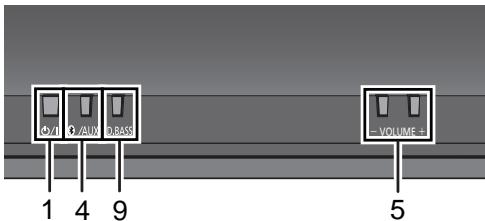
Top view
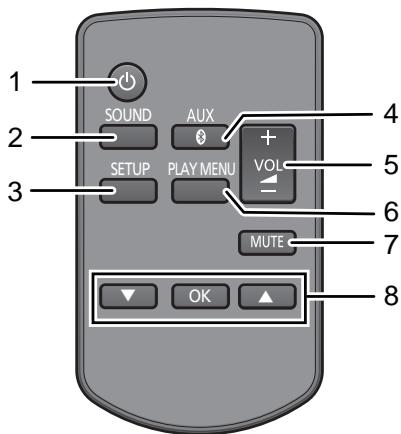
1 Standby/on switch [山 /山 ] ([])
Press to switch the unit from on to standby mode or vice versa.
In standby mode, the unit is still consuming a small amount of power.
2 Enter sound menu
3 Enter setup menu
4 Select Bluetooth®/AUX
5 Adjust the volume (0 (min) to 50 (max))
6 Enter the Bluetooth® menu/
Change the sound input level of the external device ( 6)
7 Mute the sound
Mutes the sound. Press again to cancel.
"MUTE" is also canceled when the volume is adjusted or the unit is turned off.
8 Selection/OK
9 Dynamic Bass sound effect selector
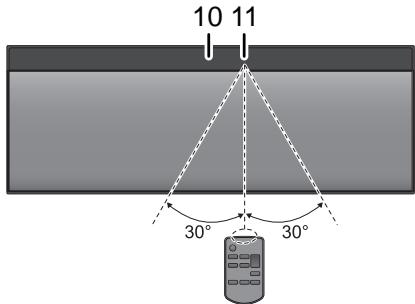
10 Display
11 Remote control signal sensor
Distance: Within approx. 7m (23 ft) directly in front.
- To avoid interference, please do not put any objects in front of signal sensor.
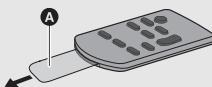
Before using for the first time
Remove the insulation sheet A.
To replace a button-type battery
Battery type: CR2025 (Lithium battery)
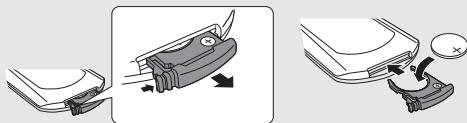
①
- Set the button-type battery with its (+) mark facing upward.
- Keep the button-type battery out of reach of children to prevent swallowing.
Connections
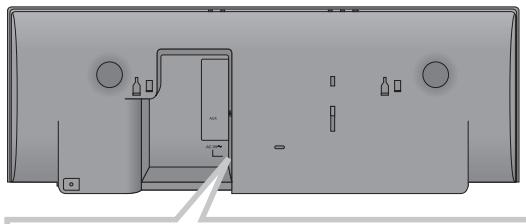
Connect the AC power supply cord.
This unit consumes a small amount of AC power ( 12) even when turned off.
- In the interest of power conservation, if you will not be using this unit for an extended period of time, unplug it from the household AC outlet.
To a household AC outlet

AC Power supply cord (supplied)

- These speakers do not have magnetic shielding. Do not place them near a television, personal computer or other devices easily influenced by magnetism.
Additional Connection

Connect an external music device (for AUX mode).
① Plug the audio cable (not supplied) into the AUX jack. Plug type: 3.5mm(^1 / 8^ ) stereo
(2) Press [AUX] to select "AUX" and start playback on the connected device.
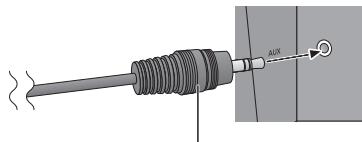
Audio cable (not supplied)
To select the sound input level of the external device
① While in “AUX” mode, press [PLAY MENU] repeatedly to select “INPUT LEVEL” and then press [OK].
(2) Press [, ] to select "NORMAL" or "HIGH".
- The default setting is "NORMAL".

- Switch the equalizer off or turn the volume of the external device down to reduce the input signal. High level of input signal will distort the sound.
- For details, refer to the instruction manual of the other equipment.
- The cables and the devices are not supplied.
Bluetooth® operations
By using the Bluetooth® connection, you can listen to the sound from the Bluetooth® audio device from this unit wirelessly.
Refer to the operating instructions of the Bluetooth® device for details.
Pairing Bluetooth® devices
Preparation
- Turn on the Bluetooth® feature of the device and place the device near this unit.
- If this unit is already connected to a Bluetooth® device, disconnect it.
1 Press [AUX] to select "BLUETOOTH".
- If "PAIRING" is indicated on the display, go to step 3.
2 Press [PLAY MENU] to select "NEW DEV." and then press [OK].
"PAIRING" is indicated on the display.
3 Select "SC-NE1" from the Bluetooth® device's Bluetooth® menu.
4 Start play on the Bluetooth® device.

- If prompted for the passkey, input "0000".
- You can register up to 8 devices with this unit. If a 9th device is paired, the device that has not been used for the longest time will be replaced.
Connecting a paired Bluetooth® device
Preparation
- Turn on the Bluetooth® feature of the device and place the device near this unit.
- If this unit is already connected to a Bluetooth® device, disconnect it.
1 Press [AUX] to select "BLUETOOTH".
"READY" is indicated on the display.
2 Select "SC-NE1" from the Bluetooth® device's Bluetooth® menu.
The name of the connected device is indicated on the display for 2 seconds.
3 Start play on the Bluetooth® device.

- This unit can only be connected to one device at a time.
- When "BLUETOOTH" is selected as the source, this unit will automatically try and connect to the last connected Bluetooth® device.
- The Bluetooth® device will be disconnected if "AUX" is selected as an audio source.
Bluetooth® transmission mode
You can change the transmission speed to prioritize transmission quality or sound quality.
Preparation
Press [AUX] to select "BLUETOOTH".
- If a Bluetooth® device is already connected, disconnect it.
1 Press [PLAY MENU] repeatedly to select "LINK MODE".
2 Press [, ] to select the mode and then press [OK].
MODE 1: Emphasis on connectivity
MODE 2: Emphasis on sound quality

- The default setting is "MODE 1".
Bluetooth® input level
If the sound input level of the Bluetooth® transmission is too low, change the input level setting.
Preparation
- Connect a Bluetooth® device.
1 Press [PLAY MENU] repeatedly to select "INPUT LEVEL".
2 Press [, ] to select the level and then press [OK].


- Select "LEVEL 0" if the sound is distorted.
- The default setting is "LEVEL 0".
Disconnecting a Bluetooth® device
1 While a Bluetooth® device is connected: Press [PLAY MENU] to select "DISCONNECT?"
2 Press [, ] to select "OK? YES" and then press [OK].
Sound adjustment
The following sound effects can be added to the audio output.
1 Press [SOUND] repeatedly to select the effect.
2 Press [ , ] to select the setting and then press [OK].
| Direct-Vocal Surround (D.SURROUND) | “LEVEL 1”, “LEVEL 2” or “OFF”. · The factory preset is “OFF”. |
| Preset EQ (PRESET EQ) | “HEAVY” (heavy), “SOFT” (soft), “CLEAR” (clear), “VOCAL” (vocal) or “FLAT” (flat/off). · The factory preset is “HEAVY”. |
| Bass (BASS) or Treble (TREBLE) | Adjust the level (-4 to +4). |
| Dynamic Bass* (D.BASS) | “ON D.BASS” or “OFF D.BASS”. · The factory preset is “ON D.BASS”. |
- This function can also be selected with the [D.BASS] button on the unit.
- You may experience a reduction in sound quality when these effects are used with some sources. If this occurs, turn the sound effects off.
Others
Sleep timer
The sleep timer can turn the unit off after a set time.
1 Press [SETUP] to select "SLEEP".
2 Press [, ] to set the time (in minutes) and then press [OK].
"SLEEP 30" "SLEEP 60" "SLEEP 90" "SLEEP 120"
↑
→ "OFF" (Cancel)
- The remaining time is indicated on the unit's display except when other operations are performed.
Display brightness
The brightness of this unit's display can be changed.
1 Press [SETUP] repeatedly to select "DIMMER".
2 Press [▲,▼] to select "ON" and then press [OK].

- To cancel the dimmer, select "OFF" in step 2.
Automatic standby
As a factory preset, this unit will always turn off automatically if there is no sound output and no operation for approx. 30 minutes.
To cancel this function
1 Press [SETUP] repeatedly to select "AUTO OFF".
2 Press [, ] to select "OFF" and then press [OK].

To turn automatic standby on, select "ON" in step 2.
Changing the unit and remote control code
When other Panasonic equipment responds to the supplied remote control, change the remote control code.
1 Press [AUX] to select "AUX".
2 While pressing and holding [AUX] on the unit, press and hold [SOUND] on the remote control until the unit's display shows "REMOTE 2".
3 Press and hold [OK] and [SOUND] on the remote control for at least 4 seconds.

- To change the mode back to "REMOTE 1", repeat the steps above but replace the button pressed on the remote control from [SOUND] to [8, AUX].
Troubleshooting
Before requesting service, make the following checks. If you are in doubt about some of the check points, or if the solutions indicated in the following guide do not solve the problem, refer to "Customer Services Directory (United States and Puerto Rico)" on page 14 if you reside in the U.S.A. or Puerto Rico, or refer to "Limited Warranty (ONLY FOR CANADA)" on page 15 if you reside in Canada.
To return all settings to the factory preset
When the following situations occur, reset the memory:
- There is no response when buttons are pressed.
- You want to clear and reset the memory contents.
① Disconnect the AC power supply cord. (Wait for at least 3 minutes before proceeding to step ②.)
(2) While pressing and holding down [山 /山 ] on the unit, reconnect the AC power supply cord.
- Keep holding down [0/1] until "--------" appears on the display.
③ Release [ / ]

- All the settings are returned to the factory preset. You will need to reset the memory items.
Common problems
Humming heard during play.
- An AC power supply cord or fluorescent light is near the cords. Keep other appliances and cords away from this unit's cables.
Bluetooth®
Pairing cannot be done.
- Check the Bluetooth® device condition.
The device cannot be connected.
- The pairing of the device was unsuccessful or the registration has been replaced. Try pairing the device again.
- This unit might be connected to a different device. Disconnect the other device and try pairing the device again.
The device is connected but audio cannot be heard through this unit.
- For some built-in Bluetooth® devices, you have to set the audio output to "SC-NE1" manually. Read the operating instructions for the device for details.
The sound is interrupted.
- The device is out of the 10m (33 ft) communication range. Bring the Bluetooth® device closer to this unit.
- Remove any obstacle between this unit and the device.
- Other devices that use the 2.4 GHz frequency band (wireless router, microwaves, cordless phones, etc.) are interfering. Bring the Bluetooth® device closer to this unit and distance it from the other devices.
- Select "MODE 1" for stable communication. ( 7) .
Remote control
The remote control doesn't work properly.
- The remote control and this unit are using a different code. ( below, "REMOTE ☐")
Is the battery depleted or is the battery inserted incorrectly? ( 5)
Messages
The following messages or service numbers may appear on the unit's display.
"AUTO OFF"
- The unit has been left unused for about 30 minutes and will shut down within a minute. Press any button to cancel it.
"DIMMER"
- Appears 10 seconds after the volume is turned to "0".
"ERROR"
Incorrect operation is performed. Read the instructions and try again.
"F " (" " stands for a number.)
- There is a problem with this unit. Note down the displayed number, disconnect the AC power supply cord and consult your dealer.
"REMOTE " (" " stands for a number.)
-
The remote control and this unit are using different codes. Change the code on the remote control.
-
When "REMOTE 1" is displayed, press and hold [OK] and [AUX] for more than 4 seconds.
- When "REMOTE 2" is displayed, press and hold [OK] and [SOUND] for more than 4 seconds.
Attaching the unit to a wall (optional)
This unit can be wall mounted using the supplied wall mount brackets, etc. Make sure that the screw used and the wall are strong enough to support the weight of at least 33kg (72.8 lbs).
The screws and other items are not supplied as the type and size will vary with each installation.
Refer to step 2 of "Wall mount instructions" for details about the required screws.
- Be sure to attach the fall prevention cord as a secondary safety measure.
Installation accessories
Supplied accessories
- 1 Safety holder
1 Screw - 2 Wall mount brackets
- Additionally required accessories (commercially available)
- 4 Wall mount bracket fixing screws
- 1 Safety holder fixing screw
- 1 Fall prevention cord*
-
1 Screw eye
-
Use a cord that is capable of supporting over 33 kg( 72.8lbs) (with a diameter of about 1.5 mm( ^1/16^ ) ).
-
Keep the safety holder out of reach of children to prevent swallowing.
- Keep the screws out of reach of children to prevent swallowing.
- Keep the wall mount brackets out of reach of children to prevent swallowing.
Safety precautions
Professional installation is required. The installation should never be done by any other than a qualified installation specialist. PANASONIC DISCLAIMS ANY PROPERTY DAMAGE AND/OR SERIOUS INJURY, INCLUDING DEATH RESULTING FROM IMPROPER INSTALLATION OR INCORRECT HANDLING.
- Be sure to install this unit as indicated within this Owner's Manual.
Wall mount instructions
Before installation, turn the unit off and disconnect the AC power supply cord from the AC outlet.
1 Measure and mark the position of the wall mount brackets (Both sides).
Use figures below to identify the screwing positions.
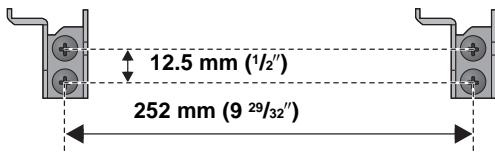
The position to attach the wall mount brackets
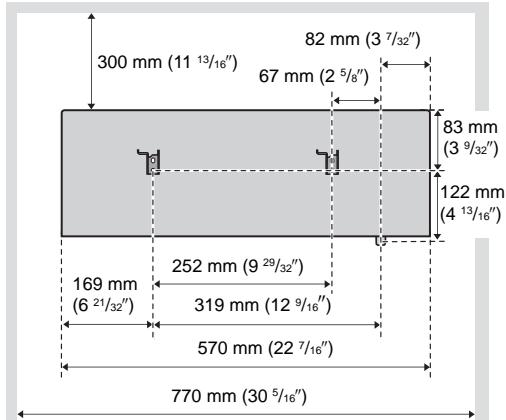
Space required
2 Attach the wall mount bracket to the wall with 2 screws (not supplied). (Both sides)
- Use a level to ensure both wall mount brackets are level.

3 Fix the safety holder onto the unit with the screw (supplied).
Screw tightening torque: 50N· cm (0.4 lbf·ft) to 70 N·cm (0.5 lbf·ft).
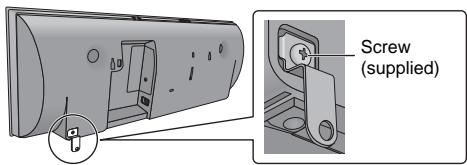
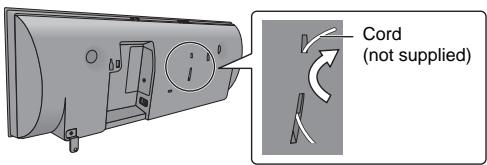
4 Attach the fall prevention cord (not supplied) to this unit.
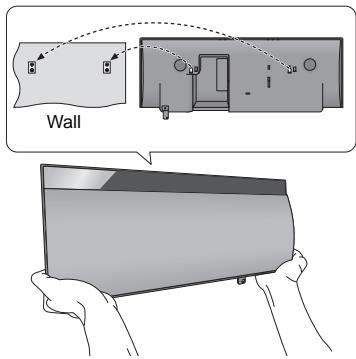
5 Hook the unit securely onto the wall mount brackets with both hands.
- Connect the AC power supply cord to the unit before hanging the unit onto the wall. ( 6)
After hanging the unit, release your hands carefully to confirm the unit sits securely on the wall.
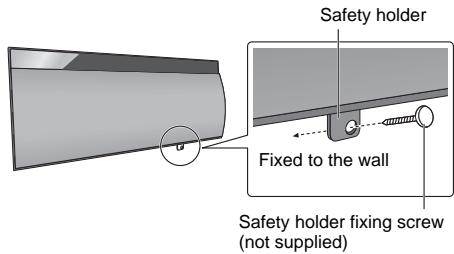
6 Drive the safety holder fixing screw (not supplied) to secure the safety holder onto the wall.
Refer to step 2 for requirements before screwing.
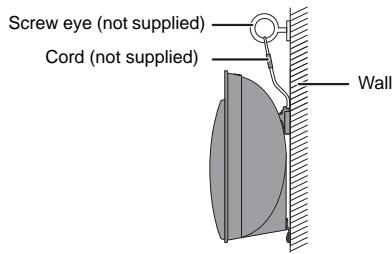
7 Attach the fall prevention cord (not supplied) to the wall.
- Make sure that the slack of the cord is minimal.
Specifications
GENERAL
| Power consumption | 11 W |
| Power consumption in standby mode | Approx. 0.1 W |
| Power supply | AC 120 V, 60 Hz |
Dimensions (W× H× D)
570mm× 206mm× 100mm
(22^7 / 16^ × 8^1 / 8^ × 3^15 / 16^ )
Mass (Weight) Approx. 2.7kg (5.95 lbs)
Operating temperature range
0^ C to +40^ C (+32^ F to +104^ F)
Operating humidity range
35% to 80% RH (no condensation)
AMPLIFIER SECTION
RMS Output Power Stereo mode Front Ch (both ch driven)
20 W per channel (6 Ω), 1 kHz, 10 % THD
Total RMS Stereo mode power 40 W
FTC Output Power Stereo mode Front Ch (both ch driven)
15 W per channel (6 Ω), 20 Hz to 20 kHz, 1% THD
Total FTC Stereo mode power 30 W
SPEAKER SECTION
Type 2 way, 2 speaker system (Bass reflex) Speaker unit(s)
- Woofer 8cm(3^1 / 8^ )× 1 per channel
- Tweeter 2.5 cm (1^ )× 1 per channel
Impedance 6Ω
Output sound pressure
83.5 dB/W (1 m (3.3 ft))
Frequency range 52 Hz to 25 kHz (-16 dB),
75 Hz to 22 kHz (-10 dB)
■ BLUETOOTH SECTION
Version Bluetooth® Ver.2.1 +EDR
Output Class 2 (2.5 mW)
Communication distance About 10 m (33 ft)*
Communication method 2.4 GHz band FH-SS
Correspondence profile A2DP
- Prospective communication distance Measurement environment: Temperature 25^ C( 77^ F) / Height 1 m (3.3 ft) Measure in "MODE 1"
TERMINALS SECTION
AUX Terminal Stereo, 3.5mm(^1 / 8^ ) jack

- Specifications are subject to change without notice. Mass and dimensions are approximate.
- Total harmonic distortion is measured by a digital spectrum analyzer.
Unit care
Pull out the AC power plug from the outlet before maintenance.
Clean this unit with a soft, dry cloth
- When dirt is heavy, wring a cloth moistened in water tightly to wipe the dirt, and then wipe it with a dry cloth.
- Never use alcohol, paint thinner or benzine to clean this unit.
- Before using chemically treated cloth, carefully read the instructions that came with the cloth.
To dispose or transfer this unit
The unit may keep the user settings information in the unit. If you discard this unit either by disposal or transfer, then follow the procedure to return all the settings to the factory presets to delete the user settings. ( 9, "To return all settings to the factory preset")
- The operation history may be recorded in the memory of this unit.
License
The Bluetooth® word mark and logos are owned by the Bluetooth SIG, Inc. and any use of such marks by Panasonic Corporation is under license. Other trademarks and trade names are those of their respective owners.
Spanish Quick Reference / Referencia
Conexiones

Conecte el cable de alimentacion de CA.
Estaunidadconsumepoca correnteCA incluso cuando seencuentraapagada.
- Para ahorrar energia, si no va a usar estaunities durante un periodo prolongado de tempo, pueda desconectarla.
- Consumo de energia en Standby (modo de espera): Aprox. 0,1 W

A la toma domestica de CA
Cable de suministro de energia CA (suministrado)
Conexión Adicional

Conecte un dispositivo externo de música (para el modo AUX).
① Enchufe el cable de audio (no suministrado) en el AUX conector.
- Tipo de enchufe: Ø3,5 mm (1/8") estereo
② Presione [AUX] topara seleccionar "AUX" y comenzar aREENa en el dispositivo conectado.
- Desconecte el ecualizador o bajo el volumen de sonido del dispositivo externo para reducir la seals de entrada. Un nivel alto de la seals de entrada distorsionaré el sonido.
- Para mayores detailles, consulte el manual de instrucciones del除外 equipo.
- No se proportionan cables ni dispositivos.

Cable de audio (no suministrado)
Para seleccionar el nivel de entrada de sonido del dispositivo externo
① Mientras está en modalidad “AUX”, pulse [PLAY MENU] repetidamente para seleccionar “INPUT LEVEL” y bajo pulse [OK].
(2) Presione [, ] para seleccionar "NORMAL" o "HIGH".
Operaciones Bluetooth®
Al usar la connexion Bluetooth®, pourrait escurrchar el sonido desde el dispositivo de audio Bluetooth® desde este aparato, de forma inalámbrica.
- Consulte las instrucciones de funciona del dispositivo Bluetooth® para Obtener más detalles.
Dispositivos Bluetooth® de sincronizacion
Preparación
- Encienda la funciona Bluetooth® del dispositivo y colque el dispositivo cerca de este aparato.
- Si este aparato ya está conectado a un dispositivo Bluetooth®, desconectelo.
1 Pulse [3, AUX] para seleccionar "BLUETOOTH". Si se indica "PAIRING" en la pantalla, vaya al paso 3.
2 Presione [PLAY MENU] para seleccionar "NEW DEV." y bajo presione [OK]. "PAIRING" se indica en la pantalla.
3 Selezione "SC-NE1" desde el menu Bluetooth® del dispositivo Bluetooth®.
4 Inicie la reproduccion en el dispositivo Bluetooth®.

- Si se le solicita la contraseña, ingrese "0000".
- Puede registrar hasta 8 dispositivos con este aparato. Si se sincroniza un 9no disposativo, se reemplazará el dispositivo que no se uso por más tiempo.
Conexión de un dispositivo Bluetooth® synchronizezado
Preparación
- Encienda la funciona Bluetooth® del dispositivo y coloque el dispositivo cerca de este aparato.
- Si este aparato ya está conectado a un dispositivo Bluetooth®, desconectelo.
1 Pulse [AUX] para seleccionar "BLUETOOTH". "READY" se indica en la pantalla.
2 Selezione "SC-NE1" desde el menu Bluetooth® del dispositivo Bluetooth®.
El nombre del dispositivo conectado se indica en la pantalla durante 2segundos.
3 Inicie la reproduccion en el dispositivo Bluetooth®.

-Esta unidad se pueda conectar solamente a un dispositivo por vez.
- Cuando se selección "BLUETOOTH" como fuente, este aparato intentaré connectarse automatistically con elultimate dispositivo conectado Bluetooth®.
- El dispositivo Bluetooth® se desconectará si se selección "AUX" como fuente de audio.
Desconexión del dispositivo Bluetooth®
1 Mientras se conecta un dispositivo Bluetooth®: Pulse [PLAY MENU] para selectionar "DISCONNECT?"
2 Presione [ , ] para selectionar "OK? YES" y luego presione [OK].
Limited Warranty
(ONLY FOR U.S.A. AND PUERTO RICO)
Panasonic Consumer Marketing Company of North America, Division of Panasonic Corporation of North America
One Panasonic Way, Secaucus, New Jersey 07094
Panasonic Products Limited Warranty
Limited Warranty Coverage
(For USA and Puerto Rico Only)
If your product does not work properly because of a defect in materials or workmanship, Panasonic Consumer Marketing Company of North America (referred to as "the warrantor") will, for the length of the period indicated on the chart below, which starts with the date of original purchase ("warranty period"), at its option either (a) repair your product with new or refurbished parts, (b) replace it with a new or refurbished equivalent value product, or (c) refund your purchase price. The decision to repair, replace or refund will be made by the warrantor.
Product or Part Name Parts Labor Wireless Speaker System 1 Year 1 Year All included Accessories(Except Non-Rechargeable Batteries) 90 Days Not Applicable Only Non-Rechargeable Batteries 10 Days Not Applicable
During the "Labor" warranty period there will be no charge for labor. During the "Parts" warranty period, there will be no charge for parts. This Limited Warranty excludes both parts and labor for non-rechargeable batteries,
antennas, and cosmetic parts (cabinet). This warranty only applies to products purchased and serviced in the United States or Puerto Rico. This warranty is extended only to the original purchaser of a new product which was not sold "as is".
Mail-In Service
For assistance in the U.S.A. and Puerto Rico in obtaining repairs, please ship the product prepaid to:
Panasonic Exchange Center
4900 George McVay Drive
Suite B
McAllen, TX 78503
panacare@us.panasonic.com
Online Repair Request
To submit a new repair request and for quick repair status visit our Web Site at www.panasonic.com/repair.
When shipping the unit, carefully pack, include all supplied accessories listed in the Owner's Manual, and send it prepaid, adequately insured and packed well in a carton box. When shipping Lithium Ion batteries please visit our Web Site at www.panasonic.com/BatteryHandling as Panasonic is committed to providing the most up to date information. Include a letter detailing the complaint, a return address and provide a daytime phone number where you can be reached. A valid registered receipt is required under the Limited Warranty.
IF REPAIR IS NEEDED DURING THE WARRANTY PERIOD. THE PURCHASER WILL BE REQUIRED TO FURNISH A SALES RECEIPT/PROOF OF PURCHASE INDICATING DATE OF PURCHASE, AMOUNT PAID AND PLACE OF PURCHASE. CUSTOMER WILL BE CHARGED FOR THE REPAIR OF ANY UNIT RECEIVED WITHOUT SUCH PROOF OF PURCHASE.
Limited Warranty Limits And Exclusions
This warranty ONLY COVERS failures due to defects in materials or workmanship, and DOES NOT COVER normal wear and tear or cosmetic damage. The warranty ALSO DOES NOT COVER damages which occurred in shipment, or failures which are caused by products not supplied by the warrantor, or failures which result from accidents, misuse, abuse, neglect,
The model number and serial number of this product can be found on either the back or the bottom of the unit.
Please note them in the space provided below and keep for future reference.
MODEL NUMBER SC-NE1
SERIAL NUMBER
SC-NE1
mishandling, misapplication, alteration, faulty installation, set-up adjustments, misadjustment of consumer controls, improper maintenance, power line surge, lightning damage, modification, introduction of sand, humidity or liquids, commercial use such as hotel, office, restaurant, or other business or rental use of the product, or service by anyone other than a Factory Service Center or other Authorized Servicer, or damage that is attributable to acts of God.
THERE ARE NO EXPRESS WARRANTY EXCEPTIONS EXCEPT AS LISTED UNDER "LIMITED WARRANTY COVERAGE".
THE WARRANTYOR IS NOT LIABLE FOR INCIDENTAL OR CONSEQUENTIAL DAMAGES RESULTING FROM THE USE OF THIS PRODUCT, OR ASRISING OUT OF ANY BREACH OF THIS WARRANTY.
(As examples, this excludes damages for lost time, travel to and from the servicer, loss of or damage to media or images, data or other memory or recorded content. The items listed are not exclusive, but for illustration only.)
ALL EXPRESS AND IMPLIED WARRANTY, INCLUDING THE WARRANTY OF MERCHANTABILITY, ARE LIMITED TO THE PERIOD OF THE LIMITED WARRANTY.
Some states do not allow the exclusion or limitation of incidental or consequential damages, or limitations on how long an implied warranty lasts, so the exclusions may not apply to you.
This warranty gives you specific legal rights and you may also have other rights which vary from state to state. If a problem with this product develops during or after the warranty period, you may contact your dealer or Service Center. If the problem is not handled to your satisfaction, then write to the warrantor's Consumer Affairs Department at the addresses listed for the warrantor.
PARTS AND SERVICE, WHICH ARE NOT COVERED BY THIS LIMITED WARRANTY, ARE YOUR RESPONSIBILITY.
Customer Services Directory (United States and Puerto Rico)
Obtain Product Information and Operating Assistance; locate your nearest Dealer or Service Center; purchase Parts and
Accessories; or make Customer Service and Literature requests by visiting our Web Site at:
http://www.panasonic.com/help
or, contact us via the web at:
http://www.panasonic.com/contactinfo
You may also contact us directly at:
1-800-211-PANA (7262)
Monday-Friday 9am-9pm
Saturday-Sunday 10am-7pm EST
For hearing or speech impaired TTY users, TTY: 1-877-833-8855
Accessory Purchases (United States and Puerto Rico)
Purchase Parts, Accessories and Instruction Books online for all Panasonic Products by visiting our Web Site at:
http://www.pstc.panasonic.com
Or, send your request by E-mail to:
npcparts@us.panasonic.com
You may also contact us directly at:
1-800-332-5368 (Phone) 1-800-237-9080 (Fax Only)
(Monday-Friday 9am-9pm EST)
Panasonic National Parts Center
20421 84th Ave S., Kent, WA 98032
(We accept Visa, MasterCard, Discover Card, American Express)
For hearing or speech impaired TTY users, TTY: 1-866-605-1277
As of October 2012
User memo:
DATE OF PURCHASE
DEALER NAME
DEALER ADDRESS
TELEPHONE NUMBER
Limited Warranty (ONLY FOR CANADA)
Panasonic Canada Inc.
5770 Ambler Drive, Mississauga, Ontario L4W 2T3
PANASONIC PRODUCT - LIMITED WARRANTY
EXCHANGE PROGRAM
Panasonic Canada Inc. warrants this product to be free from defects in material and workmanship under normal use and for a period as stated below from the date of original purchase agrees to, at its option either (a) repair your product with new or refurbished parts, (b) replace it with a new or a refurbished equivalent value product, or (c) refund your purchase price. The decision to repair, replace or refund will be made by Panasonic Canada Inc.
Panasonic Portable / Clock Radio (without Tape, CD, MD) One (1) year
Panasonic Audio Product One (1) year
Panasonic DVD Product One (1) year
Accessories including rechargeable batteries Ninety (90) days
This warranty is given only to the original purchaser, or the person for whom it was purchased as a gift, of a Panasonic brand product mentioned above sold by an authorized Panasonic dealer in Canada and purchased and used in Canada, which product was not sold "as is", and which product was delivered to you in new condition in the original packaging.
IN ORDER TO BE ELIGIBLE TO RECEIVE WARRANTY SERVICE HEREUNDER, A PURCHASE RECEIPT OR OTHER PROOF OF DATE OF ORIGINAL PURCHASE, SHOWING AMOUNT PAID AND PLACE OF PURCHASE IS REQUIRED
LIMITATIONS AND EXCLUSIONS
This warranty ONLY COVERS failures due to defects in materials or workmanship, and DOES NOT COVER normal wear and tear or cosmetic damage. The warranty ALSO DOES NOT COVER damages which occurred in shipment, or failures which are caused by products not supplied by Panasonic Canada Inc., or failures which result from accidents, misuse, abuse, neglect, mishandling, misapplication, alteration, faulty installation, set-up adjustments, misadjustment of consumer controls, improper maintenance, power line surge, lightning damage, modification, introduction of sand, humidity or liquids, commercial use such as hotel, office, restaurant, or other business or rental use of the product, or service by anyone other than an Authorized Servicer, or damage that is attributable to acts of God.
Dry cell batteries are also excluded from coverage under this warranty.
THIS EXPRESS, LIMITED WARRANTY IS IN LIEU OF ALL OTHER WARRANTYES, EXPRESS OR IMPLIED, INCLUDING ANY IMPLIED WARRANTYES OF MERCHANTABILITY AND FITNESS FOR A PARTICULAR PURPOSE. IN NO EVENT WILL PANASONIC CANADA INC. BE LIABLE FOR ANY SPECIAL, INDIRECT OR CONSEQUENTIAL DAMAGES RESULTING FROM THE USE OF THIS PRODUCT OR ARISING OUT OF ANY BREACH OF ANY EXPRESS OR IMPLIED WARRANTY. (As examples, this warranty excludes damages for lost time, travel to and from the Authorized Servicer, loss of or damage to media or images, data or other memory or recorded content. This list of items is not exhaustive, but for illustration only.)
In certain instances, some jurisdictions do not allow the exclusion or limitation of incidental or consequential damages, or the exclusion of implied warranties, so the above limitations and exclusions may not be applicable. This warranty gives you specific legal rights and you may have other rights which vary depending on your province or territory.
CONTACT INFORMATION
For product information and operation assistance, please contact:
Our Customer Care Centre: Telephone #: 1-800-561-5505
Fax #: (905) 238-2360
Email link: "Support contact us email" on www.panasonic.ca
For defective product exchange within the warranty period, please contact the original dealer or our Customer Care Centre.
THE FOLLOWING APPLIES ONLY IN THE U.S.A.
FCC Note:
This equipment has been tested and found to comply with the limits for a Class B digital device, pursuant to Part 15 of the FCC Rules.
These limits are designed to provide reasonable protection against harmful interference in a residential installation. This equipment generates, uses and can radiate radio frequency energy and, if not installed and used in accordance with the instructions, may cause harmful interference to radio communications. However, there is no guarantee that interference will not occur in a particular installation. If this equipment does cause harmful interference to radio or television reception, which can be determined by turning the equipment off and on, the user is encouraged to try to correct the interference by one or more of the following measures:
- Reorient or relocate the receiving antenna.
- Increase the separation between the equipment and receiver.
- Connect the equipment into an outlet on a circuit different from that to which the receiver is connected.
- Consult the dealer or an experienced radio/TV technician for help.
Any unauthorized changes or modifications to this equipment would void the user's authority to operate this device. This device complies with Part 15 of the FCC Rules. Operation is subject to the following two conditions:
(1) This device may not cause harmful interference, and
(2) this device must accept any interference received, including interference that may cause undesired operation.
Responsible Party:
Panasonic Corporation of North America
One Panasonic Way,
Secaucus, NJ 07094
Support Contact:
Panasonic Consumer Marketing Company of
North America
Telephone No.: 1-800-211-PANA (7262)
THE FOLLOWING APPLIES IN THE U.S.A. AND CANADA
This device complies with Part 15 of FCC Rules and RSS-Gen of IC Rules.
Operation is subject to the following two conditions:
(1) This device may not cause interference, and
(2) this device must accept any interference, including interference that may cause undesired operation of this device.
FCC ID: ACJ-SC-NE1
IC: 216A-SCNE1
This transmitter must not be co-located or operated in conjunction with any other antenna or transmitter.
This equipment complies with FCC/IC radiation exposure limits set forth for an uncontrolled environment and meets the FCC radio frequency (RF) Exposure Guidelines in Supplement C to OET65 and RSS-102 of the IC radio frequency (RF) Exposure rules. This equipment has very low levels of RF energy that is deemed to comply without maximum permissive exposure evaluation (MPE). But it is desirable that it should be installed and operated keeping the radiator at least 20cm ( 7^7 / 8^n ) or more away from person's body (excluding extremities: hands, wrists, feet and ankles).

As an ENERGY STAR® Partner, Panasonic has determined that this product meets the ENERGY STAR® guidelines for energy efficiency.
*For Canada only: The word "Participant" is used in place of the word "Partner".

Bluetooth®
Panasonic Consumer Marketing
Company of North America,
Division of Panasonic Corporation of
North America
One Panasonic Way, Secaucus,
New Jersey 07094
http://www.panasonic.com
Panasonic Canada Inc.
5770 Ambler Drive
Mississauga, Ontario
L4W 2T3
www.panasonic.ca
En Sp
Conexiones
Conecte el cable de alimentacion de CA.
Estaunidadconsumepoca correnteCA incluso cuando seencuentraapagada. - Para ahorrar energia, si no va a usar estaunities durante un periodo prolongado de tempo, pueda desconectarla. - Consumo de energia en Standby (modo de espera): Aprox. 0,1 W  A la toma domestica de CA Cable de suministro de energia CA (suministrado)Conexión Adicional
Conecte un dispositivo externo de música (para el modo AUX).
① Enchufe el cable de audio (no suministrado) en el AUX conector. - Tipo de enchufe: Ø3,5 mm (1/8") estereo ② Presione [AUX] topara seleccionar "AUX" y comenzar aREENa en el dispositivo conectado. - Desconecte el ecualizador o bajo el volumen de sonido del dispositivo externo para reducir la seals de entrada. Un nivel alto de la seals de entrada distorsionaré el sonido. - Para mayores detailles, consulte el manual de instrucciones del除外 equipo. - No se proportionan cables ni dispositivos.  Cable de audio (no suministrado)Para seleccionar el nivel de entrada de sonido del dispositivo externo
① Mientras está en modalidad “AUX”, pulse [PLAY MENU] repetidamente para seleccionar “INPUT LEVEL” y bajo pulse [OK]. (2) Presione [, ] para seleccionar "NORMAL" o "HIGH".Operaciones Bluetooth®
Al usar la connexion Bluetooth®, pourrait escurrchar el sonido desde el dispositivo de audio Bluetooth® desde este aparato, de forma inalámbrica. - Consulte las instrucciones de funciona del dispositivo Bluetooth® para Obtener más detalles.Dispositivos Bluetooth® de sincronizacion
Preparación
- Encienda la funciona Bluetooth® del dispositivo y colque el dispositivo cerca de este aparato. - Si este aparato ya está conectado a un dispositivo Bluetooth®, desconectelo. 1 Pulse [3, AUX] para seleccionar "BLUETOOTH". Si se indica "PAIRING" en la pantalla, vaya al paso 3. 2 Presione [PLAY MENU] para seleccionar "NEW DEV." y bajo presione [OK]. "PAIRING" se indica en la pantalla. 3 Selezione "SC-NE1" desde el menu Bluetooth® del dispositivo Bluetooth®. 4 Inicie la reproduccion en el dispositivo Bluetooth®.  - Si se le solicita la contraseña, ingrese "0000". - Puede registrar hasta 8 dispositivos con este aparato. Si se sincroniza un 9no disposativo, se reemplazará el dispositivo que no se uso por más tiempo.Conexión de un dispositivo Bluetooth® synchronizezado
Preparación
- Encienda la funciona Bluetooth® del dispositivo y coloque el dispositivo cerca de este aparato. - Si este aparato ya está conectado a un dispositivo Bluetooth®, desconectelo. 1 Pulse [AUX] para seleccionar "BLUETOOTH". "READY" se indica en la pantalla. 2 Selezione "SC-NE1" desde el menu Bluetooth® del dispositivo Bluetooth®. El nombre del dispositivo conectado se indica en la pantalla durante 2segundos. 3 Inicie la reproduccion en el dispositivo Bluetooth®.  -Esta unidad se pueda conectar solamente a un dispositivo por vez. - Cuando se selección "BLUETOOTH" como fuente, este aparato intentaré connectarse automatistically con elultimate dispositivo conectado Bluetooth®. - El dispositivo Bluetooth® se desconectará si se selección "AUX" como fuente de audio.Desconexión del dispositivo Bluetooth®
1 Mientras se conecta un dispositivo Bluetooth®: Pulse [PLAY MENU] para selectionar "DISCONNECT?" 2 Presione [ , ] para selectionar "OK? YES" y luego presione [OK].Limited Warranty
(ONLY FOR U.S.A. AND PUERTO RICO)
Panasonic Consumer Marketing Company of North America, Division of Panasonic Corporation of North America One Panasonic Way, Secaucus, New Jersey 07094Panasonic Products Limited Warranty
Limited Warranty Coverage
(For USA and Puerto Rico Only)
If your product does not work properly because of a defect in materials or workmanship, Panasonic Consumer Marketing Company of North America (referred to as "the warrantor") will, for the length of the period indicated on the chart below, which starts with the date of original purchase ("warranty period"), at its option either (a) repair your product with new or refurbished parts, (b) replace it with a new or refurbished equivalent value product, or (c) refund your purchase price. The decision to repair, replace or refund will be made by the warrantor.| Product or Part Name | Parts | Labor |
| Wireless Speaker System | 1 Year | 1 Year |
| All included Accessories(Except Non-Rechargeable Batteries) | 90 Days | Not Applicable |
| Only Non-Rechargeable Batteries | 10 Days | Not Applicable |
Mail-In Service
For assistance in the U.S.A. and Puerto Rico in obtaining repairs, please ship the product prepaid to: Panasonic Exchange Center 4900 George McVay Drive Suite B McAllen, TX 78503 panacare@us.panasonic.comOnline Repair Request
To submit a new repair request and for quick repair status visit our Web Site at www.panasonic.com/repair. When shipping the unit, carefully pack, include all supplied accessories listed in the Owner's Manual, and send it prepaid, adequately insured and packed well in a carton box. When shipping Lithium Ion batteries please visit our Web Site at www.panasonic.com/BatteryHandling as Panasonic is committed to providing the most up to date information. Include a letter detailing the complaint, a return address and provide a daytime phone number where you can be reached. A valid registered receipt is required under the Limited Warranty. IF REPAIR IS NEEDED DURING THE WARRANTY PERIOD. THE PURCHASER WILL BE REQUIRED TO FURNISH A SALES RECEIPT/PROOF OF PURCHASE INDICATING DATE OF PURCHASE, AMOUNT PAID AND PLACE OF PURCHASE. CUSTOMER WILL BE CHARGED FOR THE REPAIR OF ANY UNIT RECEIVED WITHOUT SUCH PROOF OF PURCHASE.Limited Warranty Limits And Exclusions
This warranty ONLY COVERS failures due to defects in materials or workmanship, and DOES NOT COVER normal wear and tear or cosmetic damage. The warranty ALSO DOES NOT COVER damages which occurred in shipment, or failures which are caused by products not supplied by the warrantor, or failures which result from accidents, misuse, abuse, neglect, The model number and serial number of this product can be found on either the back or the bottom of the unit. Please note them in the space provided below and keep for future reference. MODEL NUMBER SC-NE1 SERIAL NUMBER SC-NE1 mishandling, misapplication, alteration, faulty installation, set-up adjustments, misadjustment of consumer controls, improper maintenance, power line surge, lightning damage, modification, introduction of sand, humidity or liquids, commercial use such as hotel, office, restaurant, or other business or rental use of the product, or service by anyone other than a Factory Service Center or other Authorized Servicer, or damage that is attributable to acts of God.THERE ARE NO EXPRESS WARRANTY EXCEPTIONS EXCEPT AS LISTED UNDER "LIMITED WARRANTY COVERAGE".
THE WARRANTYOR IS NOT LIABLE FOR INCIDENTAL OR CONSEQUENTIAL DAMAGES RESULTING FROM THE USE OF THIS PRODUCT, OR ASRISING OUT OF ANY BREACH OF THIS WARRANTY. (As examples, this excludes damages for lost time, travel to and from the servicer, loss of or damage to media or images, data or other memory or recorded content. The items listed are not exclusive, but for illustration only.) ALL EXPRESS AND IMPLIED WARRANTY, INCLUDING THE WARRANTY OF MERCHANTABILITY, ARE LIMITED TO THE PERIOD OF THE LIMITED WARRANTY. Some states do not allow the exclusion or limitation of incidental or consequential damages, or limitations on how long an implied warranty lasts, so the exclusions may not apply to you. This warranty gives you specific legal rights and you may also have other rights which vary from state to state. If a problem with this product develops during or after the warranty period, you may contact your dealer or Service Center. If the problem is not handled to your satisfaction, then write to the warrantor's Consumer Affairs Department at the addresses listed for the warrantor. PARTS AND SERVICE, WHICH ARE NOT COVERED BY THIS LIMITED WARRANTY, ARE YOUR RESPONSIBILITY.Customer Services Directory (United States and Puerto Rico)
Obtain Product Information and Operating Assistance; locate your nearest Dealer or Service Center; purchase Parts and Accessories; or make Customer Service and Literature requests by visiting our Web Site at: http://www.panasonic.com/help or, contact us via the web at: http://www.panasonic.com/contactinfo You may also contact us directly at: 1-800-211-PANA (7262) Monday-Friday 9am-9pm Saturday-Sunday 10am-7pm EST For hearing or speech impaired TTY users, TTY: 1-877-833-8855Accessory Purchases (United States and Puerto Rico)
Purchase Parts, Accessories and Instruction Books online for all Panasonic Products by visiting our Web Site at: http://www.pstc.panasonic.com Or, send your request by E-mail to: npcparts@us.panasonic.com You may also contact us directly at: 1-800-332-5368 (Phone) 1-800-237-9080 (Fax Only) (Monday-Friday 9am-9pm EST) Panasonic National Parts Center 20421 84th Ave S., Kent, WA 98032 (We accept Visa, MasterCard, Discover Card, American Express) For hearing or speech impaired TTY users, TTY: 1-866-605-1277 As of October 2012 User memo: DATE OF PURCHASE DEALER NAME DEALER ADDRESS TELEPHONE NUMBERLimited Warranty (ONLY FOR CANADA)
Panasonic Canada Inc. 5770 Ambler Drive, Mississauga, Ontario L4W 2T3PANASONIC PRODUCT - LIMITED WARRANTY
EXCHANGE PROGRAM
Panasonic Canada Inc. warrants this product to be free from defects in material and workmanship under normal use and for a period as stated below from the date of original purchase agrees to, at its option either (a) repair your product with new or refurbished parts, (b) replace it with a new or a refurbished equivalent value product, or (c) refund your purchase price. The decision to repair, replace or refund will be made by Panasonic Canada Inc. Panasonic Portable / Clock Radio (without Tape, CD, MD) One (1) year Panasonic Audio Product One (1) year Panasonic DVD Product One (1) year Accessories including rechargeable batteries Ninety (90) days This warranty is given only to the original purchaser, or the person for whom it was purchased as a gift, of a Panasonic brand product mentioned above sold by an authorized Panasonic dealer in Canada and purchased and used in Canada, which product was not sold "as is", and which product was delivered to you in new condition in the original packaging.IN ORDER TO BE ELIGIBLE TO RECEIVE WARRANTY SERVICE HEREUNDER, A PURCHASE RECEIPT OR OTHER PROOF OF DATE OF ORIGINAL PURCHASE, SHOWING AMOUNT PAID AND PLACE OF PURCHASE IS REQUIRED
LIMITATIONS AND EXCLUSIONS
This warranty ONLY COVERS failures due to defects in materials or workmanship, and DOES NOT COVER normal wear and tear or cosmetic damage. The warranty ALSO DOES NOT COVER damages which occurred in shipment, or failures which are caused by products not supplied by Panasonic Canada Inc., or failures which result from accidents, misuse, abuse, neglect, mishandling, misapplication, alteration, faulty installation, set-up adjustments, misadjustment of consumer controls, improper maintenance, power line surge, lightning damage, modification, introduction of sand, humidity or liquids, commercial use such as hotel, office, restaurant, or other business or rental use of the product, or service by anyone other than an Authorized Servicer, or damage that is attributable to acts of God. Dry cell batteries are also excluded from coverage under this warranty. THIS EXPRESS, LIMITED WARRANTY IS IN LIEU OF ALL OTHER WARRANTYES, EXPRESS OR IMPLIED, INCLUDING ANY IMPLIED WARRANTYES OF MERCHANTABILITY AND FITNESS FOR A PARTICULAR PURPOSE. IN NO EVENT WILL PANASONIC CANADA INC. BE LIABLE FOR ANY SPECIAL, INDIRECT OR CONSEQUENTIAL DAMAGES RESULTING FROM THE USE OF THIS PRODUCT OR ARISING OUT OF ANY BREACH OF ANY EXPRESS OR IMPLIED WARRANTY. (As examples, this warranty excludes damages for lost time, travel to and from the Authorized Servicer, loss of or damage to media or images, data or other memory or recorded content. This list of items is not exhaustive, but for illustration only.) In certain instances, some jurisdictions do not allow the exclusion or limitation of incidental or consequential damages, or the exclusion of implied warranties, so the above limitations and exclusions may not be applicable. This warranty gives you specific legal rights and you may have other rights which vary depending on your province or territory.CONTACT INFORMATION
For product information and operation assistance, please contact: Our Customer Care Centre: Telephone #: 1-800-561-5505 Fax #: (905) 238-2360 Email link: "Support contact us email" on www.panasonic.ca For defective product exchange within the warranty period, please contact the original dealer or our Customer Care Centre.THE FOLLOWING APPLIES ONLY IN THE U.S.A.
FCC Note:
This equipment has been tested and found to comply with the limits for a Class B digital device, pursuant to Part 15 of the FCC Rules. These limits are designed to provide reasonable protection against harmful interference in a residential installation. This equipment generates, uses and can radiate radio frequency energy and, if not installed and used in accordance with the instructions, may cause harmful interference to radio communications. However, there is no guarantee that interference will not occur in a particular installation. If this equipment does cause harmful interference to radio or television reception, which can be determined by turning the equipment off and on, the user is encouraged to try to correct the interference by one or more of the following measures: - Reorient or relocate the receiving antenna. - Increase the separation between the equipment and receiver. - Connect the equipment into an outlet on a circuit different from that to which the receiver is connected. - Consult the dealer or an experienced radio/TV technician for help. Any unauthorized changes or modifications to this equipment would void the user's authority to operate this device. This device complies with Part 15 of the FCC Rules. Operation is subject to the following two conditions: (1) This device may not cause harmful interference, and (2) this device must accept any interference received, including interference that may cause undesired operation. Responsible Party: Panasonic Corporation of North America One Panasonic Way, Secaucus, NJ 07094 Support Contact: Panasonic Consumer Marketing Company of North America Telephone No.: 1-800-211-PANA (7262)THE FOLLOWING APPLIES IN THE U.S.A. AND CANADA
This device complies with Part 15 of FCC Rules and RSS-Gen of IC Rules. Operation is subject to the following two conditions: (1) This device may not cause interference, and (2) this device must accept any interference, including interference that may cause undesired operation of this device. FCC ID: ACJ-SC-NE1 IC: 216A-SCNE1 This transmitter must not be co-located or operated in conjunction with any other antenna or transmitter. This equipment complies with FCC/IC radiation exposure limits set forth for an uncontrolled environment and meets the FCC radio frequency (RF) Exposure Guidelines in Supplement C to OET65 and RSS-102 of the IC radio frequency (RF) Exposure rules. This equipment has very low levels of RF energy that is deemed to comply without maximum permissive exposure evaluation (MPE). But it is desirable that it should be installed and operated keeping the radiator at least 20cm ( 7^7 / 8^n ) or more away from person's body (excluding extremities: hands, wrists, feet and ankles).  As an ENERGY STAR® Partner, Panasonic has determined that this product meets the ENERGY STAR® guidelines for energy efficiency. *For Canada only: The word "Participant" is used in place of the word "Partner".  Bluetooth® Panasonic Consumer Marketing Company of North America, Division of Panasonic Corporation of North America One Panasonic Way, Secaucus, New Jersey 07094 http://www.panasonic.com Panasonic Canada Inc. 5770 Ambler Drive Mississauga, Ontario L4W 2T3 www.panasonic.ca En Sp- Owner's Manual Wireless Speaker System
- Included Installation Instructions (→ 2, 3 and 10, 11)
- IMPORTANT SAFETY INSTRUCTIONS
- WARNING
- Unit
- AC power supply cord
- Button-type battery (Lithium battery)
- DO NOT INGEST BATTERY, CHEMICAL BURN HAZARD
- CAUTION
- Placement
- -If you see this symbol
- Information on Disposal in other Countries outside the European Union
- Table of contents
- Accessories
- Wall mounting accessories
- (ONLY FOR CANADA)
- About Bluetooth®
- Frequency band used
- Certification of this device
- Restrictions of use
- Range of use
- Interference from other devices
- Intended usage
- Control reference guide
- Before using for the first time
- To replace a button-type battery
- Connections
- Connect the AC power supply cord.
- Additional Connection
- Connect an external music device (for AUX mode).
- To select the sound input level of the external device
- Bluetooth® operations
- Pairing Bluetooth® devices
- Preparation
- Connecting a paired Bluetooth® device
- Bluetooth® transmission mode
- Bluetooth® input level
- Disconnecting a Bluetooth® device
- Sound adjustment
- Others
- Sleep timer
- Display brightness
- Automatic standby
- To cancel this function
- Changing the unit and remote control code
- Troubleshooting
- To return all settings to the factory preset
- Common problems
- Humming heard during play.
- Bluetooth®
- Pairing cannot be done.
- The device cannot be connected.
- The device is connected but audio cannot be heard through this unit.
- The sound is interrupted.
- Remote control
- The remote control doesn't work properly.
- Messages
- The following messages or service numbers may appear on the unit's display.
- "AUTO OFF"
- "DIMMER"
- "ERROR"
- "F " (" " stands for a number.)
- "REMOTE " (" " stands for a number.)
- Attaching the unit to a wall (optional)
- Installation accessories
- Supplied accessories
- - Additionally required accessories (commercially available)
- Safety precautions
- Wall mount instructions
- Attach the wall mount bracket to the wall with 2 screws (not supplied). (Both sides)
- Fix the safety holder onto the unit with the screw (supplied).
- Attach the fall prevention cord (not supplied) to this unit.
- Hook the unit securely onto the wall mount brackets with both hands.
- Drive the safety holder fixing screw (not supplied) to secure the safety holder onto the wall.
- Attach the fall prevention cord (not supplied) to the wall.
- Specifications
- GENERAL
- AMPLIFIER SECTION
- RMS Output Power Stereo mode Front Ch (both ch driven)
- SPEAKER SECTION
- ■ BLUETOOTH SECTION
- TERMINALS SECTION
- Unit care
- Clean this unit with a soft, dry cloth
- To dispose or transfer this unit
- License
- Spanish Quick Reference / Referencia
- Conexiones
- Conecte el cable de alimentacion de CA.
- Conexión Adicional
- Conecte un dispositivo externo de música (para el modo AUX).
- Para seleccionar el nivel de entrada de sonido del dispositivo externo
- Operaciones Bluetooth®
- Dispositivos Bluetooth® de sincronizacion
- Preparación
- Conexión de un dispositivo Bluetooth® synchronizezado
- Desconexión del dispositivo Bluetooth®
- Limited Warranty
- (ONLY FOR U.S.A. AND PUERTO RICO)
- Panasonic Products Limited Warranty
- Limited Warranty Coverage
- (For USA and Puerto Rico Only)
- Mail-In Service
- Online Repair Request
- Limited Warranty Limits And Exclusions
- THERE ARE NO EXPRESS WARRANTY EXCEPTIONS EXCEPT AS LISTED UNDER "LIMITED WARRANTY COVERAGE".
- Customer Services Directory (United States and Puerto Rico)
- Accessory Purchases (United States and Puerto Rico)
- Limited Warranty (ONLY FOR CANADA)
- PANASONIC PRODUCT - LIMITED WARRANTY
- EXCHANGE PROGRAM
- IN ORDER TO BE ELIGIBLE TO RECEIVE WARRANTY SERVICE HEREUNDER, A PURCHASE RECEIPT OR OTHER PROOF OF DATE OF ORIGINAL PURCHASE, SHOWING AMOUNT PAID AND PLACE OF PURCHASE IS REQUIRED
- LIMITATIONS AND EXCLUSIONS
- CONTACT INFORMATION
- THE FOLLOWING APPLIES ONLY IN THE U.S.A.
- FCC Note:
- THE FOLLOWING APPLIES IN THE U.S.A. AND CANADA
Marque : PANASONIC
Modèle : SC-NE1
Catégorie : Enceinte bluetooth