
RADCD508 - Radio JUNG - Gratis gebruiksaanwijzing en handleiding
Vind de handleiding van het apparaat gratis RADCD508 JUNG in PDF-formaat.


| Type product | Radio-CD-speler |
| Merk | JUNG |
| Model | RADCD508 |
| Afmetingen (BxHxD) | Ongeveer 280 x 140 x 200 mm |
| Gewicht | Ongeveer 1,5 kg |
| Voeding | Netspanning: 230V~50Hz; Batterijvoeding: 2x AA (niet meegeleverd) |
| CD-speler | Ja, afspeelt CD, CD-R, CD-RW |
| Radio | FM/AM, met handmatig en automatisch zoeken |
| Geheugen voor radiozenders | 20 voorkeuzes (FM en AM) |
| Klok | Digitale klok met weergave |
| Wekkerfunctie | Wekken op radio, cd of zoemer |
| Sleep timer | Instelbaar (max. 90 minuten) |
| Hoofdtelefoonaansluiting | 3,5 mm jack |
| Luidspreker | 2x 3W RMS |
| Display | LCD-scherm met achtergrondverlichting |
| Afstandsbediening | Inbegrepen |
| Reiniging | Gebruik een zachte, droge doek. Geen vloeistoffen of spuitbussen. |
| Veiligheid | Niet blootstellen aan regen of vocht. Plaats op een stabiele ondergrond. |
| Onderdelen en reparatie | Geen consumentenonderdelen. Reparatie alleen door gekwalificeerd personeel. |
Veelgestelde vragen - RADCD508 JUNG
Gebruikersvragen over RADCD508 JUNG
0 vraag over dit apparaat. Beantwoord die u kent of stel uw eigen vraag.
Stel een nieuwe vraag over dit apparaat
Download de handleiding voor uw Radio in PDF-formaat gratis! Vind uw handleiding RADCD508 - JUNG en neem uw elektronisch apparaat weer in handen. Op deze pagina staan alle documenten die nodig zijn voor het gebruik van uw apparaat. RADCD508 van het merk JUNG.
GEBRUIKSAANWIJZING RADCD508 JUNG
Flush-mounted radio with display RAD...
Device descripon
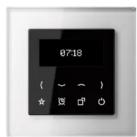
The Jung ush-mounted radio RAD... consists of a display cover and a ush-mounted power supply unit.
The display cover is used for display and operaon. All the sengs are made using the 8 sensor buons. The display shows the staon informaon from RDS, the me and the current sengs.
The radio power supply unit contains the connexons for the mains voltage, inputs and the loudspeaker.
The radio can be operated with one or two LSM... loudspeaker modules.
The extension input allows the radio to be switched on or o, e.g. together with the light.
The radio signal is obtained from the conneccon to the mains voltage. In situacons where recepon is dicult, the oponal cord aerial can be used.
Other audio sources can be played back using an AUX input, e.g. using the music centre MC..100...
Safety informaon
Electrical equipment must only be installed and assembled by qualified electricians.
Failure to comply with these instrucons may result in damage to the device, re or other hazards.
This product is only intended for use in dry rooms.
These instrucons are a component part of the product and must remain with the end customer.
Operaon
The lower half of the cover is used for operaon. All operaon is carried out using 8 sensor buons.
When idle, the buons and display may be hidden, depending on the sengs. They are reacvated when the sensor buons are touched again.

Switch-on / Switch-o
The radio is switched on and o here.
If the buon is pressed for 3 seconds when the system is switched on, then the sleep mer (fall asleep funcon) can be acvated.
Sengs
Basic conguraon of brightnesses, alarm me, and much more.
Alarm funcons
The alarm, which has a gradually increasing volume, is switched on and o here.
If the buon is pressed for longer than 3 seconds, this opens the menu for seng the alarm me.
Favourites
Preferred staons can be saved to the Favourites or the AUX input selected.
Operang buons
Staon search, volume seng and the navigaon/ seng in the menu
Brightness of display during standby
adjusts the brightness for the standby state
The lowest level is Night mode.
Night mode
In Night mode, the display is switched o completely as standby.
Pressing any buon brings the display back from Night mode.
Main menu

Aer switch-on, the staon informaon and status line are shown in the display.

The status line provides informaon on the selected favourites, me and alarm operaon.
When idle, this informaon is reduced to the me and date.
Staon selecon
The next staon is selected using the buons.
RDS (Radio Data System)
During operaon, the display shows the staon name and, in some cases, additional informaon, e.g. on the current song. If this informaon is not available, then frequency informaon on the selected radio staon is displayed.
Adjusng the volume
The volume is adjusted using


Favourites
Briey pressing the 1 in selects the saved favourites or the AUX input.

Cancel Select -/+ Conrm

In radio operaon, a long press of the buon (>3 s) adds the current staon to the Favourites list. Up to 8 favourites are possible.
Sengs
The submenus can be found using the buon. The menu is operated with the sensor buons below.
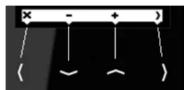
Cancel Select -/+ Conrm

Here you can select one of the following 8 submenus with the +/- buons.
With the buon you get into the selected submenu to change required sengs.
AUX input
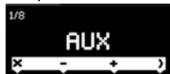
When the AUX input is acvated, radio recepon is terminated and playback comes from the external source. If the input is deactivated again, radio operaon will recommence.
Alarm me

The set alarm me starts the radio with an increasing volume.
The display and buons are previously illuminated at full brightness.

The □ terminate any further increase in volume.
The 🧑️ on switches the alarm o.
The ☐ on switches the funcon on and o.
Sleepmer (Fall asleep funcon)

The Sleepmer (fall asleep funcon) switches the radio o automacally aer the selected period of me.
The countdown is displayed in the status line.
Buon brightness

The brightness and switch-o behaviour of the buons can be varied.
On switching-o, the informaon in the display is reduced to the display of staon name and the me.
If the system is operated again, the buons become brighter again.
Brightness of operaonal display
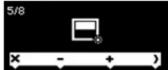
The display brightness can be reduced.
Loudspeaker

During operaon, the radio switches between stereo and mono operaon automacally. If recepon conditions are variable, it may be wise to select connuous mono operaon. This allows two dierent areas to be lled with sound.
Time
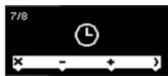
Normally, the recepon of an RDS staon is sucient to perform this seng automacally. However, the current me can also be set manually.
Default seng

The state as delivered is restored. In so doing, the 8 strongest staons are saved automacally.

Flush-mounted radio with display RAD...
Operang instrucons
Albrecht Jung GmbH & Co. KG
Vollmestrasse 1
58579 Schalksmühle
Germany
www.jung.de
We reserve the right to make technical
changes
en_RAD_V3.docx
02/2014
352 1575200

The symbol is a free trade symbol, intended solely for the authorities and does not carry any guarantee of properes.
Guarantee
Our products are under guarantee within the scope of the statutory provisions. Please send the device, postage paid, to our central Customer Service Centre, with a descripon of the error.
ALBRECHT JUNG GMBH & CO. KG
Vollmestrasse 1
58579 Schalksmühle
Germany
Telephone: +49 2355 806-0
Fax: +49 2355 806-204
kundencenter@jung.de
www.jung.de
Service Centre
Kupferstr. 17-19
44532 Lünen
Germany
Correct use
• Installaon in a ush-mounted device box
according to DIN EN 49073
(Recommendation: Deep sockets)
• VHF recepon in the frequency range
87.5 MHz to 108 MHz
Product properes
• VHF radio with display and sensor buons
• Real glass front panel
- Stereo recepon
- Connecon terminals for two loudspeakers
- Stereo/mono switch-over
- Simple operaon
- Integrated VHF aerial
• High level of recepon quality
• Automac and manual staon search
• Storage of 8 favourites
- Switch-on with most recent staon
- Switch-on with most recent volume
- Alarm funcon
- Sleep mode
- Switch-on/switch-o using extension
- Oponal external cord aerial
Art. no. RAD-ANT available as accessory
Mounng
The radio RAD... is designed for moung in ush-mounted DIN EN 49073 sockets.
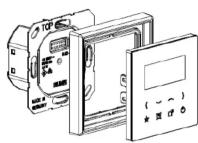
The ush-mounted power supply unit contains the connexons for the mains voltage, loudspeaker and possibly the extension.
The display cover is aached to the power supply unit together with the frame.

DANGER!
Touching live parts can result in an electric shock.
An electric shock can be fatal. Before working, disconnect all the appropriate cable protecon switches. Cover live parts in the vicinity.
Mains conneccon
The radio requires a permanent mains
power conncon.

It is not allowed to use the terminals to loop through wires.
Connecng the extension
The extension conncon is used to switch
the radio o and on using switches,
e.g. together with the light.
The extension input may only be operated with the same phase as the radio.

Connecng an external cord aerial
The rear-side conncon for the external aerial may only be used to connect the cord aerial, art. no. RAD-ANT. Connecon to roof aerials of shared aerial systems is not permied.

To connect the cord aerial, remove the jumper. Make sure to store the jumper for later use of the radio without cord aerial.
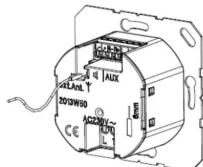
Insert the aerial in the lower conncon.
Using the AUX input
The AUX input is used to connect external sources, e.g. the music centre MC..100...

Within the device box, all the cables carrying low voltages (including the oponal cord aerial) must have an insulang hose, in
order to guarantee secure isolaon. The AUX input is selected using the Favourites buon or in the menu.
Connecng a loudspeaker
The radio is designed for operaon with one or two LSM... loudspeaker modules. The conncon cable can be up to 5 m long.
Within the device box, all the cables carrying low voltages must have an insulang hose, in order to guarantee secure isolaon.
In normal stereo operaon, both outputs (L + R) are used. If necessary, the receiver switches to mono operaon automacally.

In the case of manual switch-over to mono operaon (2 x mono), the radio can also be used with just one loudspeaker.
The conncon of mulple loudspeakers to each output is not permied.
Third-party loudspeakers may only be used if their technical data is identical to the Jung LSM...
Please observe the polarity.
Mounng of the power supply unit
Aer conncon of all the cables, mount the power supply unit in the device box in the right posion.
Mounng of the display unit
Aer the power supply unit has been mounted in the device box, each the display cover, including the frame, to the power supply unit in the right posion.
First commissioning
Switch the device on using the 🎨on.

During rst commissioning, the 8 strongest staons are saved automacally.
If necessary, adjust the sengs for the loudspeakers and brightnesses.
Normally the brief recepon of an RDS staon is sucient to set the me and date automacally. Otherwise, the me can also be set manually.
Technical data
Radio RAD..
Rated voltage: AC 230 V \~
Frequency: 50/60 Hz
Ambient temperature: 0 ...+ 50 °C
Humidity: 15% ... 90%
No dew formaon
Frequency range: 87.50 MHz ... 108.00 MHz
Protecon rang: IP 20
Connecon: Screw terminals
1 × 2.5 mm2 or 1 × 1.5 mm2
Loudspeaker conneccon cable:
Twin-core cable H03VH-H, 2 x 0.75
alternavely:
JY-(St)- Y 2x2x0.6 mm
Length: max: 5 m
Loudspeaker LSM...
Rated power: 2.5 W
Impedance: 4 Ω
Frequency range: 120 ... 15000 Hz (-10 dB)
AUX input:
Impedance: 470 Ω
Input level: 1 V
- FLUSH-MOUNTED RADIO WITH DISPLAY RAD
- DEVICE DESCRIPON
- SAFETY INFORMAON
- OPERAON
- SWITCH-ON / SWITCH-O
- SENGS
- ALARM FUNCONS
- FAVOURITES
- OPERANG BUONS
- BRIGHTNESS OF DISPLAY DURING STANDBY
- NIGHT MODE
- MAIN MENU
- STAON SELECON
- RDS (RADIO DATA SYSTEM)
- ADJUSNG THE VOLUME
- AUX INPUT
- ALARM ME
- SLEEPMER (FALL ASLEEP FUNCON)
- BUON BRIGHTNESS
- BRIGHTNESS OF OPERAONAL DISPLAY
- LOUDSPEAKER
- TIME
- DEFAULT SENG
- OPERANG INSTRUCONS
- ALBRECHT JUNG GMBH & CO. KG
- MOUNNG
- DANGER
- TECHNICAL DATA
Merk : JUNG
Model : RADCD508
Categorie : Radio