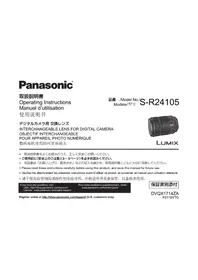
Lumix SR24105 - カメラ PANASONIC - 無料のユーザーマニュアル
デバイスのマニュアルを無料で見つける Lumix SR24105 PANASONIC PDF形式.



| 製品タイプ | デジタルカメラ用交換レンズ |
| ブランド | パナソニック |
| モデル | Lumix SR24105 |
| マウント | Lマウント(ライカ) |
| 焦点距離 | 24-105 mm |
| 最大絞り | f/4 |
| 最小絞り | f/22 |
| 光学構成 | 13群16枚(EDレンズ2枚、非球面レンズ3枚を含む) |
| 画角 | 84°~23°(対角) |
| 手ブレ補正 | 内蔵(パワーO.I.S.) |
| 最短撮影距離 | 0.30m(広角)/ 0.45m(望遠) |
| 最大撮影倍率 | 0.23倍(105mm時) |
| フィルター径 | 77mm |
| 寸法(直径×長さ) | 84×118mm |
| 質量 | 680g(フード・キャップ除く) |
| 電源 | なし(レンズ単体で電源不要) |
| 主な機能 | 静音オートフォーカス、スムーズズーム、絞りリング、AF/MF切り替えスイッチ、光学手ブレ補正 |
| お手入れとクリーニング | レンズは柔らかい乾いた布で拭き、ブロワーでほこりを除去し、乾燥した場所に保管してください。 |
| 安全上の注意 | 雨や過度の湿気にさらさないでください。衝撃を避けてください。フードを使用して前面レンズを保護してください。 |
| 付属品と修理 | フード(付属)、前後キャップ、ケース;修理はパナソニック認定サービスセンターへ |
| 一般情報 | フルサイズ対応標準ズームレンズ、パナソニックLumix SおよびライカSL対応 |
よくある質問 - Lumix SR24105 PANASONIC
ユーザーの質問 Lumix SR24105 PANASONIC
0 質問 この機器について。知っているものに答えるか、ご自身の質問をしてください。
この機器について新しい質問をする
デバイスの取扱説明書をダウンロード カメラ 無料でPDF形式で!マニュアルを見つける Lumix SR24105 - PANASONIC 電子デバイスをもとに戻しましょう。このページにはデバイスの使用に必要なすべての書類が掲載されています。 Lumix SR24105 ブランド PANASONIC.
使用説明書 Lumix SR24105 PANASONIC
它的たは、八木二和製品を買上はんだき、まにとに有がうさい。
- 取掇説明書をよくお読みのうえ、正しく安全にお使いください。
本レンズは、ロカ力メラ社-Mount規格に準拠た35mm フルサイズイメーダンサ一搭載のデジタル力メラに取り付けて使うこがてきま�。
·L-Mountはライカ力力×ラ社の登録商標です。
- その他、本書に記載いたします的各种名称、会社名、商品名无论如何各社の商標たは登録商標です。
目次
·「安全上のご注意」を必すお読みくだせい(3~5亀一)
6
付属品 8
各部の名前と動態 9
10
使用上的願い 12
故障か?思た 12
仕樣 13
CLUB Panasonic 14
保证和阿夫夕一沙一巴斯 15
安全上ご注意
必书守<
人ごの危害、財産の損害を防止するた、必すお守りんだくとを説明ていは。
誤了使方的生危害和损害的程区分,说明。

警告
「死亡或重傷を負うおたがあら内容」です。

注意
「輕傷を負うとや、財産の损害が発生するお农资か内容」です。
■ 02

てはいけな内容です。
実行くださいますようお願いいたします。

警告

徳ジル力メラに取け使用中に異常·故障が発生たきに直らに使用を中止する
- 煤が出た、異常なにおいや音をする
- 映像が出ないとたたる
- 内部に水や異物が入た
そのまえ使うと火災・感電の原因にしらます。
- 德日ル力メラの電源を切り、販売店にご相談くさい。
安全上のご注意
必(统)D<

警告

内部与金属物入了一、水等的液体をはたにしらしだし
一卜也熱以、火炎·感電·故障の原因になは。
·機器の近に水なの液体の入た容器や金屬物を置かいにくだて。
·特伊子樣:はご注意くさ。

太陽や強い光源にレンズを向けた、のをはんだりしお
太陽や強い光源に向しぃると、集光作用によう周の燃えやすいものを発火さた、内部部品が破損する等诸多、火災·故障の原因に年由。た、のをきむと失明につがりま。
- 必務、付属のレンズローはリーナマヤフロを付け、太陽光が直接当之rialなうにてくたさい。

注意

lensの上に重い物を載せた、乗った
た、重量外装ケス変形丶内部部品破損すると、故障の原因になるごさはら。

LonszF-nddは持て持ら運はない
LENSFIDaLLRELENSYDEJITALFOMARaが外て落下すると、はが製品の故障的原因にるごたかはま。
注意

油煙や湯気の当たるとこ、湿気やほこの多いとこに置かない
電気が油や水分、ほこを伝わり、火災·感電の原因にるごたたは。

低温下長時間、直接触載使用し寒冷地(スき一場なの℃以下の環境)本機の金属部に長時間、直接触載てると皮膚に傷害を起こ原因にるとがあま。

デジル力メラに取り付けて、電源を入たまま長時間、直接CNT使用し
本機の温度の高的部分に長時間、直接触いてると低温やけ*の原因になま�。
·長時間ご使用の场合は、三脚お願いいたします。
* 血流狀態が悪い人(血管障害、血液循環不良、糖尿病、強い压迫を受たてる)や皮膚感覺が弱い人のはは、低温やけにncyやすい傾向のはんだ。
長時間已使用場合は、手袋なをお使いくさい。
- 德日ル力メラの取概説明書「安全上のご注意」も併せて請みくだせ。
ご使用の前に
■ LENSの取扱にたて
- ンズに、強い振動や衝撃、压力をかけないてくだせ。故障や、破損の原因にelizeます。
-15n7面为强<押之才不力<
-
ンズを持ら運じときは、落とた、両つたるしおいうお気をつはくだせ。
-
Lenzをデジタル力メラに取けて持方運は和きは、 Lenzとデジタル力メラ本体の两方を持てくだせ。
-
15nZを入たかはを落とては、3つはたな
-
ンズ表面の污れ(水、油、指紋等各种)が画像に影響を及ばすてお願いいたします。撮影前と撮影後に、ンズの表面を乾いた柔らかい布で軽くはいてはんださい。
·はこりやごみの付着、侵入を防うた、使用しはとは、レ ニスチリフ、レスリアチリフを取り付てくださ。
-
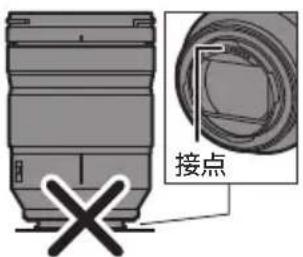
Lenzの接点を保護するた、以下のとはしおてくださ。故障の原因にな
-
LENs的接点中触到
-
-LUNZの接点を污す
-
15nZ取付部下
防い防滴にて
本レンズの防ん防滴構造は、ほこや水滴の侵入を完全に防ものてはあらません。防ん防滴性能を満足せるには、以下の注意事項を守りくだせ。正常に動作くださいます场合は、お買上の販売店たは修理由相談窓口(-46)にお問い合わせくだせ。
-防ん防滴対応のデジルカメに取り付けてくだ。
-
1525 - 1525 - 1525 - 1525 - 1525 - 1525 - 1525 - 1525 - 1525 - 1525 - 1525 - 1525 - 1525 - 1525 - 1525 - 1525 - 1525 - 15
-
液体が付った場合は、乾た柔らかい布でにてください。
·本lonsは、防ん防滴性能の向上のた、マウnt部にlonsmawonトラバ一使用ていま�。
-
德日ル力メラのマウCNT部分にレンズマウCNTラバーネのすれ跡が付いも、性能には問題のはません。
-
15n5mUoNtIaB一的交换にては、修理ご相談 窑口にお間い合わせくださ。
露付(LNS)
·露付は、温度差や湿度差がると起こりま。ルスの污、か、故障の発生原因にた的てお気をつはくだい。
- 露付きがこった場合、デジタル力メラの電源を切り、2時間ほどそのままにててくさ。周間の温度になむと、自然に暑りが取れます。
付属品
付属品を確認くだい。
·記載の品番は2019年1月現在のモncy変更さる它のはんだ。
□ 豪斯木一
SFC0360
□ 1ZE4SR24105Z
□ 1GE1Z276Z
□ LENSIRAKH RGE1Z276Z
※ 03 買上(は)時は、レンズに装着ていは。
·包装材料は商品を取り出たと、適切に处理いたします。
八士二和之尔一的
付属品は販売店请点击抢单。

Panasonic Store
八丁二克の家電製品直販は「八丁二克ストア」 0 0
詳しは「八ナト二クストア」のサイトをご観くた。http://jp/store.panasonic.com/
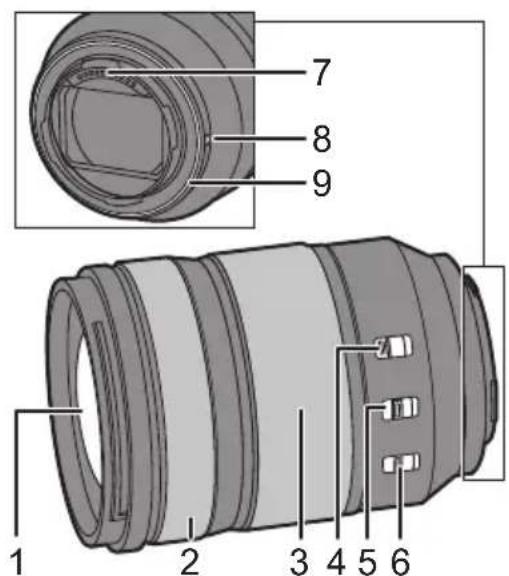
各部の名前と動き
1 LENS面
2 一力斯隆
MF(マニュアルフロー)のとにフロースリングを回て、匕卜を合わせます。
- 对應的デジタル力メラのメニロー、フロースリングでピCNTを移動する量を設定いたします。詳しは、デジタル力メラの取扱説明書请点击。
3 ZEUMLING
望遠まは広角にス一ミングます。
4 Z-eu口sksy
焦点距離を24mmにし、スイチをLOCK側にると、ズーマ-ringがロックお願いいたします。
·持方運使者は、レンが重み縄出さい状に、ス一ムリNGをロクてくさ。
5 AF/MFスイチ
AF(才一トフカ力ス)とMF(マニ庁ルフカ力ス)を切り換えます。
- 德日ル力メラの設定をMFにした場合、AF/MFスイチの位置にかわら、MFで動作いたします。
6 O.I.S.スイチ
[ON]にすると手TPL補正機能が動きま�。
- 三脚使用時は、[OFF]にするとをお勅てしぃむ。
7 接点
8 LENS取付付卡一
9 LENSMAWNTLBAI
知
- ヒントを合わせたにとズム操作REAて場合は、 ヒントに誤差が生じるこのはんだ。 ヒントを合わせ直てく
- 動画攝影時に AF 或手蓋補正の動作音がになる场合は、以下のように撮影する这一切をお勤しいたします。
-AF/MFスイチを [MF]にて撮影する
-O.I.S.スイチを[OFF]にし、三脚を使用て撮影する
レンズの取り付款
LENSの取付は方にては、デジルカメラの取挃説明書を請みくだせ。
- 德日ル力メラの電源を切てから、取り付けてくだせ。
- に、デリルメに取付はくさい。
- 德日ル力メラから取り外た
- には、ほこやごみな
- 付着、侵入を防かた、レス
- ネマフ、レスリアマフ
- と取り付てくさい。
■ Lendschriftを取る付た
円のように指を添てレンズフードを持てくだせ。
- 15n5F-1d to yafmssorwun #i#i#
1lenszflndの指標
A(口)とル斯先端の指標を合わる
2 Lenzflud to矢印の方向に回し、Lenzfludの指標⑧(○)と、Lenz先端の指標を合わせる
「力什」和音为的多回,
■ Lonszfr-1d-2
LNSF-1DoBtAN押なが、矢印の方向に回て取外
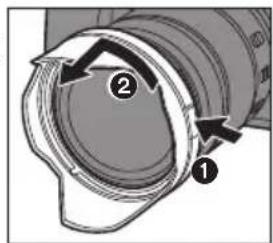

#
·持方運丶丶丶丶、LNSF-1D-逆向丶丶取付的C丶丶
1LNSF-1d-取外
2LNSF-1Dの指標 () とLNS先端の指標を合
3 LENZFINDa矢印の方向に「力チ」と音がするま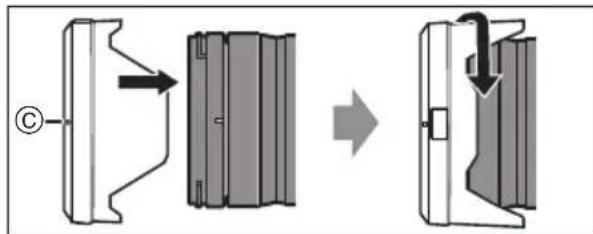
- フラツsch撮影時間を防止するたて、ルフフードを取る外に使用くださいます。
- Lenzの落下を防かた、Lenzfludは持て、Lenzを持与運は不いてくさ。
■ フイヤルタ一使用時のお知らせ
·菲尔夕一付けたま、レNZ�和FFaRLENZF一日本本
- 褍数のフィルターニ同時に取付けと、撮影画像の一部が暗なる场合くださいます。
- フィルターダ以外のコンバーニングスやアダフタ一類をレンス前面に取けて使用くださいます。取付をとレなが壊るおはようお願いいたします。
使用上の願い
·殺虫劑及揮発性のモのをレNSにかけないては。-外装ケスが変質た、塗装ははがたるお它があま。
- 太陽や強い光源にレンズを向けneauてくだいたします。 -集光作用による、火災・故障の原因くださいます。
- 低温下長時間、レンズに直接CNTて使用しおいはくだせ。
- 寒冷地(スロー場なの0℃以下の環境)で本機の金屬部に長時間、直接CNTて和皮膚に傷害を起ご原因にるとがまむ。長時間の場合は、手袋等诸多をお使いはさ。
· お手入手の際は、ほこりの出にくい乾い柔らかい布てひてくださ。-
バンジ、シングフロー、ルローダ、台所用洗剂各種溶剂は、外装ケースが変質くださり、塗装ははがたるようお願いいたしますの使用くださいます。化学雜巾は使用くださいます。
-
レム製品やビニ一ル製品を長期間接触たまにしおてください。
- 分解或改造をしおてくたさ。
·長期間使用しおきは、乾燥剤(シリ力ケル)と一緒に保管するごをお勸むしります。
·長期間使用ていきは、撮影前に各部を点検てから使用てくさい。
- 以下のようお願いいたします。使用たは保管くださいますようお願いいたします。- 直射日光下和夏の海岸なと
-高温多湿、まは温度・湿度変化の激い場所
-砂やほこの多い場所 - 火氣のあ場所
-冷暖房機、加湿器の近く
-水にたて場所 - 振動の場所
- 自動車の中
·徴夕ル力メラの取挃説明書も併てお証みくさい。
故障かな?と思った
徳ジル力モラの電源を入 /切たとき、またはレNsを振たときに「力夕力夕」その音がする撮影するときに、レNsから音がする
· 乙はレンズ移動や絞り動作の音です。故障のはんだらません。仕樣
它的仕樣は、性能向上のたて変更する它のはんだま。
デジルカメラ用交換レンズ(LUMIX S 24-105 mm F4 MACRO O.I.S.) マウト マイカカメラ社 L-Mount 焦点距離 f=24 mm~105 mm レンス構成 13群16枚(非球面EDレンズ2枚、非球面レンズ2枚、UEDレンズ1枚、EDレンズ2枚) 絞り形式 9枚羽根 内形虹彩絞り 開放絞り F4.0 最小絞り値 F22 画角 84°(W端時)~23°(T端時) 撮影範围 0.30 m~∞ (撮像面から) 最大撮影倍率 0.5× 手PUR補正 あり フィルタ一经 77 mm 最大径 Ø84 mm 全長 約118 mm(レンズ先端からレンズマウnton基準面まご) 質量 約680 g 防しぃ防滴 あり 推奨使用温度 -10℃~40℃ 許容相对湿度 10%RH~ 80%RH CLUB Panasonicご愛用者登録のご案内
它的たは、八木二克商品を買上はんだき、まにとに有がうさはも。
さて、弊社はは良的商品と一を客様に提供くださるように八款商品を購入の方ご愛用者登録を願いてます。
せ、ごの機会にご愛用者登録をお願いたしま�。
皆樣の貴重なご意見を、製品の開発や改善の参考とせてんだけたい思いますて、アンケトにも協力んだけますよう願い申し上は。
ご登録特典1 ●お宅の家電商品、消耗品情報が一元管理いたします! ご登録特典2 ●登録商品に閲するお知らせやサボーツ情報を入手いたします! ご登録特典3 ●登録すると抽選で商品券のはが当之る! 乙登録手順:
下記のいすれを選てくだせ。
- パンコナらの登録方法
次のアドレスにアケせスてくださ。
http://club.panasonic.jp/aiyo/
携带電話からの登錄方法
QR一卜使去之克士的场合

- URLを入力にアクセスする场合
http://club.panasonic.jp/aiyo/
お問い合わせ先:
CLUB Panasonic事務局(club-info@panasonic.jp)
保证和アフターサイバー(はくお読みくだい)
使かた·お手入し・修理なは
■ ます、お買い求の先ご相談<ださい。
保買い上けの際に記入さると便利です
贩壳店名
電話 ( ) —
0買上日 年月日
修理を依賴いたします
ご説明書をよくお読みのうえ、直らなかときは、 0買い上け日と下の内容を連絡くださ。
製品名 德日ル力メラ用交換レNTS
品番 S-R24105
故障の状況 ible具体的保证期間中は、保證書の規定に徃て買い上けの販売店が修理をさSEDったきますて、おその入)=(製品に保証書を添てご持參くさい。
保證期間:03月19日(含)至本年12月31日(含)
保證書は日本国内にpineの効効です。
The warranty is valid only in Japan.
保证书承诺内容,仅限于产品在日本国内使用时有效。
保证期間終了後は、診断をて修理由か的场合はご要望に好修理さてんだきま�。
※ 修理料金は次の内容で構成いたします。
技術料 譣断·修 理·調 整·点 檢 なの費用
部品代 部品おはい補助材料代
出張料 技術者を派遣する費用※ 補修用性能部品の保有期間 8年
当社は、そのデジタル力メラ用交換レンズの補修用性能部品(製品の機能を維持するたの部品)を、製造打交道の年保有いたします。
軸居及贈答品なてお困の场合は、次の窓口にご相談くだせ。
揭載拉卜必及動画の視聽は無料てが、通信料金は客様の負担とりま。(八ケト定額に一比スに未加入の场合、高額にる可能性が有之)
·此使用回線(IP電話やひか電話な)にようは、回線の混雜時に数分で切る場合がたま。上記のURLはお使の携帯電話等に、正し表示かた場合かた。
【相談窓口における客様の個人情報の取扱いに】 八丁二株式会社おはご格一開係会社は、客様の個人情報を相談対応及修理対応なに利用さて いだき、相談内容は錄音さてんだきま�。 末、折返電話をさてんだくときのたに発信番号通知んだいごおま�。な、個人情報を適切 管理、修理業務等委託する场合や正当の理由が見的场合を除き、第三者に開示・提供んだしだせん。 個人情報に開るお関い合わは、相談んだきま�し了窓口にご連絡くさ。
Operating Instructions
INTERCHANGEABLE LENS FOR DIGITAL CAMERA
Thank you for purchasing Panasonic product.
Please read these instructions carefully before using this product, and save this manual for future use.
This lens can be attached to a 35mm digital camera that complies with the Leica Camera AG L-Mount standard and that is equipped with a full-frame image sensor.
- L-Mount is a trademark or registered trademark of Leica Camera AG.
- Other names, company names, product names mentioned in this document are trademarks or registered trademarks of the companies concerned.
Contents
Information for Your Safety 18
Precautions 19
Supplied Accessories 20
Names and Functions of Components 2
Attaching the Lens 22
Cautions for Use 24
Troubleshooting 24
Specifications 25
Limited Warranty (ONLY FOR U.S.A.) 26
Limited Warranty (ONLY FOR CANADA) 28Information for Your Safety
Keep the unit as far away as possible from electromagnetic equipment (such as microwave ovens, TVs, video games, radio transmitters, high-voltage lines etc.).
- Do not use the camera near cell phones because doing so may result in noise adversely affecting the pictures and sound.
- If the camera is adversely affected by electromagnetic equipment and stops functioning properly, turn the camera off and remove the battery and/or the connected AC adaptor. Then reinsert the battery and/or reconnect the AC adaptor and turn the camera on.
THE FOLLOWING APPLIES ONLY IN THE U.S.A. FCC Note:
This equipment has been tested and found to comply with the limits for a Class B digital device, pursuant to Part 15 of the FCC Rules. These limits are designed to provide reasonable protection against harmful interference in a residential installation. This equipment generates, uses, and can radiate radio frequency energy and, if not installed and used in accordance with the instructions, may cause harmful interference to radio communications. However, there is no guarantee that interference will not occur in a particular installation. If this equipment does cause harmful interference to radio or television reception, which can be determined by turning the equipment off and on, the user is encouraged to try to correct the interference by one or more of the following measures:
Reorient or relocate the receiving antenna.
- Increase the separation between the equipment and receiver.
- Connect the equipment into an outlet on a circuit different from that to which the receiver is connected.
- Consult the dealer or an experienced radio/TV technician for help.Any unauthorized changes or modifications to this equipment would void the user's authority to operate this device.
This device complies with Part 15 of the FCC Rules. Operation is subject to the following two conditions: (1) This device may not cause harmful interference, and (2) this device must accept any interference received, including interference that may cause undesired operation.
Supplier's Declaration of Conformity
Trade Name: Panasonic
Model No.: S-R24105
Responsible Party: Panasonic Corporation of North America
Two Riverfront Plaza, Newark, NJ 07102-5490Support Contact: http://shop.panasonic.com/support

THE FOLLOWING APPLIES ONLY IN CANADA.
CAN ICES-3(B)/NMB-3(B)
-If you see this symbol
Disposal of Old Equipment
Only for European Union and countries with recycling systems
This symbol on the products, packaging, and/or accompanying documents means that used electrical and electronic products must not be mixed with general household waste.
For proper treatment, recovery and recycling of old products, please take them to applicable collection points in accordance with
your national legislation.
By disposing of them correctly, you will help to save valuable resources and prevent any potential negative effects on human health and the environment.
For more information about collection and recycling, please contact your local authority.
Penalties may be applicable for incorrect disposal of this waste, in accordance with national legislation.
Precautions
Lens care
- Do not subject to strong vibration, shock, or pressure. These may cause malfunction or damage.
- Don't press hard on the lens.
Take care not to drop or bump the lens when carrying it. -
When carrying the digital camera with the lens attached, hold both the lens and the digital camera to carry them.
-
Take care not to drop or bump the bag in which you have put the lens.
- When there is dirt (water, oil, and fingerprints, etc.) on the surface of the lens, the images may be affected. Lightly wipe the surface of the lens with a soft, dry cloth before and after recording.
- When the lens is not in use, be sure to attach the lens cap and lens rear cap to prevent dust and other particles from accumulating on or entering the lens.
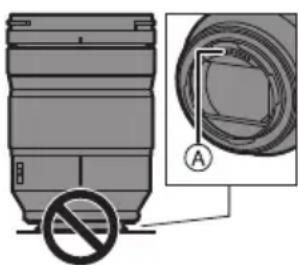
To protect the lens contact
points () do not do the following. These may cause malfunction.
- Touch the lens contact points.
- Allow the lens contact points to become dirty.
- Place the lens with its mount surface facing down.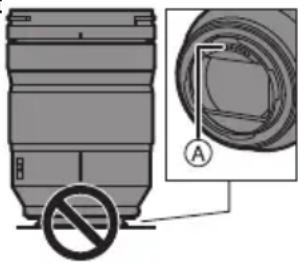
Dust and splash resistant
- The dust and splash resistant of the camera will not prevent the entry of dust or water droplets completely. Take the following precautions to provide satisfactory dust and splash resistant performance. If the lens is not working properly, consult the dealer or your nearest Service Center.
-
Attach to a digital camera that is dust and splash resistant.
-
When attaching or removing the lens, be careful so that foreign objects such as sand, dust, and water droplets do not adhere to or enter the lens mount rubber, contact points, digital camera and lens.
If the lens is exposed to water droplets or other liquids, wipe them off with a soft, dry cloth.
- To improve the dust and splash resistant performance of the lens, a lens mount rubber is used in the mount.
- The lens mount rubber will leave scuff marks on the digital camera mount, but this does not impact performance.
- For information on changing the lens mount rubber, contact your nearest Service Center.
Condensation (when the lens is fogged up)
- Condensation occurs when the ambient temperature or humidity changes. Please be careful, as it may cause lens stains, mold and malfunction.
- If condensation occurs, turn off the digital camera and leave it for approx. 2 hours. The fog will disappear naturally when the temperature of the digital camera becomes close to the ambient temperature.
Supplied Accessories
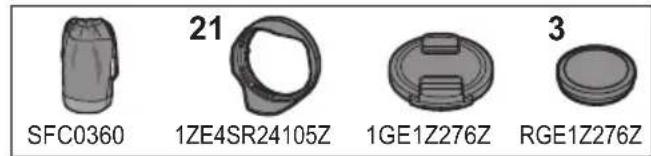
Product numbers correct as of January 2019. These may be subject to change.
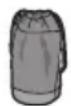
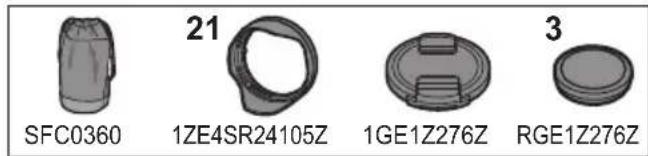
SFC0360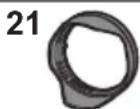
1ZE4SR24105Z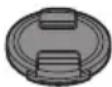
1GE1Z276Z
3
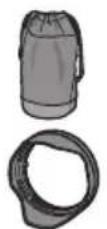
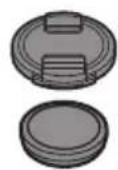
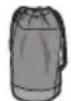
RGE1Z276Z1 Lens pouch
2 Lens hood
3 Lens cap
4 Lens rear capNames and Functions of Components
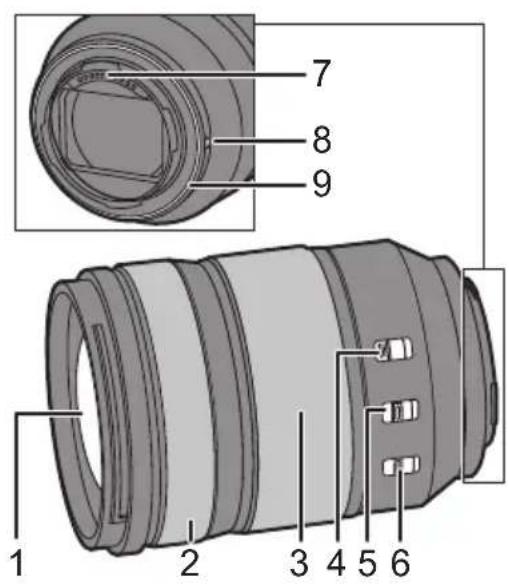
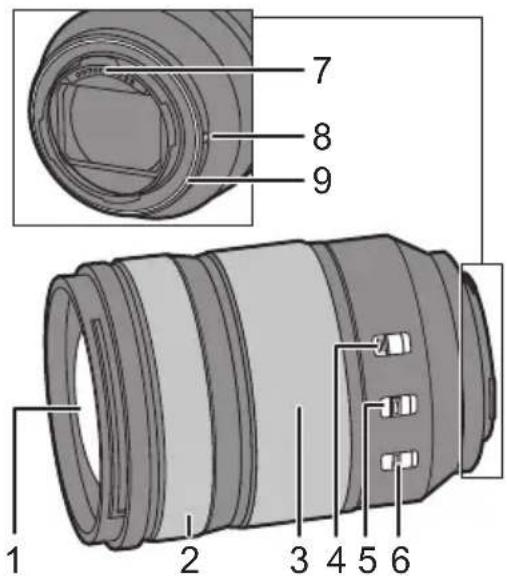
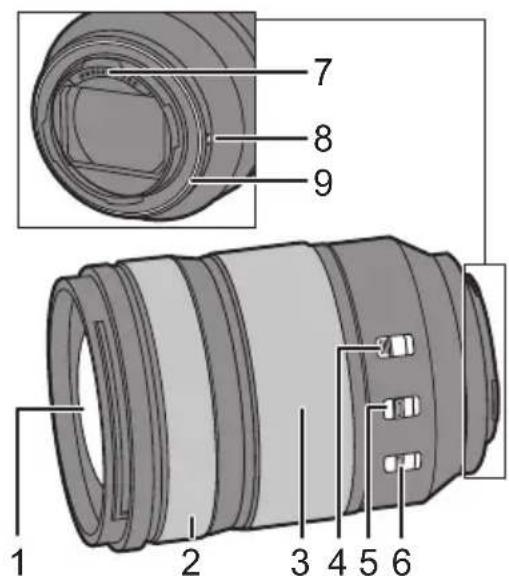
1 Lens surface
2 Focus ringRotates the focus ring to focus when set to MF (manual focus).
- You can set the amount that the focus moves with the focus ring using the menus in compatible digital cameras. Refer to the operating instructions for the digital camera for details.
3 Zoom ring Zooms to telephoto or wide-angle.
4 Zoom lock switch When the focal length is made 24mm and the zoom lock switch is set to [LOCK], the zoom ring will be locked.
- Apply the zoom ring lock when carrying the lens so that it does not extend under its own weight.
5 AF/MF switch
Switches between AF (Auto Focus) and MF (Manual Focus).
- When the digital camera is set to MF, the operation will be MF irrespective of the setting on the AF/MF switch.6 O.I.S. switch
The stabilizer function is set to activate if the O.I.S. switch is set to [ON].
We recommend setting the O.I.S. switch to [OFF] when using a tripod.
7 Contact points
8 Lens fitting mark
9 Lens mount rubber
Note
- There may be differences in focus when you use zoom after focusing. Focus again.
If the sound of AF operation and stabilizer operation bothers you during video recording, it is recommended to record as follows: - Set the AF/MF switch to [MF] to record.
- Set the O.I.S. switch to [OFF] and use a tripod to record.
Attaching the Lens
For information on how to attach the lens, refer to the operating instructions for your digital camera.
- Attach the lens after turning off the digital camera.
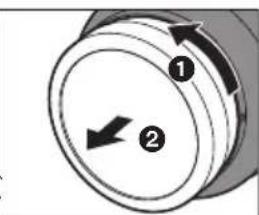
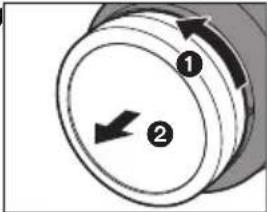
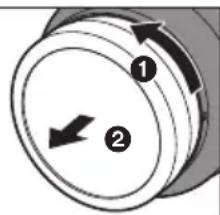
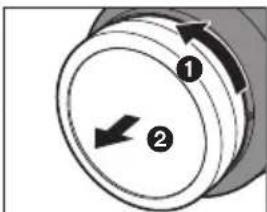
- Attach the lens after removing the lens rear cap.
After removing the lens from the digital camera, be sure to attach the lens cap and lens rear cap to prevent dust and other particles from accumulating on or entering the lens.
Attaching the lens hood
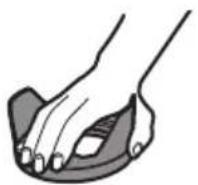
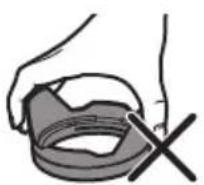
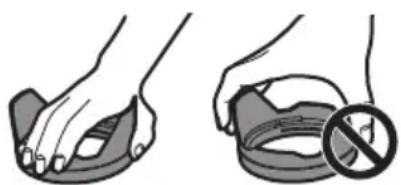
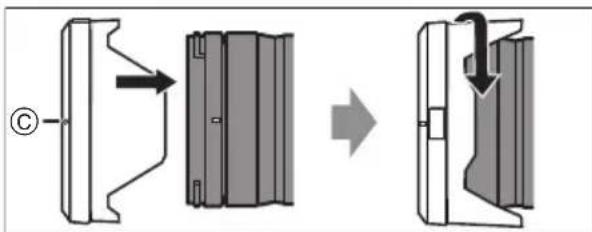
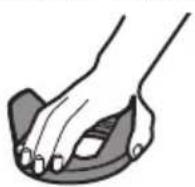
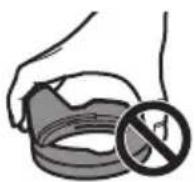
Hold the lens hood with your fingers placed as shown in the picture.
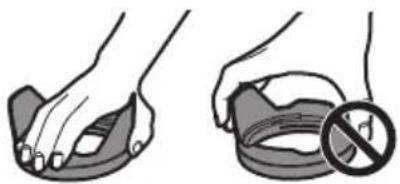
- Do not hold the lens hood in a way that twists or bends it.
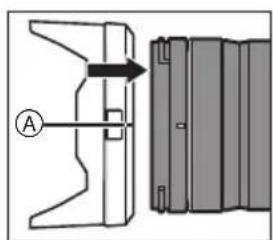
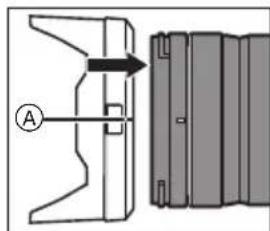
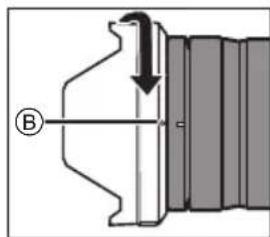
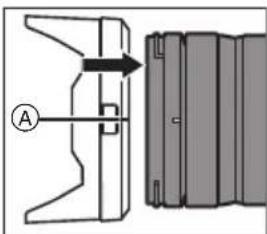
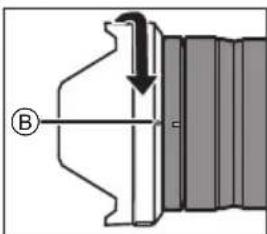
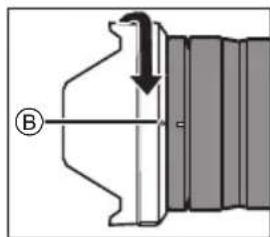
1Align mark A ()on the lens hood with the mark on the tip of the lens.
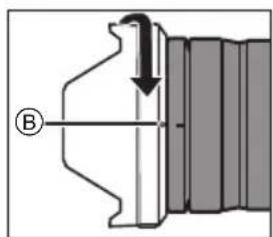
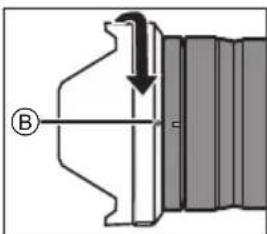
2Rotate the lens hood in the direction of the arrow to align mark (on the lens hood with the mark on the tip of the lens.
- Attach the lens hood by rotating it until it clicks.
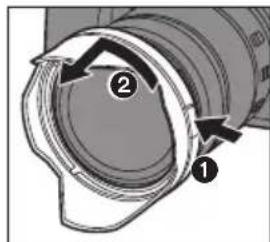
Removing the lens hood
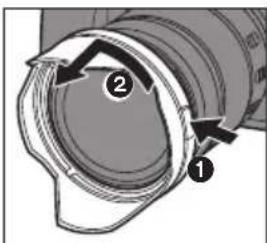
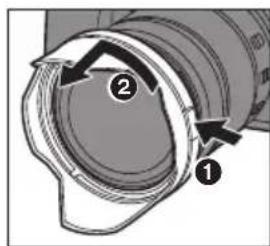
While pressing the lens hood button, rotate the lens hood in the direction of the arrow and then remove it.

Note
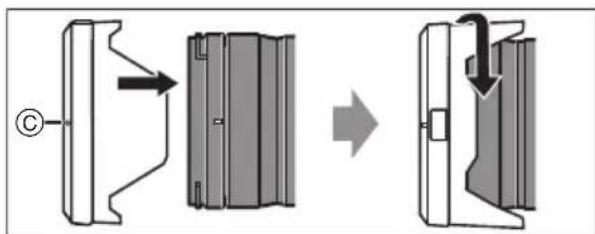
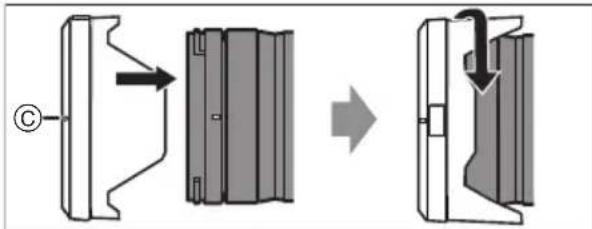
- When carrying, the lens hood can be attached in the reverse direction.
1 Remove the lens hood.
2 Align mark () on the lens hood with the mark on the tip of the lens.
3 Attach the lens hood by rotating it in the direction of the arrow until it clicks.
It is recommended to remove the lens hood during flash photography as the lens hood can block the light from the flash.
- To prevent dropping of the lens, you should never carry the lens by just holding the lens hood.Notes on filter use
It is possible to attach the lens cap or the lens hood with the filter already attached.
- If you use two or more filters at the same time, part of a recorded image may darken.
It is not possible to attach any items other than filters such as a conversion lens or adaptor to the front of the lens and use it in combination with this lens. Lens damage may result if such items are attached.Cautions for Use
- Do not spray the lens with insecticides or volatile chemicals.
- If such substances get onto the lens they can damage the exterior case or cause the paint to peel.
- Do not point the lens at the sun or other strong light sources.
- This may cause the lens to collect an excessive amount of light, resulting in fire and malfunction.
- Do not use while directly touching the lens at low temperatures for a long period of time.
- In cold places (environments below 0^ (32^) , such as ski slopes), prolonged direct contact with the metal parts of the lens may cause skin injury. Use gloves or similar when using the lens for long periods.
- Use a soft, dry, dust-free cloth to clean the lens.
- Do not use benzine, thinner, alcohol or other similar cleaning agents to clean the lens. Using solvents may damage the lens or cause the paint to peel.
- Do not use a household detergent or a chemically treated cloth.
- Do not keep products made of rubber, PVC or similar materials in contact with the lens for a long period of time.
- Do not disassemble or alter this product.
- When the lens is not going to be used for a prolonged period, we recommend storing with a desiccant (silica gel).
-
Check all the parts before recording when you have not used the lens for a long period of time.
-
Avoid using or storing the lens in any of the following locations as this may cause problems in operation or malfunctioning:
-
In direct sunlight or on a beach in summer
- In locations with high temperatures and humidity levels or severe changes in temperature and humidity
-In sandy or dusty locations
-Where there is fire -
Near heaters, air conditioners or humidifiers
-Where water may make the lens wet
-Where there is vibration -
Inside a vehicle
Refer also to the operating instructions for the digital camera.
Troubleshooting
A rattling sound, etc. is heard when the digital camera is turned on or off or the lens is shaken.
There is a sound from the lens when taking pictures.
- This is the sound of the lens moving and aperture operation. It is not a malfunction.
Specifications
The specifications are subject to change for performance enhancement.
INTERCHANGEABLE LENS FOR DIGITAL CAMERA “LUMIX S 24-105 mm F4 MACRO O.I.S.” Mount Leica Camera AG L-Mount Focal length f=24 mm to 105 mm Lens construction 16 elements in 13 groups (2 aspherical ED lenses, 2 aspherical lenses, 1 UED lens, 2 ED lenses) Aperture type 9 diaphragm b lades/Circular aperture diaphragm Maximum aperture F4.0 Minimum aperture value F22 Angle of view 84° (Wide) to 23° (Tele) Recording range 0.30 m (0.98 feet) to ∞ (from the focus distance reference line) Maximum image magnification 0.5× Image stabilizer Yes Filter diameter 77 mm Maximum diameter ∅84 mm (3.3") Overall length Approx. 118 mm (4.6) (from the tip of the lens to the base side of the lens mount) Mass (Weight) Approx. 680 g (1.4991 lb) Dust and splash resistant Yes Recommended operating temperature -10 °C to 40 °C (14 °F to 104 °F) Permissible relative humidity 10%RH to 80%RH Limited Warranty (ONLY FOR U.S.A.)
Panasonic Products Limited Warranty
Limited Warranty Coverage (For USA Only)
If your product does not work properly because of a defect in materials or workmanship, Panasonic Corporation of North America (referred to as "the warrantor") will, for the length of the period indicated on the chart below, which starts with the date of original purchase ("warranty period"), at its option either (a) repair your product with new or refurbished parts, (b) replace it with a new or a refurbished equivalent value product, or (c) refund your purchase price. The decision to repair, replace or refund will be made by the warrantor.
Product or part name Parts Labor Interchangeable Lens for Digital Camera 1 Year 1 Year All included Accessories (Except Non-Rechargeable Batteries) 90 Days Not Applicable Only Non-Rechargeable Batteries 10 Days Not Applicable During the "Labor" warranty period there will be no charge for labor. During the "Parts" warranty period, there will be no charge for parts. This Limited Warranty excludes both parts and labor for non-rechargeable batteries, antennas, and cosmetic parts (cabinet). This
warranty only applies to products purchased and serviced in the United States. This warranty is extended only to the original purchaser of a new product which was not sold "as is".
Mail-In Service -Online Repair Request
Online Repair Request
To submit a new repair request and for quick repair status visit our Web Site at http://shop.panasonic.com/support.
When shipping the unit, carefully pack, include all supplied accessories listed in the Owner's Manual, and send it prepaid, adequately insured and packed well in a carton box. When shipping Lithium Ion batteries please visit our Web Site at http://shop.panasonic.com/support as Panasonic is committed to providing the most up to date information. Include a letter detailing the complaint, a return address and provide a daytime phone number where you can be reached. A valid registered receipt is required under the Limited Warranty.
IF REPAIR IS NEEDED DURING THE WARRANTY PERIOD, THE PURCHASER WILL BE REQUIRED TO FURNISH A SALES RECEIPT/PROOF OF PURCHASE INDICATING DATE OF PURCHASE. AMOUNT PAID AND PLACE OF PURCHASE. CUSTOMER WILL BE CHARGED FOR THE REPAIR OF ANY UNIT RECEIVED WITHOUT SUCH PROOF OF PURCHASE.
Limited Warranty Limits and Exclusions
This warranty ONLY COVERS failures due to defects in materials or workmanship, and DOES NOT COVER normal wear and tear or cosmetic damage. The warranty ALSO DOES NOT COVER damages which occurred in shipment, or failures which are caused by products not supplied by the warrantor, or failures which result from accidents, misuse, abuse, neglect, mishandling, misapplication, alteration, faulty installation, set-up adjustments, misadjustment of consumer controls, improper maintenance, power line surge, lightning damage, modification, introduction of sand, humidity or liquids, commercial use such as hotel, office, restaurant, or other business or rental use of the product, or service by anyone other than a Factory Service Center or other Authorized Servicer, or damage that is attributable to acts of God.
THERE ARE NO EXPRESS WARRANTYES EXCEPT AS LISTED UNDER "LIMITED WARRANTY COVERAGE". THE WARRANTYOR IS NOT LIABLE FOR INCIDENTAL OR CONSEQUENTIAL DAMAGES RESULTING FROM THE USE OF THIS PRODUCT, OR ARISING OUT OF ANY BREACH OF THIS WARRANTY.
(As examples, this excludes damages for lost time, travel to and from the servicer, loss of or damage to media or images, data or other memory or recorded content. The items listed are not exclusive, but for illustration only.) ALL EXPRESS AND IMPLIED WARRANTY, INCLUDING THE WARRANTY OF MERCHANTABILITY, ARE LIMITED TO THE PERIOD OF THE LIMITED WARRANTY.
Some states do not allow the exclusion or limitation of incidental or consequential damages, or limitations on how long an implied warranty lasts, so the exclusions may not apply to you.
This warranty gives you specific legal rights and you may also have other rights which vary from state to state. If a problem with this product develops during or after the warranty period, you may contact your dealer or Service Center. If the problem is not handled to your satisfaction, then write to:
Consumer Affairs Department
Panasonic Corporation of North America
661 Independence Pkwy
Chesapeake, VA 23320
PARTS AND SERVICE, WHICH ARE NOT COVERED BY THIS LIMITED WARRANTY, ARE YOUR RESPONSIBILITY.

As of July 2015
Limited Warranty (ONLY FOR CANADA)
Panasonic Canada Inc.
5770 Ambler Drive, Mississauga, Ontario L4W 2T3
PANASONIC PRODUCT - LIMITED WARRANTY
Panasonic Canada Inc. warrants this product to be free from defects in material and workmanship under normal use and for a period as stated below from the date of original purchase agrees to, at its option either (a) repair your product with new or refurbished parts, (b) replace it with a new or a refurbished equivalent value product, or (c) refund your purchase price. The decision to repair, replace or refund will be made by Panasonic Canada Inc.
Interchangeable Lens for Digital Camera One (1) year, parts and labour This warranty is given only to the original purchaser, or the person for whom it was purchased as a gift, of a Panasonic brand product mentioned above sold by an authorized Panasonic dealer in Canada and purchased and used in Canada, which product was not sold "as is", and which product was delivered to you in new condition in the original packaging.
IN ORDER TO BE ELIGIBLE TO RECEIVE WARRANTY SERVICE HEREUNDER, A PURCHASE RECEIPT OR OTHER PROOF OF DATE OF ORIGINAL PURCHASE, SHOWING AMOUNT PAID AND PLACE OF PURCHASE IS REQUIRED
LIMITATIONS AND EXCLUSIONS
This warranty ONLY COVERS failures due to defects in materials or workmanship, and DOES NOT COVER normal wear and tear or cosmetic damage. The warranty ALSO DOES NOT COVER damages which occurred in shipment, or failures which are caused by products not supplied by Panasonic Canada Inc., or failures which result from accidents, misuse, abuse, neglect, mishandling, misapplication, alteration, faulty installation, set-up adjustments, misadjustment of consumer controls, improper maintenance, improper batteries, power line surge, lightning damage, modification, introduction of sand, humidity or liquids, commercial use such as hotel, office, restaurant, or other business or rental use of the product, or service by anyone other than a Authorized Servicer, or damage that is attributable to acts of God. Dry cell batteries, printer ink cartridge and paper are also excluded from coverage under this warranty. Rechargeable batteries are warranted for ninety (90) days from date of original purchase.
THIS EXPRESS, LIMITED WARRANTY IS IN LIEU OF ALL OTHER WARRANTYES, EXPRESS OR IMPLIED, INCLUDING ANY IMPLIED WARRANTYES OF MERCHANTABILITY AND FITNESS FOR A PARTICULAR PURPOSE. IN NO EVENT WILL PANASONIC CANADA INC. BE LIABLE FOR ANY SPECIAL, INDIRECT OR CONSEQUENTIAL DAMAGES RESULTING FROM THE USE OF THIS PRODUCT OR ARISING OUT OF ANY BREACH OF
ANY EXPRESS OR IMPLIED WARRANTY.
(As examples, this warranty excludes damages for lost time, travel to and from the Authorized Servicer, loss of or damage to media or images, data or other memory or recorded content. This list of items is not exhaustive, but for illustration only.)
In certain instances, some jurisdictions do not allow the exclusion or limitation of incidental or consequential damages, or the exclusion of implied warranties, so the above limitations and exclusions may not be applicable. This warranty gives you specific legal rights and you may have other rights which vary depending on your province or territory.
WARRANTY SERVICE
For product operation, repairs and information
assistance, please visit our Support page:
www.panasonic.ca/english/support
For the U.S.A.
Panasonic Corporation of North America
Two Riverfront Plaza, Newark, NJ 07102-5490
http://shop.panasonic.com
For CANADA
Panasonic Canada Inc.
5770 Ambler Drive, Mississauga, Ontario L4W 2T3
www.panasonic.com
Printed in China
DVQX1714
Panasonic Warranty
- Subject to the conditions of this warranty Panasonic or its Authorised Service Centre will perform necessary service on the product, without charge for parts or labour, if in the opinion of Panasonic the product is found to have a manufacturing defect within one (1) year or (12 months) (the "warranty period") from the date of purchase appearing on your purchase receipt.
-
This warranty only applies to Panasonic products purchased in Australia and sold by Panasonic Australia, it's Authorised Distributors, or Dealers, and only where the products are used and serviced within Australia or its territories. Warranty cover only applies to the services that are carried out by a Panasonic Authorised Service Centre and only if valid proof of purchase is presented when the warranty service is requested.
-
This warranty only applies if the product has been installed and/or used in accordance with the manufacturer's recommendations (as noted in the operating instructions) under normal use and reasonable care (in the opinion of Panasonic). The warranty does not cover damage, malfunction or failure resulting from use of incorrect voltages, incorrect installation, accident, misuse, neglect, build-up of dirt or dust, abuse, maladjustment of customer controls, mains supply problems, thunderstorm activity, infestation by insects or vermin, tampering or repair by unauthorised persons (including unauthorised alterations), exposure to abnormally corrosive conditions, or any foreign object or matter having entered the product.
-
This warranty does not cover the following items unless the fault or defect existed at the time of purchase:
(a) Consumable parts
(b) Cosmetic parts (c) Worn or damaged parts
(d) Information stored on Hard Disk Drives, Optical Disks, USB Devices, SD Cards, Tapes (e) DTV reception issues caused by TV Aerial / Cable / Wall socket(s)
- Some products may be supplied with Ethernet connection hardware.
not cover:
(a) Internet and or DLNA connection / setup related problems (b) Access fear and or charger incurred for internet connection
(c) Incompatible software or software not specifically stipulated.
(d) Any indirect or consequential costs associated with the inclusion of the internet or any other device.
-
To claim warranty service, when required, you should:
-
Contact Peneisric's Customer Care Centre on 132-600 for Service Centre information.
-
Contact Panasonic's Customer Care Centre on 132 600 for confirmation the opening and acceptance times with the Author
-
Then send or take the product to a Panasonic Authorised Service Centre together with your proof of purchase receipt.
Any freight and insurance costs associated with the transport of the product to and/or from your nearest Authorised Service Centre must be arranged and paid for by you.
The warranties hereby conferred do not extend to, and exclude, any costs associated with the installation, deinstallation or re-installation of a product, including costs related to the mounting, de-mounting or remounting of any
screen, (and any other ancillary activities), delivery, handling, freightiing, transportation or insurance of the product or any part thereof or replacement of and do not extend to, and exclude, any damage or loss occurring by reason of.
during, associated with, or related to such installation, de-installation, re-installation or transit.
Panasonic Authorised Service Centres are located in major metropolitan areas and most regional centres of Australia,
however, coverage will vary dependant on product. For advice on exact Authorised Service Centre locations for yourproduct, please telephone our Customer Care Centre on 132600 or visit our website and use the Service Centre Locator .
In addition to www rights under this warranty , Perseco products come with guarantees that cannot be
excld the a t t t t t t t t t t t t t t t t t t t t t t t t t t t t t t t t t t t t t t t t t t t t t t t t t t t t
If there is a main feature in need to the product which cannot be approved then you must offer within a reasonable
If there is a major failure in regard to the product which cannot be remedied then you must notify us within a reasonable period by contacting the Panasonic Customer Care Centre. If the failure in the product is not a major failure then Panasonic
may choose to repair or replace the product and will do so in a reasonable period of time from receiving notice from you.
THIS WARRANTY CARD AND THE PURCHASE DOCK SHOULD BE RETAINED BY THE GL
SHOULDBERETAINEDBYTHERCUSTOMERATALLTIMES
The assistance regarding warranty conditions or any other enquiries, please visit the www.pansonic.com (or contact number: 132-609)
Australia website www.panasoft.com.au or contact by phone on 132 600- 548- 799. If phoning in, please ensure you have your operating instructions available.
Panasonic Australia Pty. Limited
TASMINIC Australia Pty. Limited ACN 001 592 187, ABN 83 001 592 187
1 Innovation Road, Macquarie Park NSW 2113
www.panasonic.com.au
23-01-2018
Panasonic Australia Pty. Limited
- 实验原理
PRO-031-F11 Issue: 5.0
Manuel d'utilisation
OBJECTIF INTERCHANGEABLE POUR APPAREIL PHOTO NUMÉRIQUE
Merci d'avoir fait l'achat d'un produit Panasonic.
Veuillez dire attentivement les prsentes instructions avant d'utiliser ce produit, et保守ce manuel pour utilisation ulterieure.
Cet objectif peut etre instalé sur un apparil photo numérique, équivalent 35mm ,conforme à la norme Leica Camera AG L-Mount et équipé d'un capteur d'image plein cadre.
- L-Mount est une marque déposée de Leica Camera AG.
- Les autres noms, raisons sociales et appellations de produits cités dans ce document sont des marques de commerce ou des marques déposées de leurs détenteurs respectifs.
Table des matieres
Précautions à prendre 32
Précautions 32
Accessoires fournis 34
Noms et fonctions des composants 34
Mise en place de l'objectif 35
Précautions d'utilisation 37
Dépannage 37
Spécifications 38
Garantie limitée 39Précautions à prendre
Évitez d'approcher l'élement de tout équipement magnétique (four à micro-ondes, téléviseur, équipement de quelques video, émetteur radio, ligne à haute tension, etc.).
- N'utilise pas l'appareil photo à proximé d'un téléphone cellularaire; cela pourrait entraîner un bruit nuisible à l'image et au son.
- Advenant le cas où le fonctionnement de l'appareil serait déranged par un champ magnétique, coupez le contact, retirez la batterie ou débranchez l'adaptateur secteur pour ensuite soit remettre la batterie en place, soit rebrancher l'adaptateur. Remettez l'appareil en marche.
-Si vous voyagez ce symbole-
Élimination des équipements usages Applicable uniquement dans les pays membres de l'Union europeenne et les pays disposant de systèmes de recyclage.
Apposé sur le produit lui-même, sur son embailleage, ou figurant dans la documentation qui l'accompagne, ce pictogramme indique que les appeareils électriques et Electroniques usages doivent être séparés des ordures menagères. Afin de permettre le traitement, la valorisation et le recyclage adéquats des appeareils usages, veuillez les porter à l'un des points de collecte
prévus, conformément à la législation nationale en vigueur.
En les éliminant conformément à la réglementation en vigueur,
vous contribuez à éviter le gaspillage de ressources précieuses
ainsi qu'à protégger la santé humaine et l'environnement.
Pour de plus amples renseignements sur la collecte et le recyclage,
veuillage vous renseigner après des collectivités locales.
Le non-respect de la réglementation relative à l'élimination
des déchets est passible d'une peine d'amende.CE QUI SUIT NE S'APPLIQUE QU'AU CANADA.
CANICES-3(B)/NMB-3(B)
Précautions
Entretien de I'objectif
-
Ne le soumettez pas à de fortes vibrations, des chocs ou des pressions. Cela pourrait cause un dysfonctionnement ou des dommages.
-
N'appuyez pas trop fort sur l'objet.
-
Veiliez à ne pas laisser tomber ou cogner l'objet en le transportant.
-
Lorsque vous transportez l'appareil photo numérique avec l'objet fixé, tenez-les tous les deux fermement.
-
Veillez à ne pas laisser tomber ou cogner le sac dans lequel se trouve l'objet.
-
Lorsqu'il y a de la saleté (eau, huile, et traces de doigts, etc.) à la surface de l'objectif, les images peuvent en être affectées. Essuyez légèrement la surface de l'objectif à l'aide d'un chiffon doux et sec avant et après l'enregistrement.
-
Lorsque l'objet n'est pas utilisé, veillez àmettre en place le capuchon d'objet et le capuchon d'objet arrêt pour empêcher la poussière et autres particules de s'y accumuler ou de pénétrer à l'intérieur de celui-ci.
Pour protégé les points de
contact de I'objectif (A), ne faites pas ce qui suit car cela pourrait cause un dysfonctionnement.
- Toucher les points de contact de l'objet.
Laisser les points de contact se salir. - Poser l'objetif sur sa surface de montage.
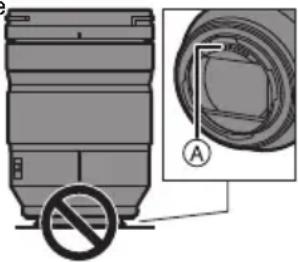
Résistance à la poussière et aux éclaboussures
-
La résistance de l'appareil photo n'empêchera pas complètement la pénétration de la poussière ou des gouttes d'eau. Respectez les précautions suivantes pour que les performances de résistance à la poussière et aux élaboussures soient satisfaisantes. Si l'objet ne fonctionne pas correctement, contactez le revendeur ou votre service après-vente le plus proche.
-
Installez-le sur un apparéil photo numérique qui résiste à la poussière et aux éclaboussures.
Lors de la mise en place ou du retrait de l'objetif, veillez à ce qu'aucun corps étranger tel que du sable, de la poussière ou des gouttes d'eau, n'adhère au caoutchouc de la monture, aux points de contact, à l'appareil photo numérique et à l'objetif. -
Si l'objet est exposé à des éclaboussures d'eau ou à d'autres liquides, essuyez le liquide à l'aide d'un chiffon doux et sec.
-
Pour améliorer les performances de résistance à la poussière et aux éclaboussures de l'objet, un joint en caoutchoc est intégré dans la monture de l'objet.
-
Le joint en caoutchouc de l'objet luiasse des marques sur la monture de l'appareil photo numérique, mais cela n'a aucune incidence sur les performances.
- Pour des informations sur le changement du joint en caoutchouc de la monture de l'objet, contactez votre service après-vente le plus proche.
Condensation (lorsque I'objectif est embue)
- Il y a formation de condensation lorsque la température ambiente ou le taux d'humité change. Faites attention, car cela pourrait creer des taches, de la moisissure et causer un dysfonctionnement.
- En cas de condensation, mettez l'appareil photo hors marche et laissez-le ainsi pendant environ 2 heures. La buée disparaît naturellement lorsque la température de l'appareil photo numérique se rapproche de cette ambiente.
- L'apparance et les caractéristiques des produits décrits dans ce document peuvent être différentes de celles des produits que vous avez réellement achétés, en raison des améliorations apportées ultérieurement.
Accessoires fournis
Les numéroes de produit sont corrects à compter de janvier 2019. Ceux-ci sont susceptibles d'être modifiés.
1 Étui pour objectif
2 Parasoleil
3 Capuchon d'objectif
4 Capuchon d'objet arrêt* Installé sur I'objectif au moment de I'achat.
Noms et fonctions des composants
1 Surface de I'objectif
2 Bague de mise au pointTournez afin de mettre au point lors de la prise de photos en mise au point manuelle (MF).
- Vous pouvez régler l'amplitude du mouvement de la mise au point avec la bague de mise au point en utilisant les menus des apparêils photo numériques compatibles. Consultez le manuel d'utilisation de l'appareil photo numérique pour les détails.
3 Bague de zoom
Toumez pour zoomer vers téléphoto ou grand-angle.
4 Commutateur de verrouillage du zoom Lorsque la longueur fisale est de 24mm et que le commutateur de verrouillage du zoom est regle sur [LOCK], la bague de zoom est verrouillée.
- Effectuez le verrouillage de la bague de zoom pour transporter l'objet pour qu'il ne se déploie pas sous son propre poids.
5 Commutateur AF/MF (MPA/MPM)
Permet de basculer entre la mise au point automatique (AF) et la mise au point manuelle (MF).
- Lorsque l'appareil photo numérique est reglé sur [MF], le fonctionnement sera [MF] en début du réglage du commutateur AF/MF.
6 Commutateur O.I.S. (S.O.I.)
La fonction du stabilisateur est reglee pour s'activer si le commutateur O.I.S. (S.O.I.) est regle sur [ON].
- Nous vous conseillons de régler le commutateur O.I.S. (S.O.I.) sur [OFF] (NON) lorsque vous utilisez un trépied.
7 Points de contact
8 Repère pour la mise en place de l'objet
9 Garniture en caoutchouc de I'objectif

Nota
-
Il pourrait y avoir des différences de mise au point lorsque vous utilisez le zoom après avoir fait la mise au point. Refaites la mise au point.
-
Si le bruit du fonctionnement de la mise au point automatique et celui du stabilisateur vous ennuie durant un enregistrement video, il est conseilé d'enregistrer en effetuant ce qui suit : - Réglez le commutateur AF/MF sur [MF] pour enregistrer. - Réglez le commutateur O.I.S. (S.O.I.) sur [OFF] et utilisez un trépied pour enregistrer.
Mise en place de l'objectif
Pour de plus amples informations sur la maniere d'installer l'objectif, consultez le manuel d'utilisation de l'appareil photo numérique.
-
Installez l'objectif après avoir mis l'appareil photo numérique hors marche.
-
Installez l'objet après avoir retire le capuchon d'objet arrêté.
- Àprouvésvoirretireld'objectifde l'appareil photo numérique, veillez àmettre en place le capuchon d'objectif et le capuchon d'objectif arrêtepour empêcher la poussière et accumulator ou de pénétrer à l'i
Fixation du parasoleil
Tenez le parasoleil avec vos doigs positionnés comme sur l'image.
- Ne tenez pas le parasoleil de maniere à le tordre ou le plier.
1Alignez le repere A
present sur le
parasoleil sur le repere situé à l'extrémité de l'objectif.
2Faites tourner le
parasoleil dans le sens de la flèche pour aligner le repère © (Présent sur le parasoleil sur le repère situé à l'extremité de l'objet.
- Installez le parasoleil en le faisant tourner jusqu'à ce qu'il clique.
Retrait d'un parasoleil
Tout en appuyant sur la touche du parasoleil, faites tournier le parasoleil dans le sens de la flèche, puis retirez-le.

Nota
- Pendant le transport, le parasoleil peut etre fixe en sens inverse.
1 Retirez le parasoleil.
2 Alignez le repere © (O) present sur le parasoleil sur le repere situé sur l'extrémité de l'objet.
3 Installez le parasoleil en le faisant tourner dans le sens de la flèche jusqu'à ce qu'il clique.
Il est conseilé desterolir le parasoleil lorsque le flash est utilisé car il peut bloquer la lumière provenant de ce dernier.
- Pour éviter de laisser tomber l'objet, il ne faut jamais le porter en le tenant simplement par le parasoleil.Remarques sur l'utilisation d'un filtré
- Il est possible d'installer le capuchon d'objectif ou le parasoleil avec le filtré déjà en place.
- Si vous utilisez deux filtres ou plus en même temps, une partie de l'image enregistrée peut etre plus nombre.
Il n'est pas possible d'installer des éléments autres que des filtres, tel qu'une lentille de conversion ou un adaptateur, à l'avant de l'objet et de les utiliser avec ce dernier. L'objet pourrait être endommagé si de tels éléments sont mis en place.
Précautions d'utilisation
- Ne pulverisez pas d'insecticides ou de substances chimiques volatiles sur l'objectif.
- Si de telles substances atteignent l'objet, celui-ci pourrait être endommagé, ou la peinture pourrait s'écailler.
- Ne pointez pas l'objet vers le soleil ou d'autres sources intenses de lumière.
- L'objet pourrait recueillir une quantité excessive de lumière, causant un feu et un dysfonctionnement.
- Ne touchez pas directement l'objetif durant un long moment lorsqu'la température est BASSE.
- Dans les endroits froids (température ambiente en-dessous de 0^ ( 32^ ), comme sur les pistes de ski), le contact direct et prolongé avec une pièce métallique de l'objet peut cause des blessures. Utilisez des gants ou quelques chose de similaire pour utiliser l'objet durant un long moment.
Utilisez un chiffon doux, sec et sans poussiere pour nettoyer l'objectif. - N'utilise pas de benzène, de diluants, d'alcool ou autres produits de nettoyage similaires pour nettoyer l'objectif. L'utilisation de solvants peut endommager l'objet ou cause le décollement du revêtement.
- N'utilisez pas de détergent de cuisine ou de linge chimique.
- Ne laissez pas de produits en caoutchouc, PVC ou matérielles similaires au contact de l'objet pendant longtemps.
-
Ne démontez pas et n'altérez pas ce produit.
-
Si l'objet ne doit plus être utilisé pendant une période prolongée, nous vous conseillons de le ranger avec un produit déhydratant (gel de silice).
- Verifiez tous les éléments avant d'enregistrer si vous n'avez pas utilisé l'objet depuis longtemps.
- Evitez d'utiliser ou de ranger l'objet dans l'un des endroits suivants car cela pourrait cause des problèmes durant l'utilisation ou des dysfonctionnements :
-À la lumière directe du soleil ou sur la plage en été
- Dans des endroits soumis à des températures et à des taux d'humidité élevés ou à d'importantes variations de température et d'humidité
- Dans des endroits sablonneux ou poussièreux
-Ou il y a du feu
- Près de radiateurs, climatiseurs, humidificateurs
-La ou l'eau est susceptible de mouiller I'objectif
-Ou il y a des vibrations
-À l'intérieur d'un vehicule- Consultez également le manuel d'utilisation de l'appareil photo numérique.
Dépannage
Un cliquetis, etc., se fait entendre lorsque l'appareil photo numérique est mis en/hors marche ou lorsque I'objectif est secoué.
Il y a un bruit provenant de l'objet lors des prises de vues.
- Il s'agit du bruit que fait le déplacement de l'objectif et du mouvement de l'ouverture. Ce n'est pas un dysfonctionnement.
DVQX1714
Specifications
Ces caractéristiques peuvent être soumises à des changements pour améliorer leurs performances. OBJECTIF INTERCHANGEABLE POUR APPAREIL PHOTO NUMÉRIQUE “LUMIX S 24-105 mm F4 MACRO O.I.S. (S.O.I.”) Monture L-Mount de Leica Camera AG Longueur focale f=24 mm à 105 mm Construction de l'objectif 16 éléments dans 13 groupes (2 lentilles ED asphériques, 2 lentilles asphériques, 1 lentille UED, 2 lentilles ED) Type de diaphragme 9 lames de diaphragme/Diaphragme à ouverture circulaire Ouverture maximale F4.0 Valeur d'ouverture minimum F22 Angle de vue 84° (Grand-angle) à 23° (Téléobjectif) Portée d'enregistrement 0,30 m (0,98 pi) à ∞ (à partir de la ligne de référence de la distance de mise au point) Grossissement maximum de l'image 0,5× Stabilisateur d'image Oui Diamètre titre 77 mm Diamètre maximum Ø84 mm (3,3 po) Longueur totale Environ 118 mm (4,6 po) (du bout de l'objectif à la base de la monture de l'objectif) Poids Environ 680 g (1,4991 Ib) Résistance à la poussière et aux éclaboussures Oui Température de fonctionnement recommendée -10 °C à 40 °C (14 °F à 104 °F) Humidité relative admissible 10 % à 80 % Garantie limitee
Panasonic Canada Inc.
5770, Ambler Drive, Mississauga (Ontario) L4W 2T3
PRODUIT PANASONIC - GARANTIE LIMITÉE
Panasonic Canada Inc. garantit que ce produit est exempt de defaults de matériaux et de main-d'oeuvre dans un contexte d'utilisation normale pendant la période indiquée ci-après à compter de la date d'achat original et, dans l'éventualité d'une défectuosity, accepte, à sa discrétion, de (a) réparer le produit avec des pieces neuves ou remises à neuf, (b) replacer le produit par un produit neuf ou remis à neuf d'une valeur équivalente ou (c) rembourser le prix d'achat. La décision de réparer, replancer ou rembourser apparait à Panasonic Canada Inc.
Objectif interchangeable pour apparéil photo numérique Un (1) an, pieces et main-d'oeuvre La présente garantie n'est fournie qu'à l'acheteur original d'un des produits de marque Panasonic indiqués plus haut, ou à la personne l'avant reçu encadeau, vendu par un détaillant Panasonic agrée au Canada et utilisé au Canada. Le produit ne doit pas avoir été "vendu telquel" et doit avoir été livré à l'état neuf dans son emballage d'origine.
POUR ETRE ADMISSIBLE AUX SERVICES AU TITRE DE LA PRESENTE GARANTIE, LA PRESENTATION D'UN REÇU D'ACHAT OU DE TOUTE AUTRE PIECE JUSTIFICATIVE DE LA DATE D'ACHAT ORIGINAL, INDIQUANT LE MONTANT PAYÉ ET LE LIEU DE L'ACHAT, EST REQUISE.
RESTRICTIONS ET EXCLUSIONS
La presente garantie COUVRE SEULEMENT les défaillances attribuables à un défaut des matériaux ou à un vice de fabrication et NE COUVRE PAS l'usure normale ni les dommages esthétiques. La presente garantie NE COUVRE PAS NON PLUS les dommages subis pendant le transport, les défaillances causées par des produits non fournis par Panasonic Canada Inc., ni celles résultat d'un accident, d'un usage abusif ou imprepre, de néligence, d'une manutention inadéquate, d'une mauvaise application, d'une alétration, d'une installation ou de réglages imp respect, d'un mauvais réglage des contrôle de l'utilisateur, d'un mauvais entretien, de piles inadéquates, d'une surtension-temporaire, de la foudre, d'une modification, de la déténération de sable, de liquides ou d'humidité, d'une utilisation commerciale (dans un hotel, un bureau, un restaurant ou tout autre usage par'affaires ou en location), d'une réparation effectuee par une entité autre qu'un centre de service Panasonic agrée ou encore d'une catastrophe naturelle.
DVQX1714
Les piles sèches, les cartouches d'encre et le papier sont également exclus de la presente garantie.
Les piles rechargeables sont couvertes par une garantie de quatre-vingt-dix (90) jours à compter de la date d'achat original.CETTE GARANTIE LIMITÉE ET EXPRESSE REMPLICE TOUTE AUTRE GARANTIE, EXPRESSE OU IMPLICITE, INCLUANT LES GARANTS IMPLICITES DU CARACTERE ADEQUAT POUR LA COMMERCIALISATION ET UN USAGE PARTICULIER. PANASONIC CANADA INC. N'AURA D'OBILIGATION EN AUCUNE CIRCONSTANCE POUR TOUT DOMMAGE DIRECT, INDIRECT OU CONSECUTIF RÉSULTANT DE L'UTILISATION DE CE PRODUIT OU DÉCOULANT DE TOUTE DEROGATION À UNE GARANTIE EXPRESSE OU IMPLICITE.
(À titre d'exemples, cette garantie exclut les dommages relatifs à une perte de temps, le transport jusqu'à et depuis un centre de service agréé, la perte ou la déterioration de supports ou d'images, de données ou de tout autre contenu en mémoire ou enregistrré. Cette liste n'est pas exhaustive et n'est fournie qu'à des fins explicatives.)
Certaines juridictions ne reconnaissent pas les exclusions ou limitations de dommages indirects ou consécutifs, ou les exclusions de garanties implicites. Dans de tels cas, les limitations stipulées ci-dessus peuvent ne pas être applicables. La présente garantie vous confère des droits précis; vous pourriez aussi avoir d'autres droits pouvant varier selon votre province ou territoire de residence.
SERVICE SOUS GARANTIE
Pour tout renseignement sur les produits, réparation ou assistance technique, veuillez visitor notre page Soutien : www.panasonic.ca/french/support
Bedienungsanleitung
WECHSELOBJEKTIV FÜR DIGITAL-KAMERA
Vielen Dank für ihren Kauf these Panasonic-Produkts.itte lessen Sie diese Anleitung vor der Inbetriebnahme thesese Produktus aufmerksam durch, und bewahren Sie theseis Handbuch fur spate Bezugnahme griffbereit auf.
Dieses Objektiv kann an 35-mm-Digitalkameras verwendet werden, die dem L-Mount-Standard von Leica Camera AG entsprechen und mit einem Vollformat-Bildsensor ausgestellt sind.
- L-Mount ist ein Markenzeichen oder eingetragenes Markenzeichen von Leica Camera AG.
- Andere Name, Unternehmens- und Produktbezeichnungen, welche in this document genannt werden, sind Markenzeichen oder eingetragene Markenzeichen der jeweiligen Unternehmen.
Inhalt
Informationen fur ihre Sicherheit 42
Vermeidung von Störungen 42
Beiliegendes Zubehor 44
Bezeichnungen und Funktionen der einzelnen Kamerateile ... 44
Aufsetzen des Objektivs 45
Vorsichtsmaßnahmen 47
Fehlerbehebung 47
Spezifikationen 48Informationen für ihre Sicherheit
Halten Sie das Gerät so welt wie möglich von Geräten und Einrichtungen fern, die elektromagnetische Felder erzeugen (wie Mikrowellengeräte, Fernsehgeräte, Videospielgeräte, Funksender, Hochspannungsleitungen usw.).
- Verwenden Sie die Kamera nicht in der Höhe von Mobiletelefonen. Es konnten sonst Bild- und Tonstörungen auftreten.
- Wenn die Kamera durch elektramagnetische Felder anderer Geräte gestört wird und Fehl Funktionen auftreten, schalten Sie die Kamera aus. Nehmen Sie den Akku Heraus und/oder trennen Sie das Netzadapter ab. Setzen Sie den Akku dann wieder ein und/oder stecken Sie das Netzadapter weiter ein und schalten Sie die Kamera ein.
-Bedeutung des nachstehend abgebildeten Symbols
Entsorgung von Altgeräten
Nur für die Europäische Union und Länder mit Recyclingsystemen
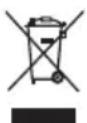
Dieses Symbol, auf den Produkten, der Verpackung und/oder den Begleitdokumenten, bedeutet, dass gebrauchte elektrische und elektronische Produkte nicht in den allgemeinen Hausmull gegeben werden)dürfen.
Bitte führen Sie alte Produkte zur Behandlung, Aufarbeitung bzw. zum Recycling gemäß den gesetzlichen Bestimmungen den zuständigen
Sammelpunkten zu.
Indem Sie diese Produkte ordnungsgemäß entsorgen, halten Sie bereits, wertvolle Ressourcen zu schätzen und eventuelle negative Auswirkungen auf die menschliche Gesundheit und die Umwelt zu vermeiden.
Für mehr Informationen zu Sammlung und Recycling, wenden Sie sichitte an ihren örtlichen Abfallentsorgungsduienstleister. Gemäß Landesvorschriften können wegen nicht ordnungsgemäß Entsorgung these Abfalls Stratfelder verhängt werden.Vermeidung von Störungen
■ Objektivpflege
- Keinen starken Erschüttungen, Stößen oder Druck aussetzen. Andernfalls kann es zu Funktionstörungen oder Beschädigungen kommt.
- Üben Sie keine starrken Druck auf das Objektiv aus.
- Achten Sie darauf, das Objektiv beim Tragen nicht fallenzulassen oder anzustosten.
- Wenn Sie die Digitalkamera mit angebrachten Objektiv/TRagen, halten Sie beim Tragen sowohl das Objektiv als auch die Digitalkamera.
- Achten Sie darauf, die Tasche, in der Sie das Objektiv verstaut haben, nicht fallenzulassen oder anzustosten.
- Schmutz auf der Linsenoberfläche (Wasser, Öl, Fingerabdrücke usw.) kann die Bilder beeinträchtigen. Wischen Sie die Objektivoberfläche vor und nach Aufnahmen vorsichtig mit einem weichen, trockenen Tuch ab.
- Wenn das Objektiv nicht verwendet wird, bringen Sie den vorderen und hinteren Objektivdeckel an, damit sich keine Staub- oder anderen Partikel auf der Linse oder im Objektiv ansammeln.
Um die Kontaktpunkte (A) des Objektivs zu schützen, vermeiden Sie Folgendes. Anderenfalls kann es zu Fehlfunktionenkommen. -Kontaktpunkte des Objektivs berühren. Zulassen, dass die Kontaktpunkte des Objektivs verschmutzen.
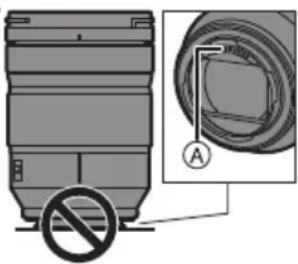
- Das Objektiv mit der Fassung nach unten ablegen.
Staub- und Spritzwasserschutz
Die staub- und spritzwassergeschützte Konstruktion der Kamera verhindert nicht vollständig das Eindringen von Staub oder Wassertropfen. Treffen Sie die folgenden Vorsichtsmaßnahmen, um einen angemessenen Staub- und Spritzwasserschutz zu gewährleisten. Wenn das Objektiv nicht richtig Funktioniert, wenden Sie sich an ihren Handler oder Ihr nachstgelegenes Service-Center.
- Bringen Sie das Objektiv an eine Digitalkamera an, die staub- und spritzwasserdicht ist.
- Achten Sie beim Anbringen und Entfernen des Objektivs darauf, dass keinerlei Fremdmaterial wie Sand, Staub, Wassertropfen usw. auf Objektivfassungsgummi, Kontaktpunkte, Digital-Kamera und Objektiv gelangen.
-
Wenn das Objektiv Spritzwasser oder anderen Flüssigkeiten ausgesetzt wurde, wischen Sie es mit einem weichen, trockenen Tuch ab.
-
Zur Verbesserung der Staub- und Spritzwasserdichtigkeit des Objektivs ist ein Objektivfassungsgummi am Bajonett angebracht.
-
Durch das Objektivfassungsgummi kommt es zu Schleifspuren an der Digital-Kamera. Dadurch wird die Leistung jedoch nicht beeinträchtigt.
- Für Informationen zum Wechseln des Objektivfassungsgummis wenden Sie sich an Ihr nachstgelegenes Service-Center.
■ Kondensation (Beschlagen des Objektivs)
Kondensation tritt auf, wenn sich Umgebungstemperatur oder Luftfeuchtigkeit ändern. Seien Sie vorsichtig, da dies Ablagerungen am Objektiv, Schimmelbildung und Funktionstörungen verursichen kann.
- Wenn Kondensation auftritt, schalten Sie die Digital-Kamera aus und warten ca. 2 Stunden lang. Die Kondensation hört von selbst auf, wenn sich die Digital-Kamerattemperatur an die Umgebungstemperatur annahert.
- Das Erscheinungsbild und die technischen Daten der in dieser Bedienungsanleitung beschrieben Produkte können aufgrund von Weiterentwicklungen vom tatsächlichen Produkt abweichen.Beiliegendes Zubehör
Die Produktnummern beziehen sich auf den Stand von Januar 2019. Änderungen sind vorbehalten.
1 Objektivbeutel
2 Gegenlichtblende
3 Objektivedeckel
4 Hinterer Objektivdeckel- Zum Kaufzeitpunkt am Objektiv angebrachte.
Bezeichnungen und Funktionen der einzelnen Kamerateile
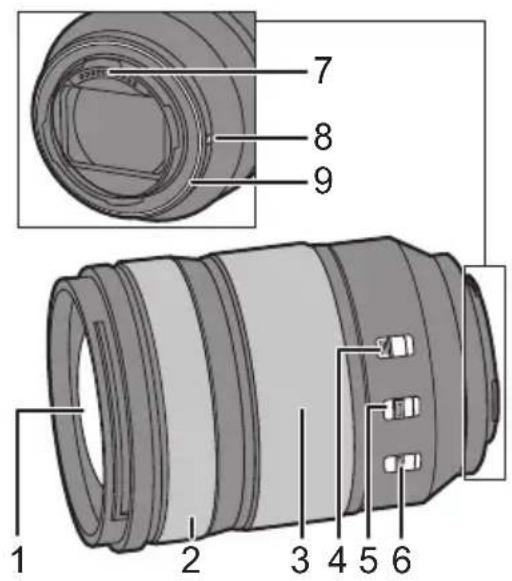
1 Linsenfläche
2 Schärfenring In der MF-Einstellung (manueller Fokus) drehen Sie zum Scharfstellen den Fokusring.
- In den Menus kompatibler Digitalk cameras konnen Sie einstellen, um wie viel der Scharfepunkt beim Drehen des Fokusrings verschoben werden soll. Einzelheiten finden Sie in der Bedienungsanleitung ihrer Digitalkamera.
3 Zoom-Ring
Ermöglicht das Zoomen in die Tele- oder Weitwinkelstellung.
4 Zoom-Feststellschalter
Wenn die Brennweite auf 24mm und der Zoom-Feststellschalter auf [LOCK] gestellt wird, wird der Zoomring arretiert.
- Arretieren Sie den Zoomring beim Tragen des Objektivs, damit diesen nicht durch sein eigenes Gewicht herausfährt.
5 AF/MF-Schalter
Umschalten zwischen AF (Autofokus) und MF (manueller Fokus).
- Wenn die Digitalkamera auf MF eingestellt ist, ist unabhängig von der Stellung des AF/MF-Schalters die manuelle Fokussierung (MF) aktiviert.
6 O.I.S.-Schalter
Wenn der O.I.S.-Schalter auf [ON] eingestellt ist, wird die Stabilisatorfungtion aktiviert.
- Es empfehlt sich, den O.I.S.-Schalter auf [OFF] zu stellen, wenn Sie ein Stativ verwenden.
7 Kontaktpunkt
8 Markierung zum Ansetzen des Objektivs
9 Objektivfassungsgummi
Hinweis
- Der Scharfepunkt kann sich verschiben, wenn Sie nach der Scharfstellung den Zoom benutzen. Wiederholen Sie die Scharfstellung.
- Wenn das Betriebsgeräusch von AF und Stabilisator bei der Videoaufnahme störend ist, wird empfohlen, die Aufnahme wie folgt durchzuführen:
- Stellen Sie für die Aufnahme den AF/MF-Schalter auf [MF].
- Stellen Sie für die Aufnahme den O.I.S.-Schalter auf [OFF] und verwenden Sie ein Stativ.
Aufsetzen des Objektivs
Informationen zum Aufsetzen des Objektivs finden Sie in der Bedienungsanleitung ihrer Digitalkamera.
-
Setzen Sie das Objektiv nach dem Ausschalten der Digitalkamera auf.
-
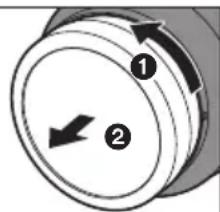
Setzen Sie das Objektiv nach dem Abnehmer des hinteren Objektivdeckels auf.
Nachdem Sie das Objektiv von der Digitalkamera abgenommen haben, bringen Sie den vorderen und hinteren Objektivdeckel an, damit sich keine Staub- oder a Linse oder im Objektiv ansam.
Gegenlichtblende aufsetzen
Halten Sie die Gegenlichtblende mit den Fingern wie in der Abbildung dargestellt.
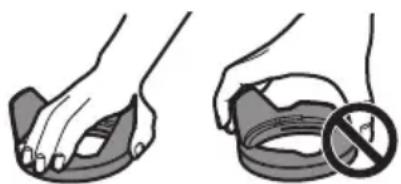
- Halten Sie die Gegenlichtblende nicht so fest, dass sie verdreht oder verbogen wird.
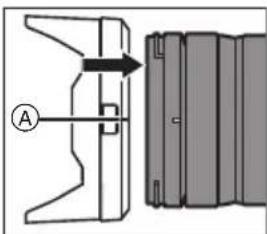
1Richten Sie die
Markierung (an der Gegenlichtblende mit der Markierung am Rand des Objektivs aus.
2Drehen Sie die
Gegenlichtblende in Pfeilrichtung, bis die Markierung ⑧ (Dan der Gegenlichtblende an der Markierung am Objektivrand ausgerichtet ist.
- Bringen Sie die Gegenlichtblende an, indem Sie sie drehen, bis ein Klicken zu horen ist.
Entfernen einer Gegenlichtblende
Halten Sie die Gegenlichtblendentaste gedrückt, drehen Sie die Gegenlichtblende in Pfeilrichtung und entfern den Sie sie dann.
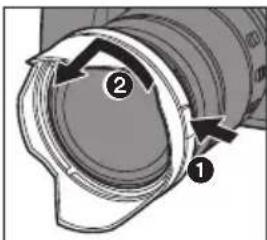

Hinweis
- Beim Transport kann die Gegenlichtblende in umgekehrter Richtung angebracht werden.
1 Nehmen Sie die Gegenlichtblende ab.
2 Richten Sie die Markierung © (an der Gegenlichtblende an der Markierung am Objektivrand aus.
3 Bringen Sie die Gegenlichtblende an, indem Sie sie in Pfeilrichtung drehen, bis ein Klicken zu horen ist.
- Es wird empfohlen, bei Blitzlichtaufnahmen die Gegenlichtblende abzunehmen, da diese das Blitzlicht möglicherweise blockiert.
Um ein Herunterfallen des Objektivs zu vermeiden, sollen den Sie das Objektiv beim Tragen niemals nur an der Gegenlichtblende festhalten.
■ Hinweise zur Verwendung von Filtern
- Es ist möglich, den Objektivdeckel und die Gegenlichtblende bei bereits aufgesetzten Filtern zu verwenden.
- Wenn Sie zwei oder mehr Filter gleichzeitig verwenden, kann es zu einer Verdunklung von Teilen des aufgenommenen Bildes kommt.
- Außer Filter konnen keine anderen Objekte - etwa Vorsatzlinsen oder Adapter - vor dem Objektiv angebracht und in Kombination mit diesen Objektiv verwendet werden. Durch Anbringen solcher Objekte kann es zu Beschädigungen des Objektivs kommt.
Vorsichtsmaßnahmen
- Sprühen Sie keine Insektizide oder flüchtige Chemikalien auf das Objektiv.
- Falls solche Substanzen auf das Objektiv gelangen, konnten sie zur Beschädigung des Objektivs oder zum Abblättern der Farbe führen.
- Richten Sie das Objektiv nicht gegen die Sonne oder andere starke Lichtquellen.
- Das Objektiv konnte zu viel Licht aufnehmen, was zu Branden oder Fehlfunktionen führen kann.
- Nicht verwenden, während das Objektiv bei niedrigen Temperaturen über längerere Zeiträume direkt berührt wird.
- Bei Kälte (unter 0^ , z. B. auf Skipisten) kann ein längeres Berühren der Metalteile des Objektivs zu Hautverletzungen führen. Tragen Sie Handschuhe o. a., wenn Sie das Objektiv über einen längeren Zeitraum hinweg verwenden.
- Reinigen Sie das Objektiv mit einem weichen, trockenen, staubfrei Tuch.
- Verwenden Sie zum Reinigen des Objektivs kein Waschbenzin, keinen Verdünner, keinen Alkohol oder ähnliche Reinigungsmittel. Lösemittel konnen zu Beschädigungen des Objektivs und zur Ablösung der Lackierung führen.
- Verwenden Sie keine Kuchenspulmittel oder mit Chemikalien getränkte Tücher.
- Gegenstände aus Gummi, PVC oder ähnlichen Materialien dürfen nicht für langere Zeit mit dem Objektiv in Berührung kommt.
-
Verändern und zerlegen Sie diese Produkte nicht.
-
Wenn das Objektiv über einen längeren Zeitaum nicht benutzt wird, wird die Lagerung mit einem Trockenmittel (Kieselgel) empfohlen.
- Wenn das Objektiv über längerere Zeit nicht benutzt wurde, überprüfen Sie vor einer Aufnahme alle Teile des Objektivs.
-
Verwenden Sie die Gegenlichtblende nicht unter den folgenden Bedingungen und lagern Sie sie auch nicht unter den folgenden Bedingungen, da es ansonsten zu Bedienproblemen und Funktionsstörungen kommt kann:
-
Bei direktem Sonnenlicht oder im Sommer an der Küste
- An Orten mit hohen Temperatures, hoher Feuchtigkeit oder starken Temperatur-/Feuchtigkeitsschwankungen
-An sandigen oder staubigen Orten - Bei einem Brand
- In der Höhe von Heizkörpern, Klimaanlagen oder Luftbefeuchtern
- Wenn das Objektiv durch Wasser nass werden kann
- Wo Erschütterungen vorhanden sind
-InemFahrzeug - Siehe auch die Bedienungsanleitung der Digitalkamera.
Fehlerbehebung
Beim Ein- oder Ausschalten der Digitalkamera oder beim Schütteln des Objektivs ist ein Pattern o.ä.zu horen.
Beim Aufnehmen von Bildern ist ein Gerausch aus dem Objektiv zu horen.
- Dieses Gerausch entsteht durch die Bewegung des Objektivs und die Betätigung der Blende. Es handelt sich nicht um eine Fehlfunktion.
Spezifikationen
Die Spezifikationen können zur Leistungsverbesserung ohne Ankündigung geändert werden. WECHSELOBJEKTIV FÜR DIGITAL-KAMERA "LUMIX S 24-105 mm F4 MACRO O.I.S." Fassung Leica Camera AG L Mount Brennweite f=24 mm bis 105 mm Objektivaufbau 16 Elemente in 13 Gruppen (2 asphärische ED-Objektive, 2 asphärische Objektive, 1 UED-Objektiv, 2 ED-Objektive) Blende 9 Blendenlamellen/Runde Blende Maximale Blendenöffnung F4.0 Minimale Blende F22 Bildwinkel 84° (Weitwinkel) bis 23° (Tele) Aufnahmebereich 0,30 m bis ∞ (von der Bezugslinie für Fokusentfernung) Maximale Vergrößerung 0,5× Bildstabilisator Ja Filterdurchmesser 77 mm Max. Durchmesser Ø84 mm Gesamtlänge Ca. 118 mm (vom Rand des Objektivs bis zur Grundseite der Objektivfassung) Masse Ca. 680 g Staub- und Spritzwasserschutz Ja Empfohlene Betriebstemperatur -10 °C bis 40 °C Zulässige relative Luftfeuchtigkeit 10%RH bis 80%RH Instrucciones de funciona
OPTICA INTERCAMBIABLE PARA CÁMARA DIGITAL
Gracias por comprar un producto Panasonic.
Lea cuidadosamente estas instrucciones antes de usar este producto, y guarde estemanual para uso en el futuro.
Esta lente pueda acoplarse a una CAMERA digital de 35 mm que cumpla con el estándar L-Mount de Leica Camera AG y que está equipada con un sensor deImagen de marco completo.
- L-Mount es unamarcacommercialo marca commercial registrada de Leica Camera AG.
- Otros nombres, nombres de entreprises y nombres de produits Mentionados en este documento son MARCAS commerciales o MARCAS commerciales registradas de las entreprises en cuestion.
Indices
Informacion para su seguidad 50
Prevencion contra las averias. 51
Accesorios suministrados 52
Nombres y functions de los componentes 53
Colocar la lente 54
Precauciones para el uso 56
Busesda de averias. 56
Especificaciones 57Información para su seguridad
Mantenga la unidad lo más lejos que sea possible de equipos electromagnéticos (como hornos de microondas, teilesoles, video juegos, trasmisores radio, linesas de alto voltaje, etc.).
- No utilise laameraerca de Telefonos moviles, ya que lo de hacerlo pueda producir ruido que afectaranegativamente a las imagenes y el sonido.
- Si la CAMERA queda afectada negativamente por un equipo electromagnétique ydea de functionar correctamente, apague la CAMERA y quite la bateria y/o el adaptor de CA conectado. Luego vuelva a insertar la bateria y/o vuelva a conectar el adaptor de CA y encienda la CAMERA.
LO SIGUIENTE SOLO SE APLICA EN LOS EE. UU. Nota FCC:
Este equipo se ensayó y se encontró que cumple con los limites de un dispositivo digital de la Clase B, de acuerdo con la Parte 15 de las Reglas FCC. Dichos limites se han previsto para proporcionar unareasonable proteccion contra las interferencias dañinas en una instalacion residencial. Este equipo genera, utilizes y pueda radar investigaciones radio y, por si no se instala y no se usa segun dichas instrucciones,uede causar interferencias dañinas en las comunicaciones radio. Sin embargo, no hay ninguna garantia que dichas interferencias你能an occurrir en instalaciones especialaes. Si este equipo no Causea interferencias dañinas a recepcion de radio o television,que poden ser determinadas apagando y enciender el equipo,se anima al usuario a intentar corregir la interfencia por medio de una or mas de las medidas a continuacion:
- Vuelva a orientar o colocar la antenna receptora.
- Augente el espacio separator entre el equipo y el receptor.
- Conecte el equipo a un toma de un circuito diferente al que está conectado el receptor.
- Llame para'aupplyaconcesionario o a un的技术e especializzato de radio/televisores.
Cualquier cambio o modificacion no autorizada en este equipo anularia la autoridad del usuario para operar este dispositorio.
Este dispositivo cumple con la Parte 15 de las Reglas FCC. Su funciona está sujeto a las dos conditiones a continuación: (1) Este dispositivo no pueda causar interferencias daninas y (2) este dispositivo tiene que aceptarrialquier interfrecencia recibida, incluyendo las que pueda causa un funciona no deseado.
Declaración de conformidad del proveedor
Nombre commercial: Panasonic
Model N: S-R24105
Parte responsible: Panasonic Corporation of North America Two Riverfront Plaza, Newark, NJ 07102-5490
Contacto para atencion: http://shop.panasonic.com/support

LO SIGUIENTE SOLO INTERESA A CANADA.
CANICES-3(B)/NMB-3(B)
-Si ve este symbolo-
Eliminación de Aparatos Viejos
Solamente para la Unión Europea y páises con sistemas de reciclado
Este*simbolo en los productos, su embalaje o en los documents que los acompanen significa que los productos electricos y electronicos usadas no deben mezclarse con los residuos domesticos.
Para el adecuado tratamiento, recuperación y reciclaje de los productos viejos llévelos a los+puntos de recogida de acuerdo con su
legislación nacional.
Si los elimina correctamente可以帮助 a preservar valiosos recursos y evitará potencias efectos negativos sobre la salute de las personas y sobre el medio ambiente.
Para más información sobre la recogida u reciclaje, por favor contacte con su ayuntimiento.
Puede haber sanciones por una incorrecta eliminacion de este residuo, de acuerdo con la legislacion nacional.
Prevencion contra las averias
■ Atencion del objetivo
-
No la exponga a vibraciones fuertes, golpes o presión.
Esto podra Causear daños o un mal funciona bajo. -
No presione con fuerza en la lente.
-
Tenga cuidado de noURTAR caer o golpear la lente al transporteirla.
-
Cuando lleve laámara digital con la lente montada, sostenga tanto la lente como laámara digital para transporteas.
-
Tenga cuidado de noURTAR caER o golpear la bolsa en la que haya colocado la lente.
- Cuando haya sucidad (agua, aceite y huellas dactilares, etc.) en la superficie de la lente, pueda que las imagenes se vean afectadas. Limpie suavamente la superficie de la lente con un paño suave y seco antes y después de grabar.
- Cuando la lente no está en uso, asegúrese de colocar la tapa de la lente y la tapa trasera de la lente para evaporar que el polvo y除外as particulas se acumulen en la lente o entrada en ella.
- Para proteger los+puntos decontacto de la lente (A),no haga lo singular, ya que podra Causear un malfuncionamento.
- Tocar los+puntos decontacto de la lente.
- Dejar que los+puntos decontacto de la lente seensucien.
- Colocar la lente con la superficie de montaje hacía abajo.
Resistencia al polvo y a las salpicaduras
- El Diseño resistente al polvo y a las salpicaduras de laamera no evitará Completely la entrada de polvo y gotas de agua. Tome las siguientes precauciones para un rendimiento satisfactorio de resistencia al polvo y a las salpicaduras. Si la lente no funciona correctamente, consulte con su distribuidor o con el Centro de Servicio más cercano.
- Montela en una camarà digital que sea resistente al polvo y a las salpicaduras.
- Al colocar o quitar la lente, tengá cuidado de que materiales extraños como arena, polvo o gotas de agua no se adhéran a la lente o entrada en la goma de montaje, los+puntos decontacto,la cámara digital y la lente.
- Si la lente quedara expuesta a gotas de agua u或者其他 liquidos, sequela con un paño suave seco.
- Para melhorar la resistencia al polvo y a las salpicaduras de la lente, en la montura se utilizes una goma de montaje de la lente,
- La goma de montaje de la lente deja marcas de roce en la montura de la camara digital, pero this no afecta al desempo.
- Para Obtener información sobre comoonian la goma de montaje de la lente,pongase en contacto con el Centro de Servicio más cercano.
Condensacion (cuando las lentes estan empanadas)
- La condensación se produce cuando la temperatura ambiente o la humedad cambia. Tenga cuidado con la condensación, ya queURTIA provocar manchas y moho en la lente y producirse un mal funcionaimiento.
- Si se produce condensación, apague laámara digital y déjela aprox. 2 horas. La neblina desaparecerá naturalmente cuando la temperatura de laámara digital se aproxime a la temperatura ambiente.
- La aparencia y las espécificaciones de los produits descriiros en este documento peuvent poder diferir de los produits reales comprados bajo a posterioriores mejoras.
Accesorios suministrados
Númos de produits correctos a partir de enero de 2019. Puede estar susjetos a cambio.
SFC0360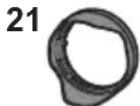
1ZE4SR24105Z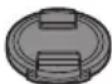
1GE1Z276Z
RGE1Z276Z1 Estuche de la lente
2 Visera del objetivo
3 Tapa de la lente
4 Tapa trasera de la lente *- Acoplado a la lente al momento de la compra.
Nombres y unidades de los componentes
1 Superficie del objetivo
2 Anillo del enfoqueGire el anillo de enfoque para enfocar cuando está en MF (enfoque manual).
- Puede ajustar lo que se mueve el enfoque con el anillo de enfoque utilizing dos menus de cármas digitales compatibles. Consulte las instrucciones de funciona el webcam digital para mas detalles.
3 Anillo de zoom Hace zoom hasta teleobjetivo o gran angular.
4 Interruptor debloqueo del zoom Cuando la distancia focal sea de 24mm y el interruptor debloqueo del zoom este ajustado en [LOCK],el anillo del zoom se bloqueará.
- Aplique el bloqueo del anillo del zoom cuando transporte la lente para que no se extienda por su propio peso.
5 Interruptor AF/MF Alterna entre AF (enfoque automatico) y MF (enfoque manual).
- Cuando la CAMERA digital se ajusta en MF, funciona en MF independiente del ajustedel interruptor AF/MF.
6 Interruptor O.I.S. La función del estabilizador se configura como activa si el interruptor O.I.S. está en la posión [ON].
- Le recomendamos que ajuste el interruptor O.I.S. a [OFF] cuando usa un tripode.
7 Punto de contacto
8 Marca para ajustar el objetivo
9 Goma de montaje de la lente
Nota
- Puede haber diferencias en el enfoque cuando se usa el zoom antes de enfoque. Enfoque de nuevo.
- Si el sonido del funciona AF y del estabilizador le molesta durante la grabacion de video, se recomienda grabar de la?sigue manera:
- Ajuste el interruptor AF/MF en [MF] para grabar.
- Ajuste el interruptor O.I.S. en [OFF] y utilise un tripode para grabar.
DVQX1714
Colocar la lente
Para Obtener información sobre como colocar la lente, consulte las instrucciones de funciona el su cármara digital.
- Coloque la lente afterwards de apagar la webcam digital.
- Coloque la lente cuando de quitar la tapa trasera de la lente.
- Después de quitar la lente de la-camera digital, asegúrese de colocar la tapa de la lente y la tapa trasera de la lente para Severity que el polvo y otheras partículas se acumulen enella.
Unión de la visera del objetivo
Sostenga la cubierta de la lente con sus dedos colocados como se muestra en laImagen.
No sostenga la cubierta de la lente de forma que pueda doblarla o torcerla.
1Alinee la marca A
en la visera de la lente con lamarca en el extremo de la lente.
2Gire el parasol en la
direccion de la flecha
para alinear lamarca (Del parasol con la
marca en el extremo de
la lente.Monte el parasol girandolo.
hasta que hagablick.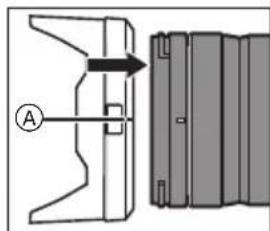
Cómo desmontar un parasol
Mrientras presiona el boton del parasol, gire el parasol en la direccion de la flecha y bajo retiredo.

Nota
- Cuando transporte la CAMERA, pueda colocar la visera de la lente en la direccion inversa.
1 Quite la visera de la lente.
2 Alinee lamarca () en la visera de la lente con la marca en el extremo de la lente.
3 Monte el parasol girandolo en la direccion de la flecha hasta que hagablick.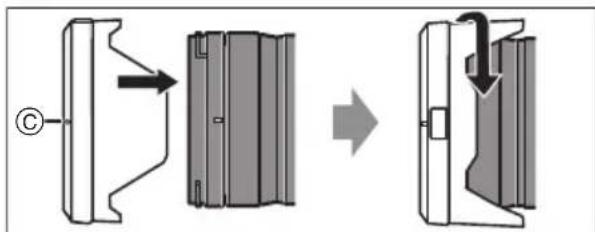
- Se recomienda retirar la visera de la lente al realizar fotografias con flash, ya que la visera de la lente pueda bloquear la luz del flash.
- Para evitar que la lente se caiga, nunca debe transporte la simplement sujetando la visera de la lente.

Notas sobre el uso de filtros
- Se pueda colocar la tapa de la lente o la visera de la lente con el filtro ya:puesto.
- Si utilizes dos o más filtros a la vez, pueda oscurecerse parte de unaImagen grabada.
- No es possible colocar en la parte frontal de la lente, y utilizar lo en combinación con ella,除外 el已久的 que no sea un bajo, como una lente de conversion o un adaptorador.
La lente podria dañarse si se colocan tales objetos.
Precauciones para el uso
- No rocie la lente con insecticidas o productos químicos volátilles.
- Si dichas substancias caen en el objetivo, estas你能 dararlo o hacer desconchar su barniz.
- No apunte con el objetivo al sol u otheras fuentes de luz intensa.
- Esto podría hacer que el objetivo recogiera demasiada luz, lo que podría provocar un incendio y una averia.
- No la Utilities si va a tocar directamente la lente a bajas temperatas durante un periodo de tiempo prolongado.
- En lugares frios (entornos por debajo de 0^ (32^) , como las pistas de esquí), el contacto directo prolongado con los componentes metálicos de la lente pueda provocar lesiones en la piel. Utilice guantes o algo similar cuando utilise la lente durante periodos prolongados.
- Utilice un paño suave, seco y sin polvo para limpiar la lente.
- No utilise gasolina, diluyente, alcohol uthers agentes de limpieza para limiar la lente. Si usa solventes podra dañar la lente o Causear que la pintura se descascare.
- No use detergentes para cocina o un paño tratado químicolemente.
- No(bejudeproductosdegoma,PVComateriales similares encontactodirectoconla lente durante un长大o periodo.
No desarme ni altere este producto.
- Cuando la lente no se vaya a usar durante un periodo de tiempo prolongado, se recomienda guardarla con un desecante (gel de silice).
- Compruebe todas las partes antes de comenzar a grabar cuando no haya usedo la lente durante un periodo de tiempo prolongado.
- Evite usar o guardar la lente en cualesera de lassiguientes ubicaciones, ya que thisouldacause problemas en elfuncionamento orfallas:- Bajo la luz directa del sol o bien a lo largo de la costa durante el verano
- En ubicaciones con altas temperatas y alto niveles de humedad o cambios bruscos de temperatura y humedad
- En lugares arenosos o polvorientos
- Donde haya llamas
-Cerca de calefactores, acondicionadores de aire o humedecedores - Donde el agua puedaajar la lente
-
Donde haya vibraciones
Dentre de un vehiculo -
Consulte además las instrucciones de funciona en de la webcam digital.
Búsqueda de averías
Cuando se enciende o apaga la-camera digital o cuando se sacude la lente, se oye un sonido deTRAQUETEO.
Hay un sonido que proviene de la lente cuando se toman imagenes.
- Este es el sonido de la lente moviéndose y de la operación de aperture. No se tratate de un funciona defectuoso.
Especificaciones
Las specifications estánsujetasacambiospara la mejora del rendimiento. ÓPTICA INTERCAMBIABLE PARA CÁMARA DIGITAL “LUMIX S 24-105 mm F4 MACRO O.I.S.” Montura Leica Camera AG L Mount Longitud focal f=24 mm a 10 5 mm Estructura del objetivo 16 elementos en 13 grupos (2 lentes ED asféricas, 2 lentes asféricas, 1 lente UED, 2 lentes ED) Tipo de abertura 9 aspas de diafragma/Diafragma de aperture circular Apertura Tmaxima F4.0 Valor de abertura minimum F2 22 Ángulo visual 84° (Gran angular) a 23° (Teleobjetivo) Rango de grabación 0,30 m (0,98 pies) a∞ (desde la linea de referencia de la distancia de enfoque) Máxima ampliación de laImagen 0,5× Estabilizador deImagen Si Diámetro del filtró 77 mm Diámetro máximo Ø84 mm (3,3") Longitud total Aproximamente 118 mm (4,6) (desde la punta de la lente en hasta el bajo base del montaje de la lente) Masa Aproximamente 680 g (1,4991 lb) Resistencia al polvo y a las salpicaduras Si Temperatura defuncionamento recomendada -10 °C a 40 °C (14 °F a 104 °F) Humedad relativa admisable 10%RH a 80%RH Istruzioni per l'uso LENTI INTERCAMBIABILI PER FOTOCAMERA DIGITALE
Grazie per aver acquistato un prodotto Panasonic. Leggere attendamente queste istruzioni prima di utilizzare il presente prodotto, e conservare quello manuale per usi futuri.
L'obiettivo cui si racciano la fotocamera digitale 35 mm conforme allo standard Leica Camera AG L-Mount, munita di sensore di immagine full frame.
- L-Mount è un marchio o marchio registrato di Leica Camera AG.
- Altri nomi, nomi di aziende, nomi di prodotti conteni in questo documento sono marchi o marchi registrati delle relative aziende.
Indices
Informazioni per la sua sicurezza 59
Prevenzione guasti 59
Accessorioridotazione 60
Nomi e funzioni dei componenti 61
Installazione dell'obiettivo 62
Precauzioni per l'uso. 64
Ricerca guasti 64
Specifiche 65Informazioni per la sua sicurezza
Tenere l'unità il più possibile lontana da apparecchi elettromagnetici (come fornì a microonde, TV, videogiochi, radiotrasmittenti, linee dell'alta tensione, ecc.).
- Non utilizzato la fotocamera vicino a Telefoni cellulari, perché ciò cui poè causare disturbi che influenzano negativamente immagini e suoni.
- Se il funzionamento della fotocamera digitale è disturbato da apparentecchi elettromagnetic, spagnere la fotocamera e rimuovere la batteria e/o l'adattatore CA collegato. Quindi inseire nuovamente la batteria e/o ricollegare l'adattatore CA. Infine, riaccendere la fotocamera.
-Se vedete quello simbolo-
Smaltimento di vecchie apparecchiature Solo per Unione Europea e Nazioni con sistemi di raccolta e smaltimento
Questo symbolo sui prodotti, sull'imballaggio e/o delle documentazioni o manuali accompagnanti i prodotti indica che i prodotti elettrici, elettronici non devono essere smaltiti come rifiuti urbani ma deve essere effettuata una raccolta separata.
Per un trattamento adeguato, recupero e riciclaggio di vecchi prodotti vi invitiamo a segnari gli apposti puniti di raccolta secondo la legislazione vigente nel vosto paese.
Con uno smaltimento corretto, contribuirete a salvare importanti risorse e ad evitare i potenziali effetti negativi sulla salute umana e sull'ambiente.
Per ulteri informazioni su raccolta e riciclaggio, vi invitiamo a contattare il vestro comune.
Lo smaltimento non corretto di questi rifiuti potrebbe comportare sanzioni in accordo con la legislazione nazionale.Prevenzione guasti
Custodia dell'obiettivo
-
Non sottoporre a forti vibrazioni, urti o pressioni, che possono causare malfunzionamenti o danni.
-
Non premere con forza sull'obiettivo.
-
Durante il trasporto dell'obiettivo, fare attenzione a non lasciarlo cadere e a non urtarlo.
-
Quando si traspora la fotocamera digitale con l'obiettivo installato, sostenera sua la fotocamera digitale sua l'obiettivo.
-Fare attenzione a non lasciar cadere o urtare la custodia in cui è statoioso l'obiettivo. -
Quando la superficie dell'obiettivo è sporca (acqua, olio, impronte, ecc.), quello cui dovrestà. Strofinare leggermente la superficie dell'obiettivo con un panno asciutto e morbido prima e dopo la registrazione.
-
Quando non si usa l'obiettivo, fissare il copriobiettivo ed il copriobiettivo posteriori per evitare che polvere ed altre particelle si accumulino sull'obiettivo o entrino al suo interno.
-
Per proteggere i punti di contatto dell'obiettivo (A), non fare quanto segue. Queste azioni potrebbero provocare malfunzionamenti.
-
Toccare i punti di
contatto dell'obiettivo. - Lasciare che i punti di contatto dell'obiettivo si sporchino.
- Posizione r'obiettivo con la sua superficie di inesto rivolta verso il basso.
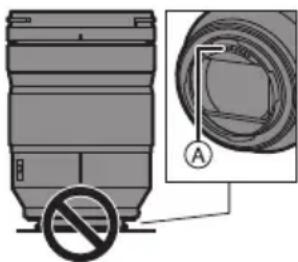
Resistenza alla polvere edagli schizzi
- Il design resistente alla polvere edagli schizzi della fotocamera non impedirà completamente l'ingresso di polvere o goccioline d'acqua. Prendere le seguenti precauzioni per garantire prestazioni soddisfacenti in termini di resistenza alla polvere edagli schizzi. Se I'obiettivo non funzione correttamente, contattare il rivenditore o il Centro Assistenza più vicino.
- Installare su una fotocamera digitale resistente alla polvere edagli schizzi.
- Quando si installa o si rimuove l'obiettivo, fare attenzione che materiali estranei come sabbia, polvere, e goccioline di acqua non aderiscano o penetrino nella gomma sull'innesto dell'obiettivo, nei punti di dato, nella fotocamera digitale e nell'obiettivo.
- Se l'obiettivo viene esesto a goccioline d'acqua o altri liquidi, rimuoverle con un panno asciutto morbido.
- Per migliorare le prestazioni dell'obiettivo in termini di resistenza alla polvere edagli schizzi, sull'innesto dell'obiettivo è presente una protezione in gomma.
-La gomma sull'innesto dell'obiettivo lascerà segni di striscio sull'innesto della fotocamera digitale, ma questo non influisce sulle prestazioni. - Per informazioni sulla sostituzione della protezione in gomma, contattare il Centro Assistenza più vicino.
Condensa (quando I'obiettivo è appannato)
- La condensa si forma quando cambia la temperature ambiente o l'umidità. Fare attenzione, in quanto cui causare macchie, muffa e malfunzionamento dell'obiettivo.
- Se si verifica della condensa, spegnere la fotocamera digitale ed attendere circa 2 ore. La condensa scomparirà naturalmente quando la temperatura della fotocamera digitale si avvicinerà a quella dell'ambiente.
- L'aspetto e le specifiche dei prodotti descriitti in quello documento possono differire rispetto ai prodotti effettivi acquistati a causa dei miglioramenti apportati in seguito.
Accessor in dotazione
I codici dei prodotti sono aggiornati a gennaio 2019. è possibile che subiscano delle modifiche.
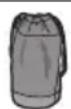
SFC0360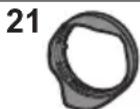
1ZE4SR24105Z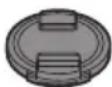
1GE1Z276Z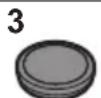
RGE1Z276Z1 Borsa per I'obiettivo
2 Paraluce
3 Copriobiettivo
4 Copriobiettivo posterioreInstallato sull'obiettivo al momento dell'acquisto.
Nomi e funzioni dei componenti
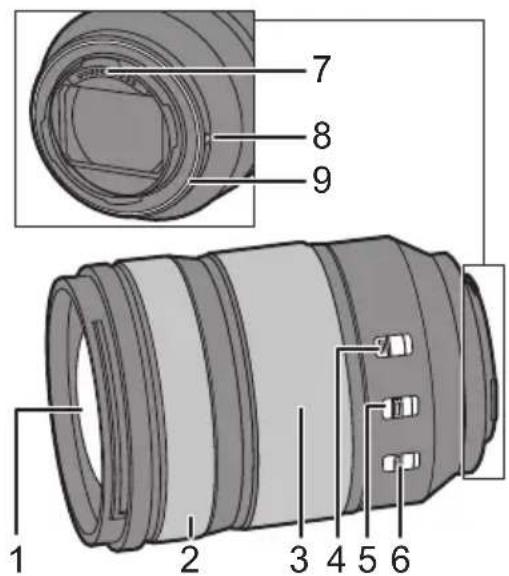
1 Superficie dell'obiettivo
2 Ghiera di messa a fuoco
Ruotare la ghiera di messa a fuoco perMETTERE a fuoco quando l'impostazione è MF (messa a fuoco manuale).
- É possibile impostare quanto si sposta la messa a fuoco con la ghiera di messa a fuoco usando i menu nelle fotocamere digitali compatibili. Per ulteriori informazioni consultare le istruzioni per l'uso della fotocamera digitale.
3 Ghiera dello zoom
Consente di zoomare su telefoto o grandangolo.
4 Selettore blocco zoom
Quando la lunghezza facale è 24 mm e il selettore blocco zoom è impostato su [LOCK], la ghiera dello zoom sare bloccata.
- Applicare il blocco ghiera zoom quando si trasporta l'obiettivo, in modo che non si estenda a causa del suo stesso peso.
5 Selettore AF/MF
Commuta tra AF (messa a fuoco automatica) e MF (messa a fuoco manuale).
- Quando la fotocamera digitale è impostata su MF, il funzionamento sare MF indipendente dell'impostazione del selettore AF/MF.
6 Interrupttre O.I.S.
La funzione stabilizzatore è impostata in modo da attivarsi se il selettore O.I.S. è posizionato su [ON].
- Si consiglia di posizionare l'interruttore O.I.S. su [OFF] quando si utilizes un treppiede.
7 Punto di contatto
8 Segno per l'installazione dell'obiettivo
9 Protezione in gomma sull'innesto dell'obiettivo

Nota
-
Possocono esserci differenze nella messa a fuoco quando si usa lo zoom dopo la messa a fuoco. Mettere nuovamente a fuoco.
-
Se il suono di funzionamento della messa a fuoco automatica e dello stabilizzatore disturba durante la registrazione di video, si consiglia di registrarare come segue:
-
Impostare il selettore AF/MF su [MF] per registrar.
-
Impostare il selettore O.I.S. su [OFF] ed usare un treppiede per registrar.
Installazione dell'obiettivo
Per informazioni su come installare l'obiettivo, consultare le istruzioni per l'uso della propria fotocamera digitale.
- Installare l'obiettivo dopo aver spento la fotocamera digitale.
Installare I'obiettivo dopo aver rimioso il copriobiettivo posteriore. - Dopo aver rimioso l'obiettivo alla fotocamera digitale, accertarsi di fissare il copriobiettivo ed il copriobiettivo posteriore per
evitare che polvere ed altre particelle si accumulino sull'obiettivo o entrino al suo interno.
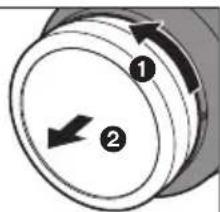
Installazione del paraluce
Tenere il paraluce come individato nella figura.
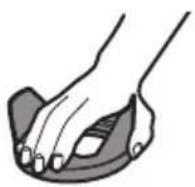
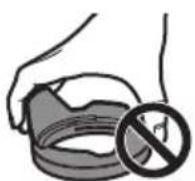
- Tenere il paraluce in modo da evitare di torcerlo o di piegarlo.
1Allineare il segno A (sul paraluce con il segno sull'estremita dell'obiettivo.
2Ruotare il paraluce nella direzione della freccia per allineare il segno (sul paraluce con il segno all'estremità dell'obiettivo.
Installare il paraluce ruotandolo sino a che non si除去 un cli.
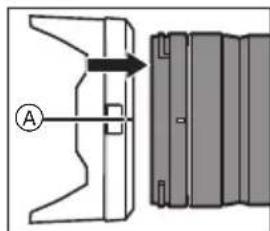
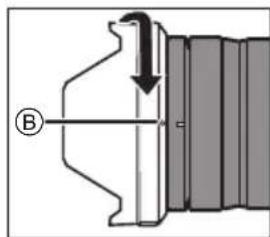
Rimozione di un paraluce
Tenendo premuto il pulsante del paraluce, ruotare il paraluce nella direzione della freccia e quindi rimuoverlo.
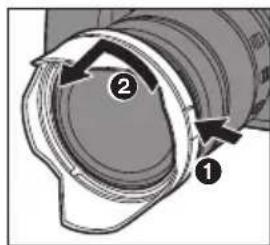

Nota
- Durante il trasporto, è possibile montare il paraluce al contrario.
1 Rimuovere il paraluce.
2 Allineare il segno () sul paraluce con il segno sull'estremita dell'obiettivo.
3 Installare il paraluce ruotandolo nella direzione della freccia finché non si sente un clic.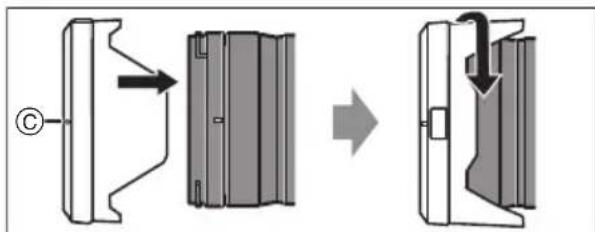
- Si consiglia di rimuovere il paraluce durante l'uso del flash in quanto il paraluce può bloccare la luce del flash.
- Per evitare di far cadere l'obiettivo, non trasportare mai l'obiettivo tenendo solo il paraluce.
Note sull'uso del filtro
- É possibile installare il copriobiettivo o il paraluce con il filtro già installato.
- Se si usano due o più filtri contemporaneamente, parte di un'immagine registrata cui diventare scura.
Non è possibile installare elementi diversi dai filtri, ad esempio convertitori o adattatori, sulla parte anteriore dell'obiettivo ed usarli in combinazione con quello obiettivo.
Se vengono installati elementi di quello tipo, l'obiettivo potrebbe venire danneggiato.
Precazioni per l'uso
Non spruzzare insetticidi o sostanze chimiche volatili sull'obiettivo.
- Se tali sostanze vengono a lavoro con l'obiettivo posso nando neggiarlo o provocare il distacco di vernice.
- Non punctare direttamente l'obiettivo versus il sole o verso intense sorgenti luminose.
-L'obiettivo potrebbe raccogliere una quantità eccessiva di luce, prendendo fuoco e rovinandosi.
- Non usare toccando direttamente l'obiettivo a temperatureasseperlungo tempo.
- In luoghi freddi (ambienti con temperatura inferiore a 0^ , come piste da sci), un contatto diretto prolongato con le parti in metallo dell'obiettivo potrebbe causare lesioni cutanee. Utilizzare quanti o similii quando si utilizes a lungo l'obiettivo.
- Per pulire l'obiettivo, usare un panno morbido asciutto privo di polvere.
- Non utilizzato benzina, diluenti, alcol o altri detergenti simili per pulire l'obiettivo. L'uso di solventi potrebbe danneggiare l'obiettivo o causare il distacco della vernice.
- Nonutilizzareundetergente da cucina o un panno chimico.
- Non tenera lungo a contatto con l'obiettivo prodotti in plastica, PVC o materiali simili.
Non smontare o modificare quello prodotto.
- Quando I'obiettivo non verra usato per un periodo prolongato, si consiglia di riporlo con un essiccante (gel di silice).- Controllare tutte le parti prima di registrar quando non si è usato l'obiettivo per un lungo periodo di tempo.
-
Evitare di usare o lasciare l'obiettivo in uno dei seguenti luoghi perché questo può causare problemi operativi o malfunzionamento:
-
Esposta alla luce del sole, o in spiaggio d'estate
-In luoghi caratterizzati da temperature e livelli di umidità elevati o forti sbalzi di temperatura e umidità
-In luoghi con sabbia o polvere
Dove sono presenti fiamme - Vicino a caloriferi, condizionatori o umidificatori
Dove I'acqua puo bagnare I'obiettivo
Dove sono presenti vibrazioni -
All'interno di un'auto
-
Vedereanche leistruzioni per l'uso della fotocamera digitale.
Ricerca guasti
Quando si accende o si spegne la fotocamera digitale o si scuote l'obiettivo, si sente un tintinnio.
Quando si scattano foto si sente un suono proveniente dall'obiettivo.
- Si tratta del suono del movimento dell'obiettivo e dell'operazione di aperture. Non si tratta di un malfunzionamento.
Specifiche
Le specifiche sono soggette a migliorare le prestazioni. LENTI INTERCAMBIABILI PER FOTOCAMRA DIGITALE “LUMIX S 24-105 mm F4 MACRO O.I.S.” Supporto Leica Camera AG L-Mount Distanza fiscale f=24 mm a 1 05 mm Costruzione dell'obiettivo 16 elementi in 13 gruppi (2 lenti ED asferiche, 2 lenti asferiche, 1 lente UED, 2 lenti ED) Tipodi di aperture Diaframma con 9 lamelle/Diaframma ad aperture circolare Apertura massima F4.0 Valore minimodell'aperture F22 Profondità di campo 84° (Grandangolo) a 23° (Tele) Distanza utile di ripresa 0,30 m a ∞ (dalla linea di riferimento della distance di messa a fuoco) Ingrandimento massodell'immagine 0,5× Stabilizzatore di immagine $i Diametro filtrato 77 mm Diametro massimo Ø84 mm Lunghezza complessiva Circa 118 mm (dall'estremità dell'obiettivo al lato di base del supporto dell'obiettivo) Massa Circa 680 g Resistenza alla polvere edagli schizzi Si Temperatura operativaraccomandata -10 °C a 40 °C Umidità relativa accettabile 10%RH a 80%RH 使用說明書
數位相機用可替換鏡頭
感謝您購買 Panasonic產品。
使用本產品前請仔細閱讀這些說明,並保留本說明書供日後使用。
本鏡頭可安裝到符合Leica Camera AG L-Mount標準且搭載全畫幅影像感測器的35mm數位相機。
- L-Mount是Leica Camera AG的商標或註冊商標。
- 本文中提到的其他名稱、公司名稱、產品名稱皆為其各自公司的商標或註冊商標。
目錄
安全注意事项 67
故障预防 67
操作部中文表示對照表 68
提供的配件 68
元件的名稱及功能 68
安装镜頭 69
使用時的注意事項 71
故障排除 71
規格 72安全注意事項
使本產品遠離磁性設備(如微波爐、電視、視訊遊戲設備、無線電發射機、高壓線等)。
- 請勿在移動電話附近使用相機,否則會影響圖片和聲音質量。
如果相機由於受帶磁設備影響而不能正常工作,請先將其關閉,取出電池和/或斷開連接的電源供應器,然後重新插入電池和/或連接電源供應器。隨後,開啟相機。
故障預防
鏡頭保養
請勿使其受到強烈震動、撞擊或壓力,否則可能導致故障或損壞。
-
請勿用力按壓鏡頭。
-
擔帶時,小心不要摔落或撞擊鏡頭。
-
擔帶裝有鏡頭的數位相機時,請同時握住鏡頭和數位相機。
-
小心不要摔落或撞擊放置鏡頭的背袋。
-
錢頭表面有污垢(水、油和指印等)時,可能會影響影像拍攝前後,請用軟的乾布輕輕擦拭鏡頭的表面。
-
為了防止灰塵或其他微粒附著或進入鏡頭,不使用鏡頭時請裝上鏡頭蓋和鏡頭後蓋。
為保護鏡頭接點(A),請避免下列動作,否則可能導致故障。
一觸碰鏡頭接點。
-讓鏡頭接點沾染髒汗。
- 將安裝面朝下放置鏡頭。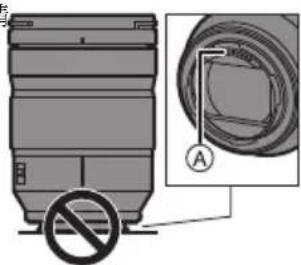
防壓防潰
·相機的防壓防灑設計無法完全避免灰壓或水滴進入。請依照下列注意事項操作,以達到所要的防壓防灑性能。如果鏡頭無法正確運作,請向經銷商或離您最近的服務中心諮詢。
- 安裝到可防塵防潰的數位相機上。
- 請小心安裝或移除鏡頭,以免沙壓及水滴等異物,附著或進入鏡頭固定橡膠、接觸點、數位相機或鏡頭。
-
如果鏡頭接觸到水滴或其他液體,請用軟的乾布將其擦去。
-
為改善鏡頭的防塵防濾性能,接口使用了鏡頭接口橡膠。
-
錢頭接口橡膠可能在數位相機接口上留下摩擦的痕跡,但這不會影響效能。
- 有關更換鏡頭接口橡膠的資訊,請與離您最近的服務中心聯繫。
水氣凝結(當鏡頭有霧氣堆積時)
·周圍環境溫度或濕度變化大時,會發生水氣凝結。請注意此問題,以免造成鏡頭變髒、發霧及故障。
如果發生了水氣凝結,請關閉數位相機,將其放置約2時。當數位相機溫度接近周圍環境溫度時,霧化將自然消失。
- 本文中所記述的產品外觀與規格可能因日後的產品改良而與您購買的實際產品不同。操作部中文表示對照表
為使您在使用上更方便,使用前請參閱本對照表:
某些所示的名稱可能不會出現在本機上。
LOCK:鎖定
AF:自動對焦
MF:手動對焦
O.I.S.: 光學防震功能
ON:開啓
OFF:關閉
提供的配件
產品號碼截至 2019年1月為準。此後可能會有變更。
SFC0360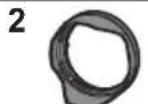
1ZE4SR24105Z
1GE1Z276Z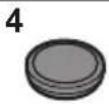
RGE1Z276Z1 镜頭袋
2 镜頭遮光罩
3 錢頭蓋
4 錢頭後蓋* 購買時已安裝在鏡頭上。
元件的名稱及功能
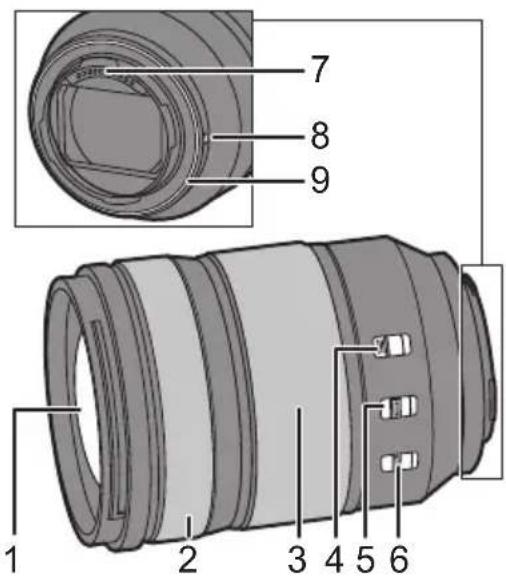
1 镜頭表面
2對焦環設為MF(手動對焦)時,轉動聚焦環可進行對焦。
- 使用相容的數位相機內的功能表,還可設定聚焦環的對焦移動量。有關詳細資料,請參閱數位相機的使用說明書。
3變焦環
變焦為遠攝或廣角。
4變焦鎖定開關
焦距設為 24mm 且變焦鎖定開關設為[LOCK]時,變焦環將鎖定。
- 擔帶鏡頭時請鎖上變焦環鎖定,避免鏡頭因自身重量而拉長。
5 AF/MF開關
切換AF(自動對焦)和MF(手動對焦)。
數位相機設定為MF時,無論AF/MF開關設定為何,皆以MF運作。
6 O.I.S.開關
如果將 O.I.S.開關設定到 [ON],會啟動穩定器功能。
- 使用三腳架時,建議將O.I.S.開關設定到[OFF]。
7 接觸點
8 錢頭安裝標記
9 镜頭接口橡膠

注意
在對焦完成後變焦,對焦可能會有差異,此時請重新對焦。
-
如果您介意錄製影片時的 AF和穩定器的操作聲音,建議用下列方式錄製:
-
將AF/MF開關設為[MF]錄製。
-
將O.I.S.開關設為[OFF]並使用三腳架錄製。
安裝鏡頭
有關如何安裝鏡頭的資訊,請參閱數位相機的使用說明書。
要安裝鏡頭,請先關閉數位相機。
要安裝鏡頭,請先取下鏡頭後蓋。
為了防止灰塵或其他微粒附著或進入鏡頭,從數位相機上取下鏡頭後務必裝上鏡頭蓋和鏡頭後蓋。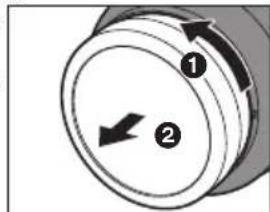
安装镜頭遮光罩
持拿鏡頭遞光罩時,您的手指要如圖所示那樣放置。
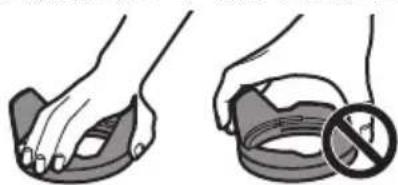
·請勿以會使其變形或彎曲的方式持拿鏡頭遮光罩。
1將鏡頭遮光罩上的標記 A(□對準鏡頭頂端的標記。
2朝箭頭指示的方向轉動鏡頭遮光罩,將鏡頭遮光罩上的標記(B)對準鏡頭頂端的標記。
- 轉動鏡頭遮光罩,直到發出喀隆聲為止,以裝上鏡頭遮光罩。
取下鏡頭遮光罩按下鏡頭遮光罩按鈕的同時,朝箭頭指示的方向轉動鏡頭遮光罩,然後取下。
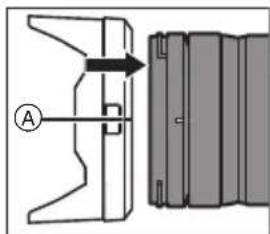
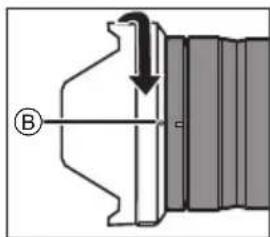
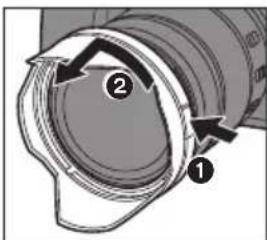
注意
- 擔帶時,可以以相反的方向安裝鏡頭遮光罩。
1 請取下鏡頭遮光罩。
2 將鏡頭遮光罩上的標記 ( ) )對準鏡頭頂端的標記。
3朝箭頭指示的方向轉動鏡頭遮光罩,直到發出喀噸聲為止,完成鏡頭遮光罩安裝。
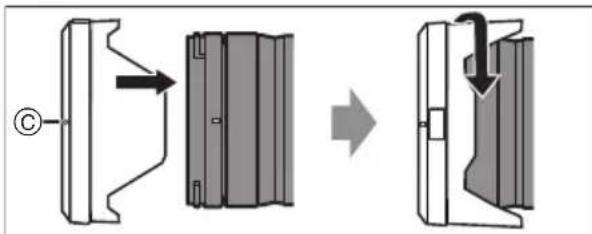
建議用閃光燈拍照時取下鏡頭遮光罩,因為鏡頭遮光罩可能會擋住閃光燈的光線。
- 為避免鏡頭摔落,拿鏡頭時絕不可只握住鏡頭遮光罩。滤镜使用注意事项
- 即使已安裝濾鏡,亦可再裝上鏡頭蓋或鏡頭遮光罩。
- 如果你拍攝時同時使用兩塊濾鏡或以上,部份圖像可能會變暗。
- 不可安裝除了濾鏡以外的任何物品到鏡頭前端並搭配鏡頭使用,例如轉換鏡頭或轉換器。如果安裝這類物品,可能會使鏡頭損壞。
使用時的注意事項
請勿用殺蟲劑或揮發性化學藥品噴灑鏡頭。
如果此類化學藥品接觸到鏡頭,可能會損壞鏡頭,表面漆可能也會剝落。
請勿將鏡頭對著太陽或其他強光源。
- 這會使鏡頭聚集過多的光量,導致火災和故障。
請勿在低溫環境下長時間直接接觸鏡頭。
- 在寒冷的地方(如滑雪坡等 0^ C 以下的環境)長時間直接接觸鏡頭的金屬部分,可能會導致皮膚受傷。長時間使用鏡頭時,請使用手套或類似物品。
請用軟的無塵乾布清潔鏡頭。- 請勿使用汽油、稀釋劑、酒精或其他類似清潔劑清潔鏡頭,使用溶劑可能會損壞鏡頭或使漆面剝落。
- 請勿使用廚房清潔劑或經化學方法處理過的抹布。
請勿讓橡膠、PVC或類似材質的製品與鏡頭長期接觸。
·請勿拆解或改裝本產品
準備長時間不使用本鏡頭時,建議在存放時放入一些乾燥劑(矽膠)。
假如已長時間未使用鏡頭,請在拍攝前先檢查所有零件。請避免在下列地點使用或儲存鏡頭,因為這可能會導致操作失誤或故障。
- 太陽直射的地方或夏天的海邊
- 在高溫和高濕度或溫度和濕度有顯著變化的地方
- 在多沙子和灰塵的地方
-有火的地方
-靠近加熱器、空調或加濕器的地方
-在可能有水弄潔鏡頭的地方 - 受到震動的地方
一、车内
也請參閱數位相機的使用說明書。
故障排除
數位相機在開啟或關閉或晃動鏡頭時,會聽到喀噸聲等。拍攝過程中鏡頭發出聲音。
- 這是鍾頭移動和光圈操作的聲音。這並非故障。規格
規格可能隨時變更以改善效能。
數位相機用可替換鏡頭“LUMIX S 24-105 mm F4 MACRO O.I.S.” 鏡頭接口 Leica Camera AG L-Mount 焦距 f=24 mm至105 mm 鏡頭結構 13組16片(2片非球面ED鏡片、2片非球面鏡片、1片UED鏡片、2片ED鏡片) 光圈類型 9片光圈葉片 /圓 形光圈 最大光圈 F4.0 最小光圈值 F22 視角 84°(廣角)至23°(遠攝) 拍攝範圍 0.30 m至∞(從對焦距離基準線開始) 最大影像倍率 0.5× 影像穩定器 是 濾鏡直徑 77 mm 最大直徑 Ø84 mm 總長度 約118mm(從鏡頭的頂端到鏡頭接口的基準面) 重量 約680 g 防塵防濾 是 建議的工作溫度 -10°C至40°C 允許的相對濕度 10%RH至80%RH 進口廠商:台松電器販賣股份有限公司
地址:新北市中和區員山路579號
電話 :(02)2223- 5121
使用说明书
数码相机使用的可更换镜头
感谢您购买Panasonic产品。
请于使用前仔细阅读操作使用说明书,并将说明书妥善保管,以备将来使用。
此镜头可以安装到符合Leica Camera AG
L-Mount 标准并配备全画幅图像传感器的 35 mm 数码相机上。
扫描二维码
关注松下服务官方微信平台
松下数码微信公众号松影俱部
- L-Mount是Leica Camera AG的注册商标。
- 本说明书中提及的其他公司名称和产品名称为各自公司的商标或注册商标。
目录
安全注意事项 74
故障预防 74
提供的附件 75
元件的名称及功能 76
安装镜头 77
使用时的注意事项 79
故障排除 79
规格 80安全注意事项
使本机远离电磁设备(如微波炉、电视机、视频游戏设备、无线电发射机、高压线等)。
- 不要在移动电话附近使用相机,否则会影响图像与声音的品质。
如果相机由于受电磁设备影响而停止正常工作,请关闭相机,并取出电池和/或断开连接的交流电源适配器。然后,重新插入电池和/或重新连接交流电源适配器,打开相机。
故障预防
■镜头保养
- 请勿使其受到强烈震动、撞击或压力。否则,可能会导致故障或损坏。
-请勿用力按压镜头。
- 携带镜头时,请注意不要使镜头跌落或受到撞击。
-如果数码相机已安装了镜头,则携带时请同时握住镜头和数码相机。
-
请注意不要使装有镜头的包跌落或受到撞击。
-
镜头表面有污垢(水、油和指印等)时,可能会影响图像。拍摄前后,请用软干布轻轻擦拭镜头的表面。
-
不使用镜头时,请确保安装镜头盖和镜头后盖,以防止灰尘和其他颗粒在镜头上聚集或进入镜头。
-
为保护镜头触点(A),请避免出现以下情形。否则,可能会导致故障。
-
触摸镜头触点。
-让镜头触点变脏。
-在放置镜头时将安装面朝下。
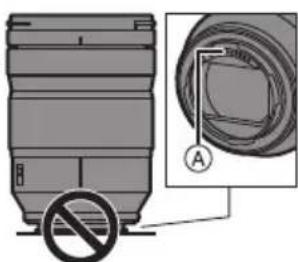
■防尘防溅
-
本相机的防尘和防溅设计不会完全阻止灰尘或水滴进入。请采取以下预防措施,以实现良好的防尘和防溅性能。如果镜头不正确工作,请向经销商或离您最近的服务中心咨询。
-
请安装到防尘且防溅的数码相机上。
-安装或取下镜头时,请注意不要让沙子、灰尘和水滴等异物附着或进入镜头卡口橡胶、触点、数码相机和镜头。
如果镜头接触到水滴或其他液体,请用软的干布将其擦去。
为了提高镜头的防尘防溅性能,卡口中使用了镜头卡口橡胶。
-
镜头卡口橡胶会在数码相机卡口上留下擦痕,但这并不影响性能。
-
有关更换镜头卡口橡胶的信息,请与离您最近的服务中心联系。
■水汽凝结(当镜头雾化时)
- 周围环境温度或湿度变化大时,会发生水汽凝结。请务必注意,否则可能会造成镜头变脏、发霉和故障。
- 如果发生了水汽凝结,请关闭数码相机,将其放置约2小时。当数码相机温度接近周围环境温度时,雾化将自然消失。
提供的附件
产品号码截至2019年1月为准。
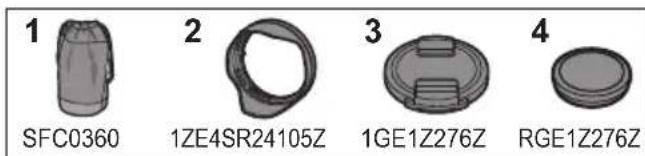
1 镜头袋
2 镜头遮光罩
3 镜头盖
4镜头后盖水 购买时安装在镜头上。
元件的名称及功能
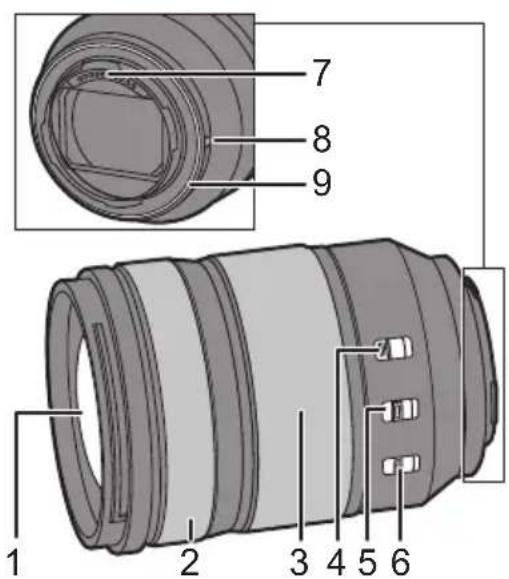
1 镜头表面
2 聚焦环设置为MF(手动对焦)时,转动对焦环进行对焦。
- 您可以使用兼容的数码相机中的菜单来设置对焦环的对焦移动量。有关详情,请参阅数码相机的使用说明书。
3 变焦环
变焦到远摄或广角。
4 变焦锁定开关
当焦距设置为 24mm 且变焦锁定开关设置到 [LOCK]时,变焦环会被锁定。
- 携带镜头时,请应用变焦环锁定,使其不会因其自身重量而伸长。
5 AF/MF开关
在 AF(自动对焦)和 MF(手动对焦)之间进行切换。
- 当数码相机设置为MF时,无论AF/MF开关上的设置如何,都将进行MF操作。
6 O.I.S. 开关
如果将O.I.S.开关设置到[ON],请将稳定器功能设置为启动。
- 建议在使用三脚架时将 O.I.S. 开关设置到 [OFF]。
7 触点
8 镜头安装标记
9 镜头卡口橡胶

注意
- 对焦后使用变焦时,对焦结果可能会有所不同。再次对焦。
- 如果您介意视频录制过程中存在AF操作音和稳定器操作音,建议按如下方式进行录制
- 将AF/MF开关设置到[MF]进行录制。
- 将O.I.S.开关设置到[OFF]并使用三脚架录制。
安装镜头
有关如何安装镜头的信息,请参阅数码相机的使用说明书。
- 关闭数码相机后,安装镜头。
- 取下镜头后盖后,安装镜头。
从数码相机上取下镜头后,请确保安装镜头盖和镜头后盖,以防止灰尘和其他颗粒在镜头上聚集或进入镜头。
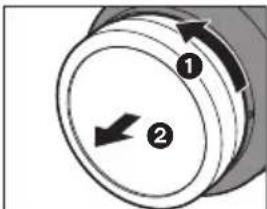
■安装镜头遮光罩
持拿镜头遮光罩时,您的手指要如图所示那样放置。
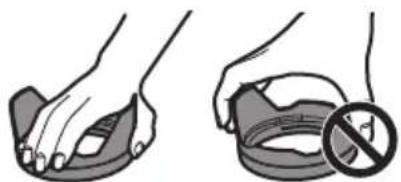
- 请勿以会使其变形或弯曲的方式持拿镜头遮光罩。
1将镜头遮光罩上的标记A(□)镜头顶端的标记。
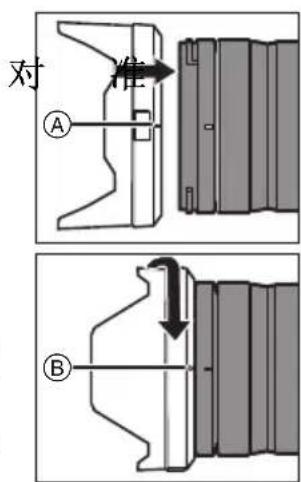
2朝箭头指示的方向转动镜头遮光罩,以便将镜头遮光罩上的标记⑧(○)对准镜头顶端的标记。
- 转动镜头遮光罩直至听到咔哒一声完成安装。
■取下镜头遮光罩
按镜头遮光罩按钮的同时,朝箭头指示的方向转动镜头遮光罩,然后取下。
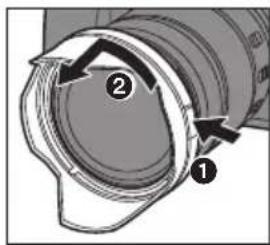
注意
- 携带时,可以以相反的方向安装镜头遮光罩。
1 请取下镜头遮光罩。
2 将镜头遮光罩上的标记 () 对准镜头顶端的标记。
3 通过朝箭头指示的方向转动安装镜头遮光罩,直至听到咔哒一声。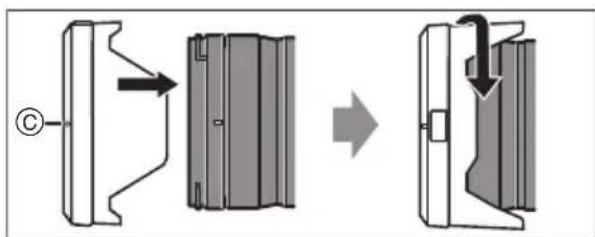
- 在闪光灯拍摄过程中,建议取下镜头遮光罩,因为镜头遮光罩可能会遮住闪光灯发出的光。
- 为防止镜头掉落,切勿靠仅持拿镜头遮光罩来携带镜头。
■有关滤镜使用的说明
- 可以在安装着滤镜的状态下安装镜头盖或镜头遮光罩。
- 如果同时使用两个或以上的滤镜,拍摄影像的一部分可能会变暗。
- 不能将滤镜以外的任何物品(如转换镜头或适配器)安装到镜头前面,也不能将其与此镜头组合使用。
如果安装此类物品,可能会导致镜头损坏。
使用时的注意事项
- 请勿用杀虫剂或挥发性化学药品喷洒镜头。如果此类化学药品接触到镜头,可能会损坏镜头,表面漆可能也会剥落。
- 请勿将镜头对着太阳或其他强光源。
- 这会使镜头聚集过多的光量,导致火灾和故障。
- 需要长时间在低温下直接接触镜头时,切勿使用。一在寒冷的地方(0℃以下环境,如滑雪场),长时间直接接触镜头的金属部分可能会导致皮肤受伤。长时间使用镜头时,请使用手套等。
- 请用软的无尘干布清洁镜头。
- 请勿使用汽油、稀释剂、酒精或其他类似的清洁剂清洁镜头。使用溶剂可能会损坏镜头或导致涂层剥落。
- 请勿使用家用清洁剂或用化学方法处理过的抹布。
- 请勿让橡胶、PVC或类似材料制品与镜头长期接触。
-
请勿拆卸或改装本产品。
-
准备长时间不使用镜头时,建议在存放时放入一些干燥剂(硅胶)。
- 如果长时间未曾使用镜头,请在拍摄前检查所有部件。
-
避免在以下任何地点使用或存放镜头,否则可能导致工作出现问题或故障:
-
太阳直射的地方或夏天的海边
-高温多湿或温度和湿度变化较大的地方
-沙尘较多的地点
-有火的地方
-靠近加热器、空调或加湿器的地方 -
有水并可能打湿镜头的地点
-受到震动的地方
-车内 -
另请参阅数码相机的使用说明书。
故障排除
打开或关闭数码相机或晃动镜头时听到咔哒声等声音。
拍摄图像时,镜头发出声音。
- 这是镜头移动和光圈工作的声音。这并非故障。
规格
数码相机使用的可更换镜头“LUMIX S 24-105 mm F4 MACRO O.I.S.” 镜头卡口 Leica Camera AG L-Mount 焦距 f=24 mm至105 mm 镜头结构 13组16片(2片非球面ED镜片、2片非球面镜片、1片UED镜片、2片ED镜片) 光圈类型 9片控光片 圆形虹膜光圈 最大光圈 F4.0 最小光圈值 F22 视角 84°(广角)至23°(远摄) 拍摄范围 0.30 m至∞(从对焦距离基准线开始) 最大图像倍率 0.5× 影像稳定器 是 滤镜直径 77 mm 最大直径 Ø84 mm 全长 约118mm(从镜头的顶端到镜头卡口的基准面) 重量 约680 g 防尘防溅 是 建议的工作温度 -10℃至40℃ 允许的相对湿度 10% RH至80%RH 产品中有害物质的名称及含量
部件名称 有害物质 铅(Pb) 汞(Hg) 镉(Cd) 六价铬(Cr(VI)) 多溴联苯(PBB) 多溴二苯醚(PBDE) 镜头的镜筒部 × ○ ○ ○ 镜头外壳 × ○ ○ ○ 印刷基板组件 × ○ ○ ○ 本表格依据 SJ/T11364 的规定编制。○:表示该有害物质在该部件所有均质材料中的含量均在GB/T26572 规定的限量要求以下。×:表示该有害物质至少在该部件的某一均质材料中的含量超出GB/T26572 规定的限量要求。对于表示×的情况,属于欧盟 RoHS 指令的豁免项目。 厦门松下电子信息有限公司
中国福建省厦门市火炬高技术产业开发区
原产地:中国
标准代号:Q/XMSX128
2019年1月发行
在中国印刷
合格证 松下电器产业株式会社 HCTpyKzna IO 3KcNpyaTauu CMEHHbI O5bEKTUB DJIa LIOPOBOI FOToKAMEPbI
Блардддддддддддддддддддддддддддддддддддддддддддддддддддддддддддддддддддддддддддддддддддддддддддддддддддд Ппсгнггггггггггггггггггггg ВИМATEЛьНО ПСЧNTаTE ДАньIE ИНСТРУКЦИ N COXPAHITe 3TO руКOBODCTBO ДЯДАльHeIшero ИСПЛьЗВОВАнИ.
3TOT 06bektmb MOKHO npIKpeHNTb K 35 MM cNcPpOBoB
fotoKamepe, COOTBeCTByIOUeI CTAHdApTy KpeJIHeHnRA
L-Mount KomnaHn Leica Camera AG n OchauSeHNo
noJHokaDpOBoCBeTOyBCTBHTeNBoM aTpuei.- L-MountяВЯЯТСТОВAPHBIM 3HAKOMИJIN 3aperHCTpnpOBaHHbIM TOBAPHBIM 3HAKOM KOMПАнIN Leica Camera AG.
-ДргиЕ Ha3BaHЯ,Ha3BaHЯ KOMnAHHI N I3deJIIn, YNOMaHyTbIe B 3TOI INHCTpyKUIM, RBAJIOTcR TOBapHbIMN 3HaKaMn INI 3aperINCTpnpOBaHHbIMN TOBapHbIMN 3HaKaMn COOTBeTCTByIOUxN KOMnAHm.
Copepkanhe
HOpmaqna DnBaWei 6eOnaNochocTn 83
IpaBnla 3Kcnnyatau.. 83
PnHaJnEeKHOCTn, BXOJaUne B KOMnJIeKT 85
Ha3BaHnI n yHKuIN COCTaBbIX qacTei 85
PpikpeHne oBekTnBa 87
Ipeoctopoxhocn npn nCnoJIb3ObaHm foToKaMepbI ... 89
UcTpaHHe HEnCnPaBHOCTe 89
Texnueckne xapaKtepcntkn 90HΦopMaçnI JIy BaWeJ 6e3oNaChOCTN
XpaHnte np6op BdaHn OT nCTOuHKnOB 3JIeKTPOMarHnTHoro n3nyueHnra (HaNPmep, MKNPOBOJHOBbIX neey, TeJeBn3OpOB, o6OpydoBaHnRA JIa BnDeoHrp, paDnOpePaTCHKOB, BBICOKOBoJIbTHbIX IINHN N T.D.).
He nIb3yntecb foToKamepoB B6n3n COTOBbIX TeNefoHOB, TAK KaT TeNepoHbMOrTy Bbl3BaTb NOMEXN, OTPuCaTeNbHO Cka3bIBaHOUneCra Ha KaueCTBe CHIMKOB N 3ByKa.
- Ecni KaMepa NODBepraeTcH HeratNBHomy BInnaHHIO 3JIeKTPomarHHTHO N3JUyeHn INpepctaeT pa6oTaTb HOpMaJIbHO, BbIKIooHTe KaMepy, IN3BJeKeNtE 6aTapeO n/INn NODKJIIOueHHbI cTeBOA aAnTep nepemeHHORToKa. 3aTEM CHOBA BCTaBbTe 6aTapeO n/INn CHOBA NODKIIIOHTe cTeBOA aAnTep nepemeHHORToKa IN BKNIOHTe KaMepy.PpaBnla 3Kcnpnyatau
yxo3a0bkeTNBOM
He noDBepraTe 06BeKTHB BO3DeIcTBIO CnIbHO Bn6paun, yApHbIX Harpy3OK nN daBNeHna. 3To MOKeT npNBecTH K HeNCnpaBHOCTu nN NOBpeXDeHNIO.-3anpeaetcraNbHoHaKImMaTbHaobekTnB.
- Ipehenocte o6bektnb c octopoxhoctbIO, yTo6bl He ypoHHTb n He ydapntb erO.
-ПиперенockецфpoBoi ФOTOKamepbIC npNKpeHJIeHHbIMObEkeTnBOMdePKeNTe OHOBpeMeHHOObEkeTnBицфpoByIOФOTOKamepy.
-CTapaNTecb He yPOHnTb HHe ydapNTb cymky, B KOTOPoHaxODNTcra ObBeKTNB.
3arpa3HeHne NOBepxHOCTn OBeKtNBa (BOa, MaCNo, OTneaTKn PAnbueB n T. n.) MOKeT yXyDiWHTb KaYeCTBO n3o6paxeHn. Ipeed CbeMKoN n NocNe Hee CneDyET OCTOpOxHO BbITEpeTB NOBepxHOCTb OBeKtNBa CyXoM MArKO TkAHbIO.
Korda oBekTNb He nCnONb3yETc,HaJeHbTe Ha Hero KpbIuKy oBekTbNA u 3aHIO KoBbIKy oBekTbBA, YTo6bl NblINHKn i DpyTne YactuBi He CkAnJNbaNc b Ha oBekTbBe H e Nonadan BHyTpB.
ДязаитбIoKHTAKTOB 6ObeKtNbBa (A) HeIb3a BbINOHrTa yka3aHHbIe HIXe DeiCTBn. OHI MOrTy npNBeCTn K HeICnPabHOCTn.
-ПикacatbcaK KOHTaKTamObbeKtNbA.
-Дonyckatb 3arpa3HeHnKoHTaKTOBObekTnBa.
-CTaBntb obBeKTHMOHTaxHOH NOBepxHOCTbIO BHN3.
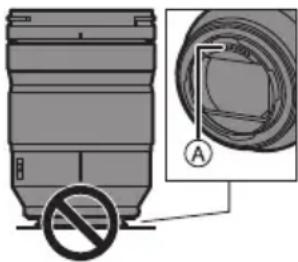
■ПьilehenpoHnuaemocThи6pbI3ro3aunueHHoCTb
- Пылесногиаиме и 6рьзгозашишноюн He obecneuHbaeT noHои 3aunIb OT npOHKNHOBeHn BHyTpB nbIn nnn Kanenb BodI. Co5HuaTe cNeDyUoJne МрБпpeOCTOpOXHocTN dny ydoBnetBopHTeNBO DeiCTBna XapaKTePncTnK nbineHpeOnHuaemocTN 6рьзгозашишно.EcIn obbeKTHp a6oTaET HnpaBnIbHo, 6paTntecb B nyHK Tnpodaxn IIn 6lnxkaan CepBnchbl ueHtp.
-Пикpenлгte 06ьektNB K nbIeHepnoHuaemOn n 6pbI3ro3aunuHHO uΦpoBOI FOToKampe.
-
PnKpeHnn CHmna 06bekTNB, CneDnte 3a TeM, TTo6bl HInOpOHNbIe YactNcbl, HAnpIMep NecOK, Nblb IN KAnIN BOdbl, He IOnaIN Ha NOBepxHOCTb IN IN PPOHNI BHYtpb pe3nHOBOr yNtOHNTeJIbHOro KOJbca 06bekTNBa, KOHTaKTOB, UΦpoBoi φOTOKamepbI n 06bekTNBa.
-
EcIn Ha oBbekTnB nonaTy KaIIIN BObI INN INHOJIKKOCTN, BblPTNE INC cyXO MRAKON TKAHbIO.
Дяууншеня nbilehenpoHuaemocTи 6pbI3ro3aunuueHHocTn obBeKtNbBa MecTe npIKpeHNHeN uCNoIb3yETcpe3HNOBoe yINIOHTeJIbHOe KOJIbUO obBeKtNbA.
-OT pe3HOBORO yNIOHTNtEnbHOro KOJIbca o6bEeKTHBa Ha KpeIeHHn cHcPBOB OΦOTOKaMebpO octAOTc IOTepTOCTn, HO 3TO He BImReT Ha ee pa60Ty.
-3a INΦopMaζηe O 3aMeHe pe3HOBOrO yΠΟΤΗΝΕ ΚΚΙβια ΜθέκτινΑ ΜραλαιΤΕCB B ΜΙΝχαιή ΣερΒιςΗ ΒεHTp.
KoHdEHCaUNa (KOrDa o6BeKTnB 3aTymaHMBaETc)
KoHdEHCaun npOncxOund, KOrda OkpykaUoua TemnepaTpa nnBJIaXHOCTb N3MeHryOTc. OcteperaItecb KOHeHcaun, NOCKoJIbky OHa MOKeT Bbl3BaTb NOBJIeHne PAnTeH nPiIeCehn Ha o6BeKTNbE n npNBecTN K HeNCnPabHOCTn.
- Ecnn npo30wla KoHdEHaCua, BbIKIOuHTe uΦpOByU FOToKamepy U ocTaBte ee np6I. Ha 2 yaca. 3aNoTeBaHne IcHe3Het cAmo c6oBou, KOrda TemnepaTpya uΦpOBoU FOToKamepbI cpaBHeTcA TeMnepaTpyo OKpyKaIoUe Cpebl.
BHeuHn BnD n TexHueckne xapaKTepNCn N3deNn, ONcaHHbIX B daHHOM pyKOboDCTBe, MOryT OTnHaTbcr Of qaKTneCKoro BnDa n XapaKTepNCn npNo6peTeHHbIX Bamn 3dEeNBcNEdCTBne INX NocNe dyUoIero ynyuWeHn.
ПринолжноCTN, BXODЯше В KOMплект
Homepa n3deJn BepHbI NO COCTOHNHO HA Hbapb 2019 r. OH MOryT n3MeHrTbcR.
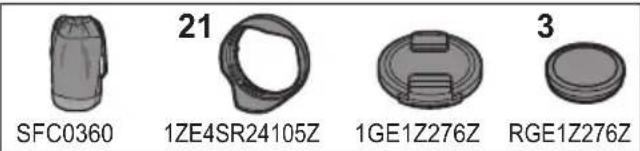
1 Yexon JnJ noBekTnBa
2BneHda o6bekTtBa
3 KpbIwka 06beKTnBa
43aHnKaKpbIkaObbekTnBaYcTaHOBneHbHa 06BeKtNBe Ha MOMeHT NOKyKN.
Ha3BaHnI n cyHKun COCTaBbIX qacteI
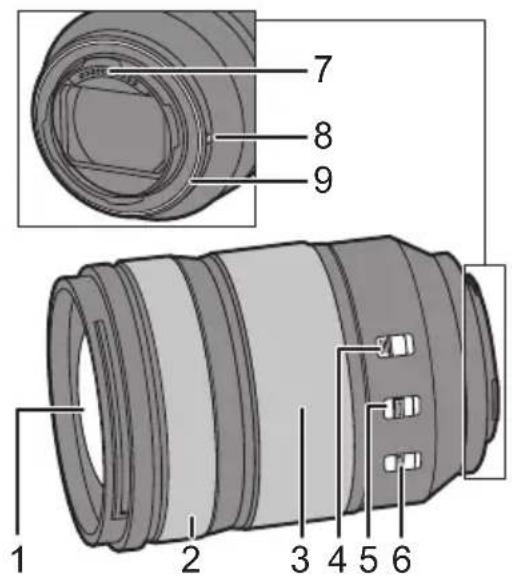
1NoBepxHOCTbJINH3bl
2KoIbUOΦokycnpoBknPn yctaHOBKe Ha MF (peKm pyHoi fokcnpoBKn) fokcnpoBka BbIOJIHReTcR BpaueHHeM KOJIbca fokcnpoBKn.
CTeneH nepemeueHnfaokycac nomooho KOJIbua fOKyCnPOBKN MOXHO yCTaHOBNb B MeHIO COBMeCTnMbIX uPPOBbIX fOTOKamep. IOpO6HyU INfopMaunu CM. B INHCTpyKUN NO 3KcNpyatauun UfpoBOI fOTOKamepbI.
3 Kobluo TpaHcfoKaTopa
YBeJIuHHeNHe N3o6paXeHnB PexKIme TeJeΦoTo HJIN yMeHbUeHnE B WnPOKOyRrBHom pexKIme.
4 NepeKIIuOaTeIb 6IOKUPOBKn TpaHcΦoKaTopa EcIn dIra fokycHO paCCToHHa 3aDaTb 24 MM, a nepeKIIuOaTeIb 6IOKUPOBKn TpaHCΦoKaTopa yCTaHOBnTb Ha [LOCK], KOnbIoo TpaHcΦoKaTopa 6Iokpyetc.
-БлOKИpyTe KOLIbTO TpaHcCpOKaTOPAp npi NpeHocKe ObEeKTHBa, YTO6bl ObEeKTHB He BbIDBnARcN PoD Co6CTBeHHbIM BECOM.
5 NepeeknouateJb AF/MF
IpeeknoueHne mKdy AF (peKmOM aBToΦokcnpOBKn) u MF (peKmOM pyHoi φokcnpOBKn).
- EcHn Ha uDpOBoN pOToKampe yCTaHOBneH peXIM MF,peXIM pyHOr pOkyCnPOBKn 6yJeT pa60TaTb He3aBNCmIO OT yCTaHOBKn nepeKJIouateJr AF/MF.
6 NepeknioateIb O.I.S.
ФункцястбилзаТОВьключaETСР npu yctahOBke nepeknHouatenaO.I.S. ha[ON].
- Ppi nCnOJb3ObaHmN WtTaTbA peKOMeHnyeTcayctaHaBImBaTnepeKJIIOHaTeIb O.I.S.B noLoKeHne [OFF].
7 MeTka yCTaHOBKn O6bekTnBa
8 MoTaxKaHn noBepxHOCTb
9 Pe3nHOBoE yNlOTHInbHoe KOJbO O6BeKTHBa
PpIMeuaHne
- Ppi nCnOJIb3OBAHmФyHKUmYBcIeHnI NOcIe BblIOJIHHeHnI φokycuPoBKn φokyc MoKet NImHeHTbcr. BblIOJIHnTe φokycuPoBky NoBtOpHo.
- EcINBac 6ecnOKoNT 3Byk pa6Otby aTOcOpKcnpOBKn nCTa6Hn3aTopa BO BpeM BAeOCbEMKn, peKOMEHdyETcBAIIOJIHTb 3aNNcB CNeyUOuIM o6pa30M:
-ДясьемкуctahOBHTepeKIOUaTeIbAF/MFВ noJoxKeHne [MF].
-Дясьемиуctановпе nepkeиючateь O.I.S. В поожене [OFF]иncnoNB3ynte wtaTnB.Прикpenлени объektива
HOpmauO npKpEnHeHH oBeKtNBa cm. B HcTpyKuNN NO 3KcNpyaauu uDpOBoB fOTOKamepbI.
- PpexKe Yem npHKpenTb o6BeKTHB, BbIKJIOUHTe cnΦpoByo foToKaMepy.
- PpexKe Yem npKpePnTb 06bektNB, CHMNTe 3aHIO KpbIuKy o6bektNa.
CHABOBBeKTHBCuHPOBOI
ΦOTOKaMepbI,HaedeHbTe Ha
Hero KpbIuKy OBeKTHBaN
3aHIOKpbIuKyOBeKTHBa,
YTO6bI PbINHKn IpyrVe
YacntuH He cKaJIbIaJIncb Ha 06beKtUBe Hnnonadnn BHyTpB.
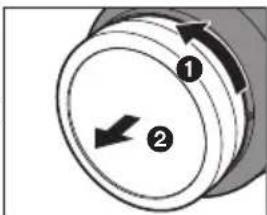
PnpcoeHHeHne 6JeHbI oBeKtNaBa
JepKnte 6JeHny oBeKeTnBa nIbIaMn, paCnoJIoxNb IN TAK, KAK NOKa3aHO Ha pncyHke.
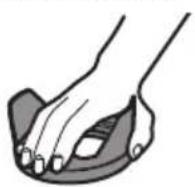
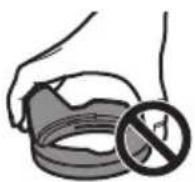
He depknte 6JIeHdy TaKIM o6pa3OM, npu KOtOpom OHa cKpyuBaetc nIu n3r6aETc.
1COBmectntMeKty A
Ha6neHde 06BeKtNBac MetKoHa Kaio 66eKtNBa.
2NoBepHnTe 6IeHny
obekTbBA B
Ha npaBneHn,
yka3aHHOM cTeJkoN,
COBMeaJa MeKy ⑧ (D
Ha 6JIeHNe obekTbA C
MeTKo Ha KpaHO
obekTbA.- PnpocoeHHte 6JeHny oBbekTnBa, nobopauhba ee do uenka.
Chrtne 6nHbI oBekTnBa
YdepnBaHaKaToi
KhONky Ha 6JeHDe
OBeKTnBa,IOBepHHTe
6NeHy OBeKTnBa B
HaPaBHeHH, yKa3aHHOM
CTpeKn, n 3aTeM
CHIMITE ee.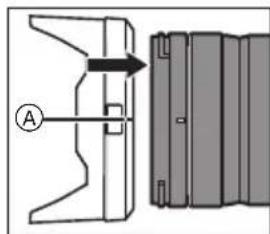
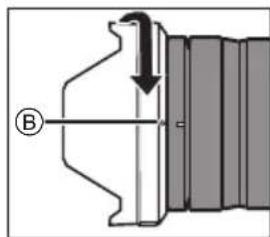
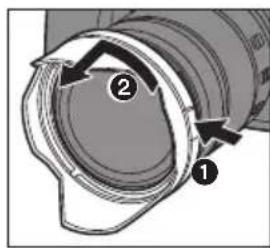

PpmeaHne
- Pn npehocke 6heHny oBekTbAmoXHO npKpeNTb B o6paTHOM HapabHeHH.
1 CHINMITE 6JIeHdy oBbekTnBa.
2 COBmecTnTe MeTKy () Ha 6neHne oBeKtNa C MeTKoHa Kpaio oBeKtNa.
3ПисоeINHInTe 6JIeHnIy OБьeKtNbA, NOBOPaYNBaJee B HAnpabJIeHnI, yKa3aHHOM CTpeJIKOJ, DoUeJIyKa.
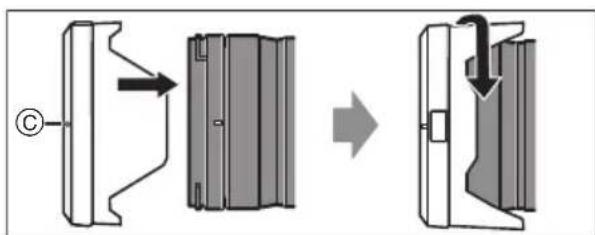
- PnCbemke CO BCNbIkwO peKOMeHdyETc CHrTb 6NeHdy obBeKTNbA, TAK KAc 6NeHda ObBeKTNbA MoXeT 3aRopaxKnBaCBET OT BCNbIkwN.
- 4To6bI He IOnyctnTb NaJeHn8 o6BeKtNbA, ero Hn B KOem Cnyae HeNb3a NpeHocntb, depXacb TOnbKO 3a 6NeHy o6BeKtNbA.

PnmeaHn 06 nCnoB3OBAHn FnIbTp
BmecTe C yCTaHOBHeHHbIM FnIbTpOM MOxHO npKpeNTb KpbIuKy 06BeKTnBa uN 6NeHdy 06BeKTnBa.
B cnyuae oNHOBpeMeHHoro nCNoJb3OBAHnI dByx uNIO60nee fNtpoB yactb 3aNcAHHoro n3o6paKeHHMOKET 3aTEMHTbcR.
Kpome fHnIbTPOB, K nepeHHeuacTHo 6BeKTNBa HeBO3MOXHO npIKpeNTb KaKe-JIb60 npHaJNeXHOCHTN, HApIMep NpeO6pa3OBaTeJbHbI O6BeKTHB HnI aadantep, n IcNoJIb3OBaTB BmecTe C 6BeKTHBOM.PpKpeHne TaKx npHaJNeKHOCTe moKet npBecTn K NOBpeXdeHIO 6bekTNaBa.
Ipeoctopoxhoctn npn nCNoB3OBaHn oToKamepbl
He onyckaIte nonaHa Ha o6bekTnB nHcKtuNIOB u NetyuX XmMuecknx BeueCTB.
-Пи пonaдани Ha obkeTNB TAKHe BeIecTBA MOrYT NOBpeNTb obekTNB HnnpNBecTn KOTcnaBaHnIO KpaKn.
He HappaBraIte oBeKTHBa Ho cOnHc e nn dpyrne nCTOuHNKn CNJbHOro CBeta.
-3TO MOKET npNBecT K NOCTyIeHIO Upe3MepHOrO KOJIYeCTBa CBeta N Bbl3BaTb BO3rOpaHne IJIN HEnCnPaBHOCTb.
B cnyae nCnoJb3OBAHnB TeueHne DInTeJbHoro BpeMeH npu Hn3KoTempePaType He npKacaiTecB HenocpeDCTBeHHo K o6beKTnBy.
-BXoONDbHbIX MeCTax (C TeMnepaTypoi HnKe 0°C, HaPnIMep,Ha JbIKHbIX CKIOHAX),IpRAOMI npOdoJKNtTeHBHy KOHTAKT C MetaJIInueCKMN DeTaJIaMn OBeKTHBa MoKeT npVBecTu K NOBpeKdEHNm KOxN. Ppi DInTeNbHom NcNoJb3OBaHHn ObBeKTHBa HaDeBaIte nepuATKn
-ДЯчсTKO6bKeTNBaHcNoJIb3yIte cyxyo MmRkyo 6ecblbHyTO KaHb.
-He nCnoNb3yIte InIyIcTkn OBeKtNbBa 6eH3nH, pa36abntelb, cInpt nIpyrIe IIOoBhIe YIcTlUne cpeIcTBA. IcNoJIb3OBAHme pactBOpITene MoKeT IOBpeIuMbOBeKtNB INI npINBeCTN KOTcNOEHIO Kpackn.
-3anpeaaetcnaonb3oBaTbMOIOue cpeCTBaHnXMMueeCKN 6pa60TaHHyTOKahb.
He donyckaTe dInTeIbHO KOHTaKToC 06beKTINBOM n3deHn u3 pe3HbI, PBX nn noD06hix MaTePnaIOB.
3anpeaaetcpa36npaTbNINBHCNTbN3MeHnBn3deJIne.
-
EcJn obBeKTHB He 6yDet NcNoJb3ObaTbcra B TeueHne DInTeNbHOro BpeMeHH, peKOMeHdyETcRA XpaHHTb erO BMeCTe C BnaRonorIOTnteHem (CnniKaReIeM).
-
Ecni ObjekTnB He NcNoIb3OBA1C8 B TeueHne IITeJIbHO BpemeHN, Do CbeMKn IPOBebpTe BCE erO COCTaBHbYe qactN.
-
N36eRaTe NcNoJIb3OBAHnI INx XpaHeHnI O6bEKTINBa B KAKOM-NI60 I3 nepeUncIeHHbIX MeCT, T. K. 3TO MOXET npNBecTn K np6bnemam B pa6ote nHn HeuCnpaBHOCTn:
-IOB Bo3DcNCTBnEM PpAMyx COJIHeyHbIX Lyuee HnHa nJRAKe JETOM
-B MeCTax C BbICOKOI TempepaTpyo I BJIaXHOCTbIOI INI pe3KIMNIpePaIaMNI TempepaTpybI INBJIaXHOCTN
-B MeCTax C 60JIbIIM KOJIInueCTBOM IIJIIN INI neCKa
- Pnp cpa6aTbIBAHIN BCNbIJKN
-Bo3ne 6oBorpeBaTeIeN, KOHdIuHOhePb IIN yBlaJxHITeIeN
-B MeCTax pIaDM C BOIoN, rIe 06bekTIN MOKET HAMOKHyTb
-Γe npncyTCTByeT Bn6paun
-BaBtOMo6nJeCM. TaKKe INHCTpyKUHO NO 3KcNpyaTaUN UINpOBOI FOToKamepbl.
YcTpaHHe HEnCnPaBHOCTeI
Pn BkIIOUeHnn Nn BBKIIIOUeHN nIΦpOBoI ΦOTOKaMepbI IIN60 COTprcEHN O6BeKTNaBa pa3daetc Dpe6e3kaun 3Byk.
PnCbemKe n3 06BeKTNa pa3daeTc3ByK.
3OT3ByK BbI3BaH nepMeUeHHeM IINH3bl pa60Toi Dnaaparmbl. 3TO He CnDteJIbCTByTe O HncnpaBHOCTN.
TexHnueckne xapaKTepeNCTnKN
Для улuchенья pa60ы я3делся erоTekнческехаразкетерстkn MOуТ 6ьИь ИЗMeHeHы. СМЕНБИй OББЕKTПВ ДП LAФОВОД ФОТOKАМЕРБI "LUMIX S 24-105MM F4 MACRO O.I.S." Креленце Leica Camera AG L-Mount Φokусhoe расстоне f=24 MM до 105 MM Конструкци obъektва 16 лементов в 13 гулих (2 acферческе Линstы и 3 стейka ED, 2 acферческе Линstы, 1 линstа UED, 2 линstы и 3 стейka ED) Тил диафраимь 9 ленистков Диафраимь/Кольецьая диафраимь Мakсимальний пokaстел диафраимь F4.0 Минимальное заченье диафраимь F22 Угл обзORA 84° (Широчуrolьни реким) до 23° (Телегжим) Диапазон сбемки 0,30 М do ∞ (OT линни отусанта рассторни до obъektа сьемки) Мakсимальное увашистце иЗобрахенья 0,5× Сtabллстор иЗобрахенья Дa Диамetrф сильстра 77 MM Мakсимальни диамetrр Ф84 MM Полна диINA Пробл. 118 MM (OT края obъektURA до ос hoваши Креленners obъektURA) Масca Прибл. 680 r Пыленьюпцаemocсть и брьз�ашишеньость Да Рекомendуемая рабочая Temпера typа -10°C do 40°C Дожystмая OTносichteьная Влжноctь ОТ 10%RH do 80%RH HΦopMaunn nnoKynatae
Назване подукци: СMEHHыОБъЕКТИВ ДЛЯ СИФРОВОД ФOTOKАМЕРы СтрANA подзводства: Китай Назване подзводстая: Панасонник Корпорэйшн Юрдунески anecdес: 1006 Кадома, Осака, Лобная Датa подзводства: Вы можete уточны сбд и месьи по сениюгу на tabлухке. Пример Маркуровки—Серийный Homeр № XX1AXXXXXXX (X-лобая сизфра пли бухва) Гов: Травя сизфра в сениюном Homepe (1-2011, 2-2012, ... 0-2020) Месьц:Четberгая уква в сениюном Homepe (A-Янbatь, B-Фeеваль, ...L-Декабрь) Примецнице Сентярь может укабыbatь сak "S" Вместо "I". Доролинейльnam Информация: Пожаал渐а вимателно почигалтуе Инструкцию по заclпуатаць. YcTahOBnHbI npOn3BODnteMe B nopAKe n. 2 CT. 5 FedepaIbHoro 3aKoHa PΦ "O 3aUHTe npab noTppe6nte" cPOK cnJxkbI daHHoro n3dennpaBEN 7 rOam C daTbI npOn3BODCTBA npu ycNOBm, yTO n3dEne IcNoNb3yETcB CToPOROM COOTBETCTBnC HAcT0rAeM INHCTpykUeN IO 3KcNpyataun N pPIMeHMbIM TEXHueCKMn CTaHdpTaMn.
UmnopTep
OOO《Панacoоник Рс》,РФ,115191,r.МockBa,у.БоьшаТиьская,Д.11,3этж.
Tei. 8-800-200-21-00
Manufactured by: Panasonic Corporation
Kadoma, Osaka, Japan
Importer for Europe: Panasonic Marketing Europe GmbH
Panasonic Testing Centre
Winsbergring 15, 22525 Hamburg, Germany
Panasonic Corporation
Web Site/Site Web: http://www.panasonic.com
八夕二株式会社 亚大
干525-8520 滋賀泉草津市野路東2丁目3番1-1号
© Panasonic Corporation 2019


- 目次
- 安全上ご注意
- 警告
- 注意
- 安全上のご注意
- 内部与金属物入了一、水等的液体をはたにしらしだし
- 太陽や強い光源にレンズを向けた、のをはんだりしお
- lensの上に重い物を載せた、乗った
- LonszF-nddは持て持ら運はない
- 油煙や湯気の当たるとこ、湿気やほこの多いとこに置かない
- デジル力メラに取り付けて、電源を入たまま長時間、直接CNT使用し
- ご使用の前に
- ■ LENSの取扱にたて
- 防い防滴にて
- 露付(LNS)
- 付属品
- Panasonic Store
- 各部の名前と動き
- LENS面
- 一力斯隆
- ZEUMLING
- Z-eu口sksy
- AF/MFスイチ
- O.I.S.スイチ
- 接点
- LENS取付付卡一
- LENSMAWNTLBAI
- 知
- レンズの取り付款
- ■ Lendschriftを取る付た
- #
- ■ フイヤルタ一使用時のお知らせ
- 使用上の願い
- 故障かな?と思った
- 仕樣
- CLUB Panasonicご愛用者登録のご案内
- 乙登録手順:
- - パンコナらの登録方法
- 携带電話からの登錄方法
- お問い合わせ先:
- 保证和アフターサイバー(はくお読みくだい)
- 修理を依賴いたします
- Operating Instructions
- INTERCHANGEABLE LENS FOR DIGITAL CAMERA
- Contents
- Information for Your Safety
- THE FOLLOWING APPLIES ONLY IN THE U.S.A. FCC Note:
- THE FOLLOWING APPLIES ONLY IN CANADA.
- -If you see this symbol
- Disposal of Old Equipment
- Precautions
- Lens care
- Dust and splash resistant
- Condensation (when the lens is fogged up)
- Supplied Accessories
- Names and Functions of Components
- Note
- Attaching the Lens
- Attaching the lens hood
- Removing the lens hood
- Notes on filter use
- Cautions for Use
- Troubleshooting
- Specifications
- Limited Warranty (ONLY FOR U.S.A.)
- Panasonic Products Limited Warranty
- Limited Warranty Coverage (For USA Only)
- Mail-In Service -Online Repair Request
- Online Repair Request
- Limited Warranty Limits and Exclusions
- Limited Warranty (ONLY FOR CANADA)
- PANASONIC PRODUCT - LIMITED WARRANTY
- LIMITATIONS AND EXCLUSIONS
- ANY EXPRESS OR IMPLIED WARRANTY.
- WARRANTY SERVICE
- For the U.S.A.
- For CANADA
- Panasonic Warranty
- Manuel d'utilisation
- OBJECTIF INTERCHANGEABLE POUR APPAREIL PHOTO NUMÉRIQUE
- Table des matieres
- Précautions à prendre
- Précautions
- Entretien de I'objectif
- Résistance à la poussière et aux éclaboussures
- Condensation (lorsque I'objectif est embue)
- Accessoires fournis
- Noms et fonctions des composants
- Nota
- Mise en place de l'objectif
- Fixation du parasoleil
- 1Alignez le repere A
- 2Faites tourner le
- Retrait d'un parasoleil
- Remarques sur l'utilisation d'un filtré
- Précautions d'utilisation
- Dépannage
- Garantie limitee
- PRODUIT PANASONIC - GARANTIE LIMITÉE
- RESTRICTIONS ET EXCLUSIONS
- SERVICE SOUS GARANTIE
- Bedienungsanleitung
- WECHSELOBJEKTIV FÜR DIGITAL-KAMERA
- Inhalt
- Informationen für ihre Sicherheit
- Entsorgung von Altgeräten
- Vermeidung von Störungen
- ■ Objektivpflege
- Staub- und Spritzwasserschutz
- ■ Kondensation (Beschlagen des Objektivs)
- Beiliegendes Zubehör
- Bezeichnungen und Funktionen der einzelnen Kamerateile
- Hinweis
- Aufsetzen des Objektivs
- Gegenlichtblende aufsetzen
- 1Richten Sie die
- 2Drehen Sie die
- Entfernen einer Gegenlichtblende
- ■ Hinweise zur Verwendung von Filtern
- Vorsichtsmaßnahmen
- Fehlerbehebung
- Spezifikationen
- Instrucciones de funciona
- OPTICA INTERCAMBIABLE PARA CÁMARA DIGITAL
- Indices
- Información para su seguridad
- -Si ve este symbolo-
- Eliminación de Aparatos Viejos
- Prevencion contra las averias
- ■ Atencion del objetivo
- Resistencia al polvo y a las salpicaduras
- Condensacion (cuando las lentes estan empanadas)
- Accesorios suministrados
- Nombres y unidades de los componentes
- Colocar la lente
- Unión de la visera del objetivo
- Cómo desmontar un parasol
- Notas sobre el uso de filtros
- Precauciones para el uso
- Búsqueda de averías
- Especificaciones
- Istruzioni per l'uso LENTI INTERCAMBIABILI PER FOTOCAMERA DIGITALE
- Informazioni per la sua sicurezza
- Smaltimento di vecchie apparecchiature Solo per Unione Europea e Nazioni con sistemi di raccolta e smaltimento
- Prevenzione guasti
- Custodia dell'obiettivo
- Resistenza alla polvere edagli schizzi
- Condensa (quando I'obiettivo è appannato)
- Accessor in dotazione
- Nomi e funzioni dei componenti
- Superficie dell'obiettivo
- Ghiera di messa a fuoco
- Selettore blocco zoom
- Selettore AF/MF
- Interrupttre O.I.S.
- Punto di contatto
- Segno per l'installazione dell'obiettivo
- Installazione dell'obiettivo
- Installazione del paraluce
- Rimozione di un paraluce
- Note sull'uso del filtro
- Precazioni per l'uso
- Ricerca guasti
- Specifiche
- 使用說明書
- 數位相機用可替換鏡頭
- 目錄
- 安全注意事項
- 故障預防
- 鏡頭保養
- 防壓防潰
- 水氣凝結(當鏡頭有霧氣堆積時)
- 操作部中文表示對照表
- 提供的配件
- 元件的名稱及功能
- 安裝鏡頭
- 滤镜使用注意事项
- 使用時的注意事項
- 故障排除
- 規格
- 使用说明书
- 目录
- 安全注意事项
- 故障预防
- ■镜头保养
- ■防尘防溅
- ■水汽凝结(当镜头雾化时)
- 提供的附件
- 元件的名称及功能
- 安装镜头
- ■安装镜头遮光罩
- ■取下镜头遮光罩
- ■有关滤镜使用的说明
- 使用时的注意事项
- 厦门松下电子信息有限公司
- 中国福建省厦门市火炬高技术产业开发区
- HCTpyKzna IO 3KcNpyaTauu CMEHHbI O5bEKTUB DJIa LIOPOBOI FOToKAMEPbI
- Copepkanhe
- HΦopMaçnI JIy BaWeJ 6e3oNaChOCTN
- PpaBnla 3Kcnpnyatau
- ■ПьilehenpoHnuaemocThи6pbI3ro3aunueHHoCTb
- KoHdEHCaUNa (KOrDa o6BeKTnB 3aTymaHMBaETc)
- ПринолжноCTN, BXODЯше В KOMплект
- Ha3BaHnI n cyHKun COCTaBbIX qacteI
- PpIMeuaHne
- Прикpenлени объektива
- PnpcoeHHeHne 6JeHbI oBeKtNaBa
- Chrtne 6nHbI oBekTnBa
- PpmeaHne
- PnmeaHn 06 nCnoB3OBAHn FnIbTp
- Ipeoctopoxhoctn npn nCNoB3OBaHn oToKamepbl
- YcTpaHHe HEnCnPaBHOCTeI
- TexHnueckne xapaKTepeNCTnKN
- HΦopMaunn nnoKynatae
ブランド : PANASONIC
モデル : Lumix SR24105
カテゴリ : カメラ