PV-27D53 - Televisión PANASONIC - Manual de uso y guía de instrucciones gratis
Encuentra gratis el manual del aparato PV-27D53 PANASONIC en formato PDF.


Preguntas de los usuarios sobre PV-27D53 PANASONIC
0 pregunta sobre este aparato. Responde a las que conoces o haz la tuya.
Hacer una nueva pregunta sobre este aparato
Descarga las instrucciones para tu Televisión en formato PDF gratis! Encuentra tus instrucciones PV-27D53 - PANASONIC y toma tu dispositivo electrónico nuevamente en la mano. En esta página están publicados todos los documentos necesarios para el uso de su dispositivo. PV-27D53 de la marca PANASONIC.
MANUAL DE USUARIO PV-27D53 PANASONIC
Conecte por favor todas las conexiones del cable o de la antena antes de energizar los aparatos.
Conectando
■ Conexión para Sistema Digital de Satelite (DSS)/Convertidor de cable
Conecte la salida del convertidor de cable la entrada "VFH/UHF" con el RF cable.
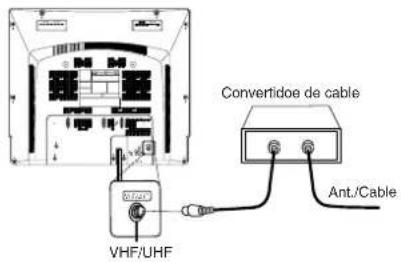
Realizando Confi guración Inicial
Presione FM/TV para la modalidad TV.
1 Conecte el cable electrico de la unidad en el enchufe de pared de la CA.
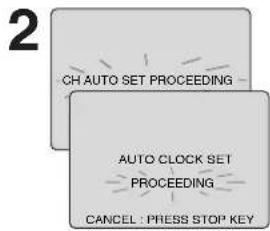
Encienda la TV mediante el control o directamente en la unidad. La unidad inicia la busqueda de canales y ajusta el tiempo automaticamente.
- Si usa convertidor de cable, enciendala y seleccione el Servicio Publico de Canales de Television (PBS) en su horario de uso o tiempo de su zona. Si utiliza receptor DSS este debe de estar apagado.
3
2/6/2003 THU 12:00PM DST:ON SETTING : CH 10 AUTO CLOCK SET COMPLETED
Selecciones se realizaran automaticamente, cuando la confi guracion termine la pantalla siguiente aparecera.
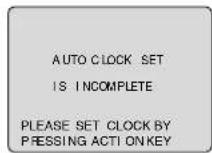
- Si "AUTO CLOCK SET IS INCOMPLETE" aparece en pantalla, coloque el tiempo usando el procedimiento manual (MANUAL CLOCK SET), vealo enseguida.
Nota
- Los botones de funciones son inoperantes durante la Configuración inicial.
- Dependiendo de las condiciones, puede que el Ajuste automático del reloj tarde más de 30 minutos. En ese caso, pulse STOP para detener la configuración y realice los ajustes manualmente. (Vea la p.12-13 de Libro de operaciones avanzadas).
Spanish Quick Use Guide/Guía para rápida consulta
Ajuste Manual del Reloj
Si el ajuste automático del reloj no se ha completado, ajuste el reloj manualmente de la siguiente manera.
1 Presione ACTION en el control remoto para visualizar la pantalla del menú RELOJ.
2 Presione ▲▼ para seleccionar el mes y SET para colocarlo. De la misma forma, seleccione y ajuste la fecha, año, hora y DST (Hora de Verano).
3 Presione dos veces la tecla ACTION para poner el RELOJ en marcha y salir.
Ajustar de nuevo el reloj
1 Presione ACTION para visualizar el menú.
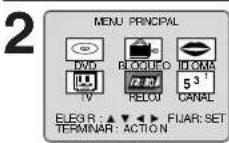
Presione ▲▼ para seleccionar "MANUAL" y luego presione SET.
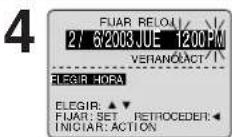
Presione ▲▼ y SET para seleccionar y ajustar la hora y la fecha.
5 Presione ACTION dos veces para que el reloj comience a funcionar y salir de este modo.
Operaciones básicas del DVD
1 Presione POWER en el control remoto o el aparato y luego el boton DVD.
2 Introducir un disco. 1) Presione OPEN/CLOSE.
2) Ponga un disco en la bandeja de disco.
- Sujete el disco sin tocar ninguna de sus superfi cies, póngalo con el lado donde esté impreso el título hacia arriba, alinéelo con las guías y póngalo en su posición apropiada. Disco de 3"(8 cm) Disco de 5" (12 cm)
3 Presione PLAY para Iniciar la reproducción. La bandeja del disco se cierra automáticamente.
- Si está usando un DVD interactivo (Interactive DVD) o un Vídeo CD con control de reproducción (playback control) y aparece un menú de títulos (TITLE MENU) en la pantalla, siga al paso 4.
4 1) Presione ▲▼◀ ▶ o las teclas numéricas para seleccionar el artículo deseado.
2) Presione SET para la reproducción. Si usa las teclas numéricas, la reproducción comienza automáticamente.
5 Presione STOP para parar la reproducción.
6 Presione OPEN/CLOSE para expulsar el disco.
Cambio del idioma de subtítulos [DVD solamente]
El idioma de los subtítulos seleccionado al hacer las fi jaciones iniciales se puede cambiar por otro idioma diferente, si éste se encuentra disponible.
![PANASONIC PV-27D53 - Cambio del idioma de subtítulos [DVD solamente] - 1](/content/2026/06/1190565/images/3e2da971d69e44dc4b0639187afec9befb8f83ee809a272408d6ca1827ab8014.jpg)
Presione SUB TI TLE durante la reproducción.
- Cuando no haya subtítulos grabados, “-” se visualizará en lugar del número de idioma.
![PANASONIC PV-27D53 - Cambio del idioma de subtítulos [DVD solamente] - 2](/content/2026/06/1190565/images/6e2719e07841bbdb1a12297be61f230924c7d82b8032488b97965401544cf2aa.jpg)
1) Presione ▲▼ para seleccionar el idioma deseado.
2) Presione ▶ (o ◀) para seleccionar "ACTIVO" o "INACTIVO."
Para buscar una escena en particular Búsqueda hacia adelante Presione SEARCH/SLOW▶▶en el modo de reproducción. Búsqueda hacia atrás → Presione SEARCH/SLOW ◀◀en el modo de reproducción. (Para liberar, presione PLAY)
Para saltar un capítulo o una pista Salto hacia adelante Presione SKIP+ ▶▶I en el modo de reproducción. Un capítulo (DVD) o una pista (Vídeo CD/CD) se salta cada ves que se oprime la tecla. Salto hacia atrás → Presione SKIP- ◀◀en el modo de reproducción.
Para ver una imagen fi ja Presione PAUSE durante la reproducción. (Para liberar, presione PLAY)
Para ver imágenes cuadro a cuadro (DVD/Vídeo CD) Presione PAUSE en el modo de imagen fi ja. La imagen avanza un cuadro cada vez que presiona la tecla. (Para volver a la reproducción normal, presione PLAY.)
Para ver en cámara lenta (DVD/Vídeo CD) Presione SEARCH/SLOW▶ o SEARCH/SLOW ◀ en el modo de imagen fi ja. (Para liberar, presione PLAY)
Cambio del idioma de la pista de sonido [DVD solamente]
El idioma de la pista de sonido seleccionado al hacer las fi jaciones iniciales se puede cambiar por otro idioma diferente, si éste se encuentra disponible.
![PANASONIC PV-27D53 - Cambio del idioma de la pista de sonido [DVD solamente] - 1](/content/2026/06/1190565/images/8e622354d6a73f2bd4a9f4ec891e6ebf961d77544785f44f7bd7efdf16f3d07c.jpg)
Presione AUDIO durante la reproducción para visualizar la pantalla AUDIO.
![PANASONIC PV-27D53 - Cambio del idioma de la pista de sonido [DVD solamente] - 2](/content/2026/06/1190565/images/c44f9219be9e7ced9ce349fc65bd984897f66f48f4f912bbdd0dec2cd97858a4.jpg)
Presione ▲▼ para seleccion el idioma deseado.
Spanish Quick Use Guide/Guía para rápida consulta
Visión desde otro ángulo [DVD solamente]
Algunos discos DVD tienen escenas que han sido fi Imadas simultáneamente desde un número de ángulos diferentes. Con estos discos, la misma escena podrá verse desde cada uno de estos ángulos diferentes utilizando el botón ANGLE.
1
![PANASONIC PV-27D53 - Visión desde otro ángulo [DVD solamente] - 1](/content/2026/06/1190565/images/b08a3714bb339027fb762f6960af8ecf69008741a159fc59b8ab1925755b8420.jpg)
Presione ANGLE
durante la reproducción para visualizar la pantalla de ángulo.
2
![PANASONIC PV-27D53 - Visión desde otro ángulo [DVD solamente] - 2](/content/2026/06/1190565/images/b8de8112401c0f5b1905a6cd043485167d44eee903558059d1e0620140be3902.jpg)
Presione ▲▼ para seleccionar el ángulo deseado.
Selección de vocal para los discos de Karaoke [DVD/Video CD]
1 Presione AUDIO durante la reproducción para visualizar la pantalla AUDIO.
2
![PANASONIC PV-27D53 - Selección de vocal para los discos de Karaoke [DVD/Video CD] - 1](/content/2026/06/1190565/images/e4e93c2bc3c0eac1897a6aba2d9a0aee2b816ef86fb371a98d2500ef242af114.jpg)
1) Presione ▲▼ (o ◀◀) para seleccionar el ajuste deseado. 2) Presione ▶ (o ◀) para ajustar. (DVD solamente)
• DVD Karaoke (1 vocal)
VOCAL ON→VOCAL OFF
• DVD Karaoke (2 vocales)
VOCAL V1→VOCAL V2→VOCAL V1+V2→VOCAL OFF
• Video CD
LR→L→R
Ampliación de la imagen [DVD solamente]
Durante la reproducción de un DVD, puede ampliar a imagen seleccionando la relación de zoom usando el botón ZOOM mediante control remoto.
Seleccione el tamaño de la imagen.
Presione ZOOM repetidamente para cambiar el tamaño de la imagen como se indica a continuación:
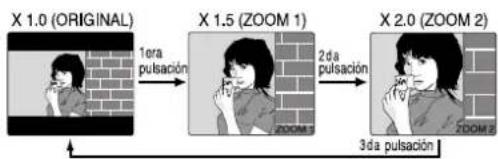
flowchart
graph LR
    A["X 1.0 (ORIGINAL)"] -->|1era pulsación| B["X 1.5 (ZOOM 1)"]
    B -->|2da pulsación| C["X 2.0 (ZOOM 2)"]
    C -->|3da pulsación| D["Final Output"]
■ Use los botones ▲, ▼ yí para desplazar la posición hacia arriba, hacia abajo, hacia la izquierda o hacia la derecha.
Utilización de un menú de títulos [DVD solamente]
Algunos discos con películas, por ejemplo, vienen con dos o más títulos. Si el disco tiene un menú de títulos grabados, el botón TITLE podrá utilizarse para seleccionar el título de la película.
1
Presione TITLE durante la reproducción. Ahora se visualiza una lista de los títulos del disco.
2
![PANASONIC PV-27D53 - Utilización de un menú de títulos [DVD solamente] - 1](/content/2026/06/1190565/images/8b0fd30649386cd120b0192d63904d779f944b891bb6ced6d912db86bf4b228b.jpg)
1) Presione ▲▼◀ ▶o las teclas numéricas para seleccionar el título deseado. 2) Presione SET o PLAY.
Utilización de un menu de DVD [DVD solamente]
Algunos discos DVD tienen estructuras únicas de menús llamadas menús DVD. Por ejemplo, los DVDs programados con un contenido complejo proporcionan menús guía, y los grabados con varios idiomas proporcionan menús para audio e idiomas de subtítulos. Aunque los contenidos de los menús DVD y la operación cambian de disco a disco, a continuación se explica la operación básica cuando se utiliza esta característica.
1 Presione MENU durante la reproducción. El menú de DVD introducido en el disco se visualiza ahora.
2
![PANASONIC PV-27D53 - Utilización de un menu de DVD [DVD solamente] - 1](/content/2026/06/1190565/images/144d2d13ce95f051e27bee8618cc07d4012d4a9bd4126ed888bc462e0b1c282a.jpg)
1) Presione ▲▼◀ ▶ o las teclas numéricas para seleccionar el articulo deseado. 2) Presione SET o PLAY.
For assistance, please call : 1-800-211-PANA(7262) or send e-mail to : consumerproducts@panasonic.com
Reproducción programada [Vídeo CD/CD]
Puede usted programar pistas específi cas y el orden de reproducción.
1 Presione ACTION en el modo paro (STOP) para visualizar MAIN MENU.
2
![PANASONIC PV-27D53 - Reproducción programada [Vídeo CD/CD] - 1](/content/2026/06/1190565/images/4d3bf706bcf96dc9661c7af4dd7285d34c59b4858cabe9a4f2630fc5e3189f5c.jpg)
1) Presione
para seleccionar "MODO DE REPRODUCCION."
2) Presione SET para visualizar.
4
![PANASONIC PV-27D53 - Reproducción programada [Vídeo CD/CD] - 2](/content/2026/06/1190565/images/c8e2e95dd62b95ff46cb81ff23c0e0929d2b8b31781b681dbc331340a1bace06.jpg)
1) Presione ▲▼
para seleccionar "REPRODUCCION DE PROGRAMAS."
2) Presione SET para visualizar.
5
![PANASONIC PV-27D53 - Reproducción programada [Vídeo CD/CD] - 3](/content/2026/06/1190565/images/5f3fe63a412a1fd5cff9f126bac753387f1cb9443a3c4e1ce79738e4355867d0.jpg)
1) Presione ▲▼◀ ▶
para seleccionar el número de la pista deseada. (Se visualizan los números de la pista del disco).
2) Presione SET para seleccionar.
- Repita el paso 5 para seleccionar otra pista.
- La pista seleccionada se añade a la parte derecha.
6
![PANASONIC PV-27D53 - Reproducción programada [Vídeo CD/CD] - 4](/content/2026/06/1190565/images/be6260bca9feb32057c737323804d78acad382df82d6ac076a06e0fc8d18ad1e.jpg)
1) Presione ▲▼◀ ▶
para seleccionar "INICIAR."
2) Presione SET.
- La reproducción comienza en la secuencia programada.
- Para cancelar, presione STOP durante la reproducción y luego presione CLEAR.
Reproducción arbitraria [Vídeo CD/CD]
Las pistas se reproducen de forma arbitraria.
1 Repita los pasos 1-3 de la "Reproducción programa".
2
![PANASONIC PV-27D53 - Reproducción arbitraria [Vídeo CD/CD] - 1](/content/2026/06/1190565/images/01d4c30a20219e1b158eef065da6c528a3e76c43aee6850774615d183bc994a4.jpg)
1) Presione
▲▼ para
seleccionar "REPRODUCCION ALEATORIA."
2) Presione SET.
• Comienza la reproducción arbitraria.
- Para cancelar, presione STOP durante la reproducción y luego presione CLEAR.
Spanish Quick Use Guide/Guía para rápida consulta
Funcionamiento del DVD utilizando visualizaciones en pantalla
Cuando se presiona DISPLAY, la visualización en pantalla muestra la información del disco (título / capítulo / número de lista, tiempo transcurrido de reproducción, audio / idioma del subtítulo, y ángulo) e información (repetir la reproducción, modo reproducción, Karaoke vocal encendido / apagado, etc.).
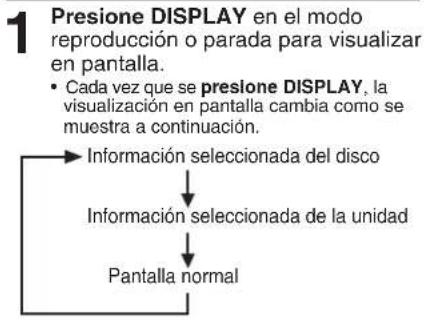
flowchart
graph TD
    A["Presione DISPLAY en el modo reproducción o parada para visualizar en pantalla."] --> B["Cada vez que se presione DISPLAY, la visualización en pantalla cambia como se muestra a continuación."]
    B --> C["Información seleccionada del disco"]
    C --> D["Información seleccionada de la unidad"]
    D --> E["Pantalla normal"]
2 1) Presione ▲▼ (o ◀▶) para seleccionar el artículo deseado. 2) Presione SET para colocar.
3
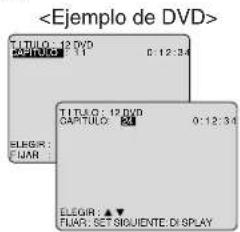
1) Presione ▲▼ para seleccionar el ajuste deseado. 2) Presione SET para colocar.
Limited Warranty
PANASONIC CONSUMER ELECTRONICS COMPANY, DIVISION OF MATSUSHITA ELECTRIC CORPORATION OF AMERICA One Panasonic Way Secaucus, New Jersey 07094 PANASONIC SALES COMPANY, DIVISION OF MATSUSHITA ELECTRIC OF PUERTO RICO, INC., AVE. 65 de Infantería, Km. 9.5 San Gabriel Industrial Park, Carolina, Puerto Rico 00985Panasonic/Quasar Video Products Limited Warranty
Limited Warranty Coverage
If your product does not work properly because of a defect in materials or workmanship, Panasonic Consumer Electronics Company or Panasonic Sales Company (collectively referred to as "the warrantor") will, for the length of the period indicated on the chart below, which starts with the date of original purchase ("warranty period"), at its option either (a) repair your product with new or refurbished parts, or (b) replace it with a new or a refurbished product. The decision to repair or replace will be made by the warrantor.| Product | Parts Labor Service Contact Number | |||
| Camcorder | One (1) Year (except CCD Image Sensor)CCD Image Sensor - 6 (Six)Months | Ninety (90) DaysNinety (90) Days | Carry-In or Mail-In 1-800-211-PANA(7262) | |
| DVD/VCR Deck,A/V Mixer | One (1) Year Ninety (90) Days | Carry-In or Mail-In | 1-800-211-PANA(7262) | |
| TV/VCR, TV/DVD,TV/DVD/VCRCombination | One (1) Year (except CRT)CRT - Two (2) Years | Ninety (90) DaysNinety (90) Days | Carry-In: 21" CRT and SmallerIn-Home or Carry-In: 22" CRT and Larger | 1-800-211-PANA(7262) |
| TV/HDRCombination | One (1) Year (except CRT)CRT - Two (2) Years | Ninety (90) DaysNinety (90) Days | In-Home or Carry-In 1-888-843-9788 | |
| RechargeableBatteries(in exchange for defective item) | Ten (10) Days Not Applicable | 1-800-211-PANA(7262) | ||
| Tape(in exchange for defective item) | Five (5) Days | Not Applicable | Carry-In or Mail-In | 1-800-211-PANA(7262) |
| Memory Cards(in exchange for defective item) | Ninety (90) Days | Not Applicable | Carry-In or Mail-In | 1-800-211-PANA(7262) |