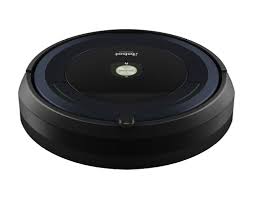
ROOMBA 695 - Robot vacuum IROBOT - Free user manual and instructions
Find the device manual for free ROOMBA 695 IROBOT in PDF.


| Product type | Robot vacuum |
| Brand | iRobot |
| Model | Roomba 695 |
| Dimensions (diameter x height) | 34 cm x 9 cm |
| Weight | 3.6 kg |
| Power supply | Rechargeable Ni-MH battery 14.8 V / 3000 mAh or Li-ion 3300 mAh; mains charger (100-240 V) |
| Battery life | About 60 to 90 minutes (depending on floor type) |
| Charging time | 3 hours for first charge; full charge in about 2 hours |
| Cleaning modes | Automatic cleaning, spot cleaning (SPOT), scheduled cleaning |
| Scheduling | Up to 7 scheduled cleanings per week (day, hour, minute settings) |
| Sensors | Cliff sensors (anti-fall), dirt sensors (Dirt Detect), proximity sensors |
| Virtual barrier | Dual Mode Virtual Wall: barrier mode (up to 3 m) and halo mode (60 cm protection zone) |
| Charging station | Home Base: automatic charging and storage |
| Dustbin capacity | About 0.6 L |
| Filtration | High performance filter (washable); replacement recommended every 2 months |
| Routine maintenance | Empty dustbin after each use; clean filter and brushes once a week (twice with pets) |
| Brushes | Main brush (2 side brushes); replacement every 6-12 months |
| Front wheel | Swivel wheel; clean every 2 weeks; replace every 12 months |
| Safety | Indoor use only; do not use on wet surfaces; do not sit or stand on device; keep away from floor power outlets; do not use with damaged battery |
| Spare parts available | Dustbin, filter, brushes, wheel, battery, dock, virtual barrier |
| Repairability | User replaceable parts; iRobot customer support |
| Warranty | 1 year (varies by country) |
Frequently Asked Questions - ROOMBA 695 IROBOT
User questions about ROOMBA 695 IROBOT
0 question about this device. Answer the ones you know or ask your own.
Ask a new question about this device
Download the instructions for your Robot vacuum in PDF format for free! Find your manual ROOMBA 695 - IROBOT and take your electronic device back in hand. On this page are published all the documents necessary for the use of your device. ROOMBA 695 by IROBOT.
USER MANUAL ROOMBA 695 IROBOT
Important Safety Instructions
WARNING: TO REDUCE THE RISK OF INJURY OR DAMAGE, READ THE FOLLOWING SAFETY PRECAUTIONS WHEN SETTING UP, USING AND MAINTAINING YOUR ROBOT.
THIS APPLIANCE CAN BE USED BY CHILDREN AGED FROM 8 YEARS AND ABOVE AND PERSONS WITH REDUCED PHYSICAL, SENSORY OR MENTAL CAPABILITIES OR LACK OF EXPERIENCE AND KNOWLEDGE IF THEY HAVE BEEN GIVEN SUPERVISION OR INSTRUCTION CONCERNING USE OF THE APPLIANCE IN A SAFE WAY AND UNDERSTAND THE HAZARDS INVOLVED. CHILDREN SHALL NOT PLAY WITH THE APPLIANCE. CLEANING AND USER MAINTENANCE SHALL NOT BE MADE BY CHILDREN WITHOUT SUPERVISION.
WARNING: TO AVOID ELECTRIC SHOCK DO NOT EXPOSE THE ELECTRONICS OF YOUR ROBOT, OR THE INTEGRATED DOCK-CHARGER KNOWN AS HOME BASE. THERE ARE NO USER SERVICEABLE PARTS INSIDE. REFER SERVICING TO QUALIFIED SERVICE PERSONNEL. DO NOT HANDLE YOUR ROBOT AND HOME BASE™ WITH WET HANDS.
Important Safety Instruction (cont.)
Heed all warnings on your robot, and it's parts.
WARNING: Risk of electric shock, use indoors in dry location only.
- Your robot is not a toy. Do not sit or stand on this device. Small children and pets should be supervised when your robot is operating.
- Store and operate your robot in room temperature environments only.
- Do not use this device to pick up sharp objects, glass, or anything that is burning or smoking.
- Do not use this device to pick up spills of water bleach, paint, or other chemicals, or anything wet.
- Do not spray or pour liquids on your robot.
- Before using this device, pick up objects like clothing, loose papers, pull cords for blinds or curtains, power cords, and any fragile objects. If the device passes over a power cord and drags it, there is a chance an object could be pulled off a table or shelf.
- If the room to be cleaned contains a balcony, a physical barrier should be used to prevent access to the balcony and ensure safe operation.
- Do not place anything on top of your robot.
- Be aware that the robot moves on its own. Take care when walking in the area that the robot is operating in to avoid stepping on it.
- Do not operate the robot in areas with exposed electrical outlets in the floor.
- WARNING Shock Hazard: Your robot comes with a region approved power supplycord. Do not use any other power supply cord. For replacement cords, please contact Customer Care to ensure proper selection of country specific power supply cord.
- This robot is intended for dry floor use only.
- WARNING Shock and Fire Hazard: This product is designed to be plugged into a standard outlet only. Product may not be used with any type of power converter. Use of power converters will immediately void the warranty.
- Do not use non-rechargeable batteries. Use only the rechargeable battery supplied with the product. For replacement, purchase identical iRobot battery or contact iRobot Customer Care for alternative battery options.
- CAUTION: Only charge one of the following iRobot batteries: maximum 14.8V, max 3000mAh Ni-MH or maximum 3300mAh Li-ion battery. Other type of batteries may burst causing injury. Always contact Customer Care for the correct replacement of your battery.
WARNING Shock Hazard: Do not use a Home Base with a damaged cord or plug if the cord or plug is damaged, it must be replaced.
- Always charge and remove the battery from your robot and accessories before long-term storage or transportation.
- If you live in an area prone to electrical storms, it is recommended that you use additional surge protection. Your robot's Home Base may be protected with a surge protector in the event of severe electrical storms.
WARNING Shock Hazard: Always disconnect your robot from the Home Base before cleaning or maintaining it.
Before every use, check the battery pack for any sign of damage or leakage. Do not charge damaged or leaking battery packs.
- WARNING Chemical Exposure: If the battery pack is leaking, do not allow the liquid to come in contact with skin or eyes. If contact has been made, wash the affected area with copious amounts of water and seek medical advice. Place the battery in a sealed plastic bag and dispose of safely according to local environmental regulations. return it to your local authorized iRobot Service Center for disposal.
- The battery pack must be removed from the robot before disposal.
- WARNING Fire or Explosion Hazard: Do not crush or dismantle battery packs. Do not heat or place the battery pack near any heat source or direct sunlight. Do not incinerate or short-circuit the battery pack. Do not subject batteries to mechanical shock.
- Do not immerse the battery pack in any liquid.
- Contact your local waste management authority for battery recycling and disposal regulations in your area.

The symbol on the product or its packaging indicates:
Do not dispose of electrical appliances or batteries as unsorted municipal waste, use separate collection facilities. Contact your local authority for information regarding the collection systems available. If electrical appliances are disposed of in landfills or dumps, hazardous substances can leak into the groundwater and get into the food chain, damaging your health and well-being. Please contact your local or regional waste authority for more information on collection, reuse and recycling programs.
Table of Contents
Important Safety Instructions..
About Your Roomba 2
Using Your Roomba 3
Scheduling 4
Accessories 4
Regular Robot Care 5
Troubleshooting 8
iRobot Customer Care 9
About your Roomba
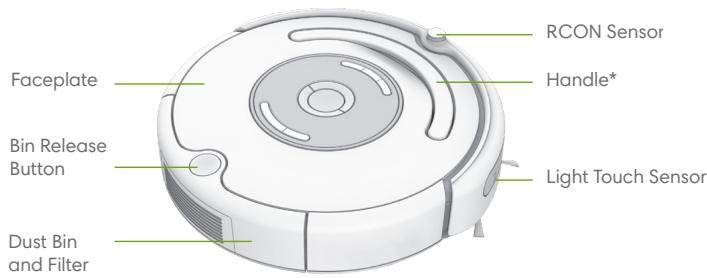
Top View
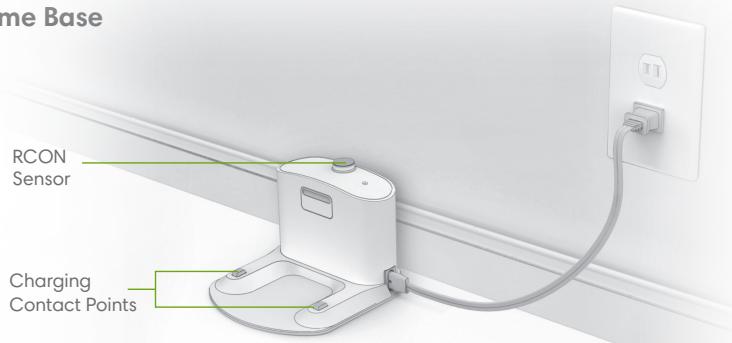
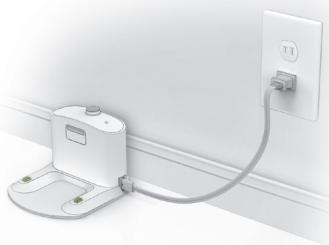
Home Base
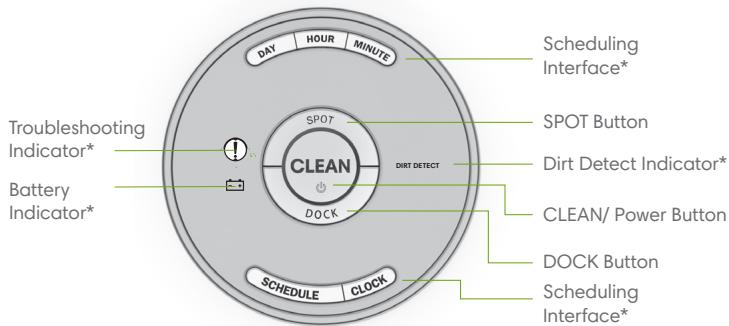
Buttons & Indicators
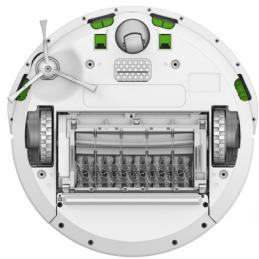
Bottom View
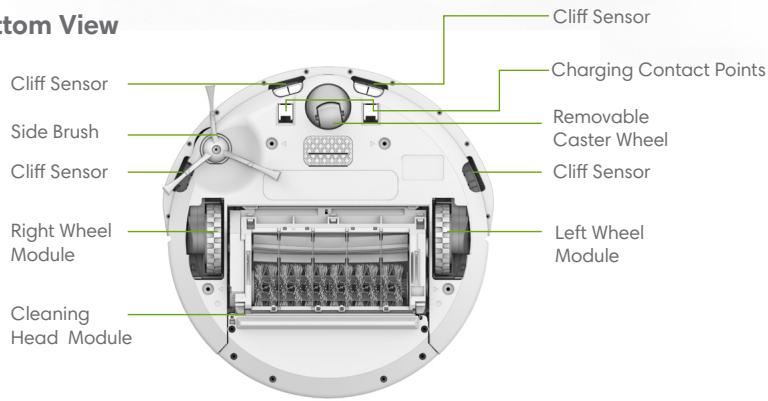
*Features and/or location may vary by model
Using your Roomba
Positioning the Home Base
Place the Home Base in an open, uncluttered area leaving the following distances around the Home Base:
- At least 1.5 feet (0.5 meters) on each side of the Home Base
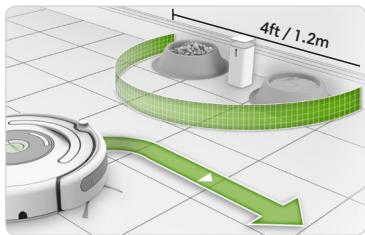
- At least 4 feet (1.2 meters) in front of the Home Base, and at least 4 feet (1.2 meters) away from stairs
- At least 8 feet (2.4 meters) from Virtual Wall Barriers
Always keep the Home Base plugged in.
Use Instructions
- Turn your robot over and remove the battery pull tab.
Then place Roomba on the Home Base to charge the battery. - To fully charge the battery before the first cleaning cycle, allow Roomba to charge on the Home Base for 3 hours.
- Manually wake Roomba up by pressing CLEAN once.
To start a cleaning cycle, press CLEAN again.

Note: Remove excess clutter from floors before cleaning (e.g. clothing, toys, etc.). Use Roomba frequently to maintain well-conditioned floors.
- To pause Roomba during a cleaning cycle, press CLEAN.
To resume the cleaning cycle, press CLEAN again. - To end the cleaning cycle and put Roomba in standby mode, press and hold CLEAN until Roomba's indicators turn off.
- To send Roomba back to its Home Base during a cleaning cycle, press DOCK on Roomba. This will end the cleaning cycle.
- To use SPOT Cleaning, place Roomba on top of the localized debris and press SPOT on the robot. Roomba will thoroughly clean the area by spiraling outward about 3 feet (1 meter) in diameter and then spiraling inward to where it started.

Note: After each use, empty the bin and clean the filter.
- Always store Roomba on the Home Base so it's charged and ready to clean when you need it. If storing off of the Home Base, remove the battery first and then store Roomba and the battery in a cool, dry place.
Battery and Charging
Charge Roomba using the Home Base. Indicator lights will turn off after 60 seconds to conserve energy while Roomba is charging. Check status of the battery by pressing the CLEAN button to illuminate the Battery Indicator or the CLEAN button. Use this chart to determine the status of the battery while charging.
| Indicator Color | Battery Status |
| Amber | Charging |
| Solid green | Fully charged |
Setting the Clock (select models)
You must set the clock before scheduling Roomba to clean. To set the time:

Press and hold CLOCK.

While holding CLOCK, use the DAY, HOUR, and MINUTE buttons to set the correct time.

Release CLOCK. Roomba will beep to indicate that the time has been set.
Scheduling (select models)
You can schedule Roomba to clean once per day, up to seven times per week. You must set the time before setting a schedule.
To Set or Change the Cleaning Schedule
Press and hold SCHEDULE.
2 While holding SCHEDULE, use the DAY, HOUR, and MINUTE buttons to set the schedule.
3 Release SCHEDULE. Roomba will beep to indicate that the schedule has been set.
To Delete a Scheduled Cleaning Time
1 Press and hold SCHEDULE.
2 While holding SCHEDULE, press the DAY button to cycle through scheduled cleaning times.
3 When Roomba displays the scheduled cleaning time you'd like to delete, press and hold DAY for five seconds.
4 Release SCHEDULE. Roomba will beep to indicate the cleaning time has been deleted.
Accessories
The Dual Mode Virtual Wall Barrier (optional accessory for all models)
The Dual Mode Virtual Wall barrier keeps Roomba in the places you want to be cleaned — and out of the ones you don't. In between cleaning cycles, you can leave the device operating in its position on the floor. You can set your device to one of two modes to fit your home's cleaning needs:
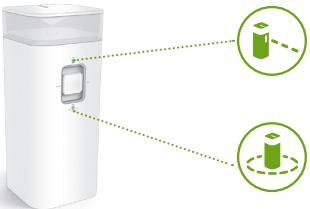
Note: Under normal use, batteries will last 8-10 months. If you are not planning on using your Virtual Wall device for an extended period of time and you would like to store it, be sure to switch it to the "Off" (middle) position.
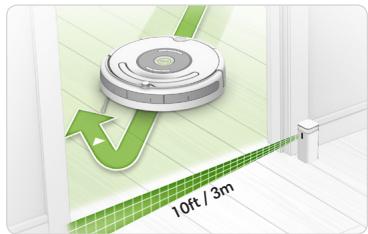
Virtual Wall Mode: When the switch is in the "up" position (1-), the device functions as a Virtual Wall. This means that you can set it to block openings of up to 10 feet (3 meters). It creates an invisible, cone-shaped barrier that only Roomba can see.
Note: This barrier gets wider as it gets further from the device (refer to illustration).
Halo Mode: When the switch is in the "down" position ( ) , the device creates a protective zone that Roomba will not enter. This prevents Roomba from bumping into items you want to protect (e.g. a dog bowl or vase) or crossing into undesired areas (e.g. a corner or under a desk). The Halo is invisible and reaches approximately 24 inches (60 centimeters) from the center of the device.
Regular Robot Care
Recommended Robot Care
To keep Roomba running at peak performance, perform the following care procedures. If you notice Roomba picking up less debris from your floor, empty the bin, clean the filter and clean the brushes.
| Robot Part | Care Frequency | Replacement Frequency |
| Bin | After each use | - |
| Filter | Once per week (twice per week in homes with pets) | Every 2 months |
| Brushes | Once per week (twice per week in homes with pets) | Every 6-12 months |
| Front Caster Wheel | Once every two weeks | Every 12 months |
| Side Brushes Cliff Sensors Charging Contacts | Once per month | - |

Note: iRobot manufactures various replacement parts and assemblies. Purchase replacement parts by visiting www.irobot.com/Roomba600. If you have questions regarding replacement parts, please contact iRobot Customer Care for more information.
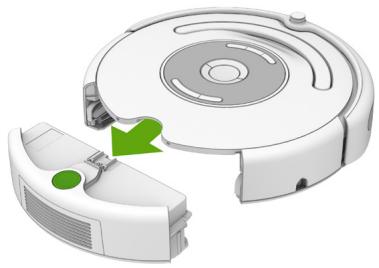
Emptying the Bin
Press the button and pull to remove the bin.
Cleaning the Filter
Pull the filter to remove. Tap the filter against the rubbish container to clear the debris. Reinstall the filter.
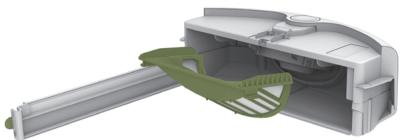
Replace the filter every two months.
Cleaning the Brushes
1 Open the brush guard by lifting both tabs.
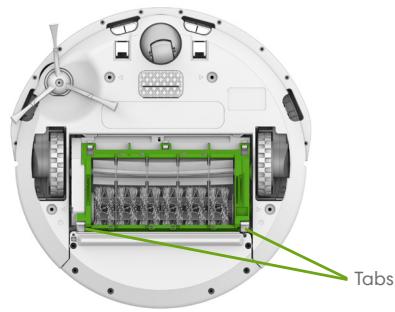
2 Remove the brushes and remove any hair or debris.
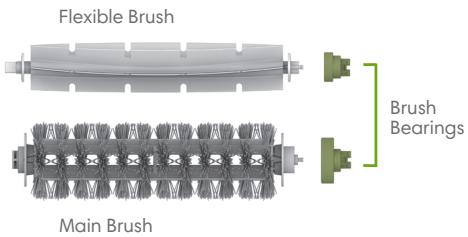
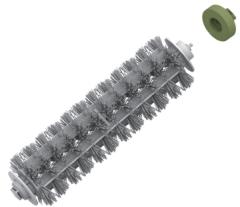
3 Remove and clean the hair and dirt from the brush bearings.
Cleaning the Front Caster Wheel
Pull firmly on the front wheel to remove from the front caster assembly.
2 Remove any debris from inside the wheel cavity.
Spin the wheel by hand. If the rotation is restricted, remove the wheel from its housing and push firmly to remove the axle and clear any debris or hair wrapped around it.
4 Reinstall all parts when finished. Make sure the wheel clicks back into place.
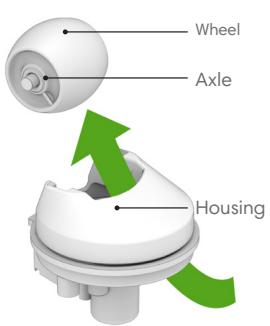
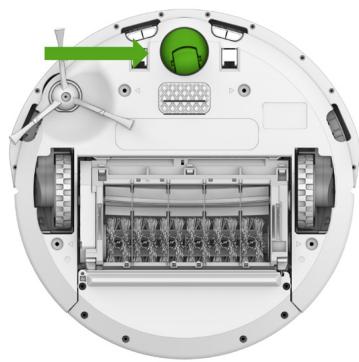

Important: A front wheel clogged with hair and debris could result in floor damage.
Cleaning the Cliff Sensors and Charging Contacts
Wipe all sensors and charging contacts with a clean, dry cloth.
Cleaning the Side Brush
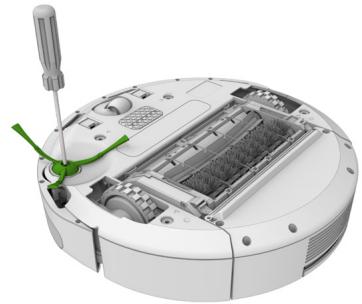
Use a small screwdriver to remove the screw. Pull the side brush to remove it from the robot. Remove any hair and/or debris and reinstall the side brush.
Troubleshooting
Problems While Cleaning
If the battery is low, the Battery Indicator or CLEAN button will illuminate red. Please charge immediately. Place the Roomba on the Home Base to charge.
If the Roomba encounters an error while cleaning, the Troubleshooting Indicator or CLEAN button will blink and you will hear an audible error message. Follow the audible instructions. The message can be repeated by pressing CLEAN.
If the problem persists, visit global.irobot.com to contact your local customer support center.
Problems While Charging
If Roomba encounters an error while charging, the Troubleshooting Indicator will blink and you will hear an audible error message. Check charging contacts on the robot and Home Base to ensure that they are clean and free of debris. If you continue to experience problems while charging, visit global.irobot.com to contact your local customer support center.
If you have questions or comments about this product, please contact iRobot before contacting a retailer.
Visit the iRobot Owner's Center site at global.irobot.com for support tips, frequently asked questions, and information about accessories and other iRobot products.
Lithium Ion Battery
(available for select models)
Important: Lithium ion batteries and products that contain lithium ion batteries are subject to stringent transportation regulations. If you need to ship this product (with the battery included) for service, travel or any other reason, you MUST comply with the following shipping instructions:
» Remove the lithium ion battery from the product
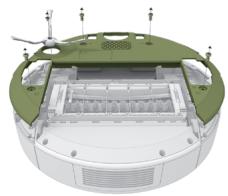
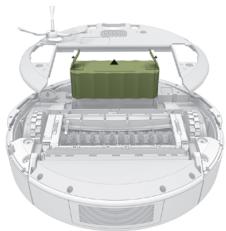
- Turn robot over and remove the side brush screw and then remove the side brush by pulling gently.
- Unscrew the four screws on bottom cover and lift off bottom cover.
- Remove the battery.
» Place a piece of tape over the battery's metal charging contacts
» Reinstall the battery (with the tape on it) in the product and secure the battery door
» Package the product in its original packaging or in your own packaging that prevents any movement during transportation
» Ship via ground transportation only (no air shipping)
iRobot Customer Care
USA & Canada
If you have questions or comments about your Roomba, please contact iRobot before contacting a retailer.
You can start by visiting www.irobot.com/support for support tips, frequently asked questions and information about accessories. Should you still need assistance, call our Customer Care team at (877) 855-8593.
iRobot Customer Care Hours:
- Monday to Friday, 9AM - 9PM Eastern Time
Saturday and Sunday, 9AM - 6PM Eastern Time
Outside USA & Canada
Visit global.irobot.com to:
- Learn more about iRobot in your country
- Get hints and tips to improve your Roomba's performance
Get answers to questions - Contact your local support center
For EU Declaration of Conformity information, visit www.irobot.com/compliance.
Robot
©2017 iRobot Corporation, 8 Crosby Drive, Bedford, MA 01730 USA. All rights reserved. iRobot, Roomba, iAdapt, Home Base and Virtual Wall are registered trademarks of iRobot Corporation. AeroVac and Dirt Detect are trademarks of iRobot Corporation.