AOPEN DE3105 - Computing

DE3105 - Computing AOPEN - Free user manual and instructions

Find the device manual for free DE3105 AOPEN in PDF.

📄 1 pages English EN Download 💬 AI Question 10 questions ⚙️ Specs
Notice AOPEN DE3105 - page 1
Pick your language and provide your email: we'll send you a specifically translated version.
Type de produitDesktop PC
MarqueAOpen
ModèleDE3105
Dimensions (L x l x H)200 x 200 x 50 mm (7.9 x 7.9 x 2.0 in)
Poids1.5 kg (3.3 lb)
AlimentationAdaptateur secteur externe 65W
ProcesseurIntel Celeron ou Atom (selon configuration)
Mémoire RAMJusqu'à 8 Go DDR3 ou DDR4
StockageDisque dur SATA 2.5 pouces ou SSD
Système d'exploitationWindows 10/11 Pro ou Linux
ConnectivitéEthernet Gigabit, Wi-Fi 802.11ac, Bluetooth 4.2
Ports4x USB 3.0, 2x USB 2.0, HDMI, VGA, RJ45, prise audio
Fonctions principalesBureautique, navigation web, lecture multimédia, déploiement en kiosque
Entretien et nettoyageDépoussiérer les grilles d'aération avec un chiffon doux et sec ; éviter les liquides
SécuritéVentilation adéquate, ne pas exposer à l'humidité ou à des températures extrêmes
Pièces détachéesBloc d'alimentation, batterie CMOS, ventilateur, kit de montage VESA
RéparabilitéAccès par panneau inférieur ; RAM et SSD remplaçables
Garantie2 ans pièces et main-d'œuvre
Température de fonctionnement0 °C à 40 °C (32 °F à 104 °F)
CertificationsCE, FCC, RoHS

Frequently Asked Questions - DE3105 AOPEN

How do I connect the DE3105 to a monitor?
Use the HDMI or VGA port on the rear panel. Connect one end of the cable to the PC and the other to your monitor.
Can I upgrade the RAM?
Yes, the DE3105 supports up to 8 GB of RAM. Open the bottom panel to access the RAM slot. Use DDR3 or DDR4 SO-DIMM modules depending on your model.
What power adapter does the DE3105 require?
The device uses an external 65W power adapter with a DC barrel jack. Ensure the voltage matches your local mains (100-240V).
How do I reset the BIOS password?
Open the case and locate the CMOS battery. Remove it for 30 seconds, then reinsert. This clears the BIOS settings including the password.
What is the maximum resolution supported?
The DE3105 supports up to 1920x1080 (Full HD) via HDMI and 1920x1200 via VGA. 4K is not supported.
Does the DE3105 support Wi-Fi?
Yes, it has built-in 802.11ac Wi-Fi and Bluetooth 4.2. Ensure the antenna (if external) is properly connected.
How do I mount the DE3105 behind a monitor?
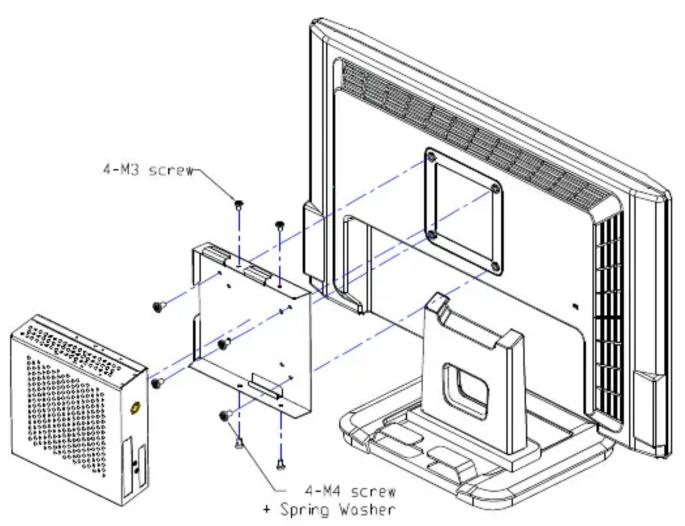
The DE3105 supports VESA mount (75x75mm or 100x100mm). Use the included mounting bracket and screws to attach it to the back of a VESA-compatible monitor.
What should I do if the device overheats?
Ensure the ventilation grills are not blocked. Clean dust with compressed air. Place the PC in a well-ventilated area. If problem persists, check the fan operation.
Can I install a 2.5-inch SSD instead of an HDD?
Yes, the DE3105 accepts standard 2.5-inch SATA drives (HDD or SSD). Open the bottom panel and replace the existing drive.
How do I update the drivers?
Visit the AOpen support website (www.aopen.com) and download the latest drivers for the DE3105. Alternatively, use Windows Update or a driver update tool.

User questions about DE3105 AOPEN

0 question about this device. Answer the ones you know or ask your own.

Ask a new question about this device

The email remains private: it is only used to notify you if someone responds to your question.

No questions yet. Be the first to ask one.

Download the instructions for your Computing in PDF format for free! Find your manual DE3105 - AOPEN and take your electronic device back in hand. On this page are published all the documents necessary for the use of your device. DE3105 by AOPEN.

USER MANUAL DE3105 AOPEN

Installation Guide for Digital Engine Fanless model

In order to get the better thermal flow effect when install Digital Engine fanless model in vertical position, please follow the direction as below diagram.

Suitable Model: DE2700, DE896-FL, DE945-FL

Wall Mount
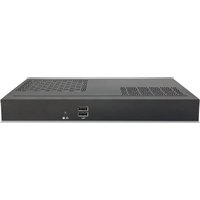
CPU/NB Heatsink Rear IO H.D.D.

VESA Mount
4-M3 screw 4-M4 screw + Spring Washer

Table of contents Click a title to access it
Manual assistant
Powered by Anthropic
Waiting for your message
Product information

Brand : AOPEN

Model : DE3105

Category : Computing