
70-292-11 - Cables for Computers and Peripherals Extron - Free user manual and instructions
Find the device manual for free 70-292-11 Extron in PDF.


| Type of product | Cable for computers and peripherals |
| Brand | Extron |
| Model | 70-292-11 |
| Cable length | 6 ft (1.8 m) |
| Connector type | Male to male |
| Weight | Approx. 0.15 lbs (68 g) |
| Power requirement | None (passive) |
| Primary function | Transmit audio and video signals |
| Compatible devices | Computers, monitors, projectors, AV equipment |
| Maintenance instructions | Wipe with a soft, dry cloth; avoid liquids |
| Safety warnings | Do not bend excessively; keep away from heat sources |
| Spare parts availability | Not applicable (integrated cable) |
| Reparability | Non-repairable; replace if damaged |
| Operating temperature | 32°F to 122°F (0°C to 50°C) |
| Storage temperature | -4°F to 140°F (-20°C to 60°C) |
| Environmental compliance | RoHS, REACH |
| Package contents | 1 cable |
| Warranty | Limited lifetime warranty (check Extron) |
Frequently Asked Questions - 70-292-11 Extron
User questions about 70-292-11 Extron
0 question about this device. Answer the ones you know or ask your own.
Ask a new question about this device
Download the instructions for your Cables for Computers and Peripherals in PDF format for free! Find your manual 70-292-11 - Extron and take your electronic device back in hand. On this page are published all the documents necessary for the use of your device. 70-292-11 by Extron.
USER MANUAL 70-292-11 Extron
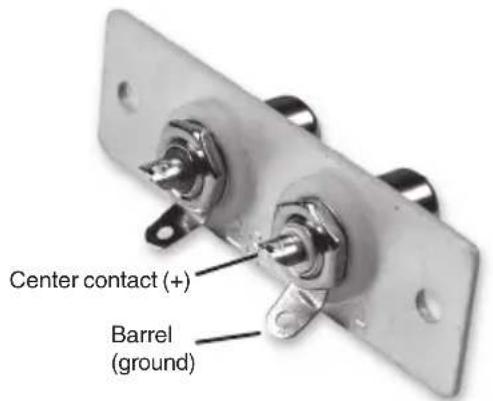
RCA to Solder CupRCA to Captive S
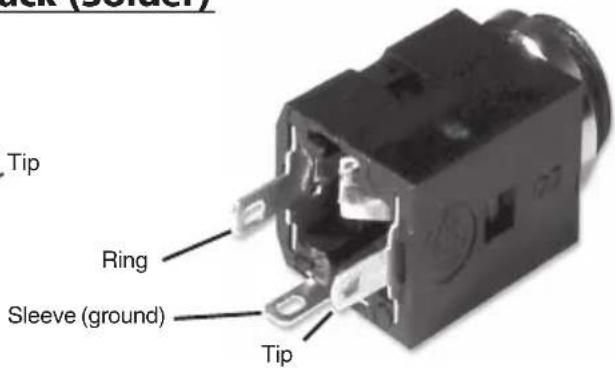
3.5mm Stereo Mini Jack (Solder)
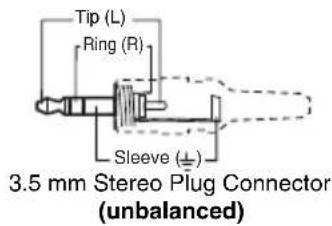
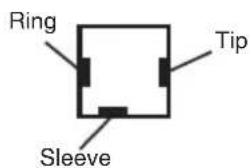
Wiring 3.5 mm Tip-Ring-Sleeve Mini Stereo Plug
68-1054-01
Rev. B
08 05
Extron Electronics, USA
714.491.1500
Fax 714.491.1517
www.extron.com
Extron Electronics, Europe
The Netherlands
+31.33.453.4040
Fax +31.33.453.4050
Extron Electronics, Asia
+65.6383.4400
Fax +65.6383.4664
Extron Electronics, Japan
+81.3.3511.7655
Fax +81.3.3511.7656
Brand : Extron
Model : 70-292-11
Category : Cables for Computers and Peripherals