
DP Pro P/25 - Câbles pour ordinateurs et périphériques Extron - Free user manual and instructions
Find the device manual for free DP Pro P/25 Extron in PDF.


| Product Type | DisplayPort Cable |
| Brand | Extron |
| Model | DP Pro P/25 |
| Length | 25 ft (7.6 m) |
| Connector Type | DisplayPort Male to DisplayPort Male |
| Bandwidth | Up to 21.6 Gbps (DisplayPort 1.2 compliant) |
| Max Resolution | 3840x2160 @ 60Hz (4K Ultra HD) |
| Shielding | Dual-shielded with foil and braid |
| Jacket Material | PVC |
| Color | Black |
| Weight | 0.4 kg (14 oz) |
| Cable Diameter | 8.0 mm (0.31 in) |
| Compliance | RoHS, REACH |
| Operating Temperature | -10°C to 60°C (14°F to 140°F) |
| Storage Temperature | -20°C to 70°C (-4°F to 158°F) |
| Latches | Latching connectors for secure connection |
| Warranty | 3 years |
Frequently Asked Questions - DP Pro P/25 Extron
User questions about DP Pro P/25 Extron
0 question about this device. Answer the ones you know or ask your own.
Ask a new question about this device
Download the instructions for your Câbles pour ordinateurs et périphériques in PDF format for free! Find your manual DP Pro P/25 - Extron and take your electronic device back in hand. On this page are published all the documents necessary for the use of your device. DP Pro P/25 by Extron.
USER MANUAL DP Pro P/25 Extron
DP Pro Plenum Series Cable Guide
The Extron DP Pro Plenum cables support digital video resolutions up to 8K/30 at 4:4:4 while maintaining a small and flexible diameter (0.18" [4.7 mm]) ideal for an installation with a tight bend radius. These unidirectional, plenum rated cables are offered in seven lengths from 25 feet (7.6 m) to 150 feet (45.7 m):
| Model Description | |
| DP Pro P/25 DP Pro Plenum Cable M-M 25 feet (7.6 m) | |
| DP Pro P/35 DP Pro Plenum Cable M-M 35 feet (10.6 m) | |
| DP Pro P/50 DP Pro Plenum Cable M-M 50 feet (15.2 m) | |
| DP Pro P/75 DP Pro Plenum Cable M-M 75 feet (22.8 m) | |
| DP Pro P/100 DP Pro Plenum Cable M-M 100 feet (30.4 m) | |
| DP Pro P/125 DP Pro Plenum Cable M-M 125 feet (38 m) | |
| DP Pro P/150 DP Pro Plenum Cable M-M 150 feet (45.7 m) | |
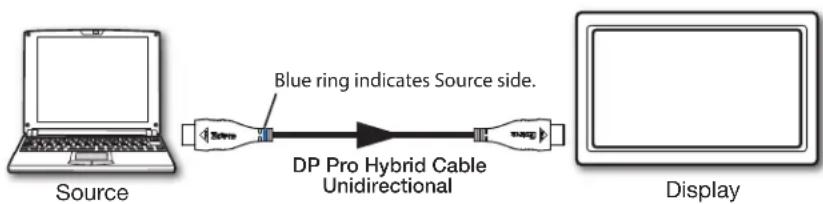
NOTE: The DP Pro Plenum cables are unidirectional from source to display.
DP Pro Plenum Series Cable Guide, Continued
flowchart
graph LR
    A["Source"] --> B["Blue ring indicates Source side."]
    B --> C["DP Pro Hybrid Cable Unidirectional"]
    C --> D["Display"]
NOTES:
- The DP Pro Plenum connectors are labeled Source and Display. Be sure to connect them accordingly for proper signal flow.
- Insert the connector with the blue ring into the source.
Brand : Extron
Model : DP Pro P/25
Category : Câbles pour ordinateurs et périphériques