
SMX040 - Cables for Computers and Peripherals APC - Free user manual and instructions
Find the device manual for free SMX040 APC in PDF.


| Product Type | Power Cable |
| Brand | APC |
| Model | SMX040 |
| Category | Computer Cables & Peripherals |
| Length | 1.8 m (6 ft) |
| Connector Type | C13 to C14 (IEC) |
| Compatibility | APC UPS units, computers, monitors |
| Color | Black |
| Material | PVC jacket, copper conductors |
| Weight | 0.25 kg (0.55 lbs) |
| Package Contents | 1 x Power Cable |
| Special Features | Standard IEC cord, durable |
| Warranty | 2 years limited |
| Certification | UL, CSA, RoHS |
| Operating Temperature | 0°C to 45°C (32°F to 113°F) |
| Storage Temperature | -20°C to 60°C (-4°F to 140°F) |
| Maintenance | Wipe with a dry cloth; avoid liquids |
| Safety Instructions | Do not bend sharply; unplug by gripping plug |
Frequently Asked Questions - SMX040 APC
User questions about SMX040 APC
0 question about this device. Answer the ones you know or ask your own.
Ask a new question about this device
Download the instructions for your Cables for Computers and Peripherals in PDF format for free! Find your manual SMX040 - APC and take your electronic device back in hand. On this page are published all the documents necessary for the use of your device. SMX040 by APC.
USER MANUAL SMX040 APC
Smart-UPS™ X-Series 120 VDC External Battery Pack Installation
Important Safety Messages
SAVE THESE INSTUCTIONS - This manual contains important instructions that should be followed during installation and maintenance of the Smart-UPS and batteries.
Read these instructions carefully and look at the equipment to become familiar with the device before trying to install, operate, service or maintain it. The following special messages may appear throughout this document or on the equipment to warn of potential hazards or to call attention to information that clarifies or simplifies a procedure.

The addition of this symbol either to a “Danger” or “Warning” safety label indicates that an electrical hazard exists which will result in personal injury if the instructions are not followed.

This is the safety alert symbol. It is used to alert you to potential personal injury hazards. Obey all safety messages that follow this symbol to avoid possible injury or death.
DANGER
DANGER indicates a hazardous situation which, if not avoided, will result in death or serious injury.
WARNING
WARNING indicates a hazardous situation which, if not avoided, could result in death or serious injury.

CAUTION
CAUTION indicates a hazardous situation which, if not avoided, could result in minor or moderate injury.
NOTICE
NOTICE is used to address practices not related to physical injury.
Product Handling Guidelines

<18 kg <40 lb

18-32 kg 40-70 lb

32-55 kg 70-120 lb

55 kg 120 lb


Safety and General Information
Read the Safety Guide included in the package before installation.
- Adhere to all national and local electrical codes. - Changes and modifications to this unit not expressly approved by APC by Schneider Electric could void the warranty.
- This unit is intended only for indoor use in a controlled environment.
- Do not operate this unit in direct sunlight, in contact with fluids, or where there is excessive dust or humidity
- Be sure the air vents on the UPS are not blocked. Allow adequate space for proper ventilation.
• The equipment is heavy. Always practice safe lifting techniques adequate for the weight of the equipment.
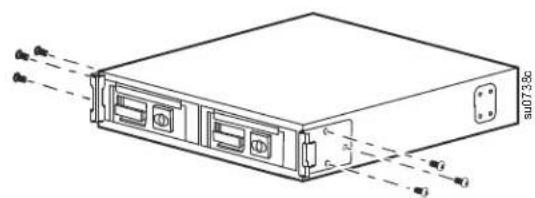
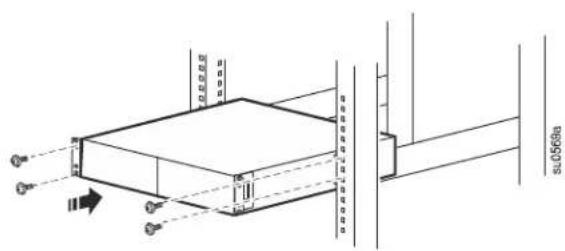
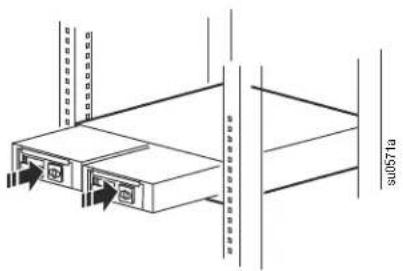
- The batteries are heavy. Remove the batteries before installing the UPS and external battery packs (XLBPs) in a rack.
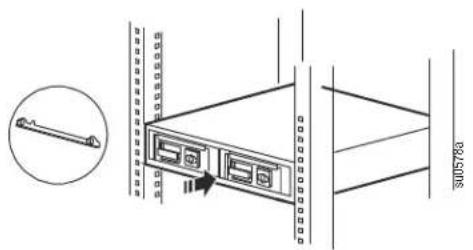
- Always install XLBPs at the bottom in rack-mount configurations. The UPS must be installed above the XLBPs.
- The UPS will recognize as many as 10 XLBPs connected to the UPS.
Note: For each XLBP added, increased recharge time will be required.
- Do not dispose of batteries by burning them. The batteries may explode.
- Do not open or mutilate batteries. Released material is harmful to the skin and eyes, and may be toxic.
• Always recycle used batteries. - Recycle the package materials or save them for reuse.
• Additional safety information can be found in the Safety Guide supplied with this unit.
Inventory
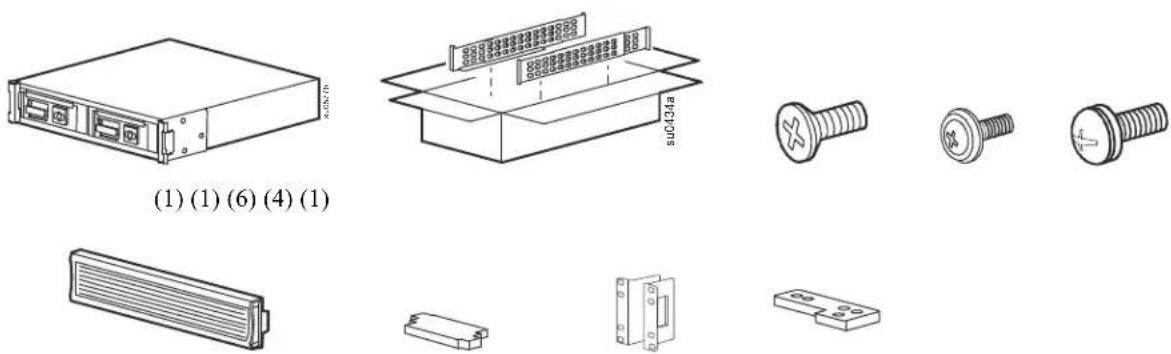
Specifications
For additional specifications, refer to the APC by Schneider Electric Web site at www.apc.com.
Environmental
| Temperature | Operating 0° to | 40°C (32° to 104°F) |
| Storage -15° to | 45°C (5° to 113°F)Charge UPS battery every six months | |
| Maximum Elevation | Operating 3,000 | m (10,000 ft) |
| Storage 15,000 | m (50,000 ft) | |
| Humidity | 0% to 95% relative humidity, non-condensing | |
Battery

CAUTION
RISK OF HYDROGEN SULPHIDE GAS AND EXCESSIVE SMOKE
- Replace the battery at least every 5 years.
- Replace the battery immediately when the UPS indicates battery replacement is necessary.
- Replace battery at the end of its service life.
- Replace batteries with the same number and type of batteries as originally installed in the equipment.
- Replace the battery immediately when the UPS indicates a battery overtemperature condition, or UPS internal overtemperature, or when there is evidence of electrolyte leakage. Power off the UPS, unplug it from the AC input, and disconnect the batteries. Do not operate the UPS until the batteries have been replaced.
- *Replace all battery modules (including the modules in External Battery Packs) which are older than one year, when installing additional battery packs or replacing the battery module(s).
Failure to follow these instructions could result in equipment damage and minor or moderate injury.
Installation
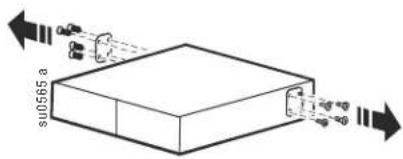
Remove the Shipping Brackets
1
natural_image
Diagram of a server rack with two ports and two connectors, showing internal components and directional arrows (no text or labels)Remove the battery

CAUTION
RISK OF FALLING EQUIPMENT
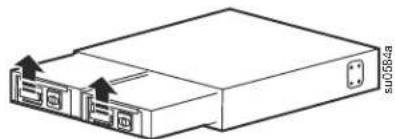
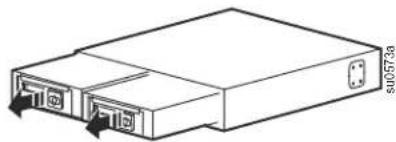
• Each battery module weighs 23 kg (51 lbs).
• Always practice safe lifting techniques adequate for the weight of the equipment.
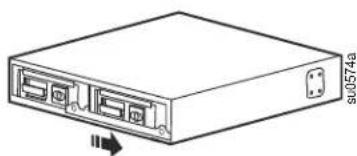
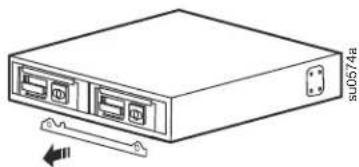
- Remove the battery modules before installing the XLBP.
- Remove the battery modules before installing in a rack.
- Use the battery module handle to carefully slide the battery modules in or out of the XLBP.
- Do not use the battery module handle to lift or carry the battery module.
Failure to follow these instructions can result in minor or moderate injury.
1
natural_image
Line drawing of a rectangular electronic device with ports and an arrow indicating direction (no text or symbols)2
natural_image
Line drawing of a server rack unit with ports and a cable attachment (no text or symbols)3
natural_image
Line drawing of a rectangular electronic device with two ports and an arrow indicating direction (no text or symbols)4
natural_image
Technical line drawing of a rectangular electronic device with ports and connectors (no text or symbols)Four-post rack installation
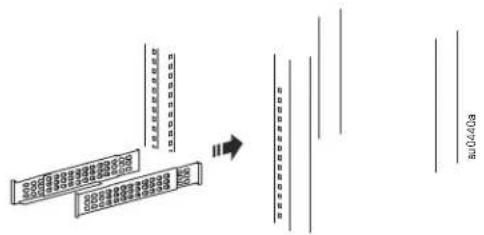
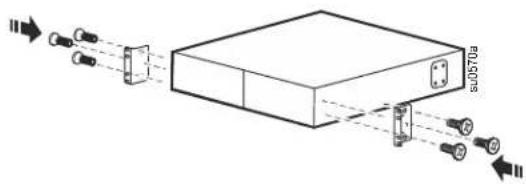
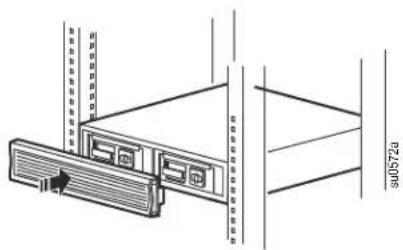
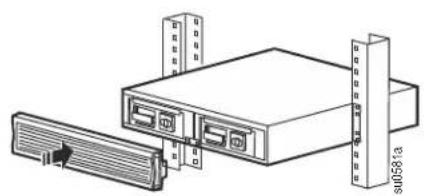
Rack-mount brackets may differ by model.
1
flowchart
graph TD
    A["初始处理"] --> B{判断条件}
    B -->|是| C["执行操作"]
    B -->|否| D["返回错误"]
    C --> E["输出结果"]
    D --> E
Use the APC Four-Post Rail Kit.
2
natural_image
Diagram of a device with connectors and an internal box, showing light path from left to right (no text or symbols)3
natural_image
Technical line drawing of a mechanical assembly with mounting holes and structural supports (no text or symbols)4
natural_image
Technical line drawing of a server rack with two ports and vertical racks, no text or symbols present5
6
natural_image
Technical line drawing of a server rack with ventilation slots and a cable outlet (no text or symbols)Two-post rack
1
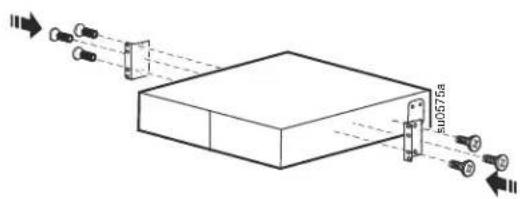
2
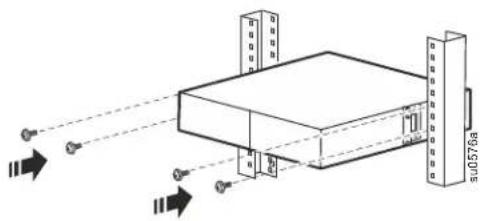
natural_image
Isometric line drawing of a server rack with two towers and a base unit, showing signal beams from input/output ports (no text or symbols)3
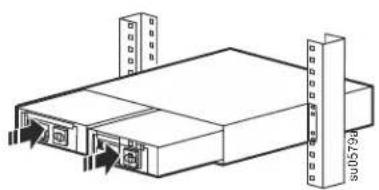
natural_image
Isometric line drawing of a server rack unit with two vertical connectors and two front-mounted ports (no text or symbols)4
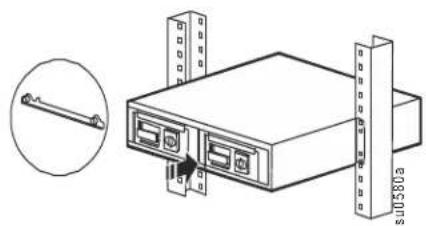
natural_image
Technical line drawing of a server rack with two connectors and a close-up inset showing a cable (no text or symbols)5
natural_image
Technical line drawing of a server rack unit with ports and connectors (no text or symbols)Rack-to-tower conversion
1
2
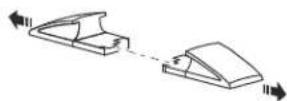
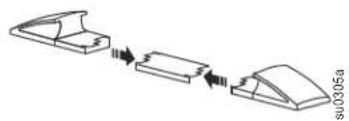
Use the stabilizer bracket provided with the UPS.
3
natural_image
Diagram showing a three-step assembly process with arrows indicating progression (no text or symbols)4
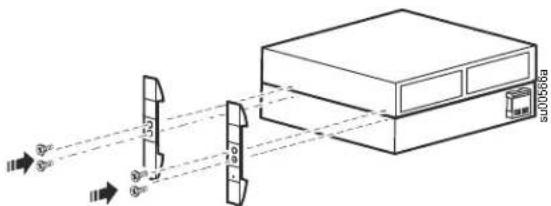
5
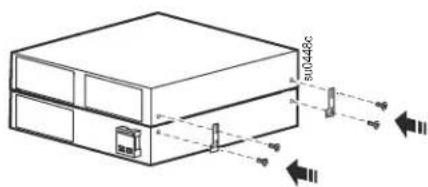
6
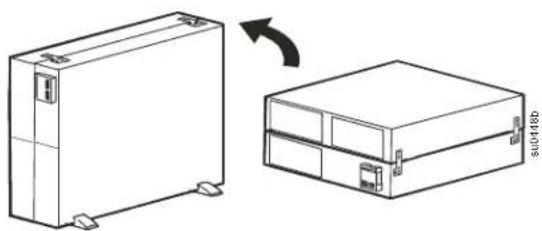
natural_image
Technical line drawing of a rectangular electronic device with mounting feet, shown in two views: one with a curved arrow indicating rotation or change, the other with a flat base (no text or symbols)7
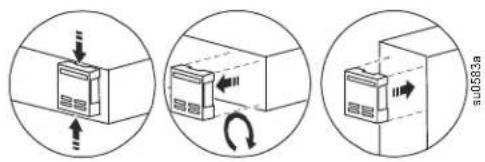
8
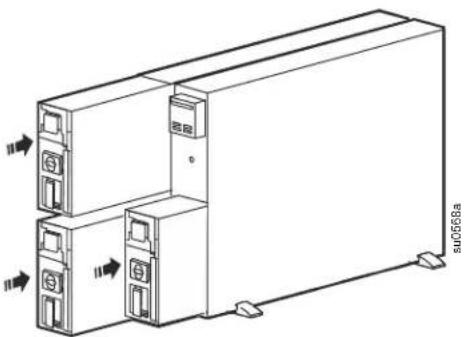
natural_image
Technical line drawing of a server rack unit with two ports and directional arrows indicating movement (no text or symbols)9
10
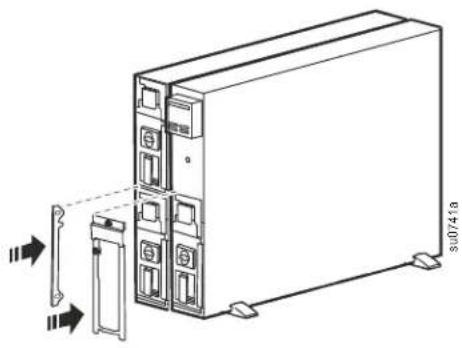
natural_image
Diagram of a server rack unit with two panels and a door, showing internal components and connection arrows (no text or symbols)11
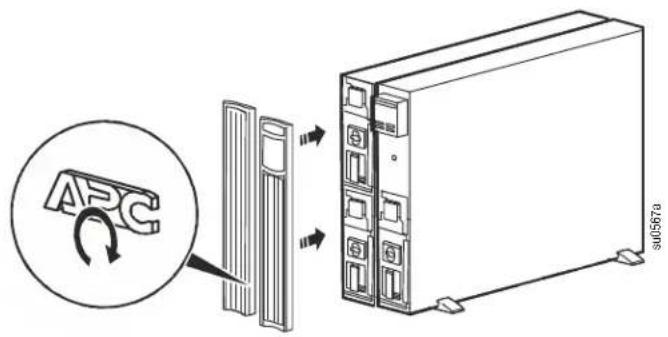
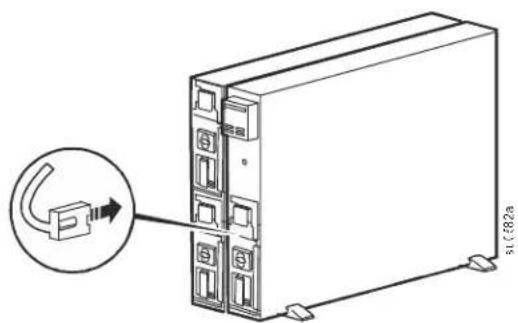
Connect the External Battery Packs
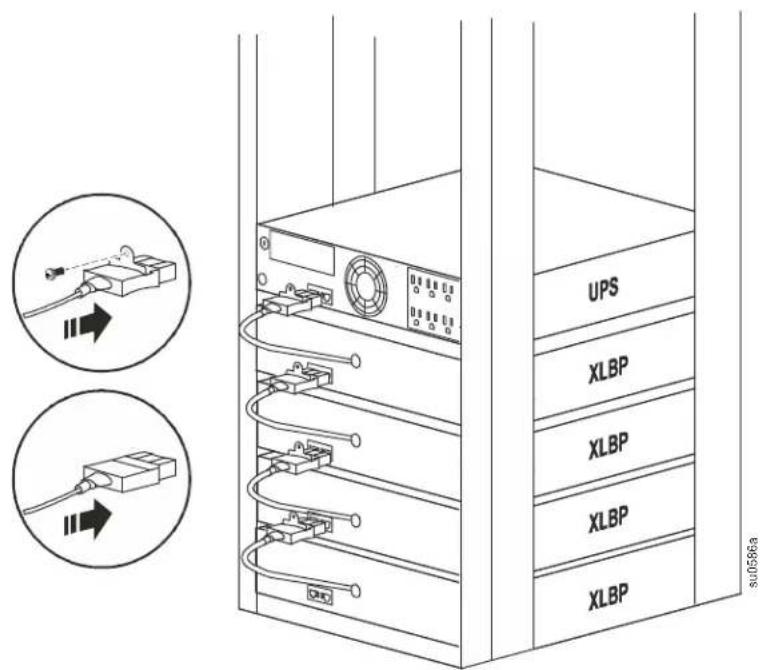
The XLBP connectors may vary by model.
An optional battery extension cable is available from APC by Schneider Electric, see www.apc.com.
Service
If the unit requires service, do not return it to the dealer. Follow these steps:
- Review the Troubleshooting section of the manual to eliminate common problems.
- If the problem persists, contact APC by Schneider Electric Customer Support through the APC by Schneider Electric Web site, www.apc.com.
a. Note the model number and serial number and the date of purchase. The model and serial numbers are located on the rear panel of the unit.
b. Call APC by Schneider Electric Customer Support and a technician will attempt to solve the problem over the phone. If this is not possible, the technician will issue a Returned Material Authorization Number (RMA#).
c. If the unit is under warranty, the repairs are free.
d. Service procedures and returns may vary internationally. Refer to the APC by Schneider Electric Web site for country specific instructions.
- Pack the unit properly to avoid damage in transit. Never use foam beads for packaging. Damage sustained in transit is not covered under warranty.
a. For the UPS, always DISCONNECT THE BATTERY before shipping in compliance with U.S. Department of Transportation (DOT) and IATA regulations. The battery may remain in the unit.
b. Internal batteries may remain connected in the XLBP during shipment, (if applicable, not all units have XLBPs).
- Write the RMA# provided by Customer Support on the outside of the package.
- Return the unit by insured, prepaid carrier to the address provided by Customer Support.
Transport the unit
- Shut down and disconnect all connected equipment.
- Disconnect the unit from mains power.
- Disconnect all internal and external batteries (if applicable).
- Follow the shipping instructions outlined in the Service section of this manual.
Limited Factory Warranty
Schneider Electric IT Corporation (SEIT), warrants its products to be free from defects in materials and workmanship for a period of two (2) years from the date of purchase. The SEIT obligation under this warranty is limited to repairing or replacing, at its own sole option, any such defective products. Repair or replacement of a defective product or part thereof does not extend the original warranty period.
This warranty applies only to the original purchaser who must have properly registered the product within 10 days of purchase. Products may be registered online at warranty.apc.com.
SEIT shall not be liable under the warranty if its testing and examination disclose that the alleged defect in the product does not exist or was caused by end user or any third person misuse, negligence, improper installation, testing, operation or use of the product contrary to SEIT recommendations of specifications. Further, SEIT shall not be liable for defects resulting from: 1) unauthorized attempts to repair or modify the product, 2) incorrect or inadequate electrical voltage or connection, 3) inappropriate on site operation conditions, 4) Acts of God, 5) exposure to the elements, or 6) theft. In no event shall SEIT have any liability under this warranty for any product where the serial number has been altered, defaced, or removed.
EXCEPT AS SET FORTH ABOVE, THERE ARE NO WARRANTIES, EXPRESS OR IMPLIED, BY OPERATION OF LAW OR OTHERWISE, APPLICABLE TO PRODUCTS SOLD, SERVICED OR FURNISHED UNDER THIS AGREEMENT OR IN CONNECTION HERewith.
SEIT DISCLAIMS ALL IMPLIED WARRANTIES OF MERCHANTABILITY, SATISFACTION AND FITNESS FOR A PARTICULAR PURPOSE.
SEIT EXPRESS WARRANTIES WILL NOT BE ENLARGED, DIMINISHED, OR AFFECTED BY AND NO OBLIGATION OR LIABILITY WILL ARISE OUT OF, SEIT RENDERING OF TECHNICAL OR OTHER ADVICE OR SERVICE IN CONNECTION WITH THE PRODUCTS.
THE FOREGOING WARRANTIES AND REMEDIES ARE EXCLUSIVE AND IN LIEU OF ALL OTHER WARRANTIES AND REMEDIES. THE WARRANTIES SET FORTH ABOVE CONSTITUTE SEIT'S SOLE LIABILITY AND PURCHASER EXCLUSIVE REMEDY FOR ANY BREACH OF SUCH WARRANTIES. SEIT WARRANTIES EXTEND ONLY TO ORIGINAL PURCHASER AND ARE NOT EXTENDED TO ANY THIRD PARTIES.
IN NO EVENT SHALL SEIT, ITS OFFICERS, DIRECTORS, AFFILIATES OR EMPLOYEES BE LIABLE FOR ANY FORM OF INDIRECT, SPECIAL, CONSEQUENTIAL OR PUNITIVE DAMAGES, ARISING OUT OF THE USE, SERVICE OR INSTALLATION OF THE PRODUCTS, WHETHER SUCH DAMAGES ARISE IN CONTRACT OR TORT, IRRESPECTIVE OF FAULT, NEGLIGENCE OR STRICT LIABILITY OR WHETHER SEIT HAS BEEN ADVISED IN ADVANCE OF THE POSSIBILITY OF SUCH DAMAGES. SPECIFICALLY, SEIT IS NOT LIABLE FOR ANY COSTS, SUCH AS LOST PROFITS OR REVENUE, WHETHER DIRECT OR INDIRECT, LOSS OF EQUIPMENT, LOSS OF USE OF EQUIPMENT, LOSS OF SOFTWARE, LOSS OF DATA, COSTS OF SUBSTITUANTS, CLAIMS BY THIRD PARTIES, OR OTHERWISE.
NOTHING IN THIS LIMITED WARRANTY SHALL SEEK TO EXCLUDE OR LIMIT SEIT LIABILITY FOR DEATH OR PERSONAL INJURY RESULTING FROM ITS NEGLIGENCE OR ITS FRAUDULENT MISREPRESENTATION OF TO THE EXTENT THAT IT CANNOT BE EXCLUDED OR LIMITED BY APPLICABLE LAW.
To obtain service under warranty you must obtain a Returned Material Authorization (RMA) number from customer support. Customers with warranty claims issues may access the SEIT worldwide customer support network through the APC by Schneider Electric Web site: www.apc.com. Select your country from the country selection drop down menu. Open the Support tab at the top of the web page to obtain information for customer support in your region. Products must be returned with transportation charges prepaid and must be accompanied by a brief description of the problem encountered and proof of date and place of purchase.
APC™ by Schneider Electric Worldwide Customer Support
Customer support for this or any other APC by Schneider Electric product is available at no charge in any of the following ways:
- Visit the APC by Schneider Electric Web site to access documents in the APC by Schneider Electric Knowledge Base and to submit customer support requests.
- www.apc.com (Corporate Headquarters)
Connect to localized APC by Schneider Electric Web site for specific countries, each of which provides customer support information.
- www.apc.com/support/
Global support searching APC by Schneider Electric Knowledge Base and using e-support.
- Contact the APC by Schneider Electric Customer Support Center by telephone or e-mail.
- Local, country specific centers: go to www.apc.com/support/contact for contact information.
- For information on how to obtain local customer support, contact the APC by Schneider Electric representative or other distributor from whom you purchased your APC by Schneider Electric product.
- Smart-UPS™ X-Series 120 VDC External Battery Pack Installation
- Important Safety Messages
- DANGER
- WARNING
- CAUTION
- NOTICE
- Product Handling Guidelines
- Safety and General Information
- Read the Safety Guide included in the package before installation.
- Inventory
- Specifications
- Battery
- RISK OF HYDROGEN SULPHIDE GAS AND EXCESSIVE SMOKE
- Installation
- RISK OF FALLING EQUIPMENT
- Four-post rack installation
- Two-post rack
- Connect the External Battery Packs
- Service
- Transport the unit
- Limited Factory Warranty
- APC™ by Schneider Electric Worldwide Customer Support
Brand : APC
Model : SMX040
Category : Cables for Computers and Peripherals