APC AR7717A - Câbles pour ordinateurs et périphériques

AR7717A - Câbles pour ordinateurs et périphériques APC - Free user manual and instructions

Find the device manual for free AR7717A APC in PDF.

📄 1 pages English EN Download 💬 AI Question 10 questions ⚙️ Specs
Notice APC AR7717A - page 1
Pick your language and provide your email: we'll send you a specifically translated version.
Product Type Power Cord for Computers and Peripherals
Model AR7717A
Brand APC
Connector Type (Device End) IEC 60320 C13
Connector Type (Wall End) IEC 60320 C14 (M) or NEMA 5-15P (Based on region)
Length 1.8 meters (6 feet)
Color Black
Wire Gauge 14 AWG
Rated Current 15 A (North America) or 10 A (IEC)
Rated Voltage 125 V (North America) or 250 V (IEC)
Operating Temperature 0°C to 60°C
Compliance UL, CSA, IEC, RoHS
Product Weight Approximately 0.3 kg
Package Dimensions 20 x 15 x 5 cm
Application Connects UPS, PDU, server, or computer to power outlet

Frequently Asked Questions - AR7717A APC

What devices is the APC AR7717A cable compatible with?
This power cord is designed for computers, servers, UPS units, and peripherals that use an IEC C13 inlet. It is commonly used with APC UPS systems and power distribution units.
What is the length of the AR7717A cable?
The standard length is 1.8 meters (6 feet), providing flexibility in positioning your equipment.
Does the AR7717A support high-power devices?
Yes, it is rated for 15A at 125V (North America) or 10A at 250V (IEC), suitable for most computer and peripheral loads.
Is the AR7717A a shielded cable?
No, this is a standard unshielded power cord for AC mains connection. It is not intended for data transmission.
Can I use this cable outdoors?
No, the AR7717A is designed for indoor use only. Exposure to moisture or extreme temperatures may damage the cable.
What color is the cable?
The cable is black, which is the standard color for APC power cords.
Does the AR7717A come with a warranty?
APC offers a limited lifetime warranty against defects in materials and workmanship.
How should I clean the cable?
Disconnect it from power and wipe with a dry cloth. Do not use liquids or abrasive cleaners.
Can I replace the connectors on the AR7717A?
It is not recommended to modify the cable. If damaged, replace it with an identical APC cord to ensure safety and compliance.
Where can I find the user manual for the AR7717A?
The user manual is available for free download on notice-facile.com in PDF format. Search for 'APC AR7717A manual' on the site.

User questions about AR7717A APC

0 question about this device. Answer the ones you know or ask your own.

Ask a new question about this device

The email remains private: it is only used to notify you if someone responds to your question.

No questions yet. Be the first to ask one.

Download the instructions for your Câbles pour ordinateurs et périphériques in PDF format for free! Find your manual AR7717A - APC and take your electronic device back in hand. On this page are published all the documents necessary for the use of your device. AR7717A by APC.

USER MANUAL AR7717A APC

Vertical Cable Manager (AR7717A)—Installation

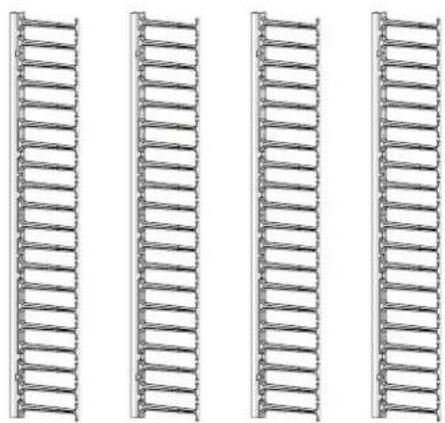
Inventory
APC AR7717A - Vertical Cable Manager (AR7717A)—Installation - 1

natural_image Four identical vertical metal lattice structures arranged horizontally (no text or symbols)

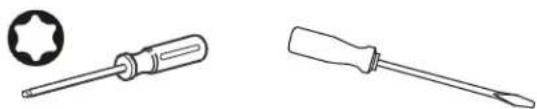
Tools required (not provided)

APC AR7717A - Vertical Cable Manager (AR7717A)—Installation - 2

natural_image Two types of screwdrivers: a circular head with a star-shaped head and a standard screwdriver (no text or symbols)

Torx ^® T30 screwdriver or 1/4-in slotted screwdriver

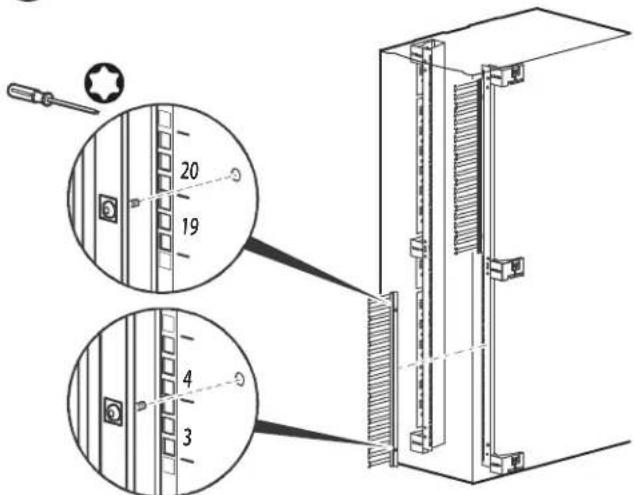
Installation (Vertical mounting flange)

APC AR7717A - Installation (Vertical mounting flange) - 1
Note: The Vertical Cable Managers can only be installed in a 42U NetShelter® SX Networking Enclosure
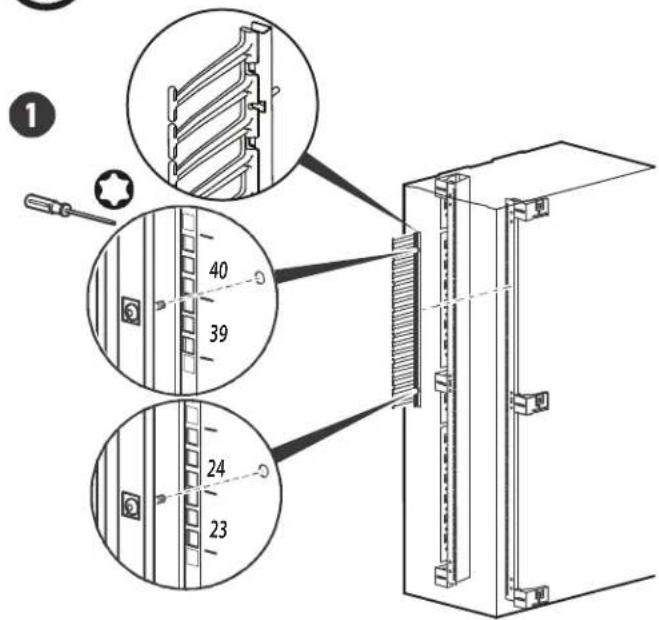
Technical diagram showing assembly of a server rack with labeled components and parts, including screwdriver and numbered parts.

2
Technical diagram showing component alignment of a server rack with numbered parts and screwdriver insertion instructions

Customer support and warranty information is available at the APC Web site, www.apc.com.

Table of contents Click a title to access it
Manual assistant
Powered by Anthropic
Waiting for your message
Product information

Brand : APC

Model : AR7717A

Category : Câbles pour ordinateurs et périphériques