APC AR7585 - Cables for Computers and Peripherals

AR7585 - Cables for Computers and Peripherals APC - Free user manual and instructions

Find the device manual for free AR7585 APC in PDF.

📄 2 pages English EN Download 💬 AI Question 10 questions ⚙️ Specs
Notice APC AR7585 - page 1
Pick your language and provide your email: we'll send you a specifically translated version.
Product Type Vertical Cable Manager
Brand APC
Model AR7585
Compatible Rack Height 45U (78.74 in / 2000 mm)
Overall Dimensions (H x W x D) 78.7 x 3.5 x 5.5 in (2000 x 89 x 140 mm)
Net Weight 12.5 lb (5.7 kg)
Material Steel with black powder coat finish
Color Black
Mounting Type Vertical mounting rails
Installation Orientation Front or rear of enclosure
Included Accessories Mounting hardware, hole covers, plugs
Wire Management Capacity Up to 100 cables (based on varying diameters)
Compatible Enclosures APC NetShelter series
Operating Temperature Range 32°F to 122°F (0°C to 50°C)
Storage Temperature Range -4°F to 140°F (-20°C to 60°C)
Relative Humidity (Operating) 0% to 95% non-condensing
Compliance Standards RoHS, REACH
Warranty 2 years (parts and labor)
Maintenance Periodic cleaning with dry cloth; inspect fasteners
Manufacturer Support www.apc.com

Frequently Asked Questions - AR7585 APC

What is the APC AR7585 used for?
The APC AR7585 is a vertical cable manager designed to organize and route cables in server racks, improving airflow and cable management.
What rack height does the AR7585 support?
It supports 45U racks (78.74 inches tall), commonly used in data centers.
Can the AR7585 be mounted at the rear of the enclosure?
Yes, the manual indicates it can be installed in the rear of the enclosure, but you may need to move or remove the vertical O U accessory channel.
What mounting hardware is included?
The AR7585 includes mounting hardware, hole covers, and plugs for a complete installation.
Is the AR7585 compatible with other rack brands?
It is specifically designed for APC NetShelter enclosures, but may fit other standard 45U racks with similar rail spacing.
How many cables can the AR7585 manage?
It can manage up to 100 cables, depending on cable diameter and routing.
What materials is the AR7585 made from?
It is made from steel with a black powder coat finish for durability and corrosion resistance.
Does the AR7585 require special tools for installation?
Installation typically requires only basic hand tools (screwdriver, wrench) and the included hardware.
Where can I find the full installation manual?
The installation manual is available for free download at www.apc.com or on notice-facile.com.
What is the warranty on the AR7585?
APC offers a 2-year warranty covering parts and labor for defects.

User questions about AR7585 APC

0 question about this device. Answer the ones you know or ask your own.

Ask a new question about this device

The email remains private: it is only used to notify you if someone responds to your question.

No questions yet. Be the first to ask one.

Download the instructions for your Cables for Computers and Peripherals in PDF format for free! Find your manual AR7585 - APC and take your electronic device back in hand. On this page are published all the documents necessary for the use of your device. AR7585 by APC.

USER MANUAL AR7585 APC

Vertical Cable Manager AR7585 Installation
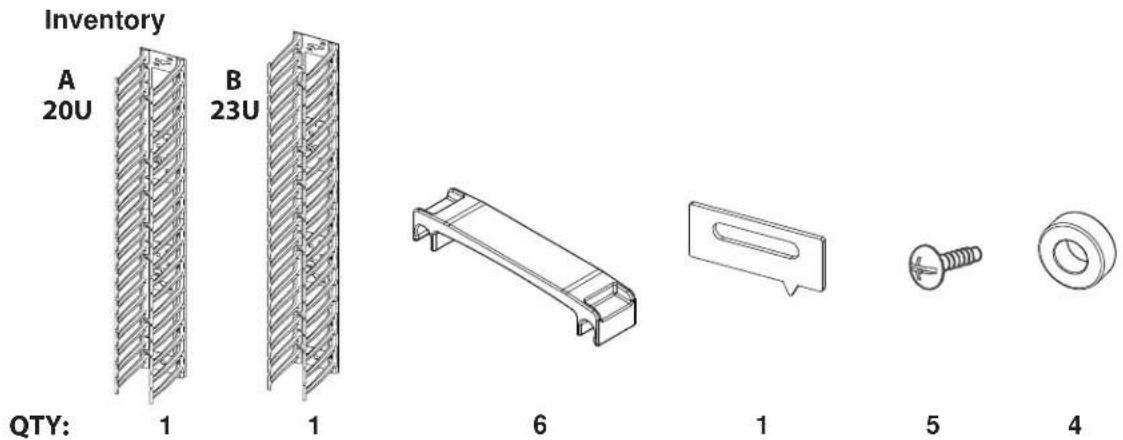
Inventory A 20U B 23U QTY: 1 1 6 1 5 4

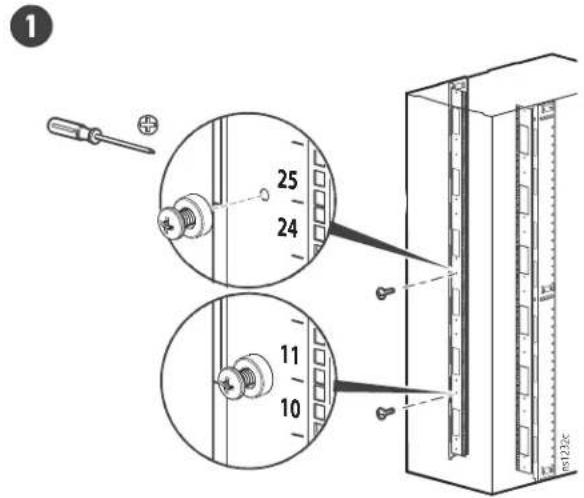
Adjust the vertical mounting rails and remove all hole covers and plugs
Note: If installing in rear of enclosure, move or remove vertical O U accessory channel.
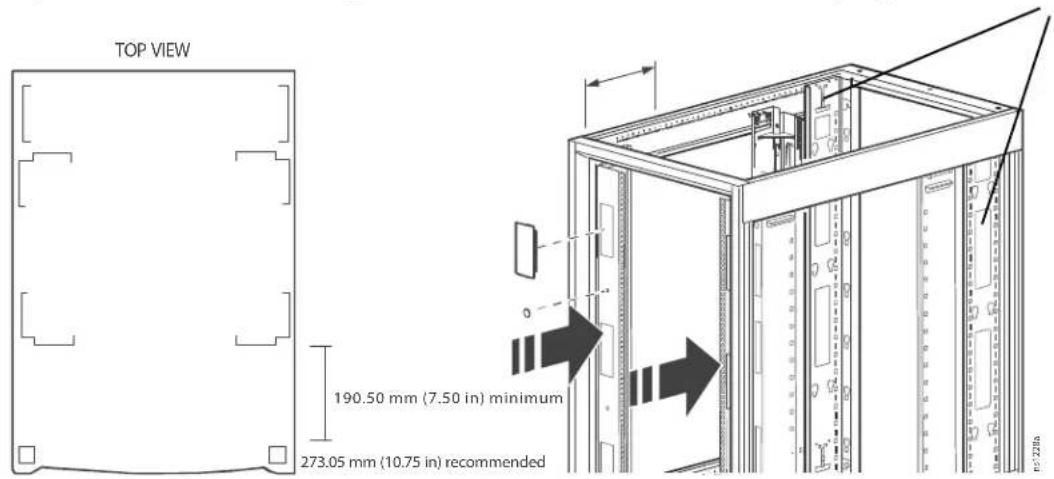
TOP VIEW 190.50 mm (7.50 in) minimum 273.05 mm (10.75 in) recommended

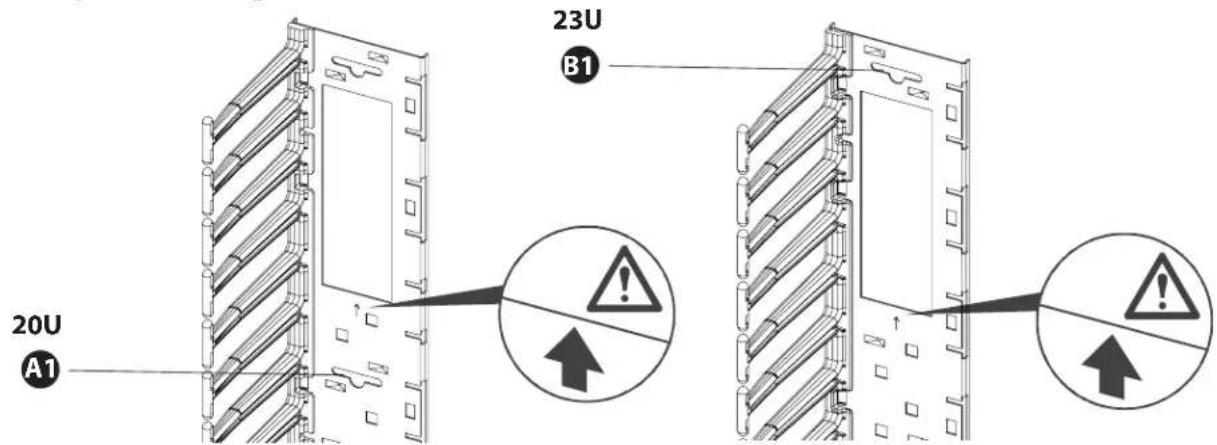
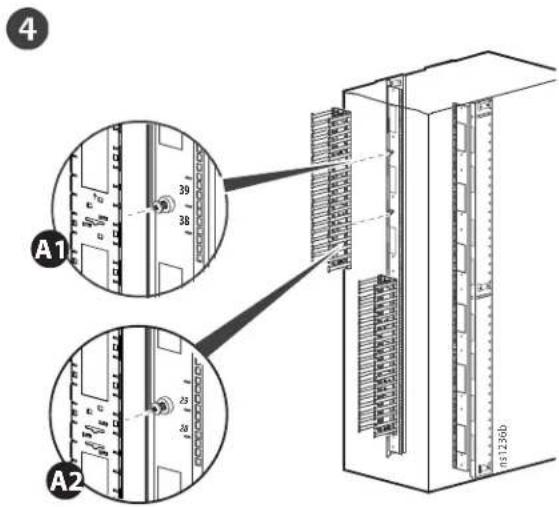
Identify the mounting slots
20U A1 23U B1

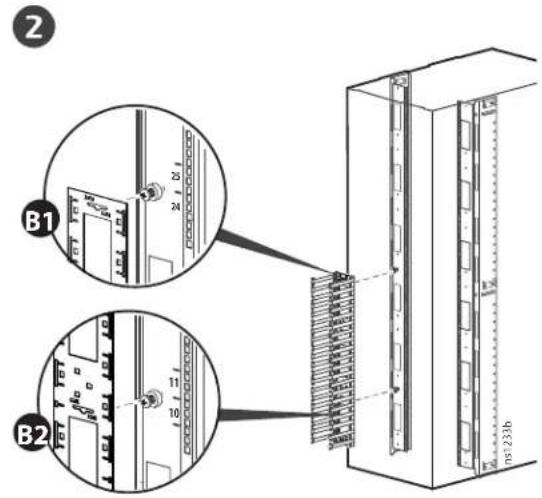
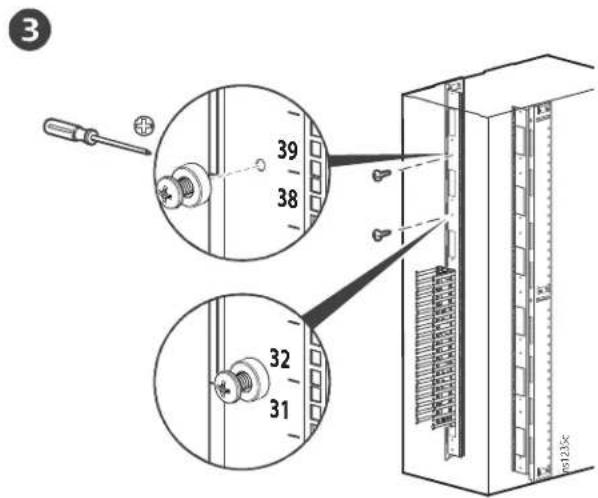
NetShelter 45 U Installation
1 25 24 11 10 23.22

2 B1 B2

3 39 38 32 31

4 A1 39 38 A2 017260

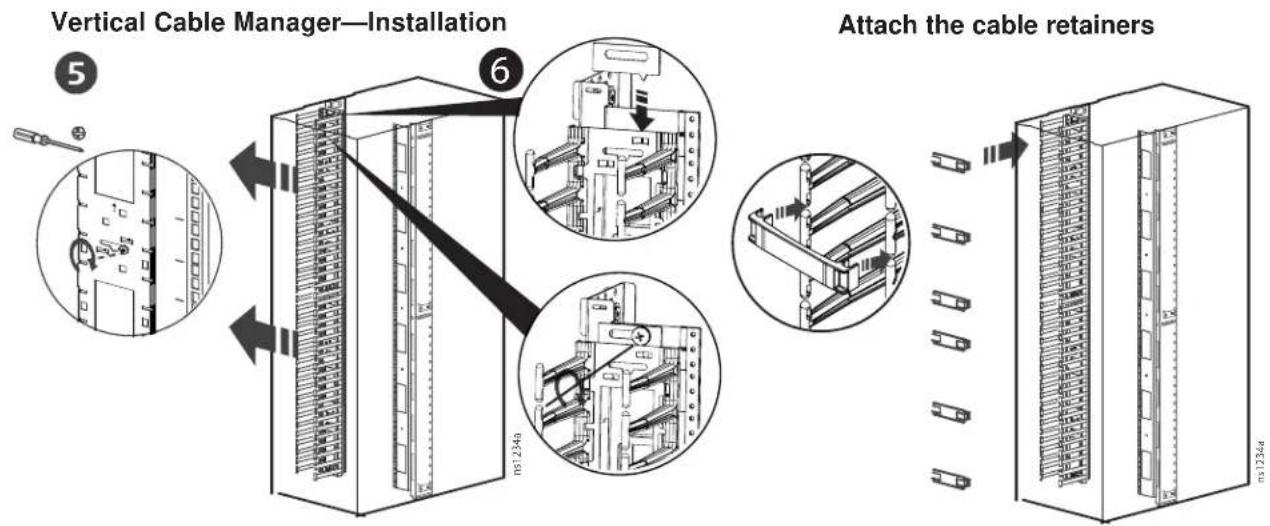
Vertical Cable Manager—Installation Attach the cable retainers

Customer support and warranty information is available at the APC Web site, www.apc.com.

Table of contents Click a title to access it
Manual assistant
Powered by Anthropic
Waiting for your message
Product information

Brand : APC

Model : AR7585

Category : Cables for Computers and Peripherals