Indigo IS-MC412S01 - Multicooker Scarlett - Free user manual and instructions
Find the device manual for free Indigo IS-MC412S01 Scarlett in PDF.


| Product Type | Multicooker |
| Brand | Scarlett |
| Model | Indigo IS-MC412S01 |
| Capacity | 5 L |
| Power | 700 W |
| Voltage | 220-240 V ~ 50/60 Hz |
| Dimensions (W x D x H) | 280 x 280 x 280 mm |
| Weight | 3.5 kg |
| Main Functions | Rice, Steam, Soup, Stew, Porridge, Slow Cook, Keep Warm |
| Control Type | Electronic with LED display |
| Timer | Yes, up to 24 hours delay start |
| Auto Keep Warm | Yes, up to 24 hours |
| Inner Pot Coating | Non-stick |
| Removable Lid | Yes |
| Steamer Basket Included | Yes |
| Measuring Cup Included | Yes |
| Spatula Included | Yes |
| Cleaning and Care | Wipe with damp cloth; inner pot is dishwasher safe |
| Safety Features | Overheat protection, pressure release valve |
| Spare Parts Available | Yes, inner pot and gasket sold separately |
| Repairability | Service center access via Scarlett support |
| Warranty | 2 years |
Frequently Asked Questions - Indigo IS-MC412S01 Scarlett
User questions about Indigo IS-MC412S01 Scarlett
0 question about this device. Answer the ones you know or ask your own.
Ask a new question about this device
Download the instructions for your Multicooker in PDF format for free! Find your manual Indigo IS-MC412S01 - Scarlett and take your electronic device back in hand. On this page are published all the documents necessary for the use of your device. Indigo IS-MC412S01 by Scarlett.
USER MANUAL Indigo IS-MC412S01 Scarlett
natural_image
Rice cooker with pink and white design, digital display, and control buttons (no visible text or symbols)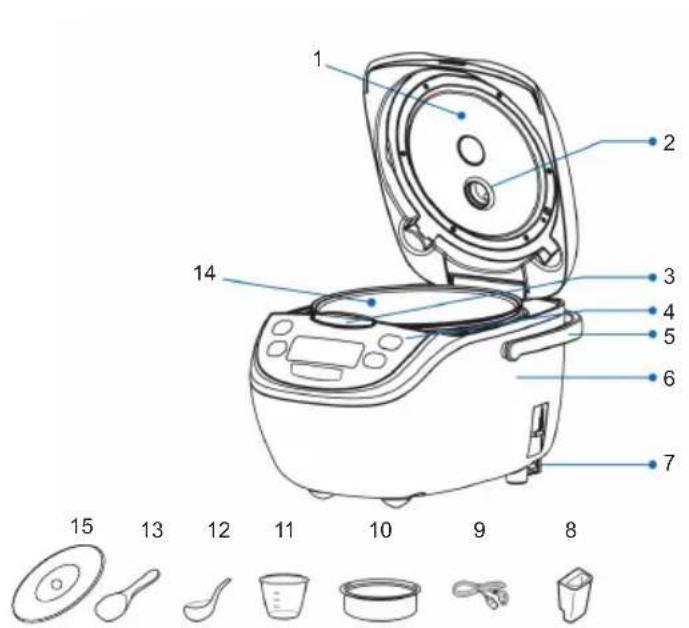
GB
- Hinged Lid
- Steam Outlet
- Lid Open Button
- Control Panel
- Handle
- Case
- Power Cable Socket
- Spoon Support
- Power Cord
- Wire Back
- Measurin
- Ladle
- Spoon
- Bowl
- Lid from a heat-resistant plastic
RUS
Pls add month and year of production e.g. 08.2010 at this place
- Important safety instructions. Please read carefully and save for future reference.
- Incorrect use of the device may damage the device and harm the user.
- Before switching on the appliance for the first time please check if the technical specifications indicated on the unit correspond to the mains parameters.
- CAUTION! The plug of the power cord is grounding type and has a wire. Plug the device only into the corresponding grounded sockets.
- Use the device only for household purposes and in accordance with this Operating Manual. The device is not intended for industrial use
- Do not use outside.
- Always unplug the device from the socket before cleaning the device or if You are not using the device.
- The device may not be used by persons (including children) with underdeveloped physical, mental and sensual abilities when these persons do not have the experience or the knowledge or if they are not supervised or guided by a person who is responsible for their safety.
- Children should be supervised at all times and should never play with the device.
- Do not leave switched-on device unattended.
- Do not use the parts which are not included in the package.
- Do not use the device if the power cord or/and the plug are damaged. To avoid danger the damaged cord should be replaced by an authorized service center.
- Do not submerge the device or the power cord in water or other liquids. However, if this happened
unplug the device from the socket immediately and before using the device again have qualified specialists check the operability of the device.
- Make sure that the power cord doesn't touch sharp edges and hot surfaces.
- Do not pull the power cord and do not twist or wrap the cord around the device.
- The multicooker is to be used only for cooking food. Never use the multicooker for drying clothes, paper and other items.
- Do not turn the multicooker when the pot is empty.
- Do not use the multicooker without the pot.
- Do not put the foodstuffs on the bottom of the multicooker, always use the pot.
- Do not replace the pot with any other container.
- Do not use metal items which may scratch the pot.
- The inner coating of the pot may initially wear off, therefore be careful when using the pot.
• Follow cooking recipes. - Do not let water get into the vent holes in order to avoid short circuit.
- If using an extension cord make sure that maximum capacity of the cord corresponds to the capacity of the device.
- CAUTION! The device becomes hot during operation! If you need to touch the multicooker when it is operating use tacks or cooking gloves.
- Protect Your face and hands from the steam coming out of the valve.
- Do not insert metal and other items into the outlet hole or into any other parts of the device.
-
Do not cover the cover of the multicooker with the towels or other items.
-
After cooking, let the universal cooker cool down for fifteen minutes before next switching on.
- Do not use hot water for cooking in the universal cooker.
- If the product has been exposed to temperatures below 0^ C for some time it should be kept at room temperature for at least 2 hours before turning it on.
- The manufacturer reserves the right to introduce minor changes into the product design without prior notice, unless such changes influence significantly the product safety, performance, and functions.
- Make sure that there is no packaging material or any other items inside the multicooker.
- Check whether the following remained undamaged during the transportation: the cover; the casing; additional appliances; the removable pot. In case you notice any defects do not turn on the device and contact the salesperson or the service center.
- Place the device on a dry, even and heat-proof surface. Do not place the device close to combustible materials, explosives and self-igniting gases.
- Do not place the device close to a gas or electric stove or any other sources of heat.
- Do not place the device very close to walls or furniture.
- Do not put anything on top of the multicooker. Do not cover the vent holes.
- Do not place the multicooker in a kitchen cabinet. For proper operation the device needs free space for ventilation: at least 20 cm from the top, 10 cm from the back and 5 cm from the sides.
INSTALLATION
- Before first use wipe the removable pot, the steamer, the measuring cup, the spoon, the inside and the outside surface of the multicooker with a clean wet cloth.
- The inside surface of the pot contains a conventional scale for cereal and water: the scale on the right marks the number of cups for rice, the scale on the left marks liters of water. The maximum amount of cereal to be cooked – 8 cups and 1.5 liters of liquid.
OPERATION
- Before initial use wipe the cooking pot, the surface of heating element and internal surface of the universal cooker.
- Put water and food in the cooking pot. DO NOT fill the cooker more than to 3/5 of its capacity. During cooking food products that expand in hot water (rice, dry vegetables) or foam, do not fill the pot more than to the half of its capacity. At that the entire volume of food products and water should not exceed 1/5 of the total pot capacity.
- Put the pot inside the outer body of the universal cooker.
- Close the lid until the click is heard.
- Connect the universal cooker to mains. The indicator lamp corresponding to the 1st cooking program starts blinking. Time of cooking for this program will be displayed automatically.
• There are 12 cooking programs.
- The detailed description of cooking programs and adjustments is given in Recipe Book.
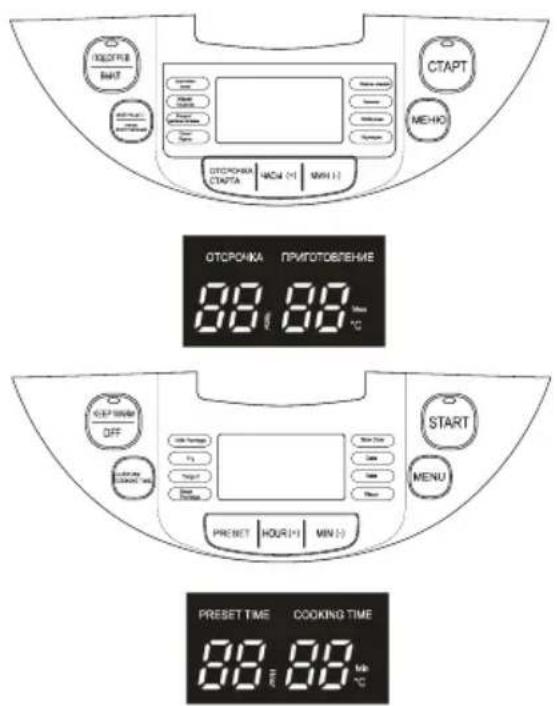
- Press "MEHIO" (MENU) button as many times as required to select respective cooking program. The corresponding indicator lamp located near the program lights when the program is selected. Time
of automatic cooking for the selected program will be displayed.
- Use the "ЧАСЫ (+)" (HOURS (+)) and "МИН (-)" (MINUTES (-)) buttons to set cooking time according to Recipe Book. The cooking time adjustment range for each program is given in the table above.
- Press the "CTAPT" (START) button to begin cooking. The button's LED will light up.
- After completion of the operation the universal cooker automatically switches to warming up mode.
- Use wire rack for "ПАРОВАРКА" (STEAM COOKER) program. Pour water in the pot, put food products on the rack and place the wire rack into the pot. "МОЙ РЕЦЕПТ / ВРЕМЯ ПРИГОТОВЛЕНИЯ" (MY RECIPE/COOKING TIME) FUNCTION
- This function allows cooking food by presetting cooking time and temperature different from settings used in automatic programs.
- Press the "МОЙ РЕЦЕПТ/ ВРЕМЯ ПРИГОТОВЛЕНИЯ" (MY RECIPE/COOKING TIME) button. The minimal temperature
- 40 °C will be displayed. You may set the required temperature in the range from 40°C to 160°C. To do it, press and hold the "МИН (-)" (MINUTES (-)) button. To confirm the setting, press Press the "МОЙ РЕЦЕПТ / ВРЕМЯ ПРИГОТОВЛЕНИЯ" (MY RECIPE/COOKING TIME) button again.
- After that, you may set cooking time within the range from 1 minute to 12 hours. To do it, press and hold the "МИН (-)" (MINUTES (-)) button. To confirm the setting and start cooking press the "CTAPT" (START) button.
"OTCPOЧКА СТАРТА" (START DELAY) FUNCTION
- This function allows you to start cooking at predefined time.
- To set this function, press the "ОТСРОЧКА СТАРТА" (START DELAY) button, and set the desired time when cooking should start, using the "ЧАСЫ (+)" (HOURS (+)) and "МИН (-)" (MINUTES (-)) buttons. The display will show time at which the program should stop.
- Then use the "MEHIO" (MENU) button to select the required cooking program.
- To begin operation press the "CTAPT" button. "ПОДОГРЕВ/ ОТМЕНА" (PREHEAT/CANCEL) FUNCTION
- If needed, press the "ПОДОГРЕВ/ ОТМЕНА" (PREHEAT/CANCEL) button to suspend the cooking process.
- The preheat function operates in automatic mode and starts only after the cooking process is finished.
- The maximum time interval to maintain temperature is 1 hour. At that the temperature inside the universal cooker shall not exceed 60°C.
- This function can be used to preheat foods. To use this function, put the food you want to preheat inside the cooker bowl, and press the "ПОДОГРЕВ/ОТМЕНА" (PREHEAT/CANCEL) button.
• CLEANING AND MAINTENANCE
- The device needs to be cleaned regularly; remove all of the food residue from the surface of the multicooker
- Before cleaning turn off the multicooker and unplug it from the socket. Let the device cool off completely.
- Wipe the control panel, the outer and the inner surfaces of the multicooker with a wet cloth and detergent, wipe dry.
- Do not use aggressive substances or abrasive materials.
STORAGE
- Make sure that the device is unplugged from the socket and is completely cooled off.
- Follow all of the steps mentioned in "CLEANING AND MAINTENANCE" section.
- Store the multicooker with the cover half open in a dry and clean place.
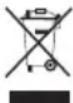
Do not dispose of electrical appliances as sorted municipal waste, use separate collection facilities.
- Contact your local government for information regarding the collection systems available.
- If electrical appliances are disposed of in landfills or dumps, hazardous substances can leak into the groundwater and get into the food chain, damaging your health and well-being.
- When replacing old appliances with new once, the retailer is legally obligated to take back your old appliance for disposal at least for free of charge.
МЕРЫ БЕЗОПАСНОСТИ
Brand : Scarlett
Model : Indigo IS-MC412S01
Category : Multicooker