
Kolt - Mouse Krom - Free user manual and instructions
Find the device manual for free Kolt Krom in PDF.


| Product Type | Gaming Mouse |
| Brand | Krom |
| Model | Kolt |
| Connectivity | Wired USB |
| Sensor Type | Optical |
| DPI Range | 800 - 3200 DPI |
| Number of Buttons | 6 programmable buttons |
| Switch Lifecycle | 10 million clicks |
| Backlight | RGB LED |
| Weight | 100 g |
| Dimensions (L x W x H) | 125 x 65 x 38 mm |
| USB Cable Length | 1.8 m |
| Polling Rate | 1000 Hz |
| Compatibility | Windows 7/8/10/11, macOS, Linux |
| Software Support | Krom Gaming Software |
| Onboard Memory | Built-in profile storage |
| Mouse Feet | PTFE glide pads |
| Cleaning Instructions | Wipe with a dry or slightly damp cloth; avoid liquids |
| Storage Conditions | Room temperature, dry environment |
| Certifications | CE, FCC, RoHS |
Frequently Asked Questions - Kolt Krom
User questions about Kolt Krom
0 question about this device. Answer the ones you know or ask your own.
Ask a new question about this device
Download the instructions for your Mouse in PDF format for free! Find your manual Kolt - Krom and take your electronic device back in hand. On this page are published all the documents necessary for the use of your device. Kolt by Krom.
USER MANUAL Kolt Krom
natural_image
Technical line drawing of a multi-level electronic device with internal components (no text or symbols)QuickGuide Installation

natural_image
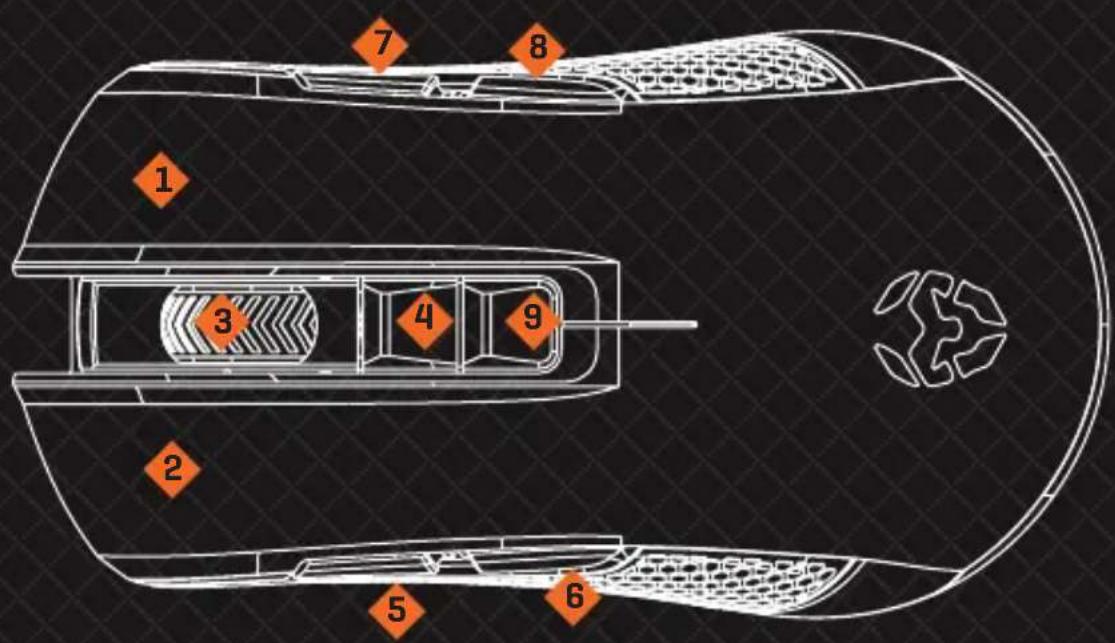
Solid dark textured background with a thin orange border at the bottom (no text or symbols)DEFAULT FUNCTIONS & ELEMENTS
EN

1] Right button
2] Left button
3] Scroll wheel
4] DPI switch
5] Forward
6] Backward
7] Volume up
8] Volume down
9] LED color button
SYSTEM REQUIREMENTS
- Operation system:
Windows 7 / Windows 8 / Windows 8.1 / Windows 10
- Free USB 2.0 / 3.0 port
- Software installation
- 50MB free hard disk space
KROM KOLT FULL MANUAL
Please, download the Complete User manual from our website:
- Connect to the internet and enter www.kromgaming.com
- Into the product sheet, the right side menu [downloads] Click on "MANUAL"
- In this link you can download the Complete Manual.
KROM KOLT SOFTWARE
Please, download the software from our website:
www.kromgaming.com
SOFTWARE INSTALLATION
- Plug USB connector of KROM KOLT to a USB port of your PC
- Download the software from www.kromgaming.com
2.1 Connect to the internet and enter www.kromgaming.com
2.2 Into the product sheet, the right side menu (downloads) click on "DRIVERS"
2.3 In this link you can download the Software.
- Double click "setup.exe" to start the installation program.
- Select the folder to save the software and click "next" to continue.
- Installation run automatically: click "finish" to complete the installation.
SPECIFICATIONS
- Sensor: Optical AVAGO 3050
- Resolution: 1000/1500/2000/3000/4000 dpi
- Buttons: 9
- Main switches: Omron
-
Backlit color: RGB
-
Connection: Gold plated USB
- Length of cord: 1.8 m
- Dimensions: 125 x 66 x 39 mm
- Weight: 120 ± 5 ~g
- Compatibility: Windows 7/8/8.1/10
EU DIRECTIVES
CE STATEMENT OF COMPLIANCE WITH EUROPEAN UNION DIRECTIVES
Krom declares that this product is in compliance with the essential requirements and other relevant provisions from the following Directives: 2004/30/EC; 2011/65/EC, as applicable. The technical documentation required by the Conformity Evaluation process is in Krom's possession and can be requested through the email info@kromgaming.com.

DISPOSAL OF BATTERIES AND ELECTRICAL OR ELECTRONIC EQUIPMENT WASTE
The existence of this symbol on the product, batteries or respective packaging, signifies that this product and the contained batteries can not be disposed as domestic waste. It is the user's responsibility to deliver this product at a battery, electrical or electronic recycling pick-up point. The pick-up and separate recycling contributes for the preservation of natural resources and suppresses potential negative consequences for the human health and the environment resultant of inadequate disposal of dangerous substances contained in batteries and electrical or electronic equipment. For additional information regarding batteries, electrical or electronic recycling pick-up points, please contact your local municipal services.
WARRANTY
Who does the warranty protect:
This warranty is valid for the original purchaser only.
What does the warranty protect:
For warranty claims, please contact Krom's overseas distribution partners in your country.
Find the distribution partner list at www.kromgaming.com
Warranty: 2 years from the purchasing date. (Depending on the laws of each country)
URL: www.kromgaming.com
E-mail: support@kromgaming.com
What doesn't the warranty cover:
- Any product, on which the serial number has been defaced, modified or removed.
- Accident, misuse, neglect, fire, water, lightning, or other acts of nature, unauthorized product modification, or failure to follow instructions supplied with the product.
- Repair or attempted repair by anyone not authorized by Krom.
- Damage to or loss of any programs, data or removable storage media.
- Software or data loss occurring during repair or replacement.
- Any damage of the product due to shipment.
- Removal or installation of the product.
- External causes, such as electric power fluctuations or failure.
- Use of supplies or parts not meeting Krom's specifications.
- Normal wear and tear.
- Any other cause which does not relate to a product defect.
If you have any questions regarding technical problems, please contact us via our website:
WWW.KROMGAMING.COM
Krom reserves the right for any modifications in text and/or images.
FUNCIONES POR DEFECTO Y ELEMENTOS
MANUAL COMPLETO KROM KOLT
URL: www.kromgaming.com
E-mail: support@kromgaming.com
URL: www.kromgaming.com
E-mail: support@kromgaming.com

- DEFAULT FUNCTIONS & ELEMENTS
- SYSTEM REQUIREMENTS
- KROM KOLT FULL MANUAL
- KROM KOLT SOFTWARE
- SOFTWARE INSTALLATION
- SPECIFICATIONS
- EU DIRECTIVES
- CE STATEMENT OF COMPLIANCE WITH EUROPEAN UNION DIRECTIVES
- DISPOSAL OF BATTERIES AND ELECTRICAL OR ELECTRONIC EQUIPMENT WASTE
- WARRANTY
- FUNCIONES POR DEFECTO Y ELEMENTOS
- MANUAL COMPLETO KROM KOLT
Brand : Krom
Model : Kolt
Category : Mouse