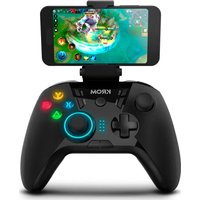
Kloud - Controller Krom - Free user manual and instructions
Find the device manual for free Kloud Krom in PDF.


Pick your language and provide your email: we'll send you a specifically translated version.
| Product Type | Wireless Controller |
| Brand | Krom |
| Model | Kloud |
| Compatible Platforms | PC, PlayStation, Xbox, Nintendo Switch |
| Connectivity | Bluetooth 5.0, USB-C wired |
| Dimensions | 155 x 105 x 60 mm |
| Weight | 250 g (with battery) |
| Power Source | Built-in rechargeable lithium-ion battery, 600 mAh |
| Charging Time | Approximately 2 hours |
| Battery Life | Up to 10 hours of continuous use |
| Main Functions | Analog sticks, D-pad, action buttons, shoulder triggers, vibration feedback, motion controls |
| Special Features | Programmable back buttons, adjustable trigger stops, RGB lighting |
| Care and Cleaning | Wipe with a soft dry cloth; avoid liquids and abrasives |
| Safety Precautions | Do not expose to extreme temperatures or moisture; use only provided charger |
| Spare Parts and Repairability | Replacement thumbsticks and battery available; user-replaceable with basic tools |
| General Information | Includes USB-C charging cable; user manual in PDF format |
Frequently Asked Questions - Kloud Krom
How do I pair the Krom Kloud controller with my PC?
Press and hold the pairing button (located on the top edge) until the LED blinks, then select 'Krom Kloud' from your PC's Bluetooth settings.
What is the battery life of the controller?
The built-in 600 mAh battery provides up to 10 hours of gaming on a full charge.
Can I use the controller while charging?
Yes, you can use the controller in wired mode via USB-C while it charges.
Is the Krom Kloud compatible with PlayStation 5?
Yes, it works with PS5 via Bluetooth or USB cable, though some features like adaptive triggers may not be supported.
How do I clean the controller?
Use a soft, dry cloth to wipe the surfaces. Do not use alcohol or abrasive cleaners.
Does the controller have vibration feedback?
Yes, it features dual rumble motors for immersive haptic feedback.
Can I adjust the trigger sensitivity?
Yes, the triggers have adjustable stop levels for quicker actuation in FPS games.
How do I reset the controller?
Use a paperclip to press the reset button on the back near the battery compartment.
Are replacement parts available?
Yes, you can purchase replacement thumbsticks and battery packs from Krom's website.
What does the RGB lighting do?
The RGB lighting can be customized via software or set to indicate connection status and battery level.
User questions about Kloud Krom
0 question about this device. Answer the ones you know or ask your own.
Ask a new question about this device
No questions yet. Be the first to ask one.
Download the instructions for your Controller in PDF format for free! Find your manual Kloud - Krom and take your electronic device back in hand. On this page are published all the documents necessary for the use of your device. Kloud by Krom.
USER MANUAL Kloud Krom



Manual assistant
Powered by Anthropic
Waiting for your message
Product information
Brand : Krom
Model : Kloud
Category : Controller