Kalax - Mouse Krom - Free user manual and instructions
Find the device manual for free Kalax Krom in PDF.


Pick your language and provide your email: we'll send you a specifically translated version.
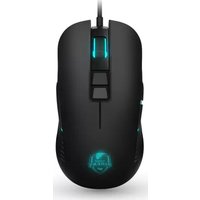
| Product Type | Gaming Mouse |
| Brand | Krom |
| Model | Kalax |
| Connection Type | Wired USB |
| Cable Length | 1.8 m |
| Dimensions (L x W x H) | 125 x 70 x 40 mm |
| Weight | 100 g |
| Number of Buttons | 6 |
| DPI Range | 800 - 6400 DPI |
| Polling Rate | 1000 Hz |
| Lighting | RGB LED |
| Compatible Systems | Windows, macOS, Linux |
| Software | Krom Configuration Software |
| Switch Type | Mechanical (Omron) |
| Mouse Feet | PTFE Glides |
| Warranty | 2 Years |
| Package Contents | Mouse, User Manual |
| Cleaning Instructions | Wipe with dry cloth; avoid liquids |
| Safety | CE, FCC certified |
Frequently Asked Questions - Kalax Krom
How do I change the DPI settings on my Krom Kalax mouse?
You can change the DPI by pressing the DPI button located on the top of the mouse, behind the scroll wheel. Each press cycles through preset DPI levels (e.g., 800, 1600, 3200, 6400). The current DPI is indicated by the color of the RGB lighting. For custom DPI settings, use the Krom Configuration Software.
Is the Kalax mouse compatible with macOS?
Yes, the Krom Kalax mouse is compatible with Windows, macOS, and Linux. Simply plug the USB cable into an available port, and the mouse will be recognized automatically. For full customization, you may need to install the Krom Configuration Software (available for Windows only).
How do I clean my Krom Kalax mouse?
To clean your mouse, unplug it from the computer. Use a soft, dry cloth to wipe the surface. For stubborn dirt, slightly dampen the cloth with water (do not use solvents). Avoid getting moisture into the openings. Do not use compressed air on the sensor lens.
What is the warranty period for the Krom Kalax?
The Krom Kalax mouse comes with a 2-year limited warranty against manufacturing defects. This covers non-mechanical failures under normal use. For warranty claims, contact Krom support with proof of purchase.
Can I adjust the RGB lighting effects?
Yes, the RGB lighting can be customized using the Krom Configuration Software. You can choose from multiple effects (e.g., static, breathing, rainbow) and adjust colors and brightness. The software also allows you to sync lighting with other Krom devices.
How many buttons does the Kalax mouse have and can I reprogram them?
The Kalax mouse has 6 programmable buttons: left, right, middle (scroll wheel click), two side buttons, and a DPI button. All buttons except the DPI button can be reprogrammed using the Krom Configuration Software to perform custom macros or keystrokes.
Is the mouse suitable for left-handed users?
The Krom Kalax is an ambidextrous mouse, designed to be used comfortably by both left-handed and right-handed users. The side buttons are symmetrically placed on both sides, though they are only functional on one side depending on orientation. There is no dedicated left-handed mode.
What is the polling rate and how do I change it?
The default polling rate is 1000 Hz (1 ms response time). You can adjust the polling rate to 125 Hz, 250 Hz, 500 Hz, or 1000 Hz using the Krom Configuration Software. A higher rate reduces input lag but may increase CPU usage slightly.
Does the mouse have on-board memory?
Yes, the Krom Kalax features on-board memory that stores your DPI settings, button assignments, and lighting profiles. Once configured using the software, you can use the mouse on other computers without needing to reinstall the software.
Why is my mouse cursor moving erratically or not responding?
First, try connecting the mouse to a different USB port. Ensure the sensor lens is clean and the mouse is on a suitable surface (avoid glass or glossy surfaces). If using a laptop, disable the touchpad. If problems persist, update the mouse drivers via the Krom Configuration Software or contact support.
User questions about Kalax Krom
0 question about this device. Answer the ones you know or ask your own.
Ask a new question about this device
No questions yet. Be the first to ask one.
Download the instructions for your Mouse in PDF format for free! Find your manual Kalax - Krom and take your electronic device back in hand. On this page are published all the documents necessary for the use of your device. Kalax by Krom.
USER MANUAL Kalax Krom



Manual assistant
Powered by Anthropic
Waiting for your message
Product information
Brand : Krom
Model : Kalax
Category : Mouse