
FDX-2500 - AV Extender Smart-AVI - Free user manual and instructions
Find the device manual for free FDX-2500 Smart-AVI in PDF.


| Product Type | AV Extender |
| Brand | Smart-AVI |
| Model | FDX-2500 |
| Video Interface | DVI-D, Single Link |
| Maximum Resolution | 1920 x 1200 @ 60Hz |
| Transmission Medium | CAT5e/6 UTP |
| Maximum Distance | Up to 60 meters |
| Dimensions (Transmitter) | 4.3 x 2.6 x 1.0 in (109 x 66 x 25 mm) |
| Dimensions (Receiver) | 4.3 x 2.6 x 1.0 in (109 x 66 x 25 mm) |
| Weight (each) | 0.3 lbs (136 g) |
| Power Supply | 5V DC, 1A (included) |
| Power Consumption | 2.5W max |
| Video Bandwidth | 165 MHz |
| Supported Audio | Digital audio via DVI (if available) |
| EDID Support | Internal EDID or pass-through |
| Operating Temperature | 32°F to 122°F (0°C to 50°C) |
| Storage Temperature | -4°F to 158°F (-20°C to 70°C) |
| Humidity | Up to 80% non-condensing |
| Housing Material | Metal |
| Mounting | Desktop or wall mountable (bracket not included) |
| LED Indicators | Power and Link status |
| Compliance | FCC, CE |
| Warranty | 1 year |
Frequently Asked Questions - FDX-2500 Smart-AVI
User questions about FDX-2500 Smart-AVI
0 question about this device. Answer the ones you know or ask your own.
Ask a new question about this device
Download the instructions for your AV Extender in PDF format for free! Find your manual FDX-2500 - Smart-AVI and take your electronic device back in hand. On this page are published all the documents necessary for the use of your device. FDX-2500 by Smart-AVI.
USER MANUAL FDX-2500 Smart-AVI
| PART NO. QTY DESCRIPTION | |
| FDX-TX2500 1 | FDX-2500 Transmitter Unit - DVI-D, Stereo Audio, PS/2 Keyboard/Mouse and RS-232 Extender over Fiber Optic Cable |
| FDX-RX2500 1 | FDX-2500 Receiver Unit - DVI-D, Stereo Audio, PS/2 Keyboard/Mouse and RS-232 Extender over Fiber Optic Cable |
| Power Supply 2 | P55VDC4A |
Technical Specifications
| VIDEO | |
| Format | DVI-D Single Line |
| Maximum Pixel Clock | 165 MHz |
| Input Interface | (2) DVI-D 29-pin female |
| Output Interface | (1) DVI-D 29-pin female |
| Resolution | Up to 1920 x 1200 @60Hz |
| DDC | Internal |
| Input Equalization | Automatic |
| Input Cable Length | Up to 20 ft. |
| Output Cable Length | Up to 20 ft. |
| AUDIO | |
| Frequency Response | 20 Hz to 20 KHz |
| Impedance | 600 ohm |
| Nominal Level | 0-1.0 V |
| Common Mode | Rejection at 60dB |
| Input Interface | (1) 3.5 mm Stereo Audio |
| Output Interface | (1) 3.5 mm Stereo Audio |
| PS/2 | |
| Signaling | PS/2 Keyboard and Mouse ONLY |
| Input Interface | (2) PS/2 Female |
| Output Interface | (2) PS/2 Female |
| OTHER | |
| Power | External 100-240 VAC/SVDC4A @20W |
| Dimensions | 4.5"W x 5.375"H x 1.75"D |
| Weight | 1 lb. |
| Approvals | UL, CE, ROHS Compliant |
| Operating Temp. | 32-131°F (0-55 °C) |
| Storage Temp. | -4-185 °F (-20-85 °C) |
| Humidity | Up to 95% |
| RS-232 | Data up to 115,000 bps |
© Copyright 2011 Smart-AVI, All Rights Reserved
NOTICE
The information contained in this document is subject to change without notice. Smart-AVI makes no warranty of any kind with regard to this material, including but not limited to, implied warranties of merchantability and fitness for any particular purpose.
Smart-AVI will not be liable for errors contained herein or for incidental or consequential damages in connection with the furnishing, performance or use of this material.
No part of this document may be photocopied, reproduced or translated into another language without prior written consent from Smart-AVI.
For more information, visit www.smartavi.com.
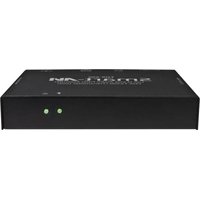
FDX-2500 Receiver Front

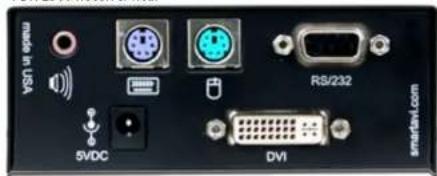
FDX-2500 Receiver Rear

SmartAVI, Inc. / Twitter: smartavi 11651 Vanowen St., North Hollywood, CA 91605 Tel: (818) 503-6200 Fax: (818) 503-6208 http://www.SmartAVI.com

Installation Manual
FDX-2500
DVI-D Video, Stereo Audio, PS/2 Keyboard/Mouse and RS-232 Extender over Fiber Optic Cable

natural_image
Exterior view of a black and purple SITAS-MSI device with ports and connectors (no visible text or symbols)The FDX-2500 consists of a transmitter and receiver that extend KVM, DVI-D, audio and RS-232 signals. It is a professional quality KVM capable of extending signals up to 15 kilometers over a single singlemode fiber optic cable.
www.smartavi.com
Introduction
The FDX-2500 consists of a transmitter and receiver that extend KVM, DVI-D, audio and RS-232 signals. It is a professional quality KVM capable of extending signals up to 15 kilometers over a single singlemode fiber optic cable.
Features
• Top Signal Quality at Maximum Extension Over Singlemode Fiber (15 Km)
• Superior Image Quality at all Resolutions
• Video Resolutions up to 1920 x 1200 at 60Hz (1280 x 1024 at 75Hz)
- Customizable/Programmable DDC Table
• Supports PS/2 Keyboard/Mouse
• Supports Stereo Audio
• Supports DVI-D
• Supports RS-232 Control from 300bps to 115,000bps
• Supports all PS/2 Keyboards
- Fiber Plug Type LC
• Compatible With all Operating Systems
• Compatible With all Major KVM Switches
- Compact Metal Casing
Applications
• Corporate or Educational Presentations
• Financial (Remote Servers/User Control)
- Call Centers
• Industrial (Long-Range Workstation Isolation)
• Information Terminals/Kiosks
• Airport Installations (Air Traffic Control/Passenger Information)
• KVM Extension where Exceptional Quality of Signal is Crucial
• Medical (Remote Operation Away from Sensitive/Magnetic Equipment)
- Recording (for Large Studios where Editing/Mixing Stations are Compact and/or Require Complete Silence)

natural_image
Illustration of a desktop computer setup with printer, keyboard, monitor, and mouse (no visible text or symbols)Product - Installation Diagram
Fiber Optic Cable up to 15 Km

Receiver Transmitter
Installation
- Turn off the computer, display, and speakers.
- Connect the DVI extension cable, PS/2 keyboard and mouse cables, and audio cable (not included) to the computer and to the ports on the FDX-2500-TX.
- Connect the display to the DVI connector on the FDX-2500-RX.
- Connect PS/2 mouse and keyboard to the PS/2 connectors on the FDX-2500-RX.
- Connect speakers to the audio connector on the FDX-2500-RX.
- Connect the power cord and power on the FDX-2500TX and the FDX-2500-RX.
- Power on the computer, display and speakers.
Why Fiber Optic?
SmartAVI has created a full line of fiber optic extender products, understanding that this technology is superior to traditional cabling.
Fiber optic cables are:
- capable of transmitting over very long distances with no signal loss.
- immune to electromagnetic interference. In situations where there is considerable interference, fiber optic cabling is the only solution.
- much more secure because they cannot be easily tapped. For this reason, military and law enforcement agencies use fiber optic cables for the transmission of sensitive data.
• relatively inexpensive and small enough to be routed through small spaces.
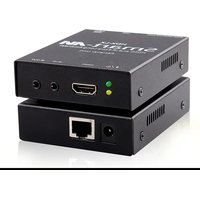
Brand : Smart-AVI
Model : FDX-2500
Category : AV Extender