
XTA-TXS - AV Extender Smart-AVI - Free user manual and instructions
Find the device manual for free XTA-TXS Smart-AVI in PDF.


| Product Type | AV Extender |
| Model | XTA-TXS |
| Brand | Smart-AVI |
| Transmission Medium | Cat5e/6 UTP cable |
| Supported Interfaces | HDMI (input and output) |
| Maximum Resolution | 1920x1080 @ 60Hz (Full HD) |
| Maximum Distance | 60 meters (196 feet) |
| Audio Support | Embedded HDMI audio (2-channel PCM) |
| Power Supply | 5V DC via USB (includes USB cable) |
| Power Consumption | < 2W |
| Dimensions (W x D x H) | 85mm x 55mm x 20mm (3.3 x 2.2 x 0.8 in) |
| Weight | 95g (0.21 lbs) |
| Operating Temperature | 0°C to 45°C (32°F to 113°F) |
| Storage Temperature | -20°C to 60°C (-4°F to 140°F) |
| Humidity | 10% to 85% RH (non-condensing) |
| LED Indicators | Power and Signal status |
| Mounting | DIN rail or wall mount (optional bracket) |
| Included Accessories | Transmitter and receiver units, USB power cables, user manual |
| Compliance | CE, FCC, RoHS |
| Warranty | 1 year limited |
| Maintenance | Wipe with dry cloth; keep away from moisture |
| Repairability | No user-serviceable parts; contact support |
| Safety | Use only supplied power adapter; avoid liquids |
Frequently Asked Questions - XTA-TXS Smart-AVI
User questions about XTA-TXS Smart-AVI
0 question about this device. Answer the ones you know or ask your own.
Ask a new question about this device
Download the instructions for your AV Extender in PDF format for free! Find your manual XTA-TXS - Smart-AVI and take your electronic device back in hand. On this page are published all the documents necessary for the use of your device. XTA-TXS by Smart-AVI.
USER MANUAL XTA-TXS Smart-AVI
Technical Specifications
XP-AV SPECIFICATIONS
| VGA Data | |
| Format RGBHV, RGsB, YUV, Y/C, CVBS | |
| Resolution | Up to 1900 x 1200 VGA, SVGA, XGA, SXGA) |
| Connector type HD | 15 socket |
| Audio | |
| Signal Type Stereo | unbalanced |
| Connector 3.5mm | jack socket |
| Power | |
| Requirements 5VDC @.5A | |
| Connector 2.1mm | DC jack (center +ve) |
| Physical | |
| Dimensions 135 x 90 x 23mm (26 with pegs) | |
| Weight .8 lbs or .36 kg | |
© Copyright 2011 Smart-AVI, All Rights Reserved
NOTICE
The information contained in this document is subject to change without notice. Smart-AVI makes no warranty of any kind with regard to this material, including but not limited to, implied warranties of merchantability and fitness for any particular purpose.
Smart-AVI will not be liable for errors contained herein or for incidental or consequential damages in connection with the furnishing, performance or use of this material.
No part of this document may be photocopied, reproduced or translated into another language without prior written consent from Smart-AVI.
For more information, visit www.smartavi.com.
Rack Mountable Option

natural_image
Exterior view of a black server rack unit with attached power bays (no visible text or labels)Our SmartRack is the perfect solution to allow virtually all SmartAVI devices to be custom mounted in a standard 19" server rack. The SmartRack is fully adjustable and can secure/organize several devices.

SmartAVI, Inc. / Twitter: smartavi 11651 Vanowen St. North Hollywood, CA 91605 Tel: (818) 503-6200 Fax: (818) 503-6208 http://www.SmartAVI.com

User Manual
XT-AV
natural_image
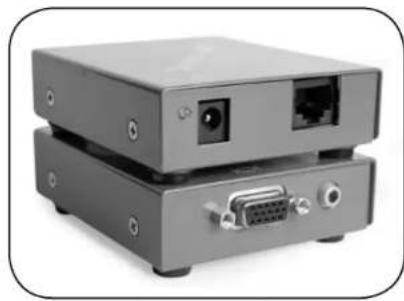
Two stacked electronic devices with ports and connectors, no visible text or symbolsUse a single CAT5 to broadcast high resolution SXGA and Stereo Audio up to 1000ft away.
www.smartavi.com
Introduction
The XT-av range of products allows the extension of a wide range of video and audio formats via a single Category 5 Unshielded Twisted Pair (UTP) cable.
Features
■ Uses easy to install, inexpensive CAT-5/5e/6/7/8.
■ Output reaches up to 1,000 feet (300 m).
■ Resolutions up to 1900x1200.
■ 300 MHz Bandwidth.
■ Sends high-resolution UXGA, Stereo Audio and
■ Compatible with VGA, XGA, Sun, MAC and SGI
■ Sync Format / Polarity Preservation.
■ Compatible with Line Level Stereo Audio Signals.
■ High ground loop immunity.
■ Built-in lightning, power surge and transient protection.
■ Designated trimmer in the remote unit to compensate for cable length.
■ Compact Metal Case Enclosure.
What's in the box?
XT-AV
Please check the contents of the package before beginning installation.
| XT-AV Package Content | ||
| Qty | Items | Part No. |
| 1 | XT-AV Transmitter unit | XTAV-TX |
| 1 | XT-AV Receiver unit | XTAV-RX |
| 2 | 5 volt dc power supply | PS-5D1A-US |
| 1 | HDD 15 male to male VGA cable [6ft] | CC-VGAMM-06 |
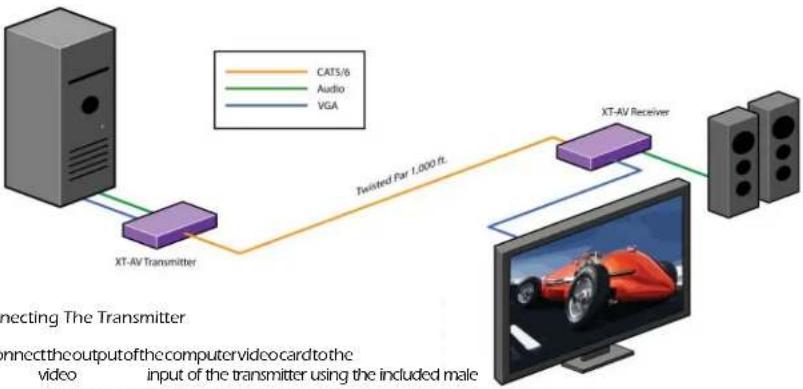
Installation Diagram
flowchart
graph LR
    A["XT-AV Transmitter"] -->|Twisted Far 1.000 ft.| B["XT-AV Receiver"]
    B --> C["Computer"]
    subgraph CATS/6
        A
        B
        C
    end
    subgraph Audio
        A
        B
        C
    end
    subgraph VGA
        A
        B
        C
    end
Connecting The Transmitter
-
Connect the output of the computer video card to the video input of the transmitter using the included male to male video cable.
-
Connect the output of the computer audio card to the audio input of the transmitter using 3.5mm audio male to male audio cable.
- Connectexternalspeakerstothetransmitter'saudio out (Standard 3.5mm stereo miniplug).
- In the back of the unit connect the CAT5 cable that will connect to the receiver (XTAV-RX).
Connecting The Receiver
- Connect CAT5 cable (coming from the transmitter) to the back of the receiver.
- Connect display monitors to the VGA out connector on the front of the receiver.
- Connect external speakers to the audio output connections on the front of the unit. (Standard 3.5mm stereo Miniplug)
Preparing & Connecting System CAT5 Cable
Following is the wiring standard for terminating CAT 5 cable using RJ-45 connector:
Pair 1 Pins 1 & 2
Pair 2 Pins 3 & 6
Pair 3 Pins 4 & 5
Pair 4 Pins 7 & 8
Connectors:
Capacitance: 14 pf/ft (46.2 pf/m)
Conductor Gauge: 24 AWG
Impedance: 100 +/- 15 ohms


RJ45
Pair
Adjusting and Tuning the Signal
In order to fine tune the signal, adjust the individual dials one at a time starting with GREEN, then BLUE, and lastly RED. As you turn the dials you will notice the colors slightly change as you increase or decrease the strength. All dials should be around the same distance.
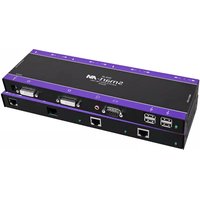
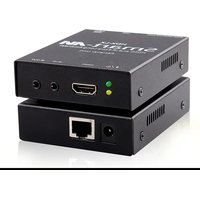
Brand : Smart-AVI
Model : XTA-TXS
Category : AV Extender