
BML-06 - Headphones BRIGMTON - Free user manual and instructions
Find the device manual for free BML-06 BRIGMTON in PDF.


| Type | Over-ear wireless headphones |
| Dimensions | 18 x 15 x 7 cm |
| Weight | 200 g |
| Power Supply | Built-in rechargeable lithium battery, USB-C charging |
| Battery Life | Approximately 15 hours |
| Charging Time | 2 hours |
| Wireless Connectivity | Bluetooth 5.0 |
| Driver Diameter | 40 mm |
| Frequency Response | 20 Hz - 20 kHz |
| Impedance | 32 Ω |
| Sensitivity | 105 dB |
| Microphone | Built-in, omnidirectional |
| Controls | Volume up/down, multi-function button (play/pause/call) |
| Foldable Design | Yes, for portability |
| Ear Cushions | Soft memory foam, leatherette |
| Cleaning Instructions | Wipe with a soft, dry cloth. Do not use liquids or solvents. |
| Safety Warnings | Do not use at high volume for extended periods to prevent hearing damage. |
| Spare Parts Available | Ear cushions, charging cable |
| Repairability | User-replaceable ear cushions; battery replacement by authorized service center |
| Warranty | 1 year limited warranty |
Frequently Asked Questions - BML-06 BRIGMTON
User questions about BML-06 BRIGMTON
0 question about this device. Answer the ones you know or ask your own.
Ask a new question about this device
Download the instructions for your Headphones in PDF format for free! Find your manual BML-06 - BRIGMTON and take your electronic device back in hand. On this page are published all the documents necessary for the use of your device. BML-06 by BRIGMTON.
USER MANUAL BML-06 BRIGMTON
natural_image
Black BRIGHTON brand phone with earbuds and antenna (no visible text or symbols on device body)BML-06
AURICULAR BLUETOOTH - MANOS LIBRES
natural_image
Black BRIGHTON brand phone with earbuds and antenna (no visible text or symbols on device body)BML-06
BLUETOOTH EARPHONE - HANDS FREE
Instruction Manual
INTRODUCTION
Please read the user manual to make the best use of this produt and its many features.
Bluetooth wireless technology makes it possible to connect compatible communication devices without using cables. A Bluetooth connection does not require that the phone and the headset be in line of sight, but both devices should be within 10 meters of each other, Connections can be subject to interference from obstructions, such as walls or other electronic devices.
-he headset is compliant with Bluetooth Specification 3.0 supporting the following profiles: Headset profiles and Hands-Free Profiles check with the manufactures of other devices to determine their compatibility with this device.
GET STARTED
OVERVIEW
·he headset contains the following parts as shown in the figure:
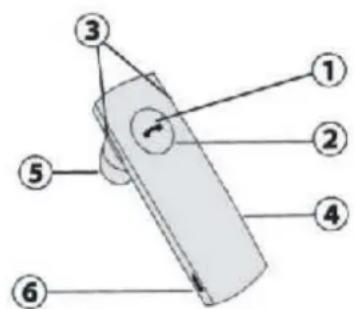
(1)Answer/end key.
(2) Led Indicator (red/blue)
(3)Volume up and volume down buttons
(4)Microphone
(5) Earphone
(6)Charger socket
Before you can start using the headset, you must charge the battery and pair the headset with a compatible phone.
Note: Parts of the headset are magnetic, Metallic materials may be attracted to the headset. Do not place credit cards or other magnetic storage media near the headset, because information stored on them may be erased.
CHARGER AND BA…ERIES
Your headset uses a rechargeable battery. You must charge the battery fully before using the headset for the first time.
Simply plug in provided USB cable to USB port then to USB Car Charger Adaptor/Notebook Computer/Desktop Computer. Headset will start charging. -he red indicator of headset will turn on when charging. When the battery is full, the red indicator of the headset will turn off.
a) Charge the headset until the red light on the headset turn off.
b) ·he headset will be fully charged in approximately 2 hour.
c) Remove the USB cable from the charging socket.
·he fully charged battery has power for up to 4 hours of talk-time or up to 120 hours of standby time. However, the talk and standby times
may vary when used with different mobile phones, products that use a Bluetooth connection, usage settings, usage styles, and environments.
When the battery is running out of power, the red indicator light starts to Flash.
IMPOR·AN·: ·he headset cannot be used while charging.
SWI·CH ·HE HEADSE· ON OR OFF
- o switch on, press and hold the Answer/end key for 3 seconds. -he blue indicator light starts to flash. -o switch off, press and hold the power key for 4 seconds until headset beeps 2 times and the red indicator light is displayed briefly.
PAIR ·HE HEADSE· WI·H A COMPA·IBLE PHONE
a) Make sure your headset is turn off
b) Push the answer/end key for 8 second until the blue and red light flashes alternately
c) Activate the Bluetooth feature on the phone, and set the phone to search for Bluetooth devices. See the user guide of your phone for instructions.
d) Select the headset from the list of found devices.
e) Enter the passcode 0000 to pair and connect the headset to your phone. In some phones you may need to make the connection separately after pairing. See the user guide of your phone for details. You only need to pair the headset with your phone once.
f) If the pairing is successful, the headset's blue light will flash 3 times briefly for the first time follow by a single flash every 7 seconds. ·he headset's name appears in the phone menu where you can view the currently paired Bluetooth devices.
PAIRING ·HE HEADSE· WI·H A 2ND MOBILE PHONE
·his headset is capable of pairing to two mobile phones simultaneously. airing a second phone (Multi-Link):
a) Make sure the headset is turned ON and connected to the first phone.
b) Press and HOLD DOWN the Volume Down button for 3 seconds or until the headset indicator light flashes RED or BLUE alternately.
c) ·he headset is now in Pairing Mode and is ready to connect to your second mobile phone.
d) Set your second mobile phone to search for Bluetooth devices.
e) When the second phone finds the headset, confirm by selecting BML-06 from the list.
f) Enter passcode "0000" when prompted by the second phone.
g) After pairing the second phone, by default the first phone will be disconnected from the headset. Enter the first phone's Bluetooth settings screen and connect it to the headset. Both phones should
now be connected to the headset.
SWITCHING CALLS BETWEEN TWO CONNECTED PHONES
a) While on a call with one phone and the second phone rings with an incoming call, press and HOLD the volume up button briefly to answer the 2nd call and place the 1st phone on hold.
b) Press and HOLD the volume up button briefly to switch between the two phones and place the current phone on hold.
c) To hang up current call, press the Call button. The headset will end the current call and return to the other phone which was placed on hold.
d) To end that call, press the Call button or press the End key on your Phone.
DISCONNECT THE HEADSET FROM THE PHONE
To disconnect the headset from your phone (for example, to connect the phone to another Bluetooth device), do one of the following:
- Switch off the headset.
- Disconnect the headset in the Bluetooth menu of your phone.
- Move the headset more than 10 meters away from the phone. You do not need to delete the pairing with the headset to disconnect it.
8) Reconnect the paired headset to your phone
To connect the headset to your phone, switch on the headset, make the connection in the Bluetooth menu of your phone, or press and hold the answer/end key.
You can set your phone to connect with the headset automatically when the headset is switched on. See the user guide of your phone for details.
BASIC USE
1) Call handling
·To make a call
Use your phone in the normal way when the headset is connected to your phone.
·To answer a call
Press the answer/end key, or use the phone keys. If the automatic answer function is set on, the phone automatically answers the incoming call after one ring.
·To end a call
Press the answer/end key, or use the phone keys.
2) Voice dialing (dialing a number by saying a name)
It is possible to make a call directly from the headset using voice recognition.
To use this voice dialing function, your mobile phone must provide this option and corresponding voice samples must have been recorded.
- Step-1 Press the Answer/end button of the headset one time, you will
hear a beep prompt.
- Step-2 When you hear a short tone, say the name of the person you wish to call loudly.
3) Adjust the earphone volume
·Volume up
While in conversation, press the VOLUME + button to increase the volume.
·Volume down
While in conversation, press the VOLUME - button to decrease the volume.
TROUBLESHOOTING
If you cannot connect the headset to your phone, do as follows:
- Ensure that the headset is charged, switched on, paired with and connected to your phone.
- Ensure that the Bluetooth feature is activated on your phone.
- Check that the headset is within 10 meters of your phone and that there are no obstructions between the headset and the phone, such as walls or other electronic devices.
Battery information
1) Your device is powered by a rechargeable battery. The full performance of a new battery is achieved only after two or three complete charge and discharge cycles. The battery can be charged and discharged hundreds of times, but it will eventually wear out. Recharge your battery only with compatible chargers designated for this device.
2) Unplug the charger from the electrical plug and the device when not in use. Do not leave a fully charged battery connected to a charger, since overcharging may shorten its lifetime. If left unused, a fully charged battery will lose its charge over time.
3) Never use any charger that is damaged.
4) Leaving the device in hot or cold places, such as in a closed car in summer or winter conditions, will reduce the capacity and lifetime of the battery. Always try to keep the battery between 15° and 25°.
A device with a hot or cold battery may not work temporarily, even when the battery is fully charged. Battery performance is particularly limited in temperatures well below freezing.
5) Do not dispose of batteries in a fire as they may explode. Batteries may also explode if damaged. Dispose of batteries according to local regulations.
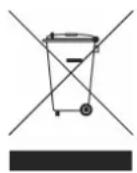
Please recycle when possible. Do not dispose as household waste.
CARE AND MAINTENANCE
Your device is a product of superior design and craftsmanship and should be treated with care. The suggestions below will help you
protect your warranty coverage.
1) Keep all accessories and enhancements out of the reach of small children.
2) Keep the device dry. Precipitation, humidity, and all types of liquids or moisture can contain minerals that will corrode electronic circuits. If your device does get wet, allow it to dry completely.
3) Do not use or store the device in dusty, dirty areas. Its moving parts and electronic components can be damaged.
4) Do not store the device in hot areas. High temperatures can shorten the life of electronic devices, damage batteries, and warp or melt certain plastics.
5) Do not store the device in cold areas. When the device returns to its normal temperature, moisture can form inside the device and damage electronic circuit boards.
6) Do not drop, knock, or shake the device. Rough handling can break internal circuit boards and fine mechanics.
7) Do not use harsh chemicals, cleaning solvents, or strong detergents to clean the device.
8) Do not paint the device. Paint can clog the moving parts and prevent proper operation.
All of the above suggestions apply equally to your device, battery, charger, or any enhancement. If any device is not working properly, take it to the nearest authorized service facility.
WARNING
Permanent hearing loss may result from long-term exposure to sound at high volumes. Use as low a volume as possible and avoid prolonged use of the earphone at excessive sound pressure levels. Please read the safety guidelines below prior to using the safety guidelines below prior to using this earphone. You can reduce the risk of hearing damage by following these safety guidelines.
Prior to using this product follow these steps:
1) Before putting on the earphone, turn the volume control to its lowest level.
2) Put the earphone on, and then slowly adjust the volume control to a comfortable level.
During the use of this product:
1) Keep the volume at the lowest level as possible.
2) If increased volume is necessary, adjust the volume control slowly.
3) If you experience discomfort or ringing in your ears, immediately discontinue using the earphone.
(With continued use at high volume, your ears may become accustomed to the sound level, which may result in permanent damage to your hearing without any noticeable discomfort.)
SAFETY INFORMATION
1) If you have a cardiac pacemaker or other electronic medical equipment, you should consult your physician before using this product.
2) ·his product contains small parts that may be hazardous to children.
Always store the product out of reach from children. ·he bags themselves or the many small parts they contain may cause choking if ingested.
3) Never attempt to disassemble the product yourself, or push other objects into this product, as this may cause short circuit, which led to the fire or get an electric shock.
4) None of the components can be replaced or repaired by users. Only authorized dealer or service center may open the product. If any parts of your product require replacement for any reason, including normal wear and tear or breakage, please contact your dealer.
BRIGMTN
"Features can change without notice"
Imported: I.R.P., S.L.
DECLARATION OF CONFORMITY
I.R.P., SL declare under our responsibility that the equipment meets the requirements indicated in the following directives:
EMC DIRECTIVES
EN300328
EN301489-17
EN61000-3-3
EN61000-3-2
EN62479
EN60950
EN50332
Description of apparatus:
BRIGM·ON Model BML-06
Bluetooth earphone
Importer: I.R.P., SL
Address: Avenida Santa Clara de Cuba 5, 41007, Sevilla.
- BML-06
- Instruction Manual
- INTRODUCTION
- GET STARTED
- OVERVIEW
- CHARGER AND BA…ERIES
- SWI·CH ·HE HEADSE· ON OR OFF
- PAIR ·HE HEADSE· WI·H A COMPA·IBLE PHONE
- PAIRING ·HE HEADSE· WI·H A 2ND MOBILE PHONE
- SWITCHING CALLS BETWEEN TWO CONNECTED PHONES
- DISCONNECT THE HEADSET FROM THE PHONE
- BASIC USE
- TROUBLESHOOTING
- Battery information
- CARE AND MAINTENANCE
- WARNING
- SAFETY INFORMATION
- BRIGMTN
- DECLARATION OF CONFORMITY
- EMC DIRECTIVES
Brand : BRIGMTON
Model : BML-06
Category : Headphones