
F-60GDS - Household Fan PANASONIC - Free user manual and instructions
Find the device manual for free F-60GDS PANASONIC in PDF.


| Product Type | Domestic Stand Fan |
| Brand | Panasonic |
| Model | F-60GDS |
| Dimensions (Height) | 135 cm |
| Dimensions (Base Diameter) | 38 cm |
| Net Weight | 5.5 kg |
| Power Supply | AC 220-240V, 50Hz |
| Power Consumption | 50 W |
| Fan Speed Settings | 3 (Low, Medium, High) |
| Oscillation | Yes (80° wide angle) |
| Timer Function | Yes (up to 7 hours) |
| Remote Control | Yes (included) |
| Blade Diameter | 60 cm (23.6 inches) |
| Material | ABS plastic, metal stand |
| Noise Level | ≤ 58 dB (A) |
| Safety Features | Overheat protection, tip-over switch |
| Cleaning | Wipe with damp cloth; detachable grille |
| Maintenance | Lubricate motor annually |
| Spare Parts Available | Blade, guard, motor, remote |
| Repairability Index | 7/10 (Easy part replacement) |
Frequently Asked Questions - F-60GDS PANASONIC
User questions about F-60GDS PANASONIC
0 question about this device. Answer the ones you know or ask your own.
Ask a new question about this device
Download the instructions for your Household Fan in PDF format for free! Find your manual F-60GDS - PANASONIC and take your electronic device back in hand. On this page are published all the documents necessary for the use of your device. F-60GDS by PANASONIC.
USER MANUAL F-60GDS PANASONIC
Operating and Installation Instructions
Ceiling Fan
natural_image
Line drawing of a five-blade propeller with a control panel labeled F-60GDN (no text or symbols on the propeller itself)natural_image
Line drawing of a five-blade propeller with a control panel labeled F-60GDS (no text or symbols on the diagram itself)SCAN ME
Operating and Installation Instructions
Ceiling Fan
Thank you for purchasing this Panasonic product. Before operating this product, please read the instructions carefully, and save this manual for future use.
Contents
| Safety precautions | 2 - 3 |
| Maintenance | 6 |
| Name of parts | 7 |
| How to install | 8 - 13 |
| How to use | 14 - 20 |
| Copyright | 21 - 22 |
| Specifications | 23 |
Electronic-warranty is available from My Panasonic App. Please check the warranty card for details.
To avoid the possibility of causing injury to users or damage to properties, please follow all the explanations written below.

This symbol denotes an action that is COMPULSORY.

This symbol denotes an action that is PROHIBITED.

WARNING
A state that may be caused by the mishandling of products, which, if not avoided, may lead to the possibility of death or serious injury of users.

CAUTION
A state that may be caused by the mishandling of products, which, if not avoided, may result in the injury of users or property damage.

WARNING

Follow strictly all the instructions given in this manual for installation.
Electrical or installation work needs to be performed by a qualified individual.
Installation error can cause fire, electrical shock, injury or Ceiling Fan to drop.

Switch off the power supply and wait until the Blades is fully static, before cleaning or doing any maintenance jobs.
Can cause injury and electrical shock if Ceiling Fan move suddenly.
Kindly refer to your authorized dealer for repairing or maintenance issue.

Tighten the Blade Screws firmly using a screwdriver. (250-300 N•cm)
Can cause injury if Blade drops.

Ensure that the ceiling hook can sustain more than 10 times the Ceiling Fan weight.
Can cause injury if Ceiling Fan drops.

Stop using the Ceiling Fan when any abnormality or failure occurs and turn "OFF" the Miniature Circuit Breaker (MCB).
Risk of smoke, fire, electrical shock and drop. Please contact your authorized dealer for maintenance/repair.

Dismantle the broken or damaged Ceiling Fan.
Can cause injury if Ceiling Fan drops.

If unusual oscillating movement is observed, immediately stop using the Ceiling Fan and contact the manufacturer, its service agent or suitably qualified persons.
Can cause injury if Ceiling Fan drops.

Do not install the Ceiling Fan at oily and dusty places.
Can cause fire, short circuit and electrical shock.

Do not install the Ceiling Fan near flammable areas such as a gas cooker.
Can cause fire, short circuit and electrical shock.

Do not install the Ceiling Fan near chemicals and alkaline.
Can cause fire, short circuit and electrical shock.

Do not damage the wire during installation eg.
deform due to heat, twist, bend, etc.
Can cause fire, short circuit and electrical shock.

Do not use power supply other than rated voltage mentioned.
Overheating can cause electrical shock or fire.

Do not insert any metal items in the battery area with the Battery.
Can cause fire, short circuit and electrical shock.

Do not hang onto the Ceiling Fan.
Can cause injury if Ceiling Fan drops.

Do not disassemble the Ceiling Fan unless stated by this manual.
Must use only supplied parts.
Can cause fire, electrical shock, injury or Ceiling Fan to drop.

Do not touch the Ceiling Fan while it is operating.
Can cause injury, damage and Ceiling Fan to drop.

Do not sprinkle water to Ceiling Fan or do not wet the Ceiling Fan.
Can cause fire, short circuit and electrical shock.

CAUTION

To avoid the possibility of causing injury to users or damage to properties, please follow all the explanation written in this manual. The manufacturer will not be responsible for any accidents or injuries caused by defective, deficient installation or installation which does not follow the instruction manual. Can cause the injury of users or property damage.

This appliance is not intended for use by persons (including children) with reduced physical, sensory or mental capabilities, or lack of experience and knowledge, unless they have been given supervision or instruction concerning use of the appliance by a person responsible for their safety. Children should be supervised to ensure that they do not play with the appliance. Can cause the injury of users or property damage.

The Ceiling Fan must be mounted above 2.3 m from the floor and 1 m from the wall to the Blade. Can cause unstable air flow and affect Ceiling Fan to wobble. Can cause injury if Ceiling Fan drops. Refer to Step 2 - ① on page 15 for the measurement method.

After installation make sure the Ceiling Fan does not wobble extremely. Can cause injury if Ceiling Fan drops.

Replace all the Blades if any of them breaks or cracks. Wobbling can cause Ceiling Fan to drop.

The mounting of the suspension system shall be performed by the manufacturer, its service agent or suitably qualified persons. Can cause injury if Ceiling Fan drops.

The Ceiling Fan suspension system should be examined at least once every two years. Can cause the injury of users or property damage.

The replacement of parts of the safety suspension system device shall be performed by the manufacturer, its service agent or suitably qualified persons. Can cause the injury of users or property damage.

This product is for in house use only. Do not install at a windy places. Can cause rust, discolour, damage and injury.

Do not install at places where there is high vibration and impact. Can cause injury if Ceiling Fan drops.

Avoid fixing inside dome ceiling. Can cause unstable air flow and affect Ceiling Fan to wobble. Can cause injury if Ceiling Fan drops.

Do not expose yourself continuously to direct wind from the Ceiling Fan. It may cause discomfort.

Wipe away dirt with a clean soft cloth, ordinary soap and water to keep the Ceiling Fan clean. Do not use solvents (gasoline, petroleum, thinner, benzine, alcohol, cleaning powder, alkaline detergent) or any other chemicals. Can cause plastic part deformation and metal corrosion. Can cause injury if parts drop.

Ensure that the Ceiling Hook ("J" Hook) or ("U" Hook) is not loosen. Tighten the Bolt and Nut of the Pulley Set Plate firmly using a torque wrench. (1500-1800 N•cm) Can cause injury if Ceiling Fan drops due to wobbling. Refer to Step 2 on page 9 for the installation method.

Do not use at the area near to hot spring and volcanic. Can cause the lighting not lit.

Do not install the Ceiling Fan at a wet, high temperature and high humidity area such as shower room. If an electrical current leakage occurs, it can cause electrical shock and fire easily.
① Check the Ceiling Fan condition annually. If a problem occurs, stop using the Ceiling Fan. Then refer to authorized dealer.
□ Check point:
Loosened screws, safety wire condition, motor shaft damage, etc.
② Ensure the Safety Switch is in good condition. If a problem occurs, stop using the Ceiling Fan. Then refer to authorized dealer.
③ Keep the Ceiling Fan clean. Wipe away dirt with a clean soft cloth, ordinary soap and water. Wipe it again to dry it. Do not use solvents (gasoline, petroleum, thinner, benzine, alcohol, cleaning powder, alkaline detergent) or any other chemicals.
- Do not bend the Blade while cleaning.
④ Do not paint the Blades. If damaged, order a new set of Blades (5 pieces) from an authorized dealer.
⑤ When referring to an authorized dealer, show these instructions to them and maintain correctly.
⑥ If the product is broken or damaged, remove it from the ceiling and replace with new. This is to avoid the Ceiling Fan drops.
⑦ The Ceiling Fan suspension system should be examined at least once every two years.
natural_image
Line drawing of a streamlined object labeled 'F-60GDS' with no other text or symbols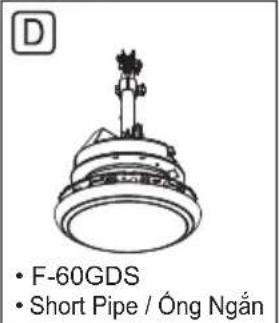
natural_image
Illustration of two remote control devices, one with a display and the other with a closed panel (no text or symbols)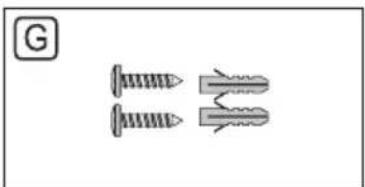
natural_image
Two screwdrivers with different end caps, shown in line drawings (no text or symbols)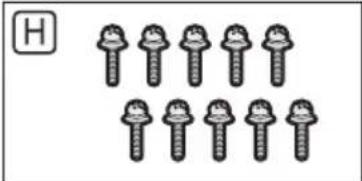
Parts
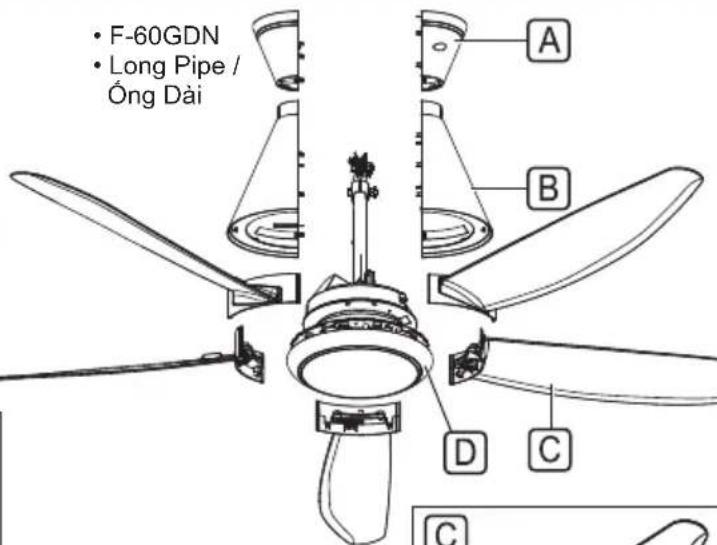
A Upper Canopy 2....
B Lower Canopy....2
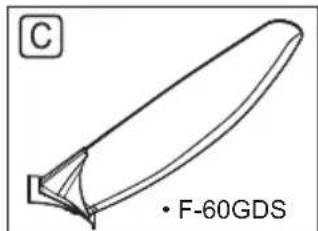
© Blade Assembly.5....
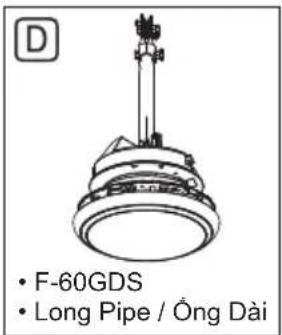
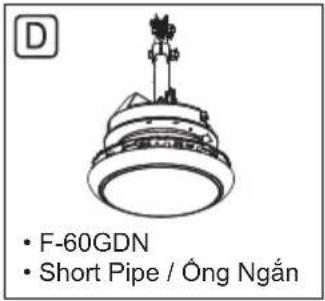
D Motor Unit 1.
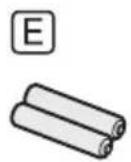
E Batteries AAA / R03 / LR03 2....
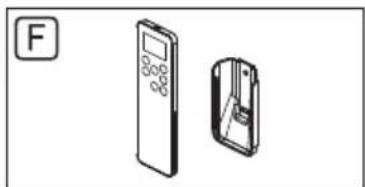
F Remote Control / Holder 1......
G Wall Plugs and Screws 2......
H Blade Screws 10....
■ Attention:
- Do not place the Ceiling Fan directly on the floor. Refer to Step 1 (page 8) for the installation method. Can cause scratches to the product.
Note:
- The illustrations in this manual are for explanation purposes only and may differ from the actual unit.

WARNING

Do not use modified parts other than original supplied parts. Can cause injury if the Ceiling Fan drops.
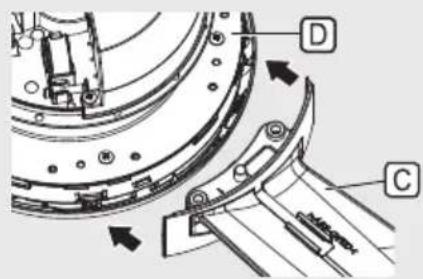
① Put the Motor Unit ☑ on the Installation Area a of the Packing Material b as shown to assemble the Blade Assembly C.
② Assemble the Blade Assembly Ⓐ towards the Motor Unit Ⓓ.
③ Tighten the Blade Assembly firmly with the Blade Screws H provided.
Use 2 screws for one Blade Assembly.
For reference, tightening torque is 250-300 N·cm.
Ensure the Blade Assembly screw hole is center with the Motor Unit screw hole.
Hold the Blade Assembly during installation.
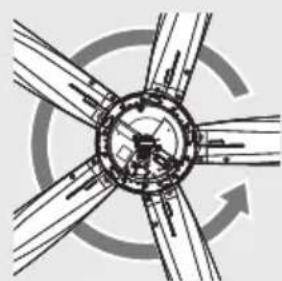
④ Attach the Blade Assembly counterclockwise when viewed from above.
■ Lắp đặt Cánh Quạt
②
④
natural_image
Abstract diagram of intersecting circular and radial lines with a central arrow, no text or symbols present.
WARNING

Tighten the Blade Screws firmly using a screw driver. (250-300 N·cm)
Can cause injury if the Blade drops.

CẢNH BÁO

The Blade must be fixed correctly.
Can cause no air flow.
Can cause injury if the Blade drops.

LU'U Y

Check point after installation

The Blade Screws (10 pieces) fixing the Blades are securely tightened.

① Remove the supplied Bolt b, Nut c, Cotter Pin d and Pulley e.
② Ensure that the Ceiling Hook ("J" hook c) or ("U" hook d) is not loosen.
For reference, the Ceiling Hook ("J" hook c) or ("U" hook d) can sustain 20 N.
③ Place Pulley e on to the Ceiling Hook c.
④ Tighten the Pulley Set Plate f firmly with the Bolt b and Nut c provided.
For reference, tightening torque is 1500-1800 N·cm.
• Cotter Pin d must fix into Bolt b and bent.
⑤ Tighten the 2 Hook Holder screws ^9 firmly. For reference, tightening torque is 50-80 N·cm.
■ Lắp lên trần nhà
Note:
- In case "U" hook d is being used, installation method is the same.
- Loosen installation can cause taking a long time to start up or vibration of Ceiling Fan.
Ghi chú:
⑥ Remove the Safety Wire Screw h from the Pipe.
⑦ Arrange and tie the Safety Wire i as shown.
- Firmly screw the Safety Wire i with Safety Wire Screw h onto the Pipe.
Ensure that the Ceiling Hook can sustain more than 10 times the Ceiling Fan weight. Safety Wire must be fixed correctly to the Pipe. Can cause injury if the Ceiling Fan drops.

CẢNH BÁO

Check point after installation
☐ Make sure Bolt and Nut are fully tightened and Cotter Pin is inserted and bent for safety reason.
☐ Make sure Ceiling Fan is securely fixed on Ceiling Hook and Ceiling Fan not slanting after installation.
☐ The Safety Wire is looped to the Ceiling Hook and securely fixed to the Pipe.
Connect the house's supply wire ⓔ to the terminal j according to the diagram shown.
- Recommended wire stripping length is 7 - 8 mm.
① It is recommended to user to install OFF/ON switch on the wall for the Ceiling Fan, replacing existing regulator.
② This product should be installed with a double poles single throw switch (breaker switch) with a minimum of 3 mm contact gap in the fixed installation circuit.
③ Do not use regulator or dimmer switch for this model. (It can damage the Ceiling Fan)
- If your Remote Control missing or misplaced, the Ceiling Fan can be switched on in previous state. (If previous state is OFF, Ceiling Fan don't move.)
④ Should there be a regulator or dimmer switch, disconnect it and reconnect the wiring as above.
Electrical wiring must be done by a qualified individual.
Can cause fire, electrical shock, injury or Ceiling Fan to drop.

This product is not provided with a cord and plug or with other means for connection to the supply.
When connecting or changing the power cord or lead wire, it must be performed by a qualified person in order to avoid a hazard. Please use 227IEC53(RVV) or thickness of tube 1 mm or above. (If there are other requirements such as the diameter of lead wire, please use according to the regulation of the country).
Can cause fire, electrical shock.

Do not bypass and short circuit the Safety Switch.
Can cause fire, electrical shock, injury or Ceiling Fan to drop.

CẢNH BÁO

Check point after installation

The wiring is connected properly to the power supply.

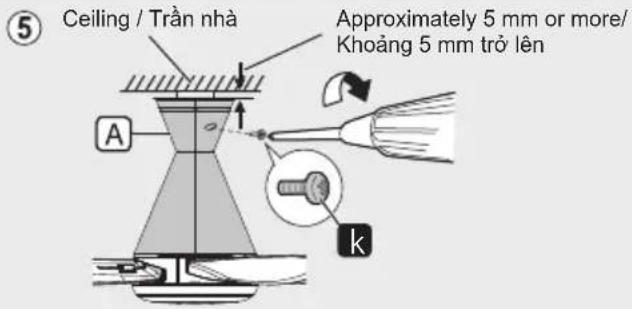
① Remove the screw (2 pieces) k from Upper Canopy A and keep it for Step 4 - ⑤.
② Align and insert the Fixing Rib 1 of the Lower Canopy B (2 pieces) into the Lower Canopy Fixing slot m. Clip it until it is fully fixed.
Note:
- Don't pinch house's supply wire ⓔ and safety wire ⚠.
③ Make sure Lower Canopy B sit properly on the slot m before fix Upper Canopy A.
■ Lắp đặt Nắp Chụp
④ Align and insert the Fixing Rib n of Upper Canopy A into the Fixing Slot o of Lower Canopy B.
Clip it until it is fully fixed.
Ensure Upper Canopy A (2 pieces) is sit on top of Lower Canopy B.
⑤ Check the gap between the Upper Canopy A and ceiling is approximately 5 mm or more.
Tighten the Upper Canopy A with the screw k which is removed in Step 4 - ①. (80-100 N·cm)
■ Attention:
- Do not assemble the Fixing Rib n of Upper Canopy A in opposite direction.
- Can cause abnormal noise.
Check point after installation
☐ The Canopy is securely screwed.
Install the Remote Control Holder F to wall. Fix the Remote Control Holder F using provided Screw P (2 pieces) and Wall Plugs (2 pieces) as shown in figure below.
• Distance between holes r is 42 mm.
- Depth for Wall Plug s is 30 mm.
• Hole diameter t is ∅ 6 mm.
■ Attention:
• The Wall Plugs are not needed for wooden wall.
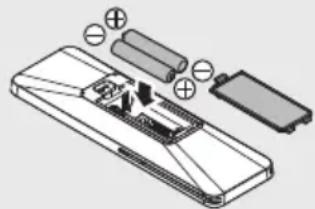
- “+” “-” position should match.
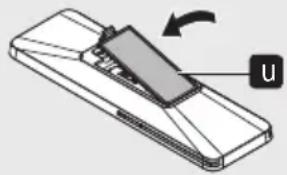
③ Close the cover u.
■ Attention:
- The included batteries may have a short life. If it becomes difficult to operate, please replace the battery.
- Replace all Batteries at one time and be careful not to mix Battery type.
-
natural_image
Diagram of a mobile phone showing the U component and its rotation arrow (no text or symbols)②
natural_image
Diagram of a smartphone internal structure with battery pack and charging elements (no text or labels)③
natural_image
Diagram of a device with a slide and arrow indicating rotation (no text or symbols)
WARNING

Do not insert any metal items in the battery area with the battery.
Can cause fire or electrical shock due to short circuit.

CẢNH BÁO

- If the Ceiling Fan is found to wobble during operation,
i.) Fix the Blades at different combination of position. Repeat this step until the Ceiling Fan stop wobbling.
ii.) Make sure Ceiling Fan is securely fixed on Ceiling Hook and Ceiling Fan not slanting after installation.
iii.) Ensure Bolt and Nut are fully tighten.
- If Ceiling Fan still wobbles after Step 2 - ⑦ (page 9), please refer to authorized dealer.
Chú y:
① The figure above shows the best coverage area (W) around 8 m if the height (H) is 4 m. The Remote Control must be pointed to the direction of the Ceiling Fan when in use.
② Avoid the following situations:
- Netting and Glass f can reduce the signal power or reflect the infrared signal from the Remote Control.
- Lighting effect generated by Fluorescent Lighting Systems ⑨ directly onto the product receiver area can affect the signal transmission.
- Obstacles such as Walls or Glass ⓗ between the product receiver and Remote Control can cause signal transmission failure.
■ Attention:
- The power consumption when the operation is turned off by Remote Control is about 0.5 W.
- It is recommended to switch off wall switch or breaker if Ceiling Fan is not in use for long period. This is for zero power consumption purpose.
- Point the Remote Control directly to the desired Ceiling Fan. If 2 or more Ceiling Fan are controlled by same Remote Control, there is a possibility that the other Ceiling Fan function/setting may be change at the same time.
Press to activate or stop the Ceiling Fan.
"ON" - Short beeping sound.
"OFF" - Long beeping sound.
Note: Ghi chú:
- When restarting at low rotation speeds, the fan rotation may be stopped and then restarted.
• It may take a while to start up.
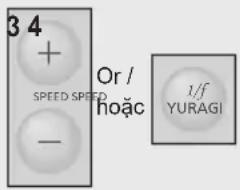
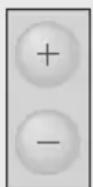
③ SPEED+ Button
Increase Fan Speed, maximum fan speed is 9. When setting the OFF TIMER and ON TIMER, Increase the time.
④ SPEED- Button
Decrease Fan Speed, minimum fan speed is 1. When setting the OFF TIMER and ON TIMER, Decrease the time.
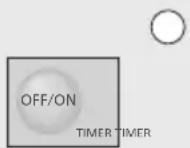
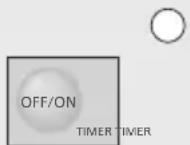
⑤ TIMER OFF/ON Button
Press to select ON TIMER or OFF TIMER. ON TIMER : To turn ON the Ceiling Fan according to the time and speed setting.
OFF TIMER : To turn OFF the Ceiling Fan according to the time and speed setting.
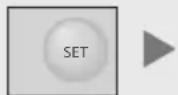
⑥ TIMER SET Button
After selecting the timer time with 'SPEED+' Button and 'SPEED-' Button, press to set the OFF TIMER and ON TIMER from 1 hour to 24 hour.
①
② Nút OFF/ON
To stop the Ceiling Fan according to the time setting.
For SLEEP MODE function, refer to 7 on page 20.
⑦ Nút 1/f YURAGI
Press “SPEED+” or “SPEED-” button to increase or decrease the speed gradually until reaching the desired condition.
This fan is equipped with MEMORY FUNCTION to restore user's last setting whenever fan is switched on.
Add smooth accent to air capacity and comfortable wind more naturally. To activate 1/f YURAGI function according to speed setting.
① Select a desired speed (speed 1 - 9).
② Press "1/f YURAGI" button on Remote Control to activate 1/f YURAGI function.
- Press again to deactivate 1/f YURAGI function.
■ 1/f YURAGI (Gió tự nhiên)
This pattern is an example for 1/f YURAGI setting at speed 4.
Note:
- 1/f YURAGI function does exist for speed 1 but less noticeable compared to higher speed (speed 4 and above).
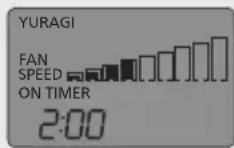
The Timer will count down every minute until fan is switched ON.
- During this timer count down, fan will remain OFF until count down is completed.
① Select a desired speed (speed 1 - 9) or 1/f YURAGI.
② Press "TIMER OFF/ON" button to select ON TIMER.
③ Press “SPEED+” or “SPEED-” button to select desired time frame (1 - 24 hours).
④ Press "TIMER SET" button to activate ON TIMER. Short beeping sound is heard when activate ON TIMER.
①2
O
O
6
OFF TIMER HỆN GIỜ TẮT
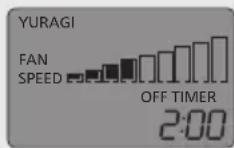
The Timer will count down every minute until fan is switched OFF.
- During this timer count down, speed will remain the same until the Ceiling Fan is OFF.
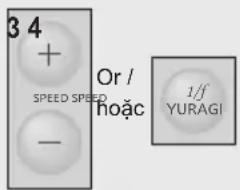
① Select a desired speed (speed 1 - 9) or 1/f YURAGI.
② Press "TIMER OFF/ON" button to select OFF TIMER.
③ Press “SPEED+” or “SPEED-” button to select desired time frame (1 - 24 hours).
④ Press "TIMER SET" button to activate OFF TIMER. Short beeping sound is heard when activate OFF TIMER.
①2
O
O
7
SLEEP MODE CHẾ ĐỘ NGỦ
Ceiling Fan speed and timer will gradually reduce until the Ceiling Fan is OFF.
- The operation pattern of SLEEP MODE: Fan reduces two speeds after every two hours (minimum speed 1), until the Ceiling Fan is turned OFF.
① Select a desired speed (speed 1 - 9) or 1/f YURAGI.
② Press "TIMER OFF/ON" button to select OFF TIMER. SLEEP MODE will only shown with OFF TIMER turn on.
③ Press “SPEED+” or “SPEED-” button to select desired time frame (1 - 24 hours).
④ Press "TIMER SET" button to activate OFF TIMER.
⑤ Press "SLEEP" button to activate SLEEP MODE.
- SLEEP MODE can only use with OFF TIMER enabled.
- SLEEP MODE function is deactivated, if TIMER function is changed.
Ghi chú:
This software component is provided to you as part of a software package and applicable license terms are in the Package_license file. If you received this software component outside of a package or without applicable license terms, the terms of the BSD-3-Clause license shall apply. You may obtain a copy of the BSD-3-Clause at: https://opensource.org/licenses/BSD-3-Clause
Copyright
Redistribution and use in source and binary forms, with or without modification, are permitted provided that the following conditions are met:
- Redistributions of source code must retain the above copyright notice, this list of conditions and the following disclaimer.
- Redistributions in binary form must reproduce the above copyright notice, this list of conditions and the following disclaimer in the documentation and/or other materials provided with the distribution.
- Neither the name of the copyright holder nor the names of its contributors may be used to endorse or promote products derived from this software without specific prior written permission.
THIS SOFTWARE IS PROVIDED BY THE COPYRIGHT HOLDERS AND CONTRIBUTORS "AS IS" AND ANY EXPRESS OR IMPLIED WARRANTIES, INCLUDING, BUT NOT LIMITED TO, THE IMPLIED WARRANTIES OF MERCHANTABILITY AND FITNESS FOR A PARTICULAR PURPOSE ARE DISCLAIMED. IN NO EVENT SHALL THE COPYRIGHT HOLDER OR CONTRIBUTORS BE LIABLE FOR ANY DIRECT, INDIRECT, INCIDENTAL, SPECIAL, EXEMPLARY, OR CONSEQUENTIAL DAMAGES (INCLUDING, BUT NOT LIMITED TO, PROCUREMENT OF SUBSTITUTE GOODS OR SERVICES; LOSS OF USE, DATA, OR PROFITS; OR BUSINESS INTERRUPTION) HOWEVER CAUSED AND ON ANY THEORY OF LIABILITY, WHETHER IN CONTRACT, STRICT LIABILITY, OR TORT (INCLUDING NEGLIGENCE OR OTHERWISE) ARISING IN ANY WAY OUT OF THE USE OF THIS SOFTWARE, EVEN IF ADVISED OF THE POSSIBILITY OF SUCH DAMAGE.
Apache License
Version 2.0, January 2004
http://www.apache.org/licenses/
TERMS AND CONDITIONS FOR USE, REPRODUCTION, AND DISTRIBUTION
1. Definitions.
"License" shall mean the terms and conditions for use, reproduction, and distribution as defined by Sections 1 through 9 of this document.
"Licensor" shall mean the copyright owner or entity authorized by the copyright owner that is granting the License.
"Legal Entity" shall mean the union of the acting entity and all other entities that control, are controlled by, or are under common control with that entity. For the purposes of this
definition, "control" means (i) the power, direct or indirect, to cause the direction or management of such entity, whether by contract or otherwise, or (ii) ownership of fifty percent (50%) or more of the outstanding shares, or (iii) beneficial ownership of such entity. "You" (or "Your") shall mean an individual or Legal Entity exercising permissions granted by this License.
"Source" form shall mean the preferred form for making modifications, including but not limited to software source code, documentation source, and configuration files.
"Object" form shall mean any form resulting from mechanical transformation or translation of a Source form, including but not limited to compiled object code, generated documentation, and conversions to other media types.
"Work" shall mean the work of authorship, whether in Source or Object form, made available under the License, as indicated by a copyright notice that is included in or attached to the work (an example is provided in the Appendix below).
"Derivative Works" shall mean any work, whether in Source or Object form, that is based on (or derived from) the Work and for which the editorial revisions, annotations, elaborations, or other modifications represent, as a whole, an original work of authorship. For the purposes of this License, Derivative Works shall not include works that remain separable from, or merely link (or bind by name) to the interfaces of, the Work and Derivative Works thereof.
"Contribution" shall mean any work of authorship, including the original version of the Work and any modifications or additions to that Work or Derivative Works thereof, that is intentionally submitted to Licensor for inclusion in the Work by the copyright owner or by an individual or Legal Entity authorized to submit on behalf of the copyright owner. For the purposes of this definition, "submitted" means any form of electronic, verbal, or written communication sent to the Licensor or its representatives, including but not limited to communication on electronic mailing lists, source code control systems, and issue tracking systems that are managed by, or on behalf of, the Licensor for the purpose of discussing and improving the Work, but excluding communication that is conspicuously marked or otherwise designated in writing by the copyright owner as "Not a Contribution."
"Contributor" shall mean Licensor and any individual or Legal Entity on behalf of whom a Contribution has been received by Licensor and subsequently incorporated within the Work.
2. Grant of Copyright License.
Subject to the terms and conditions of this License, each Contributor hereby grants to You a perpetual, worldwide, non-exclusive, no-charge, royalty-free, irrevocable copyright license to reproduce, prepare Derivative Works of, publicly display, publicly perform, sublicense, and distribute the Work and such Derivative Works in Source or Object form.
3. Grant of Patent License.
Subject to the terms and conditions of this License, each Contributor hereby grants to You a perpetual, worldwide, non-exclusive, no-charge, royalty-free, irrevocable (except as stated in this section) patent license to make, have made, use, offer to sell, sell, import, and otherwise transfer the Work, where such license applies only to those patent claims licensable by such Contributor that are necessarily infringed by their Contribution(s) alone or by combination of their Contribution(s) with the Work to which such Contribution(s) was submitted. If You institute patent litigation against any entity (including a
cross-claim or counterclaim in a law
suit) alleging that the Work or a Contribution incorporated within the Work constitutes direct or contributory patent infringement, then any patent licenses granted to You under this License for that Work shall terminate as of the date such litigation is filed.
4. Redistribution.
You may reproduce and distribute copies of the Work or Derivative Works thereof in any medium, with or without modifications, and in Source or Object form, provided that You meet the following conditions:
(a) You must give any other recipients of the Work or Derivative Works a copy of this License; and
(b) You must cause any modified files to carry prominent notices stating that You changed the files; and
(c) You must retain, in the Source form of any Derivative Works that You distribute, all copyright, patent, trademark, and attribution notices from the Source form of the Work, excluding those notices that do not pertain to any part of the Derivative Works; and
(d) If the Work includes a "NOTICE" text file as part of its distribution, then any Derivative Works that You distribute must include a readable copy of the attribution notices contained within such NOTICE file, excluding those notices that do not pertain to any part of the Derivative Works, in at least one of the following places: within a NOTICE text file distributed as part of the Derivative Works; within the Source form or documentation, if provided along with the Derivative Works; or, within a display generated by the Derivative Works, if and wherever such third-party notices normally appear. The contents of the NOTICE file are for informational purposes only and do not modify the License. You may add Your own attribution notices within Derivative Works that You distribute, alongside or as an addendum to the NOTICE text from the Work, provided that such additional attribution notices cannot be construed as modifying the License.
You may add Your own copyright statement to Your modifications and may provide additional or different license terms and condition for use, reproduction, or distribution of Your modifications, or for any such Derivative Works as a whole, provided Your use, reproduction, and distribution of the Work otherwise complies with the conditions stated in this License.
5. Submission of Contributions.
Unless You explicitly state otherwise, any Contribution intentionally submitted for inclusion in the Work by You to the Licensor shall be under the terms and conditions of this License, without any additional terms or conditions.
Notwithstanding the above, nothing herein shall supersede or modify the terms of any separate license agreement you may have executed with Licensor regarding such Contributions.
6. Trademarks.
This License does not grant permission to use the trade names, trademarks, service marks, or product names of the Licensor, except as required for reasonable and customary use in describing the origin of the Work and reproducing the content of the NOTICE file.
7. Disclaimer of Warranty.
Unless required by applicable law or agreed to in writing, Licensor provides the Work (and each Contributor provides its
Contributions) on an "AS IS" BASIS, WITHOUT WARRANTIES OR CONDITIONS OF ANY KIND, either express or implied, including, without limitation, any warranties or conditions of TITLE, NON-INFRINGEMENT, MERCHANTABILITY, or FITNESS FOR A PARTICULAR PURPOSE. You are solely responsible for determining the appropriateness of using or redistributing the Work and assume any risks associated with Your exercise of permissions under this License.
8. Limitation of Liability.
In no event and under no legal theory, whether in tort (including negligence), contract, or otherwise, unless required by applicable law (such as deliberate and grossly negligent acts) or agreed to in writing, shall any Contributor be liable to You for damages, including any direct, indirect, special, incidental, or consequential damages of any character arising as a result of this License or out of the use or inability to use the Work (including but not limited to damages for loss of goodwill, work stoppage, computer failure or malfunction, or any and all other commercial damages or losses), even if such Contributor has been advised of the possibility of such damages.
9. Accepting Warranty or Additional Liability.
While redistributing the Work or Derivative Works thereof, You may choose to offer, and charge a fee for, acceptance of support, warranty, indemnity, or other liability obligations and/or rights consistent with this License. However, in accepting such obligations, You may act only on Your own behalf and on Your sole responsibility, not on behalf of any other Contributor, and only if You agree to indemnify, defend, and hold each Contributor harmless for any liability incurred by, or claims asserted against, such Contributor by reason of your accepting any such warranty or additional liability.
END OF TERMS AND CONDITIONS
APPENDIX: How to apply the Apache License to your work.
To apply the Apache License to your work, attach the following boilerplate notice, with the fields enclosed by brackets "[]" replaced with your own identifying information. (Don't include the brackets!) The text should be enclosed in the appropriate comment syntax for the file format. We also recommend that a file or class name and description of purpose be included on the same "printed page" as the copyright notice for easier identification within third-party archives.
Copyright [yyyy] [name of copyright owner]
Licensed under the Apache License, Version 2.0 (the "License"); you may not use this file except in compliance with the License. You may obtain a copy of the License at http://www.apache.org/licenses/LICENSE-2.0
Unless required by applicable law or agreed to in writing, software distributed under the License is distributed on an "AS IS" BASIS, WITHOUT WARRANTIES OR CONDITIONS OF ANY KIND, either express or implied. See the License for the specific language governing permissions and limitations under the License.
- Operating and Installation Instructions
- WARNING
- CAUTION
- Parts
- ■ Attention:
- Note:
- ■ Lắp đặt Cánh Quạt
- CẢNH BÁO
- LU'U Y
- Check point after installation
- ■ Lắp lên trần nhà
- Ghi chú:
- ■ Lắp đặt Nắp Chụp
- -
- Chú y:
- ⑦ Nút 1/f YURAGI
- ■ 1/f YURAGI (Gió tự nhiên)
- 6
- OFF TIMER HỆN GIỜ TẮT
- 7
- SLEEP MODE CHẾ ĐỘ NGỦ
- Definitions.
- Grant of Copyright License.
- Grant of Patent License.
- Redistribution.
- Submission of Contributions.
- Trademarks.
- Disclaimer of Warranty.
- Limitation of Liability.
- Accepting Warranty or Additional Liability.
- END OF TERMS AND CONDITIONS
Brand : PANASONIC
Model : F-60GDS
Category : Household Fan