RLP151 - Wireless pointer Mitsai - Free user manual and instructions
Find the device manual for free RLP151 Mitsai in PDF.


| Product Type | Wireless Presentation Pointer |
| Brand | Mitsai |
| Model | RLP151 |
| Dimensions (L x W x H) | 4.7 x 1.2 x 0.9 inches (approx. 120 x 30 x 23 mm) |
| Weight | 1.6 oz (45 g) including battery |
| Power Source | 1 x AAA battery |
| Battery Life | Up to 20 hours continuous use |
| Wireless Technology | 2.4 GHz RF |
| Operating Range | Up to 50 feet (15 meters) |
| Connectivity | USB receiver (nano dongle) |
| Compatibility | Windows, macOS, Linux, Android (USB OTG supported) |
| Key Functions | Laser pointer, page up/down, slideshow start/exit, black screen |
| Laser Type | Class 2 red laser (less than 1 mW, 650 nm) |
| Number of Buttons | 4 (laser, up, down, mode/power) |
| Build Material | ABS plastic with rubberized grip |
| Color | Black with silver accents |
| Storage | USB receiver stored inside the pointer body |
| Cleaning Instructions | Wipe with a soft, dry cloth. Do not use liquids or solvents. |
| Safety | Avoid direct eye exposure to laser beam. Keep away from children. |
| Warranty | 1 year limited warranty |
| Included Accessories | USB receiver, 1 AAA battery, user manual |
| Repairability | Battery compartment easily accessible; no user-serviceable parts inside |
Frequently Asked Questions - RLP151 Mitsai
User questions about RLP151 Mitsai
0 question about this device. Answer the ones you know or ask your own.
Ask a new question about this device
Download the instructions for your Wireless pointer in PDF format for free! Find your manual RLP151 - Mitsai and take your electronic device back in hand. On this page are published all the documents necessary for the use of your device. RLP151 by Mitsai.
USER MANUAL RLP151 Mitsai
Declaration of Concormity
Declare that the Product:
Wireless presenter, brand Mitsai, model RLP151.
Is in conformity with the following EEC Directives, including amendments to the current date:
Directive 1999/5/EC for RTTE
Directive 89/336 EEC for EMC
Directiva 1999/5/EC para RTTE
Directiva 89/336 EEC para EMC
Directiva 1999/5/EC para RTTE
Directiva 89/336 EEC para EMC
InstRuction Manual
Dear client,
We thank you for purchasing this product.
This appliance was submitted to several laboratorial tests, which certify its quality. To simplify the use of this appliance, this instruction manual has been provided. The instructions must ensure a quick and safe use.
Please read carefully the instructions and safety measures described in this manual.
We wish our clients great satisfaction in using their new appliance.
IndeX
1. Safety Instructions 5
1.1. Power Energy 7
1.2. Power Cord and Other Cables 7
1.3. Humidity and Water 7
1.4.Cleaning 7
1.5. General Precautions 8
2. Utilization and Functioning 9
2.1.Product Description 9
2.2. Features 10
2.3. Operating System 10
2.4. Functions 10
2.5. Operating Hints 11
2.6. Battery Installation 11
2.7. Notes 12
3. Technical Specifications 13
4. Aftermarket 14
5. Environment Conservation 15
1. SAFETY INSTRUCTIONS

ATTENTION RISK OF ELECTRIC SHOCK DO NOT OPEN

ATTENTION: TO AVOID THE RISK OF ELECTRIC SHOCK, DO NOT REMOVE THE COVER. THE INTERIOR DOES NOT CONTAIN ANY PARTS THAT MAY BE REPAIRED BY THE USER. ASK FOR ASSISTANCE TO QUALIFIED PERSONNEL.
Important Warnings
Before using your appliance, read carefully this instruction manual and keep it in a safe place, as you may need it for future consultations.
Before you start your appliance, and to ensure a correct use, do not use it if:
- It has fallen on the ground;
- You notice any evidence of damage;
- Any anomaly occurs during its operation;
To avoid hazards and deterioration of your appliance by an incorrect use, it is advisable to read the instructions carefully and attentively.
Your appliance must not be used to other ends than the ones foreseen in the instructions manual. Your safety is only guaranteed in a household use and not for commercial use. The incorrect use will not be covered and automatically cancels the right to warranty.
Assistance
Be sure that, in case of malfunction, you take your appliance to a qualified technician for assistance.
THIS APPLIANCE CAN BE USED BY CHILDREN FROM 8 YEARS OLD AND ABOVE AND
PERSONS WITH REDUCED PHYSICAL, SENSORY OR MENTAL CAPABILITIES OR LACK OF EXPERIENCE AND KNOWLEDGE IF THEY HAVE BEEN GIVEN INSTRUCTION CONCERNING USE OF THE APPLIANCE IN A SAFE WAY AND UNDERSTAND THE HAZ- ARDS INVOLVED. CHILDREN SHALL NOT PLAY WITH THE APPLIANCE. CLEANING AND MAINTENANCE SHALL NOT BE MADE BY CHILDREN WITHOUT SUPERVISION.
These instructions are also available on www.suporteworten.pt
1.1. Power Energy
Make sure the voltage of the electric network is compatible with the one of the appliance. If it does not match, consult the vendor or Customer Support Service.
1.2. Power Cord and Other Cables
Do not roll up or pull the cord to disconnect the appliance, and do not use to twine the appliance. Keep the cord far from warm surfaces.
Never use the appliance if it has a damaged cable or socket, or if it is not working properly.
EN
WIRELESS LASER PRESENTER
In case of damage of the power cord, do not use your appliance.
Take it to technical assistance for its replacement.
1.3. Humidity and Water
Do not use your appliance in humid places. Do not let your appliance to catch water under any circumstance, as it may be dangerous. TO AVOID FIRE HAZARD OR ELECTRIC SHOCK DO NOT EXPOSE YOUR APPLIANCE TO HUMIDITY OR WATER. Do not place your appliance under water (for example for washing).
1.4. Cleaning
Be sure to switch off the appliance before cleaning. Use a damp cloth with mild soap to clean the device. Solvents and other cleaning agents may cause damage to the device.
1.5. General Precautions
- Please follow the instructions of the user manual, which helps properly installing and operating this product and enjoying its advanced features. Please keep the instructions for future reference.
- Read all instructions before using the appliance.
- To avoid possible eye damage, never point the presenter at people especially their faces, or look directly into the presenter's laser beam.
- Avoid pointing the presenter's laser beam at a mirror or other highly reflective surface.
- Keep the presenter away from the children.
- Never view the presenter's laser beam using telescopic devices, such as microscope or binoculars.
- Any attempt to disassemble, adjust or repair the presenter may result in exposure to laser light or other safety hazards.
- Every presenter has an exclusive code! Do not exchange the transmitter and receiver to other presenters! Please contact with the local dealer if mixed.
- Do not insert the battery into the device in the wrong direction.
- Do not leave bad or exhausted battery in the device.
- If you do not use the device for a long period of time, remove in the battery to avoid possible damage from battery corrosion.
- If the device does not function correctly or if the operating range becomes reduced, try to replace the battery with a new one.
2. UTILIZATION AND FUNCTIONING
2.1. Product Description

Side View
USB Receiver

natural_image
Technical line drawing of a mechanical component with no visible text or symbolsFunctions (see Section 2.4.)

EN
WIRELESS LASER PRESENTER
2.2. Features
1. Easy to carry
The transmitter and receiver are integrated into one unit for easy carrying!
2. Easily control the pace of your presentation
Advanced radio frequency (RF) technology that works through walls and the controlling distance is up to 10-meters.
3. Easy to use
It is a plug-and-play USB. No driver is required. Just plug the receiver into the USB port on a PC.
4. Multifunctional presenter
It combines the functions of a laser pointer, page up and page down for PowerPoint Presentation. If you need flash memory, the receiver supports to be added built-in-flash memory.
(No memory/128M/256M/512M/1G/2G/4G).
2.3. Operating System
Windows 98, Se, Me, 2000, XP, Mac OS, Linux, Windows Vista, Windows8.
2.4. Functions
 | PAGE UP | |
 | PAGE DOWN | |
 | LASER POINTER |
2.5. Operating Hints
a) For optimal performance and RF reception, please place the receiver at least 15cm away from all electrical devices, such as your monitor, speakers or external storage devices.
b) Please use the USB extension cable, if the control distance of the presenter works abnormally.
2.6. Battery Installation
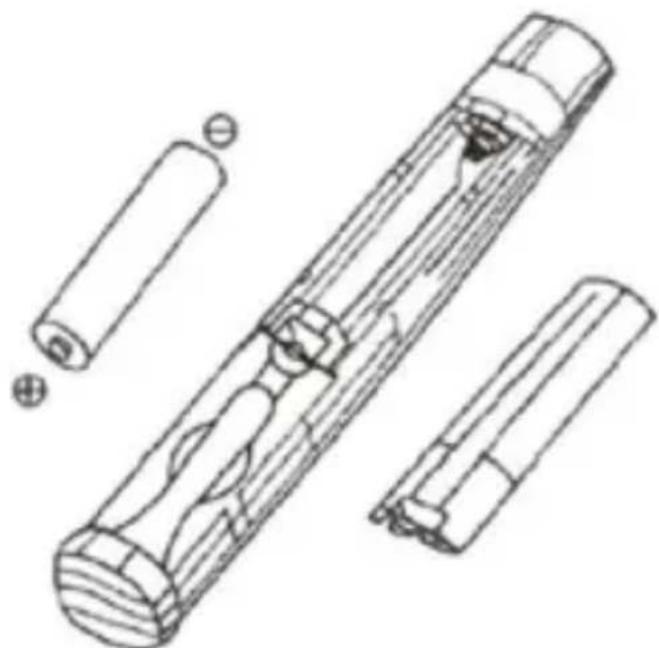
- The product is powered by 1x AAA battery.
- Open the battery cover and insert 1x AAA battery into the bat-
WIRELESS LASER PRESENTER
EN
tery holder.
- The battery's negative pole (-) is left and the positive (+) pole is right as shown below.
- Turn around battery compartment back into position.
natural_image
Technical line drawing of a cylindrical mechanical component with internal cutouts and external housing (no text or symbols)2.7. notes
This equipment generates uses and can radiate radio frequency energy and can also interfere with communications. However, there is no guarantee that interference will not occur in a particular installation. If this equipment does cause harmful interference to radio or television reception, which can be determined by turning the equipment off and on, the user can try to correct the interference by one or more of the following measures:
• Reorient or relocate the receiving antenna.
- Increase the separation between the equipment and receiver.
- Connect the equipment into an outlet on a circuit different from that to which the receiver is connected.
- Consult the dealer or an experienced radio/TV technician for help.
3. TECHNICAL SPECIFICATIONS
Transmitter:
| Class Class II | Class III | |
| Technology Radio Frequency Radio Frequency | ||
| Frequency 2.4GHz 2.4GHz | ||
| Control distance 10m 10m | ||
| Laser distance >200m >200m | ||
| Battery voltage AAAx1 AAAx1 | ||
| Working voltage 1.5v 1.5v | ||
| Sleep current <10uA <10uA | ||
| Wavelength | 650nm | 650nm |
| Max output | <1mw | <5mw |
| Dimension | (L) 133 x (W) 26 x (H) 22mm | (L) 155 x (W) 26 x (H) 22mm |
| Weight(without battery) | 20g | 20g |
USB Receiver:
| Operating system | Windows98, Se, Me, 2000, XP, Mac OS, Linux, Windows Vista |
| USB version USB1.1 Compatible USB2.0 | |
| Working voltage | USB electricity supply(4.5-5.5v) |
| Dimension | (L) 65 x (W) 20 x (H) 11mm |
| Weight | 5g |
4. aFteRMaRKet
Mitsai has designed this appliance in order to guarantee the maximum reliability. However, if a problem occurs, by following the procedures suggested in this section you may be able to determine its cause.
Do not attempt to open the appliance – there is a risk of electrical shock.
If you are not able to solve the problem, please contact your seller or manufacturer.
All users must be familiarized with this section. Knowing what could go wrong can help you avoid the occurrence of problems.
WARNING: any attempt of fixing the appliance without contacting the manufacturer will nullify the warranty.
In case the problem persists, take your appliance to an aftermarket section of any Worten, Modelo or Continente store in order to solve the problem.
Worten Equipamentos para o Lar ensures for a period of 2 years, counting from the date of purchase of this appliance, a warranty against any found manufacturing defect. The warranty supposes a correct use and maintenance of the appliance, namely according to the instructions expressed in this manual. In case otherwise identified, the malfunctions will not be under the warranty.
The repairing of electrical appliances must only be made by qualified technicians, as otherwise there may occur future complications on the appliances.
To avoid unnecessary risks, in case there are any malfunctions on the wires or on another type of components, repairing must be made on the specialized locations of technical assistance, as appropriate tools are needed.
5. envlRonMent conseRvatlon
Aiming to protect the environment, we try to reduce to a maximum the volume of the packages which are confined to three easy separation materials: cardboard, paper and plastic.
The appliance is made of recyclable material, once disassembled by a specialized company. Follow the local legislation concerning recycling of all materials.

natural_image
Orange circular icon with white crossed-out trash bin symbol (no text or numbers)Manual de InstRucciones
natural_image
Technical line drawing of a mechanical component with internal structure and directional arrow (no text or symbols)natural_image
Technical line drawing of a cylindrical device with internal components and external connectors (no text or symbols)2.7. Notas
natural_image
Orange circular icon with white cross symbol resembling a trash bin or trash bin, no text or numbers present.PT
ApresentAdor LAser sem Fios
natural_image
Technical line drawing of a cylindrical mechanical component with internal cutouts and external housing (no text or symbols)2.7. Notas
natural_image
Orange circular icon with white cross symbol resembling a trash bin or trash can (no text or numbers)ApresentAdor LAser sem Fios
PT
de todo o material.

bar
| Category | Value | |---|---| | Category 1 | 20 | | Category 2 | 35 | | Category 3 | 40 | | Category 4 | 30 | | Category 5 | 25 | | Category 6 | 20 | | Category 7 | 15 | | Category 8 | 10 | | Category 9 | 5 | | Category 10 | 5 | | Category 11 | 10 | | Category 12 | 15 | | Category 13 | 20 | | Category 14 | 25 | | Category 15 | 30 | | Category 16 | 35 | | Category 17 | 40 | | Category 18 | 45 | | Category 19 | 50 | | Category 20 | 55 | | Category 21 | 60 | | Category 22 | 65 | | Category 23 | 70 | | Category 24 | 75 | | Category 25 | 80 | | Category 26 | 85 | | Category 27 | 90 | | Category 28 | 95 | | Category 29 | 100 | | Category 30 | 105 | | Category 31 | 110 | | Category 32 | 115 | | Category 33 | 120 | | Category 34 | 125 | | Category 35 | 130 | | Category 36 | 135 | | Category 37 | 140 | | Category 38 | 145 | | Category 39 | 150 | | Category 40 | 155 | | Category 41 | 160 | | Category 42 | 165 | | Category 43 | 170 | | Category 44 | 175 | | Category 45 | 180 | | Category 46 | 185 | | Category 47 | 190 | | Category 48 | 195 | | Category 49 | 200 | | Category 50 | 205 | | Category 51 | 210 | | Category 52 | 215 | | Category 53 | 220 | | Category 54 | 225 | | Category 55 | 230 | | Category 56 | 235 | | Category 57 | 240 | | Category 58 | 245 | | Category 59 | 250 | | Category 60 | 255 | | Category 61 | 260 | | Category 62 | 265 | | Category 63 | 270 | | Category 64 | 275 | | Category 65 | 280 | | Category 66 | 285 | | Category 67 | 290 | | Category 68 | 295 | | Category 69 | 300 | | Category 70 | 305 | | Category 71 | 310 | | Category 72 | 315 | | Category 73 | 320 | | Category 74 | 325 | | Category 75 | 330 | | Category 76 | 335 | | Category 77 | 340 | | Category 78 | 345 | | Category 79 | 350 | | Category 80 | 355 | | Category 81 | 360 | | Category 82 | 365 | | Category 83 | 370 | | Category 84 | 375 | | Category 85 | 380 | | Category 86 | 385 | | Category 87 | 390 | | Category 88 | 395 | | Category 89 | 400 | | Category 90 | 405 | | Category 91 | 410 | | Category 92 | 415 | | Category 93 | 420 | | Category 94 | 425 | | Category 95 | 430 | | Category 96 | 435 | | Category 97 | 440 | | Category 98 | 445 | | Category 99 | 450 | | Total (Total) = [sum of individual components] / [sum of total components] * [sum of components] * [sum of components] * [sum of components] * [sum of components] * [sum of components] * [sum of components] * [sum of components] * [sum of components] * [sum of components] * [sum of components] * [sum of components] * [sum of components] * [sum of components] * [sum of components] * [sum of components] * [sum of components] * [sum of components] * (the sum of components) * (the sum of components) * (the sum of components) * (the sum of components) * (the sum of components) * (the sum of components) * (the sum of components) * (the sum of components) * (the sum of components) * (the sum of components) * (the sum of components) * (the sum of components) * (the sum of components) * (the sum of components) * (the sum of components) *- InstRuction Manual
- IndeX
- Safety Instructions 5
- Utilization and Functioning 9
- Technical Specifications 13
- Aftermarket 14
- Environment Conservation 15
- SAFETY INSTRUCTIONS
- ATTENTION RISK OF ELECTRIC SHOCK DO NOT OPEN
- Important Warnings
- Assistance
- THIS APPLIANCE CAN BE USED BY CHILDREN FROM 8 YEARS OLD AND ABOVE AND
- Power Energy
- Power Cord and Other Cables
- EN
- WIRELESS LASER PRESENTER
- Humidity and Water
- Cleaning
- General Precautions
- UTILIZATION AND FUNCTIONING
- Product Description
- Features
- Easy to carry
- Easily control the pace of your presentation
- Easy to use
- Multifunctional presenter
- Operating System
- Functions
- Operating Hints
- Battery Installation
- notes
- TECHNICAL SPECIFICATIONS
- aFteRMaRKet
- envlRonMent conseRvatlon
- Manual de InstRucciones
- Notas
- PT
- ApresentAdor LAser sem Fios
Brand : Mitsai
Model : RLP151
Category : Wireless pointer