
Xenia 14 Lifestyle - Laptop XPG - Free user manual and instructions
Find the device manual for free Xenia 14 Lifestyle XPG in PDF.


| Product Type | Laptop |
| Brand | XPG |
| Model | Xenia 14 Lifestyle |
| Display Size | 14 inches |
| Processor | Intel Core i7-1165G7 |
| RAM | 16 GB LPDDR4x |
| Storage | 512 GB NVMe SSD |
| Graphics | Intel Iris Xe |
| Operating System | Windows 10 Home |
| Battery Capacity | 56 Wh |
| Battery Life | Up to 10 hours |
| Weight | 1.3 kg |
| Dimensions (W x D x H) | 319 x 216 x 15.9 mm |
| Power Supply | 65W USB-C PD adapter |
| Ports | 2x USB-C, 1x USB-A, HDMI, 3.5mm audio |
| Wireless Connectivity | Wi-Fi 6, Bluetooth 5.1 |
| Camera | HD webcam with privacy shutter |
| Keyboard | Backlit chiclet keyboard |
| Material | Aluminum chassis |
| Cleaning | Wipe with soft, dry cloth. Avoid liquids. |
| Safety | Do not block vents; avoid overheating. |
| Spare Parts & Repairability | Contact XPG support for authorized service. |
| Warranty | 2 years limited warranty |
Frequently Asked Questions - Xenia 14 Lifestyle XPG
User questions about Xenia 14 Lifestyle XPG
0 question about this device. Answer the ones you know or ask your own.
Ask a new question about this device
Download the instructions for your Laptop in PDF format for free! Find your manual Xenia 14 Lifestyle - XPG and take your electronic device back in hand. On this page are published all the documents necessary for the use of your device. Xenia 14 Lifestyle by XPG.
USER MANUAL Xenia 14 Lifestyle XPG
Ⓐ Camera Status LED
⑧ Infrared Capability for Facial Recognition Camera
© Microphone
© LCD Screen
Power Button
F Backlit Membrane Keyboard
G Caps Lock Status Indicator
H Touchpad Enable/Disable Switch with Indicator
① Touchpad with Integrated Left/Right Buttons
Right Side

Thunderbolt™4 (USB Type C 3.1) / Power Connector 5V/3A Type-C Adapter (40W-100W)
*Support: 40Gbps, USB 4, DP 1.4, Up to 20V/5A/100W Power Charging 4K Display, Power Output 5V/3A
B USB 3.0 Gen1 Port
© HDMI 2.0b Port
Power Connector
Front Side View

Left Side

Kensington® Lock Port
⑧ USB 3.1 Gen2 Port (Type C 5V/3A)
© USB 3.0 Gen1 Port
© SD Card Reader
⑤3.5mm Audio Combo Jack (Mic In / Audio Out)
Back Side View

Bottom Compartment View

A Air Vents
⑧ 2W Speakers
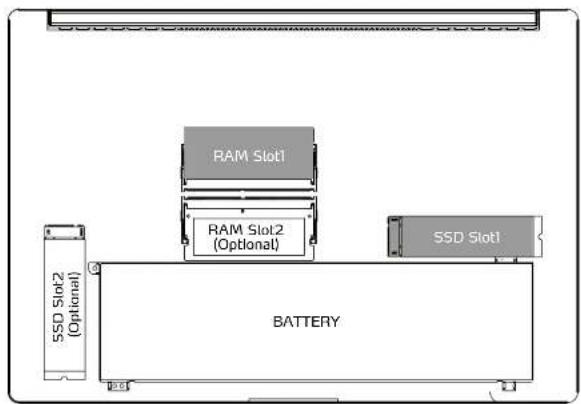
SSD & DRAM specifications may vary depending on region and model.
AC Adapter
Attach the AC adapter when you need to charge your battery or when you want to operate the notebook with AC power.
It is recommended to connect the AC adapter and use the AC power while using this notebook for the first time. When the AC adapter is connected, the battery will be charged immediately.
It is the fastest way to get started, because the battery pack will need to be charged before you can operate from battery power.

NOTE: The AC adapter included in the package is specifically designed for your notebook and certified to comply to local safety regulations. Using other adapters requires caution as you may cause damage the notebook or other devices connected to it.

Preparing Your Computer
- Connect provided the AC adapter's DC output plug into the DC IN jack. Alternatively you can also connect a compatible USB charger to the USB Type-C port or Thunderbolt 4 port.
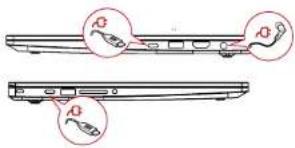
NOTE: Thunderbolt 4 and Type-C ports are compatible with USB Power Delivery (PD) quick charge adapters for up to 100W power delivery.
- Lift the display to a comfortable opening viewing angle.

NOTE: The display can be positioned in a wide range of angles up to 150°. For optimal viewing.
- Hold shortly the power button to turn on the notebook.

NOTE: The power button is conveniently located inside your keyboard at the top-right corner
Understanding the Keyboard
The following procedure introduces the hot keys on your keyboard.
Highlighted commands can only be accessed by first holding the Function Key (Fn) while pressing one of the highlighted key commands.
![BSC F Z O O/C O P P P P P P P P P P P P P P P P P P P P P P P P P P P P P P P P P P P P P P P P P P P P P P P P P P - 11 20 3+ 4$ 5% 6× 7& 8* 9( O ) - - + - ← - tab Q W E R T Y U I O P [ ( J ) \ I ] caps A S D F G H J K L : : * * enter shift Z X C V B N M * < * > J T shift ctrl to alt —— alt ctrl <…](/content/2026/05/978526/images/d7b4e95d50260e8dccee29acce3594ae3ea021ec8e5eecaef3006e4430443989.jpg)
* The number of keys available on your keyboard will depend on the country/region localization and may differ slightly from the picture above.
To activate these functions, press the hot key associated with the desired function as below:
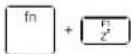
Sleep: In place low power state.

Mute Audio: Toggle between Mute and Unmute modes
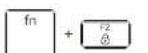
Windows Lock/On: Toggle Windows Lock/On.

Volume Down: Decrease audio volume.

Display Mode: Enable Display Mode.

Volume Up: Increase audio volume
Radio On/Off: Turn all radios on or off.

Screen Brightness Down: Decrease screen brightness

Mode Switch: Quick switch - Basic Mode / Silent Mode.
Screen Brightness Up: Increase screen brightness

Keyboard Brightness: Toggle control for keyboard brightness.

Print Screen: Send the current screen image to the selected printer
Your Laptop is equipped with a Windows Precision Touchpad. A double-tap on the upper-left corner will toggle on or off your touchpad's functionality to avoid accidental touches.

- Left and right buttons are embedded, under the touchpad on the bottom left and right side, press on each side to activate the designed function.
Safety and Caution InformationUsing You
Warning:
To reduce the risk of fire or burns, do not disassemble, crush,
puncture; do not short external contacts; do not dispose of in fire or water.
Danger:
Never attempt to disassemble or reassemble. Risk of explosion if battery is incorrectly replaced. Replace only by the manufacturer with the same type used by the manufacturer.
AC Power Adapter:
Using a non-approved AC adapter other than the one provided with the device may result in risk of electric shock, fire, or burn. For indoor use only and in dry locations. Device must only be repaired by a professional. Do not open the enclosure. The adapter is rated for use between 0 °C and 35 °C (32 °F and 95 °F). Connect only to a properly wired and grounded outlet. 20W, 3.25A, 65W.
Operating Temperature:
This device is intended for use in ambient temperatures between 0 °C and 30 °C (32 °F and 85 °F). Avoid using or storing next to heat sources, In direct sunlight, or outside the intended temperature ranges to avoid damages.
Additional Medical Precautions:
This device may interfere with the operation of some pacemakers, hearing aids or other medical devices. To reduce the risk, maintain a separation distance of 20 cm (8 inches) between the device and the medical device. Refer to the medical device instructions or your doctor for additional information.
Modifications:
Modification of the wireless solution, thermal solution, device components or enclosure shell violate regulatory compliance requirements and may induce safety hazards.
A 通压口
B 2W 揭聲器

準備電腦
註:電源按鈕是位於縦盤的右上角
瞭解鍵盤
以下介绍鍵盤上的快速鍵。
A 通风口
B 2W扬声器

SSD和DRAM规格因地区和型号而异。
交流适配器
准备计算机
注:电源按钮位于键盘的右上角
了解键盘
下面介绍键盘上的热键。
Regulatory Information
FCC Declaration of Conformity
This device complies with Part 15 of the FCC Rules. Operation is subject to the following two conditions: (1) this device may not cause harmful interference, and (2) this device must accept any interference received, including interference that may cause undesired operation.
This equipment has been tested and found to comply with the limits for a Class B digital device, pursuant to part 15 of the FCC Rules. These limits are designed to provide reasonable protection against harmful interference in a residential installation. This equipment generates, uses, and can radiate radio frequency energy and, if not installed and used in accordance with instructions, may cause harmful interference to radio communications. However, there is no guarantee that interference will not occur in a particular installation. If this equipment does cause harmful interference to radio or television reception, which can be determined by turning the equipment off and on, the user is encouraged to try to correct the interference by one or more of the following measures:
- Reorient or relocate the receiving antenna.
- Increase the separation between the equipment and receiver.
- Connect the equipment into an outlet on a circuit different from that to which the receiver is connected.
- Consult the dealer or an experienced radio/TV technician for help.
For questions related to the EMC performance of this product, contact:
RF Exposure Information
This device is tested and meets the government's requirements for exposure to radio waves. This device complies with applicable limits for exposure to radio frequency (RF) energy set by the FCC.
Specific Absorption Rate (SAR) refers to the rate at which the body absorbs RF energy. The SAR limit set by the FCC is 1.6 W/kg. Testing for SAR is conducted using standard operating positions accepted by the FCC. During testing, the radio is set to its highest transmission levels and placed in positions that simulate use against the body.
The FCC has granted an Equipment Authorization for this device with all reported SAR levels evaluated as in compliance with the FCC RF exposure guidelines.
SAR information on this device is on file with the FCC and can be found under the Display Grant section of www.fcc.gov/not/ea/fccid after searching on FCC ID : " RLYAX20ING "and *Contains IC : * 10809A-AX20ING *

Any changes or modifications not expressly approved by Intel could void your authority to operate the equipment.
Canadian Department of Communications Compliance Statement
This digital apparatus does not exceed the Class B limits for radio noise emissions from digital apparatus set out in the Radio Interference Regulations of the Canadian Department of Communications. This device complies with industry Canada license-exempt RSS standards(s). Operation is subject to the following two conditions: (1) this device may not cause interference and (2) this device must accept any interference, including interference that may cause undesired operation of the device.
The 5150-5250 MHz band is for indoor use only, to reduce potential for harmful interference to co-channel Mobile Satellite systems.

CE compliance
This device is classed as a technical information equipment (ITE) in class B and is intended for use in living room and office. The CE-mark approves the conformity by the EU-guidelines:
- EMC Directive 2014/30/EU,
- Low Voltage Directive 2014/35/EU(equals A2 : 2013) ,
- RF Directive 2014/53/EU
SAR/DAS refers to the rate at which the body absorbs RF energy. The SAR limit set by the ICNIRP Guidelines is 2.0 W/kg(10g).
Testing for SAR is conducted using standard operating positions accepted by the EN standard.
During testing, the radio is set to its highest transmission levels and placed in positions that simulate use against the body.
This product is compliant with ICNIRP Guidelines with respect to Electromagnetic Fields (EMF) which specifies a Specific Absorption Rate (SAR) limit of 2W/kg. DAS*/SAR: 0.96 W/kg (corps/body)
Rechargeable Battery Notice
Do not
- Throw into fire or a hot oven, or mechanically crush or cutting of a BATTERY
- Throw or immerse into water
- Heat to more than 60°C
- Repaire or disassemble
5.Leave in an extremely low air pressure environment
6.Leave in an extremely high-temperature environment
A power cord is connected to a socket-outlet with earthing connection.
CAUTION: To reduce the possibility of heat-related injuries or of overheating the computer, do not place the computer directly on your lap or obstruct the computer air vents. Use the computer only on a hard, flat surface. Do not allow another hard surface, such as an adjoining optional printer, or a soft surface, such as pillows or rugs or clothing, to block airflow. Also, do not allow the AC adapter to come into contact with the skin or a soft surface, such as pillows or rugs or clothing, during operation.

In the European Union, this symbol indicates that this product including battery must not be disposed of with household waste. It is your responsibility to hand it over to a designated collection point for the recycling of waste electrical and electronic equipment. For more information, please contact your local waste collection center or the point of purchase of this product.
| AT | BE | BG | CH | CY | CZ | DE | DK | EE | |
| EL | ES | FL | FR | HR | HU | IE | IS | IT | |
| LI | LT | LU | LV | MT | NL | NO | PL | PT | |
| RO | SE | SI | SK | TR | UK |
For RE-Directive 2014/53/EU
All operational modes:
2.4GHz: 802.1lb, 802.1lg, 802.1ln (HT20), 802.1ln (HT40), Bluetooth
5GHz: 802.11a, 802.11ac (VHT20), 802.11ac (VHT40), 802.11ac (VHT80), 802.11ax
The frequency, mode and the maximum transmitted power in EU are listed below:
2400-2485MHz:20dBm
5150-5250MHz : 23 dBm
5470-5725MHz:23dBm
5725-5875MHz:13.95dBm
The adapter shall be installed near the equipment and shall be easily accessible.
Taiwan NCC 警語
應避免影響附近富達系統之操作
Taiwan RoHS: www.adata.com/rohs/

Improper use may cause explosion or the leakage of flammable liquid or gas.
Do not replace with an incorrect type of battery that can defeat a safeguard. Do not dispose the battery into fire or a hot oven, or mechanically crush or cut the battery. Do not leave the battery in an extremely high temperature surrounding environment. Do not place the battery under extremely low air pressure.
CNC xxxxxx
Specific Absorption Rate (SAR) refers to the rate at which the body absorbs RF energy. The SAR limit set by the EN standard is 2.0 W/kg(10g). Testing for SAR is conducted using standard operating positions accepted by the EN standard. During testing, the radio is set to its highest transmission levels and placed in positions that simulate use against the body.


- Scan the QR Code of Device
掃描機身QR Code - Connect to Website
速钻至网页 - You'll get more Certification information 將會連結到產品認鑑資訊頁面

Material Declaration Data Sheet
限用物質含有情況標示聲明書
Declaration of the Presence Condition of the Restricted Substances Marking
備註:「超出0.1wt%」及「超出0.01wt%」係指現用物之百分比含量超出百分比含量且準值。
Note 1: "Exceeding 0.1 wt %" and "exceeding 0.01 wt %", indicate that the percentage content of the restricted substance exceeds the reference percentage value of presence condition.
参考2. 0° 原指该项限用特真之百分比含量未超出百分比含量基准值。
Note 2: “C” indicates that the percentage content of the restricted substance does not exceed the percentage of reference value of presence.
備考3. 一 依指額項限用物質為排除項目
Note 3: The “-” indicates that the restricted substance corresponds to the exemption.
限用物質含有情況排除項目說明



- AC ADAPTER
- PREPARING YOUR COMPUTER
- UNDERSTANDING THE KEYBOARD
- SAFETY AND CAUTION INFORMATIONUSING YOU
- 準備電腦
- 瞭解鍵盤
- 交流适配器
- 准备计算机
- 了解键盘
- REGULATORY INFORMATION
- FCC DECLARATION OF CONFORMITY
- RF EXPOSURE INFORMATION
- CANADIAN DEPARTMENT OF COMMUNICATIONS COMPLIANCE STATEMENT
- CE COMPLIANCE
- RECHARGEABLE BATTERY NOTICE
- MATERIAL DECLARATION DATA SHEET
- 限用物質含有情況標示聲明書
Brand : XPG
Model : Xenia 14 Lifestyle
Category : Laptop