
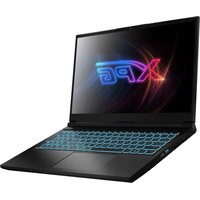
Xenia Xe Lifestyle - Laptop XPG - Free user manual and instructions
Find the device manual for free Xenia Xe Lifestyle XPG in PDF.


| Product Type | Gaming Lifestyle Ultrabook |
| Model Number | XENIA XE |
| Regulatory Model | BC57 |
| Webcam | 720p with Time of Flight sensor and Infrared LED for Windows Hello |
| Display | LCD screen with ambient light sensor |
| Keyboard | Backlit membrane keyboard with function keys and numeric keypad |
| Touchpad | Touchpad with integrated left/right buttons, enable/disable switch |
| Wireless Connectivity | Intel Wi-Fi 6 (802.11ax) and Bluetooth 5, support for 2.4GHz and 5GHz bands |
| Ports - Left Side | 1 Thunderbolt 4 / Power, 1 USB 3.2 Gen2, 1 HDMI 2.0b |
| Ports - Right Side | 1 Thunderbolt 4 / Power, 1 USB 3.2 Gen2, 3.5mm headset jack, Kensington NanoSaverLock |
| Audio | 2x 2W speakers, dual digital microphones array, 3.5mm combo jack |
| Power Adapter | 20V, 3.25A, 65W, Type-C connector |
| Battery Indicator | Breathing white (charging), solid white (charged with AC), amber (low battery) |
| Operating Temperature | 0°C to 35°C (32°F to 95°F) |
| Safety | Class 1 Laser product (IEC 60825-1:2014), FCC Class B, CE, IC compliant |
| Security | Windows Hello infrared camera, Kensington lock slot |
| Energy Efficiency | ENERGY STAR compliant |
| Environmental Compliance | EU WEEE, China RoHS, RoHS |
| Accessories Included | AC adapter, power cord, quick start guide |
| RGB Light Bar | Located on front/back, supports Alexa integration |
Frequently Asked Questions - Xenia Xe Lifestyle XPG
User questions about Xenia Xe Lifestyle XPG
0 question about this device. Answer the ones you know or ask your own.
Ask a new question about this device
Download the instructions for your Laptop in PDF format for free! Find your manual Xenia Xe Lifestyle - XPG and take your electronic device back in hand. On this page are published all the documents necessary for the use of your device. Xenia Xe Lifestyle by XPG.
USER MANUAL Xenia Xe Lifestyle XPG
GAMING LIFESTYLE ULTRABOOK
MODEL NO.: XENIA XE
REGULATORY MODEL: BC57
63070675


EN Quick Start Guide 01
Ⓐ Time of Flight Sensor for Camera Focus
⑧ Infrared LED for Windows Hello
© 720p Webcam
D Ambient Light Sensor
© LCD Screen
⑤ Air Vents
G Power Button
H Backlit Membrane Keyboard
① Touchpad Enable/Disable Switch with Indicator
① Touchpad with Integrated Left/Right Buttons
K Caps Lock Status Indicator
Right Side

Wireless Antenna
① Thunderbolt™ 4 Port / Power Connector
⑧ 3.5mm Headset Jack with Microphone
E Kensington NanoSaverLock
© USB 3.2 Gen2 Port
Left Side

Ⓐ Thunderbolt™ 4 Port / Power Connector
© USB 3.2 Gen2 Port
® HDMI 2.0b Port
©Wireless Antenna
Bottom Side

A 2W Speakers
⑧ Back Cover Screws
© Air Vents
Front Side & Back Side

Ⓐ Battery Indicator LED
Charging: Breathing White. Charging Finish (w/AC): White. Battery Low: Amber
| Powered On | Modern Stanchy Refrigerator | Powered Off | ||
| AC and Charging | White Broughting | |||
| AC NOT Charging | White Solid | OT | ||
| Battery | White Solid | OT | ||
| Battery Low | Amber Amber | Off | ||
B Digital Microphones Array
© RGB Light Bar
Used to support personal value assistants such as Alexa
D Vents
Preparing your Computer
Connect the power cord to the AC adapter first, and then the other extremity of the cable to a grounded 100-240VAC outlet.

Connect the Type-C power plug from the AC adapter to either of the Thunderbolt connectors on each side.

NOTE: The AC adapter must be used the first time the laptop is powered on. The laptop may not power on if the battery has been depleted during transportation and the AC adapter has not been plugged into the laptop and into an AC power outlet.
The display panel can be opened to a wide range of angles for optimal viewing.

Attempting to force the lid open beyond 180 degrees may cause damage to the hinges and/or the display or touch screen.


Charging: Breathing White, Charging Finish (w/AC): White, Battery Low: Amber
Understanding the Keyboard
The following defines the row of function keys including secondary hotkeys/shortcuts. They can be accessed by pressing and holding down on the Function Key (FN) while simultaneously pressing the desired hotkey/shortcut.


Press num lk to enable the Embedded Keypad, LED will illuminate.

To activate these functions, press the hotkey associated with the desired function as indicated below:

+

Function Lock:
Press this key combination (fn + esc) to toggle control for primary/secondary Fn row assignment.

+

Sleep:
Press this key combination (fn + fl) to initiate low power state.

+

Mute Audio:
Press this key combination (fn + r2) to toggle between mute and unmute.

+

Volume Down:
Press this key combination (fn + 13) to turn the audio volume down.

+

Volume Up:
Press this key combination [fn + r4] to turn the audio volume up.

+

Mic Disable (Mute):
Press this key combination (fn + f5) to toggle enable/disable for the integrated microphones. LED is illuminated when disabled.

Clickpad Enable/ Disable:
Press this key combination (fn + f7) to toggle enable/disable for the clickpad. LED is illuminated when disabled.

Keyboard Brightness:
Press this key combination (fn + f8) to toggle control for keyboard brightness between off, 50%, full.

Screen Brightness Down:
Press this key combination [fn + f9] to decrease screen brightness.

Screen Brightness Up:
Press this key combination (In + NO) to increase screen brightness.

2 nd Monitor Control:
Press this key combination [fn + fl] to initiate secondary monitor display mode.

Airplane Mode:
Press this key combination (fn + fl2) to turn Wireless and Bluetooth on or off.

prt sc:
Press this key combination (fn + Print Screen) to send the current screen image to the selected printer.

num lk:
Press this key combination (In + Numeric Lock) to toggle between enable/disable of the numeric keypad. LED is illuminated when enabled.

Page Up:
Press this key combination (fn + Arrow Up) to enable standard page up.

Page Down:
Press this key combination [fn + Arrow Down] to enable standard page down.

Home:
Press this key combination [fn + Arrow Left] to enable standard home.

End:
Press this key combination (fn + Arrow Right) to enable standard end.
Using the Touchpad

Click twice here to enable or disable the touchpad

Use these bottom corners similar to mouse buttons.
Tapping on the touchpad produces similar results.

Safety and Caution Information
AC Power Adapter: Risk of electric shock, fire, or burn if using an AC adapter other than the one provided with the device. Indoor use only and in dry locations. Device must only be repaired by a professional. Do not open enclosure. The adapter is rated for use between 0 °C and 40 °C (32 °F and 104 °F). Connect only to a properly wired and grounded outlet. 20V, 3.25A, 65W.
Temperature: This device is intended for use in ambient temperatures between 0 °C and 35 °C (32 °F and 95 °F). Avoid using or storing next to heat sources, in direct sunlight, or outside the intended temperature ranges.
Medical: This device may interfere with the operation of some pacemakers, hearing aids or other medical devices. To reduce the risk, maintain a separation distance of 20 cm (8 inches) between the device and the medical device. Refer to the medical device for additional information.
Modify: Modification of the wireless solution, thermal solution, device components or enclosure shall violate regulatory compliance requirements and may induce safety hazards.
Battery: The product may contain an internal lithium manganese dioxide, vanadium pentoxide, or alkaline battery or battery pack. To reduce the risk of fire or burns, do not disassemble, crush, puncture; do not short external contacts; do not dispose of in fire or water. Never attempt to disassemble or reassemble. Risk of explosion if battery is incorrectly replaced. Replace only by the manufacturer with the same type used by the manufacturer. Contact the seller before sending the full product for battery replacement and follow the instruction for safe transport of lithium and li-ion batteries.
Heat: Do not place the mobile computer directly on your lap or obstruct the computer air vents. Use the mobile computer only on a hard, flat surface. Do not allow another hard surface, such as an adjoining optional printer, or a soft surface, such as pillows or rugs or clothing, to block airflow. Also, do not allow the AC adapter to contact the skin or a soft surface, such as pillows or rugs or clothing, during operation.
Potential Safety Concerns: If you notice any of the following conditions (or if you have other safety concerns), do not use the computer: crackling, hissing, or popping sound, or a strong odor or smoke coming from the computer. It is normal for these conditions to appear when an internal electronic component fails in a safe and controlled manner. However, these conditions may also indicate a potential safety issue. Do not assume it is a safe failure. Turn off the computer, disconnect it from its power source, and contact technical support for assistance.
• Class 1 Laser Product, per IEC 60825-1:2014
- λ: 939 nm, P: < 5.9 mW
- Caution: Use of controls or adjustments or performance of procedures other than those specified herein may result in hazardous radiation exposure.
© Puerto USB 3.2 Gen2
D Antena inalámbrica
Lado inferior


• num lk scr lk
A 2W 喇叭
⑧ 度蓝螺絲
© 散熱孔
正面及背面


Regulatory Information
The Intel® BC57 has been certified for use as a component in Information Technology Equipment in certain countries. The system integrator is responsible for testing and acquiring any additional country-specific regulatory approvals, including all system-wide certifications.
FCC Declaration of Conformity
This device complies with Part 15 of the FCC Rules. Operation is subject to the following two conditions: (1) this device may not cause harmful interference, and (2) this device must accept any interference received, including interference that may cause undesired operation.
This equipment has been tested and found to comply with the limits for a Class B digital device, pursuant to part 15 of the FCC Rules. These limits are designed to provide reasonable protection against harmful interference in a residential installation. This equipment generates, uses, and can radiate radio frequency energy and, if not installed and used in accordance with instructions, may cause harmful interference to radio communications. However, there is no guarantee that interference will not occur in a particular installation. If this equipment does cause harmful interference to radio or television reception, which can be determined by turning the equipment off and on, the user is encouraged to try to correct the interference by one or more of the following measures:
- Reorient or relocate the receiving antenna.
- Increase the separation between the equipment and receiver.
- Connect the equipment into an outlet on a circuit different from that to which the receiver is connected.
- Consult the dealer or an experienced radio/TV technician for help.
For questions related to the EMC performance of this product, contact:
Intel Corporation
Attn: Corporate Quality
2200 Mission College Blvd.
Santa Clara, CA 95054
USA
RF Exposure Information
This device is tested and meets the government's requirements for exposure to radio waves. This device complies with applicable limits for exposure to radio frequency (RF) energy set by the FCC.
Specific Absorption Rate (SAR) refers to the rate at which the body absorbs RF energy. The SAR limit set by the FCC is 1.6 W/kg. Testing for SAR is conducted using standard operating positions accepted by the FCC. During testing, the radio is set to its highest transmission levels and placed in positions that simulate use against the body.
The FCC has granted an Equipment Authorization for this device with all reported SAR levels evaluated as in compliance with the FCC RF exposure guidelines. SAR information on this device is on file with the FCC and can be found under the Display Grant section of www.fcc.gov/eot/ea/fccid after searching on FCC ID: "PD9AX201NG" and "Contains IC : 1000M-AX201NG"
⚠️ Any changes or modifications not expressly approved by Intel could void your authority to operate the equipment.

ENERGY STAR
Canadian Department of Communications Compliance Statement
This digital apparatus does not exceed the Class B limits for radio noise emissions from digital apparatus set out in the Radio Interference Regulations of the Canadian Department of Communications. This device complies with industry Canada licence-exempt RSS standards(s). Operation is subject to the following two conditions: (1) this device may not cause interference and (2) this device must accept any interference, including interference that may cause undesired operation of the device.
Specific Absorption Rate (SAR) refers to the rate at which the body absorbs RF energy. The SAR limit set by the IC is 1.6 W/kg. Testing for SAR is conducted using standard operating positions accepted by the IC. During testing, the radio is set to its highest transmission levels and placed in positions that simulate use against the body.
IC Warning Statement
The 5150-5250 MHz band is for indoor use only, to reduce potential for harmful interference to co-channel Mobile Satellite systems.
This device complies with the essential requirements of the Radio Equipment Directive (RED) - 2014/53/EU.
Manufacturer:
Intel Corporation:
Attn: Corp. Quality, 2200 Mission College Blvd,
Santa Clara, CA 95054-1549, USA
EU Single Place of Contact:
UK Single Place of Contact:
Intel Corporation (UK) Ltd., Attn: Corp. Quality,
Pipers Way, Swindon,
Wiltshire SN3 1RJ, UK
This equipment complies with EU radiation exposure limits set forth for an uncontrolled environment. This equipment should be installed and operated with minimum distance 20cm between the radiator & your body.

In the European Union, this symbol indicates that this product including battery must not be disposed of with household waste. It is your responsibility to hand it over to a designated collection point for the recycling of waste electrical and electronic equipment. For more information, please contact your local waste collection center or the point of purchase of this product.

| AT | BE | BG | CH | CY | CZ | DE | DK | EE |
| EL | ES | FL | FR | HR | HU | IE | IS | IT |
| L | LT | LU | LV | MT | NL | NO | PL | PT |
| RO | SE | SI | SK | TR | UK (NI) | |||
For RE-Directive 2014/53/EU
All operational modes:
2.4GHz: 802.11b, 802.11g, 802.11n (HT20), 802.11n (HT40), Bluetooth
5GHz: 802.11a, 802.11ac (VHT20), 802.11ac (VHT40), 802.11ac (VHT80), 802.11ax
The frequency and the maximum transmitted power in EU are listed below:
2400-2485MHz:20dBm
5150-5250MHz:23dBm
5470-5725MHz:23dBm
5725-5875MHz:13.95dBm
The adapter shall be installed near the equipment and shall be easily accessible.
Specific Absorption Rate (SAR) refers to the rate at which the body absorbs RF energy. The SAR limit set by the ICNIRP Guidelines is 2.0 W/kg(10g). Testing for SAR is conducted using standard operating positions accepted by the EN standard. During testing, the radio is set to its highest transmission levels and placed in positions that simulate use against the body.
This product is compliant with ICNIRP Guidelines with respect to Electromagnetic Fields (EMF) which specifies a Specific Absorption Rate (SAR) limit of 2W/kg. DAS*/SAR: 1.119 W/kg (corps/body)
Taiwan NCC警語
應避免影響附近雷達系統之操作
Taiwan battery recycling

廢電池請回收

使用過度恐傷害視力
(1) 使用30分鐘請休息10分鐘。
https://www.intel.com/content/www/us/en/support/articles/000054822.html
Japan VCCI Statement
Japan Radio Law Warning Statement
https://www.intel.com/content/www/us/en/support/articles/000054822.html
Perchlorate Material - special handling may apply.
See www.dtsc.ca.gov/hazardouswaste/perchlorate
This product contains an Approved module, Model No. AX201.NGWG.NV
information.
Korea Certification mark
R-C-INT-AX201NGW
This product contains an approved Model No. AX201.NGWG.NV
Korea RF Warning Statement
Management Methods on Control of Pollution From Electronic Information Products (China RoHS declaration)
产品中有毒有害物质的名称及含量
Hazardous Substances Table
| 部件名称Component Name | 有毒有害物质或元素 Hazardous Substance | |||||
| 铅Pb | 汞Hg | 镉Cd | 六价铬Cr (VI) | 多溴联苯PBB | 多溴二苯醚PBDE | |
| 印刷板组件Printed Board Assembly | X | O | O | O | O | O |
| 显示设备Display | X | O | O | O | O | O |
| 机壳Chassis | X | O | O | O | O | O |
| 键盘Keyboard | X | O | O | O | O | O |
| 电源Power Supply | X | O | O | O | O | O |
| 电缆Cable | X | O | O | O | O | O |
This table shows where these substances may be found in the supply chain of our electronic information products, as of the date of sale of the enclosed product. Note that some of the component types listed above may or may not be a part of the enclosed product.
The Environmental Protection Use Period (EPUP) for all enclosed products and their parts are per the symbol shown here, unless otherwise marked. Certain field-replaceable parts may have a different EPUP (for example, battery modules) number. The Environment-Friendly Use Period is valid only when the product is operated under the conditions defined in the product manual.
Regulatory Information
To view electronic regulatory label:
1. Turn on or restart the computer.
2. Press F5 before the operating system loads to see the Regulatory screen.
3. To exit the Regulatory screen and load the operating system, press enter.
Intel products are not intended for use in medical, life saving, or life sustaining applications. Intel may make changes to specifications and product descriptions at any time, without notice. Intel products may contain design defects or errors known as errata which may cause the product to deviate from published specifications. Current characterized errata are available on request.
Intel and the Intel logo are trademarks of Intel Corporation in the United States and/or other countries.
* Other names and brands may be claimed as the property of others. Copyright © 2020, Intel Corporation. All rights reserved.

M14856-005



- PREPARING YOUR COMPUTER
- UNDERSTANDING THE KEYBOARD
- FUNCTION LOCK
- SLEEP
- MUTE AUDIO
- VOLUME DOWN
- VOLUME UP
- MIC DISABLE (MUTE)
- CLICKPAD ENABLE/ DISABLE
- KEYBOARD BRIGHTNESS
- SCREEN BRIGHTNESS DOWN
- SCREEN BRIGHTNESS UP
- 2 ND MONITOR CONTROL
- AIRPLANE MODE
- PRT SC
- NUM LK
- PAGE UP
- PAGE DOWN
- HOME
- END
- SAFETY AND CAUTION INFORMATION
- REGULATORY INFORMATION
- FCC DECLARATION OF CONFORMITY
- RF EXPOSURE INFORMATION
- CANADIAN DEPARTMENT OF COMMUNICATIONS COMPLIANCE STATEMENT
- IC WARNING STATEMENT
- MANUFACTURER
- EU SINGLE PLACE OF CONTACT
- UK SINGLE PLACE OF CONTACT
- TAIWAN NCC警語
- JAPAN VCCI STATEMENT
- JAPAN RADIO LAW WARNING STATEMENT
- KOREA CERTIFICATION MARK
- KOREA RF WARNING STATEMENT
Brand : XPG
Model : Xenia Xe Lifestyle
Category : Laptop