
Xenia 16 RX - Laptop XPG - Free user manual and instructions
Find the device manual for free Xenia 16 RX XPG in PDF.


| Product Type | Gaming Laptop |
| Dimensions | 359 x 259 x 18 mm (14.1 x 10.2 x 0.7 in) |
| Weight | 2.2 kg (4.85 lbs) |
| CPU | Intel Core i9-12900H |
| RAM | 16 GB DDR5 |
| Storage | 1 TB NVMe SSD |
| Display | 16-inch WQXGA (2560x1600), 165 Hz |
| Graphics | NVIDIA GeForce RTX 3070 Ti |
| Battery | 80 Wh, 4-cell |
| Power Supply | 230 W AC adapter |
| Operating System | Windows 11 Home |
| Connectivity | Wi-Fi 6E, Bluetooth 5.2, 2x USB-C, 2x USB-A, HDMI 2.1, Thunderbolt 4 |
| Keyboard | RGB backlit keyboard |
| Security | Kensington lock slot, fingerprint reader |
| Cleaning | Wipe with a soft, dry cloth. Avoid liquids. |
| Spare Parts Availability | Battery, fan, keyboard, and SSD upgradeable |
| Warranty | Limited 1-year warranty |
Frequently Asked Questions - Xenia 16 RX XPG
User questions about Xenia 16 RX XPG
0 question about this device. Answer the ones you know or ask your own.
Ask a new question about this device
Download the instructions for your Laptop in PDF format for free! Find your manual Xenia 16 RX - XPG and take your electronic device back in hand. On this page are published all the documents necessary for the use of your device. Xenia 16 RX by XPG.
USER MANUAL Xenia 16 RX XPG
Before first use:
-
Connect the AC Adapter to the power plug
-
Connect the U.C. Cable to the Forehole and press the Power Button on the Notebook
Function Keys:

XPG NOTEBOOK LIMITED WARRANTY SUMMARY
In the aim to provide the best Policy for our Customers, XPG grants one-year limited warranty for your XPG Notebook Product.
If the product fails during normal and proper use within the warranty period, XPG will, at its own discretion, repair or replace the defective parts within the product, or the product itself, with functionally equivalent components as originally supplied.
To start the warranty period validity, users must register their product online at our website xpg.com/with memberTAGin. When a repair request is made for the product has been registered, users will have to provide a proof of purchase in the form of an invoice, stamped warranty card or delivery receipt to show the purchase date, which will be the start date of the warranty. If there is no proof of purchase provided or the product has not been registered, then the product's code or manufacturing will become the effective start date for the warranty period. This date is calculated based on the XPS Serial Number printed on the back cover of the product.
Note: Warranty terms may vary depending on different distributing channels.
Please confirm first with the location where the product was purchased to verify if any restriction apply before contacting XPS.
Battery and AC Adapter
Due to their consumable nature based on standard use, Batteries and the AC Adapters are covered by a one-year warranty from the date of purchase, unless specified differently by local regulations.
Pre-Installed Software
Software and other accessories that may be bundled with the product are not covered by this warranty, but by acceptance of the standard End User License Agreement (EULA) of each software before use.
LCD Panel
While LCD panels are rigorously tested and screened for quality at the factory, over time they might present individual pixel imperfections given their physical nature. Based on each panel manufacturing standards, this limited warranty gives up to a maximum of three (3) non-contiguous bright pixels and up to five (5) black non-contiguous pixels, and in any case no more than egric (8) defective pixels are identified as normal functionality. Therefore, under the display limited one-year warranty, the LCD panel will be repeated only if the defective pixel count exceeds the aforementioned limits.
Disclaimer
XPC will not be had responsible for any damages caused by the user due to negligence, accidental damage or abuse or caused by acts of nature. This includes, but it's not limited to procurement of substitute goods or services; loss of use; data or profits; business interruption caused by a product that has been physically damaged, abused or damaged due to environmental factors; unhardred repairs or rompacing; liquid damage; usage not conforming to the proper operating instructions as laid out by this user guide, etc. in those cases, this warranty will be considered valid.
XPG shall not be responsible for any lost or damaged data, software or other materials stored or preserved on the product. XPG strongly recommends that customers back up their data and have a disaster recovery plan.
It is recommended to keep the original packaging for transportation to the authorized repair center. XPG will not cover any loss or damages that occur during transportation.
Related news and other content can be viewed on our website (www.vpg.com). The information contained herein is subject to change without notice.
For technical support or assistance, please visit xpg.com/us/support.
For additional services, advice and support, please contact your local distributor.
EAC
XPG
M PASHEM TYPE-C USB 4
N 4 СТЕРЕСДИНАМИКА
① 30-АВСИТИЯЦИЯ

XPG is most important to be able to provide the best possible information. It is not necessarily a positive view of the XPG's performance.
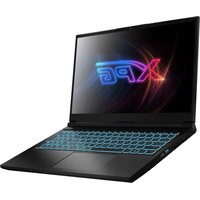


Brand : XPG
Model : Xenia 16 RX
Category : Laptop