Perfect Air CA3000 - Air purifier Concept - Free user manual and instructions
Find the device manual for free Perfect Air CA3000 Concept in PDF.


| Product type | Air purifier |
| Brand | Concept |
| Model | Perfect Air CA3000 |
| Dimensions (W x D x H) | 30 x 30 x 60 cm |
| Net weight | 6.2 kg |
| Power supply | 220-240 V ~ 50 Hz |
| Power consumption | 55 W max |
| Noise level | 25 - 50 dB(A) |
| Maximum recommended coverage | 40 m² |
| Airflow (CADR) | 200 m³/h |
| Filtration system | Pre-filter + HEPA H13 filter + Activated carbon filter |
| Main functions | Air purification, 3 speeds, automatic mode, timer, air quality indicator |
| Display | Touch display with air quality indicator (PM2.5) |
| Maintenance and cleaning | Clean the pre-filter every 2 weeks, replace the HEPA and carbon filter every 6-12 months |
| Safety | Automatic shutdown in case of overheating, child lock |
| Spare parts and repairability | Replacement filters available, repairability score 7.5/10 (estimated) |
| General information | 2-year warranty, certified manufacturing, compatible with mobile app (optional) |
Frequently Asked Questions - Perfect Air CA3000 Concept
User questions about Perfect Air CA3000 Concept
0 question about this device. Answer the ones you know or ask your own.
Ask a new question about this device
Download the instructions for your Air purifier in PDF format for free! Find your manual Perfect Air CA3000 - Concept and take your electronic device back in hand. On this page are published all the documents necessary for the use of your device. Perfect Air CA3000 by Concept.
USER MANUAL Perfect Air CA3000 Concept
Air Purifier with Humidifier
natural_image
Exterior view of a modern smart air purifier with a black lid and 'concept' branding (no additional text or symbols visible)CA3000
CZ
HU LV DE FRENSK PL
IT ES
RO
Poděkování
VLASTNOSTI
Predfiltr (Obr. 1)
obr. 4 obr. 5 obr. 6 obr. 8obr. 7
Pokyny pre spárovanie zariadenia
WŁAŚCIWOŚCI
Pamiętaj
JELLEMZÖK
Elöszürő (1. ábra)
- ábra 5. ábra 6. ábra 8. ábra 7. ábra
IPASIBAS
Priekšfiltrs (1. att.)
Thank you for purchasing a Concept product. We wish you much joy with your new appliance every day you use it. Please read the instruction manual carefully before initial use. To refer to this manual any time you need to, we recommend you to keep it in a safe place. And please pass it to any future owner of the appliance.
| Technical specifications | |
| Voltage 220-240 V, 50/60 Hz | |
| Input 85 W | |
| Sound level | 38 dB (A) |
| Frequency range 2412 - 24/2 MHz | |
| Transmitter power (max.) 19 dBm | |
IMPORTANT SAFETY PRECAUTIONS
- Do not use the appliance in any other way than as described in this manual.
- Remove all the covering and marketing materials from the appliance before the first use.
- Make sure the mains voltage corresponds to the values on the rating plate of the product.
- Place the appliance on a stable, flat surface away from other heat sources.
- Do not leave the appliance unattended when it is switched on or connected to the mains.
- When connecting and disconnecting the appliance from the mains, the on/off button must be turned off.
- When disconnecting the unit from the wall outlet, never pull the power cord, grasp the plug end and disconnect it by removing it from the receptacle.
- Do not allow children or unauthorized people to handle the appliance, use it out of their reach.
- Persons with reduced mobility, reduced sensory perception, mental disadvantage or persons not familiar with the operation must use the appliance only under the supervision of responsible person, who is familiar with the instructions.
- Pay extra attention if the appliance is used near children.
- Do not use the appliance as a toy.
CA3000
73
EN
concept
concept
EN
- Never put your fingers, pencils or other objects into the openings of the appliance.
- Never use the appliance without cover grids.
- Do not let small children and sick persons to be exposed to a direct air flow.
- Do not cover the appliance.
- Do not put anything on the appliance or place anything in front of it.
• The appliance must only be used in the upright position. - Do not use the appliance near shower, bathtub, sink or pool.
- Do not use the appliance in a damp or dusty environment.
- Do not use the appliance in an environment where there are explosive gases and flammable substances (solvents, varnishes, adhesives, etc.).
- Before assembly and disassembly, disconnect the power cord from the wall outlet.
- Before cleaning and after use of the appliance, switch the appliance off and disconnect it from the mains.
- Keep the appliance clean, do not allow foreign objects to into the grid openings. It could cause serious injury, short circuit, damage to the appliance or cause fire.
- Do not use coarse and chemically aggressive substances to clean the appliance.
- Do not use the appliance with a damaged cord or plug and have it repaired immediately by an authorized service centre.
- Do not use the appliance if it is not working properly, has been dropped, damaged or immersed in liquid. Have it checked and repaired by an authorized service centre.
- Do not use the appliance outdoors.
- The appliance is only suitable for home use and is not intended for commercial use.
- Do not touch the appliance with wet hands.
- Do not immerse the power cord, plug or appliance in water or any other liquid.
-
Do not repair the appliance yourself. Contact an authorized service centre.
-
This appliance can be used by children aged from 8 years and above and persons with reduced physical, sensory or mental capabilities or lack of experience and knowledge if they have been given supervision or instruction concerning the use of the appliance in a safe way and understand the hazards involved. Cleaning and maintenance performed by the user must not be carried out by children unless they are 8 years old and under supervision. Children aged under 8 years of age must be kept away from the appliance and its power cord. Do not let children play with the appliance.
- Do not pour water into the appliance if it is plugged into the wall socket, always disconnect it from the mains first.
- Do not point the steam outlet directly against the wall.
- NEVER tilt, empty or move the appliance while operating.
- Disconnect the appliance from the mains before manipulating with the appliance and the water tank.
- Do not pour water into any other openings of the appliance, pour water into the water tank only.
- Excessive room humidity may cause condensation of water on windows and furniture. If this happens, do not continue to use the humidifier.
Damages from failure to follow the manufacturer's instructions are not covered by the warranty.
EN
concept
concept
EN
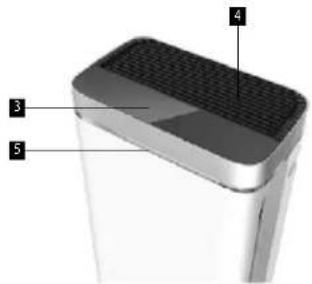
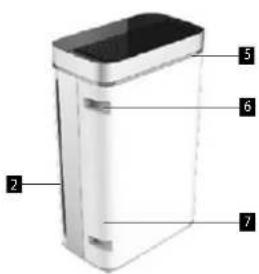
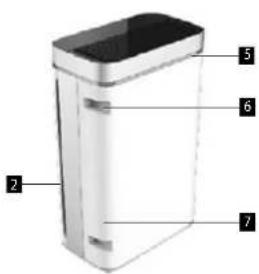
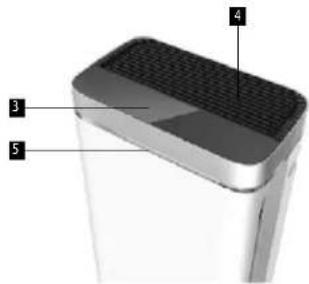
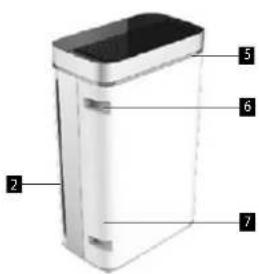
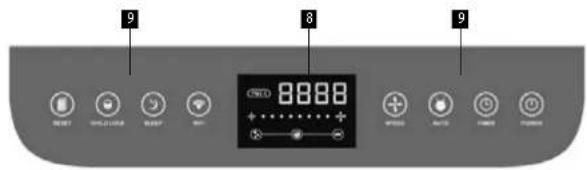
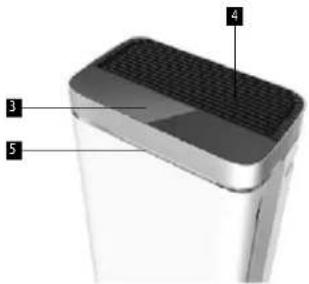
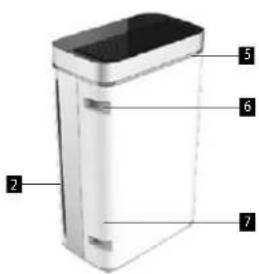
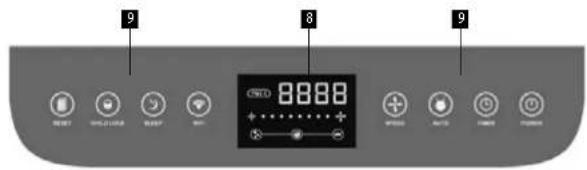
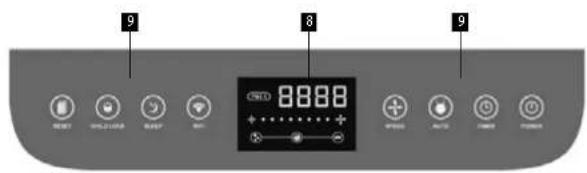
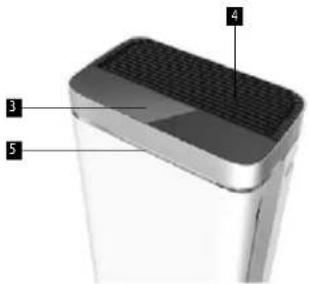
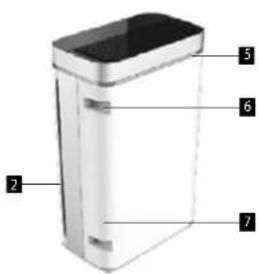
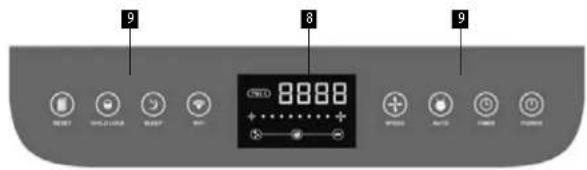
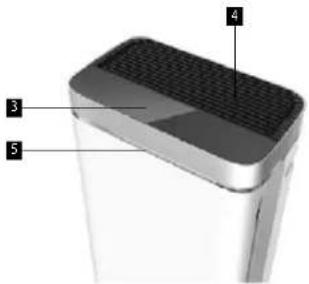
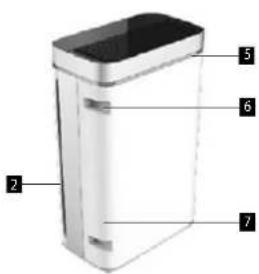
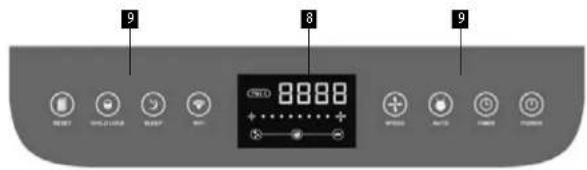
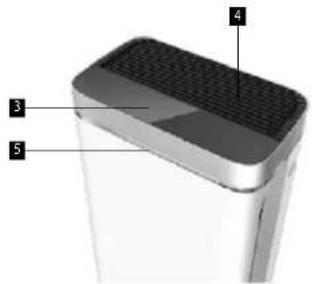
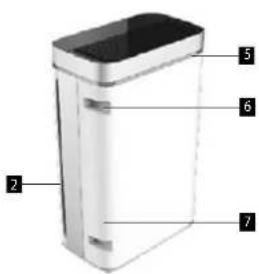
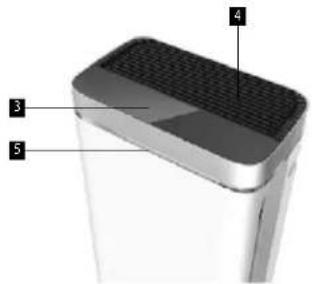
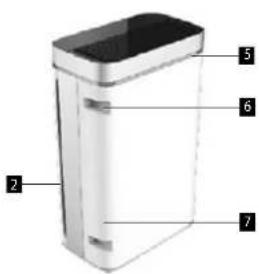
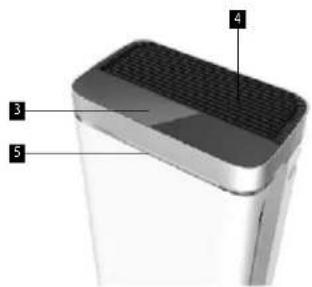
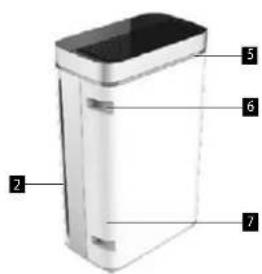
PRODUCT DESCRIPTION
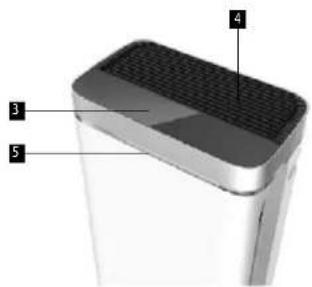
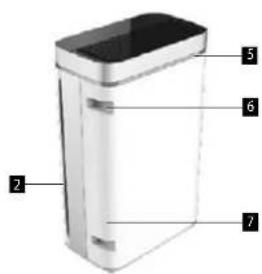
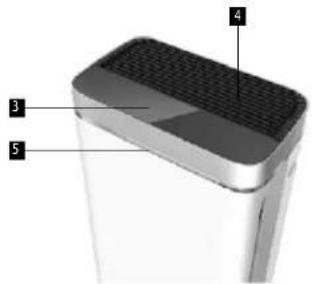
- Front cover
- Air inlet (on both sides)
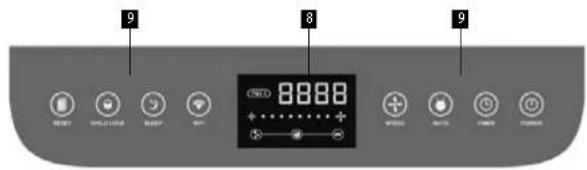
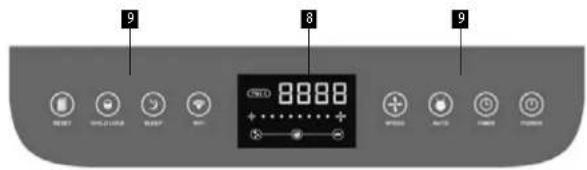
- Control panel and display screen
- Air outlet
- Air quality indicator
- Handle
- Water tank
- Display screen
- Control panel
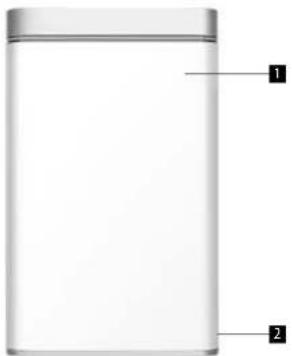
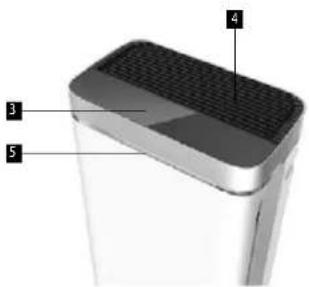
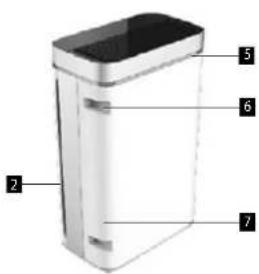
Primary filtration uses an aluminium alloy filter located in the pre-filter. It is mainly used to filter dust larger than 5 microns, including large dust particles, grease, pollen, flying residues and other pollutants. It can be washed many times and reused.
Cold Catalyst filter (Fig. 2)
- The catalytic decomposition reaction of a cold catalyst does not require UV radiation, high temperature or high pressure. In a normal environment, the catalytic effect can play a role in controlling air pollution.
- The main components of the cold catalyst come from additives found in food and pharmaceuticals. It is non-toxic, non-corrosive and non-flammable. Under normal temperature conditions, the catalytic reaction can remove formaldehyde, benzene, xylene, TVOC and other harmful gases. The reaction produces water and carbon dioxide. It does not cause any secondary pollution. It is a safe and ecological product of the highest standard, suitable for a healthy home.
- During the catalytic reaction, the cold catalyst is not directly involved in the reaction. The cold catalyst does not change or disappear. For this reason, the filter will be effective for more than five years without external damage. It basically synchronizes with the long-term release of formaldehyde.
Activated carbon filter (Fig. 2)
Activated carbon contains highly effective additives. It has good absorption and collection properties.
Antibacterial cotton filter (Fig. 3)
The antibacterial filter is a precision filter to trap particles with a diameter of 5 microns. At the same time, an antibacterial agent is added to the filter which can effectively kill more than 99% of any bacteria in the air.
Highly efficient HEPA filter (Fig. 3)
An efficient HEPA filter filters over 99 % of airborne bacteria, smoke and dust particles of 0.3 microns. In combination with a multifunction filter, the HEPA filter can filter out microscopic particles over 20 nanometres in diameter, including bacterial fungi, dust, allergens and some viruses, while filtering out smoke. According to the World Health Organization, the bird flu virus, the flu virus and Legionella bacteria are larger than 20 nanometres. The HEPA filter can filter out these bacteria.
UV sterilization light
UV sterilization can kill various bacteria in the air using 365 nanometre UV wavelength. The UV disinfection lamp is usually used to disinfect air, surface and water. It is able to purify the air, remove stale odours and create a certain amount of anions. This makes the air fresh and prevents the spread of viruses in the air or on surfaces.
Anionic cleaner
It releases large amounts of anions into the air, which the oxygen molecules then add to their outer shell to obtain a negative charge. It has an extraordinary ability to combine with positively charged flying dust, smoke, bacteria and viruses inside buildings. As a result, the free-flowing waste will fall, thus cleansing the air and the environment without harming humans. These ultra fine particles are difficult to filter by conventional mechanical equipment. Anions in the air have a special ability to trap these harmful substances.
The smaller the particle size, the higher the capture rate. It is an effective way to eliminate these pollutants.
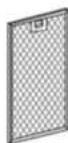
Fig. 1
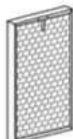
Fig. 2
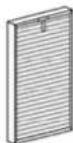
Fig. 3
76
CA3000CA3000
EN
concept
concept
EN
INSTALLING THE FILTER
Remove the filter from the plastic bag
- Remove the front cover.
- Remove the filters.
- Remove the filters from the package.
Remove the plastic bag from the filters before use.
Installing the filter and front cover
- There are differences between the inside and the outside of the dust filter 1 (antibacterial cotton filter and HEPA filter).
Caution: The handle side should be placed outwards. - There are differences between the inside and the outside of the absorption filter 2 (activated carbon filter and cold catalyst filter).
Caution: The handle side should be placed outwards. - There are differences between the inside and the outside of the front filter (pre-filter).
Caution: The handle side should be placed outwards. - Place back the front cover.
If the front panel is exposed, the appliance will not start.
- Pull out the water tank from the side of the purifier.
- Remove the humidifying filter from the package.
- Place the humidifying filter in the water tank.
- Open the rubber inlet lid.
- Add about 1 litre of cold water through the hole and fill about 80% of the water tank.
- After filling the water, close the lid.
- Put the tank back in the purifier
- This appliance has a humidifying function by evaporation.
If you add water to the tank, the appliance will automatically generate water vapour. The humidification effect is related to the air flow rate and works better when the appliance is operating at a higher speed. If the water level drops, the light will flash while the appliance is operating normally. If the water tank is removed, the light stays on and the appliance stops functioning.
FUNCTIONS
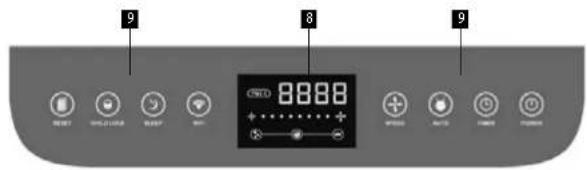
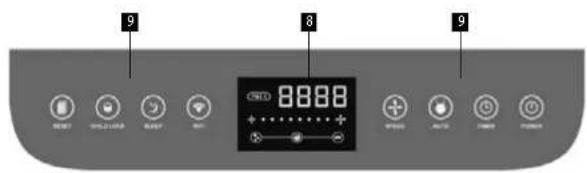
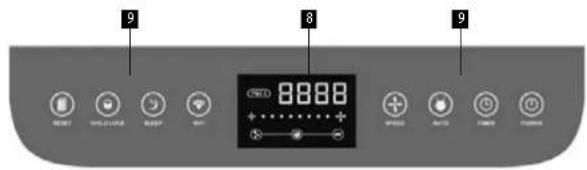
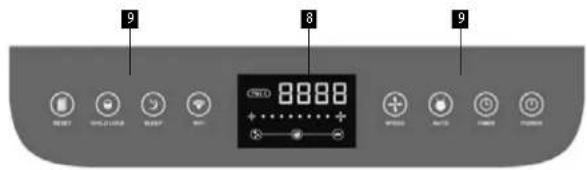
Switching on
When the appliance is connected and in standby mode, press the "POWER" button to switch it on. When the button is pressed a second time, the appliance switches to standby mode. (In standby mode, the colour is red; when the appliance is switched on, the colour is green.)
Selecting the operating mode
When the appliance is switched on and the "AUTO" button is pressed, the negative ion generator and the germicidal lamp start working and the speed changes according to the sensor data. (When operating in automatic mode, the light will stay on, otherwise it will be off.) Attention: if users change the air flow rate in automatic mode, the appliance will automatically exit this mode.
Relationships between set speed and PM 2.5 PM = solid particles
| Speed | PM 2.5 | Light colour | Speed | PM 2.5 | Light colour |
| 10-50 | Green | 5 121-140 | Yellow | ||
| 251-806 141-160 | |||||
| 381-100 | Blue | 7 161-300 | Red | ||
| 4 101-1208 | 301-500 |
TIMER: With the appliance switched on, each press of the "TIMER" button adds 1 hour to the timer. When the sum reaches 12 hours, the next press turns off the timer. (When operating in timer mode, the light will stay on, otherwise it will be off.)
NEGATIVE ION: With the appliance switched on, pressing the "negative ion" button switches the negative ion mode on and pressing it again switches it off. (When operating in negative ion mode, the light will stay on, otherwise it will be off.)
RESET: The appliance has a regular filter change reminder function that works every 320 and 1500 hours. Every 320 hours, the indicator light on the panel will flash, informing the user about cleaning the filter No. 1. After cleaning, press the "RESET" button for 5 seconds, then the indicator will stop flashing. Every 1500 hours, the indicator light stays on to inform the user about replacing the filter No. 2 and No. 3. Then press the button for 5 seconds to reset the timer. The second function of the "RESET" button: With the appliance switched on, press this button and the total working hours will be displayed on the screen. This is equal to the control of working hours. Because only three digits can be displayed on the screen, thousands are displayed first, then hundreds, tens, and finally units. Please read them together.
SLEEP: When the appliance is switched on, it switches to sleep mode 5 seconds after pressing the "SLEEP" button. In the sleep mode, all the lights go out and the appliance works at the first speed. Press any button to wake it up, then press "SLEEP" button to exit the sleep mode, or press "SPEED -" / "SPEED +" / "AUTO" button to exit after waking up.
CHILD LOCK: With the appliance switched on, press "CHILD LOCK" to lock all buttons. During this time, no button responds to pressing while the appliance is still operating as previously set. Press the "CHILD LOCK" button for 5 seconds and the appliance will exit this mode. (When operating in child lock mode, the light will stay on, otherwise it will be off.)
SPEED +/-: When switched on, press the "SPEED" button to set the airflow speed. The four speeds range from lowest to highest. After manually changing the speed position, the motor will not be controlled by the sensor and can only operate in the currently set speed position (the automatic function of the airflow speed button will be cancelled).
Wi-Fi: Enter APP mode; in standby mode, press and hold the Wi-Fi button, the button light flashes, and then goes into network assignment mode. After a successful assignment, the Wi-Fi button lights up.
76
EN
concept
concept
EN
Switching off
If you press the power button on the control panel during operation, the appliance enters standby mode and the indicator light turns red.
Remote control
The air purifier is equipped with a remote control powered by button batteries. If you do not use the remote control for a long time, remove the batteries.
Note: the buttons on the remote control correspond to those on the control panel. The function and method of operation is generally the same.
Caution: When using for the first time, remove the battery cover and remove the protective tape, replace the battery cover. Otherwise, the remote control will not operate without power.
USE
Automatic mode: With the appliance connected, press the "power" and "auto" buttons sequentially, then it can work under intelligent control. The motor speed of the appliance automatically adapts to the PM 2.5 collected by the sensor. This mode is applicable to most situations.
Forced mode: With the appliance connected, press the "power" button. Press the "wind speed" button to select the speed, then turn the negative ion generator and UV germicidal lamp on or off. This mode is suitable for situations where forced cleaning is required. In this mode, the appliance cannot change speeds.
Night mode: In the above two modes, the appliance operates at the first speed until you press the "sleeping" button and make sure it does not generate any noise that will disturb you. In auto mode, it enters sleep mode when the environment sensed by the photosensitive sensor darkens.
Timing mode: In the above three modes and after pressing the "timing" button and setting the operating time, the appliance starts to count down the set time. After the set time has elapsed, the appliance switches off. If you need to cancel the countdown, press the button until the displayed time is 12 hours, then press again to cancel this mode.
Child lock mode: In the above four modes, the appliance switches to the child lock mode when the "child lock" button is pressed. Any operation entered through the control panel or remote control will be invalid before exiting this mode. It can be cancelled by pressing the "child lock" button for 3 seconds or by unlocking the button on the remote control.
DURING INSTALLATION
- Do not place the appliance in direct sunlight, in front of the air conditioner openings or in heated places. This could cause deformation, damage, colour change or malfunction to the appliance itself.
- For efficient room circulation, place the appliance approximately 30 cm or more away from walls or other objects.
For effective use of the appliance, please keep at least 20 cm of free space behind it - Do not place any objects on the purifier as this may cause a malfunction. Do not place any magnets or other metal objects on it.
- Do not obstruct the ventilation inlet or outlet. For example, do not place any object on top of the air outlet or in front of the air inlet.
- If any of the following occurs, switch off the appliance immediately (electric shock, sparks or smoke may occur): - Strange noise and vibration during operation.
- The appliance is unusually hot or there is a smell of burning.
- Clean the plug regularly. If dust or moisture is present, it may cause damage. It could cause a fire.
- Unplug the power cord and wipe it with a dry cloth.
- If the appliance is not used for a long time, unplug the power cord.
- Before electrical maintenance, be sure to disconnect the appliance from the power supply. The appliance may suddenly switch on and cause injury or electric shock.
- Connect the power cord to the wall outlet properly. If the plug is not plugged in properly, it may cause overheating, which may result in electric shock or even fire. Do not use a damaged plug or loose socket.
- Pull the mains plug by the part of the plug that is designed for this purpose. Pulling the power cord to pull the power plug out may cause damage to the power cord, electric shock, short circuit, or fire.
- If any of the following occurs, immediately turn off the power to the appliance and contact an authorized service centre:
- The power button does not work.
- The power cord is unusually hot.
- You noticed unusual sound or vibration.
- There are any other abnormalities or faults.
• To avoid electric shock, only trained personnel should disassemble the appliance.
CLEANING AND MAINTENANCE
Pre-filter (about twice a month)
- Clean the filter surface with a vacuum cleaner or wash with water. Allow to dry thoroughly.
Activated carbon filter, cold catalyst filter (about once every two months)
- Clean the dust from the front of the filter with a vacuum cleaner.
- Place the filter in a ventilated area allowing the dispersion of harmful gases and gems. Do not expose to excessive sunlight.
- The filter is fragile. Do not squeeze it too much during vacuuming.
- Do not use water to clean this filter.
Antibacterial cotton, HEPA filter (about once every two months)
- Place the filter in a ventilated area allowing the dispersion of harmful gases and germs. Do not expose to excessive sunlight.
- Do not use water to clean this filter.
Cleaning and maintenance of anion generator
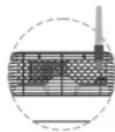
- When you hear the appliance making a creaking sound, use brush No. 1 or No. 2 as a cleaning tool. Insert a brush from the ventilation window above the anionic emission head.
• Regularly clean the dust around the emission head.

EN
concept
concept
EN
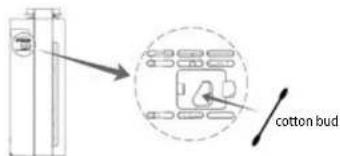
Particle sensor (about once every two months)
• To remove dirt, regularly wipe the lenses with a dry cotton bud. Moisture or residues of tobacco smoke may cause
it to no longer function properly. First remove the particle sensor cover and wipe the lenses with a dry cotton bud.
- Do not insert a cotton bud in a place other than the lens area.
- Be sure to unplug the power cord.
- If you don't see clearly, turn on extra light.
Note
- Unplug the power cord before cleaning and maintenance.
- Do not operate the appliance without a filter. It will not be able to remove dust. Dust in the appliance may cause a malfunction.
- Unplug the appliance if it is not going to be used for a long time. Power is also consumed in standby mode.
- Depending on where and how you use the purifier, you may need to replace the filters earlier (e.g. a household with a lot of smokers or areas with higher air pollution). If the filtration is not apparent, replace the filter.
TROUBLESHOOTING
Common faults, error code description and troubleshooting method.
| Problem Cause Remedy | ||
| It is not possible to turn on or press the button, no response. | Is the power cord plugged in? Connect the power cord | |
| Is the purifier covered? Close the front cover. | ||
| Is the purifier positioned vertically on the ground? | Place the purifier on a flat surface. | |
| Is the purifier in child lock mode? | When "child lock" appears on the display, hold the child lock / reset button for 5 seconds to deactivate it. | |
| The air is dirty, but the air quality indicator is "green". The air quality indicator remains "red" even in continuous operation. | Is the purifier in place that cannot easily absorb dirty air (dust)? | Move it somewhere else. |
| Isn't the particle sensor dirty? Clean the particle sensor. | ||
| A banging or chirping sound is heard during operation. | Isn't there too much dust on the anion generator? | Clean the anion generator. |
| The odour of the supplied air is unpleasant. | Is the filter dirty? Clean the filter. | |
| Has the filter been replaced after a long time? | Replace the filter. | |
| The purifier runs for a long time, but the air quality does not improve significantly. | Has the plastic bag been removed from the filter? | Remove the plastic bag from the filter before use. |
| Is the filter order correct? | ||
| The display shows F1 or F2. | Turn off the power immediately and contact the maintenance department. | |
| The appliance immediately enters sleep mode. | Turn off the power immediately and contact the maintenance department. | |
EN
concept
concept
EN
Before you can control the device through the application, it is necessary to connect it to your phone and give it access to your Wi-Fi network.
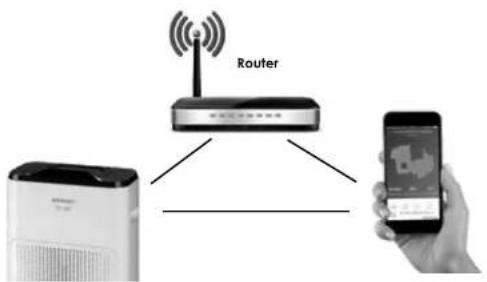
Recommended distance during set-up: less than 4 meters
Make sure your air purifier, router, and your mobile phone are close together so that you can pair your phone with the device with no problems.
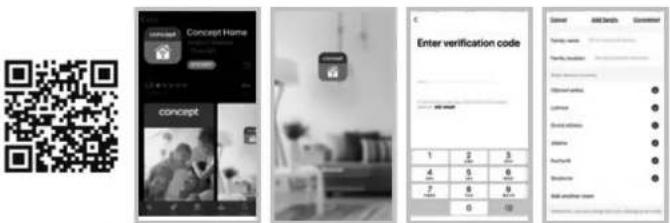
Download and installation of the app
- Scan the QR code below (Fig. 4) or find and download the "Concept Home" application on Google Play or App Store (Fig. 5)
- If you already have Concept Home, open the app, sign in, and continue with the pairing instructions.
- If you are a new user, start by registering (Fig. 6). Follow the instructions to enter the verification code and complete the registration. (Fig. 7)
- Follow the instructions to create a family (Fig. 8).
Instructions for pairing the device
- At the beginning of pairing, you need to be connected to your Wi-Fi network.
- On the device in standby mode, press the Wi-Fi button (Fig. 9) for 5 seconds until the Wi-Fi icon flashes.
- Then press + or "Add device" (Fig. 10) in the application to add a new device.
- Confirm "Confirm indicator rapidly blink" (Fig. 11)
- Select your Wi-Fi network to which the device needs to connect to and enter your password. (Fig. 12)
- This will start the set-up process, which may take some time. (Fig. 13)
- Your phone will try to connect to the device and it will connect it to your Wi-Fi network.
- After successful set-up (Fig. 14), press "Completed" to enter the device control interface (Fig. 15).
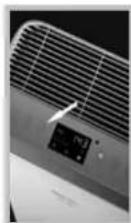
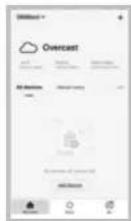
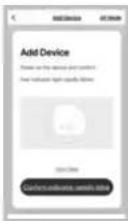
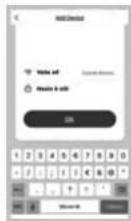
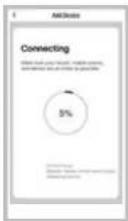
Fig. 9 Fig. 10 Fig. 11 Fig. 12 Fig. 13
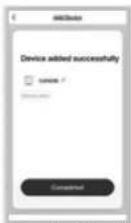
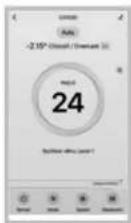
Fig. 14 Fig. 15
PAIRING TROUBLESHOOTING
- Verify that your Wi-Fi network password is correct
• The device only supports 2.4 GHz Wi-Fi networks
• The router is overloaded as many other devices are connected - When attempting to connect to the device (Fig. 13), try to manually connect to its Wi-Fi network
81
CA3000CA3000
EN
concept
concept
DE
SERVICE CENTRE
Extensive maintenance or repair, which requires access to internal parts of the product, has to be performed by a qualified specialist or the service centre.
ENVIRONMENTAL CONCERNS
- Packaging materials and old appliances should be recycled.
• Packaging materials may be disposed of as sorted waste. - Dispose the plastic bags made of polyethylene (PE) of as sorted waste.
Recycling of the appliance at the end of its lifespan:

This appliance is labelled in accordance with European Directive 2012/19/EU concerning used electrical and electronic appliances (waste electrical and electronic equipment - WEEE). The symbol on the product or on its packaging indicates that this product may not be treated as household waste. Instead it should be taken to the appropriate collection point for the recycling of electrical and electronic equipment. By ensuring this product is disposed of correctly, you will help prevent potential negative consequences for the environment and human health, which could otherwise be caused by inappropriate waste handling of this product. The disposal of such material has to be done according to the recycling regulations. For more detailed information about recycling of this product, please contact your local council, your household waste disposal service or the shop where you purchased the appliance.

The product meets all the necessary requirements of the EU directives applicable to the specific product.
Changes in text, design, and technical specifications are subject to change without prior notice and we reserve the right to change them.
86
CA3000
Danksagung
EIGENSCHAFTEN
Vorfilter (Abb. 1)
CARACTÉRISTIQUES
Préfiltre (Fig. 1)
Remarque
fig. 4 fig. 5 fig. 6 fig. 8 fig. 7
CARATTERISTICHE
Prefiltro (Fig. 1)
fig. 4 fig. 5 fig. 6 fig. 8 fig. 7
PROBLEMI CON ACCOPPIAMENTO
CARACTERÍSTICAS
Filtro previo (Fig. 1)
CARACTERISTICI
Prefiltru (Fig. 1)
fig. 7 fig. 4 fig. 5 fig. 6 fig. 8
The manufacturer (or Importer) is responsible for ensuring the product complies with the requirements of applicable legal regulations as well as those of the relevant technical standards. Moreover, they are responsible for ensuring the product has the properties the manufacturer described in documents related to the goods or those reasonably expected by the customer with regard to the nature of the goods or based on advertising produced by the manufacturer, and further they are responsible for ensuring the product is fit for the purpose proposed by the manufacturer or that a product of the same type is normally used for.
The quality warranty term is 24 months from product takeover by the customer.
The warranty does not apply to wear and tear caused by regular use. The customer shall not be entitled to any warranty claims if, prior to taking the product over, they knew the product contained a defect or if the defect is attributable to the customer.
The warranty specifically does not apply:
- if the product installation, operation and service conditions stipulated in the product operating manual have not been adhered to,
• to malfunctions caused due to mechanical, heat or chemical damage, short circuit, over voltage or incorrect installation.
• to malfunctions caused by an inexpert third-party intervention,
• to malfunctions caused by natural disaster,
• to malfunctions caused by insufficient or inappropriate maintenance in violation of the operating manual, including malfunctions caused by water and other sediments,
• to changes in colour of the heating surface or to scratching of the surface caused as a result of using the products in an unusual manner,
• to appearance and functional changes caused by exposure to sunlight, thermal radiation of water and other sediments, - if the service life of certain product parts expires, e.g. for accumulators, bulbs, etc.
The warranty does not apply to any products and services provided along with the product (gifts, promotional articles, etc.).
Filing a complaint
A complaint against a product defect must be filed as soon as identified, yet no later than before the end of the warranty term.
The customer must file a product complaint with the dealer from which they have purchased the product, or with any authorised service centre, a list of which is included in the product package, or available at www.my-concept.com.
While filing a product complaint, the product must be duly cleaned and securely packed so as to prevent any damage during its transport to an authorised service centre, where relevant, unless the product is delivered in person.
The customer must submit proof of having concluded a purchase contract for the product by producing the receipt.
While filing their complaint, the customer must indicate the noted defect and identify the preferred complaint application method.
Complaints processing
As long as the noted defect may be removed, the user has the right to have the defect duly removed free of charge on a timely basis.
Where such a procedure is not reasonable with regard to the nature of the defect, the user may require to be supplied a new defect-free product (replacement), or, where the defect applies to a part of the product only, replacement of the part concerned. However, if replacement of the product or any part thereof is not proportionate with regard to the nature of the defect, especially if the defect can be removed without undue delay, the customer has the right to have the defect removed free of charge.
If the noted defect is not removable, or if the customer becomes entitled to replacement of the product or a part thereof, yet the replacement is not possible, for example due to the product having been sold out, the customer has the right to return the product (withdrawal from the contract).
The customer shall have the right to a new product (replacement) or to replacement of a part of the product even if the defect can be removed, provided they cannot properly use the product due to repeated occurrence of the defect or due to a high number of such defects. In such a case, the customer also has the right to return the product (by withdrawing from the contract).
If the product is not returned (the customer does not withdraw from the contract), or if the customer does not apply the right to a new defect-free product (replacement), to replacement of a part thereof or to repair of the product, they may request a reasonable discount. The customer also has a right to a reasonable discount if a new defect-free product cannot be supplied to them, or if a product part cannot be replaced or the product repaired unless the situation is remedied within a reasonable time limit, or if remedying the situation would create major discomfort on the part of the customer.
The seller, authorised service centre or a staff member authorised by them must decide about each complaint immediately or within three business days in complicated cases. This term does not include a reasonable period of time, depending on the type of product concerned,
required for the defect to be assessed by an expert. A complaint, including defect removal, must be dealt with without any undue delay, yet no later than within 30 calendar days of the complaint filing date, unless the seller and the customer agree on a later deadline.
On returning the product (withdrawing from the contract) the customer must return any accessories and documents supplied along with the product.
The customer does not have the right to keep the defective parts and components of the product replaced as part of a repair of the product.
This shall be without prejudice to any other rights the customer may have in relation to the purchase of the product.
Remark: Complaints against products damaged in transport are governed by the carrier's complaints procedure.
Manufacturer
Jindrich Valenta - Concept
Vysokomýtská 1800, 565 01 Choceň
Czech Republic
tel.: +420 465 471 400
fax +420 465 473 304
Company ID No. 13216660
email: servis@my-concept.cz
www: www.my-concept.com
Product data
| Model: | |
| Production number: | |
| Date of purchase: Seal and signature of vendor: | |
concept concept
DEGARANTIEBEDINGUNGEN
Garantie
FR CONDITIONS DE GARANTIE
Garantie
CONCEPT POLSKA sp. z o.o.
Ostrowskiego 30, 53-238 Wroclaw Tel.: +48 713 390 444, Fax: 713 390 414 www.my-concept.pl

ASPICO KFT
- Poděkování
- VLASTNOSTI
- Predfiltr (Obr. 1)
- Pokyny pre spárovanie zariadenia
- WŁAŚCIWOŚCI
- Pamiętaj
- JELLEMZÖK
- Elöszürő (1. ábra)
- IPASIBAS
- IMPORTANT SAFETY PRECAUTIONS
- EN
- concept
- PRODUCT DESCRIPTION
- Cold Catalyst filter (Fig. 2)
- Activated carbon filter (Fig. 2)
- Antibacterial cotton filter (Fig. 3)
- Highly efficient HEPA filter (Fig. 3)
- UV sterilization light
- Anionic cleaner
- INSTALLING THE FILTER
- Remove the filter from the plastic bag
- Installing the filter and front cover
- FUNCTIONS
- Switching on
- Selecting the operating mode
- Switching off
- Remote control
- USE
- DURING INSTALLATION
- CLEANING AND MAINTENANCE
- Pre-filter (about twice a month)
- Activated carbon filter, cold catalyst filter (about once every two months)
- Antibacterial cotton, HEPA filter (about once every two months)
- Cleaning and maintenance of anion generator
- Note
- TROUBLESHOOTING
- Download and installation of the app
- Instructions for pairing the device
- PAIRING TROUBLESHOOTING
- SERVICE CENTRE
- ENVIRONMENTAL CONCERNS
- Recycling of the appliance at the end of its lifespan:
- Danksagung
- EIGENSCHAFTEN
- Vorfilter (Abb. 1)
- CARACTÉRISTIQUES
- Préfiltre (Fig. 1)
- Remarque
- CARATTERISTICHE
- Prefiltro (Fig. 1)
- PROBLEMI CON ACCOPPIAMENTO
- CARACTERÍSTICAS
- CARACTERISTICI
- Prefiltru (Fig. 1)
- Filing a complaint
- Complaints processing
- Manufacturer
- concept concept
- DEGARANTIEBEDINGUNGEN
- Garantie
- FR CONDITIONS DE GARANTIE
- CONCEPT POLSKA sp. z o.o.
- ASPICO KFT
Brand : Concept
Model : Perfect Air CA3000
Category : Air purifier