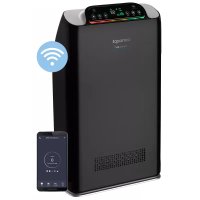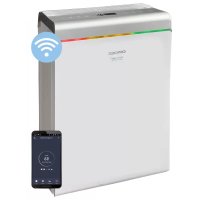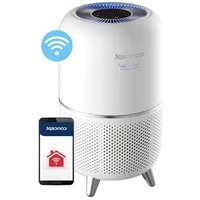
Perfect Air CA1020 - Air purifier Concept - Free user manual and instructions
Find the device manual for free Perfect Air CA1020 Concept in PDF.


| Product type | Air purifier |
| Brand | Concept |
| Model | Perfect Air CA1020 |
| Supply voltage | 220-240 V ~ 50/60 Hz |
| Power | 35 W |
| Noise level | 49 dB (A) |
| Filter type | Combined filter (replaceable) |
| UV technology | Replaceable UVC lamp |
| Connectivity | WiFi 2.4 GHz (IEEE 802.11 b/g/n) |
| Mobile app | Concept Home (Android 5.0+ / iOS 9.0+) |
| Timer | 2 h, 4 h, 8 h |
| Fan speeds | 3 speeds + automatic mode |
| Night mode | Yes |
| Filter replacement reminder function | Yes (indicator light) |
| Usage | Indoor, domestic |
| Repairability | Approved service center |
| Standards | CE directives |
| Recycling | WEEE compliant |
Frequently Asked Questions - Perfect Air CA1020 Concept
User questions about Perfect Air CA1020 Concept
0 question about this device. Answer the ones you know or ask your own.
Ask a new question about this device
Download the instructions for your Air purifier in PDF format for free! Find your manual Perfect Air CA1020 - Concept and take your electronic device back in hand. On this page are published all the documents necessary for the use of your device. Perfect Air CA1020 by Concept.
USER MANUAL Perfect Air CA1020 Concept
POKNY PRE INSTALACIU
V pripe vntornhe prach, napriklad pefu, by mal byt spotreic umiestneny na zemi. Pretoze pel, prach atd. sa obvkykle drzblko podlahy, odporica sa umiestnit cisticku na rovnu podlahu v miestosti.
- Aby nebol blokovany privod a odvod vzduchu, spotrebic umiestnite cca 30 cm alebo viac od lavej a pravej strany steny, nabytku, zaclon atd. Pre dobry chod spotrebica zachovajte za nim volny priestor aspon 20 cm od steny.
- Na hornu stranu spotrebica neumiestnujte ziadne predmetry (mohlo by to sposobit jeho poruchu).
- Poznamka: Na spotrebic neumiesthujte magnety ani kovove predmety.
- Neblokuje vstup a vystup vzduchu, napriklad na vystup vzduchu neumiestnujte ziadne predmety. Ani na prednu stranu na vstup vzduchu.
UDRZBA

m = 311 ;
Sierice ir marketa saskana ar Eiropas Parliamenta un Padomes Direktivu 2012/19/ES par elektrisko un elektronisko iekartu atkritumiem (EEIA). Symbols uz izstradajuma vai tia lepakojuma norada, ka sis izstradajums nepieder sadzives atkritumiem. Tas janoğada elektrisko un elektronisko iekartu otreizejas sparstrades savaksana punkta. Nadrosinot sa izstradajuma pareizu iznicinansanu, tikss novrsta nelabvigi etekme uz vidi un cilveku veselibu, ko var izrasit neparezi erices iznicinansana. Iznicinansana javeic saskana ar noteikumemi par atkritumu apstradi. La iegutupapildu informaciju par sis erices otreizejurpstra diudzu, szainieties ar vietejas pašvalibas sadzives atkritumu iznicinansanas dienestu vai veikalu, kur iegadajaties izstradajumu.
Sis izstradajums atbilst visam piemerojamo ES direktivu pamatprasibam.
Izmainas teksta, konstrukcija un tehniskajas specifikacijas var tikt veiktas bez iepriekseja bredinajuma, un mes paturam tiesibas veikt sis izmainas.
ACKNOWLEDGMENT
Thank you for purchasing a Concept product. We wish you much joy with your new appliance every day you use it.
Please read the instruction manual carefully before initial use. To refer to this manual any time you need to, we recommend you to keep it in a safe place. And please pass it to any future owner of the appliance.
TECHNICAL SPECIFICATIONS
Voltage 220-240 V ~ 50/60 Hz
Input 35 W
Sound level 49 dB (A)
Frequency range 2412-2472 MHz
Transmitter power (max.) ≤ 20 dBm
IMPORTANT SAFETY PRECAUTIONS
-
Do not use the appliance in any other way than as described in this manual.
-
Remove all the packaging and marketing materials before first use.
Make sure the mains voltage corresponds to the values on the rating plate of the product.
-
Place the appliance on a stable, flat surface away from other heat sources.
-
Do not leave the appliance unattended when it is switched on or connected to the mains.
-
When connecting and disconnecting the appliance from the mains, the on/off button must be turned off.
-
When disconnecting the appliance from the wall outlet, never pull the power cord, grasp the plug end and disconnect it by removing it from the receptacle.
-
Do not allow children or unauthorized people to handle the appliance, use it out of their reach.
-
Persons with reduced mobility, reduced sensory perception, mental disadvantage or persons not familiar with the operation must use the appliance only under the supervision of responsible person, who is familiar with the instructions.
-
Pay extra attention if the appliance is used near children.
-
Do not use the appliance as a toy.
-
Never put your fingers, pencils or other objects into the openings of the appliance.
-
Never use the appliance without cover grids.
-
Do not let small children and sick persons to be exposed to a direct air flow.
-
Do not cover the appliance.
-
Do not put anything on the appliance or place anything in front of it.
-
The appliance must only be used in the upright position
-
Do not use the appliance near shower, bathtub, sink or pool.
-
Do not use the appliance in a damp or dusty environment.
-
Do not use the appliance in an environment where there are explosive gases and flammable substances (solvents, varnishes, adhesives, etc.).
-
Before assembly and disassembly, disconnect the power cord from the wall outlet.
Before cleaning and after use of the appliance, switch the appliance off and disconnect it from the mains.
-
Keep the appliance clean, do not allow foreign objects to into the grid openings. It could cause serious injury, short circuit, damage to the appliance or cause fire.
-
Do not use coarse and chemically aggressive substances to clean the appliance.
-
Do not use the appliance with a damaged cord or plug and have it repaired immediately by an authorized service centre.
-
Do not use the appliance if it is not working properly, has been dropped, damaged or immersed in liquid. Have it checked and repaired by an authorized service centre.
-
Do not use the appliance outdoors.
-
The appliance is only suitable for home use and is not intended for commercial use.
-
Do not touch the appliance with wet hands.
-
Do not immerse the power cord, plug or appliance in water or any other liquid.
-
Do not repair the appliance yourself. Contact an authorized service centre.
This appliance can be used by children aged from 8 years and above and persons with reduced physical, sensory or mental capabilities or lack of experience and knowledge if they have been given supervision or instruction concerning the use of the appliance in a safe way and understand the hazards involved. Cleaning and maintenance performed by the user must not be carried out by children unless they are at least 8 years old and under supervision. Children under the age of 8 must be kept away from the appliance and its power supply. Do not let children play with the appliance.
Damages from failure to follow the manufacturer's instructions are not covered by the warranty.
PRODUCT DESCRIPTION
1 Display
2 Air outlet cover
3 Upper part of the body
4 Decorative ring
5 Bottom part of the body
6 Filter
7 Appliance base
8 UVC
Control panel
A UV on/off
B Night mode
C Fan speed
D Wi-Fi symbol
E On/off button
F Timer
G Filter restart
INSTALLING THE FILTER
- Turn the filter base counterclockwise (Fig. 1).
- Insert the filter.
- Insert the base back and turn it clockwise.
USE
TIMER: When the appliance is running, the operating time can be set using the "timer" button. Set the time to 2 hours, 4 hours, 8 hours, press again to turn off, the corresponding indicator lights up after the selected time.
Fan speed: Press the fan speed button to change the speed (1-3) and select automatic mode.
Automatic mode: Press the fan speed button to select the fan speed A. The appliance will automatically change the fan speed according to the ambient contaminants.
RESET: The appliance is equipped with a filter replacement alert function. When the filter replacement indicator lights up, replace the filters. Then hold the button for 3 seconds and the countdown will reset.
INSTALLATION INSTRUCTIONS
In case of internal dust, such as pollen, the appliance should be placed on the ground. Since pollen, dust, etc. are usually held close to the floor, it is recommended to place the purifier on a flat floor in the room.
In order not to block the air inlet and outlet, place the appliance about 30 cm or more away from the left and right sides of the wall, furniture, curtains, etc. For effective use of the appliance, please keep it at least 20 cm away from the wall behind it.
Do not place any objects on the top of the appliance (this may cause the appliance to malfunction).
Note: Do not place magnets or metal objects on the appliance.
Do not block the air inlet and outlet, for example, do not place any objects on the air outlet. Or on the front side, on the air inlet.
MAINTENANCE
Disconnect the mains supply before cleaning and maintenance.
- Place the filter in a ventilated area so that harmful gases and bacteria on the filter surface can evaporate. Do not expose it to excessive sunlight.
- Do not wash the filter with water.
- Do not work with the filter removed (operation without the effect of removing dust may cause the appliance to malfunction).
If the appliance is idle for a long time, unplug the power cord (it also consumes power in standby mode).
UVC lamp replacement
- Turn the bottom cover counterclockwise to remove it (Fig. 1).
- Remove the filter.
- Pull the UVC lamp up to remove it and replace it with a new one (Fig. 2).
- Carry out the procedure in reverse to reassemble the appliance.
TROUBLESHOOTING
Common faults, error code description and troubleshooting method.
| Problem Cause Remedy | ||
| It is not possible to turn on or press the button, no response | Is the power cord plugged in? Plug in the power cord. | |
| The odour from the appliance outlet is unpleasant | Is the filter installed correctly? | Follow the installation instructions and precautions. |
| The purifier runs for a long time, but the air quality does not improve significantly | The filter indicator is on: this means that the filter replacement timer has reached the set value. | After replacing the filter, press the button to restart the filter. |
WIRELESS CONNECTION AND COMPATIBILITY
- Jindich Valenta - CONCEPT shall in no way be liable for any incidental, indirect or consequential damages, or for any loss of data or loss due to information leakage during communication via wireless technology.
- Successful wireless communication cannot be 100% guaranteed on all Smart devices and Wi-Fi networks (routers). Due to the variety of devices on the market, there may be cases where the character or specification of a given Smart device or Wi-Fi network (router) makes connection impossible or is somehow disturbed. In addition, a number of factors, including hardware and software configuration, also affect the success of wireless communication via Wi-Fi network. The connection between the robot and your Wi-Fi network can also be adversely affected by the surrounding Wi-Fi networks, which can be tuned to the same channel and thus interfere with the connection (e.g. in housing estates, apartment buildings, etc.). These facts are not a reason to claim the appliance.
The app is owned and operated by a third party (the "Entity") different from Jindrich Valenta - CONCEPT (the "Seller"). No personal data is transferred to the Entity by the Seller. When registering for the app, the customer submits personal data directly to the Entity, who becomes the administrator of personal data. The app and the associated protection of personal data are governed by the Entity's rules.
Compatibility:
Smart device operating system - Android 5.0 and higher
- IOS 9.0 and higher
Wi-Fi network -2.4 GHz -WPA1 and WPA2 security (WPA2 recommended)
NOTICE: The appliance cannot be operated on IEEE 802.1X-protected Wi-Fi networks (usually corporate Wi-Fi networks).
Downloading, installing and pairing the app
- Download the Concept Home app from Google Play or App Store.
- Create an account.
- Press the on/off button on the turned-on appliance, the Wi-Fi symbol will start flashing
- Press + to add the device.
- Select the device from the list.
- Enter your Wi-Fi network and password.
- Press Next.
- Confirm that the appliance is flashing and press Next.
- Wait for the appliance to connect. When finished, the appliance can be used.
Pairing troubleshooting
- Verify that your Wi-Fi network password is correct.
The device only supports 2.4 GHz Wi-Fi networks. - The router is overwhelmed by connecting many other devices (especially in housing estates or in case of large concentrations of connected Smart devices). For stable operation it is necessary that the Wi-Fi signal reaches the room and at the same time is sufficiently strong. If possible, try also restarting the Wi-Fi router itself.
If your smart device is running Android 6.0 and above, you need to have location detection turned on.
SERVICE
Extensive maintenance or repair, which requires access to internal parts of the product, has to be performed by a qualified specialist or the service centre.
ENVIRONMENTAL CONCERNS
- Packaging materials and old appliances should be recycled.
- Packaging materials may be disposed of as sorted waste.
- Dispose the plastic bags made of polyethylene (PE) of as sorted waste.
Recycling of the appliance at the end of its lifespan:
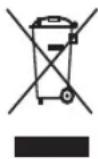
This appliance is labelled in accordance with European Directive 2012/19/EU concerning used electrical and electronic appliances (Waste Electrical and Electronic Equipment - WEEE). The symbol on the product or on its packaging indicates that this product may not be treated as household waste. Instead, it should be taken to the appropriate collection point for the recycling of electrical and electronic equipment. By ensuring this product is disposed of correctly, you will help prevent potential negative consequences for the environment and human health, which could otherwise be caused by inappropriate waste handling of this product. The disposal of such material has to be done according to the recycling regulations. For more detailed information about recycling of this product, please contact your local council, your household waste disposal service or the shop where you purchased the appliance.

The product meets all the necessary requirements of the EU directives applicable to the specific product.
Changes in text, design, and technical specifications are subject to change without prior notice and we reserve the right to change them.
DANKSAGUNG

m = 311 ;