L32SWLB16 - Loudspeaker Logik - Free user manual and instructions
Find the device manual for free L32SWLB16 Logik in PDF.


| Product Type | Active Speaker |
| Brand | Logik |
| Model | L32SWLB16 |
| Dimensions (W x H x D) | 200 mm x 150 mm x 120 mm |
| Weight | 2.5 kg |
| Power Supply | AC 100-240V, 50/60Hz |
| Power Output | 32W RMS |
| Speaker Configuration | 2.0 Stereo |
| Frequency Response | 60 Hz - 20 kHz |
| Connectivity | Bluetooth 5.0, AUX 3.5mm, USB, FM Radio |
| Bluetooth Range | Up to 10 meters |
| Controls | Volume, Source, Play/Pause, Next/Previous |
| Presets | FM Radio presets (up to 20) |
| Supported Audio Formats | MP3, WMA, WAV |
| Housing Material | MDF with wood veneer finish |
| Cleaning Instructions | Wipe with a soft, dry cloth. Do not use solvents. |
| Safety Precautions | Keep away from water and heat sources. Do not disassemble. |
| Spare Parts & Repairability | No user-serviceable parts. Contact authorized service center. |
| What's in the Box | Speaker, remote control, power cord, AUX cable, user manual |
Frequently Asked Questions - L32SWLB16 Logik
User questions about L32SWLB16 Logik
0 question about this device. Answer the ones you know or ask your own.
Ask a new question about this device
Download the instructions for your Loudspeaker in PDF format for free! Find your manual L32SWLB16 - Logik and take your electronic device back in hand. On this page are published all the documents necessary for the use of your device. L32SWLB16 by Logik.
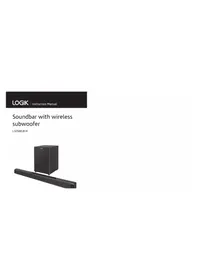
USER MANUAL L32SWLB16 Logik
2.1 CH Wireless Soundbar
L32SWLB16

Safety Warnings....4
Unpacking......6
Product Overview....7
Main Unit 7
Subwoofer 8
Remote Control....9
Remove the Plastic Strip from the Remote Control 9
Battery Replacement for the Remote Control....10
Remote Control Operation Range....11
Wall Mounting 11
Connections 13
Connecting to the TV 13
Using the AUX Connection....14
Connecting an audio device 14
Connecting to the Mains Supply....15
Pairing the Wireless Subwoofer with the Main Unit....16
General Operation....17
Selecting Modes....17
Adjusting the Volume....17
Selecting the Equaliser 17
AUX / OPTICAL / COAXIAL Operation....18
Bluetooth® Operation 18
Disconnect Bluetooth® function 19
Listen to Music from Bluetooth® Device....19
Maintenance 19
Hints and Tips 19
Specifications....21
- Read all the instructions carefully before using the unit and keep them for future reference.
- Retain the manual. If you pass the unit onto a third party make sure to include this manual.
- Check that the voltage marked on the rating label matches your mains voltage.
Damage
- Please inspect the unit for damage after unpacking.
- Do not continue to operate the unit if you are in any doubt about it working normally, or if it is damaged in any way - switch off, withdraw the mains plug and consult your dealer.
Location of Unit
- The unit must be placed on a flat stable surface and should not be subjected to vibrations.
- Do not place the unit on sloped or unstable surfaces as the unit may fall off or tip over.
- The mains socket must be located near the unit and should be easily accessible. • This unit is designed for indoor use only.
Temperature
- Avoid extreme degrees of temperature, either hot or cold. Place the unit well away from heat sources such as radiators or gas/electric fires.
- Avoid exposure to direct sunlight and other sources of heat.
Naked Flames
- Never place any type of candle or naked flame on the top of or near the unit.
Moisture
- To reduce the risk of fire, electric shock or product damage, do not expose this unit to rain, moisture, dripping or splashing. No objects filled with liquids, such as vases, should be placed on the unit. Do not operate the unit with wet hands, near water or other liquid.
- If you spill any liquid into the unit, it can cause serious damage. Switch it off at the mains immediately. Withdraw the mains plug and consult your dealer.
Ventilation
- To prevent the risk of electric shock or fire hazard due to overheating, ensure that curtains and other materials do not obstruct the ventilation vents.
- A minimum distance of 5cm around the unit should be maintained to allow for sufficient ventilation.
- Do not install or place this unit in a bookcase, built-in cabinet or in another confined space. Ensure the unit is well ventilated.
Safety
- Always disconnect the unit from the mains supply before connecting/ disconnecting other devices or moving the unit.
- Unplug the unit from the mains socket during a lightning storm.
Mains Cable
- Make sure the unit or unit stand is not resting on top of the mains cable, as the weight of the unit may damage the mains cable and create a safety hazard.
- If the mains cable is damaged it must be replaced by the manufacturer, its service agent, or similarly qualified persons in order to avoid a hazard.
Interference
- Do not place the unit on or near appliances which may cause electromagnetic interference. If you do, it may adversely affect the working of the unit, and cause a distorted sound.
Batteries
- Batteries used in the unit are easily swallowed by young children and this is dangerous.
- Keep loose batteries away from young children and make sure that the battery holder tray is secure in the unit. Seek medical advice if you believe a cell has been swallowed.
- Please dispose of batteries correctly by following the guidance in this manual.
- Do not expose the battery to direct sunlight or sources of excessive heat. • Do not ingest the battery, Chemical Burn
Hazard.
- The remote control supplied with this product contains a coin/button cell battery. If the coin/button cell battery is swallowed, it can cause severe internal burns in just 2 hours and can lead to death.
- Keep new and used battery away from children.
- If the battery compartment does not close securely, stop using the product and keep it away from children.
- If you think batteries might have been swallowed or placed inside any part of the body, seek immediate medical attention.
Supervision
• Children should be supervised to ensure that they do not play with the unit. - Never let anyone especially children push anything into the holes, slots or any other openings in the case - this could result in a fatal electric shock.


The lightning flash with arrowhead symbol, within an equilateral triangle, is intended to alert the user to the presence of uninsulated “dangerous voltage” within the unit’s enclosure that may be of sufficient magnitude to constitute a risk of electric shock.

The exclamation point within an equilateral triangle is intended to alert the user to the presence of important operating and maintenance (servicing) instructions in the manual accompanying the unit.
Service
• To reduce the risk of electric shock, do not remove screws. The unit does not contain any user-serviceable parts. Please leave all maintenance work to qualified personnel. - Do not open any fixed covers as this may expose dangerous voltages.
Maintenance
- Ensure to unplug the unit from the power supply before cleaning.
- Do not use any type of abrasive pad or abrasive cleaning solutions as these may damage the unit's surface. • Do not use liquids to clean the unit.
- This equipment is a Class II or double insulated electrical appliance. It has been designed in such a way that it does not require a safety connection to electrical earth.
Thank you for purchasing your new Logik Soundbar.
We recommend that you spend some time reading this instruction manual in order that you fully understand all the operational features it offers. You will also find some hints and tips to help you resolve any issues.
Read all the safety instructions carefully before use and keep this instruction manual for future reference.
Unpacking
Remove all items from the packaging. Retain the packaging. If you dispose of it please do so according to local regulations.
The following items are included:
Main Unit
Subwoofer
Remote Control
Mains Cable x 2
Coaxial Cable 3.5mm to 3.5mm
Audio Cable
Wall Bracket x 2
Instruction Manual
Quick Start Guide

If items are missing, or damaged please contact Partmaster (UK only).
Tel: 0344 800 3456 for assistance.
Main Unit
Front View
1. Button
Switch the unit between On and Standby mode
2. SOURCE Button
Select between AUX 1 / AUX 2 / Optical / Coaxial / Bluetooth® mode
3. EQ Button
Select a preset sound effect
4. VOL + / - Button
Increase / Decrease Button
5. STANDBY Indicator
Lights up red in Standby mode.
6. AUX 1 / AUX 2 Indicator
Lights up green in AUX 1 mode. Flashes in AUX 2 mode.
7. Optical / Coaxial Indicator
Lights up orange in Optical mode. Flashes in Coaxial mode.
8. Remote Control Sensor
9. Bluetooth® Indicator
Lights up blue in Bluetooth® mode.
Rear View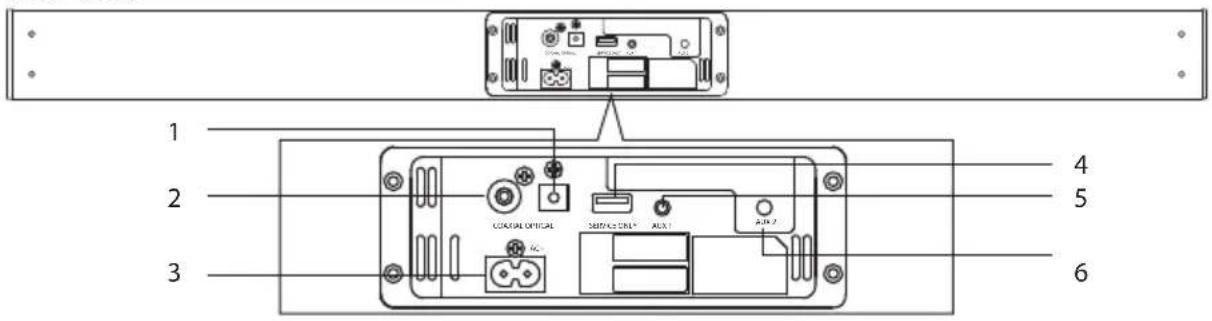
1. OPTICAL Socket
2. COAXIAL Socket
3. AC~ Power Socket
4. SERVICE ONLY Socket
The USB socket is for service only. It is not designed to charge smartphones, tablets or similar devices.
5. AUX 1 Socket
6. AUX 2 Socket
Subwoofer
Front View
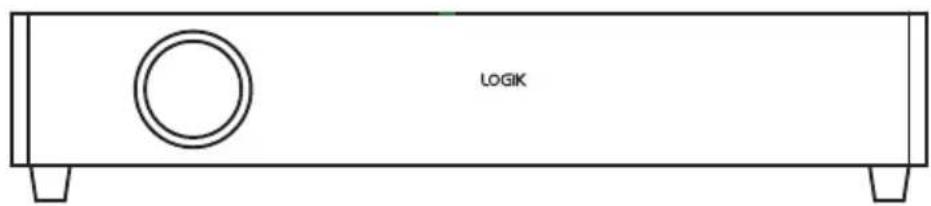
Rear View

- Pair Indicator
- AC~Socket
- Pair Button

1. Button
Switch the unit between On and Standby mode.
2. COAXIAL Button
Press to select COAXIAL mode.
3. OPTICAL Button
Press to select OPTICAL mode.
4. AUX 1 Button
Press to select AUX 1 mode.
5. Buttons
Skip to previous track/Skip to next track in Bluetooth® mode.
6. Button
- Play/pause/resume playback in Bluetooth® mode.
7. DFLT Button
Press to switch off EQ effect.
8. MOVIE Button
Press to switch to MOVIE EQ effect.
9. MUTE Button
Silence the unit or restore the sound.
10. BT PAIR Button
- Press to activate Bluetooth® mode.
- Press and hold to disconnect the existing paired Bluetooth® device in Bluetooth® mode.
11. AUX 2 Button
Press to select AUX 2 mode.
12. VOL +/- Buttons
Increase/Decrease the volume.
13. MUSIC Button
Press to switch to MUSIC EQ effect.
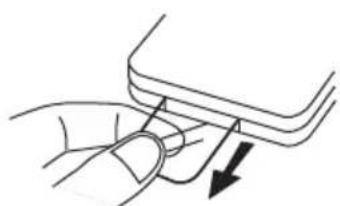
Remove the Plastic Strip from the Remote Control
Remove the plastic strip from the battery if the battery is being used for the first time. It is located at the bottom rear of the remote control.
Battery Replacement for the Remote Control
The remote control requires a CR2025, 3V Lithium battery.
- Slide and hold the battery release tab in the direction of the arrow.
- Pull out the battery holder and remove the old battery.
- Replace with a new battery.
- Insert the battery holder back into the remote control.
![graph TD A["Rectangular case with battery icon"] --> B["Internal component with battery symbol"] B --> C["Cell component with arrow indicating direction"] C --> D["Cell component with arrow indicating direction"] D --> E["Cell component with arrow indicating direction"]](/content/2026/05/968462/images/bdd9f7bdc275915588743036f20d269fab958434f233a36f89797510955e52ae.jpg)

Handling the Battery
- Improper or incorrect use of batteries may cause corrosion or battery leakage, which could cause fire, personal injury or damage to property. • Install the battery correctly in the battery compartment.
- When the battery is exhausted, the remote control will not function. • Only use the battery type indicated in this manual.
- Do not dispose of the used battery as domestic waste. Dispose of it in accordance with local regulations.
- Small button cell batteries such as the one used in the remote control are easily swallowed by young children and this is dangerous. Keep loose button cells away from young children and make sure that the battery is secure in the remote control. Seek medical advice if you believe a battery cell has been swallowed.
Handling the Remote Control
• Take care of your fingernails when you slide and pull the battery release tab. • Do not drop the remote control. • Do not allow anything to impact the remote control. • Do not spill water or liquid on the remote control. • Do not place the remote control on a wet object. - Remove the battery from the remote control when not in use for a long period of time, as corrosion or battery leakage may occur and result in physical injury, and/or property damage, and/or fire.
Remote Control Operation Range
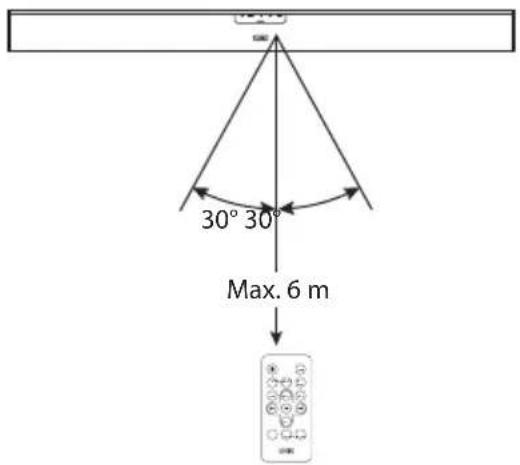
- The remote control sensor at the front unit is sensitive to the remote control's commands up to a maximum of 6 metres away and within a maximum of a 60° arc.
- Please note that the operating distance may vary depending on the brightness of the room.
Wall Mounting
- Remove the screws from the main unit.

- Attach the wall brackets to the main unit with the screws removed from the main unit.

- Drill 2 parallel holes (∅ 3-8 mm each according to wall type) in the wall. The distance between the holes should be 764 mm.

- Firmly fix 1 dowel into each hole in the wall if necessary.

- Leave a 5 mm gap between the wall and the screw's head. Lift the unit with the attached wall brackets over the heads of the screws and slot into place.

Connecting to the TV
Method 1: Optical / Coaxial Connection
Use an optical cable (not included) / coaxial cable (included) to connect the soundbar's OPTICAL / COAXIAL socket to the OPTICAL OUT / COAXIAL OUT socket of the external device. The simplest option is to connect your soundbar directly to your TV. If you connect the soundbar to another external device (e.g. Blu-Ray player), you will hear the sound from that device through the soundbar.
Press SOURCE Button repeatedly on the unit or press OPTICAL or COAXIAL Button on the remote control to select Optical or Coaxial mode.
Rear view of the unit![graph TD A["TV"] --> B["Coaxial cable (included)"] A --> C["Optical cable (not included)"] B --> D["Set-top Box"] D --> E["Blu-ray Player / DVD Player / Recorder"] D --> F["Satellite Receiver"] D --> G["Game Console"] D --> H["Video Camera"]](/content/2026/05/968462/images/3459d0e1e5f0af447fbca7aaa3cce91589a1c66d3e366c626287871b3c9432be.jpg)

If there is no sound output and the Optical indicator lights up / Coaxial indicator flashes, ensure the audio setting of the input source (e.g. TV, game console, DVD player, etc.) is set to PCM mode.
Using the AUX Connection
Use the RCA to 3.5 mm Stereo Audio Cable (not included) to connect the audio output sockets of a TV or an audio device to the unit's AUX 1/AUX 2 socket. Please ensure that the output volume is turned up in order for the soundbar to operate.
Press SOURCE Button repeatedly on the unit or press AUX 1 or AUX 2 Button on the remote control to select AUX 1 or AUX 2 mode.

Connecting an audio device
Use the 3.5mm to 3.5mm audio cable (included) to connect the audio device's headphone socket to the unit's AUX 1 / AUX 2 socket.
Press the SOURCE button repeatedly on the unit, or press the AUX 1 or AUX 2 button on the remote control to select AUX 1 or AUX 2 mode.

Connecting to the Mains Supply
- Ensure that the power supply voltage corresponds to the voltage printed on the back or underside of the unit.
- The soundbar and the subwoofer are designed to operate with the supplied mains cable.
- Connecting the main unit to any other power source may cause damage to the unit. Unwind the mains cable to its full length.
- Connect the end of the mains cable to the AC~socket at the rear of the unit, and then connect the mains plug to the mains socket.
- Connect the end of the mains cable to the AC~socket of the subwoofer, and then connect the mains plug to the mains socket. Make sure the cables are firmly inserted into the mains socket. The soundbar and the subwoofer are now connected and ready to use. To switch off the soundbar and the subwoofer completely, remove the mains plugs from the mains sockets.

Ensure all audio connections of the unit are connected before connecting to the mains power socket.


Pairing the Wireless Subwoofer with the Main Unit
Automatic pairing
The subwoofer and soundbar will automatically pair when both units are plugged into the mains sockets and turned on. No cable is needed for connecting the two units.
- When the subwoofer is pairing with the main unit, the PAIR indicator will flash.
- When the subwoofer is paired with the main unit, the PAIR indicator will light up.

Do not press the PAIR button on the rear of the subwoofer, except for manual pairing.
If the automatic pairing fails, pair the subwoofer with the main unit manually.
Manual pairing
- Ensure that all the cables are well connected and the main unit is in Standby mode.
- Press and hold the PAIR Button on the rear of the subwoofer for a few seconds. The subwoofer will enter the pairing mode and the PAIR Indicator will blink quickly.
- Press the Button on the main unit or the Button on the remote control to switch the main unit on.
- After the wireless connection succeeded, the PAIR Indicator will light up.
- If the PAIR Indicator blinks, the wireless connection has failed. Unplug the cable of the subwoofer and then reconnect the main cable. Repeat step 1 ~ 4.

If the wireless connection fails again, check if there is conflict or strong interference (for example, interference from an electronic device) around your location. Remove these conflicts or strong interferences and repeat the above procedures.
The subwoofer should be within 6m of the soundbar.
If a TV or an external device is connected, the main unit and the subwoofer will switch on automatically when the TV or the external device is switched on.
If the TV or the external unit is disconnected or switched off, the main unit and the subwoofer will switch off automatically after 15 minutes.
If the volume on the TV or an external device is too low, the main unit and the subwoofer will switch off after 15 minutes.
If the main unit is not connected with the subwoofer and it is in On mode, the POWER Indicator will flash. Follow step 1 ~ 4 above to pair the subwoofer to the main unit.
When you first connect the main unit to the mains socket, the main unit will be in Standby mode. The STANDBY Indicator will light up red.
- Press the ⏻ Button on the main unit or remote control to switch the main unit on. The status indicator of the last used mode will light up.
- Press the ⏻ Button on the main unit or remote control to switch the main unit back to Standby mode. The STANDBY Indicator will light up red.
- Disconnect the mains plug from the mains socket if you want to switch the unit off completely.

The eco-friendly technology will switch this device to Standby mode automatically when the input volume is too low or muted for 15 minutes. The device can be reactivated by pressing the ⬤ Button and turning up the input device volume. Except for Optical mode, the eco-friendly control will switch the device to standby mode automatically when there is no input signal for 15 minutes.
Selecting Modes
Press the SOURCE Button on the main unit repeatedly to switch between AUX 1, AUX 2, Bluetooth, OPTICAL or COAXIAL mode, or press AUX 1, AUX 2, BT PAIR, OPTICAL or COAXIAL Button on the remote control to select your desired mode.
- When AUX 1 mode is selected, the green indicator will light up.
- When AUX 2 mode is selected, the green indicator will flash.
- When Bluetooth® mode is selected, the Bluetooth® indicator will light up.
- When Optical mode is selected, the orange indicator will light up.
- When Coaxial mode is selected, the orange indicator will flash.
Adjusting the Volume
- Press the VOL +/- Button on the main unit or remote control to adjust the volume.
- If you wish to turn the sound off, press the MUTE Button on the remote control. Press the MUTE Button again or press the VOL + / - Button to resume normal listening. • While adjusting the volume, the status indicator flashes quickly.
- While the volume level reaches its maximum level, if you press the VOL + Button again, the status indicator flashes once. While the volume level reaches its minimum level, if you press the VOL – Button again, the status indicator flashes once.

If the unit is connected with an external device, you may also adjust the volume of the input source for volume control.
Selecting the Equaliser
While playing, press the DFLT / MOVIE / MUSIC Button on the remote control to select between preset equalisers: DFLT setting (EQ mode off), MOVIE (recommended for viewing movies) and MUSIC (recommended for listening to music).

- While the unit is in Coaxial or Optical mode, it will automatically switch into MOVIE EQ effect.
- While the unit is in AUX 1, AUX 2 or Bluetooth® mode, it will automatically switch into MUSIC EQ effect.
Ensure that the unit is connected to the TV or audio device.
- Press the SOURCE Button repeatedly on the unit or AUX 1, AUX 2, COAXIAL or OPTICAL Button on the remote control to select the desired mode.
- Operate your audio device directly for playback features.
- Press the VOL + / - Button to adjust the volume to your desired level.
Bluetooth® Operation
You can listen to tracks from a media device if it is connected to the unit via Bluetooth.

- The operational range between the main unit and a Bluetooth® device is approximately 8 meters.
- Before you connect a Bluetooth® device to this unit, familiarize yourself with the Bluetooth® capabilities of the device.
- Compatibility with all Bluetooth® devices is not guaranteed.
- Any obstacle between this unit and a Bluetooth® device can reduce the operational range.
- Keep this unit away from other electronic devices that may cause interference.
To connect your device to the unit via Bluetooth, follow the steps below:
- Switch the unit on. Press the SOURCE Button repeatedly on the main unit or press BT PAIR on the remote control to select Bluetooth® mode, the Bluetooth® indicator will flash blue.
- Activate your Bluetooth® device and select the search mode.
- "L32SWLB16" will appear on your Bluetooth® device.
- Select "L32SWLB16" and enter "0000" for password if necessary.
- On successful pairing, the unit will prompt "PAIRED" and the Bluetooth® indicator will light up steadily.

- If there is an existing connection, press and hold BT PAIR Button on the remote control to re-activate the pairing mode, the existing connection will be interrupted.
- If no other Bluetooth® device pairs with this player within two minutes, the player will recover its previous connection.
- The player will also be disconnected when your device is moved beyond the operational range.
- If you want to reconnect your device to this player, place it within the operational range.
- If the device is moved beyond the operational range, when it is brought back, please check if the device is still connected to the player.
- If the connection is lost, follow the instructions above to pair your device to the player again.
Disconnect Bluetooth® function
- Switch to another function of the unit.
- Disable the function of your Bluetooth® device. The Bluetooth® device will be disconnected from the unit and the unit will prompt "Disconnected".
- Press and hold the BT PAIR Button to disconnect the Bluetooth® connection.
Listen to Music from Bluetooth® Device
If the connected Bluetooth® device supports Advanced Audio Distribution Profile (A2DP), you can listen to the music stored on the device through the player.
If the device also supports Audio Video Remote Control Profile (AVRCP), you can use the player's remote control to play music stored on the device.
- Pair your device with the player.
- Play music via your device (if it supports A2DP).
- Use the supplied remote control to control playback (if it supports AVRCP). • To pause/resume playback, press the ▶ button. • To skip to a track, press the button.
Maintenance

Ensure the unit is fully unplugged from the mains socket before cleaning.
• To clean the unit, wipe the case with a slightly moist, lint-free cloth. - Do not use any cleaning fluids containing alcohol, ammonia, or abrasives. • Do not spray aerosol at or near the unit.
Hints and Tips
If a problem occurs, it may often be due to something very minor. The following table contains various tips.
| Problem Solution | |
| No power. • Ensure | the mains cable is connected securely.Make sure that the unit is switched on. |
| Loud hum or noise is heard. | The plugs and sockets are dirty. Wipe them with a cloth slightly moistened with an appropriate non-abrasive cleaning solution. |
| The remote control does not work. | Use the remote control near the unit.Point the remote control at the remote control sensor on the main unit.Replace the battery in the remote control with a new one.Remove any obstacles between the remote control and the unit. |
| The unit does not respond when pressing any buttons. | The unit may freeze up during use. Switch the unit off and then on again at the mains socket to reset the unit. |
| No sound output from the main unit | Make sure that the unit is not muted. Press the MUTE Button or the VOL + Button to resume normal listening.Ensure the audio setting of the input source (e.g. TV, game console, DVD player, etc.) is set to PCM mode while using optical connection. |
| No connection between the main unit and the subwoofer | Ensure the mains cables of the main unit and the subwoofer are both connected securely to the mains power socket.Pair the main unit with the subwoofer manually. Please refer to Pairing the Wireless Subwoofer with the Main Unit above. |
| The sound output effect sounds unfamiliar | Press the EQ Button on the remote control to select preset EQ mode for the optimal sound output effect.Make sure that the subwoofer is connected with the main unit. |

If any functional abnormality is encountered, unplug the unit from the mains socket and reconnect it again.
| Model L32SWLB16 | ||
| Main Unit | ||
| Power Supply AC 220 - 240V ~50/60 Hz | ||
| Main Unit Power Consumption 30 W | ||
| USB 5 V 500 mA (For service use | ---only) | |
| Ecodesign Information | ||
| Information on Power Consumption | Power Consumption of Standby Mode | 0.5 W (max.) |
| Network Standby Power Consumption | 2 W (max.) | |
| Time interval for power management function switches the unit automatically into standby | Switch to standby mode within 15 minutes after intended use | |
| Power consumption in network standby if all wireless network ports are activated | 4.1 W | |
| How to activate wireless network port:Connect the unit with power. Press ⏻ Standby button to switch on the unit.Switch to wireless mode (e.g. Bluetooth, wifi, etc)How to deactivate wireless network port:Press ⏻ Standby button to switch off the unit. | ||
| Speaker Output Power 30 W rms × 2 | ||
| Net Weight 1.3 kg | ||
| Dimension (W × H × D) 800 mm × 60 mm × 60 mm | ||
| Subwoofer | ||
| Power Supply AC 220-240V~50/60Hz | ||
| Power Consumption 30 W | ||
| Ecodesign Information | ||
| Information on Power Consumption | Power Consumption of Standby Mode | <0.5 W |
| Network Standby Power Consumption | 2 W (max.) | |
| Time interval for power management function switches the unit automatically into standby | Switch to standby mode within 15 minutes after intended use | |
| Power consumption in network standby if all wireless network ports are activated | 1.0 W | |
| How to activate wireless network port:Connect the unit with power. Press ⏻ Standby button to switch on the unit.Switch to wireless mode (e.g. Bluetooth, wifi, etc)How to deactivate wireless network port:Press ⏻ Standby button to switch off the unit. | ||
| Speaker Output Power | 60 W rms | |
| Net Weight 3.2 kg | ||
| Dimension (W × H × D) 465 mm × 94 mm × 255 mm | ||
Features and specifications are subject to change without prior notice.

For general information about this appliance and handy hints and tips, please visit
www.knowhow.com/knowledgebank or call 0344 5611234.

Visit Partmaster.co.uk today for the easiest way to buy electrical spares and accessories. With over 1 million spares and accessories available, we can deliver direct to your door the very next day. Visit
www.partmaster.co.uk or call 0344 800 3456 (UK customers only). Calls charged at National Rate.
Notes for battery disposal
The batteries used with this product contain chemicals that are harmful to the environment. To preserve our environment, dispose of used batteries according to your local laws or regulations. Do not dispose of batteries with normal household waste.
For more information, please contact the local authority or your retailer where you purchased the product.
The Bluetooth® word mark and logos are registered trademarks owned by Bluetooth SIG, Inc. and any use of such marks by DSG Retail Limited is under license. Other trademarks and trade names are those of their respective owners and all rights are acknowledged.

The symbol on the product or its packaging indicates that this product must not be disposed of with your other household waste. Instead, it is your responsibility to dispose of your waste equipment by handing it over to a designated collection point for the recycling of waste electrical and electronic equipment. The separate collection and recycling of your waste equipment at the time of disposal will help conserve natural resources and ensure that it is recycled in a manner that protects human health and the environment.
For more information about where you can drop off your waste for recycling, please contact your local authority, or where you purchased your product.
In the unlikely event of a problem developing, please contact the store where you purchased your equipment.
We continually strive to improve our products; specifications may change without prior notice. For advice on where to purchase accessories, please contact the store where you purchased your equipment.
All trademarks are the property of their respective owners and all rights are acknowledged.
DSG Retail Ltd. (co. no. 504877)
1 Portal Way, London, W3 6RS, UK
- CH WIRELESS SOUNDBAR
- DAMAGE
- LOCATION OF UNIT
- TEMPERATURE
- NAKED FLAMES
- MOISTURE
- VENTILATION
- SAFETY
- MAINS CABLE
- INTERFERENCE
- BATTERIES
- SUPERVISION
- SERVICE
- MAINTENANCE
- THANK YOU FOR PURCHASING YOUR NEW LOGIK SOUNDBAR
- UNPACKING
- MAIN UNIT
- BUTTON
- SOURCE BUTTON
- EQ BUTTON
- VOL + / - BUTTON
- STANDBY INDICATOR
- AUX 1 / AUX 2 INDICATOR
- OPTICAL / COAXIAL INDICATOR
- REMOTE CONTROL SENSOR
- BLUETOOTH® INDICATOR
- OPTICAL SOCKET
- COAXIAL SOCKET
- AC~ POWER SOCKET
- SERVICE ONLY SOCKET
- AUX 1 SOCKET
- AUX 2 SOCKET
- SUBWOOFER
- COAXIAL BUTTON
- OPTICAL BUTTON
- AUX 1 BUTTON
- BUTTONS
- DFLT BUTTON
- MOVIE BUTTON
- MUTE BUTTON
- BT PAIR BUTTON
- AUX 2 BUTTON
- VOL +/- BUTTONS
- MUSIC BUTTON
- REMOVE THE PLASTIC STRIP FROM THE REMOTE CONTROL
- BATTERY REPLACEMENT FOR THE REMOTE CONTROL
- HANDLING THE BATTERY
- HANDLING THE REMOTE CONTROL
- REMOTE CONTROL OPERATION RANGE
- WALL MOUNTING
- CONNECTING TO THE TV
- METHOD 1: OPTICAL / COAXIAL CONNECTION
- USING THE AUX CONNECTION
- CONNECTING AN AUDIO DEVICE
- CONNECTING TO THE MAINS SUPPLY
- PAIRING THE WIRELESS SUBWOOFER WITH THE MAIN UNIT
- AUTOMATIC PAIRING
- MANUAL PAIRING
- SELECTING MODES
- ADJUSTING THE VOLUME
- SELECTING THE EQUALISER
- BLUETOOTH® OPERATION
- DISCONNECT BLUETOOTH® FUNCTION
- LISTEN TO MUSIC FROM BLUETOOTH® DEVICE
- HINTS AND TIPS
- NOTES FOR BATTERY DISPOSAL
Brand : Logik
Model : L32SWLB16
Category : Loudspeaker