Logik

LSP2011 - Pregnant Logik - Free user manual and instructions

Find the device manual for free LSP2011 Logik in PDF.
📄 2 pages English EN Download 💬 AI Question 10 questions ⚙️ Specs
Notice Logik LSP2011 - page 1
Pick your language and provide your email: we'll send you a specifically translated version.
Product Type 2.0 PC Speaker System
Brand Logik
Model LSP2011
Color Black
Power Source AC/DC Mains Adapter (included, model PN:S20047AD)
Audio Input 3.5mm Auxiliary Input
Output Power 2 x 3W RMS
Impedance 4 ohms per channel
Frequency Response 80Hz - 20kHz
Driver Unit 2.5 inch full-range speakers
Dimensions (Each Speaker) Approx. 10 x 10 x 10 cm (spherical)
Weight (Total) Approx. 0.5 kg
Cable Length (Power) 1.5 meters
Controls Volume knob on satellite speaker
Compatibility PC, laptop, smartphone, tablet, MP3 player with 3.5mm output
Included Items Main unit (2 speakers + control pod), Mains adapter, Quick Start Guide
Spare Parts Availability Mains adapter available from Partmaster (UK only)
Safety Instructions Do not use in wet areas; unplug when not in use; avoid exposure to extreme temperatures
Cleaning Instructions Wipe with a soft, dry cloth; do not use liquid cleaners
Storage Store in a cool, dry place away from direct sunlight
Repairability No user-serviceable parts; refer to qualified service personnel

Frequently Asked Questions - LSP2011 Logik

How do I set up the Logik LSP2011 speakers?
Connect the mains adapter to the main speaker unit and plug into a power outlet. Connect the audio cable (3.5mm) from your device to the input on the speaker. Turn on the speakers using the volume knob (if present). Adjust volume to desired level.
Can I adjust the volume?
Yes, the Logik LSP2011 features a volume control knob on one of the satellite speakers. Rotate it to increase or decrease the volume.
What should I do if there is no sound?
Check that the speakers are properly connected to power and to your audio device. Ensure the volume is turned up on both the speakers and your device. Try a different audio source or cable. If the issue persists, contact support.
Can I use these speakers with a TV?
Yes, if your TV has a 3.5mm headphone output or a headphone jack, you can connect the Logik LSP2011 speakers. For TVs without a 3.5mm output, you may need an adapter (e.g., RCA to 3.5mm).
How should I clean the speakers?
Unplug the speakers before cleaning. Use a soft, dry cloth to gently wipe the surfaces. Avoid using water or chemical cleaners as they may damage the finish.
Is the Logik LSP2011 compatible with all devices?
It is compatible with any device that has a standard 3.5mm audio output, including PCs, laptops, smartphones, tablets, and MP3 players. Some devices may require an additional adapter.
What if I lose the power adapter?
The specific power adapter model is PN:S20047AD. You can contact Partmaster (UK only) at 0844 800 3456 to order a replacement. Do not use an unapproved adapter.
How do I avoid audio interference?
Keep the speakers away from other electronic devices like mobile phones or Wi-Fi routers. Ensure the audio cable is not coiled and is placed away from power cables. If interference persists, try a different power outlet.
Can I wall-mount the speakers?
The Logik LSP2011 speakers are not designed for wall mounting. They are intended to be placed on a desk or table. Do not attempt to hang them as they may fall and cause injury or damage.
How do I turn off the speakers?
Rotate the volume knob to the minimum position (usually a click sound indicates off) or unplug the mains adapter from the power outlet. It is recommended to unplug when not in use for extended periods.

User questions about LSP2011 Logik

0 question about this device. Answer the ones you know or ask your own.

Ask a new question about this device

The email remains private: it is only used to notify you if someone responds to your question.

No questions yet. Be the first to ask one.

Download the instructions for your Pregnant in PDF format for free! Find your manual LSP2011 - Logik and take your electronic device back in hand. On this page are published all the documents necessary for the use of your device. LSP2011 by Logik.

USER MANUAL LSP2011 Logik

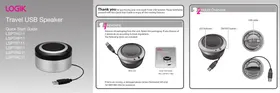
natural_image Two black spherical objects with metallic bands, no visible text or symbols

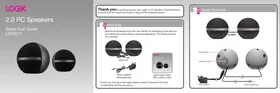
Thank you for purchasing your new Logik 2.0 PC Speakers. Please familiarise yourself with this Quick Start Guide to enjoy all the exciting features.

1 Unpacking

Remove all packaging from the unit. Retain the packaging. If you dispose of it, please do so according to the local regulations. The following items are included:

Logik LSP2011 - Unpacking - 1

Main Unit
Logik LSP2011 - Unpacking - 2
Mains adapter (PN:S20047AD)

Logik LSP2011 - Unpacking - 3
Quick Start Guide (PN.: LSP2011-001)

If Items are missing or damaged, please contact Partmaster (UK only). Tel: 0844 800 3456 for assistance.

2 Product Overview

Logik LSP2011 - Product Overview - 1

natural_image Two black spheres connected by a metallic rod, no text or symbols present

LCD Indicator Volume Control Ramps Adapter 3.5mm Stereo Plug

Connection Turn the volume control clockwise to turn the volume up. Main Adapter Connect 3.5mm stereo audio plug to your PC or other compatible device. Adjust the volume level by tuning the volume control. Check that your PC volume level is sufficient. Notebook Desktop

Safety Warnings • Read all instructions before using these speakers and keep them for future reference. • Use only voltage specified on the rating label of the speaker. • Do not place speakers close to heat sources, such as indicators and barriers. • These speakers are intended for household use only and not for commercial or industrial use. • Use those speakers only as described in this Quick Start Guide. Any other use is not recommended by the manufacturer and may cause free, electric shock or injury. • Always operate on a flat horizontal surface. Do not place the speakers on an unstable table, stand, tripod or bracket. • If the mains cable is damaged, it must be replaced by a qualified electrical person in order to avoid a hazard. • Do not use these speakers outdoors, or an exit surface. Avoid spelling liquid on the speakers. Keep the speakers dry and avoid contact with damp or wet areas. • Do not block the openings in the speaker cabinet, prevent push objects into the speaker seats or slots, and provide sufficient space around the speakers for proper ventilation. • Only use attachments/accessories specified by the manufacturer. • For added protection during lighting storms, coupling the speakers from the mains socket and turn of the computers. • Unplug the speakers when it is not in use for a long period of time. • Do not expose these speakers to turn or maintain to reduce the risk of electric shock. • Place the speakers away from strong electric magnetic environments. • These speakers are not intended for use by persons finding children with reduced physical, sensory or mental capabilities, or lack of experience and knowledge, unless they have been given supervision or instruction concerning use of the speakers by a person responsible for their safety. • Children should be supervised to ensure that they do not play with the speakers.

Specification Output Power (Total): 2W + 2W Speaker Driver Unit: 2.25" Full-range x 2 Frequency Response: 150Hz - 20KHz Dimension: 92m x 82mm x 92mm Power Supply: Universal adapter

Specification Output Power (Total): 2W + 2W Speaker Driver Unit: 2.25" Full-range x 2 Frequency Response: 150Hz - 20KHz Dimension: 92m x 82mm x 92mm Power Supply: Universal adapter

Specification Output Power (Total): 2W + 2W Speaker Driver Unit: 2.25" Full-range x 2 Frequency Response: 150Hz - 20KHz Dimension: 92m x 82mm x 92mm Power Supply: Universal adapter

Specification Output Power (Total): 2W + 2W Speaker Driver Unit: 2.25" Full-range x 2 Frequency Response: 150Hz - 20KHz Dimension: 92m x 82mm x 92mm Power Supply: Universal adapter

Specification Output Power (Total): 2W + 2W Speaker Driver Unit: 2.25" Full-range x 2 Frequency Response: 150Hz - 20KHz Dimension: 92m x 82mm x 92mm Power Supply: Universal adapter

Partmaster COUK Visit Partmaster.co.uk today for the easiest way to buy electrical spares and accessories. With over 1 million spares and accessories available we can deliver direct to your door the very next day. Visit www.partmaster.co.uk or call 0844 800 3456 (UK customers only) Calls charged at National Rate. This symbol on the product or in the instructions means that your electrical and electronic equipment should be disposed at the end of its life separately from your household waste. There are separate collection systems for recycling in the EU. For more information, please contact the local authority or your retailer where you purchased the product. DSG Retail Ltd. - Maylands Avenue - Hemel Hempstead Herts - HP2 7TG - England (PN: LSP2011-001)

Table of contents Click a title to access it
Manual assistant
Powered by Anthropic
Waiting for your message
Product information

Brand : Logik

Model : LSP2011

Category : Pregnant