
MP-F63 - Digital audio player MPMAN - Free user manual and instructions
Find the device manual for free MP-F63 MPMAN in PDF.


User questions about MP-F63 MPMAN
0 question about this device. Answer the ones you know or ask your own.
Ask a new question about this device
Download the instructions for your Digital audio player in PDF format for free! Find your manual MP-F63 - MPMAN and take your electronic device back in hand. On this page are published all the documents necessary for the use of your device. MP-F63 by MPMAN.
USER MANUAL MP-F63 MPMAN
IF YOU WANT MORE THEN 99 SONGS,
STORE THEM IN A NEW DIRECTORY
The player characteristics
Supports MP3 and WMA music format.
Supports stereo FM radio
Supports USB function
Supports two lines of lyrics display synchronization
Big display (128*32) LCD display
Supports Firmware upgrade function
Voice equalizer
GUI (graphical user interfaces).
The box:
(1) MP3 player 1Pcs
(2) Stereo earphone 1Pcs
(3) CD ROM 1Pcs
(4) Manual 1Pcs
(5) USB cable 1Pcs
PC needs
(1) Pentium 100 MHz or faster
(2) Windows 98/2000/ ME/XP
(3) USB port
(4) CD-ROM driver
(5) 15MB of free space on harddisk
(6) 32 MB RAM
1.2 The player appearance interface
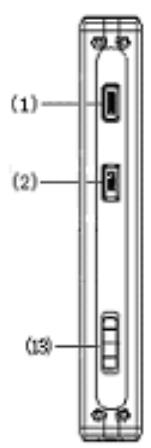
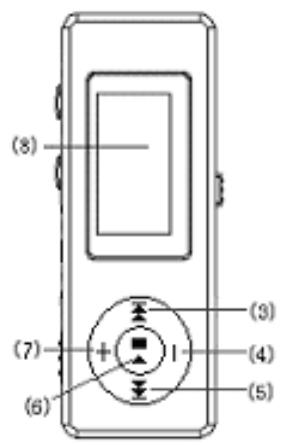
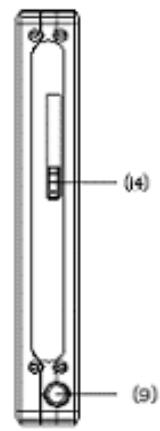
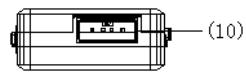

1.3 Figure & Keys

This player adopts big LCD of 128*32 lattice
1.5 Battery
The screen shows a battery indicator with nine levels.
The battery is full when the battery voltage is 1.5V .
The battery indicator will be empty when the battery is used up. At that time, the player should be charged with an external charger(optional) or with the USB connection on your PC
2 Operating instructions
2.1 Turning on/off the MP3 player
Slide switch (13) to the right. The LCD display will light up.
Slide switch (13) to the left. The MP3 player will shut off.
2.2 Main menu
Press the "Menu" button for several seconds, from any point in the menu, and the player returns automatically back to the main menu.
Six options:
| Music | |
| Record | |
| Voice | |
| FM | |
| System | |
| Exit |
You can switch between options by press the “F.FWD” or “F.REV” button
“→” or “←”。Then press shortly on the “Menu” button to enter the submenu or confirm a function.
2.3 "Music" mode
Select "Music" mode in the main menu.
2.3.1 Stop submenu
Press "Menu" button once to enter the stop submenu.
Four options:
- Local Folder
-Delete file
-Delete all
-Exit
2.3.1.1 Local folder


Local folder
Files can be stored in different folders.
Create new folders in Windows explorer when MP3 is connected.
Open "external drive".
Create new folder
- Press "Menu" button to open Local folder
- Press "F.FWD" or "F.REV" button to select the catalog
- Press "Menu" button to confirm
2.3.1.2 Delete file
2.3.1.3 Delete all
Deletes all files of the current catalog
2.3.2 Play submenu
During playback, press "Menu "button to enter "Play submenu":
Six options:
-Repeat
- Equalizer
- Tempo Rate
- Replay
- Replay times
-Replay gap
-Exit
2.3.2.1 Repeat
| Normal | All songs are played once |
| Repeat One | Repeats the current song |
| Folder | Plays all the music of a specific folder |
| Repeat Folder | Repeats the music of a specific folder |
| Repeat All | Repeats all the music. |
| Random | Plays music at random. |
| Intro | First 10 seconds of each song is played. |
2.3.2.2 Equalizer
Seven options:
- Natural
- Rock
- Pop
- Classic
- Soft
-Jazz
-DBB
2.3.2.3 Tempo Rate
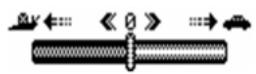
The music can be played faster or slower (only with MP3 files)
Change the rate by Press “F.FWD” or “F.REV” button.
2.3.2.4 Replay mode
A-B replay
When replay mode is selected, the A-B icon is visible. Select the start point A (flashing) by press "F.FWD" button. Select the end point B (flashing) by press "F.FWD" button. The A-B section will be repeated continuously Press "Menu" button to return to normal playback -During replay, the play-rate can be changed with VOL+ or V0 - Adding your voice to the A-B section During playback of the A-B section, by press "F.FWD" button The microphone icon appears and your voice is recorded. Press "Menu" button again to stop the recording. The A-B section + the voice recording will be repeated
2.3.2.5 Replay times
Here you are able to choose how many times (1-10) the A-B section will be repeated.
2.3.2.6 Replay gap
Choose the time (1-10 sec) between each A-B section.
2.3.3Lyrics
This MP3 player supports *. Irc "Lyric files
Lyrics can be downloaded from the Internet.
Make sure that Irc-file has the same name as the corresponding song. For example:
If the song name is "Yesterday.mp3 ", the lyric file should be named "Yesterday.lrc"
MP3 and LRC file must be stored in the same folder! No Lyric
Lyric included
Attention: A lyric cannot be larger then 500 words.
2.4 Record mode
-Select "Record mode" in the main menu. The unit can store 99 recordings in each folder.
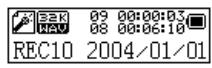
- Press "PLAY" button to start recording.
- Press "PLAY" button again to pause the recording (Time flashes).
- Press "PLAY" again to continue recording.
- Press and hold the "PLAY" button to stop recording.
2.4.1 Record submenu
In the Record mode, press menu button once
3 options:
- Local folder
-REC type
-Exit
2.4.1.1 Local folder
cfr 2.3.1.1
2.4.1.2 REC type
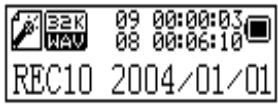
Four options:
- "Fine REC": high quality recording, wav format, good quality.
- "Long REC": lower quality recording, act format, uses less space
- "Fine VOR": wav format
- "Long VOR": act format
When using "VOR recording", the player enters into the state of "pause recording" if no sound is detected by the microphone. Recording starts again when sound is detected.
2.5 Voice mode
In this mode you can listen to the recordings created in "Record mode" Select in the main menu "Voice mode".
2.5.1 Voice stop submenu
When playback is stopped, press "Menu" button to enter the Voice submenu.
2.5.1.1 Local folder (Stop submenu)
cfr 2.3.1.1
2.5.1.2 Delete file (Stopsubmenu)
2.5.1.3 Delete all (Stop submenu)
Deletes all files of the current catalog
2.5.2 Voice play submenu
During playback, press "Menu" button to enter the Voice play submenu.
4 options: - Repeat
- Tempo rate
- Replay
- Exit
Those options are similar to the music play submenu
2.6 FM mode
Choose in main menu "FM mode". Press "Menu" button to enter
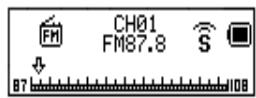
2.6.1 FM mode submenu
In "FM mode " press "Menu" button to enter the FM submenu
7 options:
- Save
-Delete
-Delete All - Normal Band
- Japan Band
- Fine REC
- Long REC
- Exit
2.6.1.1 Search Mode
2.6.1.1.1 Freq mode
In this mode the frequency will change with 0.1Hz each time you press left or right.
2.6.1.1.2 Search station
In this mode the tuner will search for a strong broadcast signal.
The value of this signal can be adjusted. Each time you push left or
right the next available station will be selected.
2.6.1.1.3 Auto search
The tuner selects the available broadcast station en stores them in the memory (max 20).
2.6.1.2 Search level
Adjust the strength of the signal that is used with the "auto search" function.
2.6.1.3 Save
This function will save the current frequency.
2.6.1.4 Delete
This function will remove the current frequency from the memory.
2.6.1.5 Select band
2.6.1.6 REC type
Choice between WAVE(high quality) and ACT(low quality)
2.7 Systems set up
Select "System" in the main menu
- Record Time
-Backlight - Language
- Power off
- Replay mode
- Contrast
- Memory info.
- Firmware version
- Exit
2.7.1 Record Time
Enter here the correct date and time.
Press VOL+ button and the year- number will start flashing.
Change the year number by Press "F.FWD" or "F.REV" button
Press again VOL+ button and the months will start flashing flashing....
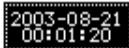
When date and time are correct, press menu button to confirm.
2.7.2 Backlight
Adjust the backlight intensity between 0 and 30,
by pressing “F.FWD” or “F.REV” button
Press “Menu” Button to confirm
2.7.3 Language
Change the language by pressing “F.FWD” or “F.REV” button
Press Menu button to confirm.
2.7.4 Power off
- Off time
With this function the device will automatically shut down after a preset time. (0-60sec), when no button is touched and music is not playing.
If time is set at 0 seconds, the function is cancelled.
- Sleeping mode
With this function the device will always shut down after a preset time (0-120 min).
If time is set at 0, the function is cancelled.
When the device is powered off, sleeping mode is set at 0.
2.7.5 Replay
Manual replay or auto replay
2.7.6 Contrast
Change contrast by pressing "F.FWD" or "F.REV" button
Press "Menu" button to confirm.
2.7.7 Memory info
Gives a percentage of the used memory compared to the total memory size
2.7.8 Firmware version
Info about software version
2.8 USB disk use
The unit functions as a standard USB disk with most operating systems.
- Windows98 (driver needed)
- Above Windows 2000 (no need to install driver)
When connected with PC (battery not needed), the device can be in 3 different modes
- "wait" mode
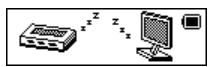
- "download data" mode
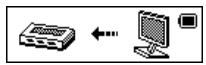
- "send data" mode
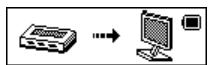
Attention: Removing the device from the PC during data transfer can cause severe damage to the device!
2.9 Specification
(1) FLASH Memory 128MB, 256MB, 512MB, 1GB
(2) music format MP3, WMA, WAV
(3) FM 76MHz- 96MHz / 87MHz- 108MHz
(4) FM sensitivity 6dB (100MHz)
(5) liquid crystal display monitor 128 × 32 lattices
(6) Display Color 7color display
(7) Languages English, French, Italian, German Spanish, Swedish, Dutch, Czech.
(8) Power supply 3.8v Rechargeable Lithium battery
(9) USB2.0 Read 1033K Byte/S Write 955K Byte/S
(10) recording WAV (32K bps), ACT (8K bps)
(11) frequency response 20Hz~20KHz
(12) distortion < 0.1%
(13) baud rate > 4Mbps
(14) weight 35g
(15) size 82mm x 30mm x 12mm (L x W x D)
2.10 Troubleshooting
If for any reason your player is blocked, you can reset the firmware. You just have to switch it off and back on. Reset is automatic at startup.