
MX 0404-KIT - Router WyreStorm - Free user manual and instructions
Find the device manual for free MX 0404-KIT WyreStorm in PDF.


| Product Type | HDMI Matrix Router |
| Model | MX 0404-KIT |
| Brand | WyreStorm |
| Input Ports | 4 x HDMI |
| Output Ports | 4 x HDMI |
| Video Resolution | Up to 4K UHD (3840x2160 @ 60Hz) |
| HDCP Support | HDCP 2.2 compliant |
| Audio Support | PCM, Dolby Digital, DTS-HD, Dolby TrueHD |
| Control Methods | IR, RS-232, Telnet, Web GUI |
| EDID Management | Internal EDID presets and EDID learn function |
| Power Supply | 12V DC, 3A (included) |
| Dimensions (W x D x H) | 440 x 220 x 44 mm (1U rackmount) |
| Weight | 3.2 kg |
| Operating Temperature | 0°C to 50°C |
| Storage Temperature | -20°C to 60°C |
| Chassis Material | Metal, black finish |
| Cooling | Fanless design, silent operation |
| Accessories Included | Power adapter, IR receiver, RS-232 cable, rackmount ears |
| Warranty | 3 years limited warranty |
Frequently Asked Questions - MX 0404-KIT WyreStorm
User questions about MX 0404-KIT WyreStorm
0 question about this device. Answer the ones you know or ask your own.
Ask a new question about this device
Download the instructions for your Router in PDF format for free! Find your manual MX 0404-KIT - WyreStorm and take your electronic device back in hand. On this page are published all the documents necessary for the use of your device. MX 0404-KIT by WyreStorm.
USER MANUAL MX 0404-KIT WyreStorm
WyreStorm recommends reading through this document in its entirety to become familiar with the product's features prior to starting the installation process.


IMPORTANT! Installation Requirements
- Visit the product page to download the latest firmware, document version, additional documentation, and configuration tools.
- Read through the Wiring and Connections section for important guidelines before creating or choosing premade cables.
In The Box
1x MX-0404-HDMI Matrix
1x 12V DC 2A Power Supply (US/UK/EU/AU)
1x 3.5mm 3-pin Terminal Block
1x IR Receiver
1x Remote Control Handset (CR2025 Battery not Included)
2x Rack Mounting Brackets
2x Wall Mounting Brackets

IMPORTANT! The MX-0404-HDMI had the previous model number of EXP-MX-0404-H2. If you would like to access previous documentation for the EXP-MX-0404-H2 click here.
Basic Wiring Diagram
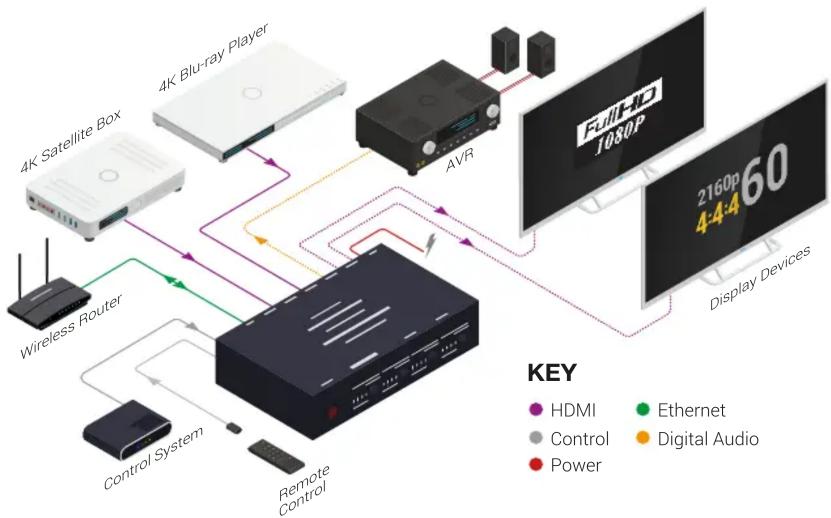
flowchart
graph TD
    A["4K Satellite Box"] --> B["4K Blu-ray Player"]
    B --> C["AVR"]
    C --> D["Full-IO J080P"]
    D --> E["Display Devices"]
    F["Wireless Router"] --> G["Control System"]
    G --> H["Remote Control"]
    H --> I["4K Satellite Box"]
    style A fill:#f9f,stroke:#333
    style B fill:#ccf,stroke:#333
    style C fill:#cfc,stroke:#333
    style D fill:#fcc,stroke:#333
    style E fill:#cff,stroke:#333
    style F fill:#ffc,stroke:#333
    style G fill:#cfc,stroke:#333
    style H fill:#fcc,stroke:#333
    style I fill:#ffc,stroke:#333
Wiring and Connections
WyreStorm recommends that all wiring for the installation is run and terminated prior to making connections to the switcher. Read through this section in it's entirety before running or terminating the wires to ensure proper operation and to avoid damaging equipment.

IMPORTANT! Wiring Guidelines
- The use of patch panels, wall plates, cable extenders, kinks in cables, and electrical or environmental interference will have an adverse effect on signal transmission which may limit performance. Steps should be taken to minimize or remove these factors completely during installation for best results.
- WyreStorm recommends using pre-terminated HDMI cables due to the complexity of these connector types. Using pre-terminated cables will ensure that these connections are accurate and will not interfere with the performance of the product.
HDMI Cable Performance Guide
| 0m | 2m | 4m | 6m | 8m | 10m | 12m | 14m | 16m | 18m | 20m |
| 0ft | 7ft | 13ft | 20ft | 26ft | 33ft | 39ft | 46ft | 52ft | 60ft | 66ft |
HD/4K Transmission
Installation and Operation
- Connect HDMI sources to INPUT ports 1-4 using good quality HDMI cables.
- Connect an HDMI display device to the HDMI OUT ports of the switcher.
- Turn the power on using the included remote handset, ensuring LED power indicators are fully lit on the front of the switcher. If not, check to make sure the HDMI cables are firmly connected.
- To operate the switcher, press the SWITCH buttons on the front of the unit to scroll numerically through connected sources.
- Alternatively, use the remote control handset to scroll forwards and backwards through the inputs or push buttons 1-4 corresponding to the connected sources. Furthermore, a RS-232 or LAN connection from a control system can be used to control the device.
IR EXT Port Pinout
Connection for IR RX (receive) uses a 3.5mm (1/8in) stereo jack that outputs +5V DC to power the included IR receiver.

RS-232 Wiring
The MX-0404-HDMI uses a 3-pin RS-232 with no hardware flow control. Most control systems and computers are DTE where pin 2 is RX, this can vary from device to device. Refer to the documentation for the connected device for pin functionally to ensure that the correct connections can be made.
Refer to RS-232 Mode Settings for details on setting RS-232 modes.

| WyreStorm Connector | 3rd Party Device | ||
| Pin 1 | TX (Transmit) ---> | To ---> RX (Receive) | |
| Pin 2 | RX (Receive) ---> | To ---> TX (Transmit) | |
| Pin 3 | G (Ground) | ---> To ---> | G (Ground) |
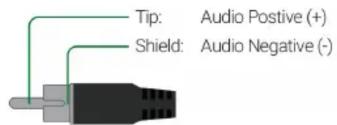
Audio Wiring
This matrix contains audio connections for Digital Audio.
Control via IP
This matrix uses an Auto IP method to generate the initial IP address based on the network connections. By default the IP address is set to DHCP and will pull the IP address from a connected DHCP server. Should the network not contain a DHCP server the IP address will be generated based on the units mac address. The above operation will occur unless the IP Address setting is changed to static via API command.
- Connect the matrix to the same network as a control system.
- Using a 3rd party network scanner, scan the network for the IP address of the matrix.
-
IP address of matrix will show up under the name MX-0404-HDMI
-
If no DHCP network is available and unit has not been issued an IP address yet, the default IP address is 192.168.11.143.

Pin 1: White/Orange
Pin 2: Orange
Pin 3: White/Green
Pin 4: Blue
Wire colors shown follow EIA/TIA-568B standard.
Pin 5: White/Blue
Pin 6: Green
Pin 7: White/Brown
Pin 8: Brown
Accessing the Web UI
This matrix uses an Auto IP method to generate the initial IP address based on the network connections. By default the IP address is set to DHCP and will pull the IP address from a connected DHCP server. Should the network not contain a DHCP server the IP address will be generated based on the units mac address. The above operation will occur unless the IP Address setting in the web UI is set to static.
- Connect the matrix to the same network as a PC.
- Using a 3rd party network scanner, scan the network for the IP address of the matrix.
- Open a web browser and enter the IP Address of the matrix.
- Enter the password for the matrix. Default Password: admin
IP Address Notes
- The installer password and general password are the same by default. WyreStorm recommends changing the password for installer login to avoid any unwanted changes being made to the matrix configuration.
Troubleshooting
No or Intermittent 3rd party Device Control
- Verify that the IR, RS-232 and Ethernet cables are properly terminated following the Wiring and Connections section.
No or Poor Quality Picture (snow or noisy image)
- Verify that power is being supplied to all devices in the system and that they are powered on.
- Verify that all HDMI connections are not loose and are functioning properly.
- If transmitting 3D or 4K, verify that the HDMI cables used are 3D or 4K rated.

Troubleshooting Tips:
- WyreStorm recommends using a cable tester or connecting the cable to other devices to verify functionality.
Specifications
| Audio and Video | ||
| Inputs 4x HDMI In: 19-pin type A | ||
| Outputs 4x HDMI Out: 19-pin type A | 1x IR Extension | 4x S/PDIF Coaxial | ||
| Audio Formats | HDMI: 2ch PCM | Multichannel: LPCM and up to DTS-X and Dolby AtmosCoaxial: 5.1ch surround sound | |
| Video Resolutions (Max) | Resolution HDMI | |
| 1920x1080p @60Hz 12bit | 15m/49ft | |
| 1920x1080p @60Hz 16bit | 7m/23ft | |
| 3840x2160p @24Hz 10bit 4:2:0 HDR | 5m/16ft | |
| 3840x2160p @30Hz 8bit 4:4:4 | 7m/23ft | |
| 3840x2160p @60Hz 10bit 4:2:0 HDR | 5m/16ft | |
| 4096x2160p @60Hz 8bit 4:2:0 | 7m/23ft | |
| 4096x2160p @60Hz 8bit 4:4:4 | 5m/16ft | |
| Supported Standards DCI | RGB | HDR | HDR10 | Dolby Vision up to 30Hz | HLG | BT.2020 | BT.2100 | ||
| Maximum Pixel Clock 600MHz | ||
| Communication and Control | ||
| HDMI HDCP 2.2 | DVI-D supported with adapter (not included) | ||
| IR 1x Front Panel Sensor | 1x IR Ext 3.5mm (1/8in) TRS Stereo | Matrix Control | ||
| RS-232 1x 3-Pin Terminal Block | Matrix Control (Telnet commands supported) | ||
| Ethernet 1x LAN: 8-pin RJ-45 Female | 10/100 Mbps auto-negotiating | IP Control | Web UI | ||
| Power | ||
| Power Supply 5V DC 2A | ||
| Max Power Consumption 10W | ||
| Environmental | ||
| Operating Temperature 0 to +45°C (32 to +113 °F), 10% to 90%, non-condensing | ||
| Storage Temperature -20 to +70°C (-4 to +158 °F), 10% to 90%, non-condensing | ||
| Maximum BTU | 17.06 BTU/hr | |
| Dimensions and Weight | ||
| Rack Units/Wall Box | <1U | |
| Height | 42mm/1.65in | |
| Width | 215mm/8.46in | |
| Depth | 120.2mm/4.73in | |
| Weight | 0.88kg/1.94lbs | |
| Regulatory | ||
| Safety and Emission | CE | FCC | RoHS | EAC | RCM | |
Note: WyreStorm reserves the right to change product specification, appearance or dimensions of this product at any time without prior notice.


- IMPORTANT! Installation Requirements
- In The Box
- Wiring and Connections
- IMPORTANT! Wiring Guidelines
- Installation and Operation
- IR EXT Port Pinout
- RS-232 Wiring
- Audio Wiring
- Control via IP
- Accessing the Web UI
- IP Address Notes
- Troubleshooting
- No or Poor Quality Picture (snow or noisy image)
- Troubleshooting Tips:
Brand : WyreStorm
Model : MX 0404-KIT
Category : Router