
ES-SL10 - Razor PANASONIC - Free user manual and instructions
Find the device manual for free ES-SL10 PANASONIC in PDF.


| Product Type | Battery Operated Shaver |
| Brand | Panasonic |
| Model | ES-SL10 |
| Power Source | 2 x LR6 (AA) alkaline batteries (not included) |
| Rated Voltage | 3 V |
| Weight (with cap, excl. batteries) | Approx. 142 g |
| Shaving Method | Wet/Dry |
| Battery Life (Panasonic alkaline) | Approx. 60 minutes |
| Country of Origin | China |
| Intended Use | Household only |
| Outer Foil (replacement) | WES9087 |
| Inner Blades (replacement) | WES9068 |
| Expected Outer Foil Life | Approx. 1 year |
| Expected Inner Blade Life | Approx. 2 years |
| Included Accessories | Protective cap, Cleaning brush |
| Cleaning | Rinse with water, use brush; do not use salt water or hot water |
| Safety Certifications | Company standard Q/SXWBMJ 6 |
| Battery Type Recommended | LR6 (AA) alkaline only, not rechargeable |
| Usage Warnings | Do not use on damaged skin, do not share, store with protective cap |
| Product Code | ES-SL10 |
Frequently Asked Questions - ES-SL10 PANASONIC
User questions about ES-SL10 PANASONIC
0 question about this device. Answer the ones you know or ask your own.
Ask a new question about this device
Download the instructions for your Razor in PDF format for free! Find your manual ES-SL10 - PANASONIC and take your electronic device back in hand. On this page are published all the documents necessary for the use of your device. ES-SL10 by PANASONIC.
USER MANUAL ES-SL10 PANASONIC
Operating Instructions
使用說明書
คู่มือการใช้งาน
(Household) Battery Operated Shaver
(家用) 刮鬍刀
natural_image
Line drawing of a hand-operated disposable water leveler (no text or symbols)English 3
中文 17
ภาษาไทย
29
Thank you for purchasing our product.
Before operating the unit, please read these instructions completely and save them for future use.
多謝您購買本公司的產品。
Operating Instructions
(Household) Battery Operated Shaver Model No. ES-SL10
Contents
Safety precautions ....4
Intended use 8
Parts identification 9
Battery installation, removal and lifespan .....10
Using the shaver....10
Cleaning the shaver....12
Troubleshooting 15
Specifications ....16
Thank you for purchasing our product.
Before operating the unit, please read these instructions completely and save them for future use.
Safety precautions
To reduce the risk of injury, loss of life, electric shock, fire, malfunction, and damage to equipment or property, always observe the following safety precautions.
Explanation of symbols
The following symbols are used to classify and describe the level of hazard, injury, and property damage caused when the denotation is disregarded and improper use is performed.

WARNING
Denotes a potential hazard that could result in serious injury or death.

CAUTION
Denotes a potential hazard that could result in minor injury.
The following symbols are used to classify and describe the type of instructions to be observed.

This symbol is used to alert users to a specific operating procedure that must not be performed.

This symbol is used to alert users to a specific operating procedure that must be followed in order to operate the unit safely.

WARNING

Do not store within the reach of children or infants. Do not let them play with it.
- Doing so may cause an accident or injury.

Immediately stop using the shaver if there is an abnormality or failure.
- Using it in such conditions may cause injury or fire.

WARNING

Properly dispose the package of the appliance, and keep the package away from infants.
- Failure to do so may cause suffocation of infants.

This appliance is not intended for use by persons (including children) with reduced physical, sensory or mental capabilities, or lack of experience and knowledge, unless they have been given supervision or instructions concerning use of the appliance by a person responsible for their safety.
- Failure to do so may cause an accident or injury.

CAUTION

Do not attempt to modify, disassemble or repair the shaver.
- Doing so may cause an accident or injury. Contact the customer service center for any repair.

Do not use excessive pressure to apply the system outer foil to your lip or other parts of your face. Do not apply the system outer foil directly to blemishes or injured skin.
- Doing so may cause injury to the skin.

Do not apply excessive pressure on the system outer foil. Also, do not touch the system outer foil with fingers or nails when in use.
- Doing so may cause injury to the skin or reduce the life of the system outer foil.

CAUTION

Do not touch the blade section (metallic section) of the inner blade.
- Doing so may cause injury.

Do not use this product for hair on head or any other part of the body.
- Doing so may cause injury to skin or reduce the life of the system outer foil.

Do not share your shaver with your family or other people.
- Doing so may result in infection or inflammation.

Do not drop or subject to shock.
- Doing so may cause injury.

Do not throw batteries into a fire, or short-circuit or disassemble it.
- Doing so may cause injury.

Do not charge non-rechargeable batteries.
- Doing so may cause injury.

Do not mix batteries of different models and types or mix new and used batteries.
- Doing this may cause pollution and injury due to battery heat, breakage and leakage.

Check the system outer foil for cracks or deformations before use.
- Cracks or deformations of the system outer foil may result in injury to the skin.

CAUTION

Be sure to place the shaver in its protective cap when carrying around or storing.
- Failure to do so may cause deformation of the system outer foil, thus resulting in injury to the skin or life reduction of the system outer foil.
Be sure to observe the cautions indicated on the battery.
Do not use rechargeable batteries.
Check that the positive “+” and negative “-” poles of the battery are correctly positioned.
When the battery is exhausted, remove it immediately and be sure to dispose of it in accordance with local regulations.
Power off the shaver before you replace the battery.

Before replacing the batteries, wipe off water from the shaver to avoid water entering the main body. If the shaver is not to be used for a long time, remove the batteries.
Use dry cell batteries before they expire.
No short circuit is allowed between the power supply terminals.
- Failure to do so may cause pollution and injury due to battery heat, breakage and leakage.
Intended use
▶ Description
- This WET/DRY shaver can be used for wet shaving using shaving lather or for dry shaving. The following symbol means suitable for use in a bath or shower.

Notes
- Keep both the inner blades inserted. If only one of the inner blades is inserted, the shaver cannot be used.
- If you clean the shaver with water, do not use salt water or hot water. Do not soak the shaver in water for a long period of time. The shaver can be cleaned with clear water.
- Clean the housing only with a soft cloth slightly dampened with tap water or soapy tap water. Do not use thinner, benzine, alcohol or other chemicals.
- Store the shaver in a place away from pool, bathroom or other high humidity areas which are exposed to water or moisture after use.
- Do not store the shaver where it will be exposed to direct sunlight or other heat sources.
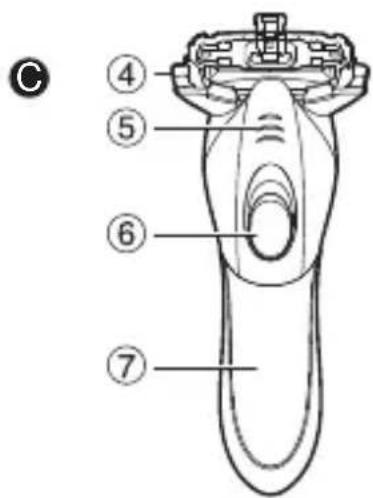
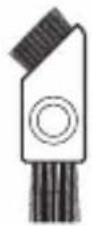
Parts identification
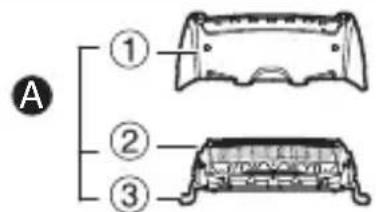

D
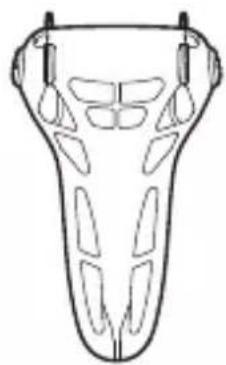
natural_image
Line drawing of a symmetrical mechanical or anatomical component with no visible text or symbolsE
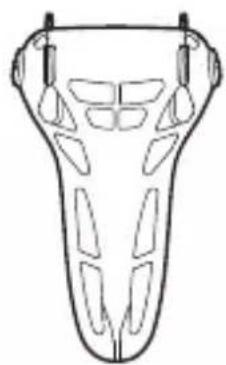
A Outer foil section
① Foil frame
② System outer foil
③ System outer foil release buttons
B Inner blades
©Main body
④ Foil frame release button
⑤ Finger rest
⑥ Power switch [0/1]
⑦ Battery cover
Protective cap
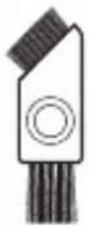
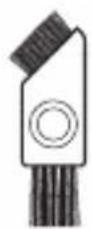
E Cleaning brush
Battery installation, removal and lifespan
Before installing the battery, make sure your hands and the shaver are dry.
- How to install
-
Remove the battery cover.
-
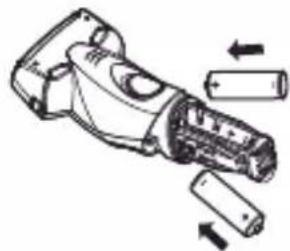
Install two LR6 (AA alkaline batteries) with the "+" and "-" poles correctly positioned.
-
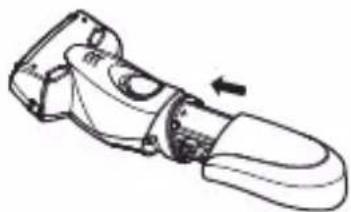
Replace the battery cover so it clicks into position.
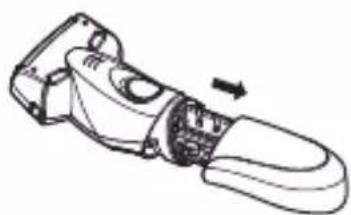
natural_image
Line drawing of a handheld device with a handle and internal components, no text or symbols present• How to remove
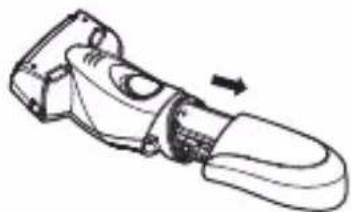
- Remove the battery cover.
natural_image
Illustration of a handheld device with battery and cylindrical components (no text or symbols)- Take the batteries out of the main unit.
natural_image
Technical line drawing of a mechanical tool or device with an arrow indicating rotation (no text or symbols present)- Replace the battery cover so it clicks into position.
natural_image
Line drawing of a mechanical tool or device with an arrow indicating direction (no text or symbols present)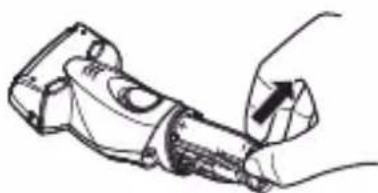
natural_image
Line drawing of a hand holding a tool, no text or symbols present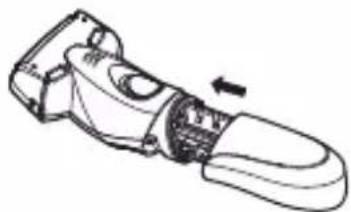
natural_image
Line drawing of a handheld device with a scroll wheel and handle, showing a left-hand rule (no text or symbols)Battery lifespan
With two LR6 (AA alkaline batteries) installed, the shaver can be used for about 60 minutes (Panasonic Alkaline batteries).
Note
Only use LR6 (AA alkaline batteries).
Using the shaver
▶ Dry shaving
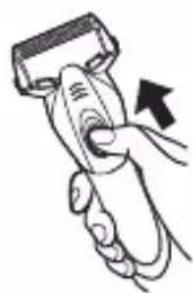
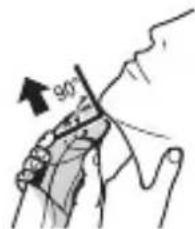
- Push the power switch up to level 1.
natural_image
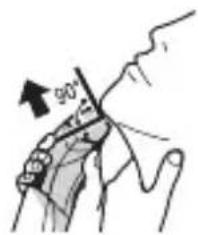
Illustration of a hand holding a handheld device with an arrow indicating motion (no text or symbols)- Hold the shaver as illustrated and shave.
natural_image
Illustration of a hand holding a small object with an arrow indicating force direction (no text or symbols)▶ Wet shaving
-
Place water, soap, shaving cream, etc. on the face.
-
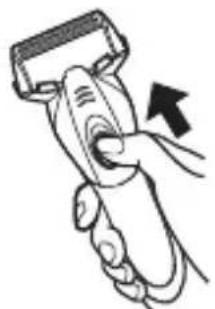
Push the power switch up to level 1.
natural_image
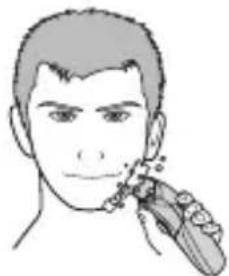
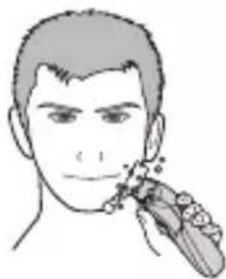
Illustration of a hand holding a handheld device with an arrow indicating motion (no text or symbols)- Shave with slow and smooth motions as illustrated.
natural_image
Line drawing of a person's face with a finger pointing to the ear area (no text or symbols)Start shaving by applying gentle pressure to your face. Move the shaver back and forth against the direction of beard growth.
You may gently increase the amount of pressure as your skin becomes accustomed to the shaver, but be noted that excessive pressure may hurt your skin.
Usable shaving foam and facial cleansers
| Shaving agent Facial cleanser | |||||
| Shaving foam | Shaving gel | Shaving cream | Facial cleansing foam (without scrubbing compounds) | Facial cleansing foam (with scrubbing compounds) | Facial soap |
| √ | √ | × | √ | × | √ |
Notes
- Place your finger on the finger rest while in use. Make sure that you can turn off the shaver as you wish when in use.
- Do not use shaving creams or face cleansers containing scrubbing compounds as these may cause the outer foil to clog.
- Wet shaving is also possible only with clean or warm water.
- Be sure to rinse the shaver with water after wet shaving.
Cleaning the shaver
-
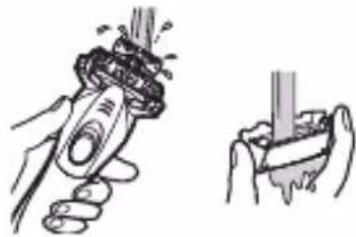
Apply some hand soap and some water to the system outer foil.
-
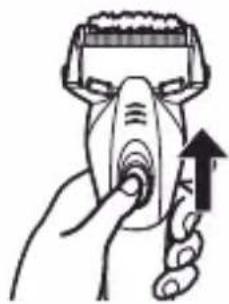
Push the power switch up to level 1.
-
Push the power switch to level 0, turn off the shaver after 10 to 20 seconds.
-
Press the foil frame release button "①". Remove the outer foil section and turn on the shaver "②".
-
Clean the shaver and the outer foil section with running water.
-
Turn off the shaver, and wipe off any drops of water with a dry cloth.
-
Air dry the outer foil section and the shaver by putting them in a ventilated place. Never shake the main body dry.
- The outer foil section can be dried more quickly by removing from the main body.
- Attach the outer foil section to the shaver.
natural_image
Illustration of a hand using a handheld device to press or interact with an upward arrow (no text or symbols present)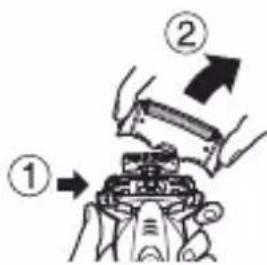
natural_image
Illustration of a hand holding a tool with a spring-like object above, and another hand holding a cylindrical object (no text or symbols present)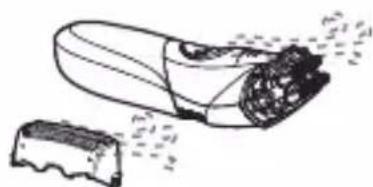
natural_image
Illustration of a shoe being cut with a small object nearby (no text or symbols)Cleaning with the brush
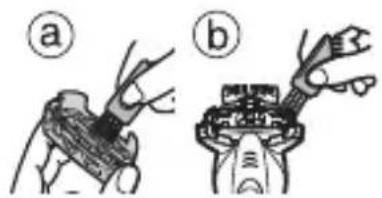
▶ Cleaning with the long brush
Clean the system outer foil (a) and the shaver body (b).
natural_image
Two technical diagrams showing mechanical components: (a) a tool inserted into a component, (b) a tool with a handle inserted into a housing (no text or symbols present)▶ Cleaning with the short brush
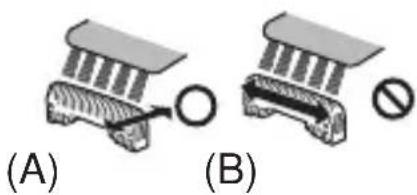
Clean the inner blades using the short brush by moving it in direction (A).
- Do not move the short brush in direction (B) as it will damage the inner blades and affect their sharpness.
- Do not use the short brush to clean the system outer foil.
natural_image
Diagram showing two mechanical components labeled (A) and (B), with a circular component and a prohibition sign (no text or symbols on the components themselves)Replacing the system outer foil and the inner blades
| system outer foil once every year |
| inner blades once every two years |
Removing the outer foil section
Press the foil frame release button and lift the outer foil section upwards.
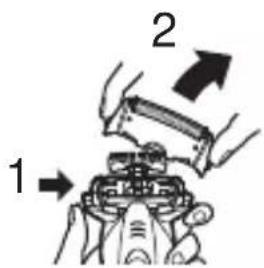
▶ Attaching the outer foil section
Securely attach the outer foil section to the shaver until it clicks.
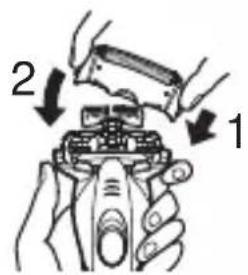
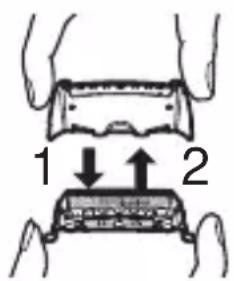
▶ Replacing the system outer foil
- Press the system outer foil release buttons and pull down the system outer foil.
-
Align the front side of the foil frame with the system outer foil mark ( ) and insert them firmly together.
-
The system outer foil cannot be reversely attached.
• Always insert the system outer foil to the foil frame when attaching to the shaver.
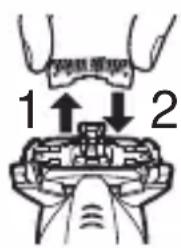
▶ Replacing the inner blades
- Remove the inner blades one at a time.
- Do not touch the edges (metal parts) of the inner blades, to prevent injury to your hands.
- Insert the inner blades one at a time until they click.
▶ Replacement parts
Replacement parts are available at your dealer or Panasonic's authorized Service Center.
| Replacement parts for ES-SL10 | System outer foil WES9087 |
| Inner blades WES9068 |
Troubleshooting
Problem Action
Beard scraps fly all over.
System outer foil gets hot.
The odor is getting stronger.
You do not get as close a shave as before.
Makes a loud sound.
Shaver stops functioning.
This can be improved by cleaning every time after shaving. Clean the inner blades thoroughly with a cleaning brush.
Replace the system outer foil if it is damaged or deformed. (See Pages 13-14.)
This can be improved by cleaning every time after shaving.
This can be improved by cleaning every time after shaving.
Replace the system outer foil and/or inner blades. Expected life of system outer foil and inner blades:
System outer foil: Approximately 1 year Inner blades: Approximately 2 years
Confirm that the blades are properly attached.
Clean the outer foil section and inner blades with the brush.
The battery has reached the end of its life.
If the problems still cannot be solved, contact the customer service center.
Specifications
| Product name Battery O | Operated Shaver | |
| Product model ES | -SL10 | |
| Rated voltage 3 V | --- | |
| Battery | LR6 (AA alkaline battery) × 2(Sold separately) | |
| Weight | Approx. 142 g (including cap)(Excluding battery) | |
| Place of origin China | ||
| Date of production | See the stamp markon the battery base.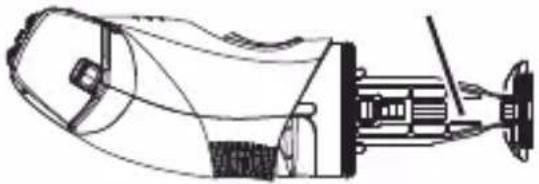 | |
| Execution standard | Company standard | Q/SXWBMJ 6 |
This product is intended for household use only.
Panasonic
使用說明書
(家用) 刮鬍刀
型號 ES-SL10
权
目錄
安全注意事項 18
使用須知 20
部件名稱 21
電池的安裝方法、取出方法及壽命 22
剃鬚 22
清潔刮鬍刀 24
疑難排解 26
規格 27
多謝您購買本公司的產品。
natural_image
Line drawing of a symmetrical mechanical or architectural component with no text or symbolsE
A 外刀部
natural_image
Line drawing of a handheld device with an arrow indicating motion (no text or symbols)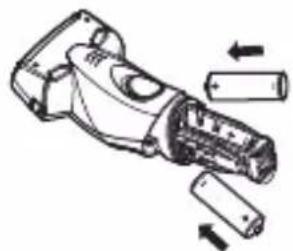
natural_image
Technical line drawing of a handheld device with arrows indicating motion or assembly (no text or symbols)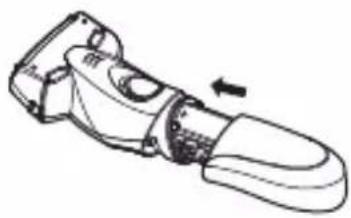
natural_image
Line drawing of a handheld device with a black arrow indicating rotation (no text or symbols)- 取出方法
-
取下電池蓋。
-
從本體內取出電池。
natural_image
Line drawing of a handheld device with a scroll wheel and handle, showing a curved arm and a black arrow indicating direction (no text or symbols)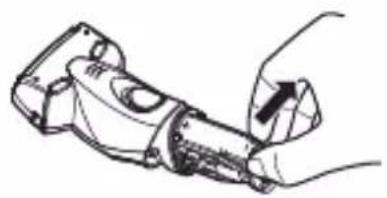
natural_image
Line drawing of a hand holding a mechanical tool or device (no text or symbols visible)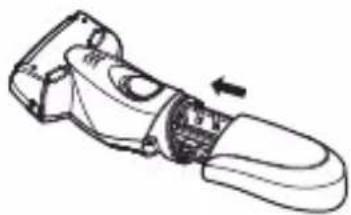
natural_image
Line drawing of a handheld device with a scroll wheel and handle, showing a left-hand rule (no text or symbols)電池壽命
natural_image
Illustration of a hand holding a handheld device with an arrow indicating motion (no text or symbols)- 如右圖所示,握住刮鬍刀剃鬚。
▶ 使用刮鬍刀濕剃
natural_image
Illustration of a hand holding a handheld device with an arrow indicating motion (no text or symbols)- 如右圖所示,在臉上輕輕滑動,即可剃鬚。
natural_image
Line drawing of a person's face with a finger pointing to the ear area (no text or symbols)- 將外刀部裝回刮鬍刀之上。
用清潔刷清潔刮鬍刀
▶ 用清潔刷長毛的一端清潔
natural_image
Two technical diagrams showing a tool interacting with a mechanical component, labeled (a) and (b), with no visible text or symbols.▶ 用清潔刷短毛的一端清潔
natural_image
Two mechanical diagrams labeled (A) and (B), showing a tool interacting with a component, with no visible text or symbols.更換外刀網和內刀頭
D
natural_image
Line drawing of a symmetrical mechanical or architectural component with no text or symbolsE
natural_image
Line drawing of a mechanical tool or device with an arrow indicating direction (no text or symbols present)- วิธีการถอต
natural_image
Technical line drawing of a handheld device with arrows indicating motion or assembly (no text or symbols)natural_image
Line drawing of a mechanical tool or device with an arrow indicating direction (no text or symbols present)natural_image
Line drawing of a mechanical tool or device with an arrow indicating direction (no text or symbols present)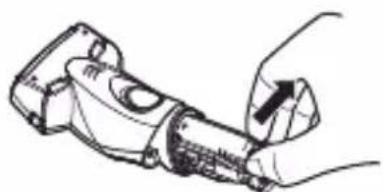
natural_image
Line drawing of a hand holding a handheld device with a handle (no text or symbols)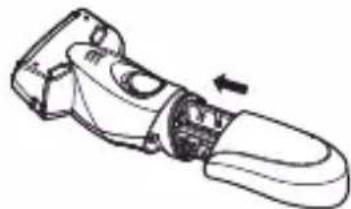
natural_image
Line drawing of a handheld device with a scroll wheel and handle, showing internal components and an arrow indicating rotation (no text or symbols)natural_image
Illustration of a hand holding a handheld device with an arrow indicating motion (no text or symbols)natural_image
Illustration of a hand holding a small object with an arrow indicating force direction (no text or symbols)▶ การโกนแบบเปียก
natural_image
Illustration of a hand holding a handheld device with an arrow indicating motion (no text or symbols)natural_image
Line drawing of a person's face with a stylized object near the mouth (no text or symbols)natural_image
Line drawing of a hand holding a nasal swab with an upward arrow indicating pressure point (no text or symbols)natural_image
Illustration of two hand tools: a tool gripping a mechanical component and a tool holding a cylindrical object (no text or symbols present)natural_image
Line drawing of a mechanical component with textured surfaces and a separate irregular block (no text or symbols)natural_image
Two technical diagrams showing mechanical components: (a) a tool inserted into a component, (b) a tool with a handle inserted into a housing (no text or symbols present)© Panasonic Corporation 2014
- Operating Instructions
- (Household) Battery Operated Shaver Model No. ES-SL10
- Contents
- Safety precautions ....4
- Safety precautions
- Explanation of symbols
- WARNING
- CAUTION
- Intended use
- ▶ Description
- Notes
- Parts identification
- A Outer foil section
- B Inner blades
- ©Main body
- Protective cap
- E Cleaning brush
- Battery installation, removal and lifespan
- Battery lifespan
- Using the shaver
- ▶ Wet shaving
- Cleaning the shaver
- Cleaning with the brush
- ▶ Cleaning with the long brush
- ▶ Cleaning with the short brush
- Replacing the system outer foil and the inner blades
- Removing the outer foil section
- ▶ Attaching the outer foil section
- ▶ Replacing the system outer foil
- ▶ Replacing the inner blades
- ▶ Replacement parts
- Troubleshooting
- Problem Action
- Specifications
- Panasonic
- 目錄
- 安全注意事項 18
- A 外刀部
- 電池壽命
- ▶ 使用刮鬍刀濕剃
- 用清潔刷清潔刮鬍刀
- ▶ 用清潔刷長毛的一端清潔
- ▶ 用清潔刷短毛的一端清潔
- 更換外刀網和內刀頭
- ▶ การโกนแบบเปียก
Brand : PANASONIC
Model : ES-SL10
Category : Razor