
RS 85 - Wireless Headphones SENNHEISER - Free user manual and instructions
Find the device manual for free RS 85 SENNHEISER in PDF.



| Product type | Wireless headset |
| Brand | SENNHEISER |
| Model | RS 85 |
| Transmitter dimensions | 155 x 153 x 105 mm |
| Receiver dimensions | 150 x 80 x 200 mm |
| Transmitter weight | approx. 186 g (including battery pack) |
| Receiver weight | approx. 160 g (including battery pack) |
| Transmitter power supply | 12 V DC via power supply unit, power consumption approx. 1 VA |
| Receiver power supply | 2.4 V via BA 151 battery pack, battery life approx. 3.5 h |
| Modulation | FM stereo |
| RF output power | typ. up to 10 mW (0.75 mW in 925 MHz) |
| Signal-to-noise ratio | typ. > 85 dBA |
| Max. sound pressure level | 101 dB |
| Total harmonic distortion | < 0.5 % (at 1 kHz / nominal excursion) |
| Transmission frequency range | See indication on the underside of the transmitter |
| Audio connector | 3.5 mm / 6.3 mm stereo jack with RCA adapter |
| Charging compartment | 1 for BA 151 battery pack |
| Main functions | Automatic power-on, automatic search and tuning, channel selection, HiDyn plus™ noise reduction system |
| Care and cleaning | Use a soft cloth or chamois; never use harsh detergents |
| Safety | Do not open the device; use only original Sennheiser accessories; caution: listening at high volume can damage hearing |
| Spare parts and accessories | BA 151 replacement battery pack, L 151-2 charger, additional HDR 85 headsets |
| Certifications | Compliant with CE and R&TTE standards |
Frequently Asked Questions - RS 85 SENNHEISER
User questions about RS 85 SENNHEISER
0 question about this device. Answer the ones you know or ask your own.
Ask a new question about this device
Download the instructions for your Wireless Headphones in PDF format for free! Find your manual RS 85 - SENNHEISER and take your electronic device back in hand. On this page are published all the documents necessary for the use of your device. RS 85 by SENNHEISER.
USER MANUAL RS 85 SENNHEISER
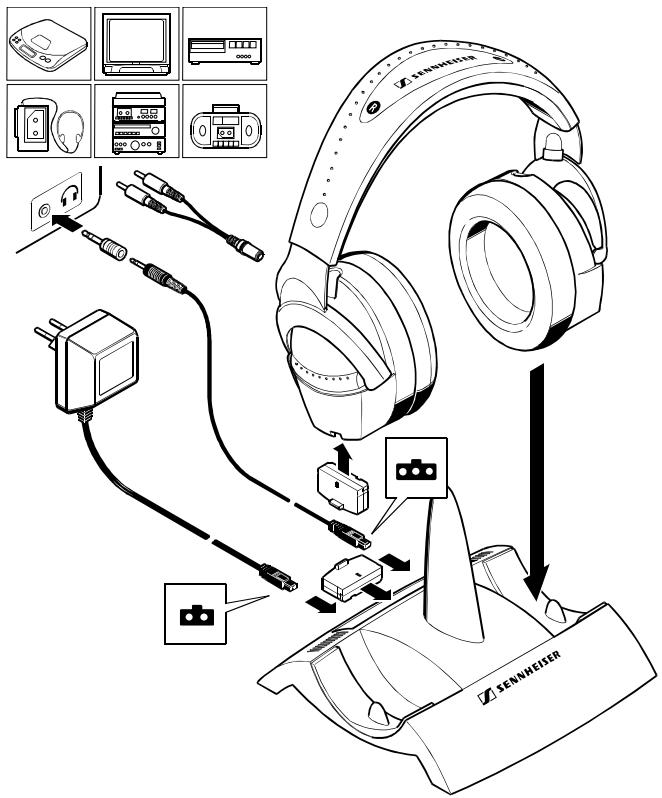
INHALT UND ANSCHLÜSSE / SYSTEM COMPONENTS AND CONNECTIONS / ELEMENTS DU SYSTEME ET RACCORDEMENT / INDICE E COLLEGAMENTO / CONTENIDO Y CONEXIONES / INHOUD EN AANSLUITING
Instruction manual 7
Notice d'emploi 11
Lautstärke
Empfang einstellen
Sendekanal wechseln
LED 1
LED 2
LED 1 und 2
Kanal 1 aktiv
Kanal 2 aktiv
Akku laden
This device has been type-approved to EN 300 220-1 Nov.97 and is in compliance with the applicable CE standards and regulations.
Certification
Product Designation:
T30-4; T40-4; T60-4; T80-4
Product Description:
Wireless Headphone Transmitter
Product Manufacturer:
Sennheiser electronic GmbH & Co. KG
Am Labor 1
30900 Wedemark
Specifications and test reports:
| Specification | Test report no. & date | Name of test laboratory | Notes |
| EN 300 220-1, V1.2.11 Nov. 1997 | 2_1326-A/99;17.06.1999 | by CETECOM ICT | conform |
Statement
This equipment fulfils the requirements or parts thereof in the above mentionend specifications.
By decree Vfg 28/2000, issued in the Official Journal 6/2010 of the Regulierungsbehörde für Telekommunikation und Post, CETECOM ICT Services is authorized to act as Notified Body in accordance with the R&TTE Directive 1999/5/EC of 09. March 1999
Place, Date of issue


CETECOM. ICT Services GmbH, Unterlöchheimer Straße 6-10, D-56117 Saarbrücken, Germany
CETECOM ICT Services GmbH

CERTIFICATE OF CONFORMITY
Registration-No.:
E811222M-CC
Number of annexes: —
Certificate Holder:
Sennheiser electronic GmbH & Co. KG
Am Labor 1
30900 Wedemark
Product Designation:
T30-8; T40-8; T60-8; T80-8
Product Description:
Wireless Headphone Transmitter
Product Manufacturer:
Seabelser electronic GmbH & Co. KG
Am Labor 1
30500 Wedemark
Specifications and test reports
| Specification | Test report no. & date | Name of test laboratory | Notes |
| EN 300 220-1,V1,2,1;No. 1997 | 2_1534-A/99;17/08.1999 | by CETECOM ICT | conform |
Statement
This equipment fulfils the requirements or parts thereof in the above mentionend specifications.
By decree Vfg 28/2009, issued in the Official Journal 6/2010 of the Regulierungsbehörde für Telekommunikation und Post, CETECOM ICT Services is authorized to act as Notified Body in accordance with the R&TTE Directive 1999/S/EC of 09. March 1999
Place, Date of Issue


When using this product within the European Union, but outside the country of purchase, you must inform yourself about the type approval regulations in the country of use. You must also check whether or not the product needs to be licensed by the national approval authorities. Radio regulations vary from country to country and what is legal in the country of purchase is not necessarily legal in another EU country.
Exigences R&TTE
Subject to alterations
INHALT UND ANSCHLÜSSE / SYSTEM COMPONENTS AND CONNECTIONS / ELEMENTS DU SYSTEME ET RACCORDEMENT / INDICE E COLLEGAMENTO / CONTENIDO Y CONEXIONES / INHOUD EN AANSLUITING
Instruction manual 7
Notice d'emploi 11
Thank you for choosing Sennheiser! Over half a century of accumulated expertise in the design and manufacture of high-quality electro-acoustic equipment have made Sennheiser a world-leading company in this field. We have designed this product to give you reliable operation over many years.
Please take a few moments to read these instructions carefully, as we want you to enjoy your new Sennheiser product quickly and to the full.
System components and connections
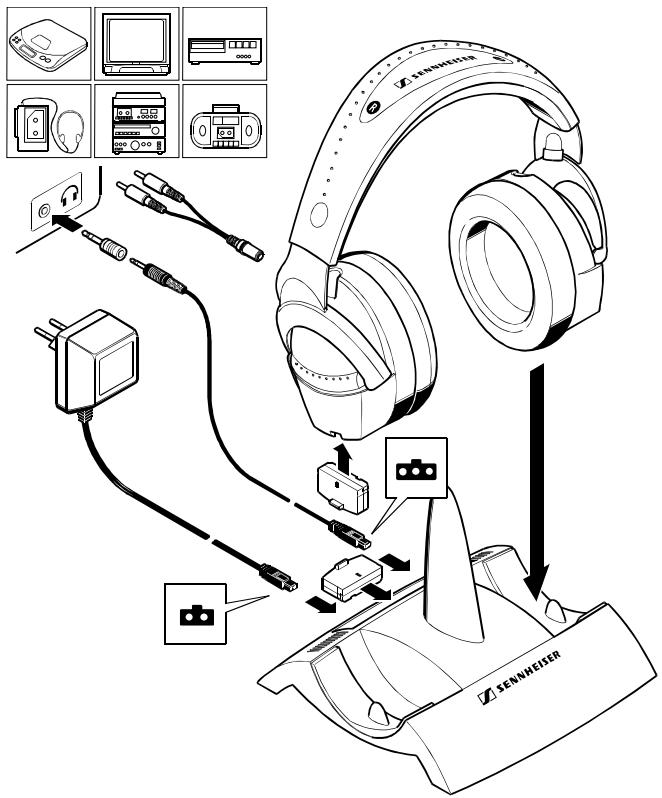
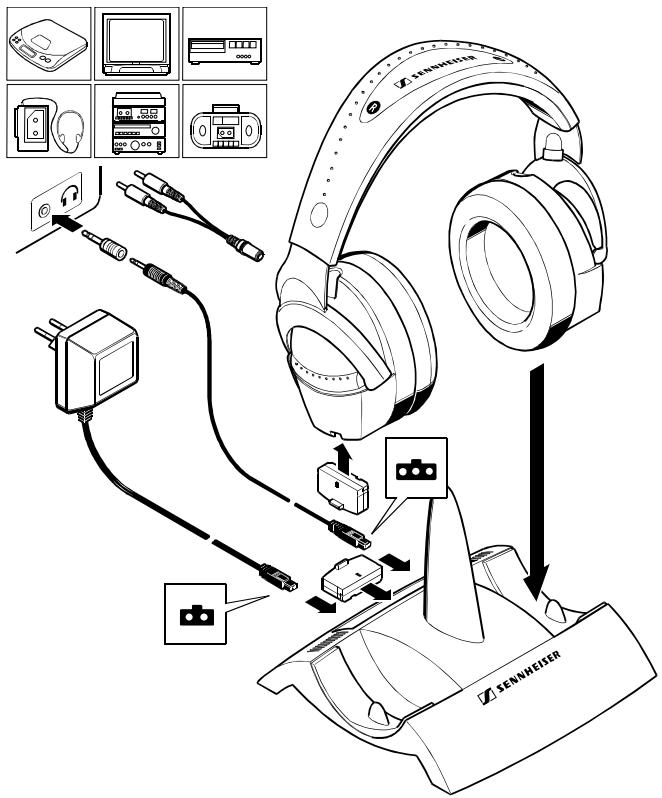
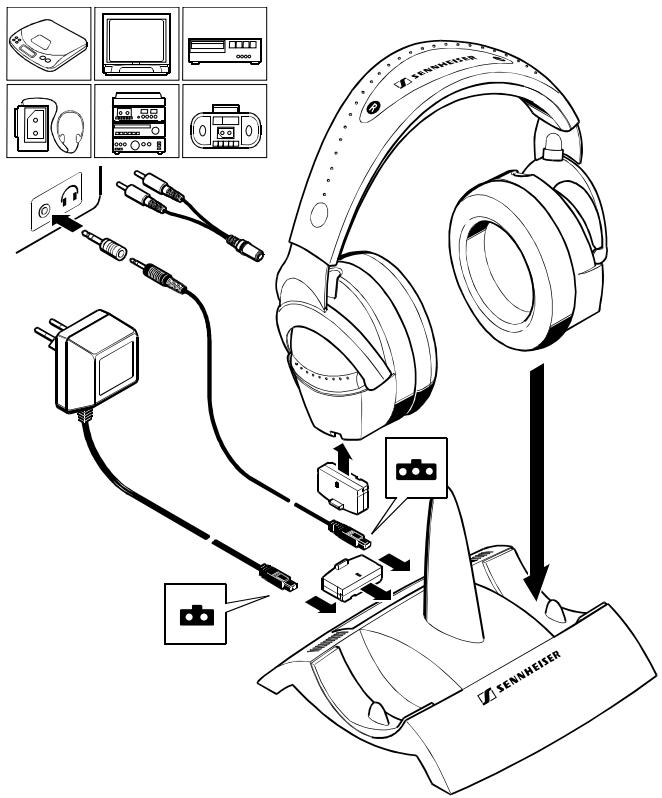
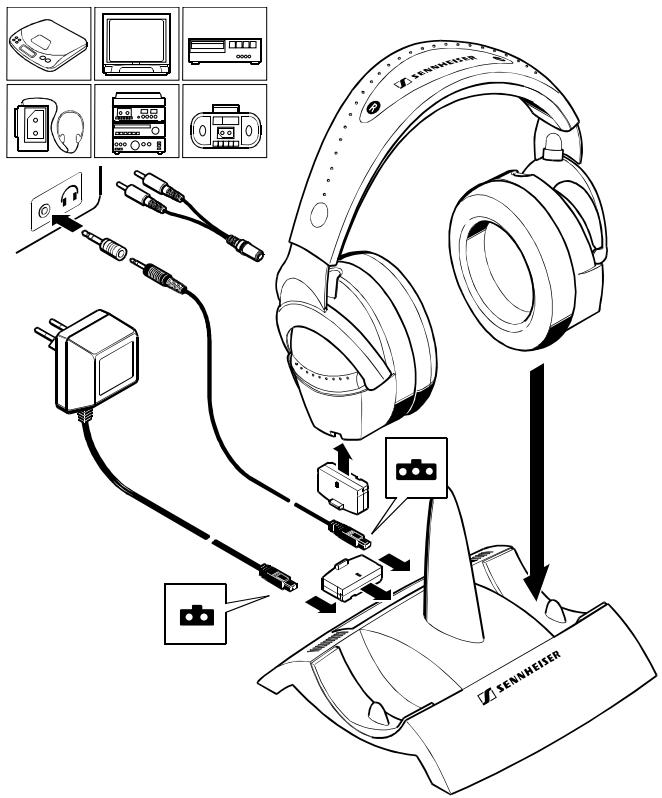
Before proceeding, please check and make sure the system components shown are all present and correct (see illustration inside cover page).
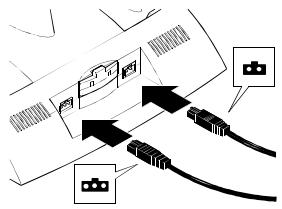
Establish the necessary connections.
Charge the accupack for 24 hours before you use it for the first time! (Please refer to the section Charging the accupack.)

Where to place the transmitter
Choose a suitable place near your hi-fi system or TV set.
Do not place the transmitter close to metal objects such as shelf bars, reinforced concrete walls, etc.
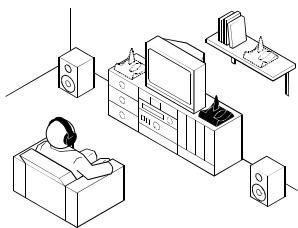
The transmitter features a convenient automatic on/off function. The transmitter is switched on by the audio signal. If there is no audio signal for about 3 minutes, the transmitter automatically switches off. The transmitter is now in stand-by mode, its power consumption is very low so that it can remain connected to the mains. Accupacks can always be recharged when the transmitter is connected to the mains.
Switching the headphone receiver on
The ON/OFF switch is on the right earpiece.
Switching the headphone receiver off
Make sure to switch off the headphones after each use and store the headphones in the transmitter's charging compartment to avoid discharging the accupack.
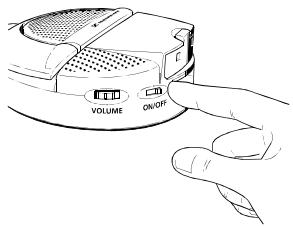
Adjusting the volume
Set the volume of your sound source to a medium value. With some devices, the volume for the headphone output can be regulated separately.
Use the VOLUME control on the right earpiece to adjust the headphones' volume.
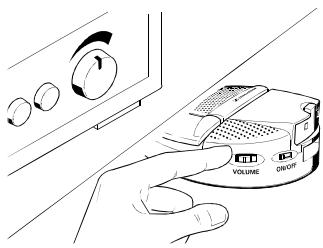
Adjusting the receiver channel
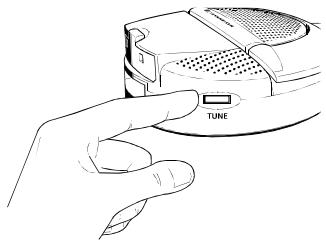
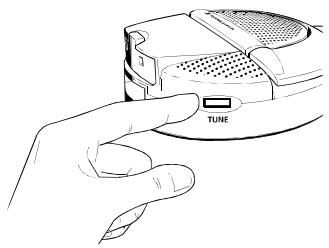
First switch on the transmitter (see section Where to place the transmitter). Then switch on the headphone receiver - as soon as the receiver is switched on it automatically tunes itself to the first strong signal found (normally the transmitter frequency). If, for some reason, the selected channel is not the correct one (eg:
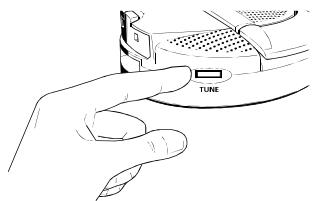
because of interference or another nearby system), press the TUNE button on the earpiece and the auto-tune function will re-tune to the next strong signal. Repeat this until you can hear the audio signal loud and clear. If you decide to change the transmitter channel, the receiver search tuning must be re-started by pressing the TUNE button on the headphones again.
Changing the transmission channel
To avoid interference caused by the simultaneous operation of several transmitters, select a different channel on each transmitter. Depending on the system variant, two or three switchable transmission channels are available. To select a channel, press the CHANNEL button until the desired LED or LED combination lights up:
![graph TD A["Human Robot"] --> B["Human Robot"] C["Human Robot"] --> D["Human Robot"] E["Human Robot"] --> F["Human Robot"] G["Human Robot"] --> H["Human Robot"] I["Human Robot"] --> J["Human Robot"] K["Human Robot"] --> L["Human Robot"] M["Human Robot"] --> N["Human Robot"] O["Human Robot"] --> P["H…](/content/2025/01/95584/images/273b0cd7efb92b2bdf3aed35a1580f07f54d10021c12f1fc830778a4c9a71b64.jpg)
LED 1
channel 1 active
LED 2
channel 2 active
LED 1 and 2
channel 3 active (except 863 MHz version).
Complete freedom of movement
It is not necessary that transmitter and headphone receiver are in a direct line of sight, so you can move around freely in the home or outside in the garden. One transmitter can be used to transmit to several receivers on the same frequency.
Additional headphones with the designation HDR 85 are available from your specialist
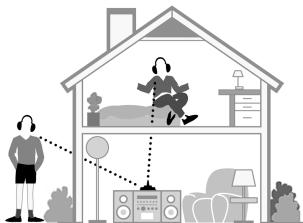
dealer. Please make sure to choose headphones with the same frequency range as the transmitter you are using (see type plate on the bottom of the transmitter).
Charging the accupack
For charging the accupack, place the headphones into the transmitter's charging compartment (nb: make sure the headphones are inserted the correct way round. The Sennheiser logo on the headband must be readable looking from the front - see diagram. The charging contacts are on the RH earpiece of the headphones - these are placed on the corresponding contacts in the LH indentation of the transmitter, the one next to the “charge” light). The red LED on the transmitter must light up to show charging is taking place.
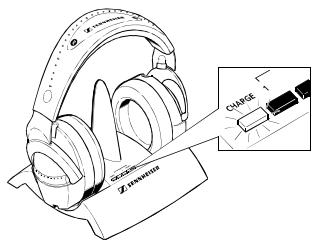
Always store the headphones on the transmitter to ensure that they are fully charged when they are needed. The headphones are automatically switched off by the charging process.
BA 151 spare accupack
When the headphones' accupack is going flat (noise, interference and distortion are sure signs of a flat accupack), recharge the accupack. After an initial charging of 24 hours, the normal charging time is 14 hours. A fully charged accupack has an operating time of approx. 3.5 hours. Place the discharged accupack in the charging compartment at the back of the transmitter and use the spare accupack in the meantime.
Additional BA 151 spare accupacks can be charged via the L 151-2 charger (available from your specialist dealer).
Before disposing of an old and exhausted accupack, make sure that it is totally discharged by using it until the device switches off. To protect the environment, only dispose of totally exhausted accupacks.
HiDyn plus™
This device is equipped with HiDyn plus TM , Sennheiser's noise reduction system that reduces noise and interference in wireless transmission systems.
Additional information
The audio transmission technology used with this device is basically that of a radio. According to today's scientific knowledge, the radio waves emitted by this device are not harmful to humans or animals.
ATTENTION: LISTENING AT HIGH VOLUME LEVELS FOR LONG PERIODS CAN PERMANENTLY DAMAGE YOUR HEARING.
This device has been designed for use with stereo devices. For connection to mono devices, please use a stereo to mono jack plug available from most audio accessory shops.
Use a soft cloth or, if necessary, a damp wash-leather for cleaning the devices. Do not use aggressive cleansing agents.
Varnish or furniture polish may attack the rubber feet of the transmitter's charging unit. As these could stain your furniture, place the transmitter on a non-slip pad.
If problems occur...
Are all connections properly made?
Are the headphones and sound source switched on and is the volume correctly adjusted?
Have you charged the accupack for at least 20 minutes?
Are you too far from the transmitter? (if so, move closer)
Choose a different channel.
Adjust the setting with the TUNE button.
If the problem persists, please contact your specialist dealer for assistance.
Never open the device!
Only use original Sennheiser spare parts and accessories. Components from other manufacturers (e.g. for mains unit or accupack) may cause damage to the device and will invalidate the guarantee.
Accessories
The following accessories are available from your specialist dealer:
Spare accupack BA 151
Charger L 151-2
Additional headphones HDR 85
Technical data
Modulation FM, stereo
Transmitter
Power supply 12 V DC via plug-in mains unit
Power consumption approx. 1 VA
RF output power typ. up to 10 mW (0.75 mW with 925 MHz version)
Signal-to-noise ratio typ. > 85 dBA
Frequency range see type plate located on the bottom of transmitter
Channels 3 (2 with 863 MHz version)
Audio connector 3.5 mm / 1 / 4 " (6.3 mm) stereo jack plug, (925 MHz version supplied with jack to 2 x phono plug)
Charging compartments 1, for BA 151 accupack
Weight approx. 186 g incl. accupack
Dimensions approx. 155 x 153 x 105 mm
Receiver
Max. sound pressure level 101 dB
THD < 0.5 % (at 1 kHz and nom. deviation)
Power supply 2.4 V via BA 151 accupack
Current consumption 24.5 mA
Operating time approx. 3.5 hrs per accupack
Weight approx. 160 g incl. accupack
Dimensions approx. 150 x 80 x 200 mm
Zulassung
This device has been type-approved to EN 300 220-1 Nov.97 and is in compliance with the applicable CE standards and regulations.
Certification
Product Designation:
T30-4; T40-4; T60-4; T80-4
Product Description:
Wireless Headphone Transmitter
Product Manufacturer:
Sennheiser electronic GmbH & Co. KG
Am Labor 1
30900 Wedemark
Specifications and test reports:
| Specification | Test report no. & date | Name of test laboratory | Notes |
| EN 300 220-1, V1.2.11 Nov. 1997 | 2_1326-A/99;17.06.1999 | by CETECOM ICT | conform |
Statement
This equipment fulfils the requirements or parts thereof in the above mentionend specifications.
By decree Vfg 28/2000, issued in the Official Journal 6/2010 of the Regulierungsbehörde für Telekommunikation und Post, CETECOM ICT Services is authorized to act as Notified Body in accordance with the R&TTE Directive 1999/5/EC of 09. March 1999
Place, Date of issue


CETECOM. ICT Services GmbH, Unterlöchheimer Straße 6-10, D-56117 Saarbrücken, Germany
CETECOM ICT Services GmbH

CERTIFICATE OF CONFORMITY
Registration-No.:
E811222M-CC
Number of annexes: —
Certificate Holder:
Sennheiser electronic GmbH & Co. KG
Am Labor 1
30900 Wedemark
Product Designation:
T30-8; T40-8; T60-8; T80-8
Product Description:
Wireless Headphone Transmitter
Product Manufacturer:
Seabelser electronic GmbH & Co. KG
Am Labor 1
30500 Wedemark
Specifications and test reports
| Specification | Test report no. & date | Name of test laboratory | Notes |
| EN 300 220-1,V1,2,1;No. 1997 | 2_1534-A/99;17.08.1999 | by CETECOM ICT | conform |
Statement
This equipment fulfils the requirements or parts thereof in the above mentionend specifications.
By decree Vfg 28/2009, issued in the Official Journal 6/2010 of the Regulierungsbehörde für Telekommunikation und Post, CETECOM ICT Services is authorized to act as Notified Body in accordance with the R&TTE Directive 1999/S/EC of 09. March 1999
Place, Date of Issue


When using this product within the European Union, but outside the country of purchase, you must inform yourself about the type approval regulations in the country of use. You must also check whether or not the product needs to be licensed by the national approval authorities. Radio regulations vary from country to country and what is legal in the country of purchase is not necessarily legal in another EU country.
Exigences R&TTE
Subject to alterations
INHALT UND ANSCHLÜSSE / SYSTEM COMPONENTS AND CONNECTIONS / ELEMENTS DU SYSTEME ET RACCORDEMENT / INDICE E COLLEGAMENTO / CONTENIDO Y CONEXIONES / INHOUD EN AANSLUITING
Instruction manual 7
Notice d'emploi 11
Réglage du volume
This device has been type-approved to EN 300 220-1 Nov.97 and is in compliance with the applicable CE standards and regulations.
Certification
Product Designation:
T30-4; T40-4; T60-4; T80-4
Product Description:
Wireless Headphone Transmitter
Product Manufacturer:
Sennheiser electronic GmbH & Co. KG
Am Labor 1
30900 Wedemark
Specifications and test reports:
| Specification | Test report no. & date | Name of test laboratory | Notes |
| EN 300 220-1, V1.2.11 Nov. 1997 | 2_1326-A/99;17.06.1999 | by CETECOM ICT | conform |
Statement
This equipment fulfils the requirements or parts thereof in the above mentionend specifications.
By decree Vfg 28/2000, issued in the Official Journal 6/2010 of the Regulierungsbehörde für Telekommunikation und Post, CETECOM ICT Services is authorized to act as Notified Body in accordance with the R&TTE Directive 1999/5/EC of 09. March 1999
Place, Date of issue


CETECOM. ICT Services GmbH, Unterlöchheimer Straße 6-10, D-56117 Saarbrücken, Germany
CETECOM ICT Services GmbH

CERTIFICATE OF CONFORMITY
Registration-No.:
E811222M-CC
Number of annexes: —
Certificate Holder:
Sennheiser electronic GmbH & Co. KG
Am Labor 1
30900 Wedemark
Product Designation:
T30-8; T40-8; T60-8; T80-8
Product Description:
Wireless Headphone Transmitter
Product Manufacturer:
Seabelser electronic GmbH & Co. KG
Am Labor 1
30500 Wedemark
Specifications and test reports
| Specification | Test report no. & date | Name of test laboratory | Notes |
| EN 300 220-1,V1,2,1;No. 1997 | 2_1534-A/99;17/08.1999 | by CETECOM ICT | conform |
Statement
This equipment fulfils the requirements or parts thereof in the above mentionend specifications.
By decree Vfg 28/2009, issued in the Official Journal 6/2010 of the Regulierungsbehörde für Telekommunikation und Post, CETECOM ICT Services is authorized to act as Notified Body in accordance with the R&TTE Directive 1999/S/EC of 09. March 1999
Place, Date of Issue


When using this product within the European Union, but outside the country of purchase, you must inform yourself about the type approval regulations in the country of use. You must also check whether or not the product needs to be licensed by the national approval authorities. Radio regulations vary from country to country and what is legal in the country of purchase is not necessarily legal in another EU country.
Exigences R&TTE
Subject to alterations
INHALT UND ANSCHLÜSSE / SYSTEM COMPONENTS AND CONNECTIONS / ELEMENTS DU SYSTEME ET RACCORDEMENT / INDICE E COLLEGAMENTO / CONTENIDO Y CONEXIONES / INHOUD EN AANSLUITING
Instruction manual 7
Notice d'emploi 11
Volume
This device has been type-approved to EN 300 220-1 Nov.97 and is in compliance with the applicable CE standards and regulations.
Certification
Product Designation:
T30-4; T40-4; T60-4; T80-4
Product Description:
Wireless Headphone Transmitter
Product Manufacturer:
Sennheiser electronic GmbH & Co. KG
Am Labor 1
30900 Wedemark
Specifications and test reports:
| Specification | Test report no. & date | Name of test laboratory | Notes |
| EN 300 220-1, V1.2.11 Nov. 1997 | 2_1326-A/99;17.06.1999 | by CETECOM ICT | conform |
Statement
This equipment fulfils the requirements or parts thereof in the above mentionend specifications.
By decree Vfg 28/2000, issued in the Official Journal 6/2010 of the Regulierungsbehörde für Telekommunikation und Post, CETECOM ICT Services is authorized to act as Notified Body in accordance with the R&TTE Directive 1999/5/EC of 09. March 1999
Place, Date of issue


CETECOM. ICT Services GmbH, Unterlöchheimer Straße 6-10, D-56117 Saarbrücken, Germany
CETECOM ICT Services GmbH

CERTIFICATE OF CONFORMITY
Registration-No.:
E811222M-CC
Number of annexes: —
Certificate Holder:
Sennheiser electronic GmbH & Co. KG
Am Labor 1
30900 Wedemark
Product Designation:
T30-8; T40-8; T60-8; T80-8
Product Description:
Wireless Headphone Transmitter
Product Manufacturer:
Seabelser electronic GmbH & Co. KG
Am Labor 1
30500 Wedemark
Specifications and test reports
| Specification | Test report no. & date | Name of test laboratory | Notes |
| EN 300 220-1,V1,2,1;No. 1997 | 2_1534-A/99;17/08.1999 | by CETECOM ICT | conform |
Statement
This equipment fulfils the requirements or parts thereof in the above mentionend specifications.
By decree Vfg 28/2009, issued in the Official Journal 6/2010 of the Regulierungsbehörde für Telekommunikation und Post, CETECOM ICT Services is authorized to act as Notified Body in accordance with the R&TTE Directive 1999/S/EC of 09. March 1999
Place, Date of Issue


When using this product within the European Union, but outside the country of purchase, you must inform yourself about the type approval regulations in the country of use. You must also check whether or not the product needs to be licensed by the national approval authorities. Radio regulations vary from country to country and what is legal in the country of purchase is not necessarily legal in another EU country.
Exigences R&TTE
Subject to alterations
INHALT UND ANSCHLÜSSE / SYSTEM COMPONENTS AND CONNECTIONS / ELEMENTS DU SYSTEME ET RACCORDEMENT / INDICE E COLLEGAMENTO / CONTENIDO Y CONEXIONES / INHOUD EN AANSLUITING
Instruction manual 7
Notice d'emploi 11
Volumen
This device has been type-approved to EN 300 220-1 Nov.97 and is in compliance with the applicable CE standards and regulations.
Certification
Product Designation:
T30-4; T40-4; T60-4; T80-4
Product Description:
Wireless Headphone Transmitter
Product Manufacturer:
Sennheiser electronic GmbH & Co. KG
Am Labor 1
30900 Wedemark
Specifications and test reports:
| Specification | Test report no. & date | Name of test laboratory | Notes |
| EN 300 220-1, V1.2.11 Nov. 1997 | 2_1326-A/99;17.06.1999 | by CETECOM ICT | conform |
Statement
This equipment fulfils the requirements or parts thereof in the above mentionend specifications.
By decree Vfg 28/2000, issued in the Official Journal 6/2010 of the Regulierungsbehörde für Telekommunikation und Post, CETECOM ICT Services is authorized to act as Notified Body in accordance with the R&TTE Directive 1999/5/EC of 09. March 1999
Place, Date of issue


CETECOM. ICT Services GmbH, Unterlöchheimer Straße 6-10, D-56117 Saarbrücken, Germany
CETECOM ICT Services GmbH

CERTIFICATE OF CONFORMITY
Registration-No.:
E811222M-CC
Number of annexes: —
Certificate Holder:
Sennheiser electronic GmbH & Co. KG
Am Labor 1
30900 Wedemark
Product Designation:
T30-8; T40-8; T60-8; T80-8
Product Description:
Wireless Headphone Transmitter
Product Manufacturer:
Seabelser electronic GmbH & Co. KG
Am Labor 1
30500 Wedemark
Specifications and test reports
| Specification | Test report no. & date | Name of test laboratory | Notes |
| EN 300 220-1,V1,2,1;No. 1997 | 2_1534-A/99;17/08.1999 | by CETECOM ICT | conform |
Statement
This equipment fulfils the requirements or parts thereof in the above mentionend specifications.
By decree Vfg 28/2009, issued in the Official Journal 6/2010 of the Regulierungsbehörde für Telekommunikation und Post, CETECOM ICT Services is authorized to act as Notified Body in accordance with the R&TTE Directive 1999/S/EC of 09. March 1999
Place, Date of Issue


CETECOM ICT Services GmbH, Unterwaltheimer Suisse 6-10, D-66117 Saarbrücken, Germany
R&TTE-Anforderungen
When using this product within the European Union, but outside the country of purchase, you must inform yourself about the type approval regulations in the country of use. You must also check whether or not the product needs to be licensed by the national approval authorities. Radio regulations vary from country to country and what is legal in the country of purchase is not necessarily legal in another EU country.
Exigences R&TTE
Subject to alterations
INHALT UND ANSCHLÜSSE / SYSTEM COMPONENTS AND CONNECTIONS / ELEMENTS DU SYSTEME ET RACCORDEMENT / INDICE E COLLEGAMENTO / CONTENIDO Y CONEXIONES / INHOUD EN AANSLUITING
Instruction manual 7
Notice d'emploi 11
Volume
![graph TD A["CHANNEL"] --> B["Human"] C["CHANNEL"] --> D["Robot"] E["CHANNEL"] --> F["Human"] G["CHANNEL"] --> H["Robot"]](/content/2025/01/95584/images/05332ceed9bbf44a451a0dd28ffce1dc963ec139dd83f49225469e1cd453fe44.jpg)
LED 1
LED 2
LED 1 en 2
Kanaal 1 actief
Kanaal 2 actief
Accu opladen
Reserve-accu BA 151
This device has been type-approved to EN 300 220-1 Nov.97 and is in compliance with the applicable CE standards and regulations.
Certification
Product Designation:
T30-4; T40-4; T60-4; T80-4
Product Description:
Wireless Headphone Transmitter
Product Manufacturer:
Sennheiser electronic GmbH & Co. KG
Am Labor 1
30900 Wedemark
Specifications and test reports:
| Specification | Test report no. & date | Name of test laboratory | Notes |
| EN 300 220-1, V1.2.11 Nov. 1997 | 2_1326-A/99;17.06.1999 | by CETECOM ICT | conform |
Statement
This equipment fulfils the requirements or parts thereof in the above mentionend specifications.
By decree Vfg 28/2000, issued in the Official Journal 6/2010 of the Regulierungsbehörde für Telekommunikation und Post, CETECOM ICT Services is authorized to act as Notified Body in accordance with the R&TTE Directive 1999/5/EC of 09. March 1999
Place, Date of issue


CETECOM. ICT Services GmbH, Unterlöchheimer Straße 6-10, D-56117 Saarbrücken, Germany
CETECOM ICT Services GmbH

CERTIFICATE OF CONFORMITY
Registration-No.:
E811222M-CC
Number of annexes: —
Certificate Holder:
Sennheiser electronic GmbH & Co. KG
Am Labor 1
30900 Wedemark
Product Designation:
T30-8; T40-8; T60-8; T80-8
Product Description:
Wireless Headphone Transmitter
Product Manufacturer:
Seabelser electronic GmbH & Co. KG
Am Labor 1
30500 Wedemark
Specifications and test reports
| Specification | Test report no. & date | Name of test laboratory | Notes |
| EN 300 220-1,V1,2,1;No. 1997 | 2_1534-A/99;17/08.1999 | by CETECOM ICT | conform |
Statement
This equipment fulfils the requirements or parts thereof in the above mentionend specifications.
By decree Vfg 28/2009, issued in the Official Journal 6/2010 of the Regulierungsbehörde für Telekommunikation und Post, CETECOM ICT Services is authorized to act as Notified Body in accordance with the R&TTE Directive 1999/S/EC of 09. March 1999
Place, Date of Issue


CETECOM ICT Services GmbH, Unterwaltheimer Suisse 6-10, D-66117 Saarbrücken, Germany
R&TTE-Anforderungen
When using this product within the European Union, but outside the country of purchase, you must inform yourself about the type approval regulations in the country of use. You must also check whether or not the product needs to be licensed by the national approval authorities. Radio regulations vary from country to country and what is legal in the country of purchase is not necessarily legal in another EU country.
Exigences R&TTE
Subject to alterations
- INHALT UND ANSCHLÜSSE / SYSTEM COMPONENTS AND CONNECTIONS / ELEMENTS DU SYSTEME ET RACCORDEMENT / INDICE E COLLEGAMENTO / CONTENIDO Y CONEXIONES / INHOUD EN AANSLUITING
- LAUTSTÄRKE
- EMPFANG EINSTELLEN
- SENDEKANAL WECHSELN
- AKKU LADEN
- CERTIFICATION
- CERTIFICATE OF CONFORMITY
- EXIGENCES R&TTE
- SYSTEM COMPONENTS AND CONNECTIONS
- WHERE TO PLACE THE TRANSMITTER
- SWITCHING THE HEADPHONE RECEIVER ON
- SWITCHING THE HEADPHONE RECEIVER OFF
- ADJUSTING THE VOLUME
- ADJUSTING THE RECEIVER CHANNEL
- CHANGING THE TRANSMISSION CHANNEL
- COMPLETE FREEDOM OF MOVEMENT
- CHARGING THE ACCUPACK
- BA 151 SPARE ACCUPACK
- HIDYN PLUS™
- ADDITIONAL INFORMATION
- ATTENTION: LISTENING AT HIGH VOLUME LEVELS FOR LONG PERIODS CAN PERMANENTLY DAMAGE YOUR HEARING
- IF PROBLEMS OCCUR
- ACCESSORIES
- TECHNICAL DATA
- TRANSMITTER
- RECEIVER
- ZULASSUNG
- RÉGLAGE DU VOLUME
- VOLUME
- VOLUMEN
- R&TTE-ANFORDERUNGEN
- ACCU OPLADEN
- RESERVE-ACCU BA 151
Brand : SENNHEISER
Model : RS 85
Category : Wireless Headphones