
AP-830 - Headphones Sven - Free user manual and instructions
Find the device manual for free AP-830 Sven in PDF.


| Type | Headphones |
| Model | AP-830 |
| Brand | Sven |
| Driver diameter | 40 mm |
| Frequency response | 20 – 20000 Hz |
| Impedance | 32 Ω |
| Sensitivity | 105 dB |
| Cable length | 1.2 m |
| Connector | 3.5 mm stereo jack |
| Weight | 150 g |
| Dimensions (W x D x H) | 160 x 80 x 200 mm |
| Material | Plastic, synthetic leather |
| Color | Black |
| Adjustable headband | Yes |
| Padded ear cushions | Yes |
| Foldable | Yes |
| Wired/Wireless | Wired |
| Power source | None (passive) |
| Maintenance | Wipe with dry cloth, avoid moisture |
| Safety precautions | Do not listen at high volumes for prolonged periods |
Frequently Asked Questions - AP-830 Sven
User questions about AP-830 Sven
0 question about this device. Answer the ones you know or ask your own.
Ask a new question about this device
Download the instructions for your Headphones in PDF format for free! Find your manual AP-830 - Sven and take your electronic device back in hand. On this page are published all the documents necessary for the use of your device. AP-830 by Sven.
USER MANUAL AP-830 Sven
natural_image
Black electronic headboard with 'DIGITAL' branding and model name 'SVEN AD-805 C' (no additional text or symbols visible)natural_image
Black digital head ear with attached microphone, no visible text or symbols on the headset bodynatural_image
Black digital head ear with attached microphone, no visible text or symbols on the headset bodyCongratulations on your purchase of the SVEN headphones!
APPLICATION
Sven AP-830 stereo headphones with a microphone are designed for operation with PC sound cards and other compatible systems. They can be also used in VoIP telephony, video conferencing, multimedia applications, interactive games, for speech recognition and learning foreign languages.
SAFETY PRECAUTIONS
- Don't use the stereo headphones while driving.
- Don’t use the stereo headphones at high volume for a long time (more than 15 minutes), as this may cause hearing impairment.
SPECIAL FEATURES
- 2*3.5 mm (3 pin) connector for PC
• Volume control on the cable - Adjustable headband
• Leather ear cushions - SVEN PNC passive noise cancelling system
- Connect the headphones connector to the audio output jack of your audio source (PC, laptop, MP3 player), as shown in Fig. 1.
- Insert the microphone connector into the microphone input jack of your audio source.
- Adjust the headphones volume level as desired with the volume control wheel on the cable.
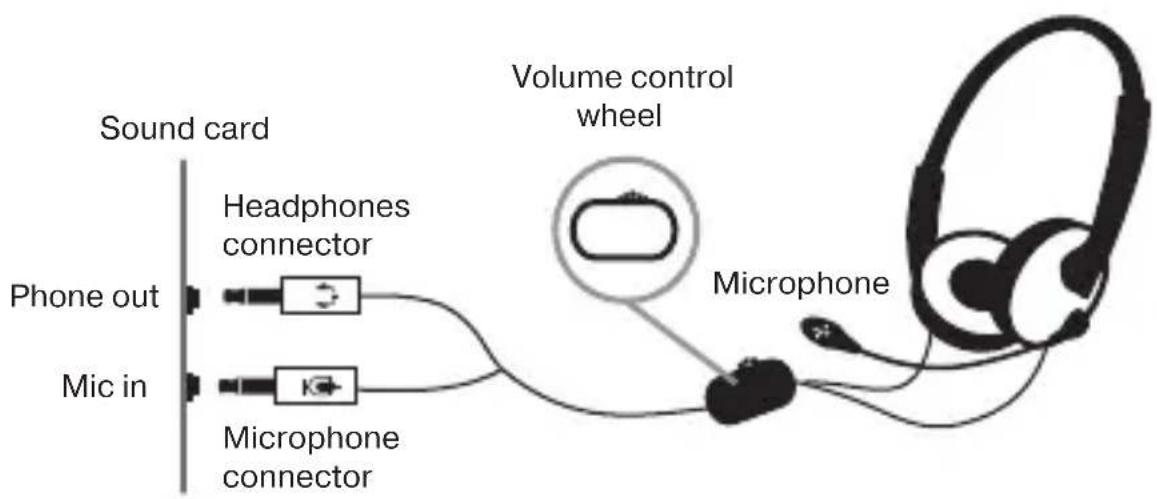
Fig. 1. Connection diagram
TECHNICAL SPECIFICATIONS
| Parameter, measurement unit | Value |
| Sensitivity, dB | headphones: 100 ± 4microphone: -60 ± 3 |
| Frequency range, Hz | headphones: 20 – 20,000microphone: 50 – 16,000 |
| Membrane, mm | ∅ 40 |
| Connector type | ∅ 2*3.5 MM (3 pin) stereo mini-jack |
| Cable length, m | 2.5 |
| Weight, g | 190 |
Notes:
- Technical specifications given in this table are supplemental information and cannot give occasion to claims.
- Technical specifications are subject to change without notice due to the improvement of SVEN production.
Technical support is on www.sven.fi.
Manufacturer: SVEN PTE. LTD, 176 Joo Chiat Road, N° 02-02, Singapore, 427447. Produced under the control of Oy Sven Scandinavia Ltd. 15, Kotolahdentie, Kotka, Finland, 48310. Made in China.
® Registered Trademark of Oy SVEN
Scandinavia Ltd. Finland.
AP-830
Brand : Sven
Model : AP-830
Category : Headphones