
TalkBand B5 - Smartwatch HUAWEI - Free user manual and instructions
Find the device manual for free TalkBand B5 HUAWEI in PDF.


| Product type | Connected bracelet with detachable Bluetooth earbud |
| Brand | Huawei |
| Model | TalkBand B5 |
| Dimensions (earbud) | 44.5 x 22.2 x 9.1 mm |
| Weight (earbud) | Approximately 18 g |
| Power supply | Built-in lithium-ion battery, charging via dedicated cable |
| Battery life | Approximately 5 days in normal use |
| Connectivity | Bluetooth 4.2 |
| Main features | Bluetooth calls, activity tracking (steps, calories), sleep tracking TruSleep, call and message notifications |
| Water resistance | Resistant to splashes, rain, and hand washing (do not swim or shower) |
| Display | AMOLED touchscreen 1.13 inches |
| Sensors | Accelerometer, heart rate sensor, sleep detection |
| Compatibility | Android 4.4+ and iOS 9.0+ with Huawei Health app |
| Box contents | TalkBand B5 earbud, bracelet, charging cable, replacement ear tips, quick start guide |
| Charging | Dedicated charging connector, dry the port before charging |
| Care and cleaning | Wipe if wet, avoid pressurized water, do not use in shower or pool |
| Safety | Do not use while driving, keep at least 15 cm away from pacemakers, avoid extreme temperatures |
| Spare parts and repairability | Replacement ear tips available, battery not user-replaceable, authorized service center for repair |
| General information | Software version JNS-BX9:1.0.0.35, compliant with EU and REACH/RoHS, manufacturer Huawei Technologies Co., Ltd. |
Frequently Asked Questions - TalkBand B5 HUAWEI
User questions about TalkBand B5 HUAWEI
0 question about this device. Answer the ones you know or ask your own.
Ask a new question about this device
Download the instructions for your Smartwatch in PDF format for free! Find your manual TalkBand B5 - HUAWEI and take your electronic device back in hand. On this page are published all the documents necessary for the use of your device. TalkBand B5 by HUAWEI.
USER MANUAL TalkBand B5 HUAWEI
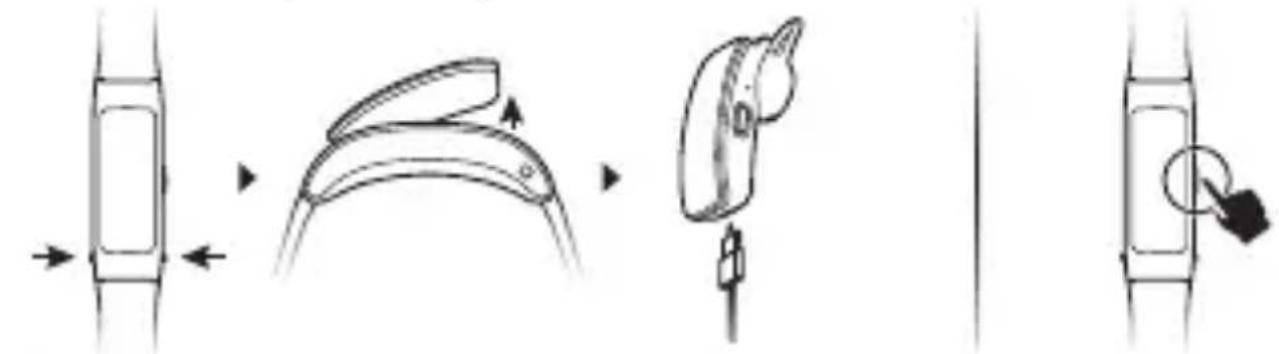
1. Powering on the band
Press the release buttons on the sides to detach the headset unit. Remove the headset unit from the strap. Connect the charger to the charging port on the headset unit. The headset unit will automatically power on. You can also press and hold the side button to power on your band.
flowchart
graph LR
    A["Rectangular State"] --> B["Curvedic State"]
    B --> C["Switch Icon"]
    C --> D["Lock Icon"]

- Wipe the charging port dry before charging.
- Use the dedicated charging cable that comes with your band to charge it.
2. Downloading Huawei Health
To download and install the Huawei Health app, search for Huawei Health in the Google Play Store or Apple App Store.
3. Pairing your band with your phone
From the device list in the Huawei Health app, select the band and follow the onscreen instructions to complete the pairing.
4. Bluetooth calling
Your Band will vibrate to notify you when there is an incoming call. Remove the headset to automatically answer a call.

You can use your phone to call a contact and use the headset to start the conversation. You can also make a call quickly through your Band call records.
5. More
You can view basic fitness/sleep data on the screen of your Band, or view more detailed information in the Huawei Health app.
Your band supports TruSleep to monitor your sleep more accurately. You can enable this feature in the app.
You can wear your Band when you are washing your hands or in the rain. Wipe your Band dry immediately if it gets wet to avoid water from getting inside the microphone.

- Do not use your Band when washing a car, swimming, diving, scuba diving, or showering.
- You can adjust or remove your strap.
6. Getting help
View the online help in the Huawei Health app for more information about connection and functions, as well as usage tips.
Copyright © Huawei Technologies Co., Ltd. 2019. All rights reserved.
THIS DOCUMENT IS FOR INFORMATION PURPOSE ONLY, AND DOES NOT CONSTITUTE ANY KIND OF WARRANTIES.
Trademarks and Permissions

HUAWEI, HUAWEI

are trademarks or registered
trademarks of Huawei Technologies Co., Ltd.
The Bluetooth ^® word mark and logos are registered trademarks owned by Bluetooth SIG, Inc. and any use of such marks by Huawei Technologies Co., Ltd. is under license.
Other trademarks, product, service and company names mentioned may be the property of their respective owners.
Privacy Policy
To better understand how we protect your personal information, please see the privacy policy at http://consumer.huawei.com/privacy-policy, or read the privacy policy and service terms using the app after pairing it with your phone.
Blasting Caps and Areas
Turn off your mobile phone or wireless device when in a blasting area or in areas posted turn off "two-way radios" or "electronic devices" to avoid interfering with blasting operations.
Operation and safety
- Using an unapproved or incompatible power adapter, charger or battery may cause fire, explosion or other hazards.
- Ideal temperatures are -10^ to +45^ .
- Some wireless devices may affect the performance of hearing aids or pacemakers. Consult your service provider for more
information.
- Pacemaker manufacturers recommend that a minimum distance of 15 cm be maintained between a device and a pacemaker to prevent potential interference with the pacemaker. If using a pacemaker, hold the device on the side opposite the pacemaker and do not carry the device in your front pocket.
- Keep the device and the battery away from excessive heat and direct sunlight. Do not place them on or in heating devices, such as microwave ovens, stoves, or radiators.
- Observe local laws and regulations while using the device. To reduce the risk of accidents, do not use your wireless device while driving.
- To prevent damage to your device's parts or internal circuits, do not use it in dusty, smoky, damp or dirty environments or near magnetic fields.
- Do not use, store or transport the device where flammables or explosives are stored (in a gas station, oil depot, or chemical plant, for example). Using your device in these environments increases the risk of explosion or fire.
- Dispose of this device, the battery, and accessories according to local regulations. They should not be disposed of in normal household waste. Improper battery use may lead to fire, explosion, or other hazards.
- The device has undergone testing and has demonstrated water and dust resistance in certain environments.
- The device has a built-in, non-removable battery, do not attempt to remove the battery, otherwise the device may be damaged. To replace the battery, take the device to an authorized service center.
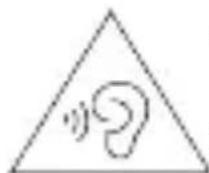
To prevent possible hearing damage, do not listen at high volume levels for long periods.
- Using a headset at high volumes may damage your hearing. To reduce this risk, lower the headset volume to a safe and comfortable level.
- Exposure to high volumes while driving may cause distraction and increase your risk of an accident.
- If the battery leaks, ensure that the electrolyte does not make direct contact with your skin or eyes. If the electrolyte touches your skin or splashes into your eyes, immediately flush with clean water and consult a doctor.
- When charging the device, make sure the power adapter is plugged into a socket near the devices and is easily accessible.
- Unplug the charger from electrical outlets and the device when not in use.
Disposal and recycling information
natural_image
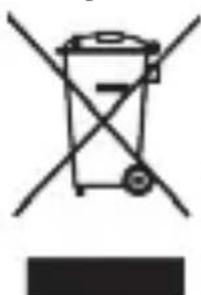
Symbol of a trash bin crossed with two crossed lines, no text or numbers presentThe crossed-out wheeled-bin symbol on your product, battery, literature or packaging reminds you that all electronic products and batteries must be taken to separate waste collection points at the end of their working lives; they must not be disposed of in the normal waste stream with household garbage. It is the responsibility of the user to dispose of the equipment using a designated collection point or service for separate recycling of waste electrical and electronic equipment (WEEE) and batteries according to local laws.
Proper collection and recycling of your equipment helps ensure
electrical and electronic equipment (EEE) waste is recycled in a manner that conserves valuable materials and protects human health and the environment, improper handling, accidental breakage, damage, and/or improper recycling at the end of its life may be harmful for health and environment. For more information about where and how to drop off your EEE waste, please contact your local authorities, retailer or household waste disposal service or visit the website http://consumer.huawei.com/en/.
Reduction of hazardous substances
This device and any electrical accessories are compliant with local applicable rules on the restriction of the use of certain hazardous substances in electrical and electronic equipment, such as EU REACH, RoHS and Batteries (where included) regulations, etc. For declarations of conformity about REACH and RoHS, please visit our web site
http://consumer.huawei.com/certification.
EU regulatory conformance
RF exposure requirements
Important safety information regarding radio frequency (RF) radiation exposure:
RF exposure guidelines require that the device should be used for wrist and ear worn. Failure to observe this guideline may result in RF exposure exceeding limits.
Statement
Hereby, Huawei Technologies Co., Ltd. declares that this device JNS-BX9 is in compliance with the essential requirements and other relevant provisions of Directive 2014/53/EU.
The most recent and valid version of the DoC (Declaration of Conformity) can be viewed at http://consumer.huawei.com/certification.
This device may be operated in all member states of the EU.
Observe national and local regulations where the device is used.
This device may be restricted for use, depending on the local network. Frequency bands and power
(a) Frequency bands in which the radio equipment operates: Some bands may not be available in all countries or all areas. Please contact the local carrier for more details.
(b) Maximum radio-frequency power transmitted in the frequency bands in which the radio equipment operates: The maximum power for all bands is less than the highest limit value specified in the related Harmonized Standard.
The frequency bands and transmitting power (radiated and/or conducted) nominal limits applicable to this radio equipment are as follows: JNS-BX9: Bluetooth: 12 dBm
Accessories and Software Information
It is recommended that the following accessories should be used:
Charging cable
Spare earcaps
The product software version is JNS-BX9: 1.0.0.35
Software updates will be released by the manufacturer to fix bugs or enhance functions after the product has been released.
All software versions released by the manufacturer have been verified and are still compliant with the related rules.
All RF parameters (for example, frequency range and output power) are not accessible to the user, and cannot be changed by the user.
For the most recent information about accessories and software, please see the DoC (Declaration of Conformity) at http://consumer.huawei.com/certification.
Please go to More > Regulatory Information on the device to view the E-label screen.
Please visit http://consumer.huawei.com/en/support/hotline for recently updated hotline and email address in your country or region.
Disposal and recycling information(India)
natural_image
Simple line drawing of a trash bin with crossed lines indicating no waste or discharge (no text or symbols)This symbol on the device or on its packaging indicates that the device (including its electrical accessories) should not be disposed of as normal household garbage. Do not dispose this product with Regular Household, Dry and Wet Waste. If you wish to discard this product, please contact on the details below and follow the correct method of disposal as guided:
E-mail: service.hw.in@huawei.com, Service hotline: 1800-209-6555 (Toll-Free) 9AM-9PM all 7 days, except public holidays.
For further information, log on to:
Huawei E-waste Policy:
http://consumer.huawei.com/in/support/e-waste-process-policy/.
Official Recycling Partner: Reteck Envirotech Private Limited.
Plot-4A, Sanghi Udyog, Near Navade Railway Station, TalPanvel, Dist. - Raigad, Taloja MIDC-410208.
info@reteck.in
www.reteck.in / www.reteck.co
Reduction of hazardous substances(India)
This device is compliant with the E-Waste (Management) Rules, 2016 and does not contain hazardous substances regulated by the Rules except for the applications of exemption.
Caution: Any changes or modifications to this device not expressly approved by Huawei Technologies Co., Ltd. for compliance could void the user's authority to operate the equipment.
natural_image
Symbol of a trash bin with crossed-out lanes and a blank rectangular base (no text or labels)JNS-BX9: Bluetooth: 12 dBm
flowchart
graph LR
    A["Device Placement"] --> B["Anatomical Change"]
    B --> C["Anatomical Insertion"]
    C --> D["Anatomical Dissection with Surgery"]
    D --> E["Dissection with Anatomical Infection"]

natural_image
Symbol of a trash bin crossed with no text or numbers, representing environmental restriction (no text present)JNS-BX9: Bluetooth: 12 dBm
natural_image
Symbol of a trash bin with crossed lines indicating no waste or restriction, and a solid black rectangle below (no text or labels)flowchart
graph LR
    A["Left side: Vertical pipe with arrow"] --> B["Top view: Top part of curved structure"]
    B --> C["Right side: Top part with arrow and valve"]
    C --> D["Bottom side: Right side with valve and arrow"]

natural_image
Simple line drawing of a triangular warning symbol with an ear inside (no text or labels)natural_image
Simple line drawing of a trash bin with crossed lines indicating no waste or restriction (no text or symbols)flowchart
graph LR
    A["Left side: Rectangle"] --> B["Right side: Pan"]
    B --> C["Mid-Right: Magnified Device"]
    C --> D["Right side: Apple with Arrow"]
    D --> E["Bottom side: Screen with Arrow"]

natural_image
Symbol of a trash bin crossed with no text or numbers, representing waste sorting or disposal (no text present)JNS-BX9: Bluetooth: 12 dBm
natural_image
Simple line drawing of a trash bin with no text or symbolsJNS-BX9: Bluetooth: 12 dBm
액세서리 및 소프트웨어 정보
flowchart
graph LR
    A["Start"] --> B["Ankle Placement"]
    B --> C["Close-up of laparoscopic area"]
    C --> D["Close-up of surgical placement"]
    D --> E["End"]

natural_image
Symbol of a trash bin crossed with a diagonal line and a horizontal bar below (no text or labels)flowchart
graph LR
    A["Rectangular Component"] --> B["Curvedic Package"]
    B --> C["Curved Bag with Arrow"]
    C --> D["Device with Arrow and Button"]
    D --> E["Final Device"]

Copyright © Huawei Technologies Co., Ltd. 2019. All rights reserved.
natural_image
Simple line drawing of a triangular warning symbol with an ear inside, no text or labels present.natural_image
Symbol of a trash bin crossed with no text or numbers, representing waste sorting or disposal (no text present)JNS-BX9: Bluetooth: 12 dBm
2. Tài Huawei Health
natural_image
Simple line drawing of a trash bin with crossed lines indicating no waste or discharge (no text or symbols)JNS-BX9: Bluetooth: 12 dBm
flowchart
graph LR
    A["Vehicle with left-side arrow"] --> B["Car seatbelt switch"]
    B --> C["Car seatbelt belt switch"]
    C --> D["Car seatbelt belt belt switch"]
    D --> E["Car seatbelt belt belt belt switch"]
i
© Huawei Technologies Co., Ltd. 2019.
- 326000:00: 3260000:00: -10°C 0 +45°C 326000: [###]
natural_image
Simple line drawing of a trash bin with crossed lines indicating no waste or discharge (no text or symbols)
flowchart
graph LR
    A["Device Position"] --> B["Assembly"]
    B --> C["Assembly with Arrow"]
    C --> D["Assembly with Arrow"]
    D --> E["Assembly with Arrow"]

natural_image
Simple line drawing of a triangular warning symbol with an ear inside (no text or labels)natural_image
Diagram showing four different types of device or device components with directional arrows indicating movement or assembly (no text or symbols present)natural_image
Simple line drawing of a trash bin with crossed lines indicating no waste or plastic discharge (no text or symbols)
natural_image
Diagram showing four different mechanical or electrical component configurations with directional arrows indicating movement (no text or symbols present)96725188_04

HUAWEI

R-NZ
- Powering on the band
- Downloading Huawei Health
- Pairing your band with your phone
- Bluetooth calling
- More
- Getting help
- Privacy Policy
- Blasting Caps and Areas
- Operation and safety
- Disposal and recycling information
- Reduction of hazardous substances
- EU regulatory conformance
- RF exposure requirements
- Statement
- Accessories and Software Information
- Disposal and recycling information(India)
- Reduction of hazardous substances(India)
- 액세서리 및 소프트웨어 정보
- Copyright © Huawei Technologies Co., Ltd. 2019. All rights reserved.
- Tài Huawei Health
Brand : HUAWEI
Model : TalkBand B5
Category : Smartwatch