
C120P - Loudspeaker YORKVILLE - Free user manual and instructions
Find the device manual for free C120P YORKVILLE in PDF.


| Product Type | Powered Loudspeaker / Active Monitor |
| Model | C120P |
| Brand | Yorkville |
| Frequency Response | 65 Hz - 19 kHz (±3 dB) |
| Power Output | 80 Watts (burst average) |
| Maximum SPL | 101 dB @ 1 meter |
| Dimensions (W x D x H) | 7.0 x 6.5 x 10.25 inches (17.8 x 16.5 x 26 cm) |
| Weight | 8.8 lbs (4.0 kg) |
| Input Connectors | 1/4-inch TRS Balanced Line In, 1/8-inch Stereo Line In |
| Output Connector | 1/8-inch Stereo Link Out |
| Controls | Gain, Treble, Bass, Mono/Stereo switch |
| Indicators | Blue LED (power), Orange LED (clip/limit) |
| Limiter | Built-in, non-defeatable |
| Warranty | 1 year against manufacturing defects |
| Paintable | Yes (remove grill and mask components) |
| Recommended Use | Stage monitoring, personal PA, studio |
Frequently Asked Questions - C120P YORKVILLE
User questions about C120P YORKVILLE
0 question about this device. Answer the ones you know or ask your own.
Ask a new question about this device
Download the instructions for your Loudspeaker in PDF format for free! Find your manual C120P - YORKVILLE and take your electronic device back in hand. On this page are published all the documents necessary for the use of your device. C120P by YORKVILLE.
USER MANUAL C120P YORKVILLE
Yorkville C120P Loudspeaker

Thank you for choosing Yorkville's Coliseum C120P powered monitors for your sound reproduction needs. We hope you will take the time to read this brief manual and if you have any questions we can be reached online at info@yorkville.com.
Front LEDs
Blue LED - indicates power ON.
Orange LED - indicates "clip/limit." The built-in non-defeatable LIMITER helps to prevent distortion. It operates continuously and has minimal effect on sound quality, however its operation does indicate that the C120P is at maximum volume and may be on the verge of distortion if the Orange LED is on more of the time than simply flashing on peaks.
Controls and Connections (top to bottom)
TREBLE Control - adjust this control clockwise or counter-clockwise to increase or decrease high frequency emphasis. A center setting is neutral. (See BASS control.)
GAIN Control - turn this control clockwise to increase the volume, or counterclockwise to reduce volume. If the orange "clip/limit" LED on the front of the enclosure illuminates, reducing the GAIN setting will decrease its activity.
BASS Control - adjust this control clockwise or counter-clockwise to increase or decrease the emphasis in the low frequency region. A center setting is neutral.
Tip: if the orange "clip/limit" LED is illuminating overtly at comparatively low sound levels, it may be a result of the BASS being turned up too far. Reducing the BASS setting will help to compensate. This also applies to the TREBLE control.
14 -Inch BALANCED LINE Input - this is for monophonic, Tip-Ring-Sleeve (balanced), line-level signals and is not internally connected to the STEREO LINK OUTPUT. Its main purpose is to provide the mixing technician with the ability to isolate mixer outputs, or patches, through a dedicated monitor.
Balancing code is; Tip= (+) 0° phase, Ring= (-) 180° phase, and Sleeve=Ground.
Tip: if you want to add-on a second C120P, connect your signal source via the 1/8-inch CD STEREO LINE IN jack, not the 14 -inch BALANCED LINE input. Now you can interconnect the second C120P as stated below.)
1/8-inch STEREO LINK OUTPUT Jack - use a 1/8-inch stereo cable here to connect an additional C120P. Make sure the MONO/STEREO button is in the STEREO position (down) otherwise the additional speaker will not work.

MONO/STEREO Pushbutton - regulates the signal coming in through the 1/8-inch CD/STEREO LINE IN jack. Use the STEREO setting when the audio signal is stereo and/or interconnecting an additional C120P. Use the MONO setting when no other C120P is linked and you want Left and Right blended.
Tip: if you are adding another C120P via the STEREO LINK OUTPUT jack, be sure the MONO/STEREO pushbutton is in the STEREO position so that the additional speaker will work
1/8-inch CD/STEREO LINE IN Jack - this is where you connect your stereo tuner/amplifier, CD player or tape deck. When used in the recording studio, you may run a mono line from the mixer to this input rather than the 14 -inch BALANCED LINE IN jack.
Additional
Your C120P can be painted. We suggest that you remove the front grill and mask off the speakers and rear connector panel to avoid getting paint on them. If you want to paint the C120P without removing the grill, a small amount of overspray will not hurt the components. However, too much paint will destroy your speakers permanently.
Frequency response: 65Hz to 19KHz +/-3dB
Power: 80 Watts burst avg. power
Max SPL: 101dB @ 1 meter
Connectors: 1/4-inch Phone and 1/8-inch Mini Jack
Dimensions: W 17.8 x D 6.5 x H 10.25 inches
W 17.8cm x D 16.5cm x H 26cm
Weight: 8.8 lbs (4.0 kg.)
REAL Gear.

REAL People.
*This Product is Warranted against manufacturing defects for a period of one year
www.yorkville.com
Yorkville Sound
550 Granite Court
Pickering, Ontario
L1W-3Y8 CANADA
Yorkville Sound Inc.
4625 Witmer Industrial Estate
Niagara Falls, New York
14305 USA
Yorkville C120P Loudspeaker

Sample Configurations
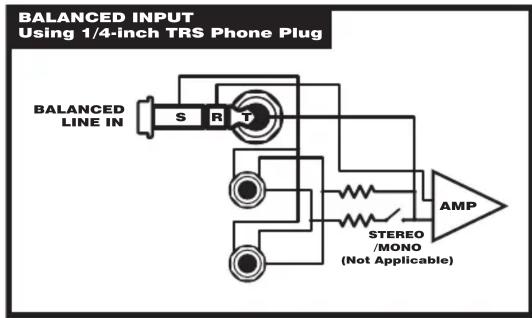


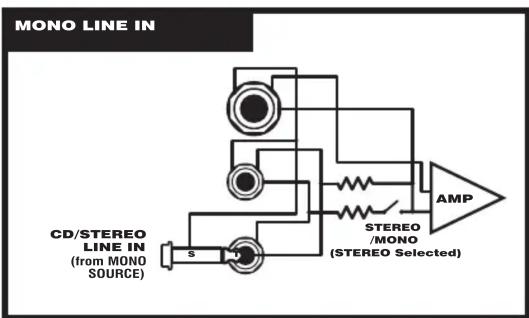
flowchart
graph TD
    A["CD/STEREO LINE IN (from MONO SOURCE)"] --> B["Amplifier"]
    B --> C["STEREO /MONO (STEREO Selected)"]
    C --> D["AMP"]
    style A fill:#f9f,stroke:#333
    style D fill:#ccf,stroke:#333
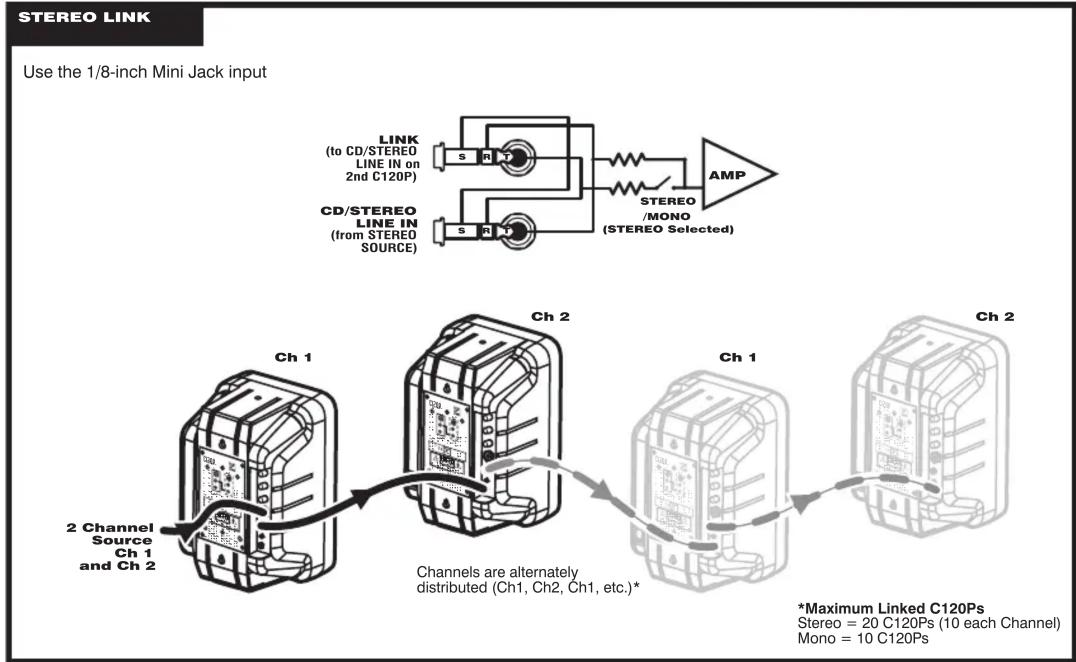
flowchart
graph TD
    A["Use the 1/8-inch Mini Jack input"] --> B["Ch 1"]
    B --> C["Ch 2"]
    C --> D["Ch 1"]
    D --> E["Ch 2"]
    E --> F["*Maximum Linked C120Ps\nStereo = 20 C120Ps (10 each Channel)\nMono = 10 C120Ps"]
    G["Link (to CD/STEREO LINE IN on 2nd C120P)"] --> H["AMP"]
    I["CD/STEREO LINE IN (from STEREO SOURCE)"] --> J["STEREO/MONO (STEREO Selected)"]
    K["2 Channel Source Ch 1 and Ch 2"] --> L["Channels are alternately distributed (Ch1, Ch2, Ch1, etc).*"]
REAL Gear.

REAL People.
*This Product is Warranted against manufacturing defects for a period of one year
www.yorkville.com
Yorkville Sound 550 Granite Court Pickering, Ontario L1W-3Y8 CANADA
Yorkville Sound Inc. 4625 Witmer Industrial Estate Niagara Falls, New York 14305 USA
Connectors: 1/4-inch Phone and 1/8-inch Mini Jack
Dimensions: 7.0" W x 6.5" D x 10.25" H
W 17.8cm x D 16.5cm x H 26cm
Niagara Falls, New York
14305 USA
Niagara Falls, New York
14305 USA


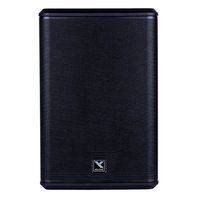
Brand : YORKVILLE
Model : C120P
Category : Loudspeaker