
SGK 3 A1 - Keyboard SILVERCREST - Free user manual and instructions
Find the device manual for free SGK 3 A1 SILVERCREST in PDF.


| Product Type | Gaming Keyboard |
| Brand | SilverCrest |
| Model | SGK 3 A1 |
| Dimensions (L x W x H) | 440 x 140 x 45 mm |
| Net Weight (incl. Hand rest) | Approx. 1050 g |
| Power Supply | USB (5 V DC, 330 mA max) |
| Cable Length | Approx. 1.8 m |
| Key Layout | Standard with multimedia and function keys (FN) |
| Backlight | RGB with multiple lighting modes (e.g., continuous gradient, running light, pulsating) |
| Multimedia Keys | My Computer, Internet browser, Calculator, Music player, Playback control (previous, next, play/pause, stop) |
| Additional Features | Win key lock, FN key combinations for lighting control |
| Operating Systems | Microsoft Windows 7/8/10, Mac OS |
| Operating Temperature | -10 °C to +60 °C |
| Storage Temperature | -10 °C to +60 °C |
| Operating Humidity | 40 to 80 % RH |
| Storage Humidity | 20 to 90 % RH |
| Material | Plastic (not specified in detail) |
| Safety Features | Protection against moisture, no open flame, no immersion; keep away from heat sources |
| Cleaning Instructions | Use a soft, dry cloth; mild detergent if needed; disconnect USB before cleaning |
| Warranty | 3 years from date of purchase (defects in materials or workmanship) |
| Intended Use | Private use as input device for computers; not for industrial/commercial or tropical climates |
| Repairability | No user-serviceable parts; repairs by qualified personnel only |
Frequently Asked Questions - SGK 3 A1 SILVERCREST
User questions about SGK 3 A1 SILVERCREST
0 question about this device. Answer the ones you know or ask your own.
Ask a new question about this device
Download the instructions for your Keyboard in PDF format for free! Find your manual SGK 3 A1 - SILVERCREST and take your electronic device back in hand. On this page are published all the documents necessary for the use of your device. SGK 3 A1 by SILVERCREST.
USER MANUAL SGK 3 A1 SILVERCREST
GAMING-KEYBOARD PELINÄPPÄIMISTÖ SGK 3 A1
GB
GAMING KEYBOARD
Operation and safety notes
SE
GAMING-TANGENTBORD
GB Operation and safety notes Page 5
Warnings and symbols used ...... Page 6
Introduction Page 7
Intended use...... Page 8
Trademark notices Page 8
Scope of delivery Page 9
Safety notes...... Page 9
Description of parts ...... Page 12
Technical data Page 13
Before use Page 13
Operation Page 14
Lighting mode key combination ...... Page 15
Function keys...... Page 18
Storage when not in use Page 19
Cleaning Page 19
Troubleshooting Page 19
Disposal Page 20
Warranty Page 21
| Warnings and symbols usedThese instructions for use contain the following symbols and warnings: | |
 | DANGER! This symbol with the signal word “DANGER” indicates a hazard with a high level of risk which, if not avoided, will result in serious injury or death. |
 | WARNING! This symbol with the signal word “WARNING” indicates a hazard with a medium level of risk which, if not avoided, could result in serious injury. |
 | CAUTION! This symbol with the signal word “CAUTION” indicates a hazard with a low level of risk which, if not avoided, could result in minor or moderate injury. |
 | ATTENTION! This symbol with the signal word “ATTENTION” indicates a possible property damage. |
| i | NOTE: This symbol with the signal word “NOTE” provides additional useful information. |
| --- | Direct current |
GAMING KEYBOARD
Introduction
We congratulate you on the purchase of your new product. You have chosen a high quality product. The instructions for use are part of the product. They contain important information concerning safety, use and disposal. Before using the product, please familiarise yourself with all of the safety information and instructions for use. Only use the product as described and for the specified applications. If you pass the product on to anyone else, please ensure that you also pass on all the documentation with it.
●Intended use
This GAMING KEYBOARD (hereinafter referred to as "product") is an information technology device. This product is intended as an input device for the connection at the USB port of a computer. This product may only be used privately and not for industrial or commercial purposes. Furthermore, this product may not be used in tropical climates. Any other use is considered improper. Any claims resulting from improper use or due to unauthorised modification of the product will be considered un-warranted. Any such use is at your own risk.
●Trademark notices
■ ^® iUSB Registered trademark of USB Implementers Forum, Inc.
■ Windows registered trademark of Microsoft Corporation in the United States and other countries.
■ Mac OS is trademarks of Apple Inc., registered in the U.S. and other countries.
The SilverCrest trademark and trade name is the property of their respective owners.
■ Any other names and products are trademarks or registered trademarks of their respective owners.
- Scope of delivery
1 Gaming keyboard (including Hand rest)
1 Instructions for use
1 Quick start guide

Safetynotes
Before using the product, please familiarize yourself with all of the safety instructions and instructions for use! When passing this product on to others, please also include all the documents!

WARNING! DANGER TO LIFE AND RISK OF ACCIDENT FOR INFANTS AND CHILDREN!

DANGER! RISK OF SUFFOCATION! Never leave children unsupervised with the packaging material. The packaging material poses a suffocation hazard. Children frequently underestimate the dangers. The packaging material is not a toy.
This product may be used by children age 8 years and up as well as by persons with reduced physical, sensory or mental capacities or lacking experience and/or knowledge, so long as they are supervised or instructed in the safe use of the product and understand the associated risks. Do not allow children to play with the product. Cleaning and user maintenance should not be performed by children without supervision. The product is not a toy.

ATTENTION! RISK OF PROPERTY DAMAGE
- Check the product before every use! Discontinue use if any damage to the product or the connection cable is detected!
This product does not contain any parts which can be serviced by the user. - Do not place burning candles or other open fire on or next to the product.
If you notice smoke or unusual noise or odour, immediately disconnect the USB connection. - Do not pull the plug out of the connection socket by the cable, but always touch the plug.
■ Sudden temperature changes may cause condensation inside the product. In this case, allow the product to acclimate for some time before using it again to prevent short circuits! - Do not operate the product near heat sources, e.g. radiators or other devices emitting heat!
- Do not throw the product into fire and do not expose to high temperatures.
- Do not try to open the product! It has no internal parts requiring maintenance.

ATTENTION! Ensure that
- no direct heat sources (e.g. heating) can affect the produc
■ any contact with splashed and dripping water and corrosi liquids is avoided and the product is not operated in the vicinity of water. In particular, the product should never be submerged in liquid; do not place any vessels filled with liquid, for example, vases or drinks, on or near the product.
■ the product is not used in the immediate vicinity of magnet fields (e.g. speakers).
- no fire sources (e.g. burning candles) are placed on or ne the product.
■ no objects are inserted into the interior of the product.
■ the product is never subjected to excessive shocks and vibrations.
- no objects are placed on a connected cable and that a cable is not connected over sharp edges because it could be damaged otherwise.

NOTE: The user must take regular breaks during the use of the product, in case of pain in the hands, arms or shoulder and neck area the work must be interrupted and some stretching exercises must be done.
It is necessary to repair the product if they have been damaged in any way, for example, if the housing is damaged, if liquid or objects have penetrated the product or
if the product has been exposed to rain or moisture.
Repair work is also required if the product is not working properly or has been dropped. If smoke is produced, or there are any unusual sounds or smells, turn the product off immediately. In such cases, the product should not be used until they have been inspected by authorised service personnel. Only have the product repaired by qualified personnel. Never open the housing of the product.
●Description of parts
Please refer to the fold out page.
Function keys 1 - 5
1 My computer key
6 Backlight on / off key
2 Internet browser key
7 Hand rest
3 Calculator key
8 Windows key
4 Music player key
9 Instructions for use
5 Music playback function keys
10 Quick start guide
i NOTE:
1) Regional keyboard layouts may differ.
2) All special functions and/or multi-assignments can only be used with using the "Fn" function key.
●Technical data
Operating systems: Microsoft and Mac OS
^® Windows ^® 7 / 8 / 10
Required ports: 1 free USB port
Working voltage: 5 V

Working current: 330 mA (max.)
Cable length: approx. 1.8 m
Operating temperature: -10 to +60 °C
Operating humidity: 40 to 80 % RH
Storage temperature: -10 to +60 °C
Storage humidity: 20 to 90 % RH
Dimension (L x W x H): 440 x 140 x 45 mm
Net weight (incl. Hand rest): approx. 1050 g
The specification and design may be changed without notification.
●Before use
NOTE:
■ Before use, verify the package contents are complete and undamaged!
- All parts have to be unpacked and the packaging material has to be removed completely.
Operation
Setup your product
- Turn ON your computer.
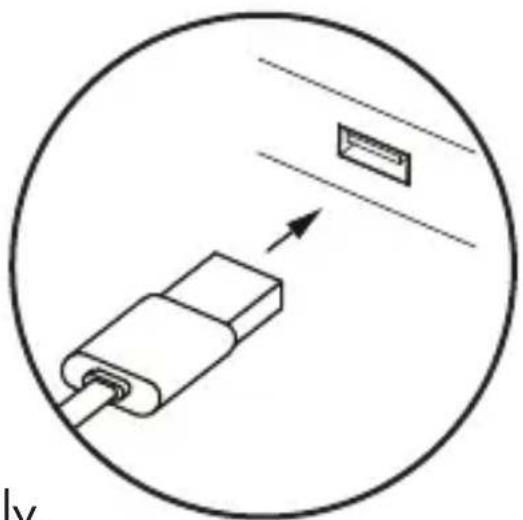
- Connect your gaming keyboard to any free USB port of your computer.
- Your gaming keyboard will be recognized by your computer and, if necessary, the necessary drivers will be installed automatically. The keyboard is now ready for use.
natural_image
Diagram of a USB connector with an arrow indicating direction, enclosed in a circle (no text or symbols)The keys in the top row are reserved for special functions.
Corresponding to the symbols used, they can be used to directly control program features such as media playback. Depending on the Mac OS used, the keys may have slightly different functions. Note that depending on the version of the operating system, some standard and special keys may not work with the described function e.g. Windows key.

NOTE: This keyboard fulfills all functions of a normal standard keyboard, the special functions and settings can be reached via the function key "Fn".
Please refer to "Function key" Section for more details on the special functions that differ from a standard keyboard
●Lighting mode key combination
To access the special functions, press and hold the "Fn" function key and then press the desired key.
Key combinations Functions
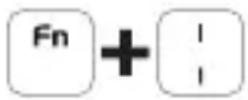 | Continuous light with colour gradient, color from left to right is Green, Yellow, Orange, Red, Purple, Blue, Cyan |
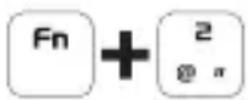 | Interval running light |
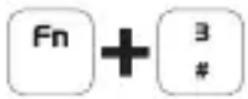 | Pulsating color change |
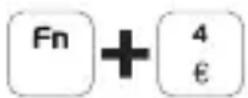 | DEFAULT - Running light |
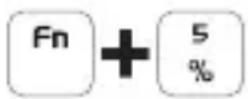 | Running light from the middle to both sides (low speed) |
 | Running light from right to left, Filling |
Key combinations Functions
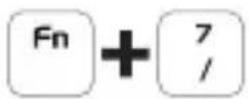 | Running light from the middle to both sides (high speed) |
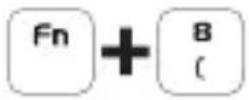 | Key confirmation; when a key is released, a running light to the right and left is triggered. |
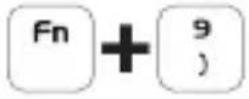 | All light modes of functions FN+2 to FN+7 are called up one after the other. |
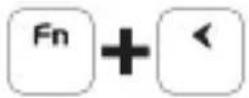 | In FN+4 to FN+8, changes the flashing light direction to the right |
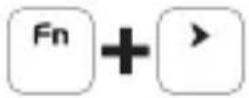 | In FN+4 to FN+8, changes the flashing light direction to the left |
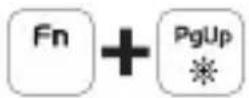 | In modes FN+2 bis FN+8 the light intensity increases, when the maximum brightness is reached the 3 status LEDs on the keyboard flash. |
Key combinations Functions
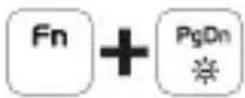
In modes FN+2 bis FN+8 the light intensity decreases, when the minimum brightness is reached the 3 status LEDs on the keyboard flash.
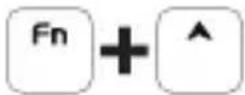
Increases the LED running speed
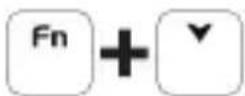
Decreases the LED running speed

Enables / disables LED lighting effects
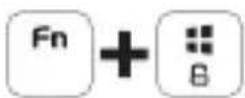
Locks Win key to avoid switching between Windows and Apps.
●Function keys
To access these functions, press the FN key and the desired key simultaneously.
Keys Functions
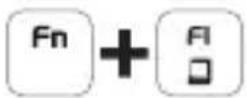 | This key combination opens the “My Computer (Windows Explorer)” of the computer. |
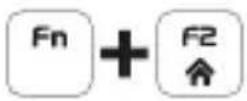 | Starts the default web browser and loads the home page |
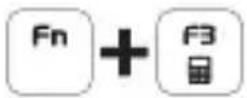 | Opens the calculator |
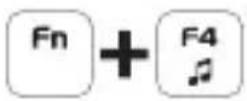 | Starts the default media player programme |
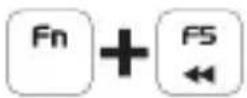 | Back to previous track |
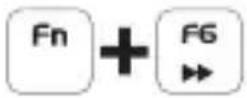 | Go to next track |
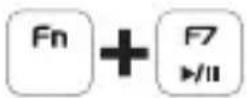 | Play / pause track. |
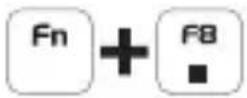 | Stop track |
●Storage when not in use
Store the product in a dry indoor location protected from direct sunlight, preferably in its original packaging.
●Cleaning
■ Disconnect the USB connection before cleaning!
■ Only clean the outside of the product using a soft, dry clot
At persistent soiling, a mild cleaning agent can be used.
■ Only use a clean, dry cloth for cleaning the product and never use any corrosive liquids. Use a slightly moistened cloth and a mild cleaning agent to remove stubborn dirt.
●Troubleshooting
Problem Solution
The product does not work properly.
Option 1: Make sure the USB plug is fully plugged into a USB port and the computer is on or try to use a different USB port.
Option 2: Re-insert the USB plug into the USB port.
●Disposal
Packaging:
The packaging is made of environmentally friendly materials, which may be disposed of through your local recycling facilities.
Product:
Contact your municipality for information on how to dispose of your worn-out product.

The adjacent symbol of a crossed out dustbin on wheels indicates this product is subject to Directive 2012/19/EU. This directive states at the end of the life this product must not be disposed of through regular household refuse but must be returned to special collection sites, recycling depots or waste management companies.
This disposal is free of charge to you.
Protect the environment and dispose of properly.
The product is recyclable, subject to extended manufacturer responsibility, and collected separately.
●Warranty
The product has been manufactured to strict quality guidelines and meticulously examined before delivery. In the event of product defects you have legal rights against the retailer of this product. Your legal rights are not limited in any way by our warranty detailed below.
The warranty for this product is 3 years from the date of purchase. Should this product show any fault in materials or manufacture within 3 years from the date of purchase, we will repair or replace it – at our choice – free of charge to you.
The warranty period begins on the date of purchase. Please keep the original sales receipt in a safe location. This document is required as your proof of purchase. This warranty becomes void if the product has been damaged, or used or maintained improperly.
The warranty applies to defects in material or manufacture. This warranty does not cover product parts subject to normal wear, thus possibly considered consumables (e.g. batteries) or for damage to fragile parts, e.g. switches, rechargeable batteries or glass parts.
CE
natural_image
Diagram showing a connector with an arrow pointing to a rectangular component, enclosed in a circle (no text or symbols)⚠️ WARNING! FARA FÖR LIV OCH RISK FÖR OLYCKOR FÖR SMÅBARN OCH BARN!
natural_image
Diagram showing a connector with an arrow pointing to a rectangular component, enclosed in a circle (no text or symbols)natural_image
Diagram of a USB connector with an arrow pointing to a rectangular component, enclosed in a circle (no text or symbols)●Tastenkombinationen
- GAMING-KEYBOARD PELINÄPPÄIMISTÖ SGK 3 A1
- GAMING KEYBOARD
- GAMING-TANGENTBORD
- Warnings and symbols used ...... Page 6
- Introduction Page 7
- Intended use...... Page 8
- Trademark notices Page 8
- Scope of delivery Page 9
- Safety notes...... Page 9
- Description of parts ...... Page 12
- Technical data Page 13
- Before use Page 13
- Operation Page 14
- Lighting mode key combination ...... Page 15
- Function keys...... Page 18
- Storage when not in use Page 19
- Cleaning Page 19
- Troubleshooting Page 19
- Disposal Page 20
- Warranty Page 21
- Introduction
- ●Intended use
- ●Trademark notices
- - Scope of delivery
- Safetynotes
- WARNING! DANGER TO LIFE AND RISK OF ACCIDENT FOR INFANTS AND CHILDREN!
- ATTENTION! RISK OF PROPERTY DAMAGE
- ATTENTION! Ensure that
- ●Description of parts
- Function keys 1 - 5
- i NOTE:
- ●Technical data
- ●Before use
- NOTE:
- Operation
- Setup your product
- ●Lighting mode key combination
- Key combinations Functions
- ●Function keys
- ●Storage when not in use
- ●Cleaning
- ●Troubleshooting
- Problem Solution
- ●Disposal
- Packaging:
- Product:
- This disposal is free of charge to you.
- ●Warranty
- ⚠️ WARNING! FARA FÖR LIV OCH RISK FÖR OLYCKOR FÖR SMÅBARN OCH BARN!
- ●Tastenkombinationen
Brand : SILVERCREST
Model : SGK 3 A1
Category : Keyboard