VC9000MS - Vacuum Cleaner Khind - Free user manual and instructions
Find the device manual for free VC9000MS Khind in PDF.


User questions about VC9000MS Khind
0 question about this device. Answer the ones you know or ask your own.
Ask a new question about this device
Download the instructions for your Vacuum Cleaner in PDF format for free! Find your manual VC9000MS - Khind and take your electronic device back in hand. On this page are published all the documents necessary for the use of your device. VC9000MS by Khind.
USER MANUAL VC9000MS Khind
USER MANUAL
SERIAL NO.
KHIND®
Experience More
natural_image
Line drawing of a vacuum cleaner (no text or symbols present)KHIND CARE Mobile App

Mobile App

Download to register for E-Warranty & enjoy hassle-free after-sales services.
1-800-88-0032
khind.com.my
IMPORTANT
Please read this manual carefully before operating this product. Keep this manual handy for further reference.
P/N: 40-51745-00
1

Safety Precaution Information
Safety & Warning Information
- Read the instruction manual carefully and follow the instruction closely.
- This appliance is not intended for use by persons (including children) with reduced physical, sensory or mental capabilities, or lack of experience and knowledge, unless they have been given supervision or instruction concerning use of the appliance by a person responsible for their safety.
Children should be supervised to ensure that they do not play with the appliance. - This appliance is intended for household use only, commercial use will void warranty.
- This appliance is not suitable for outdoors use or on wet surfaces.
- Use this appliance and adaptor with specified voltage as stated on the rating label. Before connecting the appliance to AC mains, made sure the voltage specified corresponds to the AC supply to your house.
- Do not handle the adaptor and appliance with wet hands.
- Do not pull, lift, or carry the appliance by its power cord. Do not excessively bend, stretch, twist, haul and tramp the power cord or place heavy objects on it.
- If the power cord or adaptor is damaged, it must be replaced by the manufacturer, its service agent or similarly qualified persons in order to avoid a hazard.
- Use only the attached parts which are supplied by the manufacturer.
- Do not operate the appliance if any parts appear to be faulty, missing or damaged.
- Do not operate the appliance near a gas stove, kerosene stove, gas cooker, in any space with an open fire, or in an environment with high temperature.
- With any indication of damage or malfunction, please stop using the appliance immediately to avoid hazards. Take it to the authorized service centre for repair. Do not attempt to repair or change any parts by yourself.
- Do not use the appliance without filter in place.
- Do not use the appliance in areas where flammable or combustible liquids may be present.
- Do not insert any objects into openings or covers.
- Keep body away from openings and moving parts.
- This appliance is intended to pick up cold ash from fireplaces, chimneys, ovens, ash-trays, and similar places of ash accumulation.
- ⚠ WARNING: Risk of fire Do not suck up any of the following objects to avoid damages to the product and risk of injuries:
- Any large or broken objects such as glass.
- Burning or hot object such as cigarettes, matches or ashes.
-Spilled liquid - Reactive liquids such as solvents, corrosives or detergents
- Flammable or explosive substances such as alcohol, thinners etc.
- The dust container must be emptied and cleaned before and after each use.
- Do not use paper dust bags or bags made from similar flammable materials.
- Do not rest the vacuum cleaner on flammable or polymeric surfaces, including carpeting and vinyl tile.
- When battery performance drop after some time, please purchase new battery from service centre as replacement.
- Do not litter dispose the battery by own self
- The battery is only applicable for this appliance and it must be charged with adaptor provided.
- Do not insert sharp object or disassemble the battery to avoid short circuit and electric shock.
- It is advisable to turn off the power supply whenever the appliance is fully charged.
Parts Identification
- Power Switch
- Handle Release Button
- Handheld Release Button
- Main Body
- Floor Nozzle
- Wall Mount
- Charger
- Handheld Unit
- Crevice Nozzle
- Nozzle Release Button
- Power Switch
- Charging Indicator
- Dust Container Release Button
- Dust Container
- Fabric Filter
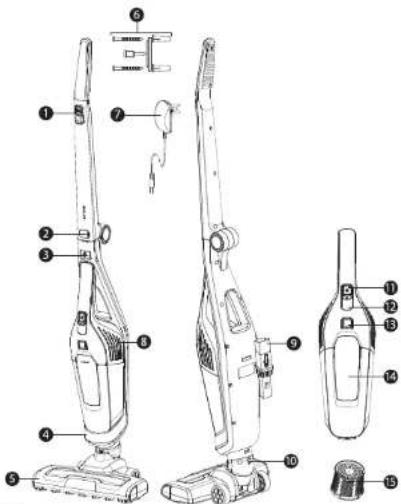
* Pictures are for illustration purpose only.
Specifications
| Model | VC9000MS |
| Voltage | 22.2Vd.c |
| Power | 100W + 20W (with brush) |
| Adapter Input Voltage | AC 100-240V - 50/60Hz |
| Adapter Output Voltage | 26Vd.c |
| Battery Type | Li-ion Battery Pack |
| Battery Voltage | 22.2V 2200mAh |
| Filtration Type | Fabric + Sponge |
| Dust Container Capacity | 0.6L |
| Charging Time | 4-6 Hours |
| Working Time | High Speed: 26min ; Low Speed: 52min |
| Noise Level | 80dB |
| Net Weight | 2.5kg |
| Product Dimension (L x W x H) | 1123 x 285 x 165mm |
* Specifications are subject to change without prior notice.
2
How to Use
Preparation
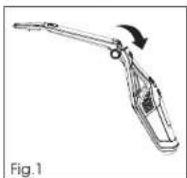
- Unfold the handle from the Main Body until it locks in place. (fig. 1)
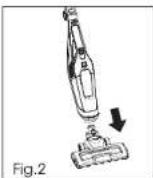
- Line up the nozzle with the Main Body and firmly push into the Main Body until the nozzle locks in place. (fig. 2)
- Normal charging time is 4 - 6 hours.
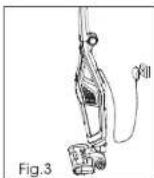
- The indicator light will blink when charging and remain lit when fully charged. (fig. 3)
- Fix the Holder on the wall with the screws and holder provided.
NOTE:
a. To remove the nozzle, press the Nozzle Release Button and pull out from the Main Body.
b. Use the charger supplied with the vacuum cleaner for charging.
c. During charging, the Power Switch must be push to "Off", and it is normal for charge to become warm when charging.
d. Unplug the charger in the event of prolonged absence such as holidays. Recharge the vacuum cleaner again before use as the battery may self-discharged over increased periods of storage.
Operation
Main Body
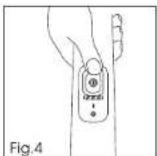
Turn on the vacuum cleaner by sliding the Power Switch to the required settings. (fig. 4).
- Hard Floor: First position of Power Switch, the brush and nozzle LED lights are off.
- Carpet: Second position of Power Switch, the brush and nozzle LED lights are on.
Handheld
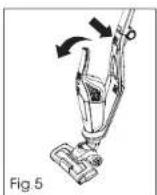
- Push the Handheld Release Button upward, lift the Handheld Unit from the Main Body (fig. 5). Then, turn on the Handheld Unit by sliding the Power Switch forward.
Discharge Indicator
- When the batteries are fully discharged, the indicator will flash for around 20 seconds before the vacuum cleaner switches off automatically.
Crevice Nozzle
- The accessory is stored at the rear area of the Main Body. It fits directly to the Handheld Unit
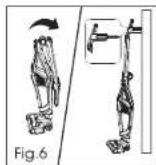
IMPORTANT: During storage and charging, secure your appliance handle into the Holder. (fig. 6).
Maintenance
Empty the Dust Container
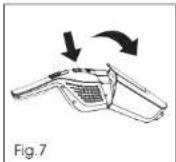
- Push the Handheld Unit Release Button upwards, lift the Handheld Unit from Main Body.
- Press the Dust container Release Button and remove the Dust Container. (fig. 7)
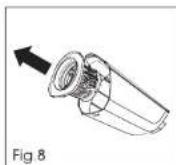
- Remove the filter from the Dust container. (fig. 8)
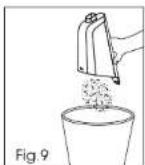
- Turn the Dust Container upside down over to remove the dust and debris. (fig. 9)
- Reassemble the Handheld Unit to the Main Body.
Clean the Filter
- Push the Handheld Release Button upwards, lift the Handheld Unit from the Main Body.
- Press the Dust Container Release Button and remove the Dust Container.
- Remover the filter from Dust Container and clean it.
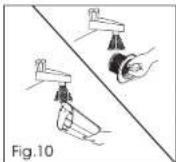
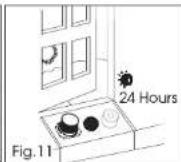
- Wash the filter with warm water and leave it to dry for 24 hours. Once thoroughly dry, reassemble it to the Dust Container. (fig. 10 & 11)
- If required, wash the Dust Container with warm water. Ensure it is fully dry before reassemble to the Main Body.
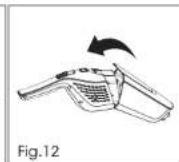
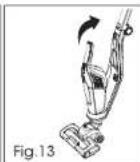
- Reassemble the Handheld Unit to Main Body. (fig. 12 & 13)
NOTE: Do not use hot water or detergents when cleaning filters to avoid damages. Do not use the vacuum cleaner without filter.
IMPORTANT: For optimum performance, always keep the filter clean. Recommend to wash the filter at least once a month.
Change and Clean the Brush
IMPORTANT: Always turn off the vacuum cleaner before removing the brush.
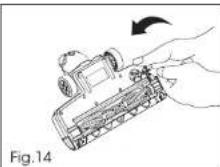
- Turn the lock by using a coin to open position. (Fig. 14).
- Remove the brush cover.
- Remove the brush
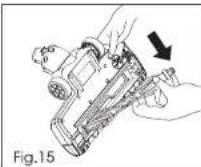
- Clean the brush or replace with a new brush. This can only fit in one direction. (Fig. 15).
- Re-fit the brush cover and lock it with a coin.
Battery Replacement
For reasons of safety, the Li-on batteries in the vacuum cleaner are only replaceable by service centre. When the batteries fail to charge, please contact the customer service centre for further assistance.
Battery Disposal
If the vacuum cleaner is to be disposed, the batteries should be removed. Used batteries should be taken to recycling station and not to disposed with household waste. To remove the batteries, please contact the customer service centre.
Troubleshooting
| Problem | Possible Causes | Solutions |
| Vacuum cleaner could not turn on | The power switch on the unit is not switched to ON | Check if the vacuum cleaner is charged |
| Bad contact to mains power socket / charger jack | Check if the vacuum cleaner is turned on | |
| Loss of suction or no suction | The Dust Container is full | Empty the Dust Container and wash the Filter |
| The Filters are blocked | Remove nozzle and check for any blockages | |
| Vacuum cleaner cannot be charged | This may be a result of long storage periods | Contact customer service for further assistance |

安全注意事项
安全和警告信息
规格
Brand : Khind
Model : VC9000MS
Category : Vacuum Cleaner