IAP-2135 - Air purifier Imarflex - Free user manual and instructions
Find the device manual for free IAP-2135 Imarflex in PDF.


| Product Type | Air Purifier |
| Brand | Imarflex |
| Model | IAP-2135 |
| Rated Voltage | 230V AC |
| Power Consumption (High) | 29W |
| Power Consumption (Medium) | 11W |
| Power Consumption (Low) | 4.5W |
| Power Consumption (Sleep) | 3W |
| Filter System | Pre-filter, H13 HEPA, Activated Carbon |
| CADR (High) | 155 CFM |
| CADR (Medium) | 91 CFM |
| CADR (Low) | 47 CFM |
| CADR (Sleep) | 40 CFM |
| Air Quality Sensor | Yes (Blue, Green, Yellow, Red) |
| Anion Function | Yes |
| Auto Mode | Yes |
| Timer Settings | 2, 4, 8, 12 hours |
| Sleep Mode | Yes |
| Child Lock | Yes (press and hold for 5 seconds) |
| Filter Replacement Indicator | Yes |
| Filter Reset | Yes (press Timer + Speed for 5 seconds) |
| Air Flow | 360° intake and outlet |
| Cleaning | Wipe with damp cloth, do not immerse |
| Recommended Filter Replacement Interval | 6-12 months |
| Safety Features | Keep away from children, do not block air inlet |
Frequently Asked Questions - IAP-2135 Imarflex
User questions about IAP-2135 Imarflex
0 question about this device. Answer the ones you know or ask your own.
Ask a new question about this device
Download the instructions for your Air purifier in PDF format for free! Find your manual IAP-2135 - Imarflex and take your electronic device back in hand. On this page are published all the documents necessary for the use of your device. IAP-2135 by Imarflex.
USER MANUAL IAP-2135 Imarflex
When using electrical appliances, basic safety precautions should always be followed, including the following:
-
Read all instructions carefully.
-
Before using the air purifier, check if the voltage indicated corresponds with the convenience outlet (230Va.c.).
-
Do not use any appliance with a damaged cord or plug. If the cord is damaged it must be replaced with the same type and size or bring the unit to the nearest authorized service center.
-
Place the unit on a flat stable surface, keep it away from the edge of the counter or hang it on a safe place to avoid accidents.
-
Keep curtains, furniture, flammable materials, etc. away from the unit and from the convenience outlet where the unit is plugged in.
-
Do not place on or near a gas stove, an electric burner or in a heated oven.
-
Children should be supervised to ensure that they do not play with the appliance.
-
This appliance is not intended to be used by a person (including children) with reduced physical, sensory or mental capabilities, or lack of experience and knowledge, unless they have been given supervision or instruction concerning the use of the appliance by a person responsible for their safety.
-
After using, switch OFF and unplug the unit from the convenience outlet.
-
Do not immerse the unit in water or in any other liquid.
-
Do not use this unit other than its intended use.
-
In case of malfunctions, please bring the unit to the nearest Imarflex Authorized Service Center.
-
Keep the appliance inlet clear of any items that can block the flow of air, like soft furnishings, curtains, or hanging blinds.
-
Air inlet should be kept a minimum of 38cm away from any wall to allow adequate air flow and circulation.
-
Filter assembly is not washable. Do not immerse any part of the filter assembly in water as this can cause damage to the filter.
-
For household use only; not intended for any business purposes.
-
Save this instruction manual for future reference.
INTRODUCTION:
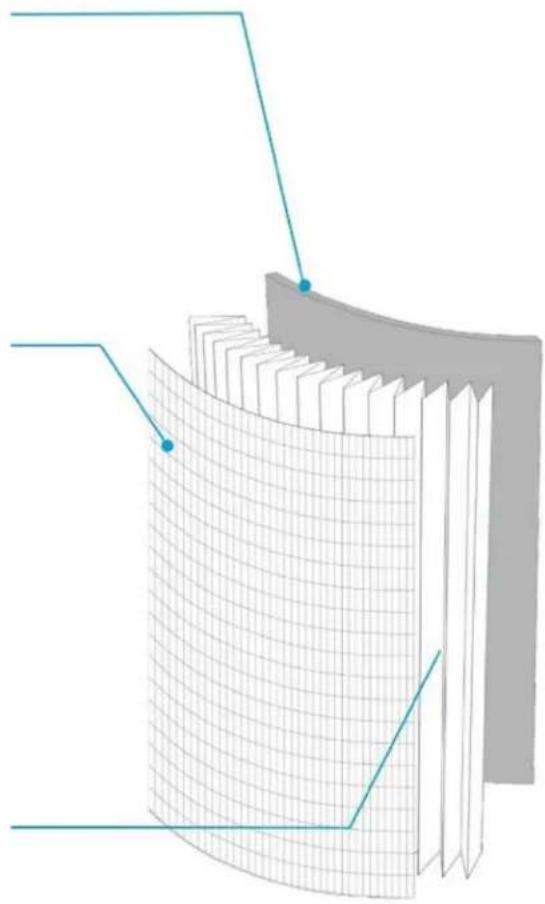
ADVANCE CARBON FILTER
Removes household odors and noxious gases.
PRE-FILTER
Captures large particles, like hair, pet dander and dust.
H13 HEPA FILTER
Captures and reduces up to 99.97% of airborne particles, pollen and other allergens.
natural_image
3D diagram of a curved surface with grid pattern, showing layered structure (no text or symbols)DESCRIPTION OF PARTS:
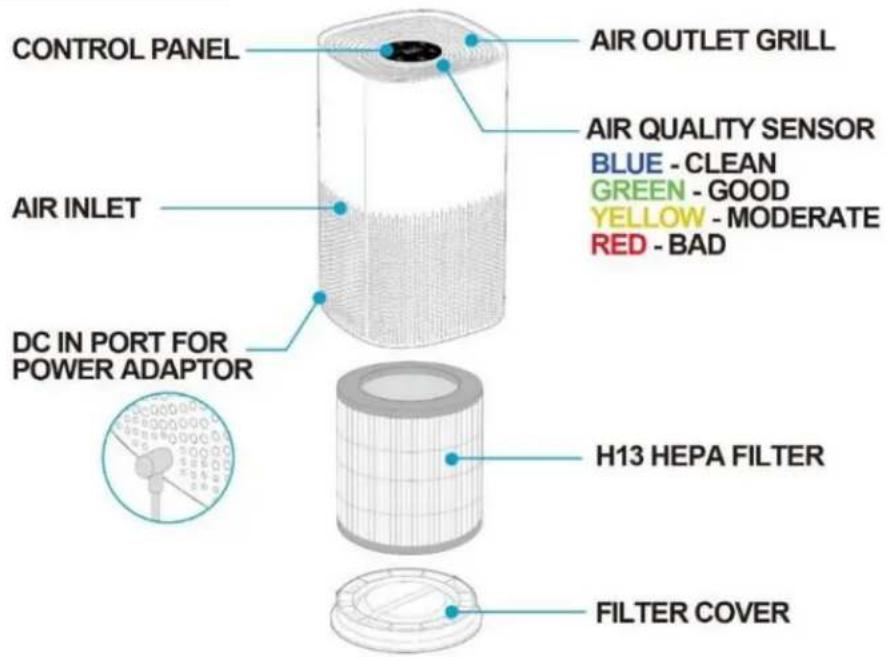
CONTROL PANEL:
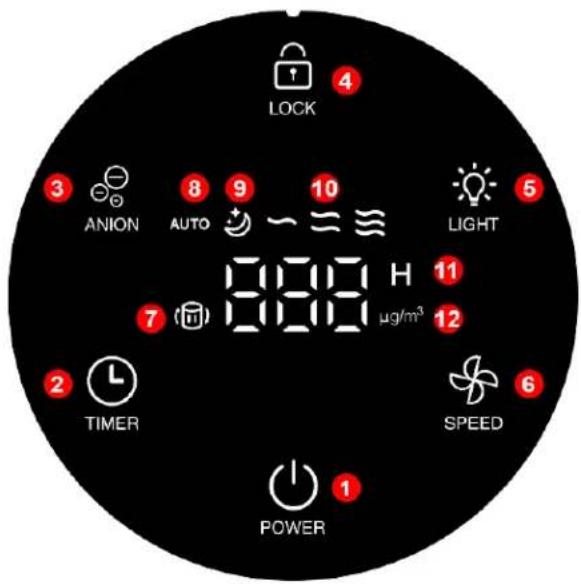
1 - Power ON/OFF
2 - Timer
3-Anion
4 - Child-lock
5 - Light
6 - Speed Control
7 – Filter Replacement Indicator
8 - Auto Mode
9 – Sleep Mode
10 – Low, Medium, High Speed
11 – Timer (Hours) display
12 – Microgram per Cubic Meter of Air Display
2+6 - Filter Reset
How to Assemble:
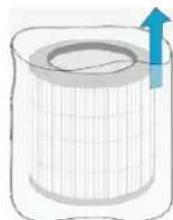
- For Initial use, make sure to remove all packaging materials such as HEPA filter plastic bag and stickers.
a. Remove Bottom Cover
- Take off the bottom cover.
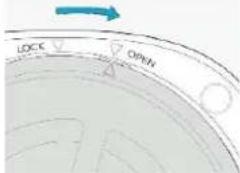
- The bottom cover should face upwards then turn the filter cover counterclockwise.
- Lift and remove the cover from the base of the unit.
b. Replace HEPA Filter
- Remove the HEPA Filter from the unit.
Take off the plastic bag and mark the date of first use on the blank space of the HEPA filter.
*Note: The power cord will be packed inside the HEPA Filter. Make sure to remove it accordingly.
c. Install the Bottom Cover
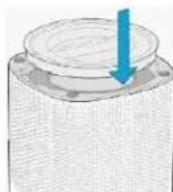
- Place the HEPA Filter inside the unit body.
- Place the filter cover by positioning the alignment tabs on the cover into the corresponding slots of the unit body.
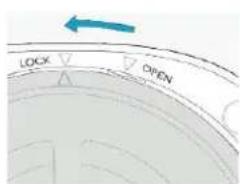
- Turn the filter cover clockwise to lock.
How to Use:
- Connect the power adaptor into the DC IN port at the back of the unit.
- Make sure that the filter is properly placed before turning ON the unit.
- Plug the unit into the convenience outlet. A sound will be heard.
- Press the Power button, the air quality sensor, light, and auto mode light indicators will light up.
- Select the desired speed by pressing ⚙️.
a. Press the Speed button once for Sleep Mode.
b. Press the Speed button ⚙ twice for ∼ Low Speed.
c. Press the Speed button ⚙ (3) three times for ≈ Medium Speed.
d. Press the Speed button ⚙ (4) four times for ≈ High Speed.
e. Press the Speed button ⚙ (5) five times for AUTO Mode.
*Note: It collects air at 360^ from the air inlet and releases clean air at 360^ from the air outlet grill.
6. AUTO MODE
a. When the air quality is less than 15 g/m^3 , the air quality sensor is blue and the speed setting is at low speed.
b. When the air quality is between 16 to 35 g/m ^3 , the air quality sensor is green and the speed setting is at medium speed.
c. When the air quality is between 36 to 75 g / m^3 , the air quality sensor is yellow and the speed setting is at medium speed.
d. When the air quality is more than 75 g/m^3 , the air quality sensor is red and the speed setting is at high speed.
| SPEED | WATTAGE | WIND SPEED (m/s) | RPM | CADR (CFM) |
| High 29W | 4.5m/s 22 | 00RPM 155 | CFM | |
| Medium | 11W | 3.1m/s | 1550RPM | 91CFM |
| Low | 4.5W | 1.9m/s | 920RPM | 47CFM |
| Sleep | 3W | 1.3m/s | 800RPM | 40CFM |
7. AUTO-OFF TIMER
a. Select the desired auto-off time.
b. Press the Timer button Ⓛ once, 2 will appear on the display for 2hrs.
c. Press the Timer button Ⓤ twice, 4 will appear on the display for 4hrs.
d. Press the Timer button Ⓤ (3) three times, 8 will appear on the display for 8hrs.
e. Press the Timer button Ⓤ (4) four times, 12 will appear on the display for 12hrs.
f. Press the Timer button Ⓜ (5) five times for OFF timer.
g. Timer display will flash (3) three times to confirm the setting. Once the timer display is on standby it will indicate that the auto-off timer will start the countdown.
h. When the timer reaches zero, the unit will be on standby mode.
8. CHILD-LOCK
a. Press and hold the Child-lock button ⏻ for 5 seconds to lock / unlock the function.
9. FILTER RESET INDICATOR
a. The filter reset indicator will be flashing indicating that the HEPA Filter needs to be replaced.
b. Turn OFF the unit and unplug the air purifier.
c. Follow the instruction on how to replace filter (How to Assemble – letter B)
d. Plug the unit into a convenience outlet and press the Power button to turn ON the unit.
e. Press and hold TIMER & SPEED buttons at the same time for 5 seconds to reset the filter.
10. ANION
a. Press the Anion button ☑️.
- Unplug the unit after every use.
*Note: The air purifier remembers the last settings except for the timer. Once you turn OFF the unit then turn it ON again, the last setting will resume.
Air Quality Sensor Guide:
| COLOR AIR QUALITY μg/m3 | ||
| Blue Clean Less than 15 μg/m3 | ||
| Green | Good | 16-35 μg/m3 |
| Yellow | Moderate | 36-75 μg/m3 |
| Red | Bad | More than 75 μg/m3 |
Cleaning and Maintenance:
- Unplug the unit from the convenience outlet before moving or cleaning.
- Wipe the surface with a damp cloth and polish with a soft, dry cloth.
- Do not use detergents or abrasive cleaners.
- Do not immerse the unit in water or in any other liquid.
- Make sure that the unit is completely dry.
- The HEPA Filter is replaceable and not washable. Do not immerse the filter in water or in any other liquid as this can cause damage to the filter.
*Note: The filter should be replaced approximately after 6 to 12 months of use.
REMINDER: Please do not forget to fill up and send the warranty card with a copy of the receipt to our email address imarflexfb@evergoodinc.com
Brand : Imarflex
Model : IAP-2135
Category : Air purifier