AP378MFX - Mini oven SMEG - Free user manual and instructions
Find the device manual for free AP378MFX SMEG in PDF.


| Product type | Mini oven |
| Brand | Smeg |
| Model | AP378MFX |
| Dimensions (W x H x D) | 560 x 597 x 575 mm |
| Power supply | 220-240 V ~, 50/60 Hz |
| Main functions | Traditional cooking (top/bottom heat), grill, ventilated grill, fan-assisted, defrosting, delicate cooking |
| Number of functions | 5, 6, 8 or 10 depending on version |
| Electronic programmer | Yes, with timer, semi-automatic and automatic cooking, clock |
| Temperature range | 50 °C to 250 °C (260 °C for models with glass front) |
| Interior lighting | Yes, replacement bulb T 300 °C |
| Cleaning | Self-cleaning walls (on some models); removable door and glass for cleaning |
| Safety | Earthing mandatory; do not use steam jet; children must not play with the appliance |
| Included accessories | Chrome grid, grill rack, dripping pan, enamel tray, chrome handle |
| Maintenance | Clean with non-abrasive products; remove sugary spills quickly |
| Repairability | Oven bulb replaceable; door gasket removable; parts available from approved service centres |
Frequently Asked Questions - AP378MFX SMEG
User questions about AP378MFX SMEG
0 question about this device. Answer the ones you know or ask your own.
Ask a new question about this device
Download the instructions for your Mini oven in PDF format for free! Find your manual AP378MFX - SMEG and take your electronic device back in hand. On this page are published all the documents necessary for the use of your device. AP378MFX by SMEG.
USER MANUAL AP378MFX SMEG
INSTRUCTIONS FOR THE INSTALLER: these are intended for the qualified technician who must install the appliance, set it functioning and carry out an inspection test.

INSTRUCTIONS FOR THE USER: these contain user advice, description of the controls and the correct procedures for cleaning and maintenance of the appliance.
1. INSTRUCTIONS FOR SAFE AND PROPER USE

THIS MANUAL IS AN INTEGRAL PART OF THE APPLIANCE AND THEREFORE MUST BE KEPT IN ITS ENTIRETY AND IN AN ACCESSIBLE PLACE FOR THE WHOLE WORKING LIFE OF THE OVEN. WE ADVISE CAREFUL READING OF THIS MANUAL AND ALL THE INSTRUCTIONS THEREIN BEFORE USING THE OVEN. INSTALLATION MUST BE CARRIED OUT BY QUALIFIED PERSONNEL IN ACCORDANCE WITH THE REGULATIONS IN FORCE. THIS APPLIANCE IS INTENDED FOR DOMESTIC USES AND CONFORMS TO CURRENT REGULATIONS IN FORCE. THE APPLIANCE HAS BEEN BUILT TO CARRY OUT THE FOLLOWING FUNCTIONS: COOKING AND HEATING-UP OF FOOD. ALL OTHER USES ARE CONSIDERED IMPROPER.
THE MANUFACTURER DECLINES ALL RESPONSIBILITY FOR IMPROPER USE.

DO NOT LEAVE THE PACKING IN THE HOME ENVIRONMENT. SEPARATE THE VARIOUS WASTE MATERIALS AND TAKE THEM TO THE NEAREST SPECIAL GARBAGE COLLECTION CENTRE.

IT IS OBLIGATORY FOR THE ELECTRICAL SYSTEM TO BE EARTHED ACCORDING TO THE METHODS REQUIRED BY SAFETY RULES.

WHEN LINKING UP TO MAINS BY PLUG AND SOCKET, MAKE SURE THAT BOTH ARE COMPATIBLE AND CONNECT BY MEANS OF A POWER CABLE COMPLYING WITH APPLICABLE REGULATIONS.
THE SOCKET MUST BE ACCESSIBLE AFTER THE APPLIANCE HAS BEEN BUILT IN.
NEVER ATTEMPT TO REPAIR THE APPLIANCE.

ALWAYS CHECK THAT THE CONTROL KNOBS ARE IN THE "ZERO" (OFF) POSITION WHEN YOU FINISH USING THE OVEN.

NEVER PUT INFLAMMABLE OBJECTS IN THE OVEN: THEY COULD BE ACCIDENTALLY CATCH LIGHT AND CAUSE FIRES.

DURING USE THE APPLIANCE BECOMES VERY HOT. TAKE CARE NOT TO TOUCH THE HEATING ELEMENTS INSIDE THE OVEN.

THE I.D. PLATE WITH TECHNICAL DATA, REGISTRATION NUMBER AND BRAND NAME IS POSITIONED VISIBLEY ON THE OVEN DOOR FRAME. THE PLATE MUST NOT BE REMOVED.

THE OVEN IS DESIGNED FOR USE BY ADULTS. DO NOT ALLOW CHILDREN TO GO NEAR OR PLAY WITH IT.

THIS APPLIANCE IS MARKED ACCORDING TO THE EUROPEAN DIRECTIVE 2002/96/EC ON WASTE ELECTRICAL AND ELECTRONIC EQUIPMENT (WEEE).
THIS GUIDELINE IS THE FRAME OF A EUROPEAN-WIDE VALIDITY OF RETURN AND RECYCLING ON WASTE ELECTRICAL AND ELECTRONIC EQUIPMENT.

BEFORE THE APPLIANCE IS PUT INTO OPERATION, ALL THE LABELS AND PROTECTIVE FILMS APPLIED INSIDE OR OUTSIDE MUST BE REMOVED.

The manufacturer declines all responsibility for damage to persons or things caused by non-observance of the above guidelines or by interference with any part of the appliance or by the use of non-original spares.
2. INSTALLATION
2.1 Electrical connection
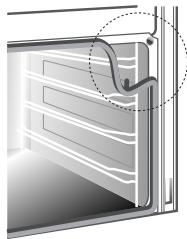
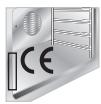
Check that the mains voltage and power cable ratings are as per the information provided on the label attached to the oven door frame. This label must never be removed.
It is obligatory for the electrical system to be earthed according to the methods required by safety rules.

If a plug and socket connection is being used make sure that the plug and socket are compatible. Avoid use of adapters and shunts as these could cause overheating and risk of burns.
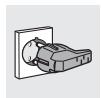
If a fixed connection is being used fit cable line with an omnipolar circuit breaker with a contact opening gap equal to or greater than 3 mm in an easily accessible position in proximity to the oven.

For operation on 220-240V \~: use an H05RR-F / H05RN-F type three-core cable (3 x 1.5 mm²).
The cable end to be connected to the appliance must be provided with an ground wire (yellow-green) at least 20 mm longer.
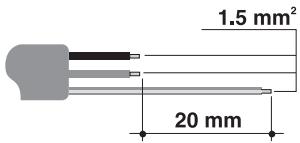
text_image
1.5 mm² 20 mm
2.2 Installing the oven
The oven is designed for installation into any piece of furniture as long as it is heat-resistant. Proceed according to the dimensions shown in Figures 1, 2 and 3. For installing under a work top, follow the dimensions given in Figure 3. For installing under a work top beneath a hob with controls connected to the oven, ensure a minimum clearance from any side walls of at least 110 mm as shown in Figure 1.
For installing in a column, follow the dimensions given in Figure 2 allowing for a clearance of 80 to 90 mm at the top and sides of the column. Tighten the four screws (ref.A) inside the frame to secure (Fig. 1).
For installing beneath a separate hob, allow for a rear and bottom clearance as shown in Figure 1 (ref. B). See relevant instructions for fitting and securing the hob.
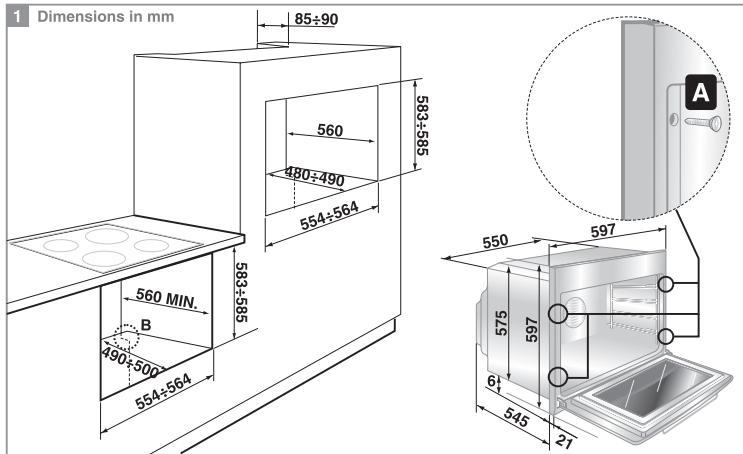
text_image
1 Dimensions in mm 85±90 560 480±490 554±564 583±585 560 MIN. B 490±500 554±564 550 597 575 597 61 545 21 A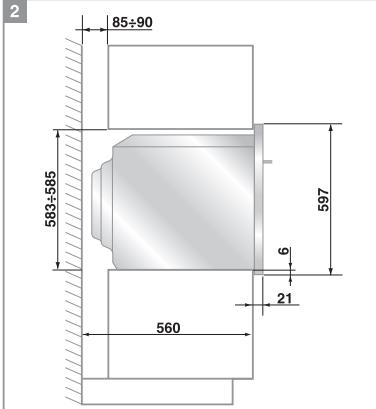
text_image
2 85÷90 583÷585 597 6 21 560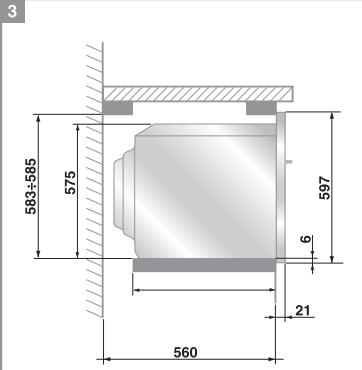
text_image
3 583±585 575 597 6 21 560
Never use the oven door to lever the oven into place when fitting.
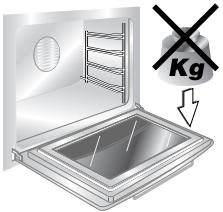
Avoid exerting too much pressure on the oven door when open.
text_image
Kg3. DESCRIPTION OF CONTROLS
3.1 Front control panel
All the oven controls are grouped together on the front panel.
5- FUNCTION MODEL

text_image
50 250 90 230 120 200 160 A 12:30 D X - + S S S S S S S S S S S S S S S S S S S S S S S S S S S S S S S S S S S S S 0FUNCTION CONTROL KNOB
(5/6/8/10 functions)
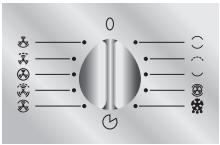
Rotate the knob in either direction to select desired function from the following:
flowchart
graph TD
    A["○"] --> B["○"]
    C["×"] --> B
    D["●"] --> B
    E["○"] --> F["○"]
    G["●"] --> H["○"]
    I["○"] --> J["○"]
    K["●"] --> L["○"]
    M["○"] --> N["○"]
    O["○"] --> P["○"]
    Q["○"] --> R["○"]
    S["○"] --> T["○"]
    U["○"] --> V["○"]
    W["○"] --> X["○"]
    Y["○"] --> Z["○"]

NO FUNCTION SET

OVEN LIGHT (NO ELEMENT ENGAGED)

UPPER AND LOWER HEATING ELEMENT

WIDE GRILL ELEMENT

GRILL ELEMENT

LOWER HEATING ELEMENT

UPPER AND LOWER HEATING ELEMENT + VENTILATED HEATING ELEMENT

DEFROSTING

UPPER AND LOWER HEATING ELEMENT + VENTILATION

FULL GRILL ELEMENT + VENTILATION

VENTILATED HEATING ELEMENT

GRILL ELEMENT + VENTILATION

LOWER HEATING ELEMENT + VENTILATION
THERMOSTAT CONTROL KNOB
(multifunction oven)
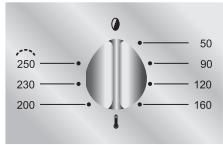
Cooking temperature is selected by turning the knob clockwise to the desired setting, between 50^ and 250^ C.
Maximum temperature in models with front glass panel is 260^ C.
text_image
250 230 200 50 90 120 160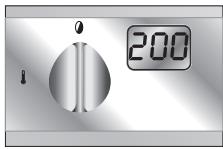
text_image
Q 200THERMOSTAT INDICATOR LIGHT
When this light comes on, the oven is heating up.
When this light goes out, the preset heating temperature has been reached.
When the light flashes, the temperature inside the oven is steady.

natural_image
Simple grayscale circular shape with a glossy black ring on a gradient background (no text or symbols)Important (in models with flush controls only)
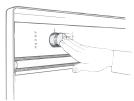
To access to the control knobs simply press them and they will spring out into the operating position (fig. A).
They must remain out in this position while the oven is in operation to prevent them from overheating. To return them to the retrected position, simply press down until the catch engages.
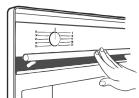
To open the oven door, press the handle and it will spring out into the operating position (fig. B). It must remain in this position while the oven is in operation to prevent it from overheating.
A
B
3.2 Electronic programmer
text_image
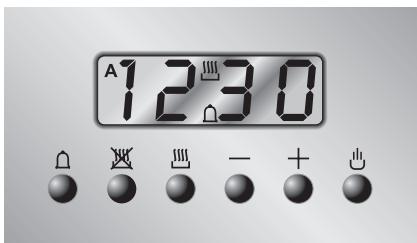
A 12:30LIST OF FUNCTIONS

text_image
Vertical sequence of symbolic icons including bell, crossed-out triangle, smokestack, minus sign, plus sign, and minus signMINUTE-COUNTER KEY
END-OF-COOKING KEY
COOKING TIME KEY
TIME BACK KEY
TIME FORWARD KEY
3.2.1 Clock adjustment
When using the oven for the first time, or after a power failure, the display flashes regularly and indicates 00:00. To stop flashing, press key ⏻ on the display. By pressing keys — or + each single press changes the time by 1 minute either up or down.
Press one of the two keys until the right time appears.

Before setting the programmer activate the desired function and temperature.
3.2.2 Semiautomatic cooking
Use this setting for automatic oven switch-off at the end of cooking time. By pressing key ☐, the display lights up, showing 00:00; keep the key pressed and at the same time, press keys - or + to set the cooking time.
Release key ☐ to start the programmed cooking time count. The display will now show the right time together with symbols A and ☐.
3.2.3 Automatic cooking
Use this setting to automatically start and stop the oven.
By pressing key ☐, the display lights up showing 00:00; keep the key pressed and at the same time, press keys — or + to set the cooking time.
By pressing key ☑ the sum of the right time + cooking time will appear; keep the key pressed and at the same time, press keys — or + to regulate the end of cooking time.
Release key ☐ to start the programmed count and the display will show the right time together with symbols A and ☐.

After setting, to see how much cooking time is left, press key ☐; to see end of cooking time, press key ☑.
3.2.4 End of cooking
When cooking is over, the oven will automatically switch off and, at the same time, an intermittent alarm will sound. After switching off the alarm, the display will once again show the right time together with the symbol ☐, indicating that the oven has returned to manual operation mode.
3.2.5 Adjusting alarm volume
The acoustic alarm has three different settings. These can be operated, while the alarm is sounding, by pressing key —.
3.2.6 Switching off the alarm
The alarm switches off automatically after seven minutes. It can be manually turned off by pressing key 🔊.
3.2.7 Minute-counter
The programmer can also be used as a simple minute counter.

The use of the minute-counter will not interrupt oven operation at the end of the set time.
By pressing key ⏠, the display shows 00:00 ; keep the key pressed and at the same time press keys — or +. By releasing the key ⏠, the programmed count starts and the symbols ⏠ and 📁 appear on the monitor.

After programming the minute-counter, the display will show the right time. to display remaining time, press key 🔊.

Wrong settings are prevented logically (e.g., any conflict between end of cooking time and a longer time will not be accepted by the programmer).
3.2.8 Cancellation of set data
Once the programme has been set, keep the key of the function to be cancelled pressed, while at the same time 00:00 is reached by means of variation keys — or +. Time cancellation will be considered as end-of-cooking time by the programmer.
3.2.9 Changing the set data
The cooking data entered can be changed at any time by keeping the function key pressed and at the same time adjusting the keys — or +.
4. USE OF THE OVEN

Before using the oven make sure that the electronic programmer displays the 🔊 symbol (see "3.2.1 Clock adjustment").
4.1 Warnings and general advice
Before using the oven for the first time, pre-heat it to maximum temperature (250°C) long enough to burn any manufacturing oily residues which could give the food a bad taste.
In the models featuring an electronic programmer, a power failure causes the display to start flashing at regular intervals and the 00:00 symbol to appear. To re-adjust, see "3.2 Electronic programmer".

During cooking, do not cover the bottom of the oven with aluminium or tin foil and do not place pans or oven trays on it as this may damage the enamel coating. If you wish to use greaseproof paper, place it so that it will not interfere with the hot air circulation inside the oven.

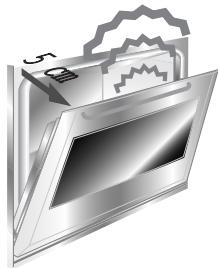
To prevent any steam in the oven creating problems, open the door in two stages: half open (5 cm approx.) for 4-5 seconds and then fully open. To access food, always leave the door open as short a time as possible to prevent the temperature in the oven from falling and ruining the food.
natural_image
Illustration of a computer monitor with a gear icon and a '5' label, no text or symbols present.4.2 Cooling system (certain models only)
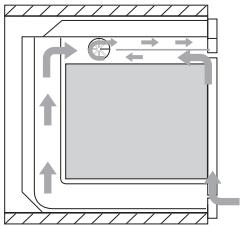
The appliance is equipped with 2 cooling fans which come into operation when the oven is switched on.
Fans cause a steady outflow of air from above the door which may continue for a brief period of time even after the oven has been turned off.
natural_image
Pure diagram of a mechanical or fluidic system with directional arrows and flow indicators, no text or symbols present.4.3 Oven light
To turn on the oven light in models with static oven, rotate the temperature knob clockwise to the first setting aligned with the lamp symbol (☀️). The light will remain on throughout entire cooking operation. In the multifunction models, the inside oven light may be turned on by simultaneously rotating the function selector knob and the timer knob. When the oven is not working, the light comes on by simply opening the door.
5. AVAILABLE ACCESSORIES
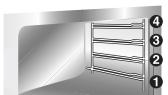
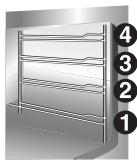
The oven features 4 support positions for shelves and pans of different height.

Some models do not feature all accessories.
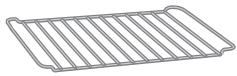
Chrome shelf: useful for holding cooking vessels.
Grill mesh: for placing above grill pan to allow juices to drip into pan below.
Roasting/Grill pan: to be used for roasting or grilling.
Enamel tray: for baking cakes, pizza and oven desserts.
Roof liner/Grill guard: removing this simplifies cleaning procedures inside the oven.
Chromium-plated handle: for removing hot shelves and pans from the oven. Be sure to wear oven gloves when in use.
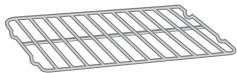
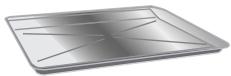
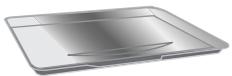
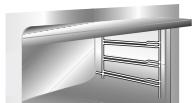
natural_image
Exterior view of a stainless steel kitchen cabinet with horizontal shelves (no text or symbols visible)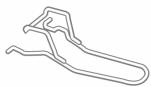

Accessories available on request
Original accessories may be ordered from any Authorised Service Centre.
6. COOKING HINTS

In fan-assisted mode preheating should be carried out at 30/40^ C above the cooking temperature. This considerably shortens cooking times and reduces power consumption, as well as giving better cooking results.

Keep the oven door closed during cooking
6.1 Traditional cooking (multifunction models)

natural_image
Six grayscale illustrations of various food and seafood items: turtle, plate with fish, sack, cake, and instant noodles (no text or symbols)FUNCTION SWITCH

THERMOSTAT SWITCH
$$ 5 0 \div 2 5 0 ^ {\circ} \mathrm{C} $$
natural_image
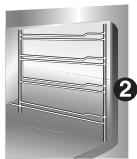
3D rendering of a multi-tiered rack-mounted shelf or rack unit (no text or symbols visible)This traditional cooking method, in which heat comes from above and below, is suitable for cooking food on a single level. You have to preheat the oven until the set temperature is reached. Place the food in the oven only after the thermostat indicator light has turned off. very fatty meats may be put in when the oven is still cold. Put frozen meat in immediately, without waiting for it to thaw. The only precaution you need to take is to set the temperature about 20^ C lower and cooking time about 1/4 longer than you would for fresh meat.
6.2 Fan cooking (multifunction models)

natural_image
Six grayscale illustrations of various food and beverage items: turtle, fish, cake, bread, milk, and instant noodles (no text or symbols)FUNCTION SWITCH

THERMOSTAT SWITCH
$$ 5 0 \div 2 5 0 ^ {\circ} \mathrm{C} $$
natural_image
Illustration of a multi-tiered rack or shelf unit with numbered callouts (1-4) on the side, no text or symbols present.This system is suitable for cooking on several levels, including different types of food (fish, meat etc.), without the tastes and smells mingling. Air circulation in the oven ensures a uniform distribution of heat.
Instructions for the user

Multiple cooking is possible as long as the cooking temperature of the different foods is the same.
6.3 Grill cooking
FUNCTION SWITCH
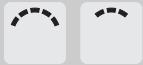
THERMOSTAT SWITCH

natural_image
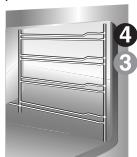
Illustration of a multi-tiered rack or shelf structure with no visible text or symbolsPermits rapid browning of foods. You are advised to place the pan in the highest position. When cooking small items for a short time the pan should be in the highest position. For larger items requiring longer cooking times, the pan should be lowered to avoid food being burned on top before being thoroughly cooked.
Grill function must be used only with the door closed.
Keep the oven door closed during grilling. Grilling with the door open could permanently damage the oven and affect safety of operation.
6.4 Fan grilling (multifunction models)
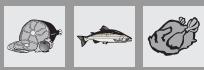
FUNCTION SWITCH

THERMOSTAT SWITCH
200
natural_image
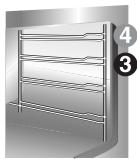
Illustration of a multi-tiered stainless steel rack cabinet (no text or symbols visible)Ensures uniform heat distribution with greater heat penetration into the food. Food will be lightly browned on the outside and remain soft inside.
Keep the oven door closed during cooking. Heating up time must not exceed 60 minutes.

Keep the oven door closed during grilling. Grilling with the door open could permanently damage the oven and affect safety of operation.
6.5 Delicate cooking (in some models only)
 |  |  | |
| FUNCTION SWITCH | |||
| THERMOSTAT SWITCH | 50 ÷ 250^ | ||
natural_image
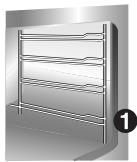
Illustration of a stainless steel rack with horizontal shelves and a circular badge labeled '1' (no text or symbols on the rack itself)Ideal for pastries and cakes with a liquid surface and little sugar and moist desserts in moulds. Excellent results can also be achieved in completing cooking at the base and with dishes requiring heat in the lower area in particular. The pan is best inserted in the lowest position.
6.6 Defrosting (multifunction models)
 |  |  |  |  |  | |
| FUNCTION SWITCH | ||||||
| THERMOSTAT SWITCH IN POSITION | 0 | |||||
natural_image
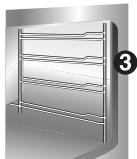
3D rendering of a stainless steel rack with horizontal shelves and a numbered label (3) in the corner, no text or symbols on the structure itself.The flow of air produced by the fan ensures quicker defrosting. The air circulating inside the oven is at room temperature.

The advantage of defrosting at room temperature is that it does not alter the taste and appearance of the food.
6.7 Recommended cooking table
Cooking times, especially meat, vary according to the thickness and quality of the food and to consumer taste.
TRADITIONAL COOKING

| SHELF POSITION(1 IS LOWEST) | TEMPERATURE(°C) | TIMEIN MINUTES (*) | |
| FIRST COURSES | |||
| LASAGNE | 2 - 3 | 210 - 230 | 30 |
| OVEN-BAKED PASTA | 2 - 3 | 210 - 230 | 40 |
| MEAT | |||
| ROAST VEAL | 2 | 170 - 200 | 30 - 40 / KG. |
| ROAST BEEF | 2 | 210 - 240 | 30 - 40 / KG. |
| ROAST PORK | 2 | 170 - 200 | 30 - 40 / KG. |
| CHICKEN | 2 | 170 - 200 | 45 - 60 |
| DUCK | 2 | 170 - 200 | 45 - 60 |
| GOOSE - TURKEY | 2 | 140 - 170 | 45 - 60 |
| RABBIT | 2 | 170 - 200 | 50 - 60 |
| LEG OF LAMB | 2 | 170 - 200 | 40 - 50 |
| FISH | 1 - 2 | 170 - 200 | ACCORDING TO SIZE |
| PIZZA | 1 - 2 | 210 - 240 | 40 - 45 |
| DESSERTS | |||
| SHORT PASTRY | 1 - 2 | 170 - 200 | 15 - 20 |
| CIAMBELLA | 1 - 2 | 165 | 35 - 45 |
| BRIOCHES | 1 - 2 | 170 - 200 | 40 - 45 |
| FRUIT CAKE | 1 - 2 | 170 - 200 | 20 - 30 |
| PARADISE CAKE | 1 - 2 | 170 | 60 |
| APPLE CAKE | 1 - 2 | 190 | 60 |
| RICE CAKE | 1 - 2 | 180 | 60 |
(*) = WITH PREHEATED OVEN
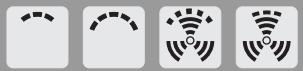
GRILLING
natural_image
Four white square icons with black dashed and solid lines, each containing a signal symbol (no text or labels)| SHELF POSITION(1 IS LOWEST) | TIME IN MINUTES | ||
| FIRST SIDE | SECOND SIDE | ||
| PORK CHOPS | 4 | 7 - 9 | 5 – 7 |
| FILLET OF PORK | 3 | 9 - 11 | 5 – 9 |
| FILLET OF BEEF | 3 | 9 - 11 | 9 – 11 |
| LIVER | 4 | 2 - 3 | 2 – 3 |
| VEAL ESCALOPES | 4 | 7 - 9 | 5 – 7 |
| HALF CHICKEN | 3 | 9 - 14 | 9 – 11 |
| SAUSAGES | 4 | 7 - 9 | 5 – 6 |
| MEAT-BALLS | 4 | 7 - 9 | 5 – 6 |
| FISH FILLETS | 4 | 5 - 6 | 3 – 4 |
| TOAST | 4 | 2 - 4 | 2 – 3 |
FAN COOKING


| SHELF POSITION(1 IS LOWEST) | TEMPERATURE(°C) | TIMEIN MINUTES | |
| FIRST COURSES | |||
| LASAGNE | 2 | 190 - 210 | 20 - 25 |
| OVEN-BAKED PASTA | 2 | 190 - 210 | 25 - 30 |
| CREOLE RICE | 2 | 190 - 220 | 20 - 25 |
| MEAT | |||
| ROAST VEAL | 2 | 150 - 170 | 65 - 90 |
| ROAST PORK | 2 | 150 - 160 | 70 - 100 |
| ROASTED BEEF | 2 | 160 - 170 | 65 - 90 |
| FILLET OF BEEF | 2 | 160 - 180 | 35 - 45 |
| ROAST LAMB | 2 | 130 - 150 | 100 - 130 |
| ROAST BEEF | 2 | 170 - 180 | 40 - 45 |
| ROAST CHICKEN | 2 | 170 | 70 - 90 |
| ROAST DUCK | 2 | 160 - 170 | 100 - 160 |
| ROAST TURKEY | 2 | 150 - 160 | 160 - 240 |
| ROAST RABBIT | 2 | 150 - 160 | 80 - 100 |
| ROAST HARE | 2 | 160 - 170 | 30 - 50 |
| ROAST PIGEON | 2 | 140 - 170 | 15 - 25 |
| FISH | 2 - 3 | 150 - 170 | ACCORDINGTO SIZE |
| PIZZA | 2 - 3 | 210 - 240 | 30 - 50 |
| BREAD | 2 - 3 | 190 - 210 | 40 |
| TOAST | 1 - 2 | 220 - 240 | 7 |
| DESSERTS | |||
| CIAMBELLA | 2 - 3 | 150 - 170 | 35 - 45 |
| FRUIT CAKE | 2 - 3 | 170 - 190 | 40 - 50 |
| BRIOCHES | 2 - 3 | 160 - 170 | 40 - 60 |
| SHORT PASTRY | 2 - 3 | 170 - 180 | 20 |
| RICE CAKE | 2 - 3 | 170 | 60 |
| APPLE CAKE | 2 - 3 | 180 | 60 |
| PARADISE CAKE | 2 - 3 | 160 | 60 |
7. CLEANING AND MAINTENANCE
NEVER USE A STEAM JET TO CLEAN THE APPLIANCE.


Before carrying out any maintenance, switch off the power supply to the machine.
7.1 Cleaning stainless steel

To keep stainless steel in good condition it should be cleaned regularly after use. Let it cool first.
7.1.1 Ordinary Daily Cleaning
To clean and preserve the stainless steel surfaces, always use only specific products that do not contain abrasives or chlorine-based acids.
How to use: pour the product on a damp cloth and wipe the surface, rinse thoroughly and dry with a soft cloth or leather.
7.1.2 Food stains or residues
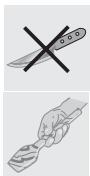
Do not use metallic sponges or sharp scrapers: they will damage the surface.
Use normal non-abrasive products for steel, and a wooden or plastic tool if necessary.
Rinse thoroughly and dry with a soft cloth or leather.
Do not allow residues of sugary foods (such as jam) to set inside the oven. If left to set for too long, they might damage the enamel lining of the oven.
7.2 Cleaning of the oven (without self-cleaning panels)

For best oven upkeep clean regularly after having allowed to cool. Take out all removable parts.
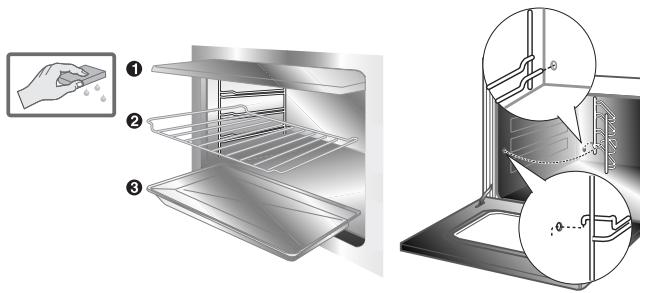
text_image
Diagram illustrating the steps of cleaning a kitchen oven, showing hand cleaning and interior cleaning with labeled parts.- Clean the oven grill and side guides with hot water and non-abrasive detergent. Rinse and dry.
- The oven should be operated at the maximum temperature for about 15/20 minutes after using specific products, to eliminate the residues deposited inside the oven.
• For easier cleaning, the door can be removed (see P. 7.4)
7.3 Self-cleaning liners (only on some models)
The oven is equipped with continuous self-cleaning enamelled liners.
These liners make the oven easier to clean and ensure its efficiency over time.
7.3.1 Using the self-cleaning liners
Periodically, to prevent food residues and unpleasant smells from accumulating inside the oven, the appliance should be operated empty at temperatures of not less than 200^ C for a time varying from 30 to 60 minutes, in order to allow the self-cleaning liners to oxidise the residues present; when the oven has cooled, these will then be removed with a damp sponge
7.3.2 Looking after the self-cleaning liners
The liners should not be cleaned with abrasive creams or ordinary detergents. Use a damp sponge only, so as not to damage the special characteristics of the enamel which coats the liners.
7.3.3 Assembling the self-cleaning liners
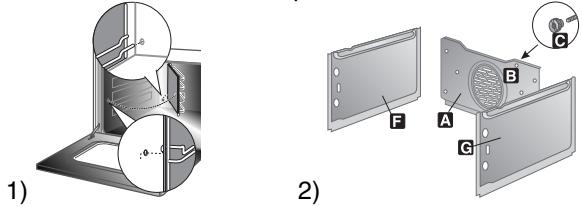
- Remove all accessories from the oven;
- Remove the side supports (fig.1);
- Extract the side liners "F" and "G"(fig. 2);
- Remove the back panel "A" after undoing the threaded ring-nut "C" (fig. 2).
- Reassemble the panels, restoring them to their original position. Incorrect installation of the rear panel can lead to uneven cooking.
7.4 Removing the door
7.4.1 Removing doors with mobile
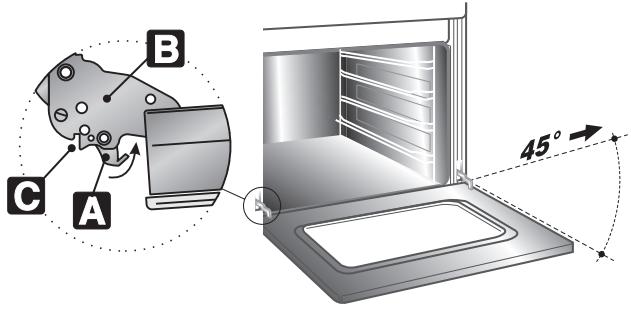
With the door completely open, lift the levers A of the two hinges until they touch the hinges B and take hold of the two sides of the door with both hands close to the hinges themselves. Raise the door to an angle of about 45^ and remove it. If the hinges have not locked, repeat the operation, raising the levers A and keeping the door slightly raised. To reassemble, fit the hinges B into their grooves, then lower the door into place, ensuring that it remains fitted into the grooves C, then lower the levers A.
text_image
A B C 45°7.4.2 Removing doors with pins
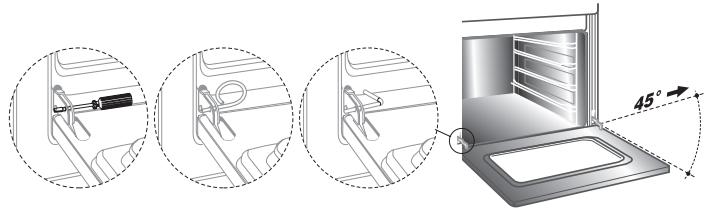
Open the door completely and insert the pins (supplied) into the holes from the inside. Close the door to an angle of about 45^ and lift it off.
To reassemble, fit the hinges into their grooves, then lower the door into place and extract the pins.
natural_image
Illustration of a refrigerator interior with three views showing internal components and a 45-degree angle measurement (no text or symbols present)7.5 Removing the door glazing
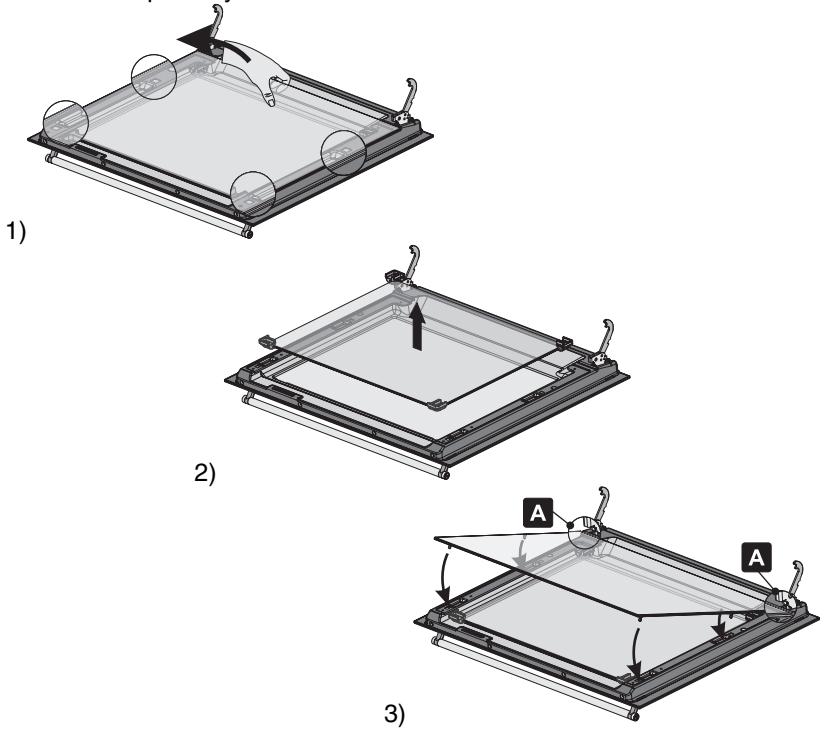
The glass in the door should always be kept thoroughly clean. For easier cleaning, the door glazing can be fully removed by proceeding as described below. After blocking the door in position as described in point "7.4 Removing the door", remove the inner glass using leverage as shown in figure 1, and release the 4 pins which fix the glass to the door. If your oven also has the middle glass (figure 2) this can simply be lifted out. After cleaning, first fit the middle glass (if featured on your oven) and then replace the inner glass, using the oven door supports as a fulcrum as shown in figure 3 (see detail A in figure 3). Once the glass has been fitted on the door, apply a little pressure against the 4 fixing pins. If the door should close during these operations, simply relock one of the hinges as described in point "7.4 Removing the door". The panes of glass can now be washed separately.
Use absorbent kitchen roll; remove stubborn dirt with a damp sponge and ordinary detergent.

Warning: before removing the panes of glass, make sure that the door has been locked in open position as described in points "7.4 Removing the door". This operation might have to be repeated during the removal process if the door is accidentally freed.

To replace the panes of glass in the oven door, follow the instructions provided in reverse order.
WARNING. Never use the oven without the glass fitted: the outside surface of the door overheads
8. ADDITIONAL MAINTENANCE
The oven may require additional maintenance or replacement of parts subject to wear such as seals, bulbs, and so on. The following instructions describe how to carry out these minor maintenance operations.

Before any intervention, disconnect the power supply.
8.1 Replacement of light bulb
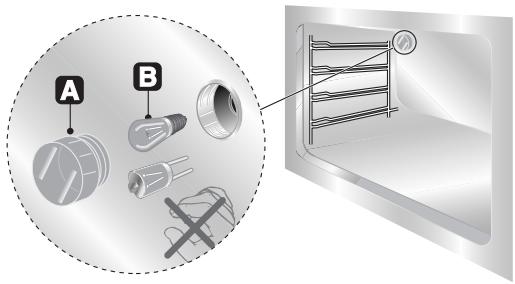
Remove the bulb protector A by turning anticlockwise and change bulb B (in the 8-function model with front glass panel change the halogen bulb C) with a similar one. Re-fit the bulb protector A.
text_image
A B
Only use oven bulbs (T 300°C).
8-functions model with glass front panel
The standard bulbs are halogen: do not touch them directly with your fingers. Use rubber glove to protect your hand.
Use only bulbs that are available at authorised service centres.
8.2 Oven door seal
To permit thorough cleaning of the oven, the seal may be removed. Before removing the seal, take off the door as described above. Once the door has been taken off, lift the tabs at the corners as shown in the figure.
After cleaning, refit the seal with the longer side horizontal and insert the tabs into the appropriate holes starting from the top ones.