
002-279 - Headphones Marquant - Free user manual and instructions
Find the device manual for free 002-279 Marquant in PDF.


| Product Type | Wireless In-Ear Headphones |
| Brand | Marquant |
| Model | 002-279 |
| Bluetooth Version | 4.1 EDR |
| Operating Time | ≤ 6 hours |
| Standby Time | ≤ 220 hours |
| Charging Time | Approx. 2.5 hours |
| Battery Type | Lithium Polymer (70 mAh) |
| Wireless Range | ≤ 10 m |
| Operating Temperature | 20°C to 40°C |
| Controls | Multifunction buttons (volume, track, voice, call) |
| Charging Port | Micro USB |
| Included Accessories | Charging cable |
| Simultaneous Connections | Up to 2 mobile phones |
| Voice Control | Yes (Siri/Google Assistant) |
| Language Setting | Yes (via button combination) |
| Call Functions | Answer, end, redial, dismiss, voice dialing |
| Music Playback | Track skip, volume adjustment |
| Safety | Hearing protection warning, do not use while driving |
| Water Resistance | Not waterproof (avoid splashes and dripping water) |
| Cleaning | Soft cloth, mild soap if needed |
| Disposal | Electronic waste recycling (do not discard with household waste) |
| Certification | CE, RoHS |
| Manufacturer | Jula AB, Box 363, SE-532 24 SKARA, SWEDEN |
Frequently Asked Questions - 002-279 Marquant
User questions about 002-279 Marquant
0 question about this device. Answer the ones you know or ask your own.
Ask a new question about this device
Download the instructions for your Headphones in PDF format for free! Find your manual 002-279 - Marquant and take your electronic device back in hand. On this page are published all the documents necessary for the use of your device. 002-279 by Marquant.
USER MANUAL 002-279 Marquant
To were put der 12 horrs in br.
Where Price is 100% (e.g., 2008-2009) from a cloudball
Echovilla na geodele.
WIRELESS IN-EAR HEADPHONES
[10.4]
In this case, we have provided a 25% confidence interval.
sub reserves the right to make charges in the event
of problems, please contact our service department.
www.jula.co
Tillversare/ Produsent/ Producer/ Manufacturer
Jia AD, Box 263, 502 24 SKARA
Desubiert/Disadvise/Desregulator/Distribution
Poland St. 607, H.
Care for the review group
Must not be discarded with household waste! This product
contains electrical or electronic components that should be
recycled, case—the product for recycling at the designated
station e.g. the local authority's recycling station.


TC DFIGURATION OF CONFORMITY
COTORSÁKAN ON OVERINSSTÁVIAISE
EF SAMSVARSERKLIERING
DELAOCAILODOSCHW

Jula AB, Box 363, SE-532 24 SKARA, SWEDEN
conforms to the following directives and standards /
RoHS Directive 2011/65/EU
EN 50581:2012
This proposal was G marked in year-17.
Skara 2017-04-21

MATTIAS UP
BUSINESS AREA MANAGER
SÄKERHETSANVISNINGAR
Batteritype Li-poly (70 mAh)
- Avoid damaging your hearing by limiting the use of the headphones with high volume, and adjust the volume to a safe level. The higher the volume, the less time you can listen safely.
- Listen at reasonable sound levels for a reasonable amount of time.
- Do not increase the volume as your hearing adapts to the level.
- Do not increase the volume so much that you cannot hear your surroundings.
• Exercise care or temporarily stop using the headphones in potentially dangerous situations.
• Very high sound pressure from headphones and a headset can result in impaired hearing. - We recommend that you do not have the headset over both ears while driving. It may also be illegal in some areas.
EN
- For reasons of safety, avoid being distracted by telephone calls when in traffic or in other potentially dangerous environments.
- Do not expose the headphones to the cold, heat or direct sunlight.
- Do not expose the headphones to impact, blows or vibration.
• The headphones must no be exposed to dripping water of splashing. - Do not immerse the headphones in water.
- Do not use detergent that contains alcohol, ammonia, petrol or abrasives.
- If cleaning is necessary, use a soft cloth, if necessary moistened with a little water or diluted mild soap, on the product.
- The supplied battery must not be exposed to excessive heat, for example sunlight, fire or the like.
• The service life of the battery can be shortened by high or low temperatures.
TECHNICAL DATA
Bluetooth 4.1 EDR
Operating time ≤ 6 hours
Stancby time ≤ 220 hours
Range ≤ 10 m
Charging time approx. 2.5 hours
Battery technique Li-poly (70 mAh)
Operating temperature 20 to 40°C
DESCRIPTION
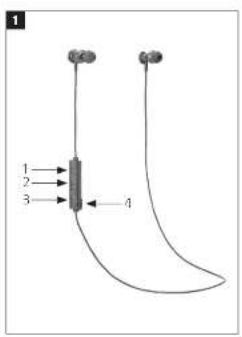
FIG. 1
-
Volume/track/voice control
-
Switch/Pause/call control
-
Volume/track/voice control
-
Micro USB port
Charging cable included
EN
USE
STARTING/SWITCHING OFF
- Start the headphones by pressing and holding the switch for about three seconds. The blue light flashes.
- Switch off the headphones by pressing the switch for about five seconds. The red light flashes.
SETTING THE LANGUAGE
- Start the headphones and press and hold the centre button (2) and + for two seconds to change the language.
CONNECTION
NOTE:
- A previously paired device connects automatically.
EN
- Two mobile telephones can be connected to the headphones simultaneously.
- Start the headphones and press and hold the switch until the red and blue lights flash.
- Activate Bluetooth on your mobile telephone and connect to "002279".
- The blue light flashes when the device is connected.
CALLS
- Press the centre button (2) once to answer. Press once again to end the call.
- Press the centre button (2) twice to redial the last number dialled.
- Press and hold the centre button (2) to dismiss the call.
- Press and hold the + and - buttons for two seconds to activate/deactivate voice control
- Press and hold the centre button for about two seconds to use voice dialling.
MUSIC PLAYBACK
- Press and hold + or - to change track.
- Briefly press the centre button (2) once.
- Briefly press + or minus to increase or lower the volume.
CHARGE
NOTE:
- The battery must be fully charged prior to using for the first time.
- The red light flashes twice every 20 seconds when the battery is discharged.
- Connect the charge cable to the micro USB port on the headphones and to the computer's USB port.
- The headphones light red while charging.
The headphones light blue when charging is complete.
Brand : Marquant
Model : 002-279
Category : Headphones