
Sound 50 iPod - Computer accessory ETON - Free user manual and instructions
Find the device manual for free Sound 50 iPod ETON in PDF.


| Product Type | Stereo iPod Docking Station with Remote |
| Brand | Etón |
| Model | Sound 50 iPod |
| Category | Computer Accessory (Audio Docking Station) |
| Compatible iPod Models | 3rd Gen, 4th Gen, 5th Gen, iPod mini, iPod photo, iPod Nano, iPod U2 Special Edition |
| Power Source | DC Power Adapter (included) |
| Inputs | AUX IN (3.5mm), iPod Dock Connector |
| Audio Output | Built-in Stereo Speakers |
| Remote Control | Included with Power, Volume, Mode, Mute, Menu, Enter buttons |
| Volume Control | 8 segments on unit and remote |
| Mode Selection | iPod Mode (red LED) and AUX Mode (green LED) |
| Mute Function | Yes, via remote or unit button |
| Menu Button | Access iPod menu navigation (iPod mode only) |
| Safety Features | Do not expose to rain/moisture; clean with dry cloth; unplug during storms; refer servicing to qualified personnel |
| Disposal Instructions | Comply with WEEE Directive; do not dispose with household waste |
| Operating Temperature Range | 0 °C to 40 °C |
| Warranty | Limited warranty; register via website or mail |
| Customer Support | USA: 1-800-872-2228; Canada: 1-800-637-1648; Worldwide: 650-903-3866; www.etoncorp.com |
| Manual Availability | Free PDF download at www.notice-facile.com or manufacturer's website |
Frequently Asked Questions - Sound 50 iPod ETON
User questions about Sound 50 iPod ETON
0 question about this device. Answer the ones you know or ask your own.
Ask a new question about this device
Download the instructions for your Computer accessory in PDF format for free! Find your manual Sound 50 iPod - ETON and take your electronic device back in hand. On this page are published all the documents necessary for the use of your device. Sound 50 iPod by ETON.
USER MANUAL Sound 50 iPod ETON
Stereo iPod Docking Station with Remote OWNER'S MANUAL

DO YOU NEED HELP? Contact Us.
If you need help, please contact us, Monday-Friday, 8:30 a.m.-4:00 p.m., North American Pacific Time. 1-800-872-2228 from the U.S.; 1-800-637-1648 from Canada; 650-903-3866, worldwide; FAX: 650-903-3867; web site, www.etoncorp.com; Etón Corporation, 1015 Corporation Way, Palo Alto, CA 94303, USA
WARNING
- Do not expose this appliance to rain or moisture.
- Do not submerge or expose for extended period to water.
- Protect from high humidity and rain.
- Only operate within specified temperature range (0 °C to 40 °C).
- Unplug immediately if liquid has been spilled or object have fallen into the apparatus.
- Clean only with a dry cloth. Do not use detergents or chemical solvents as this might damage the finish.
- Unplug and disconnect external antennas during lightning storms.
- Do not remove cover [or back].
• Refer servicing to qualified service personnel.
ENVIRONMENT

According to the European Directive 2002/96/EC all
electrical and electronic products must be collected
separately by a local collection system.
Please act according to your local rules and do not dispose of your old products with your normal household waste.
This operation guide provides instructions for the most commonly used aspects of the Etón Sound 50. Additional instructions and information can be found on our web site.
DIAGRAMS
REMOTE CONTROL
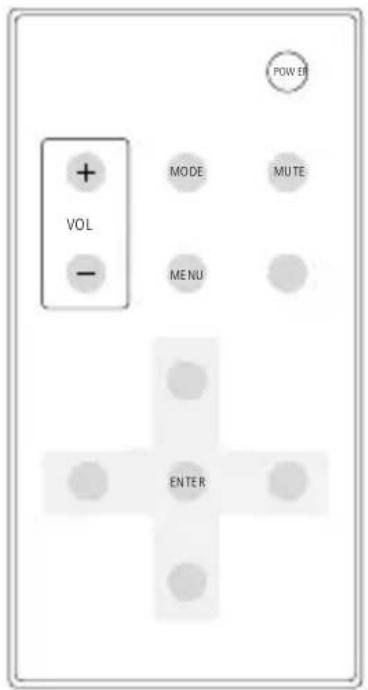


MODE

KEYPAD
SW1. POWER/STANDBY
SW2. Volume Key –
SW3. Volume Key +
SW4. MODE
DIAGRAMS continued

BACK

- Audio Output
- IR Sensor
- Mode LED
-
Docking Slot
-
Volume LED
- Keypad
- AUX IN
- DC Power

natural_image
Abstract gray shape with a white number '3' in the center, no text or symbols present.GENERAL KEY
| DEFINITION DISPLAY | DESCRIPTION | |
| Power Standby |  | 1. When the unit is working,pressing the power buttonturns off the power (fig.a.01; a.02).2. When the unit is off,pressing the power buttonturns on the unit in ipodmode. (fig. a.03).3. 30 seconds after turningon the unit, the LED willflash. (fig. a.04). |
 | ||
 | ||
 | ||
| Mute Key |  | 1. When the unit is at audiostatus, press mute key tomute the radio. (fig. b.01).2. When the unit is at mutestatus, press mute key toactivate it. |
| b.01 | ||
| Mode Key |  | 1. Press Mode button totransfer from ipod to Aux;Aux to iPod. (fig. c.01; c.02).2. At iPod mode: red lightworks (fig. c.01).3. Aux mode: green lightworks (fig. c.02). |
 | ||
GENERAL KEY continued
| DEFINITION DISPLAY | DESCRIPTION | |
| Volume Key +- |  | Use volume button to change the volume; the volume is set at 8 segments. |
| Menu Key | Menu | Press Menu button to get in menu mode; this mode exists at ipod mode |
| AT iPod Mode: |  | 1. At ipod mode: Red light works.2. The preset mode is iPod mode. |
| AT AUX Mode: |  | At AUX mode, external audio can be input to the unit; at this status, Etón Sound 50 is the speaker. |
The Etón Sound 50 can work with the following models: 3rd Generation iPod, 4th Generation iPod, iPod mini, iPod photo, iPod U2 Special Education, iPod Nano, 5th Generation.
WARRANTY REGISTRATION
To ensure full warranty coverage or product updates, registration of your product should be completed as soon as possible after purchase or receipt. You may use one of the following options to register your product:
- By visiting our website at http://www.etoncorp.com.
- Mail in enclosed warranty card.
- Mail your registration card or information to the following address; Include your name, full mailing address, phone number, model purchased, date purchased, retail vendor name and product serial number (typically located in or near the battery compartment):
Etón Corporation
1015 Corporation Way
Palo Alto, CA 94303 USA
LIMITED WARRANTY
Retain the warranty information from your warranty card with your proof of purchase or the Limited Warranty information can also be viewed at www.etoncorp.com.
SERVICE FOR YOUR PRODUCT
To obtain service for your product, we recommend first contacting an Etón service representative at 800-872-2228 US, 800-637-1648 Canada or (650) 903-3866 for problem determination and troubleshooting. If further service is required, the technical staff will instruct how to proceed based on whether the radio is still under warranty or needs non-warranty service.
WARRANTY – If your product is still in warranty and the Etón service representative determines that warranty service is needed, a return authorization will be issued and instructions for shipment to an authorized warranty repair facility. Do Not ship your radio back without obtaining the return authorization number.
NON-WARRANTY – If your product is no longer under warranty and requires service our technical staff will refer you to the nearest repair facility that will be able to best handle the repair.
For service outside of North America, please refer to the distributor information included at time of purchase/receipt.
Etón Corporation
Corporate Headquarters
1015 Corporation Way
Palo Alto, California 94303 USA
tel +1 650-903-3866
tel +1 800-872-2228
fax +1 650-903-3867
Etón Europe/Lextronix Germany
Rosenstrasse 2
D-10178 Berlin, Germany
tel +49 [0]30 243102142
Etón Canada
1 Yonge Street, Suite 1801
Toronto, Ontario M5E 1W7 Canada
tel +1 416-214-6885


Brand : ETON
Model : Sound 50 iPod
Category : Computer accessory