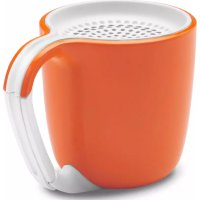
HouseParty AirWave - Pregnant GEAR4 - Free user manual and instructions
Find the device manual for free HouseParty AirWave GEAR4 in PDF.


Pick your language and provide your email: we'll send you a specifically translated version.
| Product Type | Portable Bluetooth Speaker |
| Dimensions | Approximately 20 x 7 x 7 cm |
| Weight | Approximately 1.5 kg |
| Power Source | Rechargeable battery (USB-C) or AC adapter |
| Battery Life | Up to 12 hours |
| Bluetooth Version | 5.0 |
| Wireless Range | Up to 10 meters |
| Speaker Configuration | Full-range driver with passive radiator |
| Frequency Response | 60 Hz - 20 kHz |
| Output Power | 20W RMS |
| Audio Inputs | Bluetooth, AUX 3.5mm |
| Radio | FM tuner (built-in) |
| Controls | Power, Volume, Play/Pause, Next/Previous, EQ presets |
| Microphone | Built-in for hands-free calls |
| Water Resistance | IPX5 (splash proof) |
| Material | Metal grille and fabric cover |
| Included Accessories | USB charging cable, AUX cable, user manual |
| Maintenance & Cleaning | Wipe with a soft, dry cloth; do not use liquids or abrasives |
| Safety Warnings | Keep away from water sources; do not disassemble or expose to extreme temperatures |
| Spare Parts & Repairability | No user-serviceable parts; contact Gear4 support for repairs |
| General Information | Brand: Gear4; Model: HouseParty AirWave; 1-year limited warranty |
Frequently Asked Questions - HouseParty AirWave GEAR4
How do I pair the HouseParty AirWave with my phone?
Turn on the speaker and enable Bluetooth on your device. Select HouseParty AirWave from the available devices. If prompted, enter code 0000.
What is the battery life and how do I charge it?
The battery lasts up to 12 hours at moderate volume. Use the included USB-C cable to charge; full charge takes about 3 hours.
Can I use the speaker while it's charging?
Yes, you can play music while charging, but this may extend the charging time.
How do I reset the speaker?
Press and hold the Power and Volume Up buttons simultaneously for 5 seconds until you hear a beep.
Is the speaker waterproof?
It has an IPX5 rating, meaning it is splash proof but not submersible. Avoid direct water jets.
What audio sources can I connect?
You can connect via Bluetooth or the AUX input using a 3.5mm cable (included). It also has an FM radio.
How do I switch to FM radio?
Press the Mode button to cycle through Bluetooth, AUX, and FM. In FM mode, press and hold the Play button to auto-scan stations.
Why is my speaker not turning on?
Ensure the battery is charged. Try a different USB cable and power source. If still off, perform a reset.
Can I use voice assistant with this speaker?
Yes, the built-in microphone supports Siri or Google Assistant when paired with your phone.
How do I clean the speaker?
Wipe the exterior with a soft, dry cloth. Do not use water, solvents, or abrasive materials.
User questions about HouseParty AirWave GEAR4
0 question about this device. Answer the ones you know or ask your own.
Ask a new question about this device
No questions yet. Be the first to ask one.
Download the instructions for your Pregnant in PDF format for free! Find your manual HouseParty AirWave - GEAR4 and take your electronic device back in hand. On this page are published all the documents necessary for the use of your device. HouseParty AirWave by GEAR4.